This document describes how to enable the Bidirectional Forwarding Detection (BFD) protocol. BFD is a detection protocol that is designed to provide fast forwarding path failure detection times for all media types, encapsulations, topologies, and routing protocols. It includes a description of how to configure multihop BFD sessions.
BFD provides a consistent failure detection method for network administrators, in addition to fast forwarding path failure detection. Because the network administrator can use BFD to detect forwarding path failures at a uniform rate, rather than the variable rates for different routing protocol hello mechanisms, network profiling and planning will be easier, and reconvergence time will be consistent and predictable.
Your software release may not support all the features documented in this module. For the latest caveats and feature information, see
Bug Search Tool and the release notes for your platform and software release. To find information about the features documented in this module, and to see a list of the releases in which each feature is supported, see the feature information table at the end of this module.
Use Cisco Feature Navigator to find information about platform support and Cisco software image support. To access Cisco Feature Navigator, go to
www.cisco.com/go/cfn. An account on Cisco.com is not required.
Prerequisites for Bidirectional Forwarding Detection
Cisco Express Forwarding and IP routing must be enabled on all participating devices.
You must enable Cisco Parallel eXpress Forwarding (PXF) on the Cisco 10720 Internet device in order for BFD to operate properly. PXF is enabled by default and is generally not turned off.
One of the IP routing protocols supported by BFD must be configured on the devices before BFD is deployed. You should implement fast convergence for the routing protocol that you are using. See the IP routing documentation for your version of Cisco software for information on configuring fast convergence. See the Restrictions for Bidirectional Forwarding Detection section for more information on BFD routing protocol support in Cisco IOS software.
Before Virtual Circuit Connection Verification (VCCV) BFD on pseudowires can be run, pseudowires must be configured on the network.
Depending on your release, support for offloading BFD sessions to ES+ line cards on Cisco 7600 series routers has the following prerequisites:
The device must be running BFD Version 1.
The BFD session type must be IPv4 single hop.
BFD echo mode must be disabled for the session.
See the “Configuring Synchronous Ethernet on the Cisco 7600 Router with ES+ Line Card” section of the
Cisco 7600 Series Ethernet Services Plus (ES+) and Ethernet Services Plus T (ES+T) Line Card Configuration Guide
for more information about prerequisites for hardware offload.
Depending on your release, support for multihop BFD sessions on Cisco 7600 series routers has the following prerequisites:
The client must support multihop.
A valid multihop template and map must be configured..
Each BFD multihop session must have a unique source-destination address pair.
Restrictions for Bidirectional Forwarding Detection
With CSCts32440, the maximum number of supported VRF-aware IS-IS BFD sessions is 28.
For the Cisco implementation of BFD for Cisco IOS Releases 12.2(18)SXE, 12.0(31)S, 12.4(4)T, 12.0(32)S, 12.2(33)SRA, and 12.2(33)SRB, only asynchronous mode is supported. In asynchronous mode, either BFD peer can initiate a BFD session.
For Cisco IOS Releases 12.2(33)SRC, 12.2(33)SXH, and 12.2(33)SXI, echo mode is the default.
The Cisco IOS software incorrectly allows configuration of BFD on virtual-template and dialer interfaces; however, BFD functionality on virtual-template and dialer interfaces is not supported. Avoid configuring BFD on virtual-template and dialer interfaces.
For Cisco IOS Releases 12.2(18)SXE (and later SX releases), 12.0(31)S, 12.4(4)T, 12.0(32)S, 12.2(33)SRA, 12.2(33)SRB, 12.2(33)SRC, and 12.2(33)SB, the Cisco implementation of BFD is supported only for IPv4 networks.
For Cisco IOS Release 12.2(33)SRB, the Cisco implementation of BFD supports only the following routing protocols: Border Gateway Protocol (BGP), Enhanced Interior Gateway Routing Protocol (EIGRP), Intermediate System-to-Intermediate System (IS-IS), and Open Shortest Path First (OSPF). In Cisco IOS Release 12.2(33)SRC, BFD supports static routing.
For Cisco IOS Release 12.2(33)SRA, the Cisco implementation of BFD supports only the following routing protocols: BGP, IS-IS, and OSPF.
For Cisco IOS Release 12.4(4)T, the Cisco implementation of BFD supports only the following routing protocols: BGP, EIGRP, IS-IS, and OSPF.
For Cisco IOS Release 12.4(11)T, the Cisco implementation of BFD introduced support for the Hot Standby Router Protocol (HSRP). BFD support is not available for all platforms and interfaces.
For Cisco IOS Releases 12.0(31)S and 12.0(32)S, the Cisco implementation of BFD supports only the following routing protocols: BGP, IS-IS, and OSPF.
For Cisco IOS Release 12.2(18)SXE, the Cisco implementation of BFD supports only the following routing protocols: EIGRP, IS-IS, and OSPF.
For Cisco IOS Release 12.2(18)SXH and 12.2(33)SB, the Cisco implementation of BFD supports the following routing protocols: BGP, EIGRP, IS-IS, and OSPF.
BFD works only for directly connected neighbors. BFD neighbors must be no more than one IP hop away. Multihop configurations are not supported.
BFD support is not available for all platforms and interfaces. To confirm BFD support for a specific platform or interface and obtain the most accurate platform and hardware restrictions, see the Cisco IOS software release notes for your software version.
For the following Cisco IOS Releases, BFD on PortChannel is not a supported configuration: 12.2SXF, 12.2SRC, and 12.2SRB.
On the Cisco 10720 Internet router, BFD is supported only on Fast Ethernet, Gigabit Ethernet, and RPR-IEEE interfaces. BFD is not supported on Spatial Reuse Protocol (SRP) and Packet-over-SONET (POS) interfaces.
When you configure the BFD session parameters on a Cisco 10720 interface using the
bfd command (in interface configuration mode), the minimum configurable time period supported for the
milliseconds argument in both the
intervalmilliseconds and
min_rxmilliseconds parameters is 50 milliseconds (ms).
A maximum of 100 BFD sessions is supported on the Cisco 10720 Internet router. When BFD tries to set up a connection between routing protocols and establish a 101th session between a Cisco 10720 Internet router and adjacent routers, the following error message is displayed:
00:01:24: %OSPF-5-ADJCHG: Process 100, Nbr 10.0.0.0 on RPR-IEEE1/1 from LOADING to FULL, Loading Done
00:01:24: %BFD-5-SESSIONLIMIT: Attempt to exceed session limit of 100 neighbors.
The Cisco 10720 Internet router does not support the following BFD features:
Demand mode
Echo packets
BFD over IP Version 6
On the Cisco 12000 series router, asymmetrical routing between peer devices may cause a BFD control packet to be received on a line card other than the line card that initiated the session. In this special case, the BFD session between the routing peers will not be established.
A maximum 100 sessions per line card are supported for the distributed Cisco 12000 series Internet router. The minimum hello interval is 50 ms with up to three Max retries for a BFD control packet to be received from a remote system before a session with a neighbor is declared down.
In Cisco IOS Release 12.2(33)SB, BFD is not stateful switchover (SSO) aware, and it is not supported with NSF/SSO and these features should not be used together. Enabling BFD along with NSF/SSO causes the nonstop forwarding capability to break during failover since BFD adjacencies are not maintained and the routing clients are forced to mark down adjacencies and reconverge.
BFD Control Channel over VCCV--Support for ATM Pseudowire
The BFD Control Channel over VCCV--Support for Asynchronous Transfer Mode Pseudowire feature supports VCCV type 1 only, without IP/User Datagram Protocol (UDP) encapsulation.
Any Transport over Multiprotocol Label Switching (AToM) is the only transport protocol supported by the BFD Control Channel over VCCV--Support for ATM Pseudowire feature.
Layer 2 Transport Protocol version 3 (L2TPv3) is not supported.
Pseudowire redundancy is not supported.
Only ATM attachment circuits (AC) are supported.
Cisco IOS Release 12.2(33)SXI2 and Cisco Catalyst 6500 Series Switches
Cisco Catalyst 6500 series switches support up to 100 BFD sessions with a minimum hello interval of 50 ms and a multiplier of 3. The multiplier specifies the minimum number of consecutive packets that can be missed before a session is declared down.
If SSO is enabled on a dual RP system, the following limitations apply:
The maximum number of BFD sessions supported is 50.
The minimum hello interval is 500 ms with a multiplier of 3 or higher.
If EIGRP is enabled, the maximum number of BFD sessions supported is reduced to 30.
Echo mode is supported on Distributed Forwarding Cards (DFCs) only.
BFD SSO is supported on Cisco Catalyst 6500 series switches using the E-chassis and 67xx line cards only. Centralized Forwarding Cards (CFCs) are not supported.
To enable echo mode the system must be configured with the
noipredirects command.
During the In Service Software Upgrade (ISSU) cycle the line cards are reset, causing a routing flap in the BFD session.
Cisco IOS Release 15.1(2)S and ES+ Line Cards for Cisco 7600 Series Routers
Cisco IOS Release 15.1(2)S, supports offloading BFD sessions to ES+ line cards on Cisco 7600 series routers. See the “Configuring Synchronous Ethernet on the Cisco 7600 Router with ES+ Line Card” section of the
Cisco 7600 Series Ethernet Services Plus (ES+) and Ethernet Services Plus T (ES+T) Line Card Configuration Guide
for more information about restrictions for hardware offload.
Cisco IOS Release 15.1(3)S-Support for BFD Multihop
Only IPv4 and IPv6 BFD multihop sessions are supported.
Multihop sessions will not be offloaded to hardware.
IPv6 link local addresses are not supported for BFD multihop sessions.
Echo mode is not supported in multihop.
Note
For the most accurate platform and hardware restrictions, see the Cisco IOS software release notes for your software version.
Support for Point-to-Point IPv4, IPv6, and GRE Tunnels
Depending on your release, Cisco software supports BFD forwarding on point-to-point IPv4, IPv6, and generic routing encapsulation (GRE) tunnels.
Only numbered interfaces are allowed. When the tunnel type is changed from a supported tunnel type to an unsupported one, BFD sessions are brought down for that tunnel and the BFD configuration is removed from the interface.
BFD detection time depends on the topology and infrastructure. For a single-hop IP tunnel that is deployed across physically adjacent devices, the 150 ms (that is, a hello interval of 50 ms with up to three retries) detection rate applies. However, when the source and destination endpoints of the tunnel are not connected back-to-back, the 150 ms detection rate is not guaranteed.
BFD uses the IP address configured on the tunnel interface. It does not use the tunnel source and destination addresses.
Information About Bidirectional Forwarding Detection
BFD provides a low-overhead, short-duration method of detecting failures in the forwarding path between two adjacent devices, including the interfaces, data links, and forwarding planes.
BFD is a detection protocol that you enable at the interface and routing protocol levels. Cisco supports the BFD asynchronous mode, which depends on the sending of BFD control packets between two systems to activate and maintain BFD neighbor sessions between devices. Therefore, in order for a BFD session to be created, you must configure BFD on both systems (or BFD peers). Once BFD has been enabled on the interfaces and at the device level for the appropriate routing protocols, a BFD session is created, BFD timers are negotiated, and the BFD peers will begin to send BFD control packets to each other at the negotiated interval.
This section includes the following subsections:
Benefits of Using BFD for Failure Detection
When you deploy any feature, it is important to consider all the alternatives and be aware of any trade-offs being made.
The closest alternative to BFD in conventional EIGRP, IS-IS, and OSPF deployments is the use of modified failure detection mechanisms for EIGRP, IS-IS, and OSPF routing protocols.
If you set EIGRP hello and hold timers to their absolute minimums, the failure detection rate for EIGRP falls to within a one- to two-second range.
If you use fast hellos for either IS-IS or OSPF, these Interior Gateway Protocol (IGP) protocols reduce their failure detection mechanisms to a minimum of one second.
There are several advantages to implementing BFD over reduced timer mechanisms for routing protocols:
Although reducing the EIGRP, IS-IS, and OSPF timers can result in minimum detection timer of one to two seconds, BFD can provide failure detection in less than one second.
Because BFD is not tied to any particular routing protocol, it can be used as a generic and consistent failure detection mechanism for EIGRP, IS-IS, and OSPF.
Because some parts of BFD can be distributed to the data plane, it can be less CPU-intensive than the reduced EIGRP, IS-IS, and OSPF timers, which exist wholly at the control plane.
How to Configure Bidirectional Forwarding Detection
Configuring BFD Session Parameters on the Interface
Repeat the steps in this task for each interface over which you want to run BFD sessions to BFD neighbors.
Exits interface configuration mode and returns to privileged EXEC mode.
Configuring BFD Support for Dynamic Routing Protocols
You can enable BFD support for dynamic routing protocols at the router level to enable BFD support globally for all interfaces or you can configure BFD on a per-interface basis at the interface level.
For Cisco IOS Release 12.2(18)SXE, you may configure BFD support for one or more of the following routing protocols: EIGRP, IS-IS, and OSPF.
For Cisco IOS Releases 12.2(33)SRA, you may configure BFD support for one or more of the following routing protocols: EIGRP, IS-IS, and OSPF.
For Cisco IOS Releases 12.2(33)SRB, you may configure BFD support for one or more of the following routing protocols: BGP, EIGRP, IS-IS, and OSPF.
For Cisco IOS Release 12.2(33)SRC, you may configure BFD support for static routing.
For Cisco IOS Releases 12.0(31)S and 12.4(4)T, you may configure BFD support for one or more of the following routing protocols: BGP, IS-IS, and OSPF.
For Cisco IOS Release 12.0(32)S, for the Cisco 10720 platform, you may configure BFD for one or more of the following routing protocols: BGP, IS-IS, and OSPF.
For Cisco IOS Release 12.4(11)T, BFD support for HSRP was introduced.
This section describes the following procedures:
Configuring BFD Support for Static Routing
Perform this task to configure BFD support for static routing. Repeat the steps in this procedure on each BFD neighbor. For more information, see the "Example: Configuring BFD Support for Static Routing" section.
(Optional) Displays information about the static BFD configuration from the configured BFD groups and nongroup entries.
Step 12
exit
Example:
Device# exit
Exits privileged EXEC mode and returns to user EXEC mode.
Configuring BFD Echo Mode
BFD echo mode is enabled by default, but you can disable it such that it can run independently in each direction.
BFD echo mode works with asynchronous BFD. Echo packets are sent by the forwarding engine and forwarded back along the same path in order to perform detection--the BFD session at the other end does not participate in the actual forwarding of the echo packets. The echo function and the forwarding engine are responsible for the detection process; therefore, the number of BFD control packets that are sent out between two BFD neighbors is reduced. In addition, because the forwarding engine is testing the forwarding path on the remote (neighbor) system without involving the remote system, there is an opportunity to improve the interpacket delay variance, thereby achieving quicker failure detection times than when using BFD Version 0 with BFD control packets for the BFD session.
Echo mode is described as without asymmetry when it is running on both sides (both BFD neighbors are running echo mode).
Before using BFD echo mode, you must disable the sending of Internet Control Message Protocol (ICMP) redirect messages by entering the
noipredirects command, in order to avoid high CPU utilization.
The baseline parameters for BFD sessions on the interfaces over which you want to run BFD sessions to BFD neighbors must be configured. See the Configuring BFD Session Parameters on the Interface section for more information.
Restrictions
Depending on your release, BFD echo mode is supported.
Note
BFD echo mode does not work in conjunction with Unicast Reverse Path Forwarding (uRPF) configuration. If BFD echo mode and uRPF configurations are enabled, then the sessions will flap.
Configuring the BFD Slow Timer
The steps in this procedure show how to change the value of the BFD slow timer. Repeat the steps in this procedure for each BFD device.
SUMMARY STEPS
1.enable
2.configureterminal
3.bfdslow-timermilliseconds
4.end
DETAILED STEPS
Command or Action
Purpose
Step 1
enable
Example:
Device> enable
Enables privileged EXEC mode.
Enter your password if prompted.
Step 2
configureterminal
Example:
Device# configure terminal
Enters global configuration mode.
Step 3
bfdslow-timermilliseconds
Example:
Device(config)# bfd slow-timer 12000
Configures the BFD slow timer.
Step 4
end
Example:
Device(config)# end
Exits global configuration mode and returns the device to privileged EXEC mode.
Disabling BFD Echo Mode Without Asymmetry
The steps in this procedure show how to disable BFD echo mode without asymmetry—no echo packets will be sent by the device, and the device will not forward BFD echo packets that are received from any neighbor routers.
Repeat the steps in this procedure for each BFD device.
SUMMARY STEPS
1.enable
2.configureterminal
3.nobfdecho
4.end
DETAILED STEPS
Command or Action
Purpose
Step 1
enable
Example:
Device> enable
Enables privileged EXEC mode.
Enter your password if prompted.
Step 2
configureterminal
Example:
Device# configure terminal
Enters global configuration mode.
Step 3
nobfdecho
Example:
Device(config)# no bfd echo
Disables BFD echo mode.
Use the
no form to disable BFD echo mode.
Step 4
end
Example:
Device(config)# end
Exits global configuration mode and returns to privileged EXEC mode.
Creating and Configuring BFD Templates
Perform this task to create a BFD template, enter BFD configuration mode, and configure BFD interval timers.
Note
Cisco IOS Release 15.0(1)S introduces the concept of BFD templates that allow BFD interval timers to be configured independently of an interface. BFD templates are required to provide support for the BFD Control Channel over VCCV-Support for ATM Pseudowires feature.
Configures the transmit and receive intervals between BFD packets, and specifies the number of consecutive BFD control packets that must be missed before BFD declares that a peer is unavailable.
Step 5
end
Example:
Device(bfd-config)# end
Exits BFD configuration mode and returns the device to privileged EXEC mode.
What to Do Next
The BFD templates that you create can be applied to pseudowire classes to enable BFD control channel over VCCV on ATM pseudowire networks. For more information, see the Configuring BFD Control Channel over VCCV Support for ATM Pseudowire section.
Configuring BFD Control Channel over VCCV Support for ATM Pseudowire
Perform this task to configure BFD over VCCV Support for ATM Pseudowire networks.
Before You Begin
You must create and configure the BFD template before you assign it to the pseudowire class. For more information, see the Creating and Configuring BFD Templates section.
Before VCCV BFD can be run on pseudowires, pseudowires must be configured on the network.
Binds an attachment circuit to a pseudowire, configures an AToM static pseudowire, and specifies the pseudowire class.
Step 14
end
Example:
Device(cfg-if-atm-l2trans-pvc)# end
Exits ATM virtual circuit configuration mode and returns to global configuration mode.
Monitoring and Troubleshooting BFD
This section describes how to retrieve BFD information for maintenance and troubleshooting. The commands in these tasks can be entered as needed, in any order desired.
For more information about BFD session initiation and failure, refer to the BFD Operation.
This section contains information for monitoring and troubleshooting BFD for the following Cisco platforms:
Monitoring and Troubleshooting BFD for Cisco 7600 Series Routers
To monitor or troubleshoot BFD on Cisco 7600 series routers, perform one or more of the steps in this section.
Note
See the “Configuring Synchronous Ethernet on the Cisco 7600 Router with ES+ Line Card” section of the
Cisco 7600 Series Ethernet Services Plus (ES+) and Ethernet Services Plus T (ES+T) Line Card Configuration Guide
for more information about troubleshooting BFD on Cisco 7600 series routers.
SUMMARY STEPS
1.enable
2.showbfdneighbors[details]
3.debugbfd[packet |
event]
DETAILED STEPS
Command or Action
Purpose
Step 1
enable
Example:
Device> enable
Enables privileged EXEC mode.
Enter your password if prompted.
Step 2
showbfdneighbors[details]
Example:
Device# show bfd neighbors details
(Optional) Displays the BFD adjacency database.
The
details keyword shows all BFD protocol parameters and timers per neighbor.
Note
In order to see the full output of the
showbfdneighborsdetails command on a Cisco 12000 series router, you must enter the command on the line card. Enter the
attachslot-number command to establish a CLI session with a line card. The registered protocols are not shown in the output of the
showbfdneighborsdetails command when it is entered on a line card.
Note
If hardware-offloaded BFD sessions are configured with Tx and Rx intervals that are not multiples of 50 ms, the hardware intervals are changed. However, output from the
showbfdneighborsdetails command will show the configured intervals, not the changed ones.
Step 3
debugbfd[packet |
event]
Example:
Device# debug bfd packet
(Optional) Displays debugging information about BFD packets.
Monitoring and Troubleshooting BFD for Cisco 12000 Series Routers
To monitor or troubleshoot BFD on Cisco 12000 series routers, perform one or more of the steps in this section.
SUMMARY STEPS
1.enable
2.attachslot-number
3.showbfdneighbors[details]
4.showmonitorevent-tracebfd [all]
5.debugbfdevent
6.debugbfdpacket
7.debugbfdipc-error
8.debugbfdipc-event
9.debugbfdoir-error
10.debugbfdoir-event
DETAILED STEPS
Command or Action
Purpose
Step 1
enable
Example:
Device> enable
Enables privileged EXEC mode.
Enter your password if prompted.
Step 2
attachslot-number
Example:
Device# attach 6
Connects you to a specific line card for the purpose of executing monitoring and maintenance commands on the specified line card. Slot numbers range from 0 to 11 for the Cisco 12012 and from 0 to 7 for the Cisco 12008.
If the slot number is omitted, you are prompted for the slot number.
Note
In order to display the full output of the
showbfdneighborsdetails command on a Cisco 12000 series router, you must enter the command on the line card. Enter the
attachslot-number command to establish a CLI session with a line card.
Step 3
showbfdneighbors[details]
Example:
Device# show bfd neighbors details
Displays the BFD adjacency database.
The
details keyword shows all BFD protocol parameters and timers per neighbor.
Note
The registered protocols are not shown in the output of the
showbfdneighborsdetails when it is entered on a line card.
Note
If hardware-offloaded BFD sessions are configured with Tx and Rx intervals that are not multiples of 50 ms, the hardware intervals are changed. However, output from the
showbfdneighborsdetails command will show the configured intervals, not the changed ones.
Step 4
showmonitorevent-tracebfd [all]
Example:
Device# show monitor event-trace bfd all
Displays logged messages for important events in “recent past” on BFD activities that occur on the line cards. This is a rolling buffer based log, so “distant past” events would be lost. Depending on traffic and frequency of events, these events could be seen over a variable time window.
Step 5
debugbfdevent
Example:
Device# debug bfd event
Displays debugging information about BFD state transitions.
Step 6
debugbfdpacket
Example:
Device# debug bfd packet
Displays debugging information about BFD control packets.
Step 7
debugbfdipc-error
Example:
Device# debug bfd ipc-error
Displays debugging information with IPC errors on the RP and LC.
Step 8
debugbfdipc-event
Example:
Device# debug bfd ipc-event
Displays debugging information with IPC events on the RP and LC.
Step 9
debugbfdoir-error
Example:
Device# debug bfd oir-error
Displays debugging information with OIR errors on the RP and LC.
Step 10
debugbfdoir-event
Example:
Device# debug bfd oir-event
Displays debugging information with OIR events on the RP and LC.
Monitoring and Troubleshooting BFD for Cisco 10720 Internet Routers
To monitor or troubleshoot BFD on Cisco 10720 Internet routers, perform one or more of the steps in this section.
SUMMARY STEPS
1.enable
2.showbfdneighbors[details]
3.debugbfdevent
4.debugbfdpacket
DETAILED STEPS
Command or Action
Purpose
Step 1
enable
Example:
Device> enable
Enables privileged EXEC mode.
Enter your password if prompted.
Step 2
showbfdneighbors[details]
Example:
Device# show bfd neighbors details
(Optional) Displays the BFD adjacency database.
The
details keyword will show all BFD protocol parameters and timers per neighbor.
Note
The registered protocols are not shown in the output of the
showbfdneighborsdetails when it is entered on a line card.
Step 3
debugbfdevent
Example:
Device# debug bfd event
(Optional) Displays debugging information about BFD state transitions.
Step 4
debugbfdpacket
Example:
Device# debug bfd packet
(Optional) Displays debugging information about BFD control packets.
Configuration Examples for Bidirectional Forwarding Detection
Example: Configuring BFD in an EIGRP Network with Echo Mode Enabled by Default
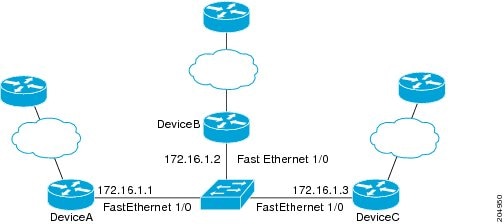
The following example shows how to configure BFD in an EIGRP network with echo mode enabled by default in Cisco IOS Release 12.4(9)T. In the following example, the EIGRP network contains RouterA, RouterB, and RouterC. Fast Ethernet interface 1/0 on RouterA is connected to the same network as Fast Ethernet interface 1/0 on Router B. Fast Ethernet interface 1/0 on RouterB is connected to the same network as Fast Ethernet interface 1/0 on RouterC.
RouterA and RouterB are running BFD Version 1, which supports echo mode, and RouterC is running BFD Version 0, which does not support echo mode. The BFD sessions between RouterC and its BFD neighbors are said to be running echo mode with asymmetry because echo mode will run on the forwarding path for RouteA and RouterB, and their echo packets will return along the same path for BFD sessions and failure detections, while their BFD neighbor RouterC runs BFD Version 0 and uses BFD controls packets for BFD sessions and failure detections.
The figure below shows a large EIGRP network with several routers, three of which are BFD neighbors that are running EIGRP as their routing protocol.
The example, starting in global configuration mode, shows the configuration of BFD.
Configuration for RouterA
interface Fast Ethernet0/0
no shutdown
ip address 10.4.9.14 255.255.255.0
duplex auto
speed auto
!
interface Fast Ethernet1/0
ip address 172.16.1.1 255.255.255.0
bfd interval 50 min_rx 50 multiplier 3
no shutdown
duplex auto
speed auto
!
router eigrp 11
network 172.16.0.0
bfd all-interfaces
auto-summary
!
ip default-gateway 10.4.9.1
ip default-network 0.0.0.0
ip route 0.0.0.0 0.0.0.0 10.4.9.1
ip route 172.16.1.129 255.255.255.255 10.4.9.1
!
no ip http server
!
logging alarm informational
!
control-plane
!
line con 0
exec-timeout 30 0
stopbits 1
line aux 0
stopbits 1
line vty 0 4
login
!
!
end
Configuration for RouterB
!
interface Fast Ethernet0/0
no shutdown
ip address 10.4.9.34 255.255.255.0
duplex auto
speed auto
!
interface Fast Ethernet1/0
ip address 172.16.1.2 255.255.255.0
bfd interval 50 min_rx 50 multiplier 3
no shtdown
duplex auto
speed auto
!
router eigrp 11
network 172.16.0.0
bfd all-interfaces
auto-summary
!
ip default-gateway 10.4.9.1
ip default-network 0.0.0.0
ip route 0.0.0.0 0.0.0.0 10.4.9.1
ip route 172.16.1.129 255.255.255.255 10.4.9.1
!
no ip http server
!
logging alarm informational
!
control-plane
!
line con 0
exec-timeout 30 0
stopbits 1
line aux 0
stopbits 1
line vty 0 4
login
!
!
end
Configuration for RouterC
!
!
interface Fast Ethernet0/0
no shutdown
ip address 10.4.9.34 255.255.255.0
duplex auto
speed auto
!
interface Fast Ethernet1/0
ip address 172.16.1.2 255.255.255.0
bfd interval 50 min_rx 50 multiplier 3
no shutdown
duplex auto
speed auto
!
router eigrp 11
network 172.16.0.0
bfd all-interfaces
auto-summary
!
ip default-gateway 10.4.9.1
ip default-network 0.0.0.0
ip route 0.0.0.0 0.0.0.0 10.4.9.1
ip route 172.16.1.129 255.255.255.255 10.4.9.1
!
no ip http server
!
logging alarm informational
!
control-plane
!
line con 0
exec-timeout 30 0
stopbits 1
line aux 0
stopbits 1
line vty 0 4
login
!
!
end
The output from the
showbfdneighborsdetails command from RouterA verifies that BFD sessions have been created among all three routers and that EIGRP is registered for BFD support. The first group of output shows that RouterC with the IP address 172.16.1.3 runs BFD Version 0 and therefore does not use the echo mode. The second group of output shows that RouterB with the IP address 172.16.1.2 does run BFD Version 1, and the 50 millisecond BFD interval parameter had been adopted. The relevant command output is shown in bold in the output.
RouterA# show bfd neighbors detailsOurAddrNeighAddr
LD/RD RH/RS Holdown(mult) State Int
172.16.1.1 172.16.1.3
5/3 1(RH) 150 (3 ) Up Fa1/0
Session state is UP and not using echo function.
Local Diag: 0, Demand mode: 0, Poll bit: 0
MinTxInt: 50000, MinRxInt: 50000, Multiplier: 3
Received MinRxInt: 50000, Received Multiplier: 3
Holdown (hits): 150(0), Hello (hits): 50(1364284)
Rx Count: 1351813, Rx Interval (ms) min/max/avg: 28/64/49 last: 4 ms ago
Tx Count: 1364289, Tx Interval (ms) min/max/avg: 40/68/49 last: 32 ms ago
Registered protocols: EIGRP
Uptime: 18:42:45
Last packet: Version: 0
- Diagnostic: 0
I Hear You bit: 1 - Demand bit: 0
Poll bit: 0 - Final bit: 0
Multiplier: 3 - Length: 24
My Discr.: 3 - Your Discr.: 5
Min tx interval: 50000 - Min rx interval: 50000
Min Echo interval: 0
OurAddr NeighAddr
LD/RD RH/RS Holdown(mult) State Int
172.16.1.1 172.16.1.2
6/1 Up 0 (3 ) Up Fa1/0
Session state is UP and using echo function with 50 ms interval.
Local Diag: 0, Demand mode: 0, Poll bit: 0
MinTxInt: 1000000, MinRxInt: 1000000, Multiplier: 3
Received MinRxInt: 1000000, Received Multiplier: 3
Holdown (hits): 3000(0), Hello (hits): 1000(317)
Rx Count: 305, Rx Interval (ms) min/max/avg: 1/1016/887 last: 448 ms ago
Tx Count: 319, Tx Interval (ms) min/max/avg: 1/1008/880 last: 532 ms ago
Registered protocols: EIGRP
Uptime: 00:04:30
Last packet: Version: 1
- Diagnostic: 0
State bit: Up - Demand bit: 0
Poll bit: 0 - Final bit: 0
Multiplier: 3 - Length: 24
My Discr.: 1 - Your Discr.: 6
Min tx interval: 1000000 - Min rx interval: 1000000
Min Echo interval: 50000
The output from the
showbfdneighborsdetails command on Router B verifies that BFD sessions have been created and that EIGRP is registered for BFD support. As previously noted, RouterA runs BFD Version 1, therefore echo mode is running, and RouterC runs BFD Version 0, so echo mode does not run. The relevant command output is shown in bold in the output.
RouterB# show bfd neighbors details OurAddr NeighAddr
LD/RD RH/RS Holdown(mult) State Int
172.16.1.2 172.16.1.1
1/6 Up 0 (3 ) Up Fa1/0
Session state is UP and using echo function with 50 ms interval.
Local Diag: 0, Demand mode: 0, Poll bit: 0
MinTxInt: 1000000, MinRxInt: 1000000, Multiplier: 3
Received MinRxInt: 1000000, Received Multiplier: 3
Holdown (hits): 3000(0), Hello (hits): 1000(337)
Rx Count: 341, Rx Interval (ms) min/max/avg: 1/1008/882 last: 364 ms ago
Tx Count: 339, Tx Interval (ms) min/max/avg: 1/1016/886 last: 632 ms ago
Registered protocols: EIGRP
Uptime: 00:05:00
Last packet: Version: 1
- Diagnostic: 0
State bit: Up - Demand bit: 0
Poll bit: 0 - Final bit: 0
Multiplier: 3 - Length: 24
My Discr.: 6 - Your Discr.: 1
Min tx interval: 1000000 - Min rx interval: 1000000
Min Echo interval: 50000
OurAddr NeighAddr
LD/RD RH/RS Holdown(mult) State Int
172.16.1.2 172.16.1.3
3/6 1(RH) 118 (3 ) Up Fa1/0
Session state is UP and not using echo function.
Local Diag: 0, Demand mode: 0, Poll bit: 0
MinTxInt: 50000, MinRxInt: 50000, Multiplier: 3
Received MinRxInt: 50000, Received Multiplier: 3
Holdown (hits): 150(0), Hello (hits): 50(5735)
Rx Count: 5731, Rx Interval (ms) min/max/avg: 32/72/49 last: 32 ms ago
Tx Count: 5740, Tx Interval (ms) min/max/avg: 40/64/50 last: 44 ms ago
Registered protocols: EIGRP
Uptime: 00:04:45
Last packet: Version: 0
- Diagnostic: 0
I Hear You bit: 1 - Demand bit: 0
Poll bit: 0 - Final bit: 0
Multiplier: 3 - Length: 24
My Discr.: 6 - Your Discr.: 3
Min tx interval: 50000 - Min rx interval: 50000
Min Echo interval: 0
The figure below shows that Fast Ethernet interface 1/0 on RouterB has failed. When Fast Ethernet interface 1/0 on RouterB is shut down, the BFD statistics of the corresponding BFD sessions on RouterA and RouterB are reduced.
When Fast Ethernet interface 1/0 on RouterB fails, BFD will no longer detect Router B as a BFD neighbor for RouterA or for RouterC. In this example, Fast Ethernet interface 1/0 has been administratively shut down on RouterB.
The following output from the
showbfdneighbors command on RouterA now shows only one BFD neighbor for RouterA in the EIGRP network. The relevant command output is shown in bold in the output.
RouterA# show bfd neighborsOurAddr NeighAddr
LD/RD RH/RS Holdown(mult) State Int
172.16.1.1 172.16.1.3
5/3 1(RH) 134 (3 ) Up Fa1/0
The following output from the
showbfdneighbors command on RouterC also now shows only one BFD neighbor for RouterC in the EIGRP network. The relevant command output is shown in bold in the output.
RouterC# show bfd neighborsOurAddr NeighAddr
LD/RD RH Holdown(mult) State Int
172.16.1.3 172.16.1.1
3/5 1 114 (3 ) Up Fa1/0
Example: Configuring BFD in an OSPF Network
The following example shows how to configure BFD in an OSPF network in Cisco IOS Release 12.0(31)S. In the following example, the simple OSPF network consists of Router A and Router B. Fast Ethernet interface 0/1 on Router A is connected to the same network as Fast Ethernet interface 6/0 in Router B. The example, starting in global configuration mode, shows the configuration of BFD. For both Routers A and B, BFD is configured globally for all interfaces associated with the OSPF process.
Configuration for Router A
!
interface Fast Ethernet 0/1
ip address 172.16.10.1 255.255.255.0
bfd interval 50 min_rx 50 multiplier 3
!
interface Fast Ethernet 3/0.1
ip address 172.17.0.1 255.255.255.0
!
router ospf 123
log-adjacency-changes detail
network 172.16.0.0 0.0.0.255 area 0
network 172.17.0.0 0.0.0.255 area 0
bfd all-interfaces
Configuration for Router B
!
interface Fast Ethernet 6/0
ip address 172.16.10.2 255.255.255.0
bfd interval 50 min_rx 50 multiplier 3
!
interface Fast Ethernet 6/1
ip address 172.18.0.1 255.255.255.0
!
router ospf 123
log-adjacency-changes detail
network 172.16.0.0 0.0.255.255 area 0
network 172.18.0.0 0.0.255.255 area 0
bfd all-interfaces
The output from the
showbfdneighborsdetails command verifies that a BFD session has been created and that OSPF is registered for BFD support. The relevant command output is shown in bold in the output.
Router A
RouterA# show bfd neighbors details
OurAddr NeighAddr LD/RD RH Holdown(mult) State Int
172.16.10.1 172.16.10.2 1/2 1 532 (3 ) Up Fa0/1
Local Diag: 0, Demand mode: 0, Poll bit: 0
MinTxInt: 200000, MinRxInt: 200000, Multiplier: 5
Received MinRxInt: 1000, Received Multiplier: 3
Holdown (hits): 600(22), Hello (hits): 200(84453)
Rx Count: 49824, Rx Interval (ms) min/max/avg: 208/440/332 last: 68 ms ago
Tx Count: 84488, Tx Interval (ms) min/max/avg: 152/248/196 last: 192 ms ago
Registered protocols: OSPF
Uptime: 02:18:49
Last packet: Version: 0
- Diagnostic: 0
I Hear You bit: 1 - Demand bit: 0
Poll bit: 0 - Final bit: 0
Multiplier: 3 - Length: 24
My Discr.: 2 - Your Discr.: 1
Min tx interval: 50000 - Min rx interval: 1000
Min Echo interval: 0
The output from the
showbfdneighborsdetails command from the line card on Router B verifies that a BFD session has been created:
Note
Router B is a Cisco 12000 series router. The
showbfdneighborsdetails command must be run on the line cards. The
showbfdneighborsdetails command will not display the registered protocols when it is entered on a line card.
Router B
RouterB# attach 6
Entering Console for 8 Port Fast Ethernet in Slot: 6
Type "exit" to end this session
Press RETURN to get started!
Router> show bfd neighbors details
Cleanup timer hits: 0
OurAddr NeighAddr LD/RD RH Holdown(mult) State Int
172.16.10.2 172.16.10.1 8/1 1 1000 (5 ) Up Fa6/0
Local Diag: 0, Demand mode: 0, Poll bit: 0
MinTxInt: 50000, MinRxInt: 1000, Multiplier: 3
Received MinRxInt: 200000, Received Multiplier: 5
Holdown (hits): 1000(0), Hello (hits): 200(5995)
Rx Count: 10126, Rx Interval (ms) min/max/avg: 152/248/196 last: 0 ms ago
Tx Count: 5998, Tx Interval (ms) min/max/avg: 204/440/332 last: 12 ms ago
Last packet: Version: 0 - Diagnostic: 0
I Hear You bit: 1 - Demand bit: 0
Poll bit: 0 - Final bit: 0
Multiplier: 5 - Length: 24
My Discr.: 1 - Your Discr.: 8
Min tx interval: 200000 - Min rx interval: 200000
Min Echo interval: 0
Uptime: 00:33:13
SSO Cleanup Timer called: 0
SSO Cleanup Action Taken: 0
Pseudo pre-emptive process count: 239103 min/max/avg: 8/16/8 last: 0 ms ago
IPC Tx Failure Count: 0
IPC Rx Failure Count: 0
Total Adjs Found: 1
The output of the
showipospf command verifies that BFD has been enabled for OSPF. The relevant command output is shown in bold in the output.
Router A
RouterA# show ip ospf
Routing Process "ospf 123" with ID 172.16.10.1
Supports only single TOS(TOS0) routes
Supports opaque LSA
Supports Link-local Signaling (LLS)
Initial SPF schedule delay 5000 msecs
Minimum hold time between two consecutive SPFs 10000 msecs
Maximum wait time between two consecutive SPFs 10000 msecs
Incremental-SPF disabled
Minimum LSA interval 5 secs
Minimum LSA arrival 1000 msecs
LSA group pacing timer 240 secs
Interface flood pacing timer 33 msecs
Retransmission pacing timer 66 msecs
Number of external LSA 0. Checksum Sum 0x000000
Number of opaque AS LSA 0. Checksum Sum 0x000000
Number of DCbitless external and opaque AS LSA 0
Number of DoNotAge external and opaque AS LSA 0
Number of areas in this router is 1. 1 normal 0 stub 0 nssa
External flood list length 0
BFD is enabled
Area BACKBONE(0)
Number of interfaces in this area is 2 (1 loopback)
Area has no authentication
SPF algorithm last executed 00:00:08.828 ago
SPF algorithm executed 9 times
Area ranges are
Number of LSA 3. Checksum Sum 0x028417
Number of opaque link LSA 0. Checksum Sum 0x000000
Number of DCbitless LSA 0
Number of indication LSA 0
Number of DoNotAge LSA 0
Flood list length 0
Router B
RouterB# show ip ospf
Routing Process "ospf 123" with ID 172.18.0.1
Supports only single TOS(TOS0) routes
Supports opaque LSA
Supports Link-local Signaling (LLS)
Supports area transit capability
Initial SPF schedule delay 5000 msecs
Minimum hold time between two consecutive SPFs 10000 msecs
Maximum wait time between two consecutive SPFs 10000 msecs
Incremental-SPF disabled
Minimum LSA interval 5 secs
Minimum LSA arrival 1000 msecs
LSA group pacing timer 240 secs
Interface flood pacing timer 33 msecs
Retransmission pacing timer 66 msecs
Number of external LSA 0. Checksum Sum 0x0
Number of opaque AS LSA 0. Checksum Sum 0x0
Number of DCbitless external and opaque AS LSA 0
Number of DoNotAge external and opaque AS LSA 0
Number of areas in this router is 1. 1 normal 0 stub 0 nssa
Number of areas transit capable is 0
External flood list length 0
BFD is enabled
Area BACKBONE(0)
Number of interfaces in this area is 2 (1 loopback)
Area has no authentication
SPF algorithm last executed 02:07:30.932 ago
SPF algorithm executed 7 times
Area ranges are
Number of LSA 3. Checksum Sum 0x28417
Number of opaque link LSA 0. Checksum Sum 0x0
Number of DCbitless LSA 0
Number of indication LSA 0
Number of DoNotAge LSA 0
Flood list length 0
The output of the
showipospfinterface command verifies that BFD has been enabled for OSPF on the interfaces connecting Router A and Router B. The relevant command output is shown in bold in the output.
Router A
RouterA# show ip ospf interface Fast Ethernet 0/1
show ip ospf interface Fast Ethernet 0/1
Fast Ethernet0/1 is up, line protocol is up
Internet Address 172.16.10.1/24, Area 0
Process ID 123, Router ID 172.16.10.1, Network Type BROADCAST, Cost: 1
Transmit Delay is 1 sec, State BDR, Priority 1, BFD enabled
Designated Router (ID) 172.18.0.1, Interface address 172.16.10.2
Backup Designated router (ID) 172.16.10.1, Interface address 172.16.10.1
Timer intervals configured, Hello 10, Dead 40, Wait 40, Retransmit 5
oob-resync timeout 40
Hello due in 00:00:03
Supports Link-local Signaling (LLS)
Index 1/1, flood queue length 0
Next 0x0(0)/0x0(0)
Last flood scan length is 1, maximum is 1
Last flood scan time is 0 msec, maximum is 0 msec
Neighbor Count is 1, Adjacent neighbor count is 1
Adjacent with neighbor 172.18.0.1 (Designated Router)
Suppress hello for 0 neighbor(s)
Router B
RouterB# show ip ospf interface Fast Ethernet 6/1
Fast Ethernet6/1 is up, line protocol is up
Internet Address 172.18.0.1/24, Area 0
Process ID 123, Router ID 172.18.0.1, Network Type BROADCAST, Cost: 1
Transmit Delay is 1 sec, State DR, Priority 1, BFD enabled
Designated Router (ID) 172.18.0.1, Interface address 172.18.0.1
No backup designated router on this network
Timer intervals configured, Hello 10, Dead 40, Wait 40, Retransmit 5
oob-resync timeout 40
Hello due in 00:00:01
Supports Link-local Signaling (LLS)
Index 1/1, flood queue length 0
Next 0x0(0)/0x0(0)
Last flood scan length is 0, maximum is 0
Last flood scan time is 0 msec, maximum is 0 msec
Neighbor Count is 0, Adjacent neighbor count is 0
Suppress hello for 0 neighbor(s)
Example: Configuring BFD in a BGP Network
The following example shows how to configure BFD in a BGP network in Cisco IOS Release 12.0(31)S. In the following example, the simple BGP network consists of Router A and Router B. Fast Ethernet interface 0/1 on Router A is connected to the same network as Fast Ethernet interface 6/0 in Router B. The example, starting in global configuration mode, shows the configuration of BFD.
Configuration for Router A
!
interface Fast Ethernet 0/1
ip address 172.16.10.1 255.255.255.0
bfd interval 50 min_rx 50 multiplier 3
!
interface Fast Ethernet 3/0.1
ip address 172.17.0.1 255.255.255.0
!
!
router bgp 40000
bgp log-neighbor-changes
neighbor 172.16.10.2 remote-as 45000
neighbor 172.16.10.2 fall-over bfd
!
address-family ipv4
neighbor 172.16.10.2 activate
no auto-summary
no synchronization
network 172.18.0.0 mask 255.255.255.0
exit-address-family
!
Configuration for Router B
!
interface Fast Ethernet 6/0
ip address 172.16.10.2 255.255.255.0
bfd interval 50 min_rx 50 multiplier 3
!
interface Fast Ethernet 6/1
ip address 172.18.0.1 255.255.255.0
!
router bgp 45000
bgp log-neighbor-changes
neighbor 172.16.10.1 remote-as 40000
neighbor 172.16.10.1 fall-over bfd
!
address-family ipv4
neighbor 172.16.10.1 activate
no auto-summary
no synchronization
network 172.17.0.0 mask 255.255.255.0
exit-address-family
!
The output from the
showbfdneighborsdetails command from Router A verifies that a BFD session has been created and that BGP is registered for BFD support. The relevant command output is shown in bold in the output.
Router A
RouterA# show bfd neighbors details
OurAddr NeighAddr LD/RD RH Holdown(mult) State Int
172.16.10.1 172.16.10.2 1/8 1 332 (3 ) Up Fa0/1
Local Diag: 0, Demand mode: 0, Poll bit: 0
MinTxInt: 200000, MinRxInt: 200000, Multiplier: 5
Received MinRxInt: 1000, Received Multiplier: 3
Holdown (hits): 600(0), Hello (hits): 200(15491)
Rx Count: 9160, Rx Interval (ms) min/max/avg: 200/440/332 last: 268 ms ago
Tx Count: 15494, Tx Interval (ms) min/max/avg: 152/248/197 last: 32 ms ago
Registered protocols: BGP
Uptime: 00:50:45
Last packet: Version: 0 - Diagnostic: 0
I Hear You bit: 1 - Demand bit: 0
Poll bit: 0 - Final bit: 0
Multiplier: 3 - Length: 24
My Discr.: 8 - Your Discr.: 1
Min tx interval: 50000 - Min rx interval: 1000
Min Echo interval: 0
The output from the
showbfdneighborsdetails command from the line card on Router B verifies that a BFD session has been created:
Note
Router B is a Cisco 12000 series router. The
showbfdneighborsdetails command must be run on the line cards. The
showbfdneighborsdetails command will not display the registered protocols when it is entered on a line card.
Router B
RouterB# attach 6
Entering Console for 8 Port Fast Ethernet in Slot: 6
Type "exit" to end this session
Press RETURN to get started!
Router> show bfd neighbors details
Cleanup timer hits: 0
OurAddr NeighAddr LD/RD RH Holdown(mult) State Int
172.16.10.2 172.16.10.1 8/1 1 1000 (5 ) Up Fa6/0
Local Diag: 0, Demand mode: 0, Poll bit: 0
MinTxInt: 50000, MinRxInt: 1000, Multiplier: 3
Received MinRxInt: 200000, Received Multiplier: 5
Holdown (hits): 1000(0), Hello (hits): 200(5995)
Rx Count: 10126, Rx Interval (ms) min/max/avg: 152/248/196 last: 0 ms ago
Tx Count: 5998, Tx Interval (ms) min/max/avg: 204/440/332 last: 12 ms ago
Last packet: Version: 0 - Diagnostic: 0
I Hear You bit: 1 - Demand bit: 0
Poll bit: 0 - Final bit: 0
Multiplier: 5 - Length: 24
My Discr.: 1 - Your Discr.: 8
Min tx interval: 200000 - Min rx interval: 200000
Min Echo interval: 0
Uptime: 00:33:13
SSO Cleanup Timer called: 0
SSO Cleanup Action Taken: 0
Pseudo pre-emptive process count: 239103 min/max/avg: 8/16/8 last: 0 ms ago
IPC Tx Failure Count: 0
IPC Rx Failure Count: 0
Total Adjs Found: 1
The output of the
showipbgpneighbors command verifies that BFD has been enabled for the BGP neighbors:
Router A
RouterA# show ip bgp neighbors
BGP neighbor is 172.16.10.2, remote AS 45000, external link
Using BFD to detect fast fallover
.
.
.
Router B
RouterB# show ip bgp neighbors
BGP neighbor is 172.16.10.1, remote AS 40000, external link
Using BFD to detect fast fallover
.
.
.
Example: Configuring BFD in an IS-IS Network
The following example shows how to configure BFD in an IS-IS network in Cisco IOS Release 12.0(31)S. In the following example, the simple IS-IS network consists of Router A and Router B. Fast Ethernet interface 0/1 on Router A is connected to the same network as Fast Ethernet interface 6/0 for Router B. The example, starting in global configuration mode, shows the configuration of BFD.
Configuration for Router A
!
interface Fast Ethernet 0/1
ip address 172.16.10.1 255.255.255.0
ip router isis
bfd interval 50 min_rx 50 multiplier 3
!
interface Fast Ethernet 3/0.1
ip address 172.17.0.1 255.255.255.0
ip router isis
!
router isis
net 49.0001.1720.1600.1001.00
bfd all-interfaces
!
Configuration for Router B
!
interface Fast Ethernet 6/0
ip address 172.16.10.2 255.255.255.0
ip router isis
bfd interval 50 min_rx 50 multiplier 3
!
interface Fast Ethernet 6/1
ip address 172.18.0.1 255.255.255.0
ip router isis
!
router isis
net 49.0000.0000.0002.00
bfd all-interfaces
!
The output from the
showbfdneighborsdetails command from Router A verifies that a BFD session has been created and that IS-IS is registered for BFD support:
RouterA# show bfd neighbors details
OurAddr NeighAddr LD/RD RH Holdown(mult) State Int
172.16.10.1 172.16.10.2 1/8 1 536 (3 ) Up Fa0/1
Local Diag: 0, Demand mode: 0, Poll bit: 0
MinTxInt: 200000, MinRxInt: 200000, Multiplier: 5
Received MinRxInt: 1000, Received Multiplier: 3
Holdown (hits): 600(0), Hello (hits): 200(23543)
Rx Count: 13877, Rx Interval (ms) min/max/avg: 200/448/335 last: 64 ms ago
Tx Count: 23546, Tx Interval (ms) min/max/avg: 152/248/196 last: 32 ms ago
Registered protocols: ISIS
Uptime: 01:17:09
Last packet: Version: 0 - Diagnostic: 0
I Hear You bit: 1 - Demand bit: 0
Poll bit: 0 - Final bit: 0
Multiplier: 3 - Length: 24
My Discr.: 8 - Your Discr.: 1
Min tx interval: 50000 - Min rx interval: 1000
Min Echo interval: 0
The output from the
showbfdneighborsdetails command from the line card on Router B verifies that a BFD session has been created:
Note
Router B is a Cisco 12000 series router. The
showbfdneighborsdetails command must be run on the line cards. The
showbfdneighborsdetails command will not display the registered protocols when it is entered on a line card.
RouterB# attach 6
Entering Console for 8 Port Fast Ethernet in Slot: 6
Type "exit" to end this session
Press RETURN to get started!
Router> show bfd neighbors details
Cleanup timer hits: 0
OurAddr NeighAddr LD/RD RH Holdown(mult) State Int
172.16.10.2 172.16.10.1 8/1 1 1000 (5 ) Up Fa6/0
Local Diag: 0, Demand mode: 0, Poll bit: 0
MinTxInt: 50000, MinRxInt: 1000, Multiplier: 3
Received MinRxInt: 200000, Received Multiplier: 5
Holdown (hits): 1000(0), Hello (hits): 200(5995)
Rx Count: 10126, Rx Interval (ms) min/max/avg: 152/248/196 last: 0 ms ago
Tx Count: 5998, Tx Interval (ms) min/max/avg: 204/440/332 last: 12 ms ago
Last packet: Version: 0 - Diagnostic: 0
I Hear You bit: 1 - Demand bit: 0
Poll bit: 0 - Final bit: 0
Multiplier: 5 - Length: 24
My Discr.: 1 - Your Discr.: 8
Min tx interval: 200000 - Min rx interval: 200000
Min Echo interval: 0
Uptime: 00:33:13
SSO Cleanup Timer called: 0
SSO Cleanup Action Taken: 0
Pseudo pre-emptive process count: 239103 min/max/avg: 8/16/8 last: 0 ms ago
IPC Tx Failure Count: 0
IPC Rx Failure Count: 0
Total Adjs Found: 1
Example: Configuring BFD in an HSRP Network
In the following example, the HSRP network consists of Router A and Router B. Fast Ethernet interface 2/0 on Router A is connected to the same network as Fast Ethernet interface 2/0 on Router B. The example, starting in global configuration mode, shows the configuration of BFD.
Note
In the following example, the
standbybfd and the
standbybfdall-interfaces commands are not displayed. HSRP support for BFD peering is enabled by default when BFD is configured on the router or interface using the
bfdinterval command. The
standbybfdand
standbybfdall-interfaces commands are needed only if BFD has been manually disabled on a router or interface.
Router A
ip cef
interface Fast Ethernet2/0
no shutdown
ip address 10.0.0.2 255.0.0.0
ip router-cache cef
bfd interval 200 min_rx 200 multiplier 3
standby 1 ip 10.0.0.11
standby 1 preempt
standby 1 priority 110
standby 2 ip 10.0.0.12
standby 2 preempt
standby 2 priority 110
Router B
interface Fast Ethernet2/0
ip address 10.1.0.22 255.255.0.0
no shutdown
bfd interval 200 min_rx 200 multiplier 3
standby 1 ip 10.0.0.11
standby 1 preempt
standby 1 priority 90
standby 2 ip 10.0.0.12
standby 2 preempt
standby 2 priority 80
The output from the
showstandbyneighbors command verifies that a BFD session has been created:
RouterA#show standby neighbors
HSRP neighbors on Fast Ethernet2/0
10.1.0.22
No active groups
Standby groups: 1
BFD enabled !
RouterB# show standby neighbors
HSRP neighbors on Fast Ethernet2/0
10.0.0.2
Active groups: 1
No standby groups
BFD enabled !
Example: Configuring BFD Support for Static Routing
In the following example, the network consists of Router A and Router B. Serial interface 2/0 on Router A is connected to the same network as serial interface 2/0 on Router B. In order for the BFD session to come up, Router B must be configured.
Router A
configure terminal
interface Serial 2/0
ip address 10.201.201.1 255.255.255.0
bfd interval 500 min_rx 500 multiplier 5
ip route static bfd Serial 2/0 10.201.201.2
ip route 10.0.0.0 255.0.0.0 Serial 2/0 10.201.201.2
Router B
configure terminal
interface Serial 2/0
ip address 10.201.201.2 255.255.255.0
bfd interval 500 min_rx 500 multiplier 5
ip route static bfd Serial 2/0 10.201.201.1
ip route 10.1.1.1 255.255.255.255 Serial 2/0 10.201.201.1
Note that the static route on Router B exists solely to enable the BFD session between 10.201.201.1 and 10.201.201.2. If there is no useful static route that needs to be configured, select a prefix that will not affect packet forwarding, for example, the address of a locally configured loopback interface.
In the following example, there is an active static BFD configuration to reach 209.165.200.225 through Ethernet interface 0/0 in the BFD group testgroup. As soon as the static route is configured that is tracked by the configured static BFD, a single hop BFD session is initiated to 209.165.200.225 through Ethernet interface 0/0. The prefix 10.0.0.0/8 is added to the RIB if a BFD session is successfully established.
configure terminal
ip route static bfd Ethernet 0/0 209.165.200.225 group testgroup
ip route 10.0.0.0 255.255.255.224 Ethernet 0/0 209.165.200.225
In the following example, a BFD session to 209.165.200.226 through Ethernet interface 0/0.1001 is marked to use the group testgroup. That is, this configuration is a passive static BFD. Though there are static routes to be tracked by the second static BFD configuration, a BFD session is not triggered for 209.165.200.226 through Ethernet interface 0/0.1001. The existence of the prefixes 10.1.1.1/8 and 10.2.2.2/8 is controlled by the active static BFD session (Ethernet interface 0/0 209.165.200.225).
configure terminal
ip route static bfd Ethernet 0/0 209.165.200.225 group testgroup
ip route 10.0.0.0 255.255.255.224 Ethernet 0/0 209.165.200.225
ip route static bfd Ethernet 0/0.1001 209.165.200.226 group testgroup passive
ip route 10.1.1.1 255.255.255.224 Ethernet 0/0.1001 209.165.200.226
ip route 10.2.2.2 255.255.255.224 Ethernet 0/0.1001 209.165.200.226
Example: Configuring BFD Control Channel over VCCV--Support for ATM Pseudowire
The figure below shows a typical ATM pseudowire configuration. The network consists of a MPLS pseudowire carrying an ATM payload between two terminating provider edge (T-PE) devices: T-PE1 and T-PE2. BFD monitoring of the pseudowire occurs between the T-PE1 device and the switching providing edge (S-PE) device, and between the S-PE device and the T-PE2 device. BFD also monitors the signal status of the ACs between the customer edge (CE) devices and the T-PE devices.
Note
No configuration specific to BFD control channel over VCCV is required for the S-PEs.
CE1
interface ATM 0/0
description connect to mfi6 atm9/0/0
no ip address
no ip directed-broadcast
atm clock INTERNAL
atm sonet stm-1
no atm enable-ilmi-trap
no atm ilmi-keepalive
!
interface ATM 0/0.2 point-to-point
ip address 10.25.1.1 255.255.255.0
no ip directed-broadcast
no atm enable-ilmi-trap
pvc 0/100
encapsulation aal5snap
T-PE1
interface Loopback 0
ip address 10.0.0.6 255.255.255.255
bfd-template single-hop nsn
interval min-tx 500 min-rx 500 multiplier 3
pseudowire-class vccv-bfd1
encapsulation mpls
vccv bfd template nsn raw-bfd
vccv bfd status signaling
interface ATM 9/0/0
description connect mfr4 atm0/0
no ip address
atm asynchronous
atm clock INTERNAL
no atm ilmi-keepalive
no atm enable-ilmi-trap
pvc 0/100 l2transport
xconnect 10.0.0.7 100 pw-class vccv-bfd1
T-PE2
interface Loopback 0
ip address 10.54.0.1 255.255.255.255
bfd-template single-hop nsn
interval min-tx 500 min-rx 500 multiplier 3
!
pseudowire-class vccv-bfd1
encapsulation mpls
vccv bfd template nsn raw-bfd
vccv bfd status signaling
interface ATM 2/0
no ip address
atm asynchronous
no atm ilmi-keepalive
no atm enable-ilmi-trap
pvc 0/100 l2transport
xconnect 10.0.0.7 102 pw-class vccv-bfd1
!
CE2
interface ATM 4/0.2 point-to-point
ip address 10.25.1.2 255.255.255.0
no snmp trap link-status
pvc 0/100
encapsulation aal5snap
Additional References
Related Documents
Related Topic
Document Title
Cisco IOS commands
Cisco IOS Master Commands List, All Releases
Configuring and monitoring BGP
“Cisco BGP Overview” module of the
Cisco IOS IP Routing Protocols Configuration Guide
BFD hardware offload
“Configuring Synchronous Ethernet on the Cisco 7600 Router with ES+ Line Card” section of the
Cisco 7600 Series Ethernet Services Plus (ES+) and Ethernet Services Plus T (ES+T) Line Card Configuration Guide
Configuring and monitoring EIGRP
“Configuring EIGRP” module of the
Cisco IOS IP Routing Protocols Configuration Guide
Configuring and monitoring HSRP
“Configuring HSRP” module of the
Cisco IOS IP Application Services Configuration Guide
Configuring and monitoring IS-IS
“Configuring Integrated IS-IS” module of the
Cisco IOS IP Routing Protocols Configuration Guide
Configuring and monitoring OSPF
“Configuring OSPF” module of the
Cisco IOS IP Routing Protocols Configuration Guide
The Cisco Support and Documentation website provides online resources to download documentation, software, and tools. Use these resources to install and configure the software and to troubleshoot and resolve technical issues with Cisco products and technologies. Access to most tools on the Cisco Support and Documentation website requires a Cisco.com user ID and password.
Feature Information for Bidirectional Forwarding Detection
The following table provides release information about the feature or features described in this module. This table lists only the software release that introduced support for a given feature in a given software release train. Unless noted otherwise, subsequent releases of that software release train also support that feature.
Use Cisco Feature Navigator to find information about platform support and Cisco software image support. To access Cisco Feature Navigator, go to
www.cisco.com/go/cfn. An account on Cisco.com is not required.
Table 1 Feature Information for Bidirectional Forwarding Detection
Feature Name
Releases
Feature Information
BFD Control Channel over VCCV—Support for ATM Pseudowire
15.0(1)S
VCCV provides a control channel that is associated with an ATM pseudowire to perform operations and management functions over the pseudowire. BFD uses the VCCV control channel to detect dataplane failures for pseudowires.
In Cisco IOS Release 15.0(1)S the BFD control channel over VCCV Support for ATM Pseudowire feature is supported for VCCV type-1 (without an IP/UDP header) only.
The following commands were introduced or modified by this feature:
bfd-template,
debugmplsl2transportvcvccv,
interval(BFD),
vccv,
vccvbfdtemplate,
vccvbfdstatussignaling.
BFD Echo Mode
12.2(33)SRB
12.4(9)T
15.0(1)S
BFD echo mode works with asynchronous BFD. Echo packets are sent by the forwarding engine and forwarded back along the same path in order to perform detection--the BFD session at the other end does not participate in the actual forwarding of the echo packets. The echo function and the forwarding engine are responsible for the detection process, therefore the number of BFD control packets that are sent out between two BFD neighbors is reduced. And since the forwarding engine is testing the forwarding path on the remote (neighbor) system without involving the remote system, there is an opportunity to improve the interpacket delay variance, thereby achieving quicker failure detection times than when using BFD Version 0 with BFD control packets for the BFD session.
BFD—EIGRP Support
12.0(31)S
12.2(18)SXE
12.2(33)SRA
12.2(33)SRB
12.4(4)T
15.1(1)SG
BFD support for EIGRP can be configured so that EIGRP is a registered protocol with BFD and will receive forwarding path detection failure messages from BFD.
BFD for EIGRP is not supported on the Cisco 12000 series routers for Cisco IOS Releases 12.0(31)S, 12.0(32)S, 12.4(4)T, and 12.2(33)SRA.
BFD—BFD Hardware Offload Support
15.1(2)S
15.1(1)SG
This feature supports offloading BFD sessions to ES+ line cards on Cisco 7600 series routers. The following command was introduced or modified:
showbfdneighbors.
BFD Multihop
15.1(3)S
This feature supports multihop BFD for IPv4 and IPv6 addresses. The following commands were introduced or modified:
authentication,
bfd map,
bfd-template,
interval,
show bfd neighbors,
show bfd neighbor drops.
BFD—Static Route Support
12.2(33)SRC
15.0(1)M
15.0(1)S
15.0(1)SY
15.1(2)S
15.1(1)SG
Unlike dynamic routing protocols, such as OSPF and BGP, static routing has no method of peer discovery. Therefore, when BFD is configured, the reachability of the gateway is completely dependent on the state of the BFD session to the specified neighbor. Unless the BFD session is up, the gateway for the static route is considered unreachable, and therefore the affected routes will not be installed in the appropriate RIB.
A single BFD session can be used by an IPv4 static client to track the reachability of next hops through a specific interface. A BFD group can be assigned for a set of BFD-tracked static routes.
The following commands were introduced or modified:
iproutestaticbfd and
showipstaticroutebfd.
BFD Support for IP Tunnel (GRE, with IP address)
15.1(1)SY
This feature supports BFD forwarding on point-to-point IPv4, IPv6, and GRE tunnels.
The following commands were introduced or modified:
bfd.
BFD Support over Port Channel
15.1(1)SY
This feature supports configuring BFD timers on port channel interface.
The following commands were introduced or modified:
bfd.
BFD—VRF Support
12.2(33)SRC
15.0(1)M
15.0(1)S
15.1(1)SY
The BFD feature support is extended to be VPN Routing and Forwarding (VRF) aware to provide fast detection of routing protocol failures between provider edge (PE) and customer edge (CE) devices.
BFD—WAN Interface Support
12.2(33)SRC
15.0(1)M
15.0(1)S
The BFD feature is supported on nonbroadcast media interfaces including ATM, POS, serial, and VLAN interfaces. BFD support also extends to ATM, FR, POS, and serial subinterfaces.
The
bfdinterval command must be configured on the interface to initiate BFD monitoring.
Bidirectional Forwarding Detection (standard implementation, Version 1)
12.0(31)S
12.0(32)S
12.2(33)SRB
12.2(33)SRC
12.2(18)SXE
12.2(33)SXH
12.4(9)T
12.4(11)T
12.4(15)T
15.0(1)S
This document describes how to enable the Bidirectional Forwarding Detection (BFD) protocol. BFD is a detection protocol designed to provide fast forwarding path failure detection times for all media types, encapsulations, topologies, and routing protocols. In addition to fast forwarding path failure detection, BFD provides a consistent failure detection method for network administrators. Because the network administrator can use BFD to detect forwarding path failures at a uniform rate, rather than the variable rates for different routing protocol hello mechanisms, network profiling and planning will be easier, and reconvergence time will be consistent and predictable.
In Release 12.0(31)S, support was added for the Cisco 12000 series Internet router.
In Release 12.0(32)S, support was added for the Cisco 10720 Internet router and IP Services Engine (Engine 3) and Engine 5 shared port adapters (SPAs) and SPA interface processors (SIPs) on the Cisco 12000 series Internet router.
HSRP Support for BFD
12.2(33)SRC
12.4(11)T
12.4(15)T
In Release 12.4(11)T, support for HSRP was added.
In Release 12.4(15)T, BFD is supported on the Integrated Services Router (ISR) family of Cisco routers, for example, the Cisco 3800 ISR series routers.
In Release 12.2(33)SRC, the number of BFD sessions that can be created has been increased, BFD support has been extended to ATM, FR, POS, and serial subinterfaces, the BFD feature has been extended to be VRF-aware, BFD sessions are placed in an “Admin Down” state during a planned switchover, and BFD support has been extended to static routing.
IS-IS Support for BFD over IPv4
12.0(31)S
12.2(18)SXE
12.2(33)SRA
12.4(4)T
15.0(1)S
BFD support for OSPF can be configured globally on all interfaces or configured selectively on one or more interfaces. When BFD support is configured with IS-IS as a registered protocol with BFD, IS-IS receives forwarding path detection failure messages from BFD.
OSPF Support for BFD over IPv4
12.0(31)S
12.2(18)SXE
12.2(33)SRA
12.4(4)T
15.0(1)S
15.1(1)SG
BFD support for OSPF can be configured globally on all interfaces or configured selectively on one or more interfaces. When BFD support is configured with OSPF as a registered protocol with BFD, OSPF receives forwarding path detection failure messages from BFD.
SSO—BFD
12.2(33)SRE
12.2(33)SXI2
12.2(33)XNE
15.0(1)S
15.1(1)SG
Network deployments that use dual RP routers and switches have a graceful restart mechanism to protect forwarding states across a switchover. This feature enables BFD to maintain sessions in a up state across switchovers.
SSO—BFD (Admin Down)
12.2(33)SRC
15.0(1)S
To support SSO, BFD sessions are placed in an “Admin Down” state during a planned switchover. The BFD configuration is synched from the active to standby processor, and all BFD clients re-register with the BFD process on the standby processor.