![]() |
IP Application Services Configuration Guide, Cisco IOS Release 15M&T
|
|||||||||||||||||||||||||||||||||||||||||||||||||||||||||||||||||||||||||||||||||||||||||||||||||||||||||||||||||||||||||||||||||||||||||||||||||||||||
WCCPv2 - IPv6 support
![]() |
||||||||||||||||||||||||||||||||||||||||||||||||||||||||||||||||||||||||||||||||||||||||||||||||||||||||||||||||||||||||||||||||||||||||||||||||||||||||
|
Contents
WCCPv2--IPv6 SupportLast Updated: December 4, 2012
This feature introduces support for Web Cache Communication Protocol version 2 (WCCPv2) in an IPv6 environment. WCCP is a Cisco-developed content-routing technology that intercepts IP packets and redirects those packets to a destination other than that specified in the IP packet. Typically the packets are redirected from their destination web server on the Internet to a content engine that is local to the client. In some WCCP deployment scenarios, redirection of traffic may also be required from the web server to the client. WCCP enables you to integrate content engines into your network infrastructure. Multiple routers can use WCCPv2 to service a content engine cluster. In WCCPv1, only one router can redirect content requests to a cluster. Finding Feature InformationYour software release may not support all the features documented in this module. For the latest caveats and feature information, see Bug Search Tool and the release notes for your platform and software release. To find information about the features documented in this module, and to see a list of the releases in which each feature is supported, see the feature information table at the end of this module. Use Cisco Feature Navigator to find information about platform support and Cisco software image support. To access Cisco Feature Navigator, go to www.cisco.com/go/cfn. An account on Cisco.com is not required. Restrictions for WCCPv2--IPv6 SupportWCCPv2
Layer 2 Forwarding and Return
Information About WCCPv2--IPv6 Support
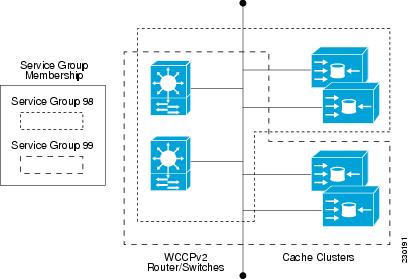
WCCP OverviewWCCP uses Cisco Content Engines (or other content engines running WCCP) to localize web traffic patterns in the network, enabling content requests to be fulfilled locally. Traffic localization reduces transmission costs and download time. WCCP enables Cisco IOS XE routing platforms to transparently redirect content requests. The main benefit of transparent redirection is that users need not configure their browsers to use a web proxy. Instead, they can use the target URL to request content, and have their requests automatically redirected to a content engine. The word "transparent" in this case means that the end user does not know that a requested file (such as a web page) came from the content engine instead of from the originally specified server. A content engine receiving a request attempts to service it from its own local cache. If the requested information is not present, the content engine issues its own request to the originally targeted server to get the required information. A content engine retrieving the requested information forwards it to the requesting client and caches it to fulfill future requests, thus maximizing download performance and substantially reducing transmission costs. WCCP enables a series of content engines, called a content engine cluster, to provide content to a router or multiple routers. Network administrators can easily scale their content engines to manage heavy traffic loads through these clustering capabilities. Cisco clustering technology enables each cluster member to work in parallel, resulting in linear scalability. Clustering content engines greatly improves the scalability, redundancy, and availability of your caching solution. You can cluster up to 32 content engines to scale to your desired capacity. Layer 2 Forwarding Redirection and ReturnWCCP uses either generic routing encapsulation (GRE) or Layer 2 (L2) to redirect or return IP traffic. When WCCP forwards traffic via GRE, the redirected packets are encapsulated within a GRE header. The packets also have a WCCP redirect header. When WCCP forwards traffic using L2, the original MAC header of the IP packet is overwritten and replaced with the MAC header for the WCCP client. Using L2 as a forwarding method allows direct forwarding to the content engine without further lookup. Layer 2 redirection requires that the router and content engines are directly connected, that is, on the same IP subnetwork. When WCCP returns traffic via GRE, the returned packets are encapsulated within a GRE header. The destination IP address is the address of the router and the source address is the address of the WCCP client. When WCCP returns traffic via L2, the original IP packet is returned without any added header information. The router to which the packet is returned will recognize the source of the packet and prevent redirection. The WCCP redirection method does not have to match the return method. L2 forwarding, return, or redirection are typically used for hardware accelerated platforms. Depending on your release, L2 forwarding, return, and redirection can also be used for software switching platforms. For content engines running Application and Content Networking System (ACNS) software, use the wccp custom-web-cache command with the l2-redirect keyword to configure L2 redirection. For content engines running Cisco Wide Area Application Services (WAAS) software, use the wccp tcp-promiscuous command with the l2-redirect keyword to configure L2 redirection. For information about Cisco ACNS commands used to configure Cisco Content Engines, see the Cisco ACNS Software Command Reference. For more information about WAAS commands used to configure Cisco Content Engines, see the Cisco Wide Area Application Services Command Reference. WCCP Mask AssignmentThe WCCP Mask Assignment feature enables mask assignment as the load-balancing method (instead of the default hash assignment method) for a WCCP service. For content engines running Application and Content Networking System (ACNS) software, use the wccp custom-web-cache command with the mask-assign keyword to configure mask assignment. For content engines running Cisco Wide Area Application Services (WAAS) software, use the wccp tcp-promiscuous command with the mask-assign keyword to configure mask assignment. For information about Cisco ACNS commands used to configure Cisco Content Engines, see the Cisco ACNS Software Command Reference. For more information about WAAS commands used to configure Cisco Content Engines, see the Cisco Wide Area Application Services Command Reference. WCCPv2 ConfigurationMultiple routers can use WCCPv2 to service a content engine cluster. In WCCPv1, only one router could redirect content requests to a cluster. The figure below illustrates a sample configuration using multiple routers. The subset of content engines within a cluster and routers connected to the cluster that are running the same service is known as a service group. Available services include TCP and UDP redirection. In WCCPv1, the content engines were configured with the address of the single router. WCCPv2 requires that each content engine be aware of all the routers in the service group. To specify the addresses of all the routers in a service group, you must choose one of the following methods:
The multicast option is easier to configure because you need only specify a single address on each content engine. This option also allows you to add and remove routers from a service group dynamically, without needing to reconfigure the content engines with a different list of addresses each time. The following sequence of events details how WCCPv2 configuration works:
WCCPv2 Support for Services Other Than HTTPWCCPv2 allows redirection of traffic other than HTTP (TCP port 80 traffic), including a variety of UDP and TCP traffic. WCCPv1 supported the redirection of HTTP (TCP port 80) traffic only. WCCPv2 supports the redirection of packets intended for other ports, including those used for proxy-web cache handling, File Transfer Protocol (FTP) caching, FTP proxy handling, web caching for ports other than 80, and Real Audio, video, and telephony applications. To accommodate the various types of services available, WCCPv2 introduced the concept of multiple service groups. Service information is specified in the WCCP configuration commands using dynamic services identification numbers (such as 98) or a predefined service keyword (such as web-cache). This information is used to validate that service group members are all using or providing the same service. The content engines in a service group specify traffic to be redirected by protocol (TCP or UDP) and up to eight source or destination ports. Each service group has a priority status assigned to it. The priority of a dynamic service is assigned by the content engine. The priority value is in the range of 0 to 255 where 0 is the lowest priority. The predefined web-cache service has an assigned priority of 240. WCCPv2 Support for Multiple RoutersWCCPv2 allows multiple routers to be attached to a cluster of cache engines. The use of multiple routers in a service group allows for redundancy, interface aggregation, and distribution of the redirection load. WCCPv2 supports up to 32 routers per service group. Each service group is established and maintained independently. WCCPv2 MD5 SecurityWCCPv2 provides optional authentication that enables you to control which routers and content engines become part of the service group using passwords and the Hashed Message Authentication Code--Message Digest (HMAC MD5) standard. Shared-secret MD5 one-time authentication (set using the ip wccp [password [0 | 7] password] global configuration command) enables messages to be protected against interception, inspection, and replay. WCCPv2 Web Cache Packet ReturnIf a content engine is unable to provide a requested object it has cached due to error or overload, the content engine will return the request to the router for onward transmission to the originally specified destination server. WCCPv2 provides a check on packets that determines which requests have been returned from the content engine unserviced. Using this information, the router can then forward the request to the originally targeted server (rather than attempting to resend the request to the content engine cluster). This process provides error handling transparency to clients. Typical reasons why a content engine would reject packets and initiate the packet return feature include the following: WCCPv2 Load DistributionWCCPv2 can be used to adjust the load being offered to individual content engines to provide an effective use of the available resources while helping to ensure high quality of service (QoS) to the clients. WCCPv2 allows the designated content engine to adjust the load on a particular content engine and balance the load across the content engines in a cluster. WCCPv2 uses three techniques to perform load distribution:
The use of these hashing parameters prevents one content engine from being overloaded and reduces the potential for bottlenecking. WCCP VRF SupportThe WCCP VRF Support feature enhances the WCCPv2 protocol by implementing support for virtual routing and forwarding (VRF). The WCCP VRF Support feature allows service groups to be configured on a per-VRF basis in addition to those defined globally. Along with the service identifier, the VRF of WCCP protocol packets arriving at the router is used to associate cache-engines with a configured service group. The same VRF must have the interface on which redirection is applied, the interface which is connected to cache engine, and the interface on which the packet would have left if it had not been redirected. IPv6 WCCP VRF Tunnel InterfaceIn Cisco IOS releases that support the WCCP VRF Support feature, the use of GRE redirection results in the creation of new tunnel interfaces. You can display these tunnel interfaces by entering the show ipv6 interface brief | include tunnel command:
Device# show ipv6 interface brief | include tunnel
Tunnel0 2001::DB8:1::1 YES unset up up
Tunnel1 2001::DB8:1::1 YES unset up up
Tunnel2 2001::DB8:1::1 YES unset up up
Tunnel3 2001::DB8:1::1 YES unset up up
Device#
The tunnel interfaces are automatically created in order to process outgoing GRE-encapsulated traffic for WCCP. The tunnel interfaces appear when a content engine connects and requests GRE redirection. The tunnel interfaces are not created directly by WCCP, but are created indirectly via a tunnel application programming interface (API). WCCP does not have direct knowledge of the tunnel interfaces, but can redirect packets to them, resulting in the appropriate encapsulation being applied to the packets. After the appropriate encapsulation is applied, the packet is then sent to the content engine.
One tunnel is created for each service group that is using GRE redirection. One additional tunnel is created to provide an IP address that allows the other tunnel group interfaces to be unnumbered but still enabled for IPv6. You can confirm the connection between the tunnels and WCCP by entering the show tunnel groups wccp command:
Device# show tunnel groups wccp
WCCP : service group 0 in "Default", ver v2, assgnmnt: hash-table
intf: Tunnel0, locally sourced
WCCP : service group 317 in "Default", ver v2, assgnmnt: hash-table
intf: Tunnel3, locally sourced
WCCP : service group 318 in "Default", ver v2, assgnmnt: hash-table
intf: Tunnel2, locally sourced
You can display additional information about each tunnel interface by entering the show tunnel interface interface-number command: Device# show tunnel interface t0 Tunnel0 Mode:multi-GRE/IP, Destination UNKNOWN, Source 2001::DB8:1::2 Application ID 2: WCCP : service group 0 in "Default", ver v2, assgnmnt: hash-table Linestate - current up Internal linestate - current up, evaluated up Device# show tunnel interface t1 Tunnel1 Mode:multi-GRE/IP, Destination UNKNOWN, Source 2001::DB8:1::1 Application ID 2: unspecified Linestate - current up Internal linestate - current up, evaluated up Device# show tunnel interface t2 Tunnel2 Mode:multi-GRE/IP, Destination UNKNOWN, Source 2001::DB8:1::1 Application ID 2: WCCP : service group 318 in "Default", ver v2, assgnmnt: hash-table Linestate - current up Internal linestate - current up, evaluated up Device# show tunnel interface t3 Tunnel3 Mode:multi-GRE/IP, Destination UNKNOWN, Source 2001::DB8:1::1 Application ID 2: WCCP : service group 317 in "Default", ver v2, assgnmnt: hash-table Linestate - current up Internal linestate - current up, evaluated up Device# Note that the service group number shown in the examples is the internal tunnel representation of the WCCP service group number. Group 0 is the web-cache service. To determine the dynamic services, subtract 256 from the displayed service group number to convert to the WCCP service group number. For interfaces that are used for redirection, the source address shown is the WCCP router ID. You can display information about the connected content engines and encapsulation, including software packet counters, by entering the show adjacency [tunnel-interface] [encapsulation] [detail] [internal] command: Device# show adjacency t0 Protocol Interface Address IP Tunnel0 2001::DB8:1::1(3) Device# show adjacency t0 encapsulation Protocol Interface Address IPV6 Tunnel1 2001:DB8:1::11(2) Encap length 48 6000000000002FFF20010DB801000000 000000000000000120010DB800010000 00000000000000110000883E00000000 Provider: TUNNEL IPV6 Tunnel1 2001:DB8:1::12(2) Encap length 48 6000000000002FFF20010DB801000000 000000000000000120010DB800010000 00000000000000120000883E00000000 Provider: TUNNEL Device# show adjacency t0 detail Protocol Interface Address IPV6 Tunnel1 2001:DB8:1::11(2) 0 packets, 0 bytes epoch 0 sourced in sev-epoch 22 Encap length 48 6000000000002FFF20010DB801000000 000000000000000120010DB800010000 00000000000000110000883E00000000 Tun endpt Next chain element: punt Device# show adjacency t0 internal Protocol Interface Address IPV6 Tunnel1 2001:DB8:1::11(2) 0 packets, 0 bytes epoch 0 sourced in sev-epoch 22 Encap length 48 6000000000002FFF20010DB801000000 000000000000000120010DB800010000 00000000000000110000883E00000000 Tun endpt Next chain element: punt parent oce 0x68C55B00 frame originated locally (Null0) L3 mtu 0 Flags (0x2808C6) Fixup disabled HWIDB/IDB pointers 0x200900DC/0x20090D98 IP redirect disabled Switching vector: IPv6 midchain adjacency oce Next-hop cannot be inferred IP Tunnel stack to 2001:DB8:1::11 in Default (0x0) Device# WCCP Bypass PacketsWCCP intercepts IP packets and redirects those packets to a destination other than the destination that is specified in the IP header. Typically the packets are redirected from a web server on the Internet to a web cache that is local to the destination. Occasionally a web cache cannot manage the redirected packets appropriately and returns the packets unchanged to the originating router. These packets are called bypass packets and are returned to the originating router using either Layer 2 forwarding without encapsulation (L2) or encapsulated in generic routing encapsulation (GRE). The router decapsulates and forwards the packets normally. The VRF associated with the ingress interface (or the global table if there is no VRF associated) is used to route the packet to the destination. GRE is a tunneling protocol developed by Cisco that encapsulates packet types from a variety of protocols inside IP tunnels, creating a virtual point-to-point link over an IP network. WCCP Closed Services and Open ServicesIn applications where packets are intercepted and redirected by a Cisco IOS router to external WCCP client devices, it may be necessary to block the packets for the application when a WCCP client device is not available. This blocking is achieved by configuring a WCCP closed service. When a WCCP service is configured as closed, WCCP discards packets that do not have a WCCP client registered to receive the redirected traffic. By default, WCCP operates as an open service, wherein communication between clients and servers proceeds normally in the absence of an intermediary device. The ip wccp service-list or the ipv6 wccp service-list command can be used only for closed-mode services. Use the service-list keyword and service-access-list argument to register an application protocol type or port number. When there is a mismatch between the service list ACL and the definition received from a cache engine, the service is not allowed to start. WCCP Outbound ACL CheckWhen WCCP is enabled for redirection on an ingress interface, the packets are redirected by WCCP and instead egress on an interface other than the destination that is specified in the IP header. The packets are still subject to ACLs configured on the ingress interface. However, redirection can cause the packets to bypass the ACL configured on the original egress interface. Packets that would have been dropped because of the ACL configured on the original egress interface can be sent out on the redirect egress interface, which poses a possible security problem. Enabling the WCCP Outbound ACL check feature ensures that redirected packets are subject to any ACL conditions configured on the original egress interface. WCCP Service GroupsWCCP is a component of Cisco IOS software that redirects traffic with defined characteristics from its original destination to an alternative destination. The typical application of WCCP is to redirect traffic bound for a remote web server to a local web cache to improve response time and optimize network resource usage. The nature of the selected traffic for redirection is defined by service groups (see figure below) specified on content engines and communicated to routers by using WCCP. The maximum number of service groups allowed across all VRFs is 256. WCCPv2 supports up to 32 routers per service group. Each service group is established and maintained independently. WCCPv2 uses service groups based on logical redirection services, deployed for intercepting and redirecting traffic. The standard service is web cache, which intercepts TCP port 80 (HTTP) traffic and redirects that traffic to the content engines. This service is referred to as a well-known service, because the characteristics of the web cache service are known by both the router and content engines. A description of a well-known service is not required beyond a service identification. To specify the standard web cache service, use the ip wccp or the ipv6 wccp command with the web-cache keyword.
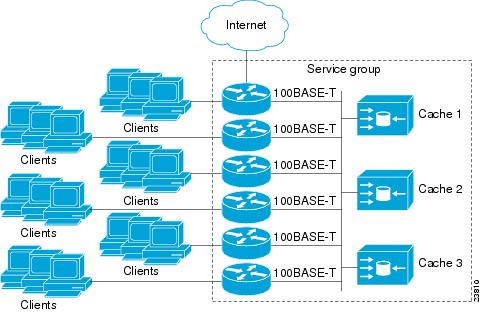
The dynamic services are defined by the content engines; the content engine instructs the router which protocol or ports to intercept, and how to distribute the traffic. The router itself does not have information on the characteristics of the dynamic service group's traffic, because this information is provided by the first content engine to join the group. In a dynamic service, up to eight ports can be specified within a single protocol. Cisco Content Engines, for example, use dynamic service 99 to specify a reverse-proxy service. However, other content engine devices may use this service number for some other service. WCCP--Check All ServicesAn interface may be configured with more than one WCCP service. When more than one WCCP service is configured on an interface, the precedence of a service depends on the relative priority of the service compared to the priority of the other configured services. Each WCCP service has a priority value as part of its definition. When an interface is configured with more than one WCCP service, the precedence of the packets is matched against service groups in priority order.
With the ip wccp check services all or the ipv6 wccp check services all command, WCCP can be configured to check all configured services for a match and perform redirection for those services if appropriate. The caches to which packets are redirected can be controlled by a redirect ACL and by the service priority. If no WCCP services are configured with a redirect ACL, the services are considered in priority order until a service is found that matches the IP packet. If no services match the packet, the packet is not redirected. If a service matches the packet and the service has a redirect ACL configured, then the IP packet will be checked against the ACL. If the packet is rejected by the ACL, the packet will not be passed down to lower priority services unless the ip wccp check services all or the ipv6 wccp check services all command is configured. When the ip wccp check services all or the ipv6 wccp check services all command is configured, WCCP will continue to attempt to match the packet against any remaining lower priority services configured on the interface. WCCP Interoperability with NATTo redirect traffic using WCCP to a router running WAAS software that is also configured with NAT, enable the ip nat inside or the ipv6 nat inside command on the WAAS interface. If you are not able to configure the ip nat inside or theipv6 nat inside command on the WAAS interface, disable Cisco Express Forwarding. You must also update the WCCP redirect ACL to include a private address to ensure that pretranslated traffic is redirected. WCCP--Configurable Router ID OverviewWCCP uses a router ID in its control messages that a WCCP client can use to uniquely identify a particular WCCP server. The router ID is an IP address and is used as the source address of any WCCP-generated Generic Routing Encapsulation (GRE) frames. Prior to the WCCP--Configurable Router ID feature, WCCP selected a router ID using an automatic mechanism; the highest reachable IP address on the system (or the highest loopback IP address, if there is one) was used as the WCCP router ID. The highest IP address on the system is not always the best choice as the router ID or as the source address of GRE frames. A change in addressing information on the system may cause the WCCP router ID to change unexpectedly. During this changeover period, WCCP clients briefly advertise the existence of two routers (the old router ID and the new router ID) and GRE frames are sourced from a different address. The WCCP--Configurable Router ID feature enables you to define a WCCP source interface from which the router ID will be obtained. The IP address of this configured source interface is then used as the preferred WCCP router ID and WCCP GRE source address. When a WCCP router ID is manually configured, the router ID does not change when another IP address is added to the system. The router ID changes only when a new router ID is manually configured using the ip wccp source-address or the ipv6 wccp source-address command, or when the address on the manually configured interface is no longer valid. WCCP Troubleshooting TipsCPU usage may be very high when WCCP is enabled. The WCCP counters enable a determination of the bypass traffic directly on the router and can indicate whether the cause is high CPU usage due to enablement of WCCP. In some situations, 10 percent bypass traffic may be normal; in other situations, 10 percent may be high. However, any figure above 25 percent should prompt a closer investigation of what is occurring in the web cache. If the counters suggest that the level of bypass traffic is high, the next step is to examine the bypass counters in the content engine and determine why the content engine is choosing to bypass the traffic. You can log in to the content engine console and use the CLI to investigate further. The counters allow you to determine the percent of traffic being bypassed. How to Configure WCCPv2--IPv6 Support
Configuring a General WCCPv2--IPv6 SessionPerform this task to configure a general IPv6 WCCPv2 session. Until you configure a WCCP service using the ipv6 wccp {web-cache | service-number} global configuration command, WCCP is disabled on the router. The first use of a form of the ipv6 wccp command enables WCCP. By default WCCPv2 is used for services. Using the ipv6 wccp web-cache password command, you can set a password for a router and the content engines in a service group. MD5 password security requires that each router and content engine that wants to join a service group be configured with the service group password. The password can be up to eight characters in length. Each content engine or router in the service group will authenticate the security component in a received WCCP packet immediately after validating the WCCP message header. Packets failing authentication will be discarded. DETAILED STEPS Configuring Services for WCCPv2--IPv6Perform this task to specify the number of service groups for WCCP, to configure a service group as a closed or open service, and to optionally specify a check of all services. DETAILED STEPS Registering a Router to a Multicast Address for WCCPv2-- IPv6If you decide to use the multicast address option for your service group, you must configure the router to listen for the multicast broadcasts on an interface. For network configurations where redirected traffic needs to traverse an intervening router, the router being traversed must be configured to perform IP multicast routing. You must configure the following two components to enable traversal over an intervening router: DETAILED STEPS
Using Access Lists for WCCPv2--IPv6 Service GroupPerform this task to configure the router to use an access list to determine which traffic should be directed to which content engines. DETAILED STEPS
Enabling the WCCP--IPv6 Outbound ACL Check
DETAILED STEPS
Enabling WCCPv2--IPv6 Interoperability with NATSUMMARY STEPS
DETAILED STEPS
Verifying and Monitoring WCCPv2--IPv6 Configuration SettingsSUMMARY STEPS
DETAILED STEPS
Configuration Examples for WCCPv2--IPv6 Support
Example: Configuring a General WCCPv2--IPv6 SessionDevice# configure terminal Device(config)# ipv6 wccp web-cache password password1 Device(config)# ipv6 wccp source-interface GigabitEthernet 0/1/0 Device(config)# ipv6 wccp check services all ! Configures a check of all WCCP services. Device(config)# interface GigabitEthernet 0/1/0 Device(config-if)# ipv6 wccp web-cache redirect in Device(config-if)# exit Device(config)# interface GigabitEthernet 0/2/0 Device(config-if)# ipv6 wccp redirect exclude in Device(config-if)# exit Example: WCCPv2--IPv6--Configuring a Web Cache ServiceDevice# configure terminal Device(config)# ipv6 wccp web-cache Device(config)# interface GigabitEthernet 0/1/0 Device(config-if)# ipv6 wccp web-cache redirect in Device(config-if)# exit Device# copy running-config startup-config The following example shows how to configure a session in which redirection of HTTP traffic arriving on Gigabit Ethernet interface 0/1/0 is enabled: Device# configure terminal Device(config)# interface GigabitEthernet 0/1/0 Device(config-if)# ipv6 wccp web-cache redirect in Device(config-if)# exit Device# show ip interface GigabitEthernet 0/1/0 . . . WCCP Redirect inbound is enabled WCCP Redirect exclude is disabled . . . Example: WCCPv2--IPv6--Running a Reverse Proxy ServiceThe following example assumes that you are configuring a service group using Cisco cache engines, which use dynamic service 99 to run a reverse proxy service: Device# configure terminal Device(config)# ipv6 wccp 99 Device(config)# interface GigabitEthernet 0/1/0 Device(config-if)# ipv6 wccp 99 redirect out Example: WCCPv2--IPv6--Registering a Router to a Multicast AddressDevice# configure terminal Device(config)# ipv6 wccp web-cache group-address 224.1.1.100 Device(config)# interface gigabitethernet 0/1/0 Device(config-if)# ipv6 wccp web cache group-listen The following example shows a device configured to run a reverse proxy service, using the multicast address of 224.1.1.1. Redirection applies to packets outgoing via Gigabit Ethernet interface 0/1/0: Device# configure terminal Device(config)# ipv6 wccp 99 group-address 224.1.1.1 Device(config)# interface gigabitethernet 0/1/0 Device(config-if)# ipv6 wccp 99 redirect out Example: WCCPv2--IPv6--Using Access Lists for a WCCPv2 IPv6 Service GroupTo achieve better security, you can use a standard access list to notify the device which IP addresses are valid addresses for a content engine attempting to register with the current device. The following example shows a standard access list configuration session where the access list number is 10 for some sample hosts: Device(config)# access-list 10 permit host 10.1.1.1 Device(config)# access-list 10 permit host 10.1.1.2 Device(config)# access-list 10 permit host 10.1.1.3 Device(config)# ipv6 wccp web-cache group-list 10 To disable caching for certain clients, servers, or client/server pairs, you can use WCCP access lists. The following example shows that any requests coming from 10.1.1.1 to 10.3.1.1 will bypass the cache, and that all other requests will be serviced normally: Device(config)# ipv6 wccp web-cache redirect-list 120 Device(config)# access-list 120 deny tcp host 10.1.1.1 any Device(config)# access-list 120 deny tcp any host 10.3.1.1 Device(config)# access-list 120 permit ip any any The following example configures a device to redirect web-related packets received via Gigabit Ethernet interface 0/1/0, destined to any host except 209.165.200.224: Device(config)# access-list 100 deny ip any host 209.165.200.224 Device(config)# access-list 100 permit ip any any Device(config)# ipv6 wccp web-cache redirect-list 100 Device(config)# interface gigabitethernet 0/1/0 Device(config-if)# ipv6 wccp web-cache redirect in Example: WCCPv2--IPv6--Configuring Outbound ACL CheckThe following configuration example shows that the access list prevents traffic from network 10.0.0.0 leaving Gigabit Ethernet interface 0/1/0. Because the outbound ACL check is enabled, WCCP does not redirect that traffic. WCCP checks packets against the ACL before they are redirected. Device(config)# ipv6 wccp web-cache Device(config)# ipv6 wccp check acl outbound Device(config)# interface gigabitethernet 0/1/0 Device(config-if)# ip access-group 10 out Device(config-if)# exit Device(config)# ipv6 wccp web-cache redirect-list redirect-out Device(config)# access-list 10 deny 10.0.0.0 0.255.255.255 Device(config)# access-list 10 permit any If the outbound ACL check is disabled, the HTTP packets from network 10.0.0.0 would be redirected to a web cache. Users with that network address could retrieve web pages even though the network administrator wanted to prevent it. Example: WCCPv2--IPv6--Enabling WCCP Interoperability with NATDevice(config)# interface ethernet1 ! This is the LAN-facing interface Device(config-if)# ipv6 nat inside Device(config-if)# ipv6 wccp 61 redirect in Device(config-if)# exit Device(config)# interface ethernet2 ! This is the WAN-facing interface Device(config-if)# ipv6 nat outside Device(config-if)# ipv6 wccp 62 redirect in Device(config-if)# exit Device(config)# interface ethernet3 ! This is the WAAS-facing interface Device(config-if)# ipv6 nat inside Device(config-if)# ipv6 wccp redirect exclude in Example: WCCPv2--IPv6--Verifying WCCP SettingsThe following example shows how to verify your configuration changes by using the more system:running-config command in privileged EXEC mode. The following example shows that both the web cache service and dynamic service 99 are enabled on the device:
Device# more system:running-config
Building configuration...
Current configuration:
!
version 12.0
service timestamps debug uptime
service timestamps log uptime
no service password-encryption
service udp-small-servers
service tcp-small-servers
!
hostname router4
!
enable secret 5 $1$nSVy$faliJsVQXVPW.KuCxZNTh1
enable password password1
!
ip subnet-zero
ipv6 wccp web-cache
ipv6 wccp 99
ip domain-name cisco.com
ip name-server 10.1.1.1
ip name-server 10.1.1.2
ip name-server 10.1.1.3
!
!
!
interface GigabitEthernet0/1/1
ip address 10.3.1.2 255.255.255.0
no ip directed-broadcast
ipv6 wccp web-cache redirect in
ipv6 wccp 99 redirect in
no ip route-cache
no ip mroute-cache
!
interface GigabitEthernet0/1/0
ip address 10.4.1.1 255.255.255.0
no ip directed-broadcast
ipv6 wccp 99 redirect in
no ip route-cache
no ip mroute-cache
!
interface Serial0
no ip address
no ip directed-broadcast
no ip route-cache
no ip mroute-cache
shutdown
!
interface Serial1
no ip address
no ip directed-broadcast
no ip route-cache
no ip mroute-cache
shutdown
!
ip default-gateway 10.3.1.1
ip classless
ip route 0.0.0.0 0.0.0.0 10.3.1.1
no ip http server
!
!
!
line con 0
transport input none
line aux 0
transport input all
line vty 0 4
password password1
login
!
end
The following example shows how to display global statistics related to WCCP:
Device# show ipv6 wccp web-cache detail
WCCP Client information:
WCCP Client ID: 10.1.1.2
Protocol Version: 2.0
State: Usable
Redirection: L2
Packet Return: L2
Packets Redirected: 0
Connect Time: 00:20:34
Assignment: MASK
Mask SrcAddr DstAddr SrcPort DstPort
---- ------- ------- ------- -------
0000: 0x00000000 0x00001741 0x0000 0x0000
Value SrcAddr DstAddr SrcPort DstPort CE-IP
----- ------- ------- ------- ------- -----
0000: 0x00000000 0x00000000 0x0000 0x0000 0x3C010102 (10.1.1.2)
0001: 0x00000000 0x00000001 0x0000 0x0000 0x3C010102 (10.1.1.2)
0002: 0x00000000 0x00000040 0x0000 0x0000 0x3C010102 (10.1.1.2)
0003: 0x00000000 0x00000041 0x0000 0x0000 0x3C010102 (10.1.1.2)
0004: 0x00000000 0x00000100 0x0000 0x0000 0x3C010102 (10.1.1.2)
0005: 0x00000000 0x00000101 0x0000 0x0000 0x3C010102 (10.1.1.2)
0006: 0x00000000 0x00000140 0x0000 0x0000 0x3C010102 (10.1.1.2)
For more information about the show ip wccp web-cache command, see the Cisco IOS IP Application Services Command Reference. Additional ReferencesRelated DocumentsTechnical Assistance
Feature Information for WCCPv2--IPv6 SupportThe following table provides release information about the feature or features described in this module. This table lists only the software release that introduced support for a given feature in a given software release train. Unless noted otherwise, subsequent releases of that software release train also support that feature. Use Cisco Feature Navigator to find information about platform support and Cisco software image support. To access Cisco Feature Navigator, go to www.cisco.com/go/cfn. An account on Cisco.com is not required.
Cisco and the Cisco logo are trademarks or registered trademarks of Cisco and/or its affiliates in the U.S. and other countries. To view a list of Cisco trademarks, go to this URL: www.cisco.com/go/trademarks. Third-party trademarks mentioned are the property of their respective owners. The use of the word partner does not imply a partnership relationship between Cisco and any other company. (1110R) Any Internet Protocol (IP) addresses and phone numbers used in this document are not intended to be actual addresses and phone numbers. Any examples, command display output, network topology diagrams, and other figures included in the document are shown for illustrative purposes only. Any use of actual IP addresses or phone numbers in illustrative content is unintentional and coincidental. © 2012 Cisco Systems, Inc. All rights reserved.
|
|||||||||||||||||||||||||||||||||||||||||||||||||||||||||||||||||||||||||||||||||||||||||||||||||||||||||||||||||||||||||||||||||||||||||||||||||||||||
|
|