- Finding Feature Information
- Prerequisites for Cisco License Call Home
- Restrictions for Cisco License Call Home
- Information About Cisco License Call Home
- How to Configure Cisco License Call Home
- Configuration Examples for Cisco License Call Home
- Additional References
- Feature Information for Cisco License Call Home
Configuring Cisco License Call Home
The Cisco License Call Home feature provides a robust set of commands that communicate with the Cisco licensing infrastructure, makes connections and data transfers, and provides interactive prompts to help you install and maintain software licenses. This module describes the tasks and the commands used to activate software by using the Cisco License Call Home feature, license keys, and Cisco EXEC commands. When you activate software from a Cisco device, you can license software without the need for additional application software.
- Finding Feature Information
- Prerequisites for Cisco License Call Home
- Restrictions for Cisco License Call Home
- Information About Cisco License Call Home
- How to Configure Cisco License Call Home
- Configuration Examples for Cisco License Call Home
- Additional References
- Feature Information for Cisco License Call Home
Finding Feature Information
Your software release may not support all the features documented in this module. For the latest caveats and feature information, see Bug Search Tool and the release notes for your platform and software release. To find information about the features documented in this module, and to see a list of the releases in which each feature is supported, see the feature information table.
Use Cisco Feature Navigator to find information about platform support and Cisco software image support. To access Cisco Feature Navigator, go to www.cisco.com/go/cfn. An account on Cisco.com is not required.
Prerequisites for Cisco License Call Home
You must obtain the device certificate from the Cisco licensing infrastructure before starting.
You must have a CCO user login account.
Restrictions for Cisco License Call Home
The device must have an Internet connection and use HTTPS to connect to the Cisco licensing infrastructure. To set up a secure HTTP connection, see the HTTP 1.1 Web Server and Client chapter in the Cisco IOS Network Management Configuration Guide.
Only certain platforms support the Cisco License Call Home feature, and these devices must be running a Cisco IOS crypto K9 image. For information about platform support, see the “Feature Information for Cisco License Call Home” section.
Information About Cisco License Call Home
Cisco License Call Home Interface
The Cisco License Call Home feature allows a Cisco device to communicate with the Cisco licensing infrastructure that provides license generation, fulfillment, and support. The Cisco License Call Home feature uses a secured Internet connection to retrieve licensing information. This feature provides a robust set of commands that makes connections, transfers data, and provides interactive prompts to help you install and maintain software licenses. Once you purchase a product authorization key (PAK), Cisco License Call Home commands enable you to easily perform these tasks:
The figure below shows how the Cisco License Call Home feature interfaces to the Cisco licensing back-end system. The architecture shown in the figure below allows the use of the License Call Home EXEC commands to communicate with the Cisco licensing infrastructure and to perform administrative license operations.
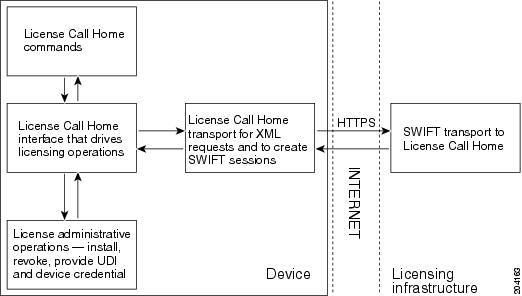
The Cisco License Call Home feature works as a client-server model with each transaction completed as a separate connection to the Cisco licensing infrastructure. The Cisco License Call Home feature displays prompts to obtain required information and then connects to the Cisco licensing back end to interact with the Cisco licensing infrastructure. A Cisco License Call Home EXEC command initiates a request, and the Cisco licensing infrastructure provides the response. The processes designed into the Cisco License Call Home architecture manage the transport of information that provides the URL required to connect to the Cisco licensing infrastructure over the Internet and to create a session.
How to Configure Cisco License Call Home
- Installing Licenses or Upgrading Software by Using Cisco License Call Home
- Rehosting a License by Using Cisco License Call Home
- Requesting a License Resend by Using Cisco License Call Home
Installing Licenses or Upgrading Software by Using Cisco License Call Home
1. Obtain the PAK.
2.
enable
3.
show license call-home pak
pak-id
4.
license call-home install pak
pak-id
5.
show license feature
DETAILED STEPS
Rehosting a License by Using Cisco License Call Home
1.
enable
2.
license call-home revoke udi
target-udi output-of-rehosted-license-url
3.
show license detail
4.
license install
stored-location-url
DETAILED STEPS
Requesting a License Resend by Using Cisco License Call Home
1.
enable
2.
license call-home resend
dest-lic-location
3.
license install
stored-location-url
DETAILED STEPS
Configuration Examples for Cisco License Call Home
- Example: Installing Licenses or Upgrading Software by Using Cisco License Call Home
- Example: Rehosting a License by Using Cisco License Call Home
- Example: Requesting a License Resend by Using Cisco License Call Home
Example: Installing Licenses or Upgrading Software by Using Cisco License Call Home
The following example shows how to use the license license call-home install pak command to install a license by using the Cisco License Call Home feature. The command also displays prompts for mandatory information. The show license feature command is used to verify the installation.
Device# license call-home install pak 3XPXR9E7D30
CCO User name: User1
CCO password : ************
Pak Number          : 3XPXR9E7D30
Pak Fulfillment type: SINGLE
     1. SKU Name           : Gatekeeper
        SKU Type           : Product
        Description        : Gatekeeper
        Ordered Qty        : 1
        Available Qty      : 1
        Feature List       :
            Feature name:         gatekeeper Count: Uncounted
        Platform Supported : N/A
                             5400
                             5350
                             2800
                             3800
Do you want to install the above listed SKU(s)? [yes/no]: yes
Please enter the user's detail:
First Name : First-name
Last Name : Last-name
Title : Software Engineer
Company Name : Cisco Systems
Address1 : 510 McCarthy Blvd.
Address2  [Optional]:
City : Milpitas
State : CA
Province  [Optional]:
Zipcode : 95134
Country : USA
Phone : 408 526-4000
Fax  [Optional]:
Email : User1@cisco.com
Installing...Feature:gatekeeper...Successful
Device# show license feature
Feature name             Enforcement  Evaluation  Subscription   Enabled
gsmamrnb-codec-pack      yes          yes         no             no
Device#
Example: Rehosting a License by Using Cisco License Call Home
The following example shows how to use the license call-home revoke udi command to revoke and transfer a license by using source and target UDIs. The command also displays prompts for mandatory information. The show license detail command is used to verify that the license has been transferred.
Device# license call-home revoke udi AS54XM-AC-RPS:JAE0948QT6R flash:licensetargetudi.xml
CCO User name: User1
CCO password : ************
Retrieving the sku from swift ............................
     1. SKU Name           : Gatekeeper
        SKU Type           : Product
        Description        :
        Ordered Qty        : 1
        Available Qty      : 1
        Feature List       :
            Feature name:         gatekeeper Count: Uncounted
        Platform Supported : N/A
                             5400
                             5350
                             2800
                             3800
     3. SKU Name           : Gatekeeper
        SKU Type           : Product
        Description        :
        Ordered Qty        : 1
        Available Qty      : 1
        Feature List       :
            Feature name:         gatekeeper Count: Uncounted
        Platform Supported : N/A
                             5400
                             5350
                             2800
                             3800
4. SKU Name           : GSMAMRNB
        SKU Type           : Product
        Description        : Transfer this feature set
        Ordered Qty        : 1
        Available Qty      : 1
        Feature List       :
            Feature name: gsmamrnb-codec-pac Count: Uncounted
        Platform Supported : 5400
                             5350
5. All of the above
Please select the sku number you want to revoke : 4
Retrieving the permission ticket from swift .............
Installing permission ticket and retrieving rehost ticket........Done
Device# show license detail
Index: 1 	Feature: gsmamrnb-codec-pack   Version: 1.0
	License Type: Evaluation
	License State: Active, Not in Use, EULA accepted
	    Evaluation total period: 8  weeks 4  days
	    Evaluation period left: 8  weeks 4  days
	Lock type: Non Node locked
	Vendor info
	License Addition: Additive
	License Generation version 135266304
	License Priority: Low
	Store Index: 0
	Store Name: Evaluation License Storage
Example: Requesting a License Resend by Using Cisco License Call Home
The following examples shows how to use the license call-home resend command to obtain all licenses this device owns and store them in the specified location:
Device# license call-home resend flash:licenseresend.lic
CCO User name: User1
CCO password : ************
Email Address: User1@cisco.com
Getting Licenses from SWIFT ..........
Saving it to flash:licenseresend.lic.....Done
Additional References
Related Documents
|
Related Topic |
Document Title |
|---|---|
|
Cisco License Manager application |
User Guide for Cisco License Manager |
|
Software activation conceptual overview |
“Cisco IOS Software Activation Conceptual Overview” module |
|
Software activation commands |
Software Activation Command Reference |
|
Cisco IOS commands |
|
|
Integrated Services Routers licensing |
Software Activation on Cisco Integrated Services Routers |
Technical Assistance
|
Description |
Link |
|---|---|
|
The Cisco Support and Documentation website provides online resources to download documentation, software, and tools. Use these resources to install and configure the software and to troubleshoot and resolve technical issues with Cisco products and technologies. Access to most tools on the Cisco Support and Documentation website requires a Cisco.com user ID and password. |
Feature Information for Cisco License Call Home
The following table provides release information about the feature or features described in this module. This table lists only the software release that introduced support for a given feature in a given software release train. Unless noted otherwise, subsequent releases of that software release train also support that feature.
Use Cisco Feature Navigator to find information about platform support and Cisco software image support. To access Cisco Feature Navigator, go to . An account on Cisco.com is not required.|
Feature Name |
Releases |
Feature Information |
|---|---|---|
|
Cisco License Call Home |
12.4(15)XZ 12.4(20)T 15.1(1)SG Cisco IOS XE Release 3.3SG |
The Cisco License Call Home feature provides a robust set of commands that communicate with the Cisco licensing infrastructure, makes connections and data transfers, and provides interactive prompts to help you install and maintain software licenses. In 12.4(15)XZ, this feature was introduced on the Cisco AS5300, AS5350, AS5350XM, AS5400, AS5400HPX, AS5400XM, 2800, 2851, 2821, 2811, 3800, 3825, and 3845 platforms. The following commands were introduced or modified by this feature: license call-home install, license call-home resend, license call-home revoke, license call-home url, show license call-home. |
 Feedback