- Index
- New and Changed Information for Interfaces NX-OS Configuration Guide
- Preface
- Overview
- Configuring Basic Interface Parameters
- Configuring Access and Trunk Interfaces
- Configuring Layer 3 Interfaces
- Configuring Port Channels
- Configuring vPCs
- Configuring IP Tunnels
- IETF RFCs Supported by Cisco NX-OS Interfaces
- Configuration Limits for Cisco NX-OS Interfaces
- Information About Access and Trunk Interfaces
- Licensing Requirements for Layer 2 Port Modes
- Prerequisites for VLAN Trunking
- Guidelines and Limitations
- Configuring Access and Trunk Interfaces
- Guidelines for Configuring Access and Trunk Interfaces
- Configuring a LAN Interface as a Layer 2 Access Port
- Configuring Access Host Ports
- Configuring Trunk Ports
- Configuring the Native VLAN for 802.1Q Trunking Ports
- Configuring the Allowed VLANs for Trunking Ports
- Configuring the Device to Tag Native VLAN Traffic
- Changing the System Default Port Mode to Layer 2
- Verifying Interface Configuration
- Displaying and Clearing Statistics
- Default Settings
- Access and Trunk Port Mode Example Configurations
- Additional References
- Feature History for Configuring Layer 2 Interfaces
Configuring Layer 2 Interfaces
This chapter describes how to configure Layer 2 switching ports as access or trunk ports.

Note A Layer 2 port can function as either a trunk port, an access port, or a private VLAN port. See the Cisco Nexus 7000 Series NX-OS Layer 2 Switching Configuration Guide, Release 4.x for more information on private VLANs.
This chapter includes the following topics:
- Information About Access and Trunk Interfaces
- Licensing Requirements for Layer 2 Port Modes
- Prerequisites for VLAN Trunking
- Guidelines and Limitations
- Configuring Access and Trunk Interfaces
- Verifying Interface Configuration
- Displaying and Clearing Statistics
- Default Settings
- Access and Trunk Port Mode Example Configurations
- Additional References
- Feature History for Configuring Layer 2 Interfaces
Note See the Cisco Nexus 7000 Series NX-OS System Management Configuration Guide, Release 4.x for information on configuring a SPAN destination interface.
You can configure Layer 2 switching ports as access or trunk ports. Trunks carry the traffic of multiple VLANs over a single link and allow you to extend VLANs across an entire network. All Layer 2 switching ports maintain media access control (MAC) address tables.
Note See the Cisco Nexus 7000 Series NX-OS Layer 2 Switching Configuration Guide, Release 4.x for information on VLANs, MAC address tables, private VLANs, and the Spanning Tree Protocol.
Note A Layer 2 port can function as either a trunk port, an access port, or a private VLAN port. See the Cisco Nexus 7000 Series NX-OS Layer 2 Switching Configuration Guide, Release 4.x for more information on private VLANs.
Information About Access and Trunk Interfaces
Note See the Cisco Nexus 7000 Series NX-OS High Availability and Redundancy Guide, Release 4.x for complete information on high-availability features.
This section includes the following topics:
- Information About Access and Trunk Interfaces
- IEEE 802.1Q Encapsulation
- Access VLANs
- Native VLAN IDs for Trunk Ports
- Tagging Native VLAN Traffic
- Allowed VLANs
- High Availability
- Virtualization Support
Note The device supports only IEEE 802.1Q-type VLAN trunk encapsulation.
Information About Access and Trunk Interfaces
A Layer 2 port can be configured as an access or a trunk port as follows:
- An access port can have only one VLAN configured on that port; it can carry traffic for only one VLAN.
- A trunk port can have two or more VLANs configured on that port; it can carry traffic for several VLANs simultaneously.
By default, all ports on the device are Layer 3 ports.
You can make all ports Layer 2 ports using the setup script or by entering the system default switchport command. See the Cisco Nexus 7000 Series NX-OS Fundamentals Configuration Guide, Release 4.x for information on using the setup script. To configure the port as a Layer 2 port using the CLI, use the switchport command,
All ports in one trunk must be in the same virtual device context (VDC). See the Cisco Nexus 7000 Series NX-OS Virtual Device Context Configuration Guide, Release 4.x for information on VDCs.
All ports in the same trunk must be in the same VDC, and trunk ports cannot carry VLANs from different VDCs.
show how you can use trunk ports in the network. The trunk port carries traffic for two or more VLANs.
Trunk and Access Ports and VLAN Traffic
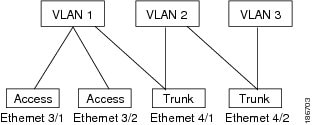
Note See the Cisco Nexus 7000 Series NX-OS Layer 2 Switching Configuration Guide, Release 4.x for information on VLANs.
In order to correctly deliver the traffic on a trunk port with several VLANs, the device uses the IEEE 802.1Q encapsulation, or tagging, method (see the “IEEE 802.1Q Encapsulation” section for more information).
Note See the Cisco Nexus 7000 Series NX-OS Unicast Routing Configuration Guide, Release 4.x for information on subinterfaces on Layer 3 interfaces.
To optimize the performance on access ports, you can configure the port as a host port. Once the port is configured as a host port, it is automatically set as an access port, and channel grouping is disabled. Use the host designation to decrease the time that it takes the designated port to begin to forward packets.
Only an end station can be set as a host port; you will receive an error message if you attempt to configure other ports as hosts.
If an access port receives a packet with an 802.1Q tag in the header other than the access VLAN value, that port drops the packet without learning its MAC source address.
A Layer 2 interface can function as either an access port or a trunk port; it cannot function as both port types simultaneously.
When you change a Layer 2 interface back to a Layer 3 interface, that interface loses all the Layer 2 configuration and resumes the default VLAN configurations.
IEEE 802.1Q Encapsulation
Note For information about VLANs, see the Cisco Nexus 7000 Series NX-OS Layer 2 Switching Configuration Guide, Release 4.x.
A trunk is a point-to-point link between the switch and another networking device. Trunks carry the traffic of multiple VLANs over a single link and allow you to extend VLANs across an entire network.
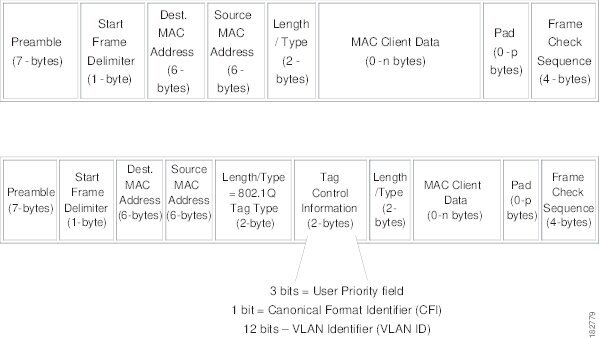
To correctly deliver the traffic on a trunk port with several VLANs, the device uses the IEEE 802.1Q encapsulation, or tagging, method that uses a tag that is inserted into the frame header (see Figure 3-1). This tag carries information about the specific VLAN to which the frame and packet belong. This method allows packets that are encapsulated for several different VLANs to traverse the same port and maintain traffic separation between the VLANs. Also, the encapsulated VLAN tag allows the trunk to move traffic end-to-end through the network on the same VLAN.
Figure 3-1 Header Without and With 802.1Q Tag
Access VLANs
Note If you assign an access VLAN that is also a primary VLAN for a private VLAN, all access ports with that access VLAN will also receive all the broadcast traffic for the primary VLAN in the private VLAN mode.
Note See the Cisco Nexus 7000 Series NX-OS Layer 2 Switching Configuration Guide, Release 4.x for complete information on private VLANs.
When you configure a port in access mode, you can specify which VLAN will carry the traffic for that interface. If you do not configure the VLAN for a port in access mode, or an access port, the interface carries traffic for the default VLAN (VLAN1).
You can change the access port membership in a VLAN by specifying the new VLAN. You must create the VLAN before you can assign it as an access VLAN for an access port. If you change the access VLAN on an access port to a VLAN that is not yet created, the system shuts that access port down.
If an access port receives a packet with an 802.1Q tag in the header other than the access VLAN value, that port drops the packet without learning its MAC source address.
Native VLAN IDs for Trunk Ports
A trunk port can carry nontagged packets simultaneously with the 802.1Q tagged packets. When you assign a default port VLAN ID to the trunk port, all untagged traffic travels on the default port VLAN ID for the trunk port, and all untagged traffic is assumed to belong to this VLAN. This VLAN is referred to as the native VLAN ID for a trunk port. That is, the native VLAN ID is the VLAN that carries untagged traffic on trunk ports.
Note Native VLAN ID numbers must match on both ends of the trunk.
The trunk port sends an egressing packet with a VLAN that is equal to the default port VLAN ID as untagged; all the other egressing packets are tagged by the trunk port. If you do not configure a native VLAN ID, the trunk port uses the default VLAN.
Tagging Native VLAN Traffic
The Cisco software supports the IEEE 802.1Q standard on trunk ports. In order to pass untagged traffic through the trunk ports, you must create a VLAN that does not tag any packets (or you can use the default VLAN). Untagged packets can pass through trunk ports and access ports.
However, all packets that enter the device with an 802.1Q tag that matches the value of the native VLAN on the trunk are stripped of any tagging and egress the trunk port as untagged packets. This situation can cause problems because you may want to retain the tagging on packets on the native VLAN for the trunk port.
You can configure the device to drop all untagged packets on the trunk ports and to retain the tagging of packets entering the device with 802.1Q values that are equal to that of the native VLAN ID. All control traffic still passes on the native VLAN. This configuration is global; trunk ports on the device either do or do not retain the tagging for the native VLAN.
Allowed VLANs
By default, a trunk port sends traffic to and receives traffic from all VLANs. All VLAN IDs are allowed on each trunk. However, you can remove VLANs from this inclusive list to prevent traffic from the specified VLANs from passing over the trunk. Later, you can add any specific VLANs that you may want the trunk to carry traffic for back to the list.
To partition the Spanning Tree Protocol (STP) topology for the default VLAN, you can remove VLAN1 from the list of allowed VLANs. Otherwise, VLAN1, which is enabled on all ports by default, will have a very big STP topology, which can result in problems during STP convergence. When you remove VLAN1, all data traffic for VLAN1 on this port is blocked, but the control traffic continues to move on the port.
Note See the Cisco Nexus 7000 Series NX-OS Layer 2 Switching Configuration Guide, Release 4.x for more information about STP.
High Availability
The software supports high availability for Layer 2 ports.
Note See the Cisco Nexus 7000 Series NX-OS High Availability and Redundancy Guide, Release 4.x for complete information on high availability features.
Virtualization Support
The device supports virtual device contexts (VDCs).
All ports in the same trunk must be in the same VDC, and trunk ports cannot carry VLANs from different VDCs.
Note See the Cisco Nexus 7000 Series NX-OS Virtual Device Context Configuration Guide, Release 4.x for complete information on VDCs and assigning resources.
Licensing Requirements for Layer 2 Port Modes
The following table shows the licensing requirements for this feature:
Note Using VDCs requires an Advanced Services license.
Prerequisites for VLAN Trunking
To set the port in either an access or trunk switchport mode, you must have the following prerequisites:
Guidelines and Limitations
The following configuration guidelines and restrictions apply when using 802.1Q trunks and impose some limitations on the trunking strategy for a network. Consider these restrictions when using 802.1Q trunks:
- A port can be either a Layer 2 or a Layer 3 interface; it cannot be both simultaneously.
- When you change a Layer 3 port to a Layer 2 port or a Layer 2 port to a Layer 3 port, all layer-dependent configuration is lost. When you change an access or trunk port to a Layer 3 port, all information about the access VLAN, native VLAN, allowed VLANs, and so forth, is lost.
- Do not connect devices with access links because access links may partition a VLAN.
- When connecting Cisco devices through an 802.1Q trunk, make sure that the native VLAN for an 802.1Q trunk is the same on both ends of the trunk link. If the native VLAN on one end of the trunk is different from the native VLAN on the other end, spanning tree loops might result.
- Disabling spanning tree on the native VLAN of an 802.1Q trunk without disabling spanning tree on every VLAN in the network can cause spanning tree loops. You must leave spanning tree enabled on the native VLAN of an 802.1Q trunk. If you cannot leave spanning tree enabled, you must disable spanning tree on every VLAN in the network. Make sure that your network has no physical loops before you disable spanning tree.
- When you connect two Cisco devices through 802.1Q trunks, the devices exchange spanning tree bridge protocol data units (BPDUs) on each VLAN allowed on the trunks. The BPDUs on the native VLAN of the trunk are sent untagged to the reserved IEEE 802.1D spanning tree multicast MAC address (01-80-C2-00-00-00). The BPDUs on all other VLANs on the trunk are sent tagged to the reserved Cisco Shared Spanning Tree (SSTP) multicast MAC address (01-00-0c-cc-cc-cd).
- Non-Cisco 802.1Q devices maintain only a single instance of spanning tree (the Mono Spanning Tree) that defines the spanning tree topology for all VLANs. When you connect a Cisco switch to a non-Cisco switch through an 802.1Q trunk, the Mono Spanning Tree of the non-Cisco switch and the native VLAN spanning tree of the Cisco switch combine to form a single spanning tree topology known as the Common Spanning Tree (CST).
- Because Cisco devices transmit BPDUs to the SSTP multicast MAC address on VLANs other than the native VLAN of the trunk, non-Cisco devices do not recognize these frames as BPDUs and flood them on all ports in the corresponding VLAN. Other Cisco devices connected to the non-Cisco 802.1Q cloud receive these flooded BPDUs. This BPDU reception allows Cisco switches to maintain a per-VLAN spanning tree topology across a cloud of non-Cisco 802.1Q devices. The non-Cisco 802.1Q cloud that separates the Cisco devices is treated as a single broadcast segment between all devices connected to the non-Cisco 802.1Q cloud through 802.1Q trunks.
- Make certain that the native VLAN is the same on all of the 802.1Q trunks that connect the Cisco devices to the non-Cisco 802.1Q cloud.
- If you are connecting multiple Cisco devices to a non-Cisco 802.1Q cloud, all of the connections must be through 802.1Q trunks. You cannot connect Cisco devices to a non-Cisco 802.1Q cloud through access ports because doing so places the access port on the Cisco device into the spanning tree “port inconsistent” state and no traffic will pass through the port.
- You can group trunk ports into port-channel groups, but all trunks in the group must have the same configuration. When a group is first created, all ports follow the parameters set for the first port to be added to the group. If you change the configuration of one of these parameters, the device propagates that setting to all ports in the group, such as the allowed VLANs and the trunk status. For example, if one port in a port group ceases to be a trunk, all ports cease to be trunks.
- If you try to enable 802.1X on a trunk port, an error message appears, and 802.1X is not enabled. If you try to change the mode of an 802.1X-enabled port to trunk, the port mode is not changed.
Configuring Access and Trunk Interfaces
This section includes the following topics:
- Guidelines for Configuring Access and Trunk Interfaces
- Configuring a LAN Interface as a Layer 2 Access Port
- Configuring Access Host Ports
- Configuring Trunk Ports
- Configuring the Native VLAN for 802.1Q Trunking Ports
- Configuring the Allowed VLANs for Trunking Ports
- Configuring the Device to Tag Native VLAN Traffic
- Changing the System Default Port Mode to Layer 2
Note If you are familiar with the Cisco IOS CLI, be aware that the Cisco NX-OS commands for this feature might differ from the Cisco IOS commands that you would use.
Guidelines for Configuring Access and Trunk Interfaces
Configuring a LAN Interface as a Layer 2 Access Port
You can configure a Layer 2 port as an access port. An access port transmits packets on only one, untagged VLAN. You specify which VLAN traffic that the interface carries, which becomes the access VLAN. If you do not specify a VLAN for an access port, that interface carries traffic only on the default VLAN. The default VLAN is VLAN1.
The VLAN must exist before you can specify that VLAN as an access VLAN. The system shuts down an access port that is assigned to an access VLAN that does not exist.
BEFORE YOU BEGIN
SUMMARY STEPS
2. interface {{ type slot/port } | { port-channel number }}
3. switchport mode { access | trunk }
DETAILED STEPS
This example shows how to set Ethernet 3/1 as a Layer 2 access port that carries traffic for VLAN 5 only:
Configuring Access Host Ports
Note You should apply the switchport host command only to interfaces connected to an end station.
You can optimize the performance of access ports that are connected to end stations by simultaneously setting that port as an access port. An access host port handles the STP like an edge port and immediately moves to the forwarding state without passing through the blocking and learning states. Configuring an interface as an access host port also disables port channeling on that interface.
Note See Chapter 5, “Configuring Port Channels” for information on port-channel interfaces and the Cisco Nexus 7000 Series NX-OS Layer 2 Switching Configuration Guide, Release 4.x. For complete information on the Spanning Tree Protocol.
BEFORE YOU BEGIN
Ensure that you are configuring the correct interface to an interface that is an end station.
SUMMARY STEPS
DETAILED STEPS
This example shows how to set Ethernet 3/1 as a Layer 2 access port with PortFast enabled and port channel disabled:
Configuring Trunk Ports
You can configure a Layer 2 port as a trunk port. A trunk port transmits untagged packets for one VLAN plus encapsulated, tagged, packets for multiple VLANs. (See the “IEEE 802.1Q Encapsulation” section for information about encapsulation.)
Note The device supports 802.1Q encapsulation only.
BEFORE YOU BEGIN
Before you configure a trunk port, ensure that you are configuring a Layer 2 interface.
SUMMARY STEPS
2. interface { type slot/port | port-channel number }
DETAILED STEPS
This example shows how to set Ethernet 3/1 as a Layer 2 trunk port:
Configuring the Native VLAN for 802.1Q Trunking Ports
You can configure the native VLAN for 802.1Q trunk ports. If you do not configure this parameter, the trunk port uses the default VLAN as the native VLAN ID.
SUMMARY STEPS
2. interface { type slot/port | port-channel number }
DETAILED STEPS
This example shows how to set the native VLAN for the Ethernet 3/1, Layer 2 trunk port to VLAN 5:
Configuring the Allowed VLANs for Trunking Ports
You can specify the IDs for the VLANs that are allowed on the specific trunk port.
BEFORE YOU BEGIN
Before you configure the allowed VLANs for the specified trunk ports, ensure that you are configuring the correct interfaces and that the interfaces are trunks.
SUMMARY STEPS
2. interface { ethernet slot/port | port-channel number }
3. switchport trunk allowed vlan { vlan-list | add vlan-list | all | except vlan-list | none | remove vlan-list }
DETAILED STEPS
This example shows how to add VLANs 15 to 20 to the list of allowed VLANs on the Ethernet 3/1, Layer 2 trunk port:
Configuring the Device to Tag Native VLAN Traffic
When you are working with 802.1Q trunked interfaces, you can maintain the tagging for all packets that enter with a tag that matches the value of the native VLAN ID and drops all untagged traffic (you will still carry control traffic on that interface). This feature applies to the entire device; you cannot apply it to selected VLANs on a device.
The vlan dot1q tag native global command changes the behavior of all native VLAN ID interfaces on all trunks on the device.
Note If you enable 802.1Q tagging on one device and disable it on another device, all traffic is dropped on the device with this feature disabled. You must configure this feature identically on each device.
BEFORE YOU BEGIN
Ensure that you are in the correct VDC (or use the switchto vdc command). You can repeat VLAN names and IDs in different VDCs, so you must confirm that you are working in the correct VDC.
SUMMARY STEPS
DETAILED STEPS
This example shows how to change the behavior of the native VLAN on an 802.1Q trunked interface to maintain the tagged packets and drop all untagged traffic (except control traffic):
Changing the System Default Port Mode to Layer 2
You can set the system default port mode to Layer 2 access ports.
SUMMARY STEPS
DETAILED STEPS
This example shows how to set the system ports to be Layer 2 access ports by default:
Verifying Interface Configuration
To display access and trunk interface configuration information, perform one of the following tasks:
For detailed information about these commands, see the Cisco Nexus 7000 Series NX-OS Layer 2 Switching Command Reference, Release 4.x.
Displaying and Clearing Statistics
To display access and trunk interface configuration information, perform one of the following tasks:
See the Cisco Nexus 7000 Series NX-OS Interfaces Command Reference, Release 4.x for information on these commands.
Default Settings
Table 3-1 lists the default settings for device access and trunk port mode parameters.
|
|
|
|---|---|
Access and Trunk Port Mode Example Configurations
The following example shows how to configure a Layer 2 access interface and assign the access VLAN for that interface:
The following example shows how to configure a Layer 2 trunk interface, assign the native VLAN and the allowed VLANs, and configure the device to tag the native VLAN traffic on the trunk interface:
Additional References
For additional information related to implementing access and trunk port modes, see the following sections:
Related Documents
Standards
|
|
|
|---|---|
No new or modified standards are supported by this feature, and support for existing standards has not been modified by this feature. |
MIBs
|
|
|
|---|---|
To locate and download MIBs, go to the following URL: http://www.cisco.com/public/sw-center/netmgmt/cmtk/mibs.shtml |
Feature History for Configuring Layer 2 Interfaces
Table 3-2 lists the release history for this feature.
|
|
|
|
|---|---|---|
Three configurable sampling intervals for interface statistics |
 Feedback