- Cisco Plug-in for OpenFlow
- Prerequisites for Cisco Plug-in for OpenFlow
- Restrictions for Cisco Plug-in for OpenFlow
- Information About Cisco Plug-in for OpenFlow
- How to Configure Cisco Plug-in for OpenFlow
- Configuring Physical Device Parameters
- Enabling Hardware Support for Cisco Plug-in for OpenFlow
- Adjusting the Number of Flow Entries (Nexus 3000 Series and Nexus 3100 Series)
- Adjusting the Number of Flow Entries (Nexus 6000 Series)
- Configuring Global Variables for a Cisco Plug-in for OpenFlow Logical Switch
- Configuring Control Plane Policing for Packets Sent to a Controller
- Specifying a Route to a Controller
- Configuring Interfaces for a Cisco Plug-in for OpenFlow Logical Switch
- Installing and Activating Cisco Plug-in for OpenFlow
- Configuring a Cisco Plug-in for OpenFlow Logical Switch
- Verifying Cisco Plug-in for OpenFlow
- Configuring Physical Device Parameters
- Configuration Examples for Cisco Plug-in for OpenFlow
- Additional Information for Cisco Plug-in for OpenFlow
- Feature Information for Cisco Plug-in for OpenFlow
Cisco Plug-in for OpenFlow
This chapter contains the following sections:
Cisco Plug-in for OpenFlow
Cisco Plug-in for OpenFlow, Release 2.0.2 provides better control over networks making them more open, programmable, and application-aware and supports the following specifications defined by the Open Networking Foundation (ONF) standards organization:
- Prerequisites for Cisco Plug-in for OpenFlow
- Restrictions for Cisco Plug-in for OpenFlow
- Information About Cisco Plug-in for OpenFlow
- How to Configure Cisco Plug-in for OpenFlow
- Configuration Examples for Cisco Plug-in for OpenFlow
- Additional Information for Cisco Plug-in for OpenFlow
- Feature Information for Cisco Plug-in for OpenFlow
Prerequisites for Cisco Plug-in for OpenFlow
-
A Cisco device and its corresponding operating system that supports the installation of Cisco Plug-in for OpenFlow.

Note
A compatibility matrix is delivered with each Cisco application. Refer to this matrix for information about the operating system releases that support features and infrastructure necessary for a particular application, such as Cisco Plug-in for OpenFlow.
-
An open virtual application (OVA) package that is compatible with the device operating system and downloaded from an FTP server connected to the device.
-
A controller installed on a connected server.
Table 1 Controller Support OpenFlow Version
Supported Controllers
OpenFlow 1.0
Extensible Network Controller (XNC) 1.0, POX, or Ixia controllers OpenFlow 1.3
Ixia or OpenDaylight
-
The required disk storage available on the device for installation and deployment of Cisco Plug-in for OpenFlow. Recommended disk space is 360 MB.
Restrictions for Cisco Plug-in for OpenFlow
-
Cisco Plug-in for OpenFlow supports only a subset of OpenFlow 1.3 and OpenFlow 1.0 functions. For more information, see Cisco Plug-in for OpenFlow Feature Support.
-
You cannot configure more than one Cisco Plug-in for OpenFlow logical switch. The logical switch ID has a value of 1.
-
OpenFlow hybrid model (ships-in-the-night) is supported. VLANs configured for Cisco Plug-in for OpenFlow logical switch ports should not overlap with regular device interfaces.
-
Cisco Plug-in for OpenFlow logical switch ports must not be configured in a mode other than trunk port.
-
You cannot configure a bridge domain, Virtual LANs and virtual routing and forwarding (VRF) interfaces on an Cisco Plug-in for OpenFlow logical switch. You can configure only Layer 2 physical interfaces or port-channel interfaces.
-
Total number of VLANs across all ports cannot exceed 32000. For example, if you have configured 512 VLANs per port, you cannot configure more than 62 ports (32000/512). If you have configured 4000 VLANs per port, you cannot configure more than 8 ports (32000/4000).
-
You cannot configure more than 512 VLANs in Per-VLAN Spanning Tree+ (PVST+) mode.
-
Matching of flows that use IPv6 address fields and ports is not supported. Connection to controller using IPv6 addresses is not supported. IPv6 Ethertype is supported.
-
Cisco IOS In-Service Software Upgrade (ISSU) is not supported for Cisco Plug-in for OpenFlow.
-
MIBs and XMLs are not supported
-
You cannot configure more than 1400 MAC flows in the ACL table for Cisco Nexus 3000 Series switches. However, you cannot configure more than 700 ACL flows for Cisco Nexus 3000 Series switches with double-wide TCAM carving configuration for a 12-tuple match.
For Cisco Nexus 3172, you can configure a maximum of 3000 ACL flows normally and a maximum of 1500 ACL flows with double-wide TCAM configuration. For Cisco Nexus 3548, you can configure a maximum of 4095 ACL FIB flows.
- You cannot configure more than 64,000 flows in the MAC forwarding table.
-
TCAM carving must be non-zero for the QoS region to ensure that control plane policing for selfIp is effective on the Cisco Nexus 3000 Series switches.
-
-
Reachability to controller via Switched Virtual Interface (SVI) is not supported.
-
You must not add or remove an interface as a port of a Cisco Plug-in for OpenFlow if the Cisco Plug-in for OpenFlow is inactive or not running.
-
You cannot connect to OpenFlow 1.0 and OpenFlow 1.3 controllers simultaneously. All controllers must support the same version.
-
The minimum idle timeout for flows must be 120 seconds.
Information About Cisco Plug-in for OpenFlow
- Cisco Plug-in for OpenFlow Feature Support
- About OpenFlow
- Cisco Plug-in for OpenFlow Operation
- OpenFlow Controller Operation
- Cisco Plug-in for OpenFlow and Virtual Services Container
- OFA Decommissioning
Cisco Plug-in for OpenFlow Feature Support
The following is a subset of OpenFlow 1.3 and OpenFlow 1.0 functions that are supported by Cisco Plug-in for OpenFlow.
About OpenFlow
OpenFlow Switch Specification Version 1.0.1 (Wire Protocol 0x01) (referred to as OpenFlow 1.0) and OpenFlow Switch Specification Version 1.3.0 (Wire Protocol 0x04), referred to as OpenFlow 1.3, is based on the concept of an Ethernet switch, with an internal flow table and standardized interface to allow traffic flows on a device to be added or removed. OpenFlow 1.3 defines the communication channel between Cisco Plug-in for OpenFlow and controllers.
Cisco Plug-in for OpenFlow 1.1.5 refers to Cisco Plug-in for OpenFlow, Release 1.1.5.
A controller can be Extensible Network Controller (XNC) 1.0, or any controller compliant with OpenFlow 1.3.
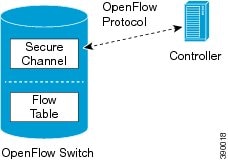
In an OpenFlow network, Cisco Plug-in for OpenFlow exists on the device and controllers exist on a server, that is external to the device. Flow management and any network management are either part of a controller or accomplished through a controller. Flow management includes the addition, modification, or removal of flows, and the handling of OpenFlow error messages.
The following figure gives an overview of the OpenFlow network.
Cisco Plug-in for OpenFlow Operation
Cisco Plug-in for OpenFlow creates OpenFlow–based TCP/IP connections to controllers for a Cisco Plug-in for OpenFlow logical switch. Cisco Plug-in for OpenFlow creates databases for a configured logical switch, OpenFlow-enabled interfaces, and flows. The logical switch database contains all the information needed to connect to a controller. The interface database contains the list of OpenFlow-enabled interfaces associated with a logical switch, and the flow database contains the list of flows on a logical switch as well as for interface that is programmed into forwarded traffic.
OpenFlow Controller Operation
OpenFlow controller (referred to as controller) controls the switch and inserts flows with a subset of OpenFlow 1.3 and 1.0 match and action criteria through Cisco Plug-in for OpenFlow logical switch. Cisco Plug-in for OpenFlow rejects all OpenFlow messages with any other action.
Cisco Plug-in for OpenFlow and Virtual Services Container
Cisco Plug-in for OpenFlow runs in an operating–system–level virtual service container on the device. The Cisco Plug-in for OpenFlow virtual service container is delivered in an open virtual application (OVA) file package (.ova). The OVA package is installed and enabled on the device through the CLI.
OFA Decommissioning
OFA must be un-configured before the virtual service is de-activated and uninstalled. If this is not done, part of the OpenFlow configuration on the interfaces will persist even after decommissioning OFA.
How to Configure Cisco Plug-in for OpenFlow
This section includes the following required and optional tasks. All tasks below require the fulfillment of the prerequisites listed in Prerequisites for Cisco Plug-in for OpenFlow:
- Configuring Physical Device Parameters
- Specifying a Route to a Controller
- Configuring Interfaces for a Cisco Plug-in for OpenFlow Logical Switch
- Installing and Activating Cisco Plug-in for OpenFlow
- Configuring a Cisco Plug-in for OpenFlow Logical Switch
- Verifying Cisco Plug-in for OpenFlow
Configuring Physical Device Parameters
- Enabling Hardware Support for Cisco Plug-in for OpenFlow
- Adjusting the Number of Flow Entries (Nexus 3000 Series and Nexus 3100 Series)
- Adjusting the Number of Flow Entries (Nexus 6000 Series)
- Configuring Global Variables for a Cisco Plug-in for OpenFlow Logical Switch
- Configuring Control Plane Policing for Packets Sent to a Controller
Enabling Hardware Support for Cisco Plug-in for OpenFlow
| Command or Action | Purpose | |
|---|---|---|
| Step 1 |
enable
Example: Device> enable |
Enables privileged EXEC mode. |
| Step 2 |
configure
terminal
Example: Device# configure terminal |
Enters global configuration mode. |
| Step 3 | Enter one of
the following commands depending on the device:
Example: Device(config)# hardware profile openflow Example: Device(config)# hardware profile forwarding-mode openflow-hybrid |
Allocates resources for Cisco Plug-in for OpenFlow. The hardware profile forwarding-mode openflow-hybrid command is only for the Cisco Nexus 3548 and 3548-X switches. |
| Step 4 | exit
Example: Device(config)# exit |
Exits global configuration mode and enters privileged EXEC mode. |
| Step 5 | copy running-config startup-config
Example: Device# copy running-config startup-config |
Saves the change persistently through reboots and restarts by copying the running configuration to the startup configuration. |
| Step 6 | reload
Example: Device# reload |
Reloads the operating system of a device so that virtual-services container support for the device hardware can start. |
Configure the number of flow entries.
Adjusting the Number of Flow Entries (Nexus 3000 Series and Nexus 3100 Series)
You can use this task to adjust the number of L3 flow entries. By default, 384 flow entries are supported. You can adjust the number of flow entries in a Nexus 3000 Series device to the maximum (1400), using the steps listed below. You can use similar steps to adjust the number of flow entries in a Nexus 3100 Series device to the maximum (3000).
| Command or Action | Purpose | |
|---|---|---|
| Step 1 |
enable
Example: Device> enable |
Enables privileged EXEC mode. |
| Step 2 |
configure
terminal
Example: Device# configure terminal |
Enters global configuration mode. |
| Step 3 |
hardware profile tcam
region vacl 0
Example: Device(config)# hardware profile tcam region vacl 0 |
Configures the size of TCAM region for VLAN Access Control Lists (ACLs). |
| Step 4 |
hardware profile tcam
region e-vacl 0
Example: Device(config)# hardware profile tcam region e-vacl 0 |
Configures the size of TCAM region for egress VLAN ACLs. |
| Step 5 |
hardware profile tcam
region racl 0
Example: Device(config)# hardware profile tcam region racl 0 |
Configures the size of TCAM region for router ACLs. |
| Step 6 |
hardware profile tcam
region e-racl 0
Example: Device(config)# hardware profile tcam region e-racl 0 |
Configures the size of TCAM region for egress router ACLs. |
| Step 7 |
hardware profile tcam
region qos 256
Example: Device(config)# hardware profile tcam region qos 256 |
Configures the size of TCAM region for egress router ACLs. |
| Step 8 | Enter one of the following commands:
Example: Device(config)# hardware profile tcam region ifacl 1408 Example: Device(config)# hardware profile tcam region ifacl 704 double-wide |
Configures the size of TCAM region for interface ACLs. To accommodate the additional match criteria of source and destination MAC addresses, the Cisco Nexus 3000 switch supports a new TCAM region, ifacl double-wide, which is a double-wide interface ACL. The ifacl and ifacl double-wide sizes for Cisco Nexus 3172 are 3072 and 1536, respectively. |
| Step 9 | exit
Example: Device(config)# exit |
Exits global configuration mode and enters privileged EXEC mode. |
| Step 10 | copy running-config
startup-config
Example: Device# copy running-config startup-config |
Saves the change persistently through reboots and restarts by copying the running configuration to the startup configuration. |
| Step 11 | reload
Example: Device# reload |
Reloads the operating system of a device so that virtual-services container support for the device hardware can start. |
Configure global variables for Cisco Plug-in for OpenFlow logical switch.
Adjusting the Number of Flow Entries (Nexus 6000 Series)
You can use this task to adjust the number of L3 flow entries. By default, 384 flow entries are supported. You can adjust the number of flow entries in a Nexus 6000 Series device to the maximum (1500), using the steps listed below.
| Command or Action | Purpose | |
|---|---|---|
| Step 1 |
enable
Example: Device> enable |
Enables privileged EXEC mode. |
| Step 2 |
configure terminal
Example: Device# configure terminal |
Enters global configuration mode. |
| Step 3 |
hardware profile tcam resource template vacl 0
Example: Device(config)# hardware profile tcam resource template vacl 0 |
Configures the size of TCAM region for VLAN Access Control Lists (ACLs). |
| Step 4 |
hardware profile tcam resource template ifacl 3520
Example: Device(config)# hardware profile tcam resource template ifacl 3520 |
Configures the size of TCAM region for interface ACLs. |
| Step 5 |
hardware profile tcam resource template e-vacl 0
Example: Device(config)# hardware profile tcam resource template e-vacl 0 |
Configures the size of TCAM region for egress VLAN ACLs. |
| Step 6 |
hardware profile tcam resource template rbacl 0
Example: Device(config)# hardware profile tcam resource template rbacl 0 |
Configures the size of TCAM region for role-based ACLs. |
| Step 7 |
hardware profile tcam resource template qos 128
Example: Device(config)# hardware profile tcam resource template qos 128 |
Configures the size of TCAM region for Quality of Service (QoS). |
| Step 8 |
hardware profile tcam resource template span 64
Example: Device(config)# hardware profile tcam resource template span 64 |
Configures the size of span regions. |
| Step 9 | exit
Example: Device(config)# exit |
Exits global configuration mode and enters privileged EXEC mode. |
| Step 10 | copy running-config startup-config
Example: Device# copy running-config startup-config |
Saves the change persistently through reboots and restarts by copying the running configuration to the startup configuration. |
| Step 11 | reload
Example: Device# reload |
Reloads the operating system of a device so that virtual-services container support for the device hardware can start. |
Configure global variables for Cisco Plug-in for OpenFlow logical switch.
Configuring Global Variables for a Cisco Plug-in for OpenFlow Logical Switch
Create a non default VDC for Cisco Plug-in for OpenFlow.
| Command or Action | Purpose | |
|---|---|---|
| Step 1 |
configure
terminal
Example: Device# configure terminal |
Enters global configuration mode. |
| Step 2 |
mac-learn
disable
Example: Device(config)# mac-learn disable |
Disables MAC address learning on all interfaces so that the device can only be used as an Cisco Plug-in for OpenFlow logical switch when an Cisco Plug-in for OpenFlow logical switch is enabled. |
| Step 3 | no cdp
enable
Example: Device(config)# no cdp enable |
Disables Cisco Discovery Protocol (CDP). |
| Step 4 |
vlan
{vlan-id | vlan-range}
Example: Device(config)# vlan 1-512 |
Adds a VLAN or VLAN range for interfaces on the device and enters the VLAN configuration mode. |
| Step 5 |
end
Example: Device(config-vlan)# exit |
Exits VLAN configuration mode and enters privileged EXEC mode. |
| Step 6 | copy running-config startup-config
Example: Device# copy running-config startup-config |
Saves the change persistently through reboots and restarts by copying the running configuration to the startup configuration. |
Specify a route to the controller.
Configuring Control Plane Policing for Packets Sent to a Controller
You can use this task to throttle the packet processing rate of Cisco Plug-in for OpenFlow as required for a traffic pattern. In general, a lower rate is helpful when there is a high rate of Link Layer Discovery Protocol (LLDP) and Address Resolution Protocol (ARP) traffic configured to be punted using Cisco Plug-in for OpenFlow flow rules.
| Command or Action | Purpose | |
|---|---|---|
| Step 1 |
enable
Example: Device> enable |
Enables privileged EXEC mode. |
| Step 2 |
setup
Example: Device# setup |
Enters the basic device setup to configure the device. |
| Step 3 |
configure
terminal
Example: Device# configure terminal |
Enters global configuration mode. |
| Step 4 |
policy-map
type control-plane
policy-map-name
Example: Device(config)# policy-map type control-plane copp-system-policy |
Specifies a control plane policy map and enters QoS policy–map configuration mode. |
| Step 5 |
class class-map-name
Example: Device(config-pmap)# class copp-s-dpss |
Specifies a control plane class map name and enters QoS policy–map class configuration mode. |
| Step 6 | Do one of
the following:
Example: Device(config-pmap-c)# police pps 1000 Example: Device(config-pmap-c)# police cir 1000 bc 3200000 |
Specifies the rate limit in terms of packets per second (PPS) for the number of packets processed by Cisco Plug-in for OpenFlow and sent to a controller. |
| Step 7 |
control-plane
Example: Device(config-pmap-c)# control-plane | (Optional)
Associates or modifies attributes (such as a service policy) that are associated with the control plane of the device and enters control plane configuration mode. |
| Step 8 |
end
Example: Device(config-pmap-c)# end Example: Device(config-pmap-c)# end |
Enters privileged EXEC mode. |
On a Cisco Nexus 3000 Series switch, the following configuration is used for no punt-to-controller packet drop@1000 pps:
Device(config)# policy-map type control-plane copp-system-policy
Device(config-pmap)# class copp-s-selfIp
Device(config-pmap-c)# police pps 5000
Specify a route to a controller.
Specifying a Route to a Controller
The following tasks are used to specify a route from the device to a controller. This can be done using a physical interface (Front Panel) or a management interface.
- Physical Interface . Refer to Specifying a Route to a Controller Using a Physical Interface.
- Management Interface. Refer to Specifying a Route to a Controller Using a Management Interface.
The IP address of the controller is configured in the Configuring a Cisco Plug-in for OpenFlow Logical Switch section.
- Specifying a Route to a Controller Using a Physical Interface
- Specifying a Route to a Controller Using a Management Interface
Specifying a Route to a Controller Using a Physical Interface
| Command or Action | Purpose | |
|---|---|---|
| Step 1 |
configure
terminal
Example: Device# configure terminal |
Enters global configuration mode. |
| Step 2 | interface
type
number
Example: Device(config)# interface Ethernet2/2 |
Configures the physical interface. The interface used here should not be a Cisco Plug-in for OpenFlow ports. |
| Step 3 | no switchport
Example: Device(config-if)# no switchport |
Configures a specified interface as a Layer 3 interface and deletes any interface configuration specific to Layer 2. |
| Step 4 | ip address
ip-address
mask
Example: Device(config-if)# ip address 10.0.1.4 255.255.255.0 |
Configures an IP address for a specified interface. |
| Step 5 | exit
Example: Device(config-if)# exit |
Exits interface configuration mode and enters global configuration mode. |
| Step 6 | ip route 0.0.0.0 0.0.0.0
next-hop
Example: Device(config)# ip route 0.0.0.0 0.0.0.0 10.0.1.6 |
Configures a default route for packet addresses not listed in the routing table. Packets are directed toward a controller. |
| Step 7 |
exit
Example: Device(config)# exit |
Exits global configuration mode and enters privileged EXEC mode. |
| Step 8 | copy running-config startup-config
Example: Device# copy running-config startup-config |
Saves the changes persistently by copying the running configuration to the startup configuration. |
Configure interfaces for the Cisco Plug-in for OpenFlow logical switch.
Specifying a Route to a Controller Using a Management Interface
| Command or Action | Purpose | |
|---|---|---|
| Step 1 |
configure
terminal
Example: Device# configure terminal |
Enters global configuration mode. |
| Step 2 | interface mgmt
management-interface-name
number
Example: Device(config)# interface mgmt0 |
Enters the management interface. |
| Step 3 | ip address
ip-address
mask
Example: Device(config-if)# ip address 10.0.1.4 255.255.255.0 |
Configures an IP address for the interface. |
| Step 4 | exit
Example: Device(config-if)# exit |
Exits interface configuration mode and enters global configuration mode. |
| Step 5 | vrf
context
management
Example: Device(config)# vrf context management |
Configures the management Virtual routing and forwarding (VRF) instance and enters in VRF configuration mode. |
| Step 6 | ip route 0.0.0.0
0.0.0.0
next-hop
Example: Device(config-vrf)# ip route 0.0.0.0 0.0.0.0 10.0.1.6 |
Configures a default route for packet addresses not listed in the routing table. Packets are directed toward a controller. |
| Step 7 |
exit
Example: Device(config)# exit |
Exits global configuration mode and enters privileged EXEC mode. |
| Step 8 | copy running-config startup-config
Example: Device# copy running-config startup-config |
Saves the change persistently by copying the running configuration to the startup configuration. |
Configure interfaces for the Cisco Plug-in for OpenFlow logical switch.
Configuring Interfaces for a Cisco Plug-in for OpenFlow Logical Switch
You must configure physical or port-channel interfaces before the interfaces are added as ports of a Cisco Plug-in for OpenFlow logical switch. These interfaces are added as ports of the Cisco Plug-in for OpenFlow logical switch in the Configuring a Cisco Plug-in for OpenFlow Logical Switch section.
Configuring a Physical Interface in Layer 2 mode
Perform the following task to add a physical interface to a Cisco Plug-in for OpenFlow logical switch in Layer 2 mode.
| Command or Action | Purpose | |
|---|---|---|
| Step 1 |
configure
terminal
Example: Device# configure terminal |
Enters global configuration mode. |
| Step 2 |
interface
Ethernetslot
port
Example: Device(config)# interface Ethernet2/2 |
Specifies the interface for the logical switch and enters interface configuration mode. |
| Step 3 |
channel-group
group-number
Example: Device(config-if)# channel-group 2 | (Optional)
Adds the interface to a port-channel. |
| Step 4 |
switchport
Example: Device(config-if)# switchport |
Specifies an interface as a Layer 2 port. |
| Step 5 |
switchport mode
trunk
Example: Device(config-if)# switchport mode trunk |
Specifies an interface as a trunk port. |
| Step 6 |
mac packet-classify
Example: Device(config-if)# mac packet-classify |
Enables MAC packet classification on the interface. |
| Step 7 |
switchport mode trunk
allowed vlan
[vlan-list]
Example: Device(config-if)# switchport trunk allowed vlan 1-3 |
Sets the list of allowed VLANs that transmit traffic from this interface in tagged format when in trunking mode. |
| Step 8 |
no shutdown
Example: Device(config-if)# no shutdown |
Enables the interface. |
| Step 9 |
end
Example: Device(config-if)# end |
Exits interface configuration mode and enters privileged EXEC mode. |
| Step 10 | copy running-config startup-config
Example: Device# copy running-config startup-config |
Saves the change persistently by copying the running configuration to the startup configuration. |
Repeat these steps to configure any additional interfaces for a Cisco Plug-in for OpenFlow logical switch. Once all the interfaces are configured, install and activate Cisco Plug-in for OpenFlow.
Configuring a Port-Channel Interface
Perform the task below to create a port-channel interface for a Cisco Plug-in for OpenFlow logical switch.
| Command or Action | Purpose | |||
|---|---|---|---|---|
| Step 1 |
enable
Example: Device> enable |
Enables privileged EXEC mode. | ||
| Step 2 |
configure
terminal
Example: Device# configure terminal |
Enters global configuration mode. | ||
| Step 3 |
interface
port-channel
number
Example: Device(config)# interface port-channel 2 |
Specifies the interface for the logical switch and enters interface configuration mode. | ||
| Step 4 |
switchport mode
trunk
Example: Device(config-if)# switchport mode trunk |
Specifies the interface as an Ethernet trunk port. A trunk port can carry traffic in one or more VLANs on the same physical link (VLANs are based on the trunk-allowed VLANs list). By default, a trunk interface can carry traffic for all VLANs.
| ||
| Step 5 |
switchport mode trunk allowed vlan
[vlan-list]
Example: Device(config-if)# switchport trunk allowed vlan 1-3 |
Sets the list of allowed VLANs that transmit traffic from this interface in tagged format when in trunking mode. | ||
| Step 6 |
end
Example: Device(config-if)# end |
Ends interface configuration mode and enters privileged EXEC mode. | ||
| Step 7 | copy running-config startup-config
Example: Device# copy running-config startup-config |
Saves the change persistently through reboots and restarts by copying the running configuration to the startup configuration. |
Install and activate Cisco Plug-in for OpenFlow.
Installing and Activating Cisco Plug-in for OpenFlow
Cisco Plug-in for OpenFlow is an application that runs at the operating–system-level virtual services container on a device. Cisco Plug-in for OpenFlow is delivered in an open virtual application (OVA) package. The OVA package is installed and activated on the device through the CLI.
Before installing and activating Cisco Plug-in for OpenFlow, ensure that an OVA package compatible with the device exists on a connected FTP server. Refer to the Prerequisites for a Virtual Services Container. A reload of the device is not essential after installing, uninstalling, or upgrading Cisco Plug-in for OpenFlow software.
To install and activate Cisco Plug-in for OpenFlow software, refer to the instructions in Installing and Activating an Application in a Virtual Services Container, where the virtual services application argument, virtual-services-name, can be specified as openflow_plugin.
To uninstall and deactivate Cisco Plug-in for OpenFlow software, refer to the instructions in Deactivating and Uninstalling an Application from a Virtual Services Container, where the virtual services application argument, virtual-services-name, must be the same as that specified during installation.
To upgrade Cisco Plug-in for OpenFlow software, refer to the instructions in Upgrading an Application in a Virtual Services Container, where the virtual services application argument, virtual-services-name, must be the same as that specified during installation.
Once installed, configure a Cisco Plug-in for OpenFlow logical switch.
Configuring a Cisco Plug-in for OpenFlow Logical Switch
This task configures a Cisco Plug-in for OpenFlow logical switch and the IP address of a controller.
| Command or Action | Purpose | |||
|---|---|---|---|---|
| Step 1 |
configure terminal
Example: Device# configure terminal |
Enters global configuration mode. | ||
| Step 2 | openflow
Example: Device(config)# openflow |
Enters Cisco Plug-in for OpenFlow mode. | ||
| Step 3 | switch
logical-switch-id
Example: Device(config-ofa)# switch 1 |
Specifies an ID for a logical switch that is used for Layer 2 (default) switching operations and enters logical switch configuration mode. | ||
| Step 4 |
pipeline
pipeline-id
Example: Device(config-ofa-switch)# pipeline 201 |
Configures a pipeline . | ||
| Step 5 | Do one of
the following:
Example: Device(config-ofa-switch)# of-port interface ethernet1/1 Device(config-ofa-switch)# of-port interface port-channel2 |
| ||
| Step 6 |
protocol-version
version-info
Example: Device(config-openflow-switch)# protocol-version 1.0
|
Configures the protocol version.
| ||
| Step 7 | controller ipv4
ip-address [port
tcp-port]
[
vrf
vrf-name]
security{none |
tls}
Example: Device(config-openflow-switch)# controller ipv4 10.1.1.2 security none
|
A connection to a controller is initiated for the logical switch. | ||
| Step 8 | default-miss
cascade {
drop |
controller |
normal | }
Example: Device(config-ofa-switch)# default-miss cascade controller |
Configures the action to be taken for packets that do not match any of the flow defined. | ||
| Step 9 |
tls trust-point
local
local-trust-point
remote
remote-trust-point
Example: Device(config-ofa-switch)# tls trust-point local mylocal remote myremote | (Optional)
Specifies the local and remote TLS trustpoints to be used for the controller connection.
| ||
| Step 10 | logging
flow-mod
Example: Device(config-ofa-switch)# logging flow-mod | (Optional)
Enables logging of flow changes, including addition, deletion, and modification of flows. | ||
| Step 11 |
probe-interval
probe-interval
Example: Device(config-openflow-switch)# probe-interval 5
| (Optional)
Configures the interval, in seconds, at which the controller is probed. | ||
| Step 12 |
rate-limit
packet_in
controller-packet-rate
burst
maximum-packets-to-controller
Example: Device(config-openflow-switch)# rate-limit packet_in 1 burst 4
| (Optional)
Configures the maximum packet rate of the connection to the controller and the maximum packets permitted in a burst of packets sent to the controller in a second. | ||
| Step 13 |
max-backoff
backoff-timer
Example: Device(config-openflow-switch)# max-backoff 8
| (Optional)
Configures the time, in seconds, for which the device must wait before attempting to initiate a connection with the controller. | ||
| Step 14 |
end
Example: Device(config-openflow-switch)# end
|
Exits logical switch configuration mode and enters privileged EXEC mode. | ||
| Step 15 | copy running-config
startup-config
Example: Device# copy running-config startup-config |
Saves the change persistently by copying the running configuration to the startup configuration. |
Verify Cisco Plug-in for OpenFlow.
Verifying Cisco Plug-in for OpenFlow
| Step 1 |
show openflow
copyright
Displays copyright information related to Cisco Plug-in for OpenFlow. Example: Device# show openflow copyright Cisco Plug-in for OpenFlow TAC support: http://www.cisco.com/tac Copyright (c) 2013-2015 by Cisco Systems, Inc. All rights reserved. The copyrights to certain works contained in this software are owned by other third parties and used and distributed under license. Certain components of this software are licensed under the GNU General Public License (GPL) version 2.0, the GNU Lesser General Public License (LGPL) Version 2.1, or or the GNU Library General Public License (LGPL) Version 2. A copy of each such license is available at http://www.opensource.org/licenses/gpl-2.0.php and http://www.opensource.org/licenses/lgpl-2.1.php and http://www.gnu.org/licenses/old-licenses/lgpl-2.0.txt |
| Step 2 |
show openflow
switch
switch-id
Displays information related to Cisco Plug-in for OpenFlow logical switch. Example: Device# show openflow switch 1
Logical Switch Context
Id: 1
Switch type: Forwarding
Pipeline id: 201
Signal version: Openflow 1.0
Data plane: secure
Table-Miss default: NONE
Config state: no-shutdown
Working state: enabled
Rate limit (packet per second): 0
Burst limit: 0
Max backoff (sec): 8
Probe interval (sec): 5
TLS local trustpoint name: not configured
TLS remote trustpoint name: not configured
Stats coll. period (sec): 5
Logging flow changes: Disabled
OFA Description:
Manufacturer: Cisco Systems, Inc.
Hardware: N3K-C3064PQ V01
Software: 6.0(2)U2(1) of_agent 1.1.0_fc1
Serial Num: SSI15200QD8
DP Description: n3k-200-141-3:sw1
OF Features:
DPID:0001547fee00c2a0
Number of tables:1
Number of buffers:256
Capabilities: FLOW_STATS TABLE_STATS PORT_STATS
Actions: OUTPUT SET_VLAN_VID STRIP_VLAN SET_DL_SRC SET_DL_DST
Controllers:
1.1.1.1:6653, Protocol: TLS, VRF: s
Interfaces:
Ethernet1/1
Ethernet1/7
|
| Step 3 |
show openflow
switch
switch-id
controllers
[stats]
Displays information related to the connection status between an Cisco Plug-in for OpenFlow logical switch and connected controllers. Example:
Device# show openflow switch 1 controllers

Logical Switch Id: 1
Total Controllers: 3
  Controller: 1
    10.1.1.2:6653
    Protocol: tcp
    VRF: default
    Connected: No
    Role: Master
    Negotiated Protocol Version: disconnected
    Last Alive Ping: N/A
    last_error:No route to host
    state:BACKOFF

  Controller: 2
    5.30.26.111:6800
    Protocol: tcp
    VRF: management
    Connected: No
    Role: Master
    Negotiated Protocol Version: disconnected
    Last Alive Ping: N/A
    last_error:Connection timed out
    state:CONNECTING
    sec_since_disconnect:14

  Controller: 3
    10.1.1.2:6653
    Protocol: tcp
    VRF: management
    Connected: No
    Role: Master
    Negotiated Protocol Version: disconnected
    Last Alive Ping: N/A
    last_error:Connection timed out
    state:CONNECTING
    sec_since_disconnect:13
The above sample output is displayed when controller is not yet connected. Device# show openflow switch 1 controllers stats
Logical Switch Id: 1
Total Controllers: 3
Controller: 1
address : tcp:10.1.1.2:6653
connection attempts : 3009
successful connection attempts : 0
flow adds : 0
flow mods : 0
flow deletes : 0
flow removals : 0
flow errors : 0
flow unencodable errors : 0
total errors : 0
echo requests : rx: 0, tx: 0
echo reply : rx: 0, tx: 0
flow stats : rx: 0, tx: 0
barrier : rx: 0, tx: 0
packet-in/packet-out : rx: 0, tx: 0
Controller: 2
address : tcp:5.30.26.111:6800%management
connection attempts : 1506
successful connection attempts : 0
flow adds : 0
flow mods : 0
flow deletes : 0
flow removals : 0
flow errors : 0
flow unencodable errors : 0
total errors : 0
echo requests : rx: 0, tx: 0
echo reply : rx: 0, tx: 0
flow stats : rx: 0, tx: 0
barrier : rx: 0, tx: 0
packet-in/packet-out : rx: 0, tx: 0
Controller: 3
address : tcp:10.1.1.2:6653%management
connection attempts : 1506
successful connection attempts : 0
flow adds : 0
flow mods : 0
flow deletes : 0
flow removals : 0
flow errors : 0
flow unencodable errors : 0
total errors : 0
echo requests : rx: 0, tx: 0
echo reply : rx: 0, tx: 0
flow stats : rx: 0, tx: 0
barrier : rx: 0, tx: 0
packet-in/packet-out : rx: 0, tx: 0
|
| Step 4 |
show openflow
switch
switch-id
ports
[hidden]
Displays the mapping between physical device interfaces and ports of an Cisco Plug-in for OpenFlow logical switch. Example: Device# show openflow switch 1 ports Logical Switch Id: 1 Port Interface Name Config-State Link-State Features 2 Ethernet1/2 PORT_UP LINK_UP 10MB-FD 3 Ethernet1/3 PORT_UP LINK_DOWN 100MB-HD AUTO_NEG 4 Ethernet1/4 PORT_UP LINK_UP 10MB-FD |
| Step 5 |
show openflow
switch
switch-id
flows [table-id
table-id][configured | controller | default | fixed | pending |
pending-del] [
brief |
summary]
Displays flows defined for the device by controllers. Example: Device# show openflow switch 1 flows Total flows: 2 Flow: 1 Rule: ip,dl_vlan=99 Actions: strip_svlan,output:1 Priority: 0x8000 Table: 0 Cookie: 0x466c6f7732 Duration: 96.359s Number of packets: 0 Number of bytes: 0 Flow: 2 Rule: ip,in_port=2,dl_vlan=50 Actions: output:1 Priority: 0x8000 Table: 0 Cookie: 0x1 Duration: 95.504s Number of packets: 0 Number of bytes: 0 Device# show openflow switch 1 flows configured Logical Switch Id: 1 Total flows: 1 Flow: 1 Match: Actions: drop Priority: 0 Table: 0 Cookie: 0x0 Duration: 1937.586s Number of packets: 0 Number of bytes: 0 Device# show openflow switch 1 flows fixed Logical Switch Id: 1 Total flows: 0 |
| Step 6 |
show openflow
switch
switch-id
stats
Displays send and receive statistics for each port defined for a Cisco Plug-in for OpenFlow logical switch. Example: Device# show openflow switch 1 stats
Logical Switch Id: 1
Total ports: 1
Port 31: rx pkts=36688, bytes=7204655, drop=0, errs=0,
tx pkts=0, bytes=3473880, drop=0, errs=0,
Total tables: 1
Table 0: classifier
Wildcards = 0x3fffff
Max entries = 1500
Active entries = 0
Number of lookups = 0
Number of matches = 0
Flow statistics are available for pipeline 201 and table 0. For pipeline 202, flow statistics are not available for table 1. |
| Step 7 |
show interfaces
type
number
counters
Displays send and receive statistics for the specified port defined for an Cisco Plug-in for OpenFlow logical switch. Example: |
| Step 8 |
show logging last
number-of-lines
Displays logging information of flow changes, including addition, deletion or modification of flows. Example: Device# show logging last 14 2013 Mar 15 19:13:05 n3k-202-194-4 %VMAN-2-ACTIVATION_STATE: Successfully activa ted virtual service 'n3k' 2013 Mar 15 19:13:23 n3k-202-194-4 %VMAN-5-VIRT_INST: VIRTUAL SERVICE n3k LOG: E rror: Didn't get initial config when booting up 2013 Mar 15 19:13:50 n3k-202-194-4 %VMAN-5-VIRT_INST: VIRTUAL SERVICE n3k LOG: O VS: Flows flushed for sw1, type:cisco-l2 2013 Mar 15 19:13:54 n3k-202-194-4 %VSHD-5-VSHD_SYSLOG_CONFIG_I: Configured from vty by admin on console0 2013 Mar 15 19:14:09 n3k-202-194-4 %VMAN-5-VIRT_INST: VIRTUAL SERVICE n3k LOG: O VS: Flow created: Rule: ip,dl_vlan=3 Actions: output:2,output:7 2013 Mar 15 19:14:09 n3k-202-194-4 %VMAN-5-VIRT_INST: VIRTUAL SERVICE n3k LOG: O VS: Flow created: Rule: ip,dl_vlan=4 Actions: output:2,output:7 2013 Mar 15 19:14:09 n3k-202-194-4 %VMAN-5-VIRT_INST: VIRTUAL SERVICE n3k LOG: O VS: Flow created: Rule: ip,dl_vlan=5 Actions: output:2,output:7 2013 Mar 15 19:14:09 n3k-202-194-4 %VMAN-5-VIRT_INST: VIRTUAL SERVICE n3k LOG: O VS: Flow created: Rule: ip,dl_vlan=6 Actions: output:2,output:7 2013 Mar 15 19:14:09 n3k-202-194-4 %VMAN-5-VIRT_INST: VIRTUAL SERVICE n3k LOG: O VS: Flow created: Rule: ip,dl_vlan=7 Actions: output:2,output:7 2013 Mar 15 19:14:09 n3k-202-194-4 %VMAN-5-VIRT_INST: VIRTUAL SERVICE n3k LOG: O VS: Flow created: Rule: ip,dl_vlan=8 Actions: output:2,output:7 2013 Mar 15 19:14:09 n3k-202-194-4 %VMAN-5-VIRT_INST: VIRTUAL SERVICE n3k LOG: O VS: Flow created: Rule: ip,dl_vlan=9 Actions: output:2,output:7 2013 Mar 15 19:14:09 n3k-202-194-4 %VMAN-5-VIRT_INST: VIRTUAL SERVICE n3k LOG: O VS: Flow created: Rule: ip,dl_vlan=10 Actions: output:2,output:7 2013 Mar 15 19:14:09 n3k-202-194-4 %VMAN-5-VIRT_INST: VIRTUAL SERVICE n3k LOG: O VS: Flow created: Rule: ip,dl_vlan=11 Actions: output:2,output:7 2013 Mar 15 19:14:09 n3k-202-194-4 %VMAN-5-VIRT_INST: VIRTUAL SERVICE n3k LOG: O VS: Flow created: Rule: ip,dl_vlan=12 Actions: output:2,output:7 |
| Step 9 |
show running-config |
section openflow
Displays configurations made for Cisco Plug-in for OpenFlow. Example: Device# show running-config | section "openflow"
openflow
switch 1
pipeline 201
controller ipv4 10.86.201.162 port 8050 vrf management security none
of-port interface ethernet1/1
of-port interface ethernet1/2
of-port interface ethernet1/3
of-port interface ethernet1/37
of-port interface ethernet1/4
|
| Step 10 |
show openflow hardware
capabilities
Displays Cisco Plug-in for OpenFlow configurations. Example: Device# show openflow hardware capabilities
Pipeline ID: 201
Flow table ID: 0
Match Capabilities Match Types
------------------ -----------
ethernet type mandatory
VLAN ID optional
VLAN priority code point optional
IP DSCP optional
IP protocol optional
IPv4 source address lengthmask
IPv4 destination address lengthmask
source port optional
destination port optional
in port (virtual or physical) optional
Actions:
output to: specified interface, use normal forwading, controller
set: set eth source mac, set eth destination mac, set vlan id
pop: pop vlan tag
other actions: drop packet
Pipeline ID: 202
Flow table ID: 0
Match Capabilities Match Types
------------------ -----------
ethernet type mandatory
VLAN ID optional
VLAN priority code point optional
IP DSCP optional
IP protocol optional
IPv4 source address lengthmask
IPv4 destination address lengthmask
source port optional
destination port optional
in port (virtual or physical) optional
Actions:
output to: specified interface, use normal forwading, controller
set: set eth source mac, set eth destination mac, set vlan id
pop: pop vlan tag
other actions: drop packet
Flow table ID: 1
Match Capabilities Match Types
------------------ -----------
ethernet mac destination mandatory
VLAN ID mandatory
Actions:
output to: specified interface
other actions: drop packet
|
Configuration Examples for Cisco Plug-in for OpenFlow
Example: Enabling Hardware Support for Cisco Plug-in for OpenFlow
Device> enable
Device# configure terminal
! Enables support for OpenFlow VLAN tagging actions.
Device(config)# hardware profile openflow
Device# copy running-config startup-config
Device# reload
Example: Adjusting the Number of Flow Entries
Device> enable
Device# configure terminal
Device(config)# hardware profile tcam region vacl 0
Device(config)# hardware profile tcam region e-racl 0
Device(config)# hardware profile tcam region e-vacl 0
Device(config)# hardware profile tcam region racl 256
Device(config)# hardware profile tcam region ifacl 1664
Device(config)# exit
Device# copy running-config startup-config
Device# reload
Example: Configuring Global Variables for a Cisco Plug-in for OpenFlow Logical Switch
Device> enable

Device# configure terminal
Device(config)# mac-learn disable
Device(config)# spanning-tree mode mst
Device(config)# vlan 2
Device(config-vlan)# end
Example: Configuring Control Plane Policing for Packets Sent to a Controller
Device> enable

Device# configure terminal
Device# setup


         ---- Basic System Configuration Dialog ----

This setup utility will guide you through the basic configuration of
the system. Setup configures only enough connectivity for management
of the system.

*Note: setup is mainly used for configuring the system initially,
when no configuration is present. So setup always assumes system
defaults and not the current system configuration values.

Press Enter at anytime to skip a dialog. Use ctrl-c at anytime
to skip the remaining dialogs.

Would you like to enter the basic configuration dialog (yes/no): yes


  Create another login account (yes/no) [n]:

  Configure read-only SNMP community string (yes/no) [n]:

  Configure read-write SNMP community string (yes/no) [n]:

  Enter the switch name : QI32

  Continue with Out-of-band (mgmt0) management configuration? (yes/no) [y]: n

  Configure the default gateway? (yes/no) [y]: n

  Enable the telnet service? (yes/no) [n]: y

  Enable the ssh service? (yes/no) [y]: n

  Configure the ntp server? (yes/no) [n]:

  Configure default interface layer (L3/L2) [L2]:

  Configure default switchport interface state (shut/noshut) [noshut]:
  Configure CoPP System Policy Profile ( default / l2 / l3 ) [default]:

The following configuration will be applied:
  switchname QI32
  telnet server enable
  no ssh server enable
  system default switchport
  no system default switchport shutdown
  policy-map type control-plane copp-system-policy ( default )

Would you like to edit the configuration? (yes/no) [n]:

Use this configuration and save it? (yes/no) [y]:

[########################################] 100%
Copy complete, now saving to disk (please wait)...

Device# configure terminal
Device(config)# policy-map type control-plane copp-system-policy
Device(config-pmap)# class copp-s-dpss
Device(config-pmap-c)# police pps 1000
Device(config-pmap-c)# end
Device# show run copp
Example: Specifying a Route to a Controller Using a Physical Interface
Device> enable
Device# switchto vdc openflow
Device# configure terminal
Device(config)# interface GigabitEthernet1/1
Device(config-if)# no switchport
Device(config-if)# ip address 10.0.1.4 255.255.255.255
Device(config-if)# exit
Device(config)# ip route 0.0.0.0 0.0.0.0 10.0.1.6
Device# copy running-config startup-config
Device(config)# exit
Example: Specifying a Route to a Controller Using a Management Interface
Device> enable

Device# configure terminal
Device(config)# interface mgmt0
Device(config-if)# no switchport
Device(config-if)# ip address 10.0.1.4 255.255.255.255
Device(config-if)# exit
Device(config)# vrf context management
Device(config)# ip route 0.0.0.0 0.0.0.0 10.0.1.6
Device(config)# exit
Device# copy running-config startup-config
Example: Installing and Activating Cisco Plug-in for OpenFlow
Refer to Installing and Activating an Application in a Virtual Services Container for an example of installing and activating Cisco Plug-in for OpenFlow in a virtual services container of a device.
Example: Configuring an Interface for a Cisco Plug-in for OpenFlow Logical Switch in L2 mode
Device> enable

Device# configure terminal

Device(config)# interface ethernet1/1
Device(config-if)# switchport mode trunk
Device(config-if)# no shutdown
Device(config-if)# exit

Device(config)# interface ethernet1/2
! Adding the interface to a port channel.
Device(config-if)# channel-group 2
Device(config-if)# switchport mode trunk
Device(config-if)# no shutdown
Device(config-if)# end
Device# copy running-config startup-config
Example: Configuring a Port-Channel Interface
Device> enable
Device# configure terminal
Device(config)# interface port-channel 2
Device(config-if)# switchport mode trunk
Device(config-if)# mac packet-classify
Device(config-if)# end
Device# copy running-config startup-config
Example: Cisco Plug-in for OpenFlow Logical Switch Configuration (Default VRF)
Device> enable

Device# configure terminal


Device(config)# openflow
Device(config-ofa)# switch 1
! Specifies the pipeline that enables the IP Forwarding Table.
Device(config-ofa-switch)# pipeline 201


Device(config-ofa-switch)# logging flow-mod
Device(config-ofa-switch)# tls trust-point local local-trustpoint-name remote remote-trustpoint-name
Device(config-ofa-switch)# max-backoff 5
Device(config-ofa-switch)# probe-interval 5
Device(config-ofa-switch)# rate-limit packet-in 30 burst 50
Device(config-ofa-switch)# controller ipv4 10.0.1.6 security none

! Adding an interface to the Cisco Plug-in for OpenFlow logical switch.

Device(config-ofa-switch)# of-port interface ethernet1/1
Device(config-ofa-switch)# of-port interface ethernet1/2

! Adding a port channel to the Cisco Plug-in for OpenFlow switch.
Device(config-ofa-switch)# of-port interface port-channel 2
Device(config-ofa-switch)# end
Device# copy running-config startup-config
Example: Configuring a Cisco Plug-in for OpenFlow Logical Switch (Management VRF)
Device> enable

Device# configure terminal

Device(config)# openflow
Device(config-ofa)# switch 1
Device(config-ofa-switch)# pipeline 201
Device(config-ofa-switch)# pipeline 1
! Specifying a controller that is part of a VRF.


! Adding an interface to the Cisco Plug-in for OpenFlow logical switch.


! Adding a port channel to the Cisco Plug-in for OpenFlow switch.
Device(config-ofa-switch)# of-port interface port-channel 2
Device(config-ofa-switch)# end
Device# copy running-config startup-config
Additional Information for Cisco Plug-in for OpenFlow
Related Documents
|
Related Topic |
Document Title |
|---|---|
|
Cisco commands |
Cisco Nexus 3000 Series Switches Command References |
Standards and RFCs
|
Standard/RFC |
Title |
|---|---|
|
OpenFlow 1.3 |
OpenFlow Switch Specification Version 1.3.0 (Wire Protocol 0x04). |
|
OpenFlow 1.0 |
OpenFlow Switch Specification Version 1.0.1 (Wire Protocol 0x01). |
Technical Assistance
|
Description |
Link |
|---|---|
|
The Cisco Support and Documentation website provides online resources to download documentation and tools. Use these resources to troubleshoot and resolve technical issues with Cisco products and technologies. Access to most tools on the Cisco Support and Documentation website requires a Cisco.com user ID and password. |
Feature Information for Cisco Plug-in for OpenFlow
The following table provides release information about the feature or features described in this module. This table lists only the software release that introduced support for a given feature in a given software release train. Unless noted otherwise, subsequent releases of that software release train also support that feature.
Use Cisco Feature Navigator to find information about platform support and Cisco software image support. To access Cisco Feature Navigator, go to www.cisco.com/go/cfn. An account on Cisco.com is not required.|
Releases |
Supported Platforms |
Feature Information |
|---|---|---|
|
Cisco Plug-in for OpenFlow Release 1.1.5 |
The supported platforms are Nexus 3000 Series Devices. The Nexus 3548-X device is supported in NX-OS software release 6.0(2)A6(2) and higher. |
Cisco Plug-in for OpenFlow supports OFA decommissioning. |
|
Cisco Plug-in for OpenFlow Release 1.1.1 |
The supported platforms are: |
Cisco Plug-in for OpenFlow now supports Nexus 5000 and 6000 Series. |
|
Cisco Plug-in for OpenFlow Release 1.1 |
The supported platforms are Nexus 3000 Series Devices. |
The following commands have been introduced: clear openflow, max-backoff, probe-interval, rate-limit, tls trust-point. The controller command has been modified to include the no-tls keyword. |
|
Cisco Plug-in for OpenFlow Release 1.0.1 |
The supported platforms are Nexus 3000 Series Devices. |
The following flow actions are supported: |
|
Cisco Plug-in for OpenFlow Release 1.0 |
The supported platforms are Nexus 3000 Series Devices. |
Cisco Plug-in for OpenFlow supports OpenFlow 1.0, and helps networks become more open, programmable, and application-aware. |
 Feedback