

-
Cisco Content Services Gateway Installation and Configuration Guide, Release 3.1(3)C5(5) --Last Updated January 26, 2007
-
About this Book
-
Overview
-
Installing the Hardware
-
Configuring the Content Services Gateway
-
Configuring Secure (Router) Mode, Redundancy, Fault Tolerance, and HSRP
-
Configuring RADIUS Support: Learning Who the Subscriber Is
-
Configuring Prepaid Support
-
PSD Configuration for the CSG
-
Command Reference
-
Protocol Compliance Statements for the CSG 3.1(3)C5(5)
-
Translated Safety Warnings
-


Table Of Contents
Configuring the Content Services Gateway
Preparing to Configure the CSG
Upgrading to a New CSG Release
Upgrading from the Supervisor Engine Bootflash
Upgrading from a Flash PC Card
Upgrading from an External TFTP Server
Upgrading to the CSG 3.1(3)C5(5)
Saving and Restoring Configurations
Configuring Accounting Policies
Activating the Accounting Policy on the CSG
Defining Client/Server Connectivity
Downloading an Accounting Service
Configuring Policies and Traffic Types
Configuring a Content Billing Service
Configuring Fixed or Variable Format CDR Support
Configuring a Refund Policy on the CSG
Configuring RADIUS Accounting Attribute Reporting
Configuring HTTP Header Reporting
Configuring Maps for Pattern-Matching
Configuring a Symbolic Weight Name
Configuring Advice of Charge, Filtering, and Other Per-Event Authorizations
Configuring Quota Server Load-Sharing
Configuring Service-Level CDR Summarization
Configuring Quota Server Reauthorization
Protocol-Specific Configuration Details
Multimedia Messaging Service (MMS)
Configuring the CSG to Monitor and Generate WAP Reports
Configuring Connection-Oriented and Connectionless WAP
Configuring the CSG SMTP and POP3 Data Mining
Configuring Connection Duration Billing
Enabling Passthrough Mode for a Service
Configuring the Idle Content Timer for UDP and WAP 1.x
Configuring Layer 2-Adjacent Devices
Simple Postpaid Billing Configuration Example
Basic WAP Configuration Example
Redirect to Top-Off Server Configuration Example
Free MMS Transactions Configuration Example
Differentiating MMS Over WAP 2 Example
Pricing by Quota Server Configuration Example
Differentiating Prices Configuration Example
Reducing the Number of Services Configuration Example
Configuring the Content Services Gateway
This chapter describes how to configure the CSG and contains these sections:
•
Preparing to Configure the CSG
•
•
•
Preparing to Configure the CSG
Before you configure the CSG, take the following actions:
•
•
The following example shows how to configure VLANs:
Router> enableRouter# vlan databaseRouter(vlan)# vlan 130VLAN 130 added:Name: VLAN130Router(vlan)# vlan 150VLAN 150 added:Name: VLAN150Router(vlan)# exit•
The following example shows how to configure a physical interface as a Layer 2 interface and assign it to a VLAN:
Router> enableRouter# configRouter(config)# interface 3/1Router(config-if)# switchportRouter(config-if)# switchport access vlan 150Router(config-if)# no shutdownRouter(vlan)# exit•
Caution
The following example shows how to configure the Layer 3 VLAN interface:
Router> enableRouter# configRouter(config)# interface vlan 130Router(config-if)# ip address 10.10.1.10 255.255.255.0Router(config-if)# no shutdownRouter(vlan)# exitUsing the CLI
The software interface for the CSG is the Cisco IOS command-line interface (CLI). For more information about using the CLI and Cisco IOS command modes, see Chapter 2 in the Catalyst 6000 Series IOS Software Configuration Guide, and Chapter 2 in the Cisco 7600 Series Cisco IOS Software Configuration Guide.
Accessing Online Help
In any command mode, you can get a list of available commands by entering a question mark (?) as follows:
Router> ?or
Router(config)# ip csg ?Online help shows the default configuration values and ranges available to commands.
Upgrading to a New CSG Release
This section describes three methods for upgrading the CSG:
•
•
•
•
During the upgrade, enter all commands on a console connected to the supervisor engine. Enter each configuration command on a separate line.
Note
The CSG can run in hybrid mode, with CatOS on the Supervisor Engine and Cisco IOS on the MSFC. In the CSG/Hybrid, you can only upgrade the CSG from the MSFC. To enter the MSFC console from CatOS, enter switch console. After you enter the MSFC console, you can configure the CSG the same as in native mode. To exit from the MSFC console, enter ^C three times.
In a redundant MSFC configuration, you cannot upgrade older versions of the CSG from the MSFC in slot 2 with the keyword slot0:. To work around this problem, you can either upgrade from the MSFC in slot 1, or you can upgrade with IP address 127.0.0.22.Upgrading from the Supervisor Engine Bootflash
For instructions on loading images into bootflash, see the Catalyst 6000 Family Flash Card Install Note or to the Cisco 7600 Series Cisco IOS Software Configuration Guide.
To upgrade the CSG from the supervisor engine bootflash, perform these steps:
Step 1
Router> enableRouter# configure terminalRouter(config)# tftp-server bootflash:namewhere name is the CSG image name, such as c6csg-apc.31-3.c5.5.
Step 2
Router# session slot slot-number processor 0where slot-number is the slot number for the CSG to be upgraded.
Step 3
CSM# upgrade 127.0.0.zz namewhere:
•
•
Step 4
Router# hw-module module slot-number resetwhere slot-number is the slot number for the CSG that has been upgraded.
Upgrading from a Flash PC Card
To upgrade the CSG from a removable Flash PC card inserted in the supervisor engine, perform these steps:
Step 1
Router> enableRouter# configure terminalRouter(config)# tftp-server slotx:namewhere name is the CSG image name, such as c6csg-apc.31-3.c5.5.
Step 2
Router# session slot slot-number processor 0where slot-number is the slot number for the CSG to be upgraded.
Step 3
CSM# upgrade 127.0.0.zz namewhere:
•
•
Step 4
Router# configure terminalRouter# hw-module module slot-number resetwhere:
•
Upgrading from an External TFTP Server
To upgrade the CSG from an external TFTP server, perform these steps:
Step 1
Note
Step 2
Step 3
Step 4
Step 5
Step 6
Step 7
Step 8
Step 9
Step 10
For the CSG/Hybrid, you must enable the VLAN for the CSG from the CatOS console. To do so, enter the following command:
set vlan vlan-list
To add a VLAN:
set trunk slot/1 vlan-list
To reset a VLAN:
clear trunk slot/1 vlan-list
Upgrading to the CSG 3.1(3)C5(5)
The CSG 3.1(3)C5(5) requires one of the following supervisor engines running Cisco IOS Release 12.2(18)SXD:
•
•
The CSG 3.1(3)C5(5) does not support Cisco IOS Releases 12.2(17d)SXB and 12.2(17d)SXB1. Therefore, you must upgrade to a supervisor engine running Cisco IOS Release 12.2(18)SXD, either before you upgrade the CSG or at the same time.
Even if you keep your existing configuration and you do not enable any new CSG 3.1(3)C5(5) features, you must be aware of the following differences between the CSG 3.1(3)C5(5) and the CSG 3.1(3)C5(3):
•
For HTTP billing, the CSG now reports only TCP byte counts. To maintain backward compatibility, the CSG still reports IP byte counts, but the values reported are the same as the TCP byte counts. Packet counts for pipelined HTTP operations are a snapshot of the number of packets detected on the connection since the previous statistics were reported. The packet count might even be zero if two pipelined operations share the same packet.
For HTTP, IMAP, POP3, SMTP, and TCP billing, the CSG no longer counts the SYN or FIN for the basis byte tcp command in CSG service configuration mode. The CSG now limits the TCP byte count to only the TCP payload.
For HTTP billing, the CSG no longer supports the basis bytes ip command in CSG service configuration mode. If your configuration includes this command, the Cisco IOS generates a warning message.
The CSG no longer supports pipeline tolerance:
–
–
–
•
–
–
Performing a Hitless Upgrade
A hitless upgrade allows you to upgrade to a new version without any major service disruption due to the downtime for the upgrade. To perform a hitless upgrade, perform these steps:
Step 1
Step 2
Step 3
Step 4
The rebooted CSG comes up as standby.
Saving and Restoring Configurations
For information about saving and restoring configurations, see the Catalyst 6000 Series IOS Software Configuration Guide or to the Cisco 7600 Series Cisco IOS Software Configuration Guide.
Configuring the CSG
This section identifies the tasks you must perform before you can use the content billing feature on the CSG. It provides information on the following topics:
•
•
•
•
•
•
•
•
•
•
•
•
•
•
•
•
Other Configuration Tasks
This section provides information on the following topics
•
•
•
•
Specifying CSG Locations
Before you can enter CSG configuration commands on the switch, you must specify the CSG that you want to configure.
To specify the slot number of a CSG in module CSG configuration mode, perform this task:
Step 1
Enters configuration mode.
Step 2
Enters module CSG configuration mode for a specified slot.
The module csg command places you in module CSG configuration mode. All further configuration commands that you enter apply to the CSG installed in the slot you have specified.
Note
Configuring User Groups
To configure the CSG to record and generate accounting records, you must specify the user groups you want to generate accounting records for, as well as the user database that the CSG queries for user IDs.
To configure user groups on the CSG; to specify the user database, RADIUS endpoint, and quota servers; and to configure redirect NAT, perform the following steps:
The following example shows how to configure a CSG user group, including a database, a RADIUS endpoint, quota servers, and redirect NAT:
ip csg user-group G1entries max 100000database 10.1.2.3 11111quota local-port 6666quota server 10.1.4.5 888 1quota server 10.1.6.7 999 2radius acct-port 7777radius key SECRET_PASSWORDradius parse strictradius server 10.13.14.15radius userid User-Nameredirect nat 10.33.33.3!ip csg user-group U1radius userid User-Nameradius monitor 10.2.3.4 1234 key ciscoradius monitor 10.2.3.9 1234 key cisco2radius monitor 10.2.7.4 3901 key ciscoConfiguring Accounting Policies
To configure the CSG to record and generate accounting records, you must define content-based client accounting as a service. This includes specifying the user groups you want to generate accounting records for, as well as the Billing Mediation Agent to send accounting records to.
To configure the accounting policies on the CSG, perform the following steps:
The following example shows how to define the CSG accounting policy:
ip csg accounting A1user-group G1agent activate 2agent local-port 3775agent 10.1.2.4 11112 1agent 10.1.2.5 11113 2keepalive 3records batchrecords http-statisticsrecords intermediate bytes 100000 time 3600records max 250record-storage local-port 5002record-storage 172.18.12.226report http header x-subnoreport http header x-al-session-idreport radius attribute 3report radius attribute 5inserviceActivating the Accounting Policy on the CSG
To activate the accounting policy on the CSG, enter the following command in module CSG configuration mode:
Router(config-csg-module)# accounting service-name
Downloads a configured accounting service to a CSG card.
Defining Client/Server Connectivity
To properly configure the CSG, you must create VLANs for both the client side and server side of the switch. You must do this so that the CSG knows where to forward the traffic it receives. The minimal configuration requires one client-side VLAN and one server-side VLAN. Additionally, you must configure IP addresses for the VLANs, and all gateway IP addresses.
To configure server-side VLANs on the CSG, enter the following command in module CSG configuration mode:
Then configure an IP address on this VLAN.
To configure client-side VLANs on the CSG, enter the following commands, beginning in module CSG configuration mode:
Then configure an IP address on this VLAN.
The following example shows how to configure client and server VLANs:
vlan 10 serverip address 10.250.0.1 255.255.0.0gateway 10.250.1.1vlan 251 clientip address 10.251.0.1 255.255.0.0route 10.200.0.0 255.254.0.0 gateway 10.251.2.11Downloading an Accounting Service
Before you can configure the CSG to perform content billing, you must enable it to reference and download a specific accounting service configuration.
To install the accounting service in a specific CSG, enter the following command in module CSG configuration mode:
Assigns a specific accounting service to a specific CSG.
Downloading Ruleset Content
A CSG billing ruleset is a list of all content names that are to be downloaded to a specific CSG card.
To download all content defined by a ruleset to a CSG card, enter the following command in module CSG configuration mode:
Downloads all content defined by a ruleset to a CSG card.
Configuring Policies and Traffic Types
Policies are access rules that traffic must match for a server farm. Policies allow the CSG to apply filters to certain types of traffic subject to the accounting service.
When the CSG is able to match policies, it selects the policy that appears first in the policy list. Policies are located in the policy list in the sequence in which they were configured in the content. You can reorder the policies in the list by removing policies and reentering them in the correct order.
To configure accounting records policies in module CSG configuration mode, perform this task:
The following example shows how to define a policy:
ip csg policy MOVIES_COMEDYaccounting type http customer-string MOVIES_COMEDYclient-group 44client-ip http-header x-forwarded-forheader-map MOVIESnext-hop 33.0.0.150url-map MOVIESConfiguring a Content Billing Service
A CSG content billing service is a component of a billing plan that is subscribed to by users.
You can configure one or more content billing services for the CSG. Each service represents a group of content that is billed the same way, such as billing per-click (or per-request) or billing per-IP byte, and that shares part of a user's quota. Grouping content into one or more services enables you to separate, for example, a user's prepaid quota for Internet browsing from his quota for e-mails.
For each service, the CSG downloads a separate quota, and deducts from that quota. Quotas are specified in units called quadrans. A quadran is a generic unit whose exact "value" is defined by each quota server. A quadran can represent, for example, a click for a per-click service (for example, an HTTP request), and a byte for a per-volume service. The value of a quadran is transparent to the CSG; it simply requests and downloads quadrans as needed from quota servers.
The CSG requests an additional quota grant when a user's per-click quota falls below a specified percentage of the last quota grant, or when a user's per-volume quota falls below a specified percentage of the last quota grant or 32 KB, whichever is greater.
For each service that a user tries to access, the CSG maintains a separate logical accounting session. When a user's quota is divided among multiple services, the CSG requests an additional quota grant for each service individually, based on its usage.
If a user fails authorization for a service, but continues to send new requests for that service, the CSG waits a specified time before sending a reauthorization request for that user to the quota server. This ensures that the quota server is not inundated with reauthorization requests from unauthorized users.
The billing basis specifies how billing is to be charged:
•
•
•
•
To configure a content billing service, perform this task:
The CSG allows you to define a pool of up to 255 services. You can authorize each user for any number of services from that pool, but we recommend that the billing system not authorize each user for more than 10 active services. Exceeding this guideline could lead to the following problems:
•
•
The following example shows how to define a content billing service:
ip csg service MOVIESbasis fixedcontent MOVIES_COMEDY policy MOVIES_COMEDYcontent MOVIES_ACTION policy MOVIES_ACTION weight DOUBLEidle 120Configuring Content
The CSG uses the Cisco command-line interface (CLI), and requires content definitions or virtual server definitions. This section provides information about configuring content.
A CSG content specification contains the following information:
•
•
If the content specification does not match any service listed under a user's billing plan, the CSG considers the service to be either free or postpaid. The CSG does not try to authorize the user with the quota server for the service.
To specify content for a CSG accounting service, perform the following tasks, beginning in module CSG configuration mode:
The following example shows how to define content for a CSG accounting service:
ip csg content MOVIES_COMEDYpolicy POLICY1client 10.4.4.0 255.255.255.0idle 120ip 172.18.45.0/24 tcp 8080pending 300replicate connection tcpvlan MOVIES_COMEDYinserviceThe following example shows how to define a range of port numbers:
ip csg content MULTI_PORTpolicy WAP_SRV_POLICYip any udp 30000 30150inserviceConfiguring Fixed or Variable Format CDR Support
The CSG supports both variable and fixed format CDR generation, including a fixed variable format for WAP CDRs. The same set of variables are reported in each CDR regardless of WSP PDU type. CDRs contain zero-length variables when there is no information to report, but the same set of variables are always reported in the same sequence. To configure a specific format, perform the following tasks:
Configuring a Refund Policy on the CSG
The prepaid error reimbursement feature allows the CSG to automatically refund quota for failed transactions, as defined by the CLI. The CSG checks them in the following order: TCP/WAP flags, ApplicationReturnCode. To configure a refund policy on the CSG, perform the following tasks:
The following example shows how to configure a refund policy on the CSG:
ip csg refund COMPANY-REFUNDretcode http 500 509retcode wap 0x44 0x50retcode ftp 454flags tcp FF 14flags wap FF 08To enable and specify the refunding policy for a CSG prepaid service, specify the following command in CSG service configuration mode:
Step 1
Enables and specifies the refunding policy for a CSG prepaid service.
The following example shows how to configure the refund-policy command:
ip csg service BILLPERCLICKbasis fixedrefund-policy COMPANY-REFUNDcontent ADVERTISEMENTS policy ADVERTISEMENTS weight PAYBACKcontent BOOKS policy BOOKSALEScontent BOOKS policy BOOKFREE weight FREEcontent CORPORATE policy CORPORATE weight FREE!ip csg service BILLBYVOLUMEbasis byte tcprefund-policy COMPANY-REFUNDcontent BILLBYVOLUME policy BILLBYVOLUME!ip csg service BILLBYIPVOLUMEbasis byterefund-policy COMPANY-REFUNDcontent INTERNET policy INTERNETConfiguring RADIUS Accounting Attribute Reporting
The CSG allows you to configure a list of RADIUS accounting attributes that are to be reported to the BMA and quota server in every CDR. To configure these attributes using their standard numbers, perform the following task:
You can specify as many attributes as you desire. The attributes are copied from the RADIUS accounting message and sent in each billing message to the BMA.
Note
If the list of configured attributes changes, only new RADIUS requests are subject to the new attributes. Attributes already saved for a user continue to be reported.
When a RADIUS start request is received, any attributes received from a previous start request are deleted. If there are multiple instances of an attribute, they are all reported. Attributes are reported in the order they exist in the RADIUS message.
The following example shows how to define multiple RADIUS attributes:
Router(config)# ip csg accounting a1Router(config-csg-accounting)# report radius attribute 3Router(config-csg-accounting)# report radius attribute 5Router(config-csg-accounting)# report radius attribute 7Router(config-csg-accounting)# report radius attribute 44Configuring RADIUS Proxy
The RADIUS Proxy feature lets you specify that the CSG should be a proxy for RADIUS messages. To configure the RADIUS Proxy feature, enter the following command in module CSG configuration mode:
Specifies that the CSG should be a proxy for RADIUS messages.
Note
Configuring RADIUS Endpoint
To configure the CSG as a RADIUS Accounting endpoint, enter the following command in module CSG configuration mode:
Identifies the CSG as an endpoint for RADIUS Accounting messages.
Configuring HTTP Header Reporting
The CSG allows you to include multiple HTTP request headers in the CSG HTTP_Header CDR. To define HTTP reporting on the CSG, perform the following task:
The following example shows how to enable HTTP header reporting for virtual server VS1:
Router(config)# ip csg accounting a1report http header x-subnoreport http header x-al-session-id
Configuring a Ruleset
A CSG billing ruleset is a list of all content names that are to be downloaded to a specific CSG card.
To define a ruleset for CSG billing, perform this task:
If you have defined more than one content name using multiple ip csg content commands, you can configure more than one content command in CSG ruleset configuration mode.The following example shows how to define a CSG billing ruleset:
ip csg ruleset R1content MOVIES_COMEDYcontent MOVIES_ACTIONConfiguring Maps for Pattern-Matching
The CSG maps are used to match URLs or headers against a pattern, to determine whether flows are to be processed by the CSG accounting services.
To define the CSG billing content filters (URL maps and header maps), perform this task:
You can specify more than one match command in CSG header map configuration mode to specify multiple header match expressions for a given header map:
•
•
•
match header host1 value *.2.*.44
but the actual HTTP header keyword is host1, the header does not match the header match expression, the match is FALSE, and the flow is not processed by the CSG accounting services.
The following example shows how to specify header match patterns for map MOVIES. In this example, the header match is TRUE only for host host1 and IP address 20.2.23.44. Any other combination of host and IP address matches FALSE:
ip csg map MOVIES headermatch header host1 value *.2.*.44match header host* value 20.*.*.44match header host* value *.2.23.*You can specify more than one match command in CSG URL map configuration mode to specify multiple URL match expressions for a given URL map:
•
•
•
match protocol http url http://url-string
but a subscriber enters the following URL in a Web browser:
HTTP://url-string
the URL does not match the URL match expression, the match is FALSE, and the flow is not processed by the CSG accounting services.
Therefore, consider upper- and lowercase combinations carefully when creating URL match expressions.
•
•
–
–
–
*.movies_(comedy|action|drama).com/*.mpeg
And the following patterns:
*.movies_comedy.com/*.mpeg
*.movies_action.com/*.mpeg
*.movies_drama.com/*.mpeg
*.clips_comedy.com/*.mpeg
*.clips_action.com/*.mpeg
*.clips_drama.com/*.mpeg
can be combined into the following single pattern:
*.(movies|clips)*?*(comedy|action|drama).com/*.mpeg
Remember that the entire pattern, including wildcards and UNIX string-matching special characters, cannot exceed 128 characters.
•
1.
2.
The following example shows how to specify URL match patterns for map MOVIES. In this example, the URL match is TRUE for *.movies_comedy.com/*.mpeg, for *.movies_action.com/*.mpeg, and for any other URLs that match the pattern:
ip csg map MOVIES urlmatch url *.movies_(comedy|action|drama).com/*.mpeg
Note
Configuring a Symbolic Weight Name
The same weight can occur in multiple rules, specified in multiple billing services. If a weight changes, and you use numeric constants for weights, each occurrence of the weight must be updated. However, if you define symbolic weight names, you need only update a single definition for each weight. The result is a more readable configuration, and price lists that are easier to manage.
The weight-name is referenced in the content command in CSG service configuration mode.
To define a symbolic name for a CSG billing weight, perform this task:
Defines a symbolic name for a CSG billing weight, and enters CSG weight configuration mode.
The following example shows how to define a CSG weight:
ip csg weight DOUBLE 2Configuring Advice of Charge, Filtering, and Other Per-Event Authorizations
You can instruct the CSG to get authorization from the quota server for each subscriber request for content.
To configure content authorization, perform this task:
The following example shows how to configure content authorization for the CSG:
Router(config)# ip csg service service_nameauthorize contentTo define the token used for the URL-rewriting feature of AoC, perform the following task:
The following example shows how to specify a token for AoC URL-rewriting:
ip csg user-group A1aoc confirmation ?CSG_AOC_OKConfiguring Quota Server Load-Sharing
The CSG allows load sharing among quota servers, similar to its BMA load-balancing feature. Multiple quota servers can be simultaneously active, and the CSG assigns a quota server to each user.
To configure quota server load-sharing, perform this task:
The following example shows how to define quota server load-sharing:
router(config)# ip csg user u1router(config-csg-usergroup)# quota activate 5Configuring Service-Level CDR Summarization
By default, the CSG generates billing records for each transaction. This has the potential to overwhelm the Charging Gateway or the collector. To prevent this situation, the CSG can summarize CDRs at the service level, instead of at the transaction level.
To configure service-level CDR summarization, perform this task:
Note
Configuring Quota Server Reauthorization
After the CSG receives a grant of zero quadrans in a Service Authorization Response, the CSG waits for an interval of time before it requests quota in a Service Reauthorization Request. To configure the initial minimum interval before the CSG sends a Service Reauthorization Request, perform this task:
For each consecutive grant of zero quadrans in a Service Authorization Response from the quota server, the CSG doubles the retry timeout. If the quota server grants any value for quota greater than zero in a Service Authorization Response, the CSG uses the initial value for retry interval after the next zero quota grant.
Note
To configure the maximum retry timeout value, perform the following task:
Note
To configure the maximum values for the threshold of available quota for sending a Service Reauthorization Request, perform the following task:
The formula for calculating the reauthorization thresholds are:
•
–
–
–
•
–
–
Protocol-Specific Configuration Details
This section provides information about the following tasks:
•
•
•
Configuring WAP/WSP Support
The CSG can intercept Wireless Application Protocol (WAP) traffic and generate reports that include contextual WAP information and counts of the bytes transferred. This feature supports both prepaid and postpaid billing. This section provides the following information:
•
•
•
•
Counting Bytes and Packets
The CSG reports WAP datagram sizes (including IP and UDP headers), the number of IP packets per transaction, and PDU counts. (The PDU count is not the same as the packet count. Multiple WAP PDUs can share a single packet.) Bytes for retransmitted WAP PDUs and segments are counted and listed separately from non-retransmitted counts in the billing reports. Byte and PDU counts are further specified by source. Reports include the number of bytes and PDUs uploaded from source to destination, and downloaded from destination to source.
Incomplete WAP Transactions
When the internal session representing a WAP flow for the CSG expires (due to inactivity or because a WAP DISCONNECT packet is received), any outstanding elements in the WAP transaction queue are reported. These are transactions that were not completed for some reason. Examples include a GET request for which a full REPLY was not received, or a segmented POST or PUSH that was incomplete (missing a segment). In such cases, the incomplete flag is set on the Wireless Transaction Protocol (WTP) Info Tag-Length-Value (TLV) in the WAP statistics record. The record reports the Wireless Session Protocol (WSP) PDU type, WTP transaction class, WTP transaction ID, and the number of IP bytes transferred during the attempted transaction.
Multimedia Messaging Service (MMS)
Multimedia Messaging Service (MMS) traffic running over WAP is differentiated from other WAP traffic by inspecting the Wireless Session Protocol (WSP) Content Type. If MMS prepaid charging is disabled, all MMS traffic flows even when non-MMS, WAP traffic is blocked due to insufficient quota. Postpaid reports for MMS are generated as for all WAP traffic.
Typically, several WAP packets are exchanged during a transaction before the WSP Content Type can be identified. In situations where prepaid WAP with free MMS is configured, some packets still flow (even if a user has insufficient quota) in order to make this determination. But the transaction does not complete, and the user does not receive content if he or she has insufficient quota for a non-MMS, WAP request.
It is not always possible to determine the WSP Content Type for incomplete transactions. In these instances, no quota is deducted for prepaid users.
Configuring the CSG to Monitor and Generate WAP Reports
To enable the CSG to monitor and generate reports for WAP traffic, perform the following task:
The following example shows how to enable the CSG to monitor and generate reports for WAP traffic:
ip csg policy WAP_CLT_POLICYaccounting type wap connection-oriented customer-string to_wap_client
Note
WAP is only supported for CSG-style configurations—using content and not virtual servers.Configuring Connection-Oriented and Connectionless WAP
The accounting types wap connection-oriented and wap connectionless specify how the WAP traffic for that port should be interpreted. To configure wap connection-oriented or wap connectionless, perform the following task:
The following example shows how to define both connection-oriented and connectionless WAP accounting:
ip csg policy WSP_CON_Paccounting type wap connection-orientedip csg policy WAP_NOCON_Paccounting type wap connectionlessip csg content WAP_CONip any udp 9201policy WAP_CON_Pip csg content WAP_CONLESSip any udp 9200policy WAP_NOCON_PPrepaid Support
Some upstream WAP browsing traffic occurs because the CSG must inspect the reply before determining that the traffic is an MMS transaction. However, the downstream WAP browsing replies are discarded if quota is depleted.
Control information is charged against quota for non-MMS transactions. WSP PDU types SUSPEND and RESUME are never charged against quota.
Redirect
The CSG can redirect client flows to an alternate IP address or URL when the client's quota is exhausted. Once configured, the CSG redirects client requests to another server that informs the user that the quota has been exceeded, and describes any appropriate actions to take.
To configure the redirect option, perform the following task:
WAP redirect requires that you configure a policy and service so a client who has exhausted quota can access the server specified in the redirect URL.
The following example shows how to define the redirect option for WAP, and to allow redirected WAP traffic to pass without charge:
ip csg user-group A1database 10.18.12.214 3311radius key secret-keyquota local-port 7788redirect wap http://www.topoff.comquota server 10.10.1.203 7777 1ip csg map TOPOFF urlmatch protocol http url http://www.topoff.com*!ip csg policy URL_TOPOFFaccounting type wap connection-oriented customer-string topoffurl-map TOPOFF!ip csg content WAP_WTP_CONTENTip any udp 9201policy URL_TOPOFFinservice!ip csg weight ZERO 0!ip csg service FREEcontent WAP_WTP_CONTENT policy URL_TOPOFF weight ZERODisabling Prepaid MMS Billing
By default the CSG treats MMS traffic like any other WAP traffic and generates prepaid and postpaid WAP statistics reports for it. The content type distinguishes it as MMS traffic. You can disable MMS prepaid billing by performing the following task:
The following example shows how to disable MMS traffic from prepaid volume billing:
ip csg service SERVIN_WAPbasis byte ip exclude mmscontent WAP_CLIENT policy WAP_CLT_POLICYcontent WAP_WSP_SRV policy WAP_SRV_POLICYcontent WAP_WTP_SRV policy WAP_SRV_POLICY
Note
Configuring the CSG SMTP and POP3 Data Mining
The CSG can report SMTP and POP3 data records. To configure SMTP or POP3 data mining on the CSG, perform the following tasks:
The following example shows how to enable the reporting of SMTP and POP3 data records on the CSG:
ip csg policy SMTPaccounting type smtpip csg policy POP3accounting type pop3ip csg content SMTPip any tcp 25policy SMTPinserviceip csg content POP3ip any tcp 110policy POP3inserviceConfiguring RTSP Billing
RTSP billing correlates various streams associated with an RTSP session, and reports application-level information (for example, filename) to the billing system.
To configure RTSP billing on the CSG, enter the following command in CSG policy configuration mode:
The following example shows how to configure RTSP billing:
ip csg policy RTSPaccounting type rtspip csg content RTSPip any tcp 554policy RTSPinserviceWhen configuring RTSP billing, keep the following considerations in mind:
•
•
•
•
•
This is not an issue when using UDP or TCP as the transport.
Blocking Ports
To block a port, specify a content definition that matches the connection to the server network and a policy that sends transactions to a false next-hop IP address, as shown in the following example:
ip csg policy RTSPaccounting type rtsp!ip csg policy RTSP-BLOCKnext-hop 10.10.10.1!ip csg content BLOCK7070ip 1.1.1.0 255.255.255.0 tcp 7070policy RTSP-BLOCKinservice!ip csg content BLOCK80ip 1.1.1.0 255.255.255.0 tcp 80policy RTSP-BLOCKinservice!ip csg content BLOCK8080ip 1.1.1.0 255.255.255.0 tcp 8080policy RTSP-BLOCKinservice!ip csg content RTSPCONTSERVERip 1.1.1.0 255.255.255.0 tcp 554idle 50replicatepolicy RTSPinserviceConfiguring Connection Duration Billing
Connection Duration Billing enables the CSG to deduct quota based on the time that a user is logged on to the IP network.
To configure the Connection Duration Billing feature on the CSG, specify the following commands in CSG service configuration mode:
The following commands are used to configure Connection Duration Billing for the OFF_NET service, with automatic activation:
ip csg service OFF_NETbasis second connectactivation automaticEnabling Passthrough Mode for a Service
To enable passthrough mode for a service, specify the following command in CSG service configuration mode:
Step 1
Enables passthrough mode for a service.
The following example specifies that the CSG grants 65,535 quadrans of quota to the service NAME each time the service runs low on quota:
ip csg service NAMEpassthrough 65535Configuring SNMP Timers
The CSG enables you to configure SNMP timers for lost CSG records.
To configure an SNMP timer, and to enter CSG SNMP timer configuration mode, specify the following command in global configuration mode:
Defines SNMP timers for lost CSG records, and enter s CSG SNMP timer configuration mode.
The following example defines a 300-second CSG SNMP agent timer and enters CSG SNMP timer configuration mode:
ip csg snmp timer agent 300Configuring the Idle Content Timer for UDP and WAP 1.x
To configure an idle content timer, specify the following command in CSG content configuration mode:
Specifies the minimum amount of time that the CSG maintains an idle content connection.
The following example shows how to configure a 120-second idle timer for the CSG content MOVIES_COMEDY:
ip csg content MOVIES_COMEDYidle 120The CSG tracks usage on a per-session basis. UDP protocols do not have an end-of-session indicator and simply idle out. For that reason, for UDP and WAP 1.x, setting the content idle timer to a low value (for example, 30 seconds) allows the CSG to quickly recognize that a session has ended and generate billing records accordingly. Other service-level features of the CSG that count sessions (such as passthrough mode and service-level CDRs) are similarly affected by the content idle timer setting.
Other Configuration Tasks
The following sections provide additional information to help you configure the CSG. The sections include:
•
•
Configuring the CSG and PSD
The configuration tasks required to establish communication between the CSG and the PSD involve several steps that go beyond the scope of this chapter. For specific information on how to configure the CSG and the PSD, see Appendix A, "PSD Configuration for the CSG."
Configuring VLANs
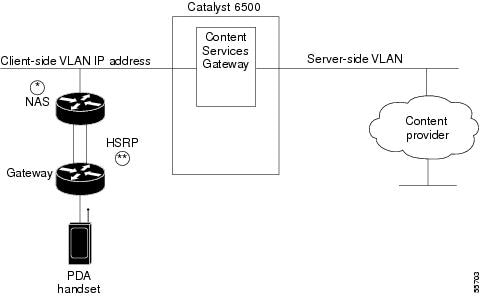
Clients and servers communicate through the CSG using Layer 2 and Layer 3 technology in a specific VLAN configuration. Clients connect to the client-side VLAN, and servers connect to the server-side VLAN. Servers and clients exist on different subnets. Servers can also be located one or more Layer 3 hops away and connect to the server-side VLAN through routers. This section describes how to configure VLANs for the CSG.
A client sends a request to one of the module's server addresses. The CSG extracts the URL—if applicable—and records the statistics. When properly configured, the CSG records statistics for flows in both directions. When a connection ends, the CSG builds an accounting record and sends it to the BMA.
When you install the CSG in a Catalyst 6500 series switch, you must configure client-side and server-side VLANs. (See Figure 3-1.)
Figure 3-1 Configuring VLANs
*Any router configured as a client-side gateway, or a next-hop router for servers more than one hop away, must have ICMP redirects disabled. The CSG does not perform a Layer 3 lookup to forward traffic; the CSG cannot act upon ICMP redirects.
** You can configure up to seven gateways per VLAN for up to 256 VLANs and up to 224 gateways for the entire system. If an HSRP/VRRP gateway is configured, the CSG uses three gateway entries out of the 224 gateway entries because traffic can come from the virtual and physical MAC addresses of the HSRP group. (See the "HSRP Configuration Overview" section on page 4-9.)
Note
You must create both a client-side and server-side VLAN:
•
•
Configuring Client-Side VLANs
To configure client-side VLANs, perform this task:
Note
The following example shows how to configure the CSG for client-side VLANs:
Router(config-module-csg)# vlan 130 clientRouter(config-csg-vlan-client)# ip address 123.44.50.6 255.255.255.0Router(config-csg-vlan-client)# gateway 123.44.50.1Router(config-csg-vlan-client)# exitConfiguring Server-Side VLANs
To configure server-side VLANs, perform this task:
The following example shows how to configure the CSG for server-side VLANs:
Router(config-module-csg)# vlan 150 serverRouter(config-csg-vlan-server)# ip address 123.46.50.6 255.255.255.0Router(config-csg-vlan-server)# alias 123.60.7.6 255.255.255.0Router(config-csg-vlan-server)# route 123.50.0.0 255.255.0.0 gateway 123.44.50.1Router(config-csg-vlan-server)# exitPreventing Pipelined Requests
Note
Some customers have handsets that attempt to make pipelined HTTP requests. Because this is not supported prior to CSG 3.1(3)C5(5), the CSG enables you to prevent HTTP pipelined requests by disabling HTTP persistence. This is done by applying TCP FIN to the final response packet to force establishing a new session for each request. The final response packet is identified using the Content-Length: field in the HTTP header, and support was not added to detect the final packet when Content-Length: is not present (as when using Transfer-Encoding: chunked). So, the CSG prevents chunked encoded responses by overwriting the HTTP version in the request to HTTP/1.0. Because chunked encoding is not supported in HTTP/1.0, an HTTP/1.1 server is not allowed to respond with chunked data.
To disable persistence
, enter the following commands in module CSG configuration mode:
Configuring Layer 2-Adjacent Devices
Note
In a typical network environment, all traffic flows between clients and servers and uses the primary device/firewall. When traffic is coming from the device/firewall to the CSG, the source MAC can be that of the physical interface on that device rather than the MAC associated with the virtual IP address that is shared between the two devices/firewalls. If there is a failover of the second device/firewall, traffic is routed through the backup device/firewall. If the CSG does not have an ARP entry in its ARP cache for the MAC address of the now-active device/firewall, it drops packets received from that device/firewall.
To avoid this behavior, configure static routes on the CSG that point to the IP addresses on the interfaces of the adjacent devices/firewalls. For example, if the CSG is Layer 2-adjacent to two firewalls, and the IP addresses on those firewalls are 1.1.1.5 and 1.1.1.6, configure the following on the CSG:
route IP address not-in-use on the network 255.255.255.255 gateway 1.1.1.5
route IP address not-in-use on the network 255.255.255.255 gateway 1.1.1.6
This causes the CSG to spawn an ARP for 1.1.1.5 and 1.1.1.6 so that it has an ARP entry in its ARP cache for both firewalls. In the event of a failover, the packets received from the now-active firewall have a source MAC that is in the ARP cache of the CSG.
Configuration Examples
This section includes the following examples:
•
•
•
•
•
•
•
•
Sample CSG Billing Rules
Table 3-1 shows sample CSG billing rules.
The following example shows how to configure these CSG billing rules:
ip csg user-group U1entries max 10000radius key ciscoradius acct-port 23385radius userid User-Namequota local-port 4095quota server 20.20.50.13 3386 5quota server 20.20.50.130 3386 6quota server 20.20.52.13 3386 7!ip csg accounting CSGBILLuser-group U1records max 2000agent activate 2 sticky 30records intermediate bytes 50000agent 9.15.72.5 3386 2agent 10.76.86.2 3386 5!agent 20.20.50.131 3386 8inservice!ip csg map ADVERTISEMENTS headermatch header Host header-value *.advt-co.com!ip csg map ALLHOSTS headermatch header Host header-value *!ip csg map BOOKS headermatch header Host header-value *.books-co-inc.com!ip csg map CORPORATE headermatch header Host header-value *bigcorp*!ip csg map ALLURLS urlmatch url *!ip csg map FREE urlmatch url *freecontent*!ip csg map JPGS urlmatch url *.jpg!ip csg map GIF urlmatch url *.gif!ip csg policy ADVERTISEMENTSaccounting type httpurl-map ALLURLSheader-map ADVERTISEMENTS!ip csg policy BOOKFREEaccounting type httpurl-map BOOKFREEheader-map BOOKS!ip csg policy BOOKSALESaccounting type httpurl-map JPGSheader-map BOOKS!ip csg policy CORPORATEaccounting type httpurl-map ALLURLSheader-map CORPORATE!ip csg policy INTERNETaccounting type httpurl-map ALLURLSheader-map ALLHOSTS!ip csg content ADVERTISEMENTSip 1.2.5.0 255.255.255.0 tcp 80policy ADVERTISEMENTSinservice!ip csg content BOOKSip 1.2.3.0 255.255.255.0 tcp 80policy BOOKSALESpolicy BOOKFREEinservice!ip csg content CORPORATEip 198.133.219.0 255.255.255.0 tcp 80policy CORPORATEinservice!ip csg content INTERNETip any tcp 80policy INTERNETinservice!ip csg ruleset R1content ADVERTISEMENTScontent BOOKScontent CORPORATEcontent INTERNET!ip csg weight FREE 0ip csg weight PAYBACK -1!ip csg service BILLPERCLICKbasis fixedcontent ADVERTISEMENTS policy ADVERTISEMENTS weight PAYBACKcontent BOOKS policy BOOKSALEScontent BOOKS policy BOOKFREE weight FREEcontent CORPORATE policy CORPORATE weight FREE!ip csg service BILLBYVOLUMEbasis byte tcpcontent BILLBYVOLUME policy BILLBYVOLUME!ip csg service BILLBYIPVOLUMEbasis bytecontent INTERNET policy INTERNET!ip csg billing PLAN1service BILLPERCLICKservice BILLBYVOLUMEservice BILLBYIPVOLUME!module ContentServicesGateway 5vlan 30 client AUCTION_HOUSEip address 123.44.50.6 255.255.255.0gateway 123.44.50.1!vlan 40 serverip address 123.46.50.6 255.255.255.0!ruleset R1accounting CSGBILLSimple Postpaid Billing Configuration Example
The following example shows a simple postpaid billing CSG configuration:
ip csg policy POLICY1accounting type http!ip csg content MOVIES_COMEDYip 172.18.45.0/24 tcp 8080policy POLICY1inservice!ip csg content AUCTION_HOUSEip 216.32.120.0/24 tcp 8080policy POLICY1vlan AUCTION_HOUSEinservice!ip csg content WAKETECHip 48.33.0.0/16 tcp 80policy POLICY1inservice!ip csg ruleset R1content MOVIES_COMEDYcontent AUCTION_HOUSEcontent WAKETECH!ip csg user-group G1entries max 100000database 10.1.2.3 11111radius key secretpassword!ip csg accounting A1user-group G1agent localport 3775agent 10.1.2.4 11112 1agent 10.1.2.5 11113 2agent activate 2records max 250inservice!mod csg 4vlan 30 client AUCTION_HOUSEip address 123.44.50.6 255.255.255.0gateway 123.44.50.1vlan 40 serverip address 123.46.50.6 255.255.255.0alias 123.60.7.6 255.255.255.0route 123.50.0.0 255.255.0.0 gateway 123.44.50.1ruleset R1accounting A1Basic WAP Configuration Example
The following example illustrates a basic CSG WAP configuration that provides the following functions:
•
•
•
ip csg map DEFAULT_URL urlmatch protocol http url http://*!ip csg policy WAP_URLaccounting type wap connection-orientedurl-map DEFAULT_URL!ip csg policy WAP_CONTROLaccounting type wap connection-oriented customer-string control_flow!ip csg content WAP_WTP_CONTENTip any udp 9201idle 30policy WAP_URLpolicy WAP_CONTROLinservice!ip csg weight ZERO 0!ip csg service WAPbasis fixedcontent WAP_WTP_CONTENT policy WAP_URLcontent WAP_WTP_CONTENT policy WAP_CONTROL weight ZERORedirect to Top-Off Server Configuration Example
The following example illustrates a WAP configuration with additions to support redirect to a top-off server. This configuration provides the following functions:
•
•
Note
Users must also be authorized to use this service by the quota server.No quota needs to be given out for this service, but a cause code of 0x04 (user authorized) must be returned for the transaction to be allowed through.
ip csg map TOPOFF urlmatch protocol http url http://www.topoff.com*!ip csg map DEFAULT_URL urlmatch protocol http url http://*!ip csg policy URL_TOPOFFaccounting type wap connection-oriented customer-string topoffurl-map TOPOFF!ip csg policy WAP_URLaccounting type wap connection-oriented customer-stringurl-map DEFAULT_URL!ip csg policy WAP_CONTROLaccounting type wap connection-oriented customer-string control_flow!ip csg content WAP_WTP_CONTENTip any udp 9201idle 30policy URL_TOPOFFpolicy WAP_URLpolicy WAP_CONTROLinservice!ip csg weight ZERO 0!ip csg service WAPbasis fixedcontent WAP_WTP_CONTENT policy WAP_URL!ip csg service FREEcontent WAP_WTP_CONTENT policy URL_TOPOFF weight ZEROcontent WAP_WTP_CONTENT policy WAP_CONTROL weight ZEROFree MMS Transactions Configuration Example
Specific MMS Transactions
The following example illustrates a WAP 1 or MMS/WAP1.x configuration in which MMS transactions to servers mms1 and mms2 are free, while third-party MMS transactions are charged.
ip csg map TOPOFF urlmatch protocol http url http://www.topoff.com*!ip csg map OUR_MMS urlmatch protocol http url http://www.mms1*match protocol http url http://www.mms2*!ip csg map DEFAULT_URL urlmatch protocol http url http://*!ip csg policy URL_TOPOFFaccounting type wap connection-oriented customer-string topoffurl-map TOPOFF!ip csg policy FREE_MMSaccounting type wap connection-oriented customer-string free_mmsurl-map OUR_MMS!ip csg policy WAP_URLaccounting type wap connection-oriented customer-stringurl-map DEFAULT_URL!ip csg policy WAP_CONTROLaccounting type wap connection-oriented customer-string control_flow!ip csg content WAP_WTP_CONTENTip any udp 9201idle 30policy URL_TOPOFFpolicy FREE_MMSpolicy WAP_URLpolicy WAP_CONTROLinservice!ip csg weight ZERO 0!ip csg service WAPbasis fixedcontent WAP_WTP_CONTENT policy WAP_URL!ip csg service FREEcontent WAP_WTP_CONTENT policy URL_TOPOFF weight ZEROcontent WAP_WTP_CONTENT policy FREE_MMS weight ZEROcontent WAP_WTP_CONTENT policy WAP_CONTROL weight ZEROAll MMS Transactions
The following example illustrates a WAP 1 or MMS/WAP1.x configuration in which all MMS transactions are free. In this example, MMS content is free for service WAP (the user must be authorized for this service).
ip csg map TOPOFF urlmatch protocol http url http://www.topoff.com*!ip csg map DEFAULT_URL urlmatch protocol http url http://*!ip csg policy URL_TOPOFFaccounting type wap connection-oriented customer-string topoffurl-map TOPOFF!ip csg policy WAP_URLaccounting type wap connection-oriented customer-stringurl-map DEFAULT_URL!ip csg policy WAP_CONTROLaccounting type wap connection-oriented customer-string control_flow!ip csg content WAP_WTP_CONTENTip any udp 9201idle 30policy URL_TOPOFFpolicy WAP_URLpolicy WAP_CONTROLinservice!ip csg weight ZERO 0!ip csg service WAPbasis fixed exclude mmscontent WAP_WTP_CONTENT policy WAP_URL!ip csg service FREEcontent WAP_WTP_CONTENT policy URL_TOPOFF weight ZEROcontent WAP_WTP_CONTENT policy WAP_CONTROL weight ZERODifferentiating MMS Over WAP 2 Example
The following example assumes that the quota server and the accounting agent are already configured for the system. It also assumes that the WAP Proxy can be found on port 9401 on a host addressable using a server VLAN configured to access the subnet 10.10.2.0/24. This example illustrates the differences in a working configuration necessary to differentiate billing WAP2/HTTP and MMS/WAP2/HTTP.
ip csg map WAP2MMS_GET_MAP urlmatch protocol http method GET url /wap/mms*ip csg map WAP2MMS_POSTMAP urlmatch protocol http method POST url /wap/mms*ip csg map WAP2MMSPOSTMAPH headermatch protocol http header Content-Type header-value application/vnd.wap.mms-messageip csg policy WAP2_MMS_GET! match all wap2/http gets of mmsaccounting type http customer-string wap2mms-geturl-map WAP2MMS_GET_MAPip csg policy WAP2_MMS_POST! match all wap2/http posts that are mms related! This catches handset-initiated MMS sends and acknowledgements of! network-initiated MMS pushes.accounting type http customer-string wap2mms-postheader-map WAP2MMSPOSTMAPH ! recommended! or! url-map WAP2MMS_POSTMAP ! optional! The header-map catches MMS even when it goes to an unknown URL,! so it is recommended over the url-map.ip csg policy WAP2! You might choose to differentiate non-MMS wap2 get/posts and URLs/headers! here, if relevant. In this case, we just label all remaining traffic as! wap2.accounting type http customer-string wap2ip csg content WAP2! 10.10.2.0 255.255.255.0 represents the network where WAP 2 Proxies are! located. Port 9401 is the port the WAP 2 Proxies are configured to use.ip 10.10.2.0 255.255.255.0 tcp 9401policy WAP2_MMS_GETpolicy WAP2_MMS_POSTpolicy WAP2inservice! Adjust these to change the pre-paid weight associated with each flow:ip csg weight WEIGHT_WAP2 3ip csg weight WEIGHT_WAP2GET 1ip csg weight WEIGHT_WAP2POST 2ip csg service WAP2MMSGETbasis fixedidle 10000content WAP2 policy WAP2_MMS_GET weight WEIGHT_WAP2GETip csg service WAP2MMSPOSTbasis fixedidle 10000content WAP2 policy WAP2_MMS_POST weight WEIGHT_WAP2POSTip csg service WAP2basis fixedidle 10000content WAP2 policy WAP2 weight WEIGHT_WAP2ip csg ruleset R! other contentscontent WAP2ip csg billing BILL1service WAP2MMSGETservice WAP2MMSPOSTservice WAP2Pricing by Quota Server Configuration Example
The following example shows a CSG configuration in which all pricing is done by a quota server. In this example:
•
•
–
–
•
•
ip csg content C1policy P1inservice!ip csg content C2policy P2inservice!ip csg service PERCLICKbasis fixedcontent C1 policy P1!ip csg service PERBYTEbasis byte ip exclude mmscontent C2 policy P2!ip csg billing REGULARservice PERCLICKservice PERBYTEWhen User X, with a subscription to billing plan REGULAR, tries to access content that matches C1, the CSG tries to download quota for User X for service PERCLICK.
The quota server borrows money from User X's $10.00, and returns some quadrans to the CSG. Each quadran is good for one object download, or one click. If the quota server wants the CSG to query for each click, it can choose to send just one quadran at a time, so that the CSG queries the quota server each time. On the other hand, if the quota server wants to grant $2.00 worth to the CSG in one shot, it can send 200 quadrans to the CSG, which the CSG keeps using for User X's access to C1.
When User X tries to access content that matches C2, the CSG makes another request to the quota server to get User X's quota for C2. C2 is billed per IP byte. The quota server borrows another $5.00 from User X's account, and sends 500000 quadrans to the CSG. As User X continues to access C2, his traffic is metered for volume, and for each byte the CSG deducts one quadran.
Differentiating Prices Configuration Example
The following example extends the previous example by adding an additional content type that is priced differently. In this example:
•
•
–
–
–
•
•
This configuration requires an additional service type, MP3, which allows the quota server to price clicks differently for MP3 files.
ip csg content C1policy P1inservice!ip csg content C2policy P2inservice!ip csg content MP3policy P1inservice!ip csg service PERCLICKbasis fixedcontent C1 policy P1!ip csg service PERBYTEbasis byte ipcontent C2 policy P2!ip csg service MP3basis fixedcontent C1 policy P1!ip csg billing REGULARservice PERCLICKservice PERBYTEservice MP3When User X tries to download an MP3 file (that is, a file that matches content MP3), the CSG requests the MP3 quota for User X. Each download of an MP3 file costs $0.05, so the quota server borrows $1.00 from User X's account, and returns 20 quadrans to the CSG for service MP3. The CSG can use the quadrans for 20 downloads of MP3 files.
Alternatively, the quota server could send just one quadran, which is good for only one transaction. This would force the CSG to ask for quota before each download of an MP3 file.
Reducing the Number of Services Configuration Example
The "Differentiating Prices Configuration Example" section showed that you can create a new service for a content and differentiate its billing from other types of content.
However, with each new service, the user's quota fragments further, and traffic between the CSG and the quota server increases.
You can improve this situation by specifying a symbolic weight on the CSG. In this example, each MP3 download ($0.05) costs five times as much as each JPG download ($0.01). By assigning a weight of 5 to MP3 downloads, you can keep both content C1 and content MP3 under service PERCLICK, reducing the overall number of services and reducing the traffic between the CSG and the quota server.
ip csg content C1policy P1inservice!ip csg content C2policy P2inservice!ip csg content MP3policy P1inservice!ip csg weight MP3 5!ip csg service PERBYTEbasis byte ipcontent C2 policy P2!ip csg service PERCLICKbasis fixedcontent C1 policy P1content MP3 policy P1 weight MP3!ip csg billing REGULARservice PERCLICKservice PERBYTEWhen the quota server borrows $1.00 from User X's account, and sends 100 quadrans for service PERCLICK, the CSG can use the quadrans for 100 JPG files, or for 20 MP3 files, or for a mix of the two.