Feedback Feedback
|

Table Of Contents
Configuring Link Aggregation on ML-MR-10 card
Understanding Link Aggregation
EtherChannel Configuration Example
Understanding Encapsulation over EtherChannel or POS Channel
Configuring Encapsulation over EtherChannel or POS Channel
Encapsulation over EtherChannel Example
Monitoring and Verifying EtherChannel and POS
Understanding Link Aggregation Control Protocol
Load Balancing on the ML-MR-10 card
MAC address based load balancing
Load Balancing Configuration Commands
Configuring Link Aggregation on ML-MR-10 card
This chapter applies to the ML-MR-10 card amd describes how to configure link aggregation for the ML-MR-10 card, both EtherChannel and packet-over-SONET/SDH (POS) channel. For additional information about the Cisco IOS commands used in this chapter, refer to the Cisco IOS Command Reference publication.
This chapter contains the following major sections:
•
Understanding Link Aggregation
•
•
•
Understanding Link Aggregation
The ML-MR-10 card offers both EtherChannel and POS channel. Traditionally EtherChannel is a trunking technology that groups together multiple full-duplex IEEE 802.3 Ethernet interfaces to provide fault-tolerant high-speed links between switches, routers, and servers. EtherChannel forms a single higher bandwidth routing or bridging endpoint and was designed primarily for host-to-switch connectivity. The ML-MR-10 card extends this link aggregation technology to bridged POS interfaces. POS channel is only supported with LEX encapsulation.
Link aggregation provides the following benefits:
•
•
•
Port channel is a term for both POS channel and EtherChannel. The port channel interface is treated as a single logical interface although it consists of multiple interfaces. Each port channel interfaces consists of one type of interface, either Fast Ethernet, Gigabit Ethernet, or POS. You must perform all port channel configurations on the port channel (EtherChannel or POS channel) interface rather than on the individual member Ethernet or POS interfaces. You can create the port channel interface by entering the interface port-channel interface configuration command.
Note
Port channel connections are fully compatible with IEEE 802.1Q trunking and routing technologies. IEEE 802.1Q trunking can carry multiple VLANs across a port channel.
Each ML-MR-10 card supports up to ten port channel interfaces. A maximum of ten Gigabit Ethernet ports can be added into one Port-Channel.
Caution
Caution
Note
Configuring EtherChannel
You can configure an FEC or a GEC by creating an EtherChannel interface (port channel) and assigning a network IP address. All interfaces that are members of a FEC or a GEC should have the same link parameters, such as duplex and speed.
To create an EtherChannel interface, perform the following procedure, beginning in global configuration mode:
For information on other configuration tasks for the EtherChannel, refer to the
Cisco IOS Configuration Fundamentals Configuration Guide.To assign Ethernet interfaces to the EtherChannel, perform the following procedure, beginning in global configuration mode:
EtherChannel Configuration Example
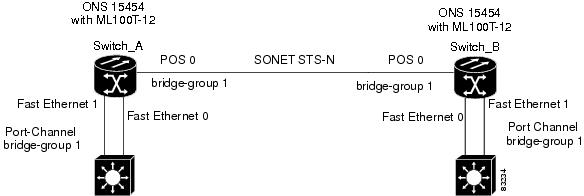
Figure 34-1 shows an example of EtherChannel. The associated commands are provided in Example 34-1 (Switch A) and Example 34-2 (Switch B).
Figure 34-1 EtherChannel Example
Example 34-1 Switch A Configuration
hostname Switch A!bridge 1 protocol ieee!interface Port-channel 1no ip addressbridge-group 1hold-queue 150 in!interface FastEthernet 0no ip addresschannel-group 1!interface FastEthernet 1no ip addresschannel-group 1!interface POS 0no ip routingno ip addresscrc 32bridge-group 1pos flag c2 1Example 34-2 Switch B Configuration
hostname Switch B!bridge 1 protocol ieee!interface Port-channel 1no ip routingno ip addressbridge-group 1hold-queue 150 in!interface FastEthernet 0no ip addresschannel-group 1!interface FastEthernet 1no ip addresschannel-group 1!interface POS 0no ip addresscrc 32bridge-group 1pos flag c2 1!Understanding Encapsulation over EtherChannel or POS Channel
When configuring encapsulation over FEC, GEC, or POS, be sure to configure IEEE 802.1Q on the port-channel interface, not its member ports. However, certain attributes of port channel, such as duplex mode, need to be configured at the member port levels. Also make sure that you do not apply protocol-level configuration (such as an IP address or a bridge group assignment) to the member interfaces. All protocol-level configuration should be on the port channel or on its subinterface. You must configure IEEE 802.1Q encapsulation on the partner system of the EtherChannel as well.
Configuring Encapsulation over EtherChannel or POS Channel
To configure encapsulation over the EtherChannel or POS channel, perform the following procedure, beginning in global configuration mode:
Encapsulation over EtherChannel Example
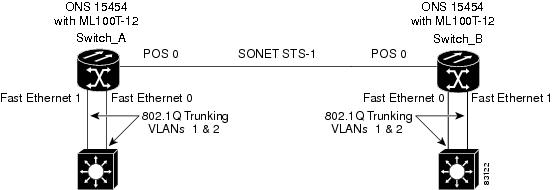
Figure 34-2 shows an example of encapsulation over EtherChannel. The associated code is provided in Example 34-3 (Switch A) and Example 34-4 (Switch B).
Figure 34-2 Encapsulation over EtherChannel Example
This encapsulation over EtherChannel example shows how to set up two ONS 15454s with ML100T-12 cards (Switch A and Switch B) to interoperate with two switches that also support IEEE 802.1Q encapsulation over EtherChannel. To set up this example, use the configurations in the following sections for both Switch A and Switch B.
Example 34-3 Switch A Configuration
hostname Switch A!bridge irbbridge 1 protocol ieeebridge 2 protocol ieee!interface Port-channel1no ip addresshold-queue 150 in!interface Port-channel1.1encapsulation dot1Q 1 nativebridge-group 1!interface Port-channel1.2encapsulation dot1Q 2bridge-group 2!interface FastEthernet0no ip addresschannel-group 1!interface FastEthernet1no ip addresschannel-group 1!interface POS0no ip addresscrc 32pos flag c2 1!interface POS0.1encapsulation dot1Q 1 nativebridge-group 1!interface POS0.2encapsulation dot1Q 2bridge-group 2Example 34-4 Switch B Configuration
hostname Switch B!bridge irbbridge 1 protocol ieeebridge 2 protocol ieee!interface Port-channel1no ip addresshold-queue 150 in!interface Port-channel1.1encapsulation dot1Q 1 nativebridge-group 1!interface Port-channel1.2encapsulation dot1Q 2bridge-group 2!interface FastEthernet0no ip addresschannel-group 1!interface FastEthernet1no ip addresschannel-group 1!interface POS0no ip addresscrc 32pos flag c2 1!interface POS0.1encapsulation dot1Q 1 nativebridge-group 1!interface POS0.2encapsulation dot1Q 2bridge-group 2!Monitoring and Verifying EtherChannel and POS
After FEC, GEC, or POS is configured, you can monitor its status using the show interfaces port-channel command.
Example 34-5 show interfaces port-channel Command
Router# show int port-channel 1Port-channel1 is up, line protocol is upHardware is FEChannel, address is 0005.9a39.6634 (bia 0000.0000.0000)MTU 1500 bytes, BW 200000 Kbit, DLY 100 usec,reliability 255/255, txload 1/255, rxload 1/255Encapsulation ARPA, loopback not setKeepalive set (10 sec)Unknown duplex, Unknown SpeedARP type: ARPA, ARP Timeout 04:00:00No. of active members in this channel: 2Member 0 : FastEthernet0 , Full-duplex, Auto SpeedMember 1 : FastEthernet1 , Full-duplex, Auto SpeedLast input 00:00:01, output 00:00:23, output hang neverLast clearing of "show interface" counters neverInput queue: 0/150/0/0 (size/max/drops/flushes); Total output drops: 0Queueing strategy: fifoOutput queue :0/80 (size/max)5 minute input rate 0 bits/sec, 0 packets/sec5 minute output rate 0 bits/sec, 0 packets/sec820 packets input, 59968 bytesReceived 0 broadcasts, 0 runts, 0 giants, 0 throttles0 input errors, 0 CRC, 0 frame, 0 overrun, 0 ignored0 watchdog, 0 multicast0 input packets with dribble condition detected32 packets output, 11264 bytes, 0 underruns0 output errors, 0 collisions, 0 interface resets0 babbles, 0 late collision, 0 deferred0 lost carrier, 0 no carrier0 output buffer failures, 0 output buffers swapped out.Understanding Link Aggregation Control Protocol
In Software Release 8.5.0 and later, ML-MR-10 card can utilize the link aggregation control protocol (LACP) to govern reciprocal peer packet transmission with respect to LACP's detection of flawed packets. The cards' ports transport a signal transparently (that is, without intervention or termination). However, this transparent packet handling is done only if the LACP is not configured for the ML- Series card.
Passive Mode and Active Mode
Passive or active modes are configured for a port and they differ in how they direct a card to transmit packets: In passive mode, the LACP resident on the node transmits packets only after it receives reciprocal valid packets from the peer node. In active mode, a node transmits packets irrespective of the LACP capability of its peer.
LACP Functions
LACP performs the following functions in the system:
•
•
•
•
In addition, LACP provides the following benefits:
•
•
•
LACP Parameters
LACP utilizes the following parameters to control aggregation:
System Identifier—A unique identification assigned to each system. It is the concatenation of the system priority and a globally administered individual MAC address.
Port Identification—A unique identifier for each physical port in the system. It is the concatenation of the port priority and the port number.
Port Capability Identification—An integer, called a key, that identifies one port's capability to aggregate with another port. There are two types of key: administrative and operational. An administrative key is configured by the network administrator, and an operational key is assigned by LACP to a port based on its aggregation capability.
Aggregation Identifier—A unique integer that is assigned to each aggregator and is used for identification within the system.
LACP Usage Scenarios
In Software Release 8.5.0 and later, LACP functions on ML-MR-10 card in termination mode and on the CE-Series cards in transparent mode.
Termination Mode
In termination mode, the link aggregation bundle terminates or originates at the ML-MR-10 card. To operate in this mode, LACP should be configured on the Ethernet interface. One protect SONET or SDH circuit can carry the aggregated Ethernet traffic of the bundle. The advantage of termination mode over transparent mode is that the network bandwidth is not wasted. However. the disadvantage is that there is no card protection between the CPE and UNI (ONS 15454) because all the links in the ML card bundle belong to the same card.
Figure 34-3 LACP Termination Mode Example
Transparent Mode
In Figure 34-4, the link aggregation bundle originates at router 1 and terminates at router 2. Transparent mode is enabled when the LACP packets are transmitted without any processing on a card. While functioning in this mode, the ML-100T-8 cards pass through LACP packets transparently so that the two CPE devices perform the link aggregation. To operate in this mode, no LACP configuration is required on the ML-100T-8 cards.
Figure 34-4 LACP Transparent Mode Example
Configuring LACP
To configure LACP over the EtherChannel, perform the following procedure, beginning in global configuration mode:
In Example 34-6, the topology includes two nodes with a GEC or FEC transport between them. This example shows one GEC interface on Node 1. (Up to four similar types of links per bundle are supported.)
Example 34-6 LACP Configuration Example
ML2-Node1# sh run int gi0Building configuration...Current configuration : 150 bytes!interface GigabitEthernet0no ip addressno keepaliveduplex autospeed autonegotiation autochannel-group 1 mode activeno cdp enableendML2-Node1#ML2-Node1# sh run int por1Building configuration...Current configuration : 144 bytes!interface Port-channel1no ip addressno negotiation autoservice instance 30 ethernet1encapsulation dot1q 30bridge-domain 30!endML2-Node1#ML2-Node1# sh lacp intFlags: S - Device is requesting Slow LACPDUsF - Device is requesting Fast LACPDUsA - Device is in Active mode P - Device is in Passive modeChannel group 1LACP port Admin Oper Port PortPort Flags State Priority Key Key Number StateGi0 SA bndl 32768 0x1 0x1 0x5 0x3DML2-Node1#Configuration remains same for the ML2-Node2 also.Load Balancing on the ML-MR-10 card
The load balancing on the ML-MR-10 card can be configured through the following options:
•
•
Note
MAC address based load balancing
The MAC address based load balancing is achieved by performing "XOR" (exclusive OR) operation on the last 4 least significant bits of the source MAC address and the destination MAC address.
Table Table 34-1 displays the ethernet traffic with 4 Gigabit Ethernet members on the port channel interfaces
.
Table 34-2 displays the ethernet traffic with 3 Gigabit Ethernet members on the port channel interfaces.
Note
VLAN Based Load Balancing
VLAN based load balancing is achieved by using the last 4 least significant bits of the incoming VLAN ID in the outer VLAN.
Table 34-3 displays the ethernet traffic with 3 Gigabit Ethernet members on the port channel interfaces.
Note
With the 4 Gigabit Ethernet members, if the incoming VLAN ID is 20, the traffic will be sent on member-0. If the incoming VLAN ID is 30, the traffic will be sent on member-2.
Load Balancing Configuration Commands
Table 34-4 details the commands used to configure load balancing on the ML-Series cards and the ML-MR-10 card.
Table 34-4
Configuration Commands for Load Balancing
Example 34-7 show command configuration
Configuration:!interface Port-channel10no ip addressno negotiation autoload-balance vlanservice instance 20 ethernetencapsulation dot1q 20bridge-domain 20!service instance 30 ethernetencapsulation dot1q 30bridge-domain 30!!!interface GigabitEthernet1no ip addressspeed autoduplex autonegotiation autochannel-group 10no keepalive!interface GigabitEthernet2no ip addressspeed autoduplex autonegotiation autochannel-group 10no keepalive!interface GigabitEthernet9no ip addressspeed autoduplex autonegotiation autochannel-group 10no keepaliveRouter#sh int port-channel 10Port-channel10 is up, line protocol is upHardware is GEChannel, address is 001b.54c0.2643 (bia 0000.0000.0000)MTU 9600 bytes, BW 2100000 Kbit, DLY 10 usec,reliability 255/255, txload 1/255, rxload 1/255Encapsulation ARPA, loopback not setKeepalive set (10 sec)ARP type: ARPA, ARP Timeout 04:00:00No. of active members in this channel: 3Member 0 : GigabitEthernet9 , Full-duplex, 100Mb/sMember 1 : GigabitEthernet1 , Full-duplex, 1000Mb/sMember 2 : GigabitEthernet2 , Full-duplex, 1000Mb/sLast input never, output never, output hang neverLast clearing of "show interface" counters neverInput queue: 0/225/0/0 (size/max/drops/flushes); Total output drops: 0Queueing strategy: fifoOutput queue: 0/120 (size/max)5 minute input rate 0 bits/sec, 0 packets/sec5 minute output rate 0 bits/sec, 0 packets/sec0 packets input, 0 bytes, 0 no bufferReceived 0 broadcasts (0 IP multicasts)0 runts, 0 giants, 0 throttles0 input errors, 0 CRC, 0 frame, 0 overrun, 0 ignored0 watchdog, 0 multicast, 0 pause input48 packets output, 19080 bytes, 0 underruns0 output errors, 0 collisions, 0 interface resets0 babbles, 0 late collision, 0 deferred0 lost carrier, 0 no carrier, 0 PAUSE output0 output buffer failures, 0 output buffers swapped outRouter#Router#show port-channel load-balance interface Port-channel 10 hash-tableHash-value Interface0 GigabitEthernet91 GigabitEthernet12 GigabitEthernet23 GigabitEthernet94 GigabitEthernet15 GigabitEthernet26 GigabitEthernet97 GigabitEthernet18 GigabitEthernet29 GigabitEthernet910 GigabitEthernet111 GigabitEthernet212 GigabitEthernet913 GigabitEthernet114 GigabitEthernet215 GigabitEthernet9Router#