-
Cisco CMTS Router Layer 2 and VPN Features Configuration Guide, Release 12.2SC
-
Cisco uBR7200 Series MPLS VPN Cable Enhancements
-
EtherChannel on the Cisco CMTS Routers
-
Generic Routing Encapsulation on the Cisco CMTS Routers
-
L2VPN Support Over Cable
-
MPLS Pseudowire for Cable L2VPN
-
Point-to-Point Protocol over Ethernet Support on the Cisco CMTS Routers
-
Service Flow Mapping to MPLS-VPN on the Cisco CMTS Routers
-
Transparent LAN Service over Cable
-
VRF Steering for Cisco CMTS Routers
-


Table Of Contents
VRF Steering for Cisco CMTS Routers
Prerequisites for VRF Steering
Information About VRF Steering
Configuration Examples for VRF Steering
Example: VRF Steering for CMTS Routers
Feature Information for VRF Steering
VRF Steering for Cisco CMTS Routers
First Published: June 20, 2011The virtual routing and forwarding (VRF) steering feature allows provisioning of data traffic from cable modems to be contained to a specified VRF instance. This enables all traffic from and to a particular set of cable modems to be constrained to a VRF instance.
Finding Feature Information
Your software release may not support all the features documented in this module. For the latest feature information and caveats, see the release notes for your platform and software release. To find information about the features documented in this module, and to see a list of the releases in which each feature is supported, see the "Feature Information for VRF Steering" section.
Use Cisco Feature Navigator to find information about platform support and Cisco software image support. To access Cisco Feature Navigator, go to http://www.cisco.com/go/cfn. An account on Cisco.com is not required.
Contents
•
Prerequisites for VRF Steering
•
•
•
•
•
Prerequisites for VRF Steering
Table 1 shows the hardware compatibility prerequisites for this feature.
Note
Table 1 Cable Hardware Compatibility Matrix for VRF Steering
Cisco uBR10012 Universal Broadband Router
Cisco IOS Release 12.2(33)SCF and later releases
•
•
Cisco IOS Release 12.2(33)SCF and later releases
•
•
•
Cisco uBR7246VXR Universal Broadband Router
Cisco IOS Release 12.2(33)SCF and later releases
•
•
Cisco IOS Release 12.2(33)SCF and later releases
•
•
Cisco uBR7225VXR Universal Broadband Router
Cisco IOS Release 12.2(33)SCF and later releases
•
•
Cisco IOS Release 12.2(33)SCF and later releases
•
•
1 The Cisco uBR-MC3GX60V line card is supported only with PRE4.
Restrictions for VRF Steering
•
•
•
Information About VRF Steering
The VRF steering feature is developed to address the need for accommodating more IPv4 addresses when customers run out of IPv4 addresses for their CPE. This solution helps customers expand their existing IP address space until they move to the IPv6 address mode.
The availability of new IPv4 addresses is quickly coming to an end. In order to continue provisioning new subscribers, operators must switch to IPv6. This feature is designed to give the operators additional time to switch to IPv6 by expanding the use of non-traditional IPv4 addresses within their network. This feature allows the operator to create a private VRF for cable modems that are not routable outside of the operator network and choose any address since the CM addresses will not be routed externally. The CPE devices will continue to be provisioned with globally routable addresses, allowing them to peruse the internet.
VRF Steering Process
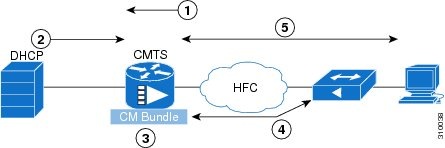
Figure 1 and the following sequence of events describe the VRF steering process.
Figure 1 VRF Steering Process
1.
2.
3.
4.
5.
How to Configure VRF Steering
•
Configuring the VRF Steering
This section describes how to configure a VRF instance on the Cisco CMTS router.
SUMMARY STEPS
Create a private routing table for the CMs.
1.
2.
3.
Create an ACL and route-map to match the CPE traffic and to steer the CPE traffic to the global subinterface from the CM subinterface. The route map needs to reference the ACL. Steps 4 and 5 are applicable to Cisco uBR10012 routers only.
4.
5.
Create the master bundle interface and add the new command to steer the CMs into the appropriate subinterface.
6.
7.
Create the subinterface for the CPEs.
8.
9.
10.
11.
12.
Create the subinterface for the CMs.
13.
14.
15.
16.
17.
18.
19.
DETAILED STEPS
Troubleshooting Tips
Run the debug cable bundle vrf-steering command to display the interfaces selected during the configuration.
Configuration Examples for VRF Steering
This section provides the following configuration examples:
•
Example: VRF Steering for CMTS Routers
The following example shows how to configure VRF steering on CMTS routers:
Router> enable configure terminalip vrf CM-VRFrd 100:100route-target export 100:100route-target import 100:100! These commands apply to all the devices attached on this cable bundle.!interface Bundle1no ip addressno cable arp filter request-sendno cable arp filter reply-acceptcable vrf-steering cable-modem CM-VRFend!Subinterface for CPEs.!interface Bundle1.1ip address 112.1.1.1 255.255.0.0 secondaryip address 111.1.1.1 255.255.0.0 secondaryip address 101.1.1.1 255.255.0.0cable dhcp-giaddr policycable helper-address 72.10.10.2! Subinterface for CMs. These CMs go into CM-VRF!interface Bundle1.2ip vrf forwarding CM-VRFip address 72.10.10.1 255.255.0.0ip policy route-map cpecable helper-address 72.10.10.2cable source-routeend! Create ACL for CPE!ip access-list extended vrfcpepermit ip 111.1.0.0 0.0.255.255 anypermit ip 112.1.0.0 0.0.255.255 anypermit ip 101.1.0.0 0.0.255.255 any!! Create route-map for CPE!route-map cpe permit 10match ip address vrfcpeend.Verifying VRF Steering
This section explains how to verify VRF steering configuration for the CMTS router, and it contains the following topics:
Verifying VRF Steering
To verify or view which VRF contains a specific cable modem in the ARP cache table, use the show ip arp vrf command in privileged EXEC mode.
The following is sample output from the show ip arp vrf command:
Router # show ip arp vrf CM-VRFProtocol Address Age (min) Hardware Addr Type InterfaceInternet 203.0.113.1 0 0018.742c.6e00 ARPA FastEthernet0/0/0Internet 203.0.113.2 - 0014.f1e4.fb58 ARPA FastEthernet0/0/0Internet 198.51.100.1 - 0014.f1e4.fc31 ARPA Bundle1.2Internet 198.51.100.2 0 001e.6bfb.34e8 ARPA Bundle1.2Internet 198.51.100.3 0 0007.0e07.9f1f ARPA Bundle1.2Internet 198.51.100.5 0 0025.2eaf.6bea ARPA Bundle1.2Internet 198.51.100.6 0 001a.c3ff.d1a4 ARPA Bundle1.2Internet 198.51.100.7 0 001e.6bfb.1c7e ARPA Bundle1.2Additional References
The following sections provide references related to the VRF Steering feature.
Related Documents
Cisco uBR10012 Universal Broadband Router Documentation
IPv6 on Cable
http://www.cisco.com/en/US/docs/ios/cable/configuration/guide/
cmts_ipv6.htmlVirtual Interface Bundling for the Cisco CMTS
http://www.cisco.com/en/US/docs/ios/cable/configuration/guide/
cmts_cbl_if_bundlg.htmlCisco uBR10012 Universal Broadband Router Hardware Installation Guide
http://www.cisco.com/en/US/docs/cable/cmts/ubr10012/
installation/guide/hig.htmlCisco uBR10012 Universal Broadband Router Software Configuration Guide http://www.cisco.com/en/US/docs/cable/cmts/ubr10012/
configuration/guide/scg.htmlCisco uBR10012 Universal Broadband Router Release Notes
http://www.cisco.com/en/US/products/hw/cable/ps2209/
prod_release_notes_list.htmlCMTS Command Reference
Cisco IOS CMTS Cable Command Reference
http://www.cisco.com/en/US/docs/ios/cable/command/reference/
cbl_book.html
Standards
MIBs
None
To locate and download MIBs for selected platforms, Cisco IOS releases, and feature sets, use Cisco MIB Locator found at the following URL:
RFCs
Technical Assistance
Feature Information for VRF Steering
Table 2 lists the features in this module and provides links to specific configuration information.
Not all commands may be available in your Cisco IOS software release. For release information about a specific command, see the command reference documentation.
Use Cisco Feature Navigator to find information about platform support and software image support. Cisco Feature Navigator enables you to determine which software images support a specific software release, feature set, or platform. To access Cisco Feature Navigator, go to http://www.cisco.com/go/cfn. An account on Cisco.com is not required.
Note
Cisco and the Cisco logo are trademarks or registered trademarks of Cisco and/or its affiliates in the U.S. and other countries. To view a list of Cisco trademarks, go to this URL: www.cisco.com/go/trademarks. Third-party trademarks mentioned are the property of their respective owners. The use of the word partner does not imply a partnership relationship between Cisco and any other company. (1110R)
Any Internet Protocol (IP) addresses and phone numbers used in this document are not intended to be actual addresses and phone numbers. Any examples, command display output, network topology diagrams, and other figures included in the document are shown for illustrative purposes only. Any use of actual IP addresses or phone numbers in illustrative content is unintentional and coincidental.
© 2011 Cisco Systems, Inc. All rights reserved.