Catalyst固定組態交換器的復原密碼

簡介
本檔案介紹舊版Cisco Catalyst第2層和第3層固定組態交換器的密碼復原程式。
必要條件
需求
本文件沒有特定需求。
採用元件
本檔案是根據2900XL/3500XL、2940、2950/2955、2960、2970、3550、3560和3750系列交換器。

附註:本文保留為前面列出的舊版Cisco Catalyst交換機系列上密碼恢復的參考。它不包括當前的Cisco Catalyst平台。
本文中的資訊是根據特定實驗室環境內的裝置所建立。文中使用到的所有裝置皆從已清除(預設)的組態來啟動。如果您的網路運作中,請確保您瞭解任何指令可能造成的影響。
慣例
如需文件慣例的詳細資訊,請參閱思科技術提示慣例。
背景資訊
本檔案介紹Cisco Catalyst第2層固定組態交換器2900XL/3500XL、2940、2950/2955、2960和2970系列以及Cisco Catalyst第3層固定組態交換器3550、3560和3750系列的密碼復原程式。
復原程式
要恢復口令,請執行以下操作:
1.將終端機或具有終端模擬的PC(例如超級終端機)連線到交換器的主控台連線埠。
使用以下終端機設定:
-
每秒位元數(鮑率):9600
-
資料位元:8
-
同位:無
-
停止位元:1
-
流量控制:Xon/Xoff
1.拔下電源線。
2.開啟交換器電源並進入switch:提示:
對於系列交換器2900XL、3500XL、2940、2950、2960、2970、3550、3560和3750,請完成以下步驟:
3.按住位於前面板左側的「模式」按鈕,同時將電源線重新接上交換器。
| Catalyst 交換器系列 |
LED 表現方式和「模式」按鈕放開動作 |
|---|---|
| 2900XL、3500XL、3550 |
Port1X上的LED熄滅時,放開模式按鈕。 |
| 2940、2950 |
狀態 (STAT) LED 熄滅時,約過 5 秒後放開「模式」按鈕。放開「模式」按鈕時,SYST LED 會閃爍琥珀色燈。 |
| 2960、2970 |
SYST LED 閃爍琥珀色燈時,放開「模式」按鈕,隨即會變為常亮綠燈。放開「模式」按鈕時,SYST LED 會閃爍綠燈。 |
| 3560、3750 |
SYST LED 變為常亮綠燈時,大約過 15 秒後放開「模式」按鈕。放開「模式」按鈕時,SYST LED 會閃爍綠燈。 |
Catalyst 3524XL
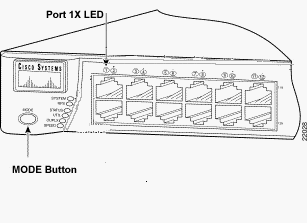 Catalyst 3524XL
Catalyst 2950-24
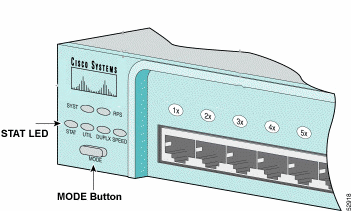 Catalyst 2950-24
僅適用於 2955 系列交換器:
Catalyst 2955系列交換器無法使用外部模式按鈕進行密碼復原。而是交換器開機載入器會基於密碼復原目的,使用Break鍵偵測來停止自動開機順序。Break 按鍵順序取決於使用的終端應用程式和作業系統。在Windows 2000上執行的超級終端機使用Ctrl + Break。在執行UNIX的工作站上,Break鍵是Ctrl-C。下一個範例在2955上使用超級終端機進入switch: 模式。
C2955 Boot Loader (C2955-HBOOT-M) Version 12.1(0.0.514), CISCO DEVELOPMENT TEST
VERSION
Compiled Fri 13-Dec-02 17:38 by madison
WS-C2955T-12 starting...
Base ethernet MAC Address: 00:0b:be:b6:ee:00
Xmodem file system is available.
Initializing Flash...
flashfs[0]: 19 files, 2 directories
flashfs[0]: 0 orphaned files, 0 orphaned directories
flashfs[0]: Total bytes: 7741440
flashfs[0]: Bytes used: 4510720
flashfs[0]: Bytes available: 3230720
flashfs[0]: flashfs fsck took 7 seconds.
...done initializing flash.
Boot Sector Filesystem (bs:) installed, fsid: 3
Parameter Block Filesystem (pb:) installed, fsid: 4

*** The system will autoboot in 15 seconds ***
Send break character to prevent autobooting.


!--- Wait until you see this message before !--- you issue the break sequence.
!--- Ctrl+Break is entered using Hyperterm.


The system has been interrupted prior to initializing the flash file system to finish
loading the operating system software:

flash_init
load_helper
boot
switch:
4.執行flash_init指令。
switch: flash_init
Initializing Flash...
flashfs[0]: 143 files, 4 directories
flashfs[0]: 0 orphaned files, 0 orphaned directories
flashfs[0]: Total bytes: 3612672
flashfs[0]: Bytes used: 2729472
flashfs[0]: Bytes available: 883200
flashfs[0]: flashfs fsck took 86 seconds
....done Initializing Flash.
Boot Sector Filesystem (bs:) installed, fsid: 3
Parameter Block Filesystem (pb:) installed, fsid: 4
switch:

!--- This output is from a 2900XL switch. Output from
!--- other switches will vary slightly.
5.運行load_helper命令。
switch: load_helper
switch:
6.運行 dir flash: 命令。
交換器檔案系統隨即顯示:
switch: dir flash:
Directory of flash:/
2    -rwx  1803357   <date>               c3500xl-c3h2s-mz.120-5.WC7.bin

!--- This is the current version of software.

4    -rwx  1131      <date>               config.text

!--- This is the configuration file.

5    -rwx  109       <date>               info
6    -rwx  389       <date>               env_vars
7    drwx  640       <date>               html
18   -rwx  109       <date>               info.ver
403968 bytes available (3208704 bytes used)
switch:

!--- This output is from a 3500XL switch. Output from
!--- other switches will vary slightly.
7.輸入rename flash:config.text flash:config.old 以重新命名配置檔案。
switch: rename flash:config.text flash:config.old
switch:

!--- The config.text file contains the password
!--- definition.
8.運行boot 命令以啟動系統。
switch: boot
Loading "flash:c3500xl-c3h2s-mz.120-5.WC7.bin"...###############################
################################################################################
######################################################################
File "flash:c3500xl-c3h2s-mz.120-5.WC7.bin" uncompressed and installed, entry po
int: 0x3000
executing...

!--- Output suppressed.
!--- This output is from a 3500XL switch. Output from other switches
!--- will vary slightly.
9.顯示提示時輸入「n」以中止初始組態對話方塊。
--- System Configuration Dialog ---
At any point you can enter a question mark '?' for help.
Use ctrl-c to abort configuration dialog at any prompt.
Default settings are in square brackets '[]'.
Continue with configuration dialog? [yes/no]: n

!--- Type "n" for no.

Press RETURN to get started.

!--- Press Return or Enter.

Switch>

!--- The Switch> prompt is displayed.
10.交換器顯示提示時,輸入en以進入啟用模式。
Switch>en
Switch#
11.輸入rename flash:config.old flash:config.text,將組態檔重新命名為其原始名稱。
Switch#rename flash:config.old flash:config.text
Destination filename [config.text]

!--- Press Return or Enter.

Switch#
12.將組態檔複製到記憶體中。
Switch#copy flash:config.text system:running-config
Destination filename [running-config]?

!--- Press Return or Enter.

1131 bytes copied in 0.760 secs
Sw1#
此時組態檔會重新載入。
13.覆寫您不知道的目前密碼。選擇至少包含一個大寫字母、一個數字和一個特殊字元的強式密碼。
Sw1#configure terminal !--- To overwrite existing secret password Sw1(config)#enable secret!--- To overwrite existing enable password Sw1(config)#enable password !--- To overwrite existing vty password Sw1(config)#line vty 0 15 Sw1(config-line)#password Sw1(config-line)#login !--- To overwrite existing console password Sw1(config-line)#line con 0 Sw1(config-line)#password
14.使用write memory指令將執行中的組態寫入組態檔。
Sw1#write memory
Building configuration...
[OK]
Sw1#
相關資訊
修訂記錄
| 修訂 | 發佈日期 | 意見 |
|---|---|---|
2.0 |
08-Oct-2026
|
為了便於閱讀,更新了拼寫、語法,插入了水平線以分隔各個部分,這是復原。 |
1.0 |
04-May-2014
|
初始版本 |
 意見
意見