將SWA與SMA整合

簡介
本檔案介紹將安全網路裝置(SWA)整合到安全管理裝置(SMA)的過程。
必要條件
需求
思科建議瞭解以下主題:
- 訪問SWA的圖形使用者介面(Graphic User Interface, GUI)。
- 對SWA的管理訪問。
- 對SMA的管理訪問。
採用元件
本文件所述內容不限於特定軟體和硬體版本。
本文中的資訊是根據特定實驗室環境內的裝置所建立。文中使用到的所有裝置皆從已清除(預設)的組態來啟動。如果您的網路運作中,請確保您瞭解任何指令可能造成的影響。
開始之前
1. 確保SMA和SWA均已獲得許可。
2.檢查SWA和SMA的相容性矩陣,使用以下連結:SWA-SMA-ESA相容性矩陣。
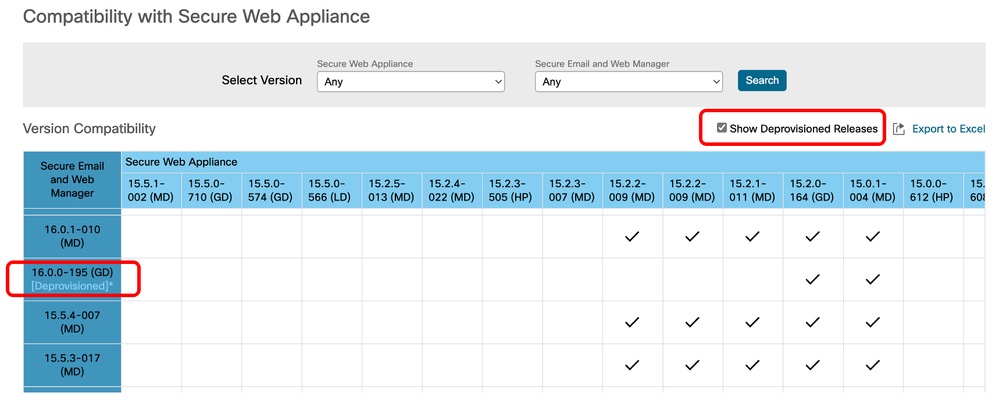 映像 — 已解除布建的版本
將SWA整合到SMA的步驟
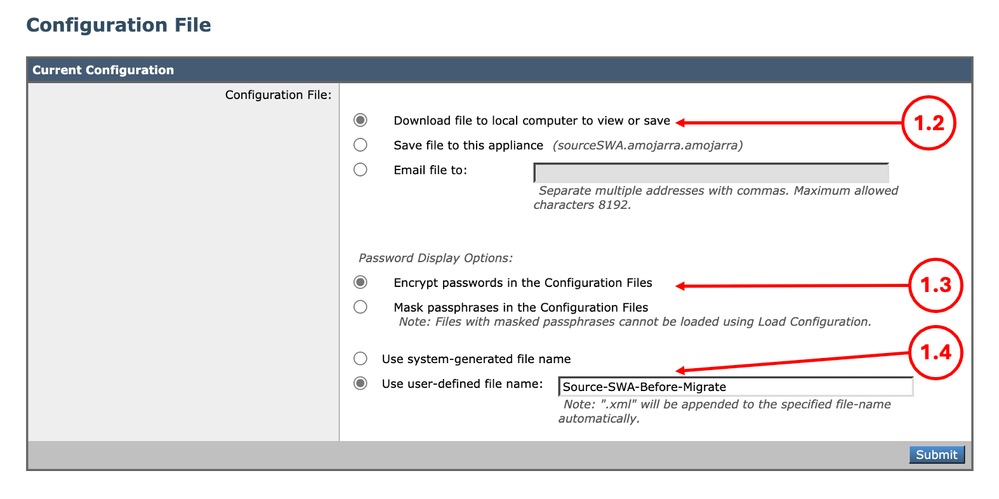
步驟1.從SWA匯出配置檔案 |
1.1.從GUI導航到系統管理,然後選擇配置檔案。 1.2.確保選中Download file to local computer to view or save(將檔案下載到本地電腦檢視或儲存)。 1.3.在「組態檔」中選擇「加密密碼」。 1.4.(可選)選擇配置檔案的名稱。 1.5.按一下Submit。
|
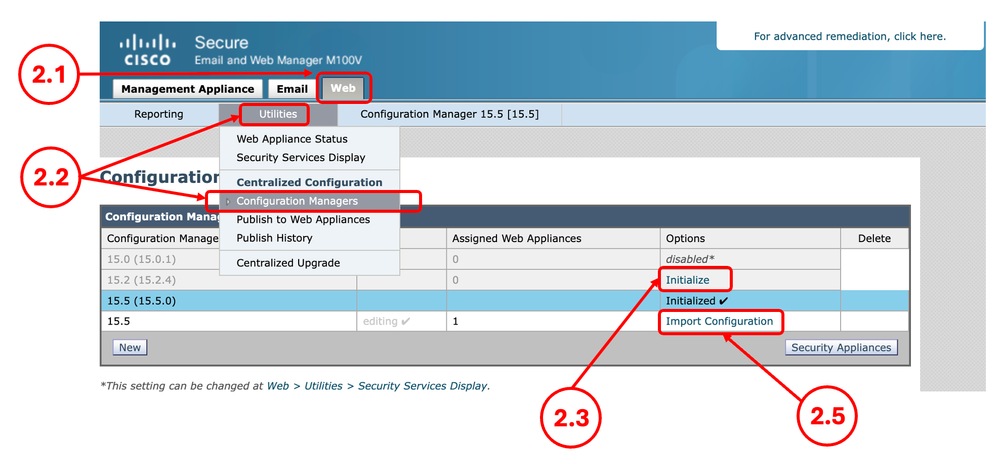
步驟2.建立配置管理器 |
2.1.在SMA GUI中,按一下Web頁籤。 2.2.從實用程式中選擇Configuration Manager。 2.3.如果Configuration Manager尚未初始化,請按一下所需Configuration Manager的Initialize連結,否則跳到步驟2.5。 2.4.選擇使用預設設定,然後選擇初始化。 2.5.為所需的Configuration Manager選擇Import Configuration。
2.6.從選擇配置源中選擇Web Configuration File。 2.7.選擇您在第1步中匯出的配置檔案。
2.8.選擇匯入。 2.9.提交更改。 |
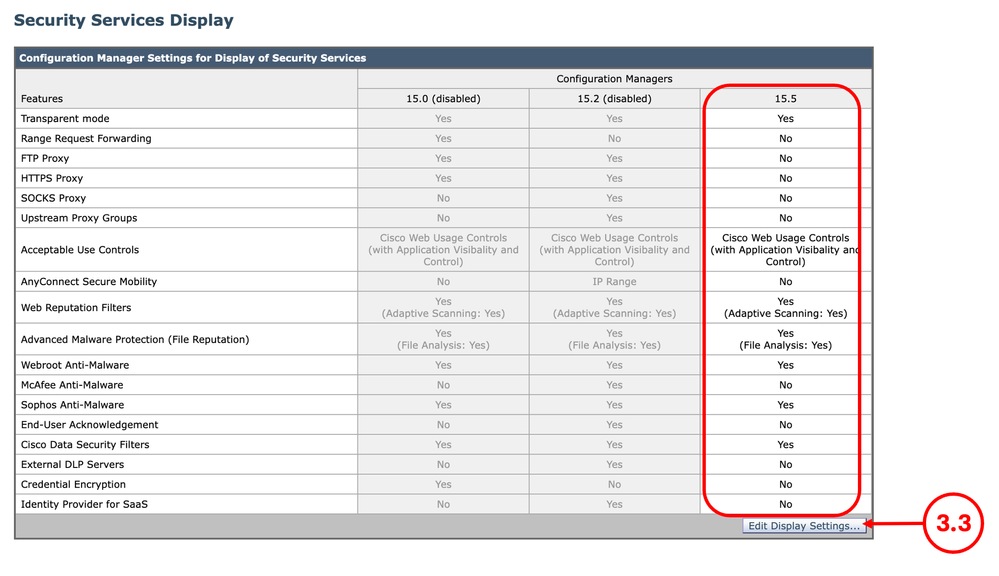
步驟3.配置Manager設定 |
3.1.在SMA GUI中,按一下Web頁籤。 3.2.從實用程式中選擇安全服務顯示。 3.3.確保已正確配置所需的功能,您可以在編輯顯示設定中啟用或禁用這些功能。 3.4.如果進行了任何更改,請提交和提交。
|
步驟4.新增Web裝置 |
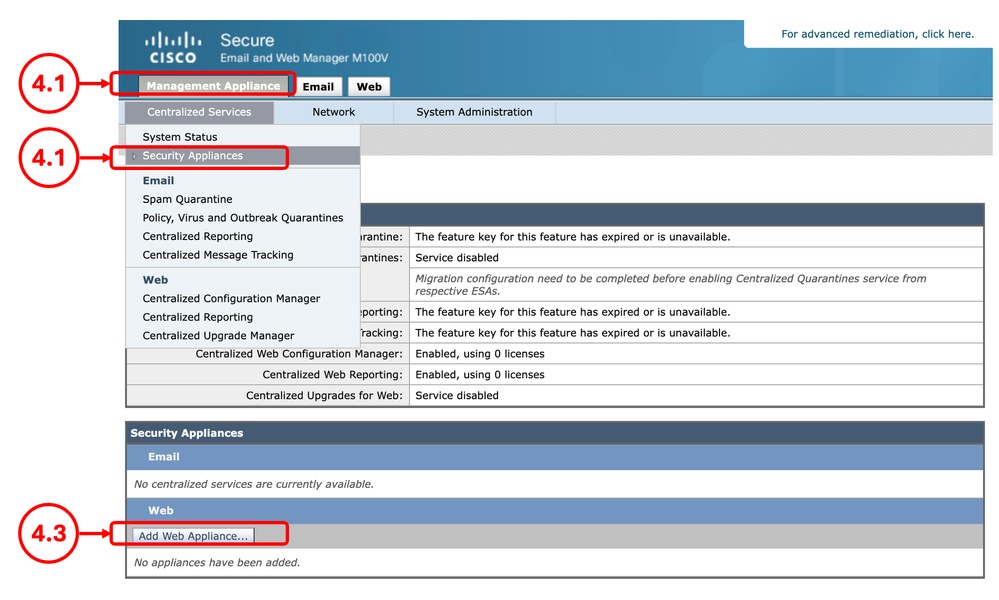
4.1.在SMA GUI中,按一下Management Appliance頁籤。 4.2.從集中服務中選擇安全裝置。 4.3.選擇Add Web Appliance。
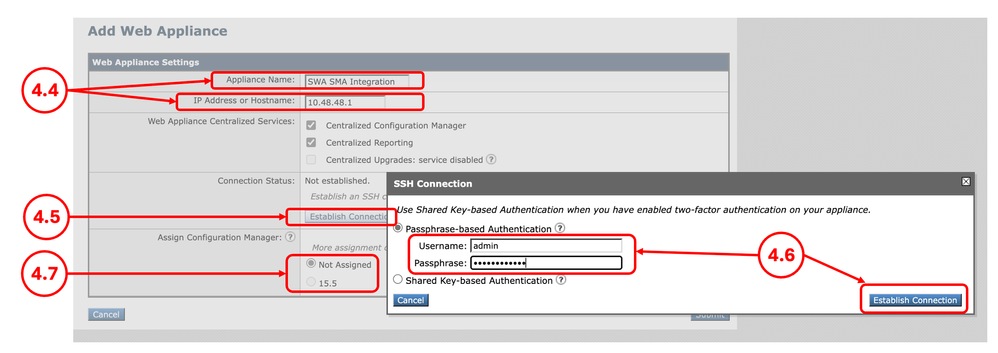
4.4.輸入裝置名稱和IP地址或主機名。 4.5.選擇建立連線。 4.6.輸入Username和Passphrase,然後選擇Establish Connection。 4.7.分配Configuration Manager。
4.8.提交並提交更改。 |
步驟5.驗證整合 |
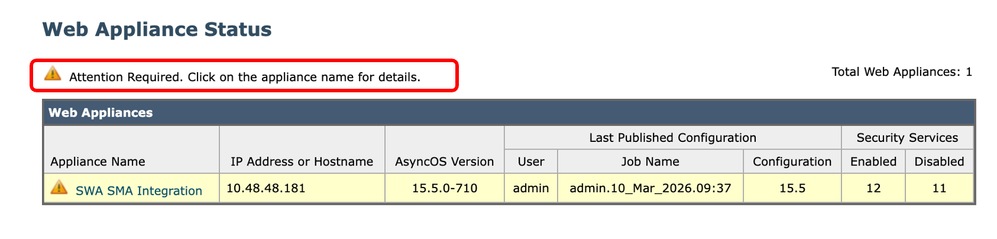
5.1.在SMA GUI中,按一下Web頁籤。 5.2.從實用程式中選擇Web裝置狀態。 5.3.如果您看到注意事項警告消息,請按一下裝置名稱瞭解詳細資訊。按一下SWA的名稱,然後檢視詳細資訊。
|

修復錯誤
集中服務已禁用
當您嘗試選擇集中服務時,如果覈取方塊處於非活動狀態,請按一下問號(?),嚮導將引導您通過路徑來啟用該服務。
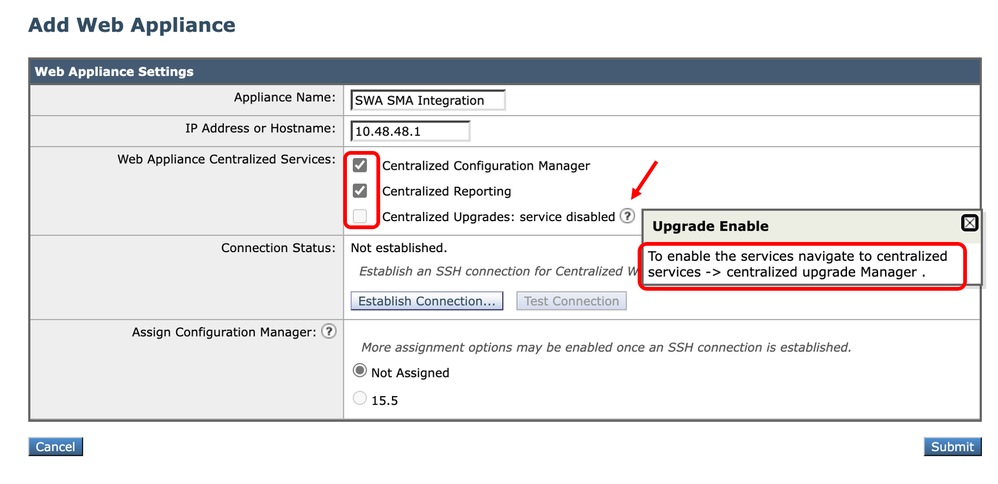 影象 — 集中服務已禁用
IP身份驗證失敗
在將SWA整合到SMA時,如果您收到此錯誤,請確保IP地址或主機名以及憑據正確。
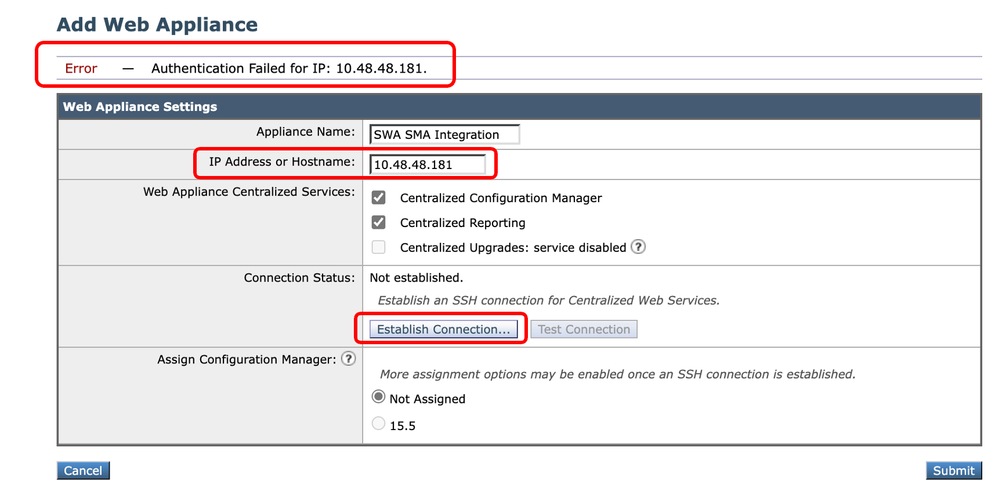 影象 — 身份驗證失敗
在SWA中禁用集中式Web報告
如果SMA配置了集中網路報告,並且您在第4步中將SWA與SMA整合時將該功能分配給SWA,則需要啟用Cisco Centralized Web Reporting:
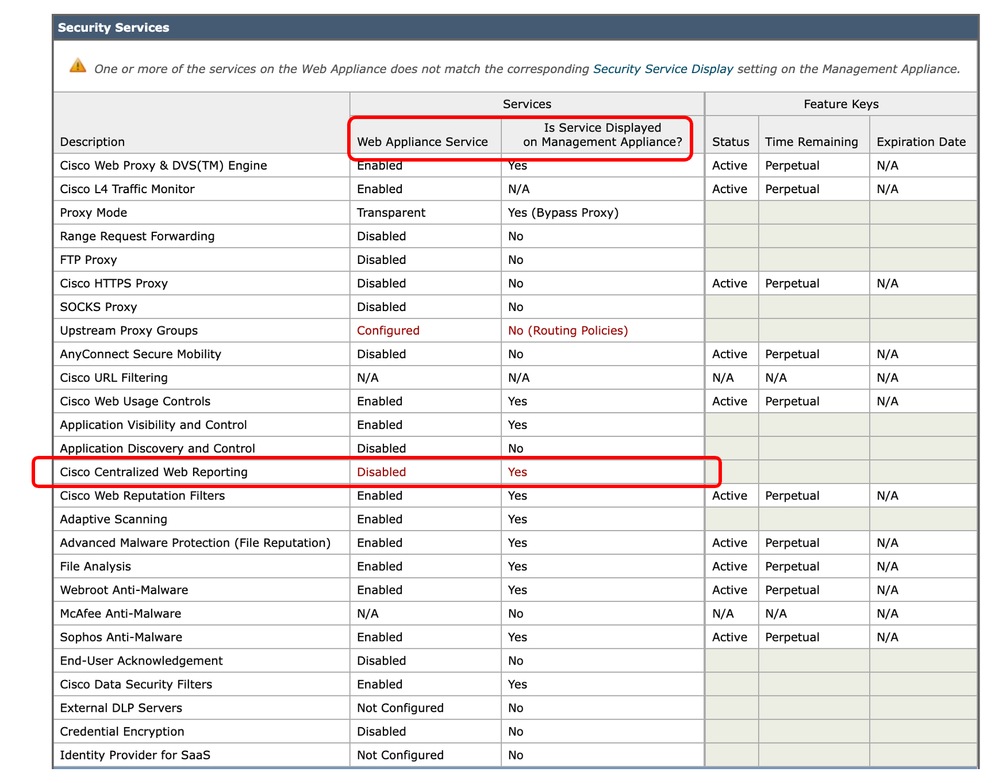 影象 — 在SWA中禁用集中式Web報告
要解決此問題,請從CLI連線到SWA,然後鍵入reportingconfig並選擇CENTRALIZED,完成嚮導以啟用集中報告並提交更改。
SWA_CLI> reportingconfig

Choose the operation you want to perform:
- COUNTERS - Limit counters recorded by the reporting system.
- WEBTRACKINGQUERYTIMEOUT - Timeout value for Webtracking Queries.
- AVERAGEOBJECTSIZE - Average HTTP Object Size used for Bandwidth Savings Calculation.
- WEBEVENTBUCKETING - Enable or Disable web transaction event bucketing.
- CTROBSERVABLE - Enable or Disable CTR observable based indexing.
- CENTRALIZED - Enable/Disable Centralized Reporting for this Secure Web Appliance.
[]> CENTRALIZED

Reporting service status: Local Reporting enabled.  (Show usernames in reports.)

Do you want to enable Centralized Reporting for this appliance? [N]> Y

Do you want to anonymize usernames in reports? [N]> N

Reporting service status: Centralized Reporting enabled.  (Show usernames in reports.)


Choose the operation you want to perform:
- COUNTERS - Limit counters recorded by the reporting system.
- WEBTRACKINGQUERYTIMEOUT - Timeout value for Webtracking Queries.
- AVERAGEOBJECTSIZE - Average HTTP Object Size used for Bandwidth Savings Calculation.
- WEBEVENTBUCKETING - Enable or Disable web transaction event bucketing.
- CTROBSERVABLE - Enable or Disable CTR observable based indexing.
- CENTRALIZED - Enable/Disable Centralized Reporting for this Secure Web Appliance.
[]>

SWA_CLI> commit
此SWA上的URL類別清單早於SMA發佈的清單
如果您正在將配置發佈到SWA並收到指示SWA和SMA中的URL類別清單不相同的錯誤,請確保兩台裝置都能連線到Cisco Update Server,並且updater_logs中沒有錯誤:
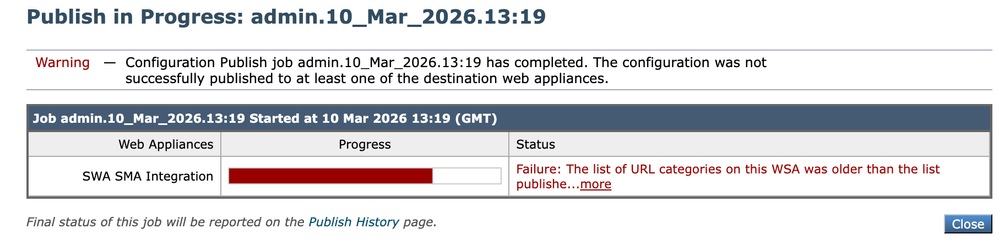 影象 — URL類別清單不匹配
要強制SWA或SMA下載更新,請從CLI鍵入updatenow。
要檢視與更新相關的SMA或SMA日誌,請從CLI鍵入grep 並選擇與updater_logs關聯的編號,然後完成嚮導。
主機金鑰似乎已更改
如果您正在將SWA整合到SMA並收到主機金鑰已更改的錯誤,則這是因為SMA在其金鑰儲存中儲存了同一IP地址的不同主機金鑰。
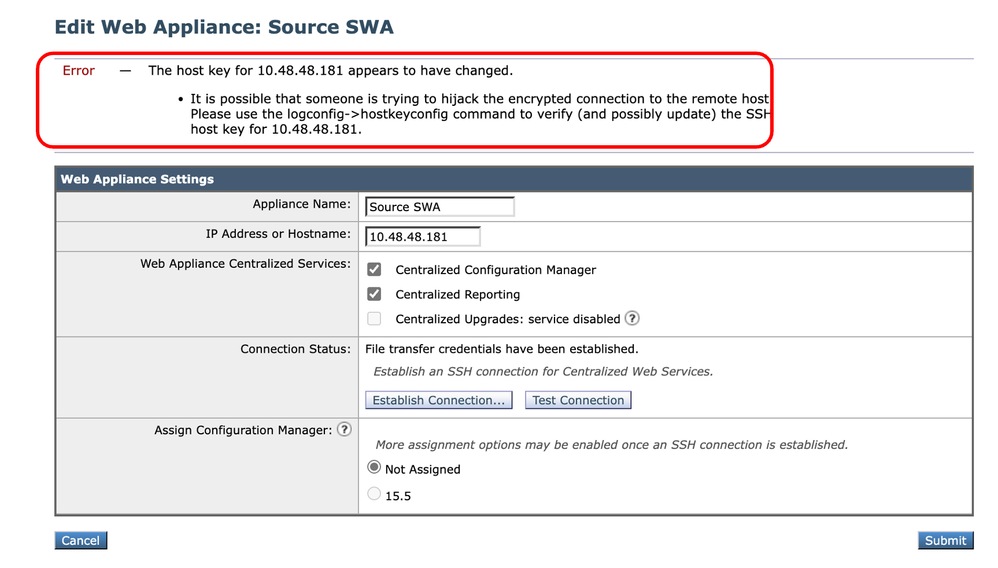 影象 — 主機金鑰似乎已更改
若要修復此錯誤,請登入SMA的CLI,運行logconfig並輸入HOSTKEYCONFIG。鍵入DELETE 並按Enter。然後,選擇與SWA關聯的編號,然後按enter直到嚮導完成。
提交更改:
SMA_CLI> logconfig

Currently configured logs:
    Log Name            Log Type                      Retrieval           Interval
 ---------------------------------------------------------------------------------
 1. aggregatord_logs    Aggregatord Logs              Manual Download     None
 2. authentication      Authentication Logs           Manual Download     None
...

Choose the operation you want to perform:
- NEW - Create a new log.
- EDIT - Modify a log subscription.
- DELETE - Remove a log subscription.
- DELETELOGFILE - Delete log files
- SETUP - General settings.
- LOGHEADERS - Configure headers to log.
- HOSTKEYCONFIG - Configure SSH host keys.
[]> HOSTKEYCONFIG

Currently installed host keys:
1. 10.48.48.182 ssh-rsa AAAAAAAAAAAAAAAAAAAAAAAAAAAAAAAA...ZhW4gEXWE=
2. 10.48.48.181 ssh-rsa BBBBBBBBBBBBBBBBBBBBBBBBBBBBBBBb...4p74b9Q9k=

Choose the operation you want to perform:
- NEW - Add a new key.
- EDIT - Modify a key.
- DELETE - Remove a key.
- SCAN - Automatically download a host key.
- PRINT - Display a key.
- HOST - Display system host keys.
- FINGERPRINT - Display system host key fingerprints.
- USER - Display system user keys.
- REGENERATESCPKEYS - Regenerate SSH Keys for SCP Log Subscription Retrieval.
[]> DELETE

Enter the number of the key you wish to delete.
[]> 2

Currently installed host keys:
1. 10.62.131.143 ssh-rsa AAAAAAAAAAAAAAAAAAAAAAAAAAAAAAAA...ZhW4gEXWE=

...
SMA_CLI> commit
相關資訊
修訂記錄
| 修訂 | 發佈日期 | 意見 |
|---|---|---|
3.0 |
22-Oct-2026
|
重新認證 — 更新的格式 |
2.0 |
29-Jul-2026
|
初始版本 |
1.0 |
24-Mar-2026
|
初始版本 |
 意見
意見