排查機箱配置匯入故障並出現錯誤";存檔檔案不包含所選裝置的配置。使用有效的存檔檔案匯入配置(&Q);

簡介
本檔案介紹對安全防火牆管理中心(FMC)上的多例項機箱組態匯入失敗進行疑難排解。
必要條件
需求
基本產品知識。
採用元件
本文中的資訊是根據特定實驗室環境內的裝置所建立。文中使用到的所有裝置皆從已清除(預設)的組態來啟動。如果您的網路運作中,請確保您瞭解任何指令可能造成的影響。
本文中的資訊係根據以下軟體和硬體版本:
- 多例項模式下的安全防火牆3100、4200
- 思科安全防火牆威脅防禦(FTD)7.4.x、7.6.x、7.7.x和10.0.x
- FMC 7.4.x、7.6.x、7.7.x和10.0.x
背景資訊
在本篇文章中,使用了「相同機箱匯入」和「跨機箱匯入」定義。
- 相同機箱匯入 — 從chassis1匯出的配置將匯入回chassis1。源機箱和目標機箱具有相同的硬體型號(例如CSF 4225),且兩個機箱序列號(SN)匹配。FMC原生支援通過Chassis 列中的Devices > Device Management > Manage或按一下Edit(編輯圖示)> System Configuration 頁籤> Import/Export匯入相同機箱匯入。只要滿足配置指南的匯入或匯出機箱配置部分中記錄的要求,即會如此。
- 跨機箱匯入 — 從機箱1匯出的配置會匯入到機箱2。源機箱和目標機箱具有相同的硬體型號,但序列號(SN)不同。 硬體更換(RMA)是跨機箱匯入的一個示例。
如何驗證機箱序列號?
使用以下選項之一驗證機箱序列號:
- FMC使用者介面:
1.在Devices > Device Management > Manage in the Chassis列,或按一下Edit(edit icon)> Summary頁籤,開啟Hardware Statistics頁籤,並參閱Serial列:
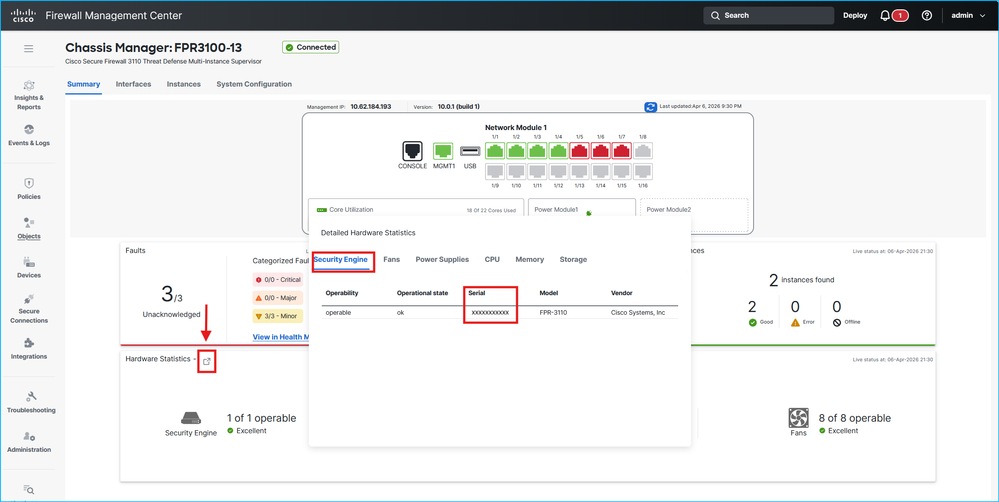 機箱序列號驗證
- FirePOWER可擴展作業系統命令列介面(CLI):
1.使用控制檯或Secure Shell連線登入到機箱。
2.請參閱show chassis inventory命令輸出中的Serial(SN)列:
firepower-3110# show chassis inventory

Chassis    PID             Vendor            Serial (SN) HW Revision
---------- --------------- ----------------- ----------- -----------
         1 FPR-3110        Cisco Systems, In XXXXXXXXXXX 1.0
問題
預設情況下,在運行軟體版本最高為10.0.x的FMC中,跨機箱匯入失敗,並出現錯誤消息「歸檔檔案不包含選定裝置的配置」。使用有效的存檔檔案匯入配置」。 此外,在專家模式下的FMC pigtail命令的輸出中顯示的錯誤與以下行類似:
> expert
$ sudo pigtail all
ACTQ: 10-25 15:19:41 pid=22600 [DEV_CONF_IMP] $VAR1 = {
ACTQ: 10-25 15:19:41 pid=22600           'devices' => {
ACTQ: 10-25 15:19:41 pid=22600                          '1f117d75-7236-4efa-b633-688065cc0311' => undef
ACTQ: 10-25 15:19:41 pid=22600                        },
ACTQ: 10-25 15:19:41 pid=22600           'currentState' => 'FAILED',
ACTQ: 10-25 15:19:41 pid=22600           'file' => {
ACTQ: 10-25 15:19:41 pid=22600                       'state' => 'SFO_UNPACKED'
ACTQ: 10-25 15:19:41 pid=22600                     },
ACTQ: 10-25 15:19:41 pid=22600           'domain' => 'e276abec-e0f2-11e3-8169-6d9ed49b625f',
ACTQ: 10-25 15:19:41 pid=22600           'type' => 'DEVICE_IMPORT',
ACTQ: 10-25 15:19:41 pid=22600           'securityZones' => {},
ACTQ: 10-25 15:19:41 pid=22600           'errorMsg' => 'The archive file does not contain configurations for the selected device. Use a valid archive file to import configurations'
ACTQ: 10-25 15:19:41 pid=22600         };
ACTQ: 10-25 15:19:41 pid=22600 Task failure (8d7e3e98-92e4-11ef-a4e3-030a6e8b1f98) Device Configuration Import : The archive file does not contain configurations for the selected device. Use a valid archive file to import configurations  at /usr/local/sf/lib/perl/5.32.1/SF/EOFileBackup/DeviceImportExportHandlers.pm line 927.
通過可用的變通方法跟蹤2個缺陷中的此問題:
- 思科錯誤ID CSCwn79846
- 思科錯誤ID CSCwn13091
解決方案
未來版本計畫對跨機箱匯入提供本機支援。作為解決方法,請使用以下選項之一:
- 如果執行的軟體版本具有思科錯誤ID CSCwn79846的修正程式,則需要在FMC上使用特殊標誌來支援跨機箱組態匯入。
- 如果執行的軟體版本沒有修正思科錯誤ID CSCwn79846,則需要使用思科錯誤ID CSCwn13091的解決方法來支援跨機箱組態匯入。請參閱Cisco錯誤ID CSCwn13091。
- 請注意,執行思科錯誤ID CSCwn79846或思科錯誤ID CSCwn13091的解決方法步驟會觸發思科錯誤ID CSCwn8067的症狀。
在所有情況下,請聯絡TAC。
相關資訊
- 思科錯誤ID CSCwn79846
- 思科錯誤ID CSCwn13091
- 思科錯誤ID CSCwn80067
修訂記錄
| 修訂 | 發佈日期 | 意見 |
|---|---|---|
1.0 |
07-Apr-2026
|
初始版本 |
 意見
意見