在路由器上配置SSH

簡介
本檔案介紹如何在思科路由器上設定和偵錯安全殼層(SSH)。
必要條件
需求
思科映像或軟體包必須包含對SSH的加密支援。要求因平台、軟體版本和許可模式而異。
採用元件
本檔案中的資訊是根據Cisco IOS和Cisco IOS XE軟體。
本文中的資訊是根據特定實驗室環境內的裝置所建立。文中使用到的所有裝置皆從已清除(預設)的組態來啟動。如果您的網路運作中,請確保您瞭解任何指令可能造成的影響。
網路圖表
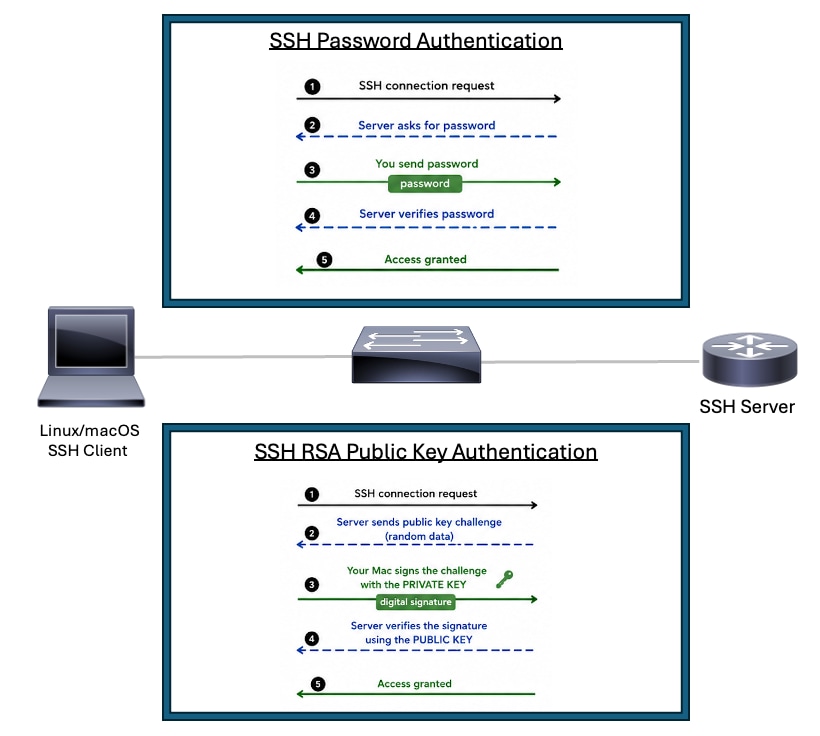 SSH拓撲
SSH拓撲
使用密碼身份驗證在思科路由器上配置SSH
在Cisco路由器上啟用SSH基本支援需要幾個步驟:
1.配置路由器主機名。
2.為SSH身份驗證建立本地使用者帳戶。
3.配置DNS域名。
4.啟用平台支援的最高SSH版本。在支援的情況下使用SSH版本2。
5.生成SSH的RSA金鑰對。使用平台支援的最大RSA模數並與您的安全策略保持一致。
6.進入VTY線路配置模式。
7.配置VTY線路以使用本地使用者資料庫或aaa進行身份驗證。
8.限制VTY僅訪問SSH傳輸。
充當SSH伺服器的Cisco裝置需要主機名、域名、RSA金鑰、身份驗證和VTY配置。僅發起SSH會話的裝置需要SSH客戶端支援以及通往SSH伺服器的有效路由。
Routert#configure terminal
Router(config)#hostname R2
R2(config)#username cisco privilege 15 secret C1sc0
R2(config)#ip domain name rtp.cisco.com
R2(config)#ip ssh version 2
R2(config)#crypto key generate rsa general-keys modulus 4096
R2(config)#line vty 0 4
R2(config-line)#login local
R2(config-line)#transport input ssh
R2(config-line)#end
附註:如果未使用login local,則aaa new-model命令會在沒有其他AAA語句的情況下使用路由器上的本地使用者名稱和密碼。
從另一台路由器進行測試時,可將此命令作為SSH客戶端命令示例。支援的密碼和hmac演算法因軟體版本和SSH策略而異:
R3#ssh -v 2 -l cisco 10.20.20.20
Password:
R2>
使用RSA公鑰身份驗證在思科路由器上配置SSH
RSA公鑰身份驗證允許SSH客戶端向Cisco路由器或交換機進行身份驗證,而無需傳送密碼或依賴於密碼。SSH伺服器儲存公鑰。SSH客戶端保留匹配的私鑰。在登入期間,客戶端通過數位簽章驗證資料來證明它擁有私鑰。伺服器使用裝置上配置的公鑰驗證簽名。私鑰保留在客戶端上,不會通過網路傳輸。
優勢
- 為已配置的使用者消除基於密碼的SSH身份驗證。
- 減少密碼猜測和暴力攻擊的風險。
- 在SSH客戶端上保留私鑰,而不是在網路裝置或自動化系統上儲存可重複使用的密碼。
- 適用於需要安全訪問思科裝置的自動化工具、指令碼和CI/CD系統。
- 提高操作一致性,因為伺服器驗證的是受信任的公鑰而不是鍵入的密碼。
- 支援管理員工作站、跳轉主機和自動化伺服器的更強身份驗證模型。
完成以下步驟,配置SSH伺服器以執行基於RSA公鑰的身份驗證:
1.配置路由器主機名。
2.配置DNS域名。
3.在line vty下啟用AAA或配置登入本地。
4.生成SSH伺服器使用的RSA金鑰對。
5.使用平台支援的最高SSH版本。支援時使用SSHv2。
6.使用平台和安全策略支援的最強RSA模數。當支援並且效能影響可以接受時,最好使用4096位模數。
7.進入SSH公鑰鏈配置模式。
8.配置允許使用RSA公鑰身份驗證進行身份驗證的SSH使用者名稱。
9.從SSH客戶端為該使用者名稱新增RSA公鑰。
附註:您可以使用ssh-keygen命令從Linux/macOS裝置生成SSH公鑰,例如ssh-keygen -m PEM -t rsa -b 1024 -f ~/.ssh/cisco1024,然後您可以使用cat ~/.ssh/cisco1024.pub 命令讀取該金鑰。
Router#configure terminal
Router(config)#hostname RSA-PublicKey
RSA-PublicKey(config)#ip domain name rtp.cisco.com
RSA-PublicKey(config)#aaa new-model
RSA-PublicKey(config)#crypto key generate rsa modulus 4096
The name for the keys will be: RSA-PublicKey.rtp.cisco.com

% The key modulus size is 4096 bits
% Generating 4096 bit RSA keys, keys will be non-exportable...
[OK] (elapsed time was 4 seconds)

RSA-PublicKey(config)#ip ssh version 2
RSA-PublicKey(config)#ip ssh pubkey-chain
RSA-PublicKey(conf-ssh-pubkey)#username ciscoadmin
RSA-PublicKey(conf-ssh-pubkey-user)#key-string
RSA-PublicKey(conf-ssh-pubkey-data)#$QaVSyuVNw== user@MacBook-Pro
RSA-PublicKey(conf-ssh-pubkey-data)#end
RSA-PublicKey#
其他配置集
配置SSH版本2
配置SSH時,請確保SSHv2已啟用,因為它提供了比SSHv1更強大的加密功能以及明顯更好的安全性。
Router(config)#ip ssh version 2防止非 SSH 連線
如要防止非 SSH 的連線,可在該行下方新增 transport input ssh 命令,限制路由器只能使用 SSH 連線。直接(非 SSH)Telnet 會遭到拒絕。
Router(config)#line vty 0 15
Router(config-line)#transport input ssh
限制對子網路的 SSH 存取
您需要將 SSH 連線限制為特定子網路;在該子網路中,應捨棄來自子網外 IP 的所有其他 SSH 嘗試。
您可以按照下列步驟進行相同工作:
- 定義允許來自該特定子網路之流量的存取清單。
- 使用 access-class 限制對 VTY 線路介面的存取。
以下是組態範例。在本例中,僅允許從10.10.10.0/24進行SSH訪問;所有其它源IP地址都被ACL末尾的隱式deny拒絕。
Router(config)#access-list 23 permit 10.10.10.0 0.0.0.255
Router(config)#line vty 0 15
Router(config-line)#transport input ssh
Router(config-line)#access-class 23 in
Router(config-line)#exitbanner 命令輸出內容的變化版本
Telnet 和不同版本 SSH 連線之間的 banner 命令輸出內容有所不同。下表列出不同 banner 命令選項與各種連線類型的運作情形。
| 橫幅命令選項 |
Telnet |
SSH v2 |
| 標語登入 |
在登入裝置前顯示。 |
在登入裝置前顯示。 |
| banner motd |
在登入裝置前顯示。 |
在登入裝置後顯示。 |
| banner exec |
在登入裝置後顯示。 |
在登入裝置後顯示。 |
偵錯和顯示命令
發出debug指令之前,請先參閱瞭解Debug指令的重要資訊。
debug ip ssh - 啟用SSH調試消息。
show ssh - 顯示SSH伺服器連線的狀態。
RSA-PublicKey#show ssh
Connection Version Mode  Encryption  Hmac                          State                Username
0          2.0     IN   aes128-gcm@ohmac-sha2-256-etm@openssh.com Session started       ciscoadmin
0          2.0     OUT  aes128-gcm@ohmac-sha2-256-etm@openssh.com Session started       ciscoadmin
show ip ssh - 顯示SSH的版本和配置資料。
RSA-PublicKey#show ip ssh
SSH Enabled - version 2.0
Authentication methods:publickey,keyboard-interactive,password
Authentication Publickey Algorithms:ssh-rsa,ecdsa-sha2-nistp256,ecdsa-sha2-nistp384,ecdsa-sha2-nistp521,ssh-ed25519,x509v3-ecdsa-sha2-nistp256,x509v3-ecdsa-sha2-nistp384,x509v3-ecdsa-sha2-nistp521,rsa-sha2-256,rsa-sha2-512,x509v3-rsa2048-sha256
Hostkey Algorithms:rsa-sha2-512,rsa-sha2-256,ssh-rsa
Encryption Algorithms:chacha20-poly1305@openssh.com,aes128-gcm@openssh.com,aes256-gcm@openssh.com,aes128-gcm,aes256-gcm,aes128-ctr,aes192-ctr,aes256-ctr
MAC Algorithms:hmac-sha2-256-etm@openssh.com,hmac-sha2-512-etm@openssh.com
KEX Algorithms:curve25519-sha256,curve25519-sha256@libssh.org,ecdh-sha2-nistp256,ecdh-sha2-nistp384,ecdh-sha2-nistp521,diffie-hellman-group14-sha256,diffie-hellman-group16-sha512
Authentication timeout: 120 secs; Authentication retries: 3
調試RSA公共身份驗證示例
SSH客戶端調試(Linux/macOS)
ciscouser@CISCOUSER-M-R Desktop % ssh -i ~/.ssh/cisco1024 -v ciscoadmin@10.82.139.71
debug1: OpenSSH_10.2p1, LibreSSL 3.3.6
debug1: Reading configuration data /etc/ssh/ssh_config
debug1: Reading configuration data /etc/ssh/ssh_config.d/100-macos.conf
debug1: /etc/ssh/ssh_config.d/100-macos.conf line 1: Applying options for *
debug1: Reading configuration data /etc/ssh/crypto.conf
debug1: Authenticator provider $SSH_SK_PROVIDER did not resolve; disabling
debug1: Connecting to 10.82.139.71 [10.82.139.71] port 22.
debug1: Connection established.
debug1: loaded pubkey from /Users/ciscouser/.ssh/cisco1024: RSA SHA256:w5wW3BqX15fO5Qm+BP75tJ1YzaXNsDNeHLLNZTW+Roo
debug1: identity file /Users/ciscouser/.ssh/cisco1024 type 0
debug1: no identity pubkey loaded from /Users/ciscouser/.ssh/cisco1024
debug1: Local version string SSH-2.0-OpenSSH_10.2
debug1: Remote protocol version 2.0, remote software version Cisco-1.25
debug1: compat_banner: match: Cisco-1.25 pat Cisco-1.* compat 0x60000000
debug1: Authenticating to 10.82.139.71:22 as 'ciscoadmin'
debug1: load_hostkeys: fopen /Users/ciscouser/.ssh/known_hosts2: No such file or directory
debug1: load_hostkeys: fopen /etc/ssh/ssh_known_hosts: No such file or directory
debug1: load_hostkeys: fopen /etc/ssh/ssh_known_hosts2: No such file or directory
debug1: SSH2_MSG_KEXINIT sent
debug1: SSH2_MSG_KEXINIT received
debug1: kex: algorithm: ecdh-sha2-nistp256
debug1: kex: host key algorithm: rsa-sha2-512
debug1: kex: server->client cipher: aes128-gcm@openssh.com MAC:  compression: none
debug1: kex: client->server cipher: aes128-gcm@openssh.com MAC:  compression: none
debug1: expecting SSH2_MSG_KEX_ECDH_REPLY
debug1: SSH2_MSG_KEX_ECDH_REPLY received
debug1: Server host key: ssh-rsa SHA256:5wvYU0FIJQmz+eHACVJMvoaX3WSgXkyem/3tOgyOYuQ
debug1: load_hostkeys: fopen /Users/ciscouser/.ssh/known_hosts2: No such file or directory
debug1: load_hostkeys: fopen /etc/ssh/ssh_known_hosts: No such file or directory
debug1: load_hostkeys: fopen /etc/ssh/ssh_known_hosts2: No such file or directory
debug1: Host '10.82.139.71' is known and matches the RSA host key.
debug1: Found key in /Users/ciscouser/.ssh/known_hosts:2
debug1: rekey out after 4294967296 blocks
debug1: SSH2_MSG_NEWKEYS sent
debug1: expecting SSH2_MSG_NEWKEYS
debug1: SSH2_MSG_NEWKEYS received
debug1: rekey in after 4294967296 blocks
debug1: SSH2_MSG_EXT_INFO received
debug1: kex_ext_info_client_parse: server-sig-algs=
debug1: SSH2_MSG_SERVICE_ACCEPT received debug1: Authentications that can continue: publickey,keyboard-interactive,password
debug1: Next authentication method: publickey
debug1: get_agent_identities: bound agent to hostkey
debug1: get_agent_identities: ssh_fetch_identitylist: agent contains no identities
debug1: Will attempt key: /Users/ciscouser/.ssh/cisco1024 RSA SHA256:w5wW3BqX15fO5Qm+BP75tJ1YzaXNsDNeHLLNZTW+Roo explicit debug1: Offering public key: /Users/ciscouser/.ssh/cisco1024 RSA SHA256:w5wW3BqX15fO5Qm+BP75tJ1YzaXNsDNeHLLNZTW+Roo explicit debug1: Server accepts key: /Users/ciscouser/.ssh/cisco1024 RSA SHA256:w5wW3BqX15fO5Qm+BP75tJ1YzaXNsDNeHLLNZTW+Roo explicit Enter passphrase for key '/Users/ciscouser/.ssh/cisco1024': Authenticated to 10.82.139.71 ([10.82.139.71]:22) using "publickey".
debug1: channel 0: new session [client-session] (inactive timeout: 0)
debug1: Entering interactive session.
debug1: pledge: filesystem
debug1: Sending environment.
debug1: channel 0: setting env LANG = "C.UTF-8"
debug1: channel 0: setting env LC_CTYPE = "UTF-8"
RSA-PublicKey>en Password:
RSA-PublicKey#show version
Cisco IOS XE Software, Version 17.12.04
Cisco IOS Software [Dublin], ASR1000 Software (X86_64_LINUX_IOSD-UNIVERSALK9-M), Version 17.12.4, RELEASE SOFTWARE (fc3)
Technical Support: http://www.cisco.com/techsupport
Copyright (c) 1986-2024 by Cisco Systems, Inc.
Compiled Tue 23-Jul-24 09:43 by mcpre


Cisco IOS-XE software, Copyright (c) 2005-2024 by cisco Systems, Inc.
All rights reserved.  Certain components of Cisco IOS-XE software are
licensed under the GNU General Public License ("GPL") Version 2.0.  The
software code licensed under GPL Version 2.0 is free software that comes
with ABSOLUTELY NO WARRANTY.  You can redistribute and/or modify such
GPL code under the terms of GPL Version 2.0.  For more details, see the
documentation or "License Notice" file accompanying the IOS-XE software,
or the applicable URL provided on the flyer accompanying the IOS-XE
software.


ROM: 17.3(1r)

RSA-PublicKey uptime is 2 weeks, 2 days, 10 hours, 28 minutes
Uptime for this control processor is 2 weeks, 2 days, 10 hours, 30 minutes
System returned to ROM by Reload Command
System image file is "bootflash:asr1000-universalk9.17.12.04.SPA.bin"
Last reload reason: Reload Command


This product contains cryptographic features and is subject to United
States and local country laws governing import, export, transfer and
use. Delivery of Cisco cryptographic products does not imply
third-party authority to import, export, distribute or use encryption.
Importers, exporters, distributors and users are responsible for
compliance with U.S. and local country laws. By using this product you
agree to comply with applicable laws and regulations. If you are unable
to comply with U.S. and local laws, return this product immediately.

A summary of U.S. laws governing Cisco cryptographic products may be found at:
http://www.cisco.com/wwl/export/crypto/tool/stqrg.html

If you require further assistance please contact us by sending email to
export@cisco.com.

License Type: Smart License is permanent
License Suite: AdvUCSuiteK9
Next reload License Suite: AdvUCSuiteK9

The current crypto throughput level is 20000000 kbps


Smart Licensing Status: Smart Licensing Using Policy

cisco ASR1001-HX (1SR) processor (revision 1SR) with 3684784K/6147K bytes of memory.
Processor board ID TKM20160032
Router operating mode: Autonomous
Crypto Hardware Module present
8 Gigabit Ethernet interfaces
8 Ten Gigabit Ethernet interfaces
32768K bytes of non-volatile configuration memory.
8388608K bytes of physical memory.
29401087K bytes of eUSB flash at bootflash:.

Configuration register is 0x2102

RSA-PublicKey#exit debug1: client_input_channel_req: channel 0 rtype exit-status reply 0 debug1: channel 0: free: client-session, nchannels 1 Connection to 10.82.139.71 closed by remote host. Connection to 10.82.139.71 closed.
Transferred: sent 3640, received 6336 bytes, in 114.1 seconds
Bytes per second: sent 31.9, received 55.5
debug1: Exit status 0
SSH伺服器偵錯(思科路由器)
RSA-PublicKey#show logging
Syslog logging: enabled (0 messages dropped, 3 messages rate-limited, 0 flushes, 0 overruns, xml disabled, filtering disabled)

No Active Message Discriminator.


No Inactive Message Discriminator.


    Console logging: disabled
    Monitor logging: level debugging, 0 messages logged, xml disabled,
                     filtering disabled
    Buffer logging:  level debugging, 617 messages logged, xml disabled,
                    filtering disabled
    Exception Logging: size (4096 bytes)
    Count and timestamp logging messages: disabled
    Persistent logging: disabled

No active filter modules.

    Trap logging: level informational, 161 message lines logged
        Logging Source-Interface:       VRF Name:
    TLS Profiles:

Log Buffer (102400 bytes):

*Aug 22 06:05:51.736: SSH2 0: ssh_receive: 36 bytes received
*Aug 22 06:05:58.163: SSH0: starting SSH control process
*Aug 22 06:05:58.163: SSH0: sent protocol version id SSH-2.0-Cisco-1.25
*Aug 22 06:05:58.165: SSH0: protocol version id is - SSH-2.0-OpenSSH_10.2
*Aug 22 06:05:58.165: SSH2 0:
ssh2_server_key_exchange: kexinit sent: kex algo = curve25519-sha256,curve25519-sha256@libssh.org,ecdh-sha2-nistp256,ecdh-sha2-nistp384,ecdh-sha2-nistp521,diffie-hellman-group14-sha256,diffie-hellman-group16-sha512
*Aug 22 06:05:58.165: SSH2 0: kexinit sent: hostkey algo = rsa-sha2-512,rsa-sha2-256,ssh-rsa
*Aug 22 06:05:58.165: SSH2 0: kexinit sent: encryption algo = chacha20-poly1305@openssh.com,aes128-gcm@openssh.com,aes256-gcm@openssh.com,aes128-gcm,aes256-gcm,aes128-ctr,aes192-ctr,aes256-ctr
*Aug 22 06:05:58.165: SSH2 0: kexinit sent: mac algo = hmac-sha2-256-etm@openssh.com,hmac-sha2-512-etm@openssh.com
*Aug 22 06:05:58.165: SSH2 0: send:packet of  length 656 (length also includes padlen of 7)
*Aug 22 06:05:58.165: SSH2 0: SSH2_MSG_KEXINIT sent
*Aug 22 06:05:58.239: SSH2 0: ssh_receive: 1300 bytes received
*Aug 22 06:05:58.239: SSH2 0: input: total packet length of 1568 bytes
*Aug 22 06:05:58.239: SSH2 0: partial packet length(block_size)8 bytes,
            needed 1560 bytes, maclen 0
*Aug 22 06:05:58.239: SSH2 0: input: padlength 4 bytes
*Aug 22 06:05:58.239: SSH2 0: SSH2_MSG_KEXINIT received
*Aug 22 06:05:58.239: SSH2 0: kex: client->server enc:aes128-gcm@openssh.com mac:hmac-sha2-256-etm@openssh.com
*Aug 22 06:05:58.239: SSH2 0: kex: server->client enc:aes128-gcm@openssh.com mac:hmac-sha2-256-etm@openssh.com
*Aug 22 06:05:58.239: SSH2 0: Using kex_algo = ecdh-sha2-nistp256
*Aug 22 06:05:58.242: SSH2 0: kexecdh_server: expecting SSH2_MSG_KEX_ECDH_INIT
*Aug 22 06:05:58.312: SSH2 0: ssh_receive: 80 bytes received
*Aug 22 06:05:58.312: SSH2 0: input: total packet length of 80 bytes
*Aug 22 06:05:58.312: SSH2 0: partial packet length(block_size)8 bytes,
            needed 72 bytes, maclen 0
*Aug 22 06:05:58.312: SSH2 0: input: padlength 5 bytes
*Aug 22 06:05:58.312: ssh2_calculate_modulus_length: modulus len 32
*Aug 22 06:05:58.312: SSH2 0: kexecdh_server: Calculated shared secret len 32
*Aug 22 06:05:58.333: SSH2 0: send:packet of  length 1160 (length also includes padlen of 10)
*Aug 22 06:05:58.333: SSH2: kex_derive_keys complete
*Aug 22 06:05:58.333: SSH2 0: send:packet of  length 16 (length also includes padlen of 10)
*Aug 22 06:05:58.333: SSH2 0: newkeys: mode 1
*Aug 22 06:05:58.333: SSH2: AES-GCM key initialized
*Aug 22 06:05:58.333: SSH2 0: SSH2_MSG_NEWKEYS sent
*Aug 22 06:05:58.333: SSH2 0: Preparing SSH2_MSG_EXT_INFO server-sig-algs
*Aug 22 06:05:58.333: SSH2 0: send:packet of  length 260 (length also includes padlen of 19)
*Aug 22 06:05:58.333: SSH2 0: SSH2_MSG_EXT_INFO sent
*Aug 22 06:05:58.333: SSH2 0: waiting for SSH2_MSG_NEWKEYS
*Aug 22 06:05:58.411: SSH2 0: ssh_receive: 16 bytes received
*Aug 22 06:05:58.411: SSH2 0: input: total packet length of 16 bytes
*Aug 22 06:05:58.411: SSH2 0: partial packet length(block_size)8 bytes,
            needed 8 bytes, maclen 0
*Aug 22 06:05:58.411: SSH2 0: input: padlength 10 bytes
*Aug 22 06:05:58.411: SSH2 0: newkeys: mode 0
*Aug 22 06:05:58.411: SSH2: AES-GCM key initialized
*Aug 22 06:05:58.411: SSH2 0: SSH2_MSG_NEWKEYS received
*Aug 22 06:05:58.411: %SSH-5-SSH2_SESSION: SSH2 Session request from 10.189.3.9 (tty = 0) using crypto cipher 'aes128-gcm@openssh.com', hmac 'hmac-sha2-256-etm@openssh.com' Succeeded
*Aug 22 06:05:58.604: SSH2 0: ssh_receive: 52 bytes received
*Aug 22 06:05:58.604: SSH2 0: input: total packet length of 36 bytes
*Aug 22 06:05:58.604: SSH2 0: partial packet length(block_size)16 bytes,
            needed 32 bytes, maclen 0
*Aug 22 06:05:58.604: SSH2 0: input: padlength 14 bytes
*Aug 22 06:05:58.604: SSH2 0: send:packet of  length 36 (length also includes padlen of 14)
*Aug 22 06:05:58.604: SSH2 0: Authentications that can continue = publickey,keyboard-interactive,password
*Aug 22 06:05:58.677: SSH2 0: ssh_receive: 68 bytes received
*Aug 22 06:05:58.677: SSH2 0: input: total packet length of 52 bytes
*Aug 22 06:05:58.677: SSH2 0: partial packet length(block_size)16 bytes,
            needed 48 bytes, maclen 0
*Aug 22 06:05:58.677: SSH2 0: input: padlength 6 bytes
*Aug 22 06:05:58.677: SSH2 0: Using method = none
*Aug 22 06:05:58.677: SSH2 0: Authentications that can continue = publickey,keyboard-interactive,password
*Aug 22 06:05:58.677: SSH2 0: send:packet of  length 68 (length also includes padlen of 18)
*Aug 22 06:05:58.755: SSH2 0: ssh_receive: 244 bytes received
*Aug 22 06:05:58.755: SSH2 0: input: total packet length of 228 bytes
*Aug 22 06:05:58.755: SSH2 0: partial packet length(block_size)16 bytes,
            needed 224 bytes, maclen 0
*Aug 22 06:05:58.755: SSH2 0: input: padlength 5 bytes
*Aug 22 06:05:58.755: SSH2 0: Using method = publickey *Aug 22 06:05:58.755: SSH2 0: Received publickey algo = rsa-sha2-512 *Aug 22 06:05:58.755: SSH2 0: Got Publickey algo = 9 *Aug 22 06:05:58.755: SSH2 0: ssh2_validate_pubkey: Verifying pubkey blob is acceptable for 'ciscoadmin' in SSH2_MSG_USERAUTH_REQUEST
*Aug 22 06:05:58.755: SSH2 0: send:packet of  length 196 (length also includes padlen of 19)
*Aug 22 06:05:58.755: SSH2 0: ssh2_validate_pubkey: Authenticating 'ciscoadmin' with method: publickey
*Aug 22 06:06:02.615: SSH2 0: ssh_receive: 404 bytes received
*Aug 22 06:06:02.615: SSH2 0: input: total packet length of 388 bytes
*Aug 22 06:06:02.615: SSH2 0: partial packet length(block_size)16 bytes,
            needed 384 bytes, maclen 0
*Aug 22 06:06:02.615: SSH2 0: input: padlength 13 bytes
*Aug 22 06:06:02.615: SSH2 0: ssh2_verify_pubkey_sign: Verifying signature for user 'ciscoadmin' in SSH2_MSG_USERAUTH_REQUEST *Aug 22 06:06:02.615: SSH2 0: ssh2_blob_to_key: Got blob_public key ssh-rsa, blob_key_type 1, publickey_algo_type 9 *Aug 22 06:06:02.616: SSH2 0: ssh2_verify_pubkey_sign: Client Signature Verification PASSED
*Aug 22 06:06:02.616: SSH2 0: passed: Pubkey Authentication ssh2_authenticate_pubkey for user 'ciscoadmin'
*Aug 22 06:06:02.616: SSH2 0: send:packet of  length 20 (length also includes padlen of 14)
*Aug 22 06:06:02.617: SSH2 0: authentication successful for ciscoadmin
*Aug 22 06:06:02.617: %SEC_LOGIN-5-LOGIN_SUCCESS: Login Success [user: ciscoadmin] [Source: 10.189.3.9] [localport: 22] at 06:06:02 UTC Fri Aug 22 2014 *Aug 22 06:06:02.617: %SSH-5-SSH2_USERAUTH: User 'ciscoadmin' authentication for SSH2 Session from 10.189.3.9 (tty = 0) using crypto cipher 'aes128-gcm@openssh.com', hmac 'hmac-sha2-256-etm@openssh.com' Succeeded
*Aug 22 06:06:02.617:  SSH: bulk-mode applying server configs
*Aug 22 06:06:02.617:  SSH: bulk_mode applied server configs
組態不正確
以下提供幾個設定錯誤所產生的偵錯輸出內容範例。
密碼錯誤
路由器偵錯
*Jul 29 23:45:34.428: SSH2 0: input: padlength 9 bytes
*Jul 29 23:45:34.465: SSH0: password authentication failed for cisco
*Jul 29 23:45:36.465: SSH2 0: Authentications that can continue = publickey,keyboard-interactive,password
*Jul 29 23:45:36.465: SSH2 0: send:packet of  length 60 (length also includes padlen of 10)
*Jul 29 23:45:39.444: SSH2 0: ssh_receive: 64 bytes received
*Jul 29 23:45:39.444: SSH2 0: input: total packet length of 60 bytes
*Jul 29 23:45:39.444: SSH2 0: partial packet length(block_size)8 bytes,
            needed 56 bytes, maclen 0
*Jul 29 23:45:39.444: SSH2 0: input: padlength 5 bytes
*Jul 29 23:45:39.444: SSH2 0: Using method = password
*Jul 29 23:45:39.482: SSH0: password authentication failed for cisco *Jul 29 23:45:39.483: SSH0: AAA authentication fail reason: Password: *Jul 29 23:45:41.483: SSH2 0: authentication failed for userid (code=1) *Jul 29 23:45:41.484: %SSH-5-SSH2_USERAUTH: User '' authentication for SSH2 Session from 192.168.1.2 (tty = 0) using crypto cipher 'chacha20-poly1305@openssh.com', hmac 'hmac-sha2-512' Failed *Jul 29 23:45:41.484: %SSH-5-SSH2_CLOSE: SSH2 Session from 192.168.1.2 (tty = 0) for user '' using crypto cipher 'chacha20-poly1305@openssh.com', hmac 'hmac-sha2-512' closed *Jul 29 23:45:41.584: SSH0: Session disconnected - error 0x09
SSH客戶端傳送不支援的密碼
路由器偵錯
R2#
*Jul 29 23:43:00.126: SSH0: starting SSH control process
*Jul 29 23:43:00.126: SSH0: sent protocol version id SSH-2.0-Cisco-1.25
*Jul 29 23:43:00.129: SSH0: protocol version id is - SSH-2.0-Cisco-1.25
*Jul 29 23:43:00.129: SSH2 0:
ssh2_server_key_exchange: kexinit sent: kex algo = curve25519-sha256,curve25519-sha256@libssh.org,ecdh-sha2-nistp256,ecdh-sha2-nistp384,ecdh-sha2-nistp521,diffie-hellman-group14-sha256,diffie-hellman-group16-sha512,kex-strict-s-v00@openssh.com
*Jul 29 23:43:00.129: SSH2 0: Host-Key not configured. Skipping algo = ecdsa-sha2-nistp256
*Jul 29 23:43:00.129: SSH2 0: Host-Key not configured. Skipping algo = ecdsa-sha2-nistp384
*Jul 29 23:43:00.129: SSH2 0: Host-Key not configured. Skipping algo = ecdsa-sha2-nistp521
*Jul 29 23:43:00.129: SSH2 0: kexinit sent: hostkey algo = rsa-sha2-512,rsa-sha2-256
*Jul 29 23:43:00.129: SSH2 0: kexinit sent: encryption algo = chacha20-poly1305@openssh.com,aes128-gcm@openssh.com,aes256-gcm@openssh.com,aes128-gcm,aes256-gcm,aes128-ctr,aes192-ctr,aes256-ctr
*Jul 29 23:43:00.130: SSH2 0: kexinit sent: mac algo = hmac-sha2-256-etm@openssh.com,hmac-sha2-512-etm@openssh.com,hmac-sha2-256,hmac-sha2-512
*Jul 29 23:43:00.130: SSH2 0: send:packet of  length 736 (length also includes padlen of 10)
*Jul 29 23:43:00.130: SSH2 0: SSH2_MSG_KEXINIT sent
*Jul 29 23:43:00.131: SSH2 0: ssh_receive: 64 bytes received
*Jul 29 23:43:00.131: SSH2 0: input: total packet length of 424 bytes
*Jul 29 23:43:00.131: SSH2 0: partial packet length(block_size)8 bytes,
            needed 416 bytes, maclen 0
*Jul 29 23:43:00.131: SSH2 0: input: padlength 10 bytes
*Jul 29 23:43:00.131: SSH2 0: SSH2_MSG_KEXINIT received
*Jul 29 23:43:00.131: SSH2 0: strict kex is enabled
*Jul 29 23:43:00.131: %SSH-3-NO_MATCH: No matching cipher found: client 3des-cbc server chacha20-poly1305@openssh.com,aes128-gcm@openssh.com,aes256-gcm@openssh.com,aes128-gcm,aes256-gcm,aes128-ctr,aes192-ctr,aes256-ctr *Jul 29 23:43:00.131: %SSH-5-SSH2_SESSION: SSH2 Session request from 192.168.1.2 (tty = 0) using crypto cipher '', hmac '' Failed *Jul 29 23:43:00.131: %SSH-5-SSH2_CLOSE: SSH2 Session from 192.168.1.2 (tty = 0) for user '' using crypto cipher '', hmac '' closed *Jul 29 23:43:00.232: SSH0: Session disconnected - error 0x07
SSH客戶端傳送不受支援的HMAC
路由器偵錯
R2#
*Jul 29 23:36:06.824: %SYS-4-LOG_CLEARED: Logging buffer was cleared by user Unknown
*Jul 29 23:36:11.418: SSH0: starting SSH control process
*Jul 29 23:36:11.418: SSH0: sent protocol version id SSH-2.0-Cisco-1.25
*Jul 29 23:36:11.421: SSH0: protocol version id is - SSH-2.0-Cisco-1.25
*Jul 29 23:36:11.421: SSH2 0:
ssh2_server_key_exchange: kexinit sent: kex algo = curve25519-sha256,curve25519-sha256@libssh.org,ecdh-sha2-nistp256,ecdh-sha2-nistp384,ecdh-sha2-nistp521,diffie-hellman-group14-sha256,diffie-hellman-group16-sha512,kex-strict-s-v00@openssh.com
*Jul 29 23:36:11.421: SSH2 0: Host-Key not configured. Skipping algo = ecdsa-sha2-nistp256
*Jul 29 23:36:11.421: SSH2 0: Host-Key not configured. Skipping algo = ecdsa-sha2-nistp384
*Jul 29 23:36:11.421: SSH2 0: Host-Key not configured. Skipping algo = ecdsa-sha2-nistp521
*Jul 29 23:36:11.421: SSH2 0: kexinit sent: hostkey algo = rsa-sha2-512,rsa-sha2-256
*Jul 29 23:36:11.421: SSH2 0: kexinit sent: encryption algo = chacha20-poly1305@openssh.com,aes128-gcm@openssh.com,aes256-gcm@openssh.com,aes128-gcm,aes256-gcm,aes128-ctr,aes192-ctr,aes256-ctr
*Jul 29 23:36:11.421: SSH2 0: kexinit sent: mac algo = hmac-sha2-256-etm@openssh.com,hmac-sha2-512-etm@openssh.com,hmac-sha2-256,hmac-sha2-512
*Jul 29 23:36:11.421: SSH2 0: send:packet of  length 736 (length also includes padlen of 10)
*Jul 29 23:36:11.421: SSH2 0: SSH2_MSG_KEXINIT sent
*Jul 29 23:36:11.421: SSH2 0: ssh_receive: 64 bytes received
*Jul 29 23:36:11.421: SSH2 0: input: total packet length of 416 bytes
*Jul 29 23:36:11.421: SSH2 0: partial packet length(block_size)8 bytes,
            needed 408 bytes, maclen 0
*Jul 29 23:36:11.422: SSH2 0: ssh_receive: 64 bytes received
*Jul 29 23:36:11.422: SSH2 0: partial packet length(block_size)8 bytes,
            needed 408 bytes, maclen 0
*Jul 29 23:36:11.422: SSH2 0: input: padlength 6 bytes
*Jul 29 23:36:11.422: SSH2 0: SSH2_MSG_KEXINIT received
*Jul 29 23:36:11.423: SSH2 0: strict kex is enabled
*Jul 29 23:36:11.423: %SSH-3-NO_MATCH: No matching mac found: client hmac-sha1 server hmac-sha2-256-etm@openssh.com,hmac-sha2-512-etm@openssh.com,hmac-sha2-256,hmac-sha2-512 *Jul 29 23:36:11.423: %SSH-5-SSH2_SESSION: SSH2 Session request from 192.168.1.2 (tty = 0) using crypto cipher '', hmac '' Failed *Jul 29 23:36:11.423: %SSH-5-SSH2_CLOSE: SSH2 Session from 192.168.1.2 (tty = 0) for user '' using crypto cipher '', hmac '' closed *Jul 29 23:36:11.523: SSH0: Session disconnected - error 0x07
錯誤「%SSH-3-PRIVATEKEY:」無法檢索RSA私鑰」
變更網域或主機名稱可能會觸發此錯誤訊息。嘗試以下解決方法:
-
將 RSA 金鑰歸零並重新產生金鑰。
crypto key zeroize rsa label crypto key generate rsa label modulus -
如果先前的解決方法無效,請嘗試以下步驟:
- 將所有 RSA 金鑰歸零。
- 重新載入裝置。
- 為 SSH 建立新的標籤金鑰。
行動
- 使用平台支援的最高SSH協定版本。SSHv2優先於SSHv1。
- 使用平台支援的最強RSA模數。如果支援,建議使用2048位或更高的模數。
- 當平台支援使用4096位模數並且效能影響可以接受時,使用4096位模數。
- 將僅SSH配置應用於所有可用的VTY線路,而不僅僅是預設範圍。
- 使用本地密碼憑證或AAA身份驗證,而不是明文密碼。
-
如果系統將您的 SSH 設定命令視為非法命令而予以拒絕,表示您尚未成功產生路由器的 RSA 金鑰配對。確認您已指定主機名稱和網域。然後使用 crypto key generate rsa 命令產生 RSA 金鑰配對,並啟用 SSH 伺服器。
-
設定 RSA 金鑰配對時,可能會收到這些錯誤訊息:
- "未指定主機名"。 使用hostname全域性配置命令配置路由器的主機名。
- "未指定域"。 使用ip domain name全域性配置命令為路由器配置主機域。
-
允許的SSH連線數限製為路由器配置
vty的最大數量。每個SSH連線都使用一個vty資源。 -
SSH 在進行使用者驗證時,會使用本機安全性或透過路由器 AAA 設定的安全性通訊協定。當您設定 AAA 時,必須確認主控台並未在 AAA 下執行。請在全域組態模式中套用關鍵字以停用主控台的 AAA。
-
show ssh命令會顯示活動的SSH會話。消息%No SSHv2 server connections running表示當前沒有SSHv2會話處於活動狀態。使用show ip ssh驗證SSH伺服器狀態和配置。如果您已配置SSH,建議您在裝置中重新配置SSH伺服器。完成這些步驟以重新設定裝置上的 SSH 伺服器。
1.使用crypto key zeroize rsa命令刪除RSA金鑰對。刪除 RSA 金鑰配對後,SSH 伺服器會自動停用。
2.分別使用hostname <name>和ip domain name <domain>命令重新配置裝置的hostname和domain name。
3.使用crypto key generate rsa命令為路由器生成RSA金鑰對。這樣做會自動啟用 SSH。
4.使用ip ssh version 2 命令啟用SSH版本2。如果不指定其他SSH引數,則使用預設值。
相關資訊
修訂記錄
| 修訂 | 發佈日期 | 意見 |
|---|---|---|
6.0 |
30-Jul-2026
|
重新認證 |
4.0 |
06-Dec-2024
|
更新的外觀方案要求和格式。 |
3.0 |
09-Aug-2023
|
已更新法律免責宣告、替代文本和格式。 |
1.0 |
10-Sep-2001
|
初始版本 |
 意見
意見