在Catalyst交換機上配置隔離專用VLAN

簡介
本檔案介紹如何在執行Cisco IOS XE軟體的Cisco Catalyst 9000系列交換器上設定隔離私人VLAN(PVLAN)。
必要條件
需求
思科建議您瞭解以下主題:
- VLAN配置
- 802.1Q中繼
- 基本Cisco IOS XE命令列介面(CLI)
採用元件
本檔案是根據以下軟體和硬體版本所編制;但是,PVLAN不限於這些版本。在部署之前驗證特定平台和Cisco IOS XE版本的PVLAN支援、命令語法和限制:
-
執行Cisco IOS XE軟體版本17.X和26.X的Cisco Catalyst 9300系列交換器
本文中的資訊是根據特定實驗室環境內的裝置所建立。文中使用到的所有裝置皆從已清除(預設)的組態來啟動。如果您的網路運作中,請確保您瞭解任何指令可能造成的影響。
慣例
如需文件慣例的詳細資訊,請參閱思科技術提示慣例。
背景資訊
在某些情況下,您需要在不將裝置置於不同IP子網的情況下阻止交換機上的終端裝置之間的第2層連線。PVLAN在屬於同一IP子網的埠之間提供第2層隔離。當主機必須到達預設網關、防火牆、負載均衡器或共用服務,但不能與同一VLAN中的其他隔離主機直接通訊時,此設計非常有用,而且有助於保留IP子網。
PVLAN將第2層廣播域劃分為主VLAN和一個或多個輔助VLAN。您可以在PVLAN中分配一組特定的埠,從而控制第2層埠之間的訪問。您可以在同一交換機上配置PVLAN和普通VLAN。
PVLAN埠有三種型別:混雜、孤立和社群。
PVLAN埠型別
| 連接埠類型 |
說明 |
廣播、未知的單點傳播和多點傳播行為 |
|---|---|---|
| 混雜 |
與關聯PVLAN域中的所有埠通訊。此埠通常連線到預設網關、防火牆、路由器、負載均衡器或共用服務。 |
混雜連線埠可以接收來自隔離連線埠和社群連線埠的流量。源自混雜連線埠的廣播、未知單點傳播和多點傳播流量可以轉送到關聯的輔助VLAN連線埠。來自輔助VLAN埠的廣播流量可以轉發到混雜埠。 |
| 已隔離 |
僅與混雜埠通訊。它不會與同一PVLAN中的其他隔離埠通訊。 |
來自隔離埠的廣播、未知單播和組播流量僅轉發到關聯的混雜埠。它不會轉發到其他隔離埠或社群埠。來自其他隔離連線埠的廣播流量不會由隔離連線埠接收。 |
| 社群 |
與同一團體中的埠和混雜埠通訊。 |
來源為社群連線埠的廣播、未知的單點傳播和多點傳播流量會轉送到相同社群VLAN中的其他連線埠和關聯的混雜連線埠。系統不會將其轉送到隔離連線埠或其他社群VLAN中的連線埠。 |
PVLAN VLAN型別
| VLAN型別 |
說明 |
|---|---|
| 主要VLAN |
傳輸來自混雜埠的流量並將其對映到輔助VLAN。 |
| 隔離VLAN |
用於主機隔離的輔助VLAN。此VLAN中的隔離埠無法在第2層相互通訊。 |

附註:PVLAN在同一主VLAN域中控制第2層轉發。隔離埠與主VLAN仍位於同一IP子網中,但隔離主機之間的第2層流量會被阻止。這包括隔離主機之間的廣播流量,例如地址解析協定(ARP)。隔離主機仍可以解析並到達預設網關或通過相關混雜埠連線的其他服務。
規則和限制
本部分提供在實施PVLAN時必須注意的一些規則和限制。
-
PVLAN不能包括VLAN 1或1002-1005。
-
VTP 1、2和3的透明模式支援PVLAN。使用VTP 3的伺服器模式也支援專用VLAN。
-
僅為主要VLAN配置第3層VLAN介面(SVI)。
-
只有該VLAN沒有當前接入埠分配時,才能指定該VLAN為PVLAN。將VLAN設定為PVLAN之前,請移除該VLAN中的所有連線埠。
附註:有關PVLAN的詳細限制(包括平台特定限制和PVLAN中繼模式的EtherChannel支援),請參閱目標Catalyst平台的Cisco IOS XE VLAN配置指南中的專用VLAN限制:Catalyst 9500系列、專用VLAN限制和Catalyst 9300系列、專用VLAN限制
設定
範例 1:一台Cisco IOS XE交換機上的隔離PVLAN
- 主機1連線到TenGigabitEthernet1/1/7。
- 主機2連線到TenGigabitEthernet1/1/8。
- 防火牆、路由器或共用服務連線到萬兆乙太網1/1/5。
- VLAN 100是主要VLAN。
- VLAN 101是隔離VLAN。
- 隔離主機使用10.1.1.1作為預設網關。
| 主機 |
交換器 |
介面 |
VLAN角色 |
IP 位址 |
|---|---|---|---|---|
| 主機1 |
9300-2 |
Te1/1/7 |
隔離,VLAN 101 |
10.1.1.99/24 |
| 主機2 |
9300-2 |
Te1/1/8 |
隔離,VLAN 101 |
10.1.1.100/24 |
| 閘道 |
9300-2 |
Te1/1/5 |
混雜 |
10.1.1.1/24 |
網路圖表
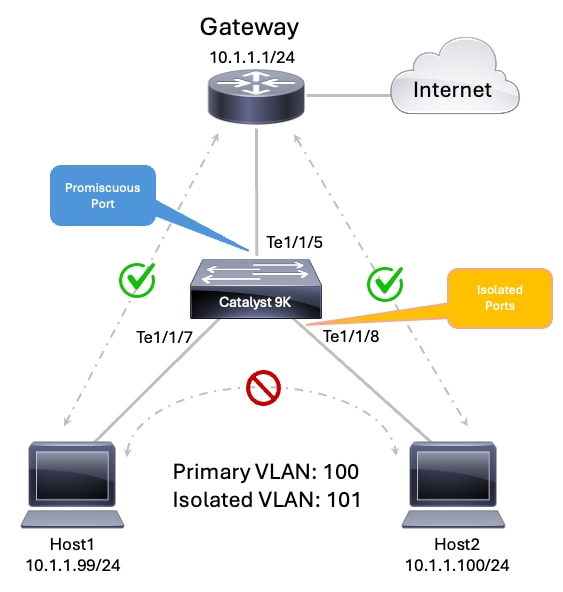 PVLAN拓撲
步驟1.配置VTP透明模式
9300-2#configure terminal
Enter configuration commands, one per line.  End with CNTL/Z.
9300-2(config)#vtp mode transparent
Setting device to VTP Transparent mode for VLANS.
9300-2(config)#end
步驟2.配置主要和隔離VLAN
9300-2#configure terminal Enter configuration commands, one per line. End with CNTL/Z. 9300-2(config)#vlan 100 9300-2(config-vlan)#name PVLAN_PRIMARY_100 9300-2(config-vlan)#private-vlan primary 9300-2(config-vlan)#private-vlan association 101 9300-2(config-vlan)#exit 9300-2(config)# 9300-2(config)#vlan 101 9300-2(config-vlan)#name PVLAN_ISOLATED_101 9300-2(config-vlan)#private-vlan isolated 9300-2(config-vlan)#exit 9300-2(config)#end附註:private-vlan association <vlan-id>命令用於將隔離VLAN繫結到主VLAN。
步驟3.配置隔離主機埠
9300-2#configure terminal Enter configuration commands, one per line. End with CNTL/Z. 9300-2(config)#interface TenGigabitEthernet1/1/7 9300-2(config-if)#description Isolated Host 1 9300-2(config-if)#switchport 9300-2(config-if)#switchport mode private-vlan host 9300-2(config-if)#switchport private-vlan host-association 100 101 9300-2(config-if)#spanning-tree portfast 9300-2(config-if)#exit 9300-2(config)# 9300-2(config)#interface TenGigabitEthernet1/1/8 9300-2(config-if)#description Isolated Host 2 9300-2(config-if)#switchport 9300-2(config-if)#switchport mode private-vlan host 9300-2(config-if)#switchport private-vlan host-association 100 101 9300-2(config-if)#spanning-tree portfast 9300-2(config-if)#exit 9300-2(config)#end步驟4.配置混雜埠
9300-2#configure terminal
Enter configuration commands, one per line.  End with CNTL/Z.
9300-2(config)#interface TenGigabitEthernet1/1/5
9300-2(config-if)#description Firewall Router or Shared Service
9300-2(config-if)#switchport
9300-2(config-if)#switchport mode private-vlan promiscuous
9300-2(config-if)#switchport private-vlan mapping 100 101
9300-2(config-if)#exit
9300-2(config)#end
第3層配置
PVLAN在同一個IP子網內提供第2層隔離。當隔離主機需要到達本地子網外的網路(例如Internet、資料中心服務或上游路由網路)時,仍需要第3層連線。
為隔離PVLAN主機提供第3層連線有兩種常用方法:
- 在交換器上設定主要VLAN交換虛擬介面(SVI)。
- 將預設網關直接連線到混雜埠。
附註:為PVLAN子網選擇一種第3層網關方法。使用交換機上的主VLAN SVI或連線到混雜埠的外部網關。
方法1:配置主VLAN SVI
當Cisco IOS XE交換機為隔離主機提供預設網關時,請使用此方法。
在PVLAN設計中,第3層SVI必須僅針對主VLAN進行配置。隔離VLAN是輔助VLAN,不提供第3層網關服務。
在此範例中:
-
VLAN 100是主要VLAN。
-
VLAN 101是隔離的輔助VLAN。
-
interface Vlan100提供預設閘道。
-
隔離VLAN 101中的主機使用10.1.1.1/24 as作為預設網關。
9300-2#configure terminal
Enter configuration commands, one per line.  End with CNTL/Z.
9300-2(config)#interface Vlan100
9300-2(config-if)#description Primary PVLAN Gateway
9300-2(config-if)#ip address 10.1.1.1 255.255.255.0
9300-2(config-if)#private-vlan mapping 101
9300-2(config-if)#no shutdown
9300-2(config-if)#exit
9300-2(config)#end
要點
- 僅為主要VLAN配置SVI。
- 使用private-vlan mapping命令將隔離的輔助VLAN對映到主VLAN SVI。
- 請勿將隔離VLAN配置為網關服務的SVI:
- 隔離主機與主VLAN SVI保留在同一個IP子網中。
- 隔離主機可以到達主VLAN SVI。
- 隔離主機無法與第2層的其他隔離主機直接通訊。
附註:僅為主要VLAN配置第3層SVI。使用隔離或社群VLAN配置,隔離和社群VLAN的VLAN介面處於非活動狀態。
方法2:將網關連線到混雜埠
當外部裝置為隔離主機提供預設網關時,請使用此方法。外部裝置可以是路由器、防火牆或其他第3層網關裝置。
在此設計中,Cisco IOS XE交換機不需要PVLAN子網的SVI。相反,外部網關連線到混雜埠。混雜埠將主VLAN對映到隔離輔助VLAN,從而允許隔離主機到達外部網關。
在此範例中:
- VLAN 100是主要VLAN。
- VLAN 101是隔離的輔助VLAN。
- 外部網關連線到TenGigabitEthernet1/1/5。
- 外部網關IP地址為10.1.1.1/24。
- 隔離主機使用10.1.1.1作為其預設網關。
9300-2#configure terminal
Enter configuration commands, one per line.  End with CNTL/Z.
9300-2(config)#interface TenGigabitEthernet1/1/5
9300-2(config-if)#description Firewall Router or Shared Service
9300-2(config-if)#switchport
9300-2(config-if)#switchport mode private-vlan promiscuous
9300-2(config-if)#switchport private-vlan mapping 100 101
9300-2(config-if)#exit
9300-2(config)#end
要點
- 當網關直接連線到混雜埠時,PVLAN子網的交換機上不需要SVI。
- 外部網關介面必須與隔離主機使用同一子網中的IP地址。
- 混雜埠必須將主VLAN對映到隔離VLAN。
- 隔離主機可以通過混雜埠到達外部網關。
- 隔離主機仍無法彼此直接通訊。
驗證
使用show vlan private-vlan 指令驗證PVLAN關聯:
9300-2#show vlan private-vlan

Primary Secondary Type              Ports
------- --------- ----------------- ------------------------------------------
100 101 isolated Te1/1/5, Te1/1/7, Te1/1/8附註:在show vlan private-vlan輸出中,Type列標識輔助VLAN型別,例如隔離或社群。它不會識別Ports列中列出的每個介面的運行角色。Ports列列出與主要VLAN和輔助VLAN對關聯的介面,包括對映到該輔助VLAN的隔離主機埠和混雜埠。
使用show interface <interface-id> switchport命令驗證主機連線埠的運作狀態,在此案例中,TenGigabitEthernet1/1/7和TenGigabitEthernet1/1/8:
9300-2#show interface TenGigabitEthernet1/1/7 switchport
Name: Te1/1/7
Switchport: Enabled
Administrative Mode: private-vlan host
Operational Mode: private-vlan host
Administrative Trunking Encapsulation: dot1q
Operational Trunking Encapsulation: native
Negotiation of Trunking: Off
Access Mode VLAN: 1 (default)
Trunking Native Mode VLAN: 1 (default)
Administrative Native VLAN tagging: enabled
Voice VLAN: none
Administrative private-vlan host-association: 100 (PVLAN_PRIMARY_100) 101 (PVLAN_ISOLATED_101)
Administrative private-vlan mapping: none
Administrative private-vlan trunk native VLAN: none
Administrative private-vlan trunk Native VLAN tagging: enabled
Administrative private-vlan trunk encapsulation: dot1q
Administrative private-vlan trunk normal VLANs: none
Administrative private-vlan trunk associations: none
Administrative private-vlan trunk mappings: none
Operational private-vlan: 100 (PVLAN_PRIMARY_100) 101 (PVLAN_ISOLATED_101)
Trunking VLANs Enabled: ALL
Pruning VLANs Enabled: 2-1001
Capture Mode Disabled
Capture VLANs Allowed: ALL

Protected: false
Unknown unicast blocked: disabled
Unknown multicast blocked: disabled
Vepa Enabled: false
App Interface: false
Appliance trust: none

9300-2#show interface TenGigabitEthernet1/1/8 switchport
Name: Te1/1/8
Switchport: Enabled
Administrative Mode: private-vlan host
Operational Mode: private-vlan host
Administrative Trunking Encapsulation: dot1q
Operational Trunking Encapsulation: native
Negotiation of Trunking: Off
Access Mode VLAN: 1 (default)
Trunking Native Mode VLAN: 1 (default)
Administrative Native VLAN tagging: enabled
Voice VLAN: none
Administrative private-vlan host-association: 100 (PVLAN_PRIMARY_100) 101 (PVLAN_ISOLATED_101)
Administrative private-vlan mapping: none
Administrative private-vlan trunk native VLAN: none
Administrative private-vlan trunk Native VLAN tagging: enabled
Administrative private-vlan trunk encapsulation: dot1q
Administrative private-vlan trunk normal VLANs: none
Administrative private-vlan trunk associations: none
Administrative private-vlan trunk mappings: none
Operational private-vlan: 100 (PVLAN_PRIMARY_100) 101 (PVLAN_ISOLATED_101)
Trunking VLANs Enabled: ALL
Pruning VLANs Enabled: 2-1001
Capture Mode Disabled
Capture VLANs Allowed: ALL

Protected: false
Unknown unicast blocked: disabled
Unknown multicast blocked: disabled
Vepa Enabled: false
App Interface: false
Appliance trust: none
驗證混雜連線埠的運作狀態(本例中為TenGigabitEthernet1/1/5):
9300-2#show interface TenGigabitEthernet1/1/5 switchport
Name: Te1/1/5
Switchport: Enabled
Administrative Mode: private-vlan promiscuous
Operational Mode: private-vlan promiscuous
Administrative Trunking Encapsulation: dot1q
Operational Trunking Encapsulation: native
Negotiation of Trunking: Off
Access Mode VLAN: 1 (default)
Trunking Native Mode VLAN: 1 (default)
Administrative Native VLAN tagging: enabled
Voice VLAN: none
Administrative private-vlan host-association: none
Administrative private-vlan mapping: 100 (PVLAN_PRIMARY_100) 101 (PVLAN_ISOLATED_101)
Administrative private-vlan trunk native VLAN: none
Administrative private-vlan trunk Native VLAN tagging: enabled
Administrative private-vlan trunk encapsulation: dot1q
Administrative private-vlan trunk normal VLANs: none
Administrative private-vlan trunk associations: none
Administrative private-vlan trunk mappings: none
Operational private-vlan: 100 (PVLAN_PRIMARY_100) 101 (PVLAN_ISOLATED_101)
Trunking VLANs Enabled: ALL
Pruning VLANs Enabled: 2-1001
Capture Mode Disabled
Capture VLANs Allowed: ALL

Protected: false
Unknown unicast blocked: disabled
Unknown multicast blocked: disabled
Vepa Enabled: false
App Interface: false
Appliance trust: none
現在,確認隔離主機可以到達網關10.1.1.1/24,但無法在彼此10.1.1.99/24和10.1.1.100/24之間執行ping
流量行為
| 來源 |
目的地 |
預期結果 |
|---|---|---|
| 主機1 |
主機2 |
失敗 |
| 主機2 |
主機1 |
失敗 |
| 主機1 |
預設閘道 |
成功 |
| 主機2 |
預設閘道 |
成功 |
| 混雜埠 |
隔離的主機 |
成功 |
| 流量結果 |
|
在檢查MAC地址表時,您可以觀察兩個BLOCKED條目。這些條目適用於隔離PVLAN主機。它們表示輔助VLAN中的第2層隔離規則,交換機阻止這些MAC地址用於直接隔離到隔離轉發。
隔離主機MAC地址顯示兩次,因為PVLAN轉發同時使用主VLAN和輔助VLAN環境:
- 在輔助VLAN 101中,MAC被阻止,用於直接隔離VLAN轉發。
- 在主VLAN 100中,MAC可用於通過混雜路徑進行PVLAN轉發。
9300-2#show mac address-table dynamic
          Mac Address Table
-------------------------------------------

Vlan    Mac Address       Type        Ports
----    -----------       --------    -----
   1    000c.000c.000c    DYNAMIC     Te1/1/3
   1    f87a.41a8.c1b5    DYNAMIC     Te1/1/1
   1    f87a.41a8.c1ba    DYNAMIC     Te1/1/6
   1    f87a.41a8.c1d1    DYNAMIC     Te1/1/6
 101 000a.000a.000a BLOCKED Te1/1/7 101 000b.000b.000b BLOCKED Te1/1/8 100 000a.000a.000a DYNAMIC pv Te1/1/7 100 000b.000b.000b DYNAMIC pv Te1/1/8 100 9077.ee3c.7b02 DYNAMIC Te1/1/5
Total Mac Addresses for this criterion: 9
範例 2:跨多個Cisco IOS XE交換機的PVLAN
-
SW1和SW2是Catalyst 9000 Cisco IOS XE交換機。
-
沒有為PVLAN子網配置SVI。
-
外部網關提供第3層連線。
-
外部網關IP地址為10.1.1.1/24。
-
外部網關連線到SW2上的混雜埠。
-
VLAN 100是主要VLAN。
-
VLAN 101是隔離的輔助VLAN。
-
VLAN 102是團體輔助VLAN。
-
SW1和SW2通過標準802.1Q中繼連線。
-
隔離的主機只能到達混雜的網關。
-
VLAN 102中的社群主機可以彼此通訊,也可以與混雜網關通訊。
-
隔離主機無法與社群主機通訊。
| 主機 |
交換器 |
介面 |
PVLAN角色 |
VLAN關聯 |
IP 位址 |
預設閘道 |
|---|---|---|---|---|---|---|
| 主機3 |
SW1 / 9300-1 |
TenGigabitEthernet1/1/3 |
社群主機 |
主要VLAN 100、社群VLAN 102 |
10.1.1.97/24 |
10.1.1.1 |
| 主機4 |
SW2/9300-2 |
TenGigabitEthernet1/1/3 |
社群主機 |
主要VLAN 100、社群VLAN 102 |
10.1.1.98/24 |
10.1.1.1 |
| 主機1 |
SW2/9300-2 |
TenGigabitEthernet1/1/7 |
隔離主機 |
主VLAN 100、隔離VLAN 101 |
10.1.1.99/24 |
10.1.1.1 |
| 主機2 |
SW2/9300-2 |
TenGigabitEthernet1/1/8 |
隔離主機 |
主VLAN 100、隔離VLAN 101 |
10.1.1.100/24 |
10.1.1.1 |
| 外部閘道 |
SW2/9300-2 |
TenGigabitEthernet1/1/5 |
混雜(面向網關的裝置) |
主要VLAN 100對映到VLAN 101和102 |
10.1.1.1/24 |
不適用 |
網路圖表
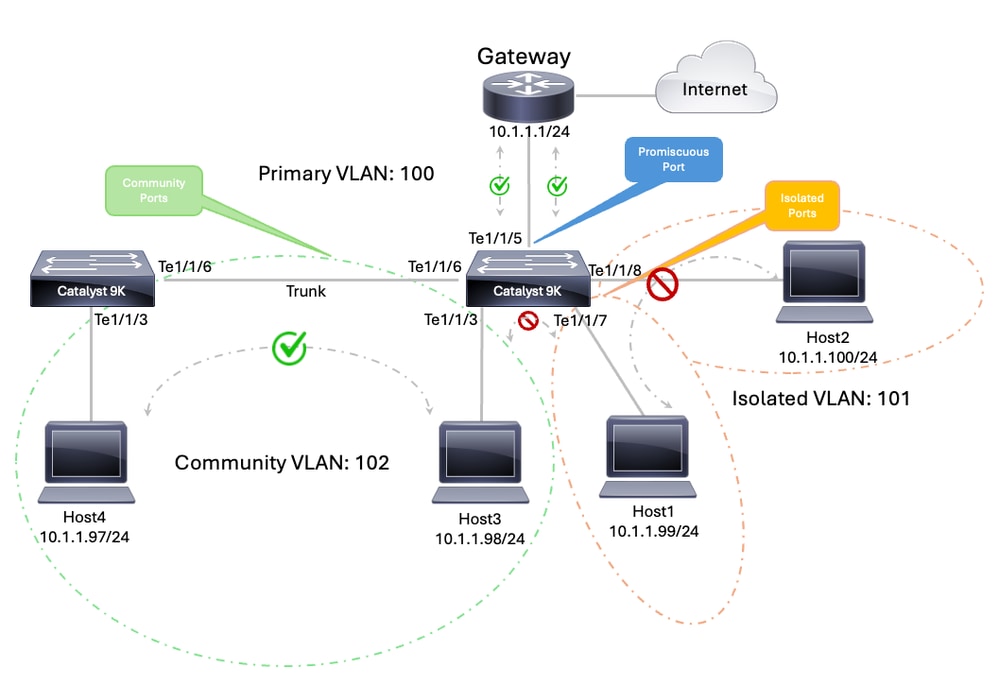 交換機之間的PVLAN
VLAN和介面計畫
| 裝置 |
介面 |
角色 |
|---|---|---|
| SW1 |
TenGigabitEthernet1/1/3 |
社群主機,VLAN 102 |
| SW1 |
TenGigabitEthernet1/1/6 |
中繼到SW2 |
| SW2 |
TenGigabitEthernet1/1/3 |
社群主機,VLAN 102 |
| SW2 |
TenGigabitEthernet1/1/7 |
隔離主機,VLAN 101 |
| SW2 |
TenGigabitEthernet1/1/8 |
隔離主機,VLAN 101 |
| SW2 |
TenGigabitEthernet1/1/6 |
中繼到SW1 |
| SW2 |
TenGigabitEthernet1/1/5 |
到外部網關10.1.1.1/24的混雜埠 |
附註:可以使用以下方法在多台交換機上使用專用VLAN:標準中繼埠、隔離專用VLAN中繼埠或混雜專用VLAN中繼埠。如需詳細資訊,請參閱跨多台交換器的專用VLAN檔案指南。
| SW1 - 9300-1 — 運行配置 | SW2 - 9300-2 — 運行配置 |
|
|
附註:在本例中,由於兩台交換機均在透明模式下使用VTP,因此必須在每台交換機上手動配置PVLAN。
附註:VTP 1、2和3的透明模式支援專用VLAN。VTP 3的伺服器模式也支援專用VLAN。
驗證
| SW1 - 9300-1 — 狀態 | SW2 - 9300-2 — 狀態 |
|
|
流量行為
| 來源 |
目的地 |
預期結果 |
|---|---|---|
| Te1/1/7上的SW2隔離主機 |
Te1/1/8上的SW2隔離主機 |
失敗 |
| Te1/1/7上的SW2隔離主機 |
Te1/1/3上的SW1社群主機 |
失敗 |
| Te1/1/7上的SW2隔離主機 |
外部閘道10.1.1.1 |
成功 |
| Te1/1/3上的SW1社群主機 |
Te1/1/3上的SW2社群主機 |
成功 |
| Te1/1/3上的SW1社群主機 |
外部閘道10.1.1.1 |
成功 |
| Te1/1/3上的SW2社群主機 |
Te1/1/7上的SW2隔離主機 |
失敗 |
|
附註:Internet可達性取決於上游路由和NAT設計實施。它僅用於顯示外部網關提供路由連線。
相關資訊
修訂記錄
| 修訂 | 發佈日期 | 意見 |
|---|---|---|
5.0 |
12-Aug-2026
|
重新認證 — 更新的技術內容。 |
4.0 |
12-Sep-2024
|
更新的SEO和格式。 |
3.0 |
13-Sep-2023
|
已從「相關資訊」部分刪除損壞的連結。 |
2.0 |
26-Jun-2023
|
重新認證 |
1.0 |
24-Feb-2003
|
初始版本 |
 意見
意見