更改Catalyst 9800无线控制器上的安装模式

简介
本文档介绍如何在Catalyst 9800无线控制器(WLC)上的不同安装模式之间进行更改。
先决条件
要求
Cisco 建议您了解以下主题:
-
Catalyst 9800无线LAN控制器和接入点(AP)平台
- Catalyst 9800无线LAN控制器软件功能集
使用的组件
本文档中的信息基于以下软件和硬件版本:
- C9800-L版本17.15.5
本文档中的信息都是基于特定实验室环境中的设备编写的。本文档中使用的所有设备最初均采用原始(默认)配置。如果您的网络处于活动状态,请确保您了解所有命令的潜在影响。
背景信息
使用本文档了解如何通过命令行界面(CLI)在Catalyst 9800无线控制器(WLC)上转换不同类型的安装模式。
此过程也可用于升级9800 WLC。
在Catalyst 9800 WLC上,您可以在捆绑包和安装模式下运行Cisco IOS® XE。
安装模式
安装模式使用从二进制文件预提取的.pkg文件到闪存中,以启动控制器解锁捆绑模式下不可用的几个关键架构功能。控制器使用从packages.conf提取操作创建的文件作为引导变量。使用此模式,控制器比捆绑包模式启动时间更短,消耗的RAM更少。
捆绑包模式
如果控制器以二进制镜像(.bin)作为引导变量进行引导,则系统以捆绑模式运行。在此模式下,控制器将.bin文件提取到RAM中,并从其中运行。
此模式比安装模式使用更多的内存,因为从启动中提取的软件包被复制到RAM。
开始使用前
验证9800 WLC的操作模式,以确定在模式之间转换时必须执行哪个过程。
运行命show version | include Installation mode令查看当前安装模式。
WLC#show version | include Installation mode
Installation mode is INSTALL
配置
从安装模式到捆绑包模式
CLI过程
步骤1.确保闪存中有足够的空间以扩展新映像。
WLC#show bootflash:
...
277 42838080 Oct 08 2025 14:22:06.0000000000 +00:00 wlc9500C-rpboot.2025-10-05_08.14_prabhask.SSA.pkg
279 19921673 Dec 13 2025 19:27:45.0000000000 +00:00 system-report_20251213-192546-Pacific.tar.gz
235937792 bytes available (5746528256 bytes used)
步骤2.在空间不足时清理旧安装文件,以便丢弃旧添加的软件包。
WLC#install remove inactive
install_remove: START Mon Jun 08 22:31:01 Central 2026
install_remove: Removing IMG
Cleaning up unnecessary package files
No path specified, will use booted path /tmp/sw/isos/packages.conf
Cleaning /bootflash
Scanning boot directory for packages ... done.
Preparing packages list to delete ...
[R0]: /bootflash/C9800-L-universalk9_wlc.17.15.05.SPA.bin File is in use, will not delete.
[R0]: /bootflash/C9800-L-universalk9_wlc.17.15.05.SPA.conf File is in use, will not delete.
The following files will be deleted:
[R0]: /bootflash/packages.conf
[R0]: /bootflash/C9800-L-universalk9_wlc.17.12.04.Cisco bug ID CSCwn02956.SPA.apsp.bin
[R0]: /bootflash/C9800-L-rommon.1612-3r.pkg
[R0]: /bootflash/C9800-L-universalk9_wlc.17.15.03.SPA.bin
[R0]: /bootflash/C9800-L-mono-universalk9_wlc.17.15.03.SPA.pkg
[R0]: /bootflash/C9800-L-universalk9_wlc.17.15.03.SPA.conf
[R0]: /bootflash/C9800-L-rpboot.17.15.03.SPA.pkg
[R0]: /bootflash/C9800-L-universalk9_wlc.17.09.06.SPA.bin
[R0]: /bootflash/C9800-L-mono-universalk9_wlc.17.09.06.SPA.pkg
[R0]: /bootflash/C9800-L-rpboot.17.09.06.SPA.pkg
[R0]: /bootflash/C9800-L-universalk9_wlc.17.09.06.SPA.conf
[R0]: /bootflash/C9800-L-universalk9_wlc.17.15.03.Cisco bug ID CSCwp18505
[R0]: /bootflash/C9800-L-mono-universalk9_wlc.17.12.04.SPA.pkg
[R0]: /bootflash/C9800-L-rpboot.17.12.04.SPA.pkg
[R0]: /bootflash/C9800-L-mono-universalk9_wlc.17.15.05.SPA.pkg
[R0]: /bootflash/C9800-L-rpboot.17.15.05.SPA.pkg
Do you want to remove the above files? [y/n]y
Deleting file /bootflash/packages.conf ... done.
Deleting file /bootflash/C9800-L-universalk9_wlc.17.12.04.Cisco bug ID CSCwn02956
Deleting file /bootflash/C9800-L-rommon.1612-3r.pkg ... done.
Deleting file /bootflash/C9800-L-universalk9_wlc.17.15.03.SPA.bin ... done.
Deleting file /bootflash/C9800-L-mono-universalk9_wlc.17.15.03.SPA.pkg ... done.
Deleting file /bootflash/C9800-L-universalk9_wlc.17.15.03.SPA.conf ... done.
Deleting file /bootflash/C9800-L-rpboot.17.15.03.SPA.pkg ... done.
Deleting file /bootflash/C9800-L-universalk9_wlc.17.09.06.SPA.bin ... done.
Deleting file /bootflash/C9800-L-mono-universalk9_wlc.17.09.06.SPA.pkg ... done.
Deleting file /bootflash/C9800-L-rpboot.17.09.06.SPA.pkg ... done.
Deleting file /bootflash/C9800-L-universalk9_wlc.17.09.06.SPA.conf ... done.
Deleting file /bootflash/C9800-L-universalk9_wlc.17.15.03.Cisco bug ID CSCwp18505
Deleting file /bootflash/C9800-L-mono-universalk9_wlc.17.12.04.SPA.pkg ... done.
Deleting file /bootflash/C9800-L-rpboot.17.12.04.SPA.pkg ... done.
Deleting file /bootflash/C9800-L-mono-universalk9_wlc.17.15.05.SPA.pkg ... done.
Deleting file /bootflash/C9800-L-rpboot.17.15.05.SPA.pkg ... done.
Deleting /flash/.images/17.15.02.0.4538.1732779336 ... /flash/.images/17.15.05.0.8370.1771573356 done.
Deleting /flash/.images/17.12.04.0.31.1732211533 ... /flash/.images/17.15.05.0.8370.1771573356 done.
Deleting /flash/.images/17.15.03.0.5635.1742971301 ... /flash/.images/17.15.05.0.8370.1771573356 done.
SUCCESS: Files deleted.
--- Starting Post_Remove_Cleanup ---
Performing REMOVE_POSTCHECK on all members
Finished Post_Remove_Cleanup
SUCCESS: install_remove Mon Jun 08 22:31:17 Central 2026
WLC#dir bootflash: | i bytes
26458804224 bytes total (18033250304 bytes free)
步骤3.将新映像复制到闪存。
WLC#copy tftp: bootflash:
Address or name of remote host []? 10.152.200.238
Source filename []? C9800-L-universalk9_wlc.17.15.05.SPA.bin
Destination filename [C9800-L-universalk9_wlc.17.15.05.SPA.bin]?
Accessing tftp://10.152.200.238/C9800-L-universalk9_wlc.17.15.05.SPA.bin...
Loading C9800-L-universalk9_wlc.17.15.05.SPA.bin from 10.152.200.238 (via Vlan210): !!!!!!!!!!!!!!!!!!!!!!!!!!!!!!!!!!!!!!!!!!
步骤4.确认映像已成功复制到闪存,并验证映像的完整性。
WLC#dir bootflash:*.bin
Directory of bootflash:/*.bin
Directory of bootflash:/
 95 -rw- 1635303343 Jun 5 2026 23:24:36 +00:00 C9800-L-universalk9_wlc.17.15.05.SPA.bin.SPA.bin

WLC#verify /md5 bootflash:C9800-L-universalk9_wlc.17.15.05.SPA.bin
........................................................................
........................................................................
........................................................................
........................................................................Done!
verify /md5 (bootflash:C9800-L-universalk9_wlc.17.15.05.SPA.bin) = 9fb93d840278a5de2b454ade1016ddce
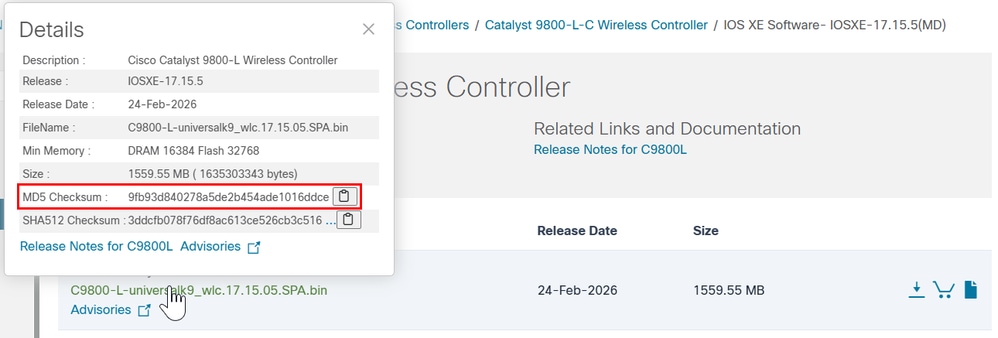
将此结果与思科软件下载站点上目标映像的版本详细信息中提供的MD5校验和相比较,值必须完全匹配。
步骤5.检查当前引导变量,如果该变量设置为packages.conf,则WLC当前正在安装模式下运行。要转换为捆绑包模式,请删除现有引导变量并将.bin映像设置为新的引导变量。更改后必须保存配置;否则,重新加载后,新的引导变量不会持续。
WLC#show bootvar
BOOT variable = bootflash:packages.conf,12;
CONFIG_FILE variable =
BOOTLDR variable does not exist
Configuration register is 0x2102
WLC#conf t
WLC(config)#no boot system
WLC(config)#do write
WLC(config)#boot system bootflash:C9800-L-universalk9_wlc.17.15.05.SPA.bin
WLC(config)#do write
WLC(config)#end
步骤6.运行此命令以验证引导变量是否设置为bootflash:。
此时将显示输出 BOOT variable = bootflash:
WLC#show bootvar
BOOT variable = bootflash:C9800-L-universalk9_wlc.17.15.05.SPA.bin,12;
CONFIG_FILE variable does not exist
BOOTLDR variable does not exist
Configuration register is 0x102

Standby not ready to show bootvar
步骤7.重新加载控制器以在捆绑包模式下启动。
WLC#reload
Reload command is being issued on Active unit, this will reload the whole stack
Proceed with reload? [confirm]
步骤8.监控WLC初始化过程,以确认其以捆绑包模式启动。
...
32768K bytes of non-volatile configuration memory.
16777216K bytes of physical memory.
26251263K bytes of eUSB flash at bootflash:.
0K bytes of Cloud S3 Storage at cloudfs:.

Base Ethernet MAC Address : FF:FF:FF:FF:FF:FF

Installation mode is BUNDLE
GUI过程
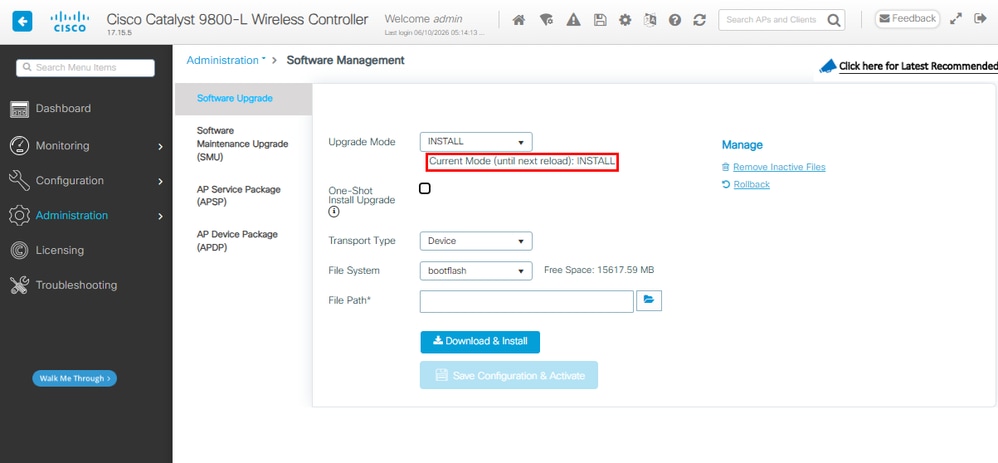
步骤1.检验当前模式。导航到管理>软件管理>软件升级,确认升级模式指示系统当前处于安装模式。
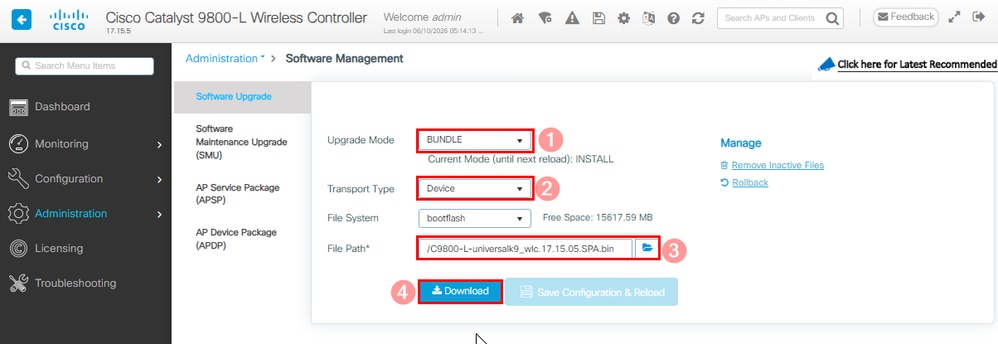
步骤2.点击升级模式中可用的下拉列表,然后选择捆绑包。然后选择Transport Type,然后选择.bin文件的File Path,然后选择Download。
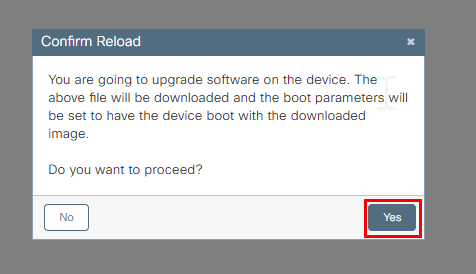
步骤3.确认系统重新加载许可。此时将开始转换为捆绑包模式。
步骤4.在右侧的Status部分和Show Logs弹出窗口中监视升级。
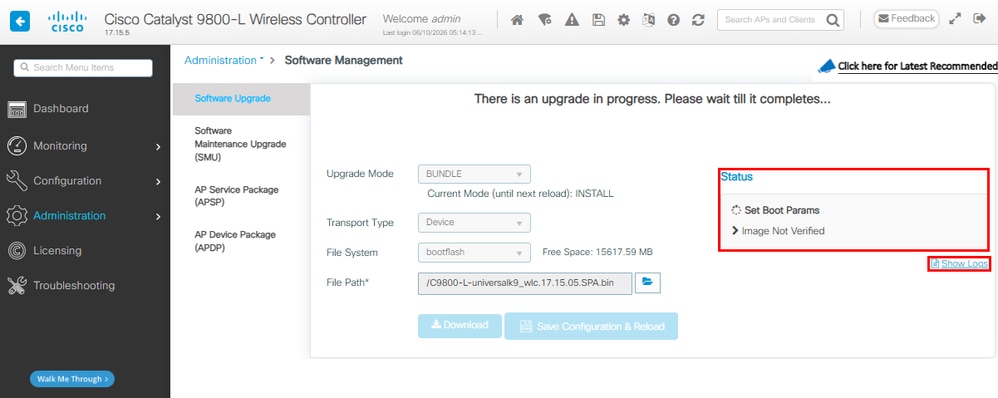
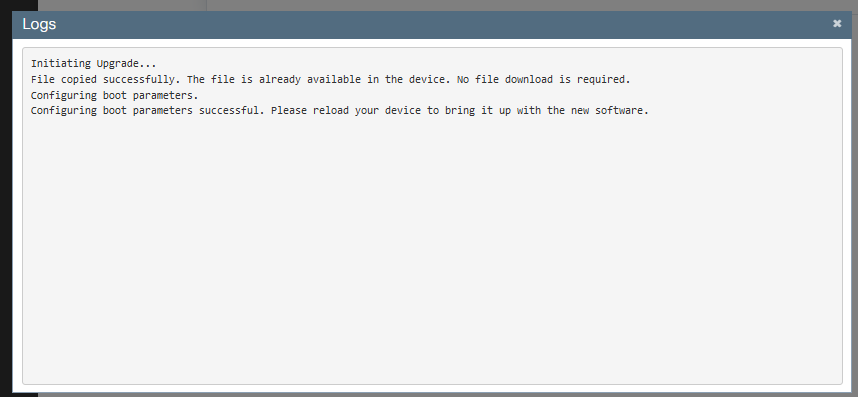
步骤5.检验映像。
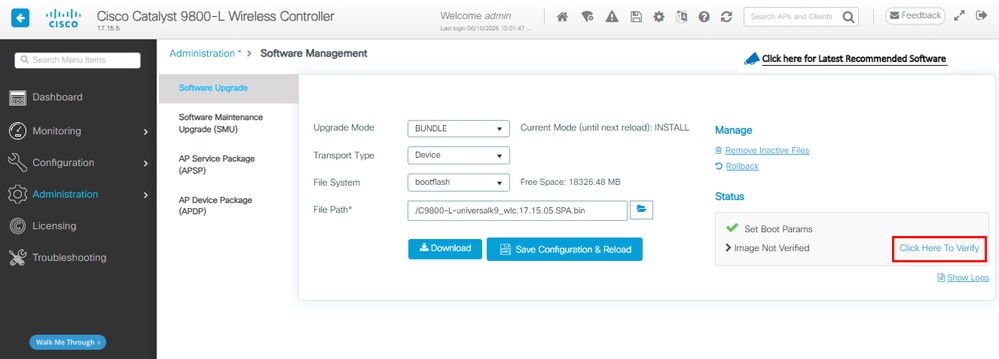
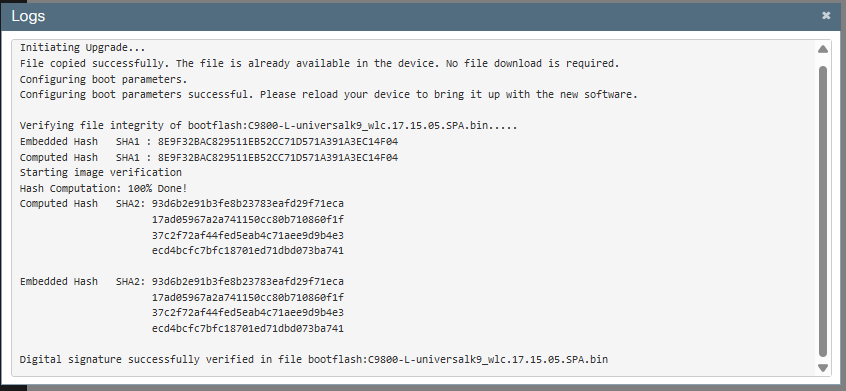
步骤6.保存配置并确认重新加载。
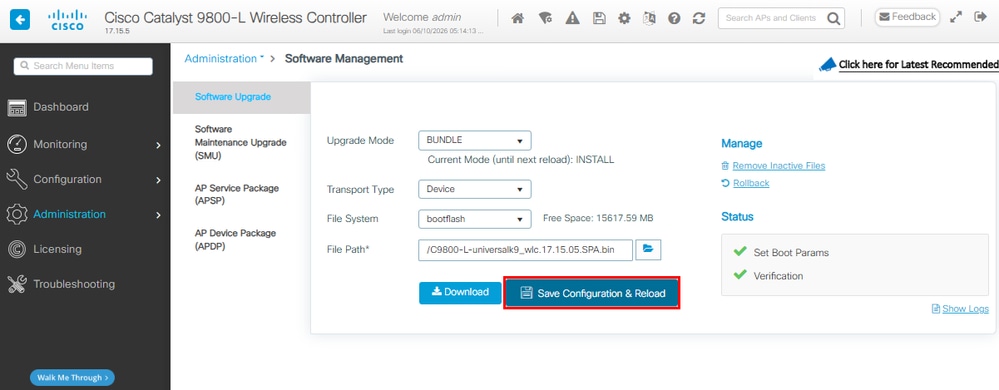
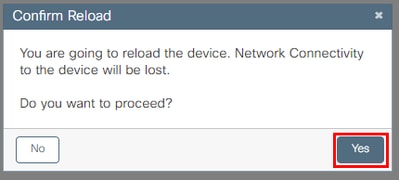
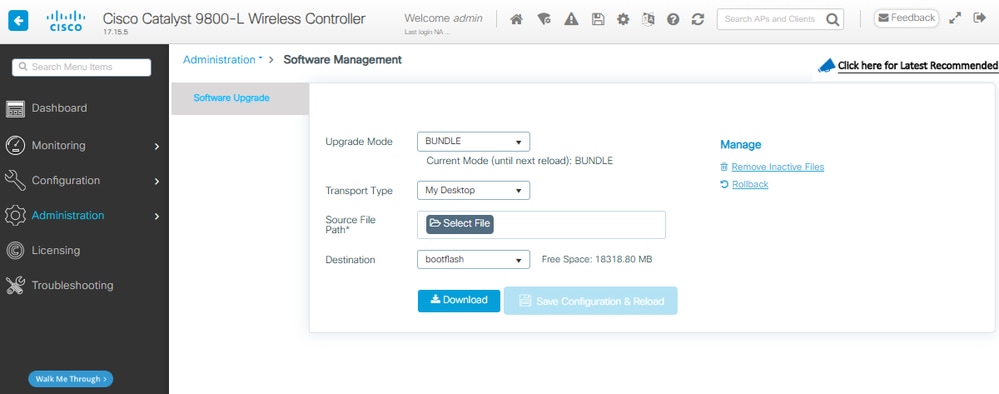
步骤7.监控WLC重新加载,一旦GUI可用,请导航到管理>软件管理>软件升级。请注意,Upgrade Mode指示系统当前以捆绑包模式运行。
从捆绑包到安装模式
CLI过程
步骤1.确保闪存中有足够的空间以扩展新映像。
WLC#dir bootflash: | i bytes free
26458804224 bytes total (9501368320 bytes free)
步骤2.在空间不足时清理旧安装文件,以便丢弃旧添加的软件包。
WLC#install remove inactive
install_remove: START Tue Jun 09 21:21:34 Central 2026
install_remove: Removing IMG
Cleaning up unnecessary package files
No path specified, will use booted path /tmp/sw/isos/packages.conf

Cleaning /bootflash
Scanning boot directory for packages ... done.
Preparing packages list to delete ...
[R0]: /bootflash/packages.conf File is in use, will not delete.
[R0]: /bootflash/C9800-L-universalk9_wlc.17.15.05.SPA.bin File is in use, will not delete.
[R0]: /bootflash/C9800-L-universalk9_wlc.17.15.05.SPA.conf File is in use, will not delete.

The following files will be deleted:
[R0]: /bootflash/C9800-L-mono-universalk9_wlc.17.15.05.SPA.pkg
[R0]: /bootflash/C9800-L-rpboot.17.15.05.SPA.pkg

Do you want to remove the above files? [y/n]y

Deleting file /bootflash/C9800-L-mono-universalk9_wlc.17.15.05.SPA.pkg ... done.
Deleting file /bootflash/C9800-L-rpboot.17.15.05.SPA.pkg ... done.
SUCCESS: Files deleted.

--- Starting Post_Remove_Cleanup ---
Performing REMOVE_POSTCHECK on all members
Finished Post_Remove_Cleanup
SUCCESS: install_remove Tue Jun 09 21:22:08 Central 2026

WLC#dir bootflash: | i bytes free
26458804224 bytes total (19666468864 bytes free)
步骤3.将新映像复制到闪存。
WLC#copy tftp: flash:
Address or name of remote host []? 10.152.200.238
Source filename []? C9800-L-universalk9_wlc.17.15.05.SPA.bin
Destination filename [C9800-L-universalk9_wlc.17.15.05.SPA.bin]?
Accessing tftp://10.152.200.238/C9800-L-universalk9_wlc.17.15.05.SPA.bin...
Loading C9800-L-universalk9_wlc.17.15.05.SPA.bin from 10.152.200.238 (via Vlan210): !!!!!!!!!!!!!!!!!!!!!!!!!!!!!!!!!!!!!!!!!!
步骤4.确认映像已成功复制到闪存,并验证映像的完整性。
WLC#dir bootflash:*.bin
Directory of bootflash:/*.bin
Directory of bootflash:/
 95 -rw- 1635303343 Jun 5 2026 23:24:36 +00:00 C9800-L-universalk9_wlc.17.15.05.SPA.bin.SPA.bin

WLC#verify /md5 bootflash:C9800-L-universalk9_wlc.17.15.05.SPA.bin
........................................................................
........................................................................
........................................................................
........................................................................Done!
verify /md5 (bootflash:C9800-L-universalk9_wlc.17.15.05.SPA.bin) = 9fb93d840278a5de2b454ade1016ddce
将此结果与思科软件下载站点上目标映像的版本详细信息中提供的MD5校验和相比较,值必须完全匹配。
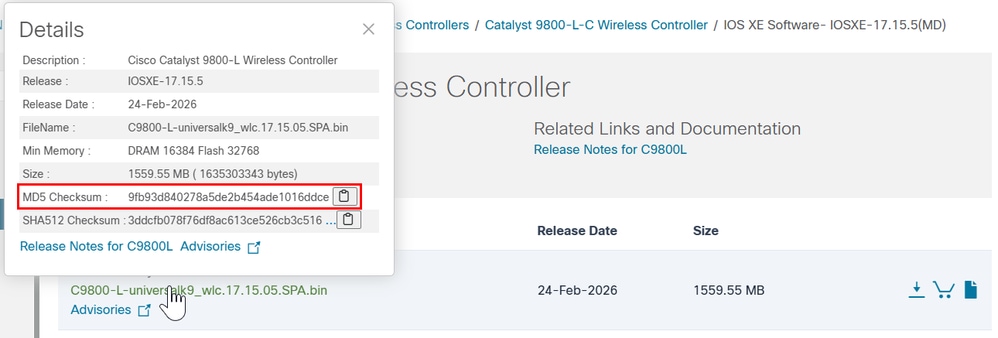
步骤5.检查当前引导变量。如果变量指向.bin文件,则系统当前在捆绑包模式下运行。此步骤不需要手动配置引导变量;在升级过程中,安装过程会自动bootflash:packages.conf将其更新为。
WLC#show bootvar
BOOT variable = bootflash:C9800-L-universalk9_wlc.17.15.05.SPA.bin,12;
CONFIG_FILE variable does not exist
BOOTLDR variable does not exist
Configuration register is 0x102
Standby not ready to show bootvar
步骤6.将软件安装映像安装到闪存。nstall add file bootflash:对于捆绑包到安装模式的转换,请使用单点CLI i命令。
WLC#install add file bootflash:C9800-L-universalk9_wlc.17.15.05.SPA.bin activate commit
步骤7.键入y (yes),表示系统重新加载同意。 安装完成后,控制器继续重新加载。
install_add_activate_commit: START Mon Jun 08 22:53:20 Central 2026
install_add: START Mon Jun 08 22:53:20 Central 2026
install_add: Adding IMG
--- Starting initial file syncing ---
Copying bootflash:C9800-L-universalk9_wlc.17.15.05.SPA.bin from Chassis 1/R0 to Chassis 1/R0
Info: Finished copying to the selected Chassis
Finished initial file syncing

--- Starting Add ---
Performing Add on all members
Checking status of Add on [1/R0]
Add: Passed on [1/R0]
Image added. Version: 17.15.05.0.8370

Finished Add

install_activate: START Mon Jun 08 22:53:59 Central 2026
install_activate: Activating IMG
Following packages shall be activated:
/bootflash/C9800-L-mono-universalk9_wlc.17.15.05.SPA.pkg
/bootflash/C9800-L-rpboot.17.15.05.SPA.pkg

This operation may require a reload of the system. Do you want to proceed? [y/n]y

--- Starting Activate ---
Performing Activate on all members
[1] Activate package(s) on Chassis 1/R0
[1] Finished Activate on Chassis 1/R0
Checking status of Activate on [1/R0]
Activate: Passed on [1/R0]
Finished Activate

--- Starting Commit ---
Performing Commit on all members
[1] Commit package(s) on Chassis 1/R0
[1] Finished Commit on Chassis 1/R0
Checking status of Commit on [1/R0]
Commit: Passed on [1/R0]
Finished Commit operation

SUCCESS: install_add_activate_commit Mon Jun 08 22:55:34 Central 2026

Initializing Hardware ...
步骤8.监控WLC初始化过程以确认它在安装模式下启动。
...
32768K bytes of non-volatile configuration memory.
16777216K bytes of physical memory.
26251263K bytes of eUSB flash at bootflash:.
0K bytes of Cloud S3 Storage at cloudfs:.

Base Ethernet MAC Address : FF:FF:FF:FF:FF:FF

Installation mode is INSTALL
GUI过程
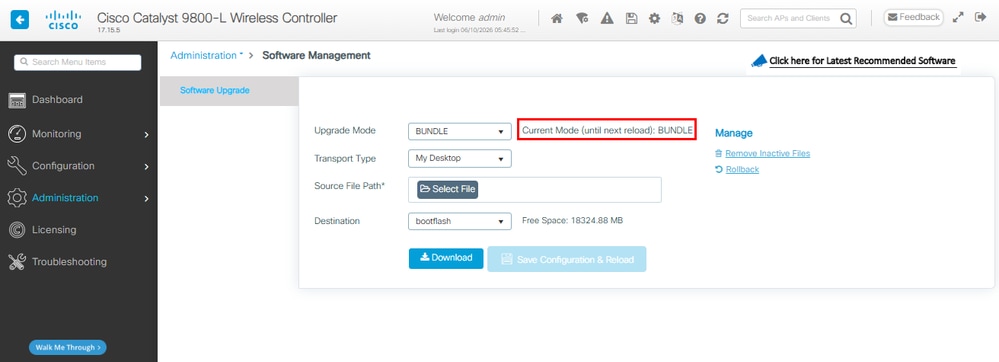
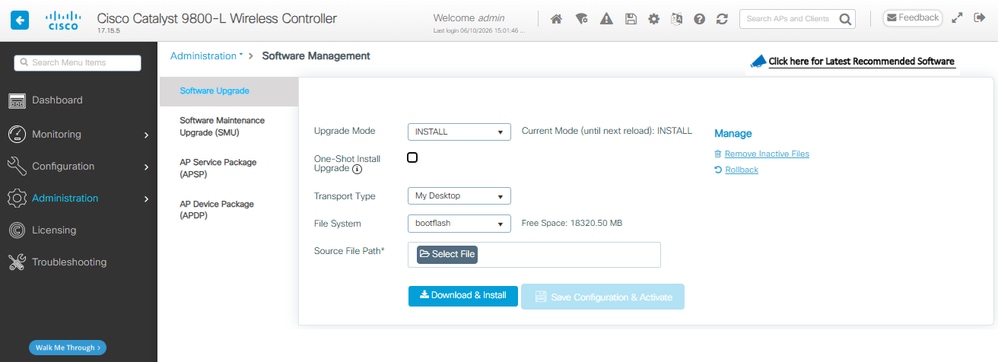
步骤1.检验当前模式。导航到管理>软件管理>软件升级,确认升级模式指示系统当前处于捆绑模式。
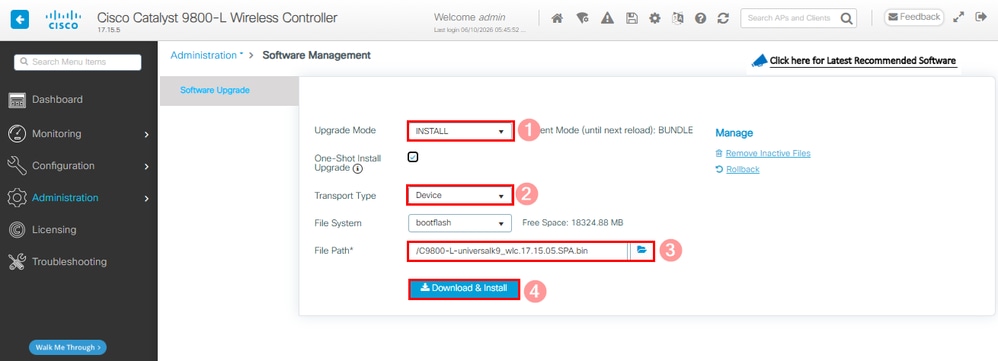
步骤2.点击升级模式中可用的下拉列表,然后选择安装。然后选择Transport Type,然后选择.bin文件的File Path,然后选择Download & Install。
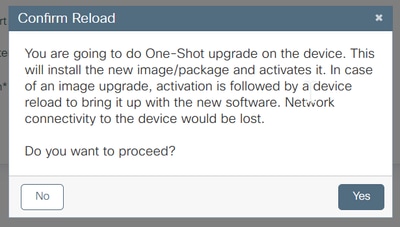
步骤3.确认系统重新加载许可。此时将开始转换到安装模式。
步骤4.在右侧的Status部分和Show Logs弹出窗口中监视升级。
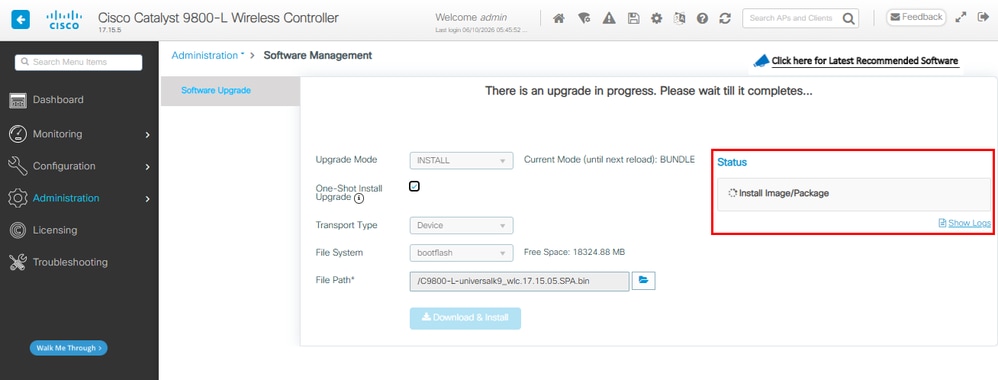
系统作为提交更改的一部分重新加载。
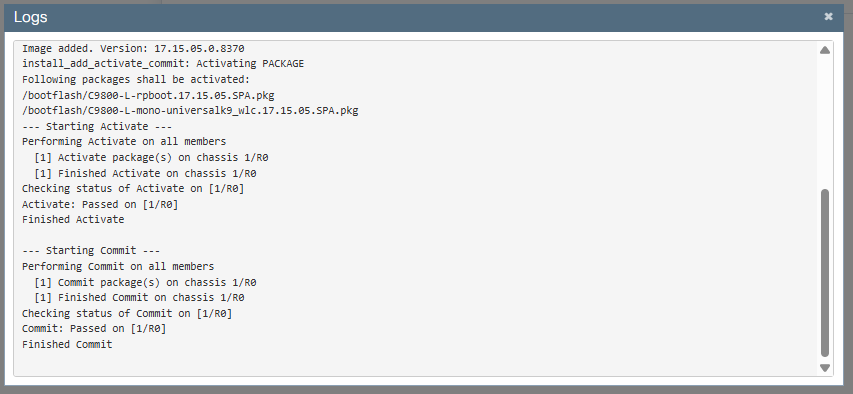
步骤5.监控WLC重新加载,一旦GUI可用,请导航到管理>软件管理>软件升级。请注意,升级模式指示系统当前以安装模式运行。
验证
使用本部分可确认配置能否正常运行。
控制器重新启动后,您可以验证控制器的当前安装模式。运行show version命令以确认转换成功。
安装模式
WLC#show version | include System image|Installation mode|IOS XE Software
Cisco IOS XE Software, Version 17.15.05
System image file is "bootflash:packages.conf"
Installation mode is INSTALL
捆绑包模式
WLC#show version | include System image|Installation mode|IOS XE Software
Cisco IOS XE Software, Version 17.15.05
System image file is "bootflash:/C9800-L-universalk9_wlc.17.15.05.SPA.bin"
Installation mode is BUNDLE
故障排除
当前没有故障排除此配置的特定可用资料。
相关信息
修订历史记录
| 版本 | 发布日期 | 备注 |
|---|---|---|
3.0 |
11-Jun-2026
|
添加了Alt文本。更新的样式要求和格式。 |
2.0 |
30-Nov-2023
|
重新认证 |
1.0 |
15-Apr-2021
|
初始版本 |
 反馈
反馈