配置AP电源配置文件并对其进行故障排除

简介
本文档介绍如何在Cisco Catalyst 9800无线LAN控制器(WLC)上配置和排除AP电源配置文件故障。
使用的组件
本文档中的信息基于以下软件和硬件版本:
- Cisco Catalyst 9800系列无线LAN控制器
- 软件版本17.15.4d和26.1.1
- C9130AXI-D
- CW9178I
- C9300-48UXM
本文档中的信息都是基于特定实验室环境中的设备编写的。本文档中使用的所有设备最初均采用原始(默认)配置。如果您的网络处于活动状态,请确保您了解所有命令的潜在影响。
概述
接入点省电是一项电源管理功能,能够:
- 减少非活动期间的能耗
- 支持灵活的调度和策略驱动的低功耗操作
- 在不影响性能的情况下优化网络效率
电源配置文件的类型
- 固定电源策略
固定电源策略定义了AP的预定义操作状态。对于每个AP类型,在这些情况下会预配置接口状态(如无线电、USB、以太网等)。AP首先根据固定电源策略应用接口状态,然后再考虑日历配置文件中定义的任何配置。
- AP电源配置文件
AP电源配置文件允许用户定义规则的优先级列表,这些规则控制活动日历期间的电源降级和行为。
- 按顺序应用规则,直到满足AP的电源要求
- 配置是通用的,应用于AP配置文件级别
- AP配置文件与站点标记关联
此配置文件确定当来自交换机的以太网供电(PoE)预算不足时AP如何运行。
它还支持绿色AP功能,其中AP根据关联的日历计划(例如,在工作时间后)转换到低功率模式。
- 日历配置文件
日历配置文件启用对AP接口活动的基于时间的控制。
- 允许配置哪些接口保持活动或不活动状态
- 根据定义的时间表应用设置
这有助于自动执行节能操作,无需人工干预。

使用案例
- 省电模式 — 常规功率配置文件
随着三射频和四射频接入点的引入,实现完整功能所需的功率通常超过802.3at所能的功率。但是,许多部署仍缺乏802.3bt支持。
目前,AP行为(如发射功率、无线电链、USB端口、SFP使用率等……)是在较低功率级别(非802.3bt)运行时静态定义的,用户对这些参数的控制有限。
常规功率配置文件通过允许根据可用功率控制功率递减来解决这个问题。

注意:17.10或更高版本支持AP节能功能的常规功率配置文件。
- 绿色/环保模式AP — 节能模式(日历配置文件)
绿色AP功能提供节能模式,当没有连接的客户端时,AP会自动进入低功率运行。
- 启用后,AP可以在低使用率期间(例如,在办公时间后)转换到睡眠或低功耗状态
- 如果客户端尝试连接(根据配置的阈值),AP将自动退出节能模式并切换到相应的固定策略
- 一旦所有客户端断开连接,AP将返回到省电模式
- 只有处理客户端连接的AP退出低功率模式;其他AP仍不受影响
电源政策的总体目标是允许用户跨不同电源(例如:802.3af、802.3at、802.3bt(多个级别))有效地分配和管理可用电源预算。
配置

警告:要将AP电源配置文件应用于AP,WLC和AP时钟必须同步。
使用案例1:常规电源配置文件
- 常规电源配置文件独立于日历配置文件运行
- 交换机端口必须提供变低功率,配置文件才能应用于AP
注意:一次只能应用一个常规功率配置文件。
在下面的示例中,9130AXI接入点在24,000 mW的降级电源状态下运行。由于AP正在接收降级电源,系统会自动应用标准电源配置文件,而无需任何日历配置文件。
在AP
xo9130#show cdp inline_power

Power_Requested(mW) Power_Available(mW) Power_request-ID Power_management-ID

              30000               24000             7114                   5
常规配置文件映射(CLI)
- 根据要求配置电源配置文件,并应用为常规配置文件。
 (config)# wireless profile power simran-regular-profile-1

 (config-wireless-power-profile)# 10 ethernet GigabitEthernet0 speed 2500Mbps

 (config-wireless-power-profile)# 20 radio 24ghz state shutdown

 (config-wireless-power-profile)# 30 radio 5ghz spatial-stream 4

 (config-wireless-power-profile)# 40 radio 5ghz state shutdown

 (config-wireless-power-profile)# exit

 (config)# ap profile powermode

(config-ap-profile)# power-profile simran-regular-profile-1

 (config-ap-profile)# end
- 显示常规配置文件
#show ap profile name powermode detailed | sec Power profile

           Power profile name            : simran-regular-profile-1
常规配置文件映射(GUI)
- Configuration > Tags & profiles > Power Profile
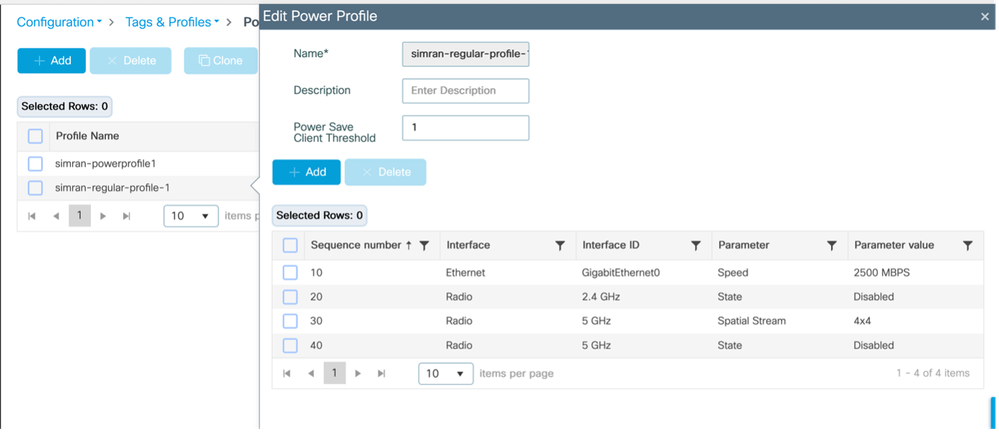
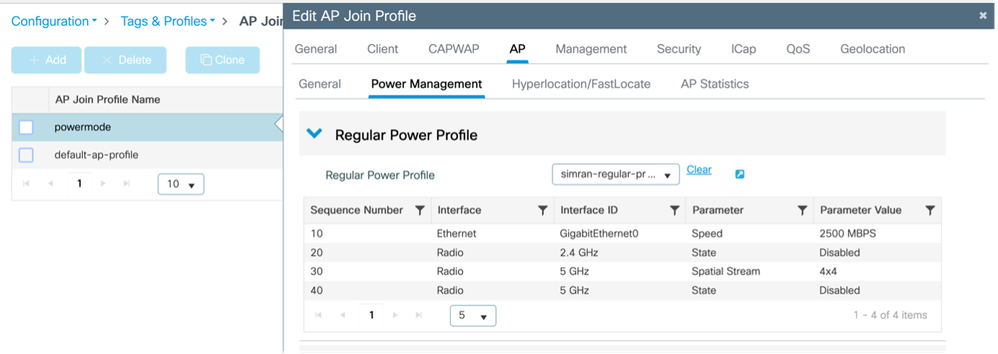
- 应用并显示常规配置文件
Configuration > Tags & Profiles > AP JOIN > AP > Power Management
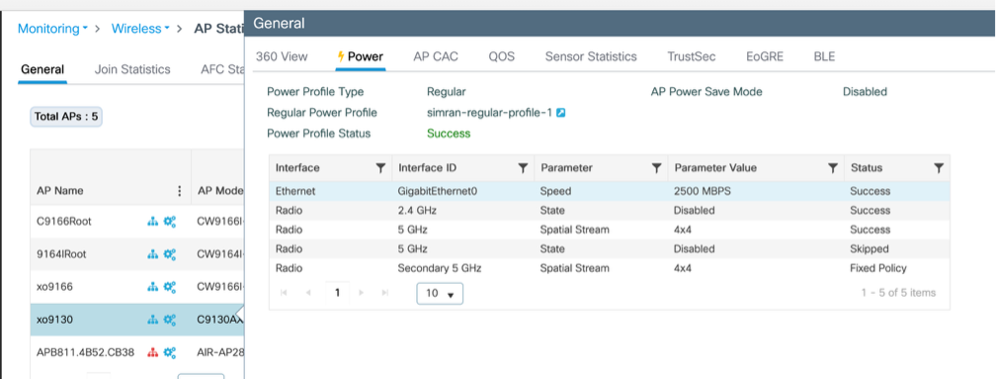
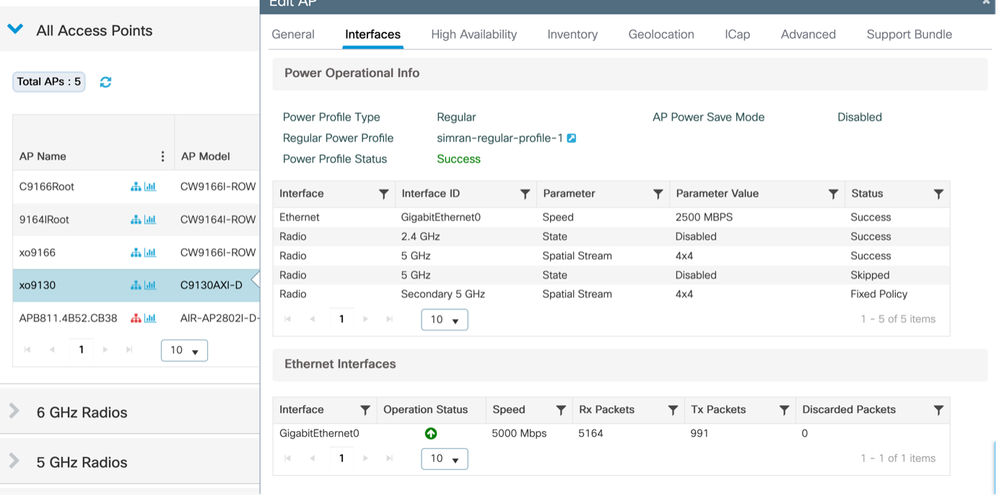
- 验证在AP上应用的配置文件
监控>无线> AP统计信息
Configuration > Wireless > Access Points > Select the AP > Interfaces
使用案例2:绿色/环保模式(日历配置文件)
- 可以应用多个/不同的周期性日历功率曲线。
- 当日历计划处于活动状态时,AP进入节能模式。如果客户端连接(基于配置的阈值),AP将退出节能模式并应用固定策略。一旦客户端断开连接,AP将返回节能模式
- 只有为客户端提供服务的AP会退出节能模式。
示例 1:
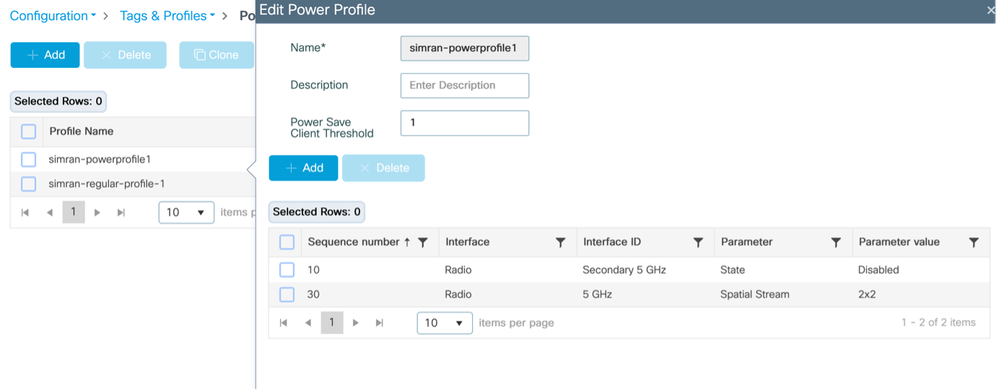
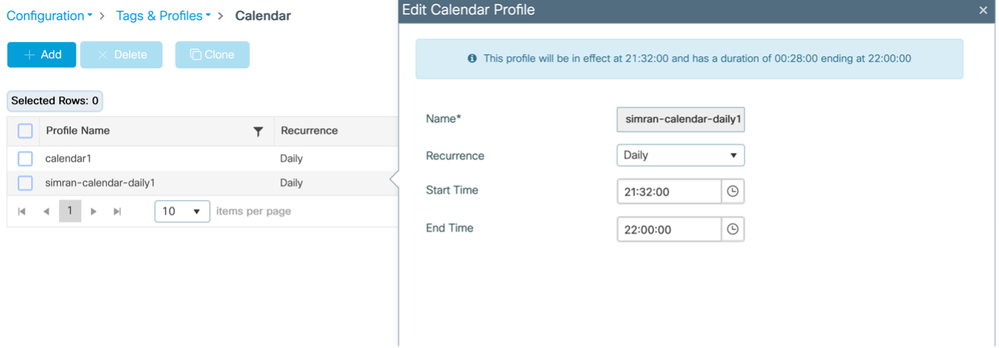
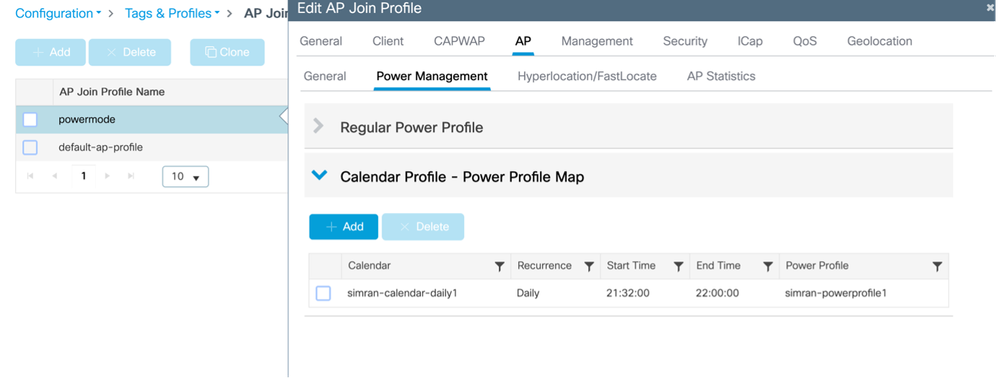
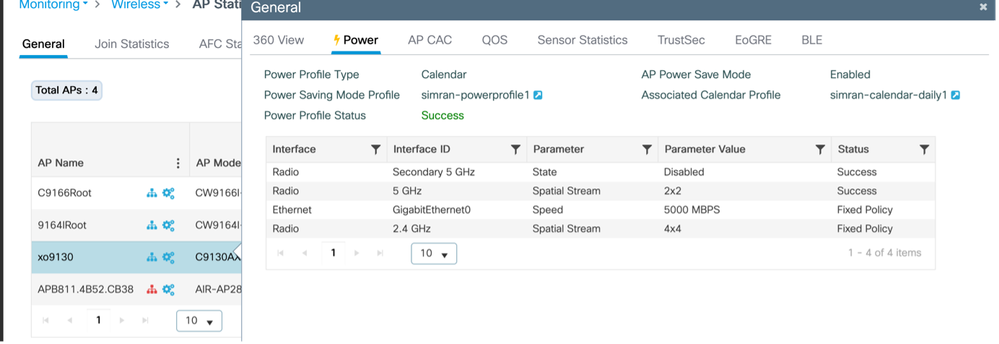
此示例说明禁用辅助5GHz无线电并在2x2模式下运行主要5GHz无线电的电源配置文件配置。此配置与从21:32:00到22:00:00的每日计划绑定。可以根据需要修改类似的配置文件以适应不同的网络方案。
日历配置文件映射(CLI)
配置并映射电源和日历配置文件
 (config)# wireless profile power simran-powerprofile1

 (config-wireless-power-profile)# 10 radio secondary-5ghz state shutdown

 (config-wireless-power-profile)# 30 radio 5ghz spatial-stream 2

 (config-wireless-power-profile)# exit

 (config)# wireless profile calender-profile name simran-calendar-daily1

 (config-calendar-profile)# recurrance daily

 (config-calendar-profile)# start 21:32:00 end 22:00:00

 (config-calendar-profile)# exit

 (config)# ap profile powermode

 (config-ap-profile)# calendar-profile simran-calendar-daily1

 (config-ap-profile-calendar)# action power-saving-mode po

 (config-ap-profile-calendar)# action power-saving-mode power-profile simran-powerprofile1

(config-ap-profile-calendar)# end
日历配置文件映射(GUI)
配置电源配置文件
Configuration > Tags & profiles > Power Profile
配置日历配置文件
Configuration > Tags & profiles > Calendar
将电源配置文件和日历配置文件映射到AP加入配置文件
Configuration > Tags & profiles > AP Join > Select the AP join profile > AP > Power Management
验证在AP上应用的配置文件
监控>无线> AP统计信息> AP >电源
日历启动时从AP进行控制台日志
xo9130#[*04/13/2026 21:35:31.1536] DOT11_CFG[1]: poe_power_mode: low_pwr_mode=5, allowed_tx_ant=3, allowed_rx_ant=3

[*04/13/2026 21:35:31.1615] DOT11_DRV[1]: Stop Radio1 - Begin

[*04/13/2026 21:35:31.1634] wlan: [0:I:CMN_MLME] mlme_ext_vap_down: VAP (mon1) is down

[*04/13/2026 21:35:31.1647] DOT11_DRV[1]: Stop Radio1 - End

[*04/13/2026 21:35:31.1792] wlan: [0:I:CMN_MLME] mlme_ext_vap_down: VAP (apr1v0) is down

[*04/13/2026 21:35:31.1840] DOT11_DRV[1]: Start Radio1 - Begin

[*04/13/2026 21:35:31.1852] wlan: [7277:I:ANY] ol_ath_set_config_param: OL_ATH_PARAM_RTT_SKIP_VDEV_RESTART: value: 1

[*04/13/2026 21:35:31.1870] wlan: [0:I:ANY] ol_ath_pdev_is_multi_band_supported: 2 GHz modes: 0, 5GHz/6GHz modes: 391f9001

[*04/13/2026 21:35:31.1876] wlan: [7277:I:ANY] ieee80211_ucfg_setparam_util: rtt_enable = 0 already configured, skip configuration

[*04/13/2026 21:35:31.1880] wlan: [7277:I:ANY] ieee80211_ucfg_setparam_util: KERN_DEBUG

[*04/13/2026 21:35:31.1880]  setting the lci enble flag

[*04/13/2026 21:35:31.1896] DOT11_DRV[1]: Start Radio1 - End

[*04/13/2026 21:35:31.2121] DOT11_DRV[2]: Stop Radio2 - Begin

[*04/13/2026 21:35:31.2137] wlan: [0:I:CMN_MLME] mlme_ext_vap_down: VAP (mon2) is down

[*04/13/2026 21:35:31.2152] DOT11_DRV[2]: Stop Radio2 - End

[*04/13/2026 21:35:31.2167] wlan: [0:E:ANY] mlme_ext_vap_up: VAP (mon1) is up, vdev_id:33 pdev_id:0 psoc_id:0

[*04/13/2026 21:35:31.2200] wlan: [0:I:CMN_MLME] mlme_ext_vap_down: VAP (apr1v0) is down

[*04/13/2026 21:35:31.2202] wlan: [0:I:ANY] ol_ath_pdev_is_multi_band_supported: 2 GHz modes: 0, 5GHz/6GHz modes: 391f9001

[*04/13/2026 21:35:31.2290] wlan: [0:I:CMN_MLME] mlme_ext_vap_down: VAP (apr2v0) is down
在交换机上
#####应用电源配置文件之前
Switch#show power inline tenGigabitEthernet 3/0/23 detail | i Meas

 Measured at the port: 11.8
#####应用电源配置文件后
Switch#show power inline tenGigabitEthernet 3/0/23 detail | in Meas

 Measured at the port: 10.8
#连接AP上的客户端;ap自动切换回固定策略
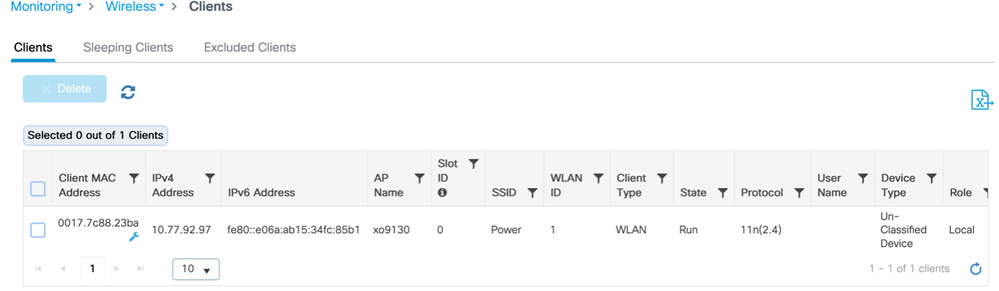
AP 的日志
[*04/13/2026 21:42:27.8792] DOT11_DRV[2]: Start Radio2 - Begin

[*04/13/2026 21:42:27.8802] wlan: [7277:I:ANY] ol_ath_set_config_param: OL_ATH_PARAM_RTT_SKIP_VDEV_RESTART: value: 1

[*04/13/2026 21:42:27.8820] wlan: [0:I:ANY] ol_ath_pdev_is_multi_band_supported: 2 GHz modes: 0, 5GHz/6GHz modes: 391f9001

[*04/13/2026 21:42:27.8827] wlan: [7277:I:ANY] ieee80211_ucfg_setparam_util: rtt_enable = 0 already configured, skip configuration

[*04/13/2026 21:42:27.8828] wlan: [7277:I:ANY] ieee80211_ucfg_setparam_util: KERN_DEBUG

[*04/13/2026 21:42:27.8828]  setting the lci enble flag

[*04/13/2026 21:42:27.8841] DOT11_DRV[2]: Start Radio2 - End

[*04/13/2026 21:42:27.8854] DOT11_CFG[2]: poe_power_mode: low_pwr_mode=5, allowed_tx_ant=15, allowed_rx_ant=15

[*04/13/2026 21:42:27.8974] wlan: [0:E:ANY] mlme_ext_vap_up: VAP (mon2) is up, vdev_id:50 pdev_id:2 psoc_id:0
在交换机上
客户端连接后消耗的电量:
Switch#show power inline tenGigabitEthernet 3/0/23 detail | in Measu

 Measured at the port: 11.8
在WLC上
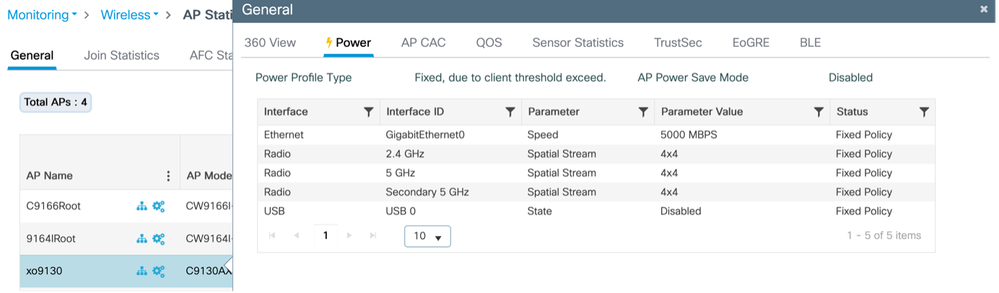
断开客户端连接,Ap自动切换至节能模式:
从AP
 xo9130#[*04/13/2026 21:46:47.2003] DOT11_CFG[1]: poe_power_mode: low_pwr_mode=5, allowed_tx_ant=3, allowed_rx_ant=3

[*04/13/2026 21:46:47.2088] DOT11_DRV[1]: Stop Radio1 - Begin

[*04/13/2026 21:46:47.2106] wlan: [0:I:CMN_MLME] mlme_ext_vap_down: VAP (mon1) is down

[*04/13/2026 21:46:47.2120] DOT11_DRV[1]: Stop Radio1 - End

[*04/13/2026 21:46:47.2264] wlan: [0:I:CMN_MLME] mlme_ext_vap_down: VAP (apr1v0) is down

[*04/13/2026 21:46:47.2452] DOT11_DRV[1]: Start Radio1 - Begin

[*04/13/2026 21:46:47.2464] wlan: [7277:I:ANY] ol_ath_set_config_param: OL_ATH_PARAM_RTT_SKIP_VDEV_RESTART: value: 1

[*04/13/2026 21:46:47.2494] wlan: [0:I:ANY] ol_ath_pdev_is_multi_band_supported: 2 GHz modes: 0, 5GHz/6GHz modes: 391f9001

[*04/13/2026 21:46:47.2504] wlan: [7277:I:ANY] ieee80211_ucfg_setparam_util: rtt_enable = 0 already configured, skip configuration

[*04/13/2026 21:46:47.2506] wlan: [7277:I:ANY] ieee80211_ucfg_setparam_util: KERN_DEBUG

[*04/13/2026 21:46:47.2506]  setting the lci enble flag

[*04/13/2026 21:46:47.2522] DOT11_DRV[1]: Start Radio1 - End

[*04/13/2026 21:46:47.2637] wlan: [0:E:ANY] mlme_ext_vap_up: VAP (mon1) is up, vdev_id:33 pdev_id:0 psoc_id:0

[*04/13/2026 21:46:47.2676] wlan: [0:I:CMN_MLME] mlme_ext_vap_down: VAP (apr1v0) is down

[*04/13/2026 21:46:47.2678] wlan: [0:I:ANY] ol_ath_pdev_is_multi_band_supported: 2 GHz modes: 0, 5GHz/6GHz modes: 391f9001

[*04/13/2026 21:46:47.2729] DOT11_DRV[2]: Stop Radio2 - Begin

[*04/13/2026 21:46:47.2744] wlan: [0:I:CMN_MLME] mlme_ext_vap_down: VAP (mon2) is down

[*04/13/2026 21:46:47.2760] DOT11_DRV[2]: Stop Radio2 - End

[*04/13/2026 21:46:47.2895] wlan: [0:I:CMN_MLME] mlme_ext_vap_down: VAP (apr2v0) is down
在WLC上
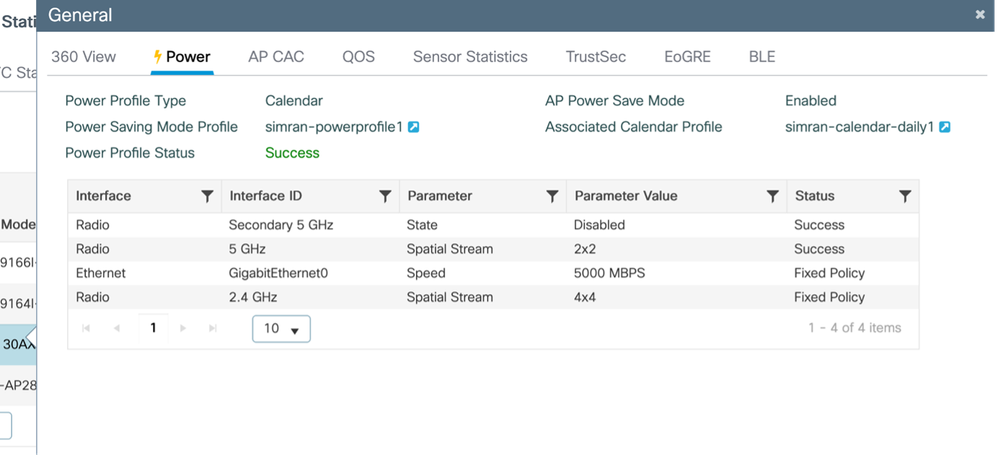
示例 2:
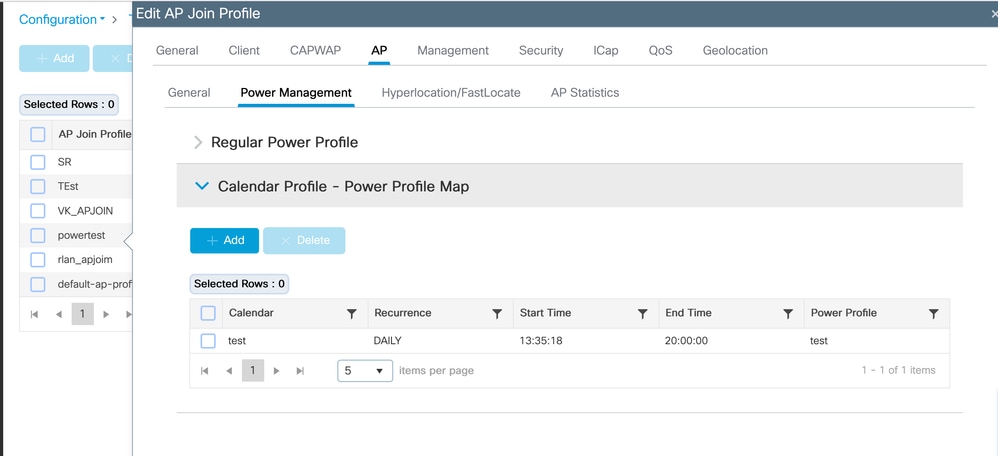
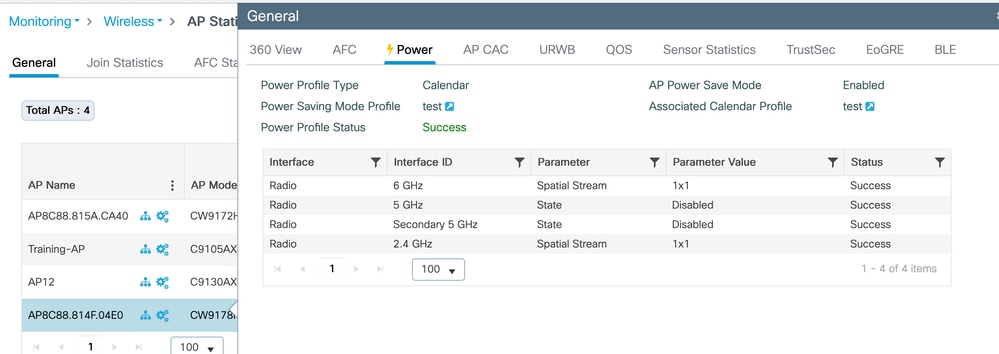
此测试验证CW9178I接入点的AP电源和日历配置文件。功率配置文件配置为在1x1空间流(SS)模式下启用2.4GHz和6GHz无线电时同时禁用5GHz无线电。此配置受从13:35:18到20:00:00的每日活动计划监管。可以根据需要对这些配置文件进行调整以适应各种网络要求。
日历配置文件映射(CLI)
配置并映射电源和日历配置文件
(config)#wireless profile power test
(config-wireless-power-profile)#0 radio 6ghz spatial-stream 1
(config-wireless-power-profile)#10 radio 5ghz state shutdown
(config-wireless-power-profile)#20 radio secondary-5ghz state shutdown
(config-wireless-power-profile)#30 radio 24ghz spatial-stream 1
(config-wireless-power-profile)# exit
(config)# wireless profile calender-profile name test
(config-calendar-profile)# recurrance daily
(config-calendar-profile)# start 13:35:18 end 20:00:00
(config-calendar-profile)# exit
(config)# ap profile powertest
(config-ap-profile)# calendar-profile test
(config-ap-profile-calendar)# action power-saving-mode power-profile test
(config-ap-profile-calendar)# end
日历配置文件映射(GUI)
配置电源配置文件
Configuration > Tags & profiles > Power Profile
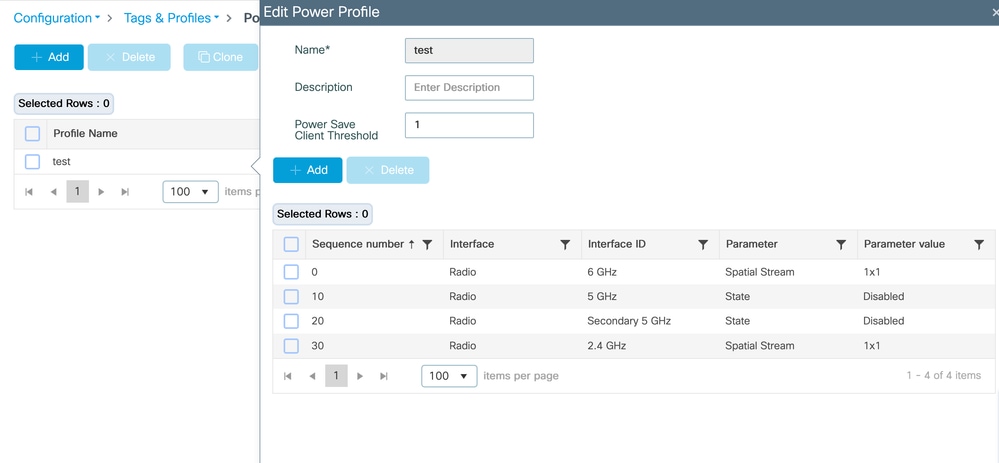
配置日历配置文件
Configuration > Tags & profiles > Calendar
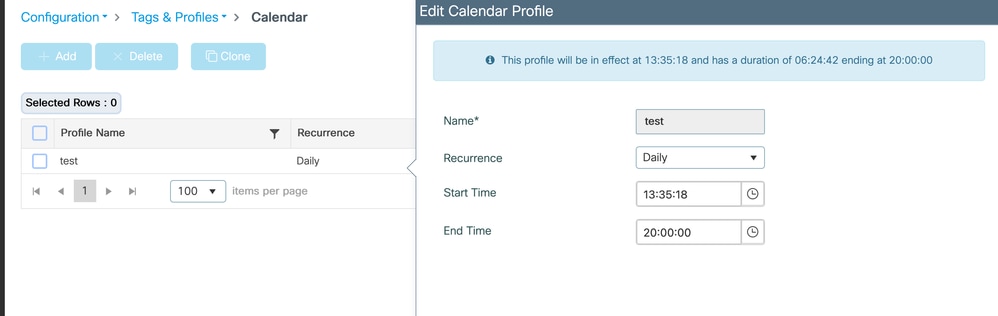
将电源配置文件和日历配置文件映射到AP加入配置文件
Configuration > Tags & profiles > AP Join > Select the AP join profile > AP > Power Management
验证在AP上应用的配置文件
监控>无线> AP统计信息> AP >电源
在交换机上
#####应用电源配置文件之前
Switch#show power inline twoGigabitEthernet 1/0/2 detail | i Mea
Measured at the port(watts) (Alt-A,B): 16.5
#####应用电源配置文件后
Switch#show power inline twoGigabitEthernet 1/0/2 detail | in Mea
Measured at the port(watts) (Alt-A,B): 14.8
PoE分配功率与实际功耗
在Catalyst交换机上,PoE电源通过两种不同方式进行跟踪:已分配功率和实际功耗。
分配功率是交换机根据IEEE类和CDP/LLDP功率协商为设备保留的功率量。此值用于PoE预算计算,显示为“用于”
show power inline module。
示例:
模块可用剩余数量
1 525.0 315.9 209.1
此处,315.9 W是为相连设备预留的PoE总预算。
例如,接口Tw1/0/2上的CW9178I AP分配了60 W:
已分配功率
管理员值:60.0
已分配功率:60.0
但是,AP的实际功耗可能低得多:
实际消耗量
在端口上测量:16.9 W
自通电以来的最大值:18.6 W
可通过以下方式查看交换机范围的实时消耗情况:
show power inline police
示例:
总计:103.8 W
这意味着虽然预留了315.9 W,但设备当前仅占用103.8 W。
此行为是预期行为,因为PoE交换机根据最大协商功率要求而不是瞬时消耗功率来预留功率。
这可确保接入点等设备在不断电的情况下立即增加用电量(例如在无线电活动高峰期间)。
应用AP省电配置文件时,由于某些AP组件在降低状态下运行,因此仅实际功耗会降低。
分配的功率保持不变,因为AP和交换机之间的协商最大功率包络没有改变。
PoE预算计算使用分配的(保留的)功率,而不是实时消耗。因此,通常可以看到“已用功率”(Used power)和“已测量功率”(measured power)之间的巨大差异。
验证
无线局域网控制器(WLC)上
- show ap profile name default-ap-profile detailed
- show ap name <ap-name> power-profile summary
- show wireless profile power summary
- show wireless profile power detailed <power-profile-name>
- show wireless profile calendar-profile summary
在接入点上
- show ap power policy config
- show ap power policy status
- show ap power calendar config
在交换机上
验证实际功耗:
- show power inline gig <interface>详细信息 |包括测量值
故障排除
在AP
#Console日志
#debug capwap客户端负载
#debug powerpolicy logging level trace
#debug powerpolicy logging level info
#debug powerpolicy logging console enable
#terminal monitor
在WLC上
#RA跟踪(AP无线电MAC)
调试级别的WNCD日志数量:
 #set platform software trace wncd <0/1/2/3> chassis active/Standby R0 ap-pwr-prof-main debug`
`#set platform software trace wncd <0/1/2/3> chassis active/Standby R0 ap-pwr-prof-db debug`
`#set platform software trace wncd <0/1/2/3> chassis active/Standby R0 ap-pwr-prof-wcnm debug`
`#set platform software trace wncd <0/1/2/3> chassis active/Standby R0 apcfg-profile-db debug`
`#set platform software trace wncd <0/1/2/3> chassis active/Standby R0 apmgr-db debug`
注意:重现问题后,将软件跟踪级别恢复为“notice”。
已知问题
- AP电源配置文件状态出现意外的“Insufficient De-rating”:Cisco Bug ID CSCwf92519
- 17.9尚不支持“常规功率配置文件”功能,但GUI上显示“常规功率配置文件”:Cisco Bug ID CSCwi51691

修订历史记录
| 版本 | 发布日期 | 备注 |
|---|---|---|
2.0 |
09-Jun-2026
|
对电源预算预留和实际功耗的补充说明 |
1.0 |
22-May-2026
|
初始版本 |
 反馈
反馈