在Nexus 7000系列交换机上配置第2层vPC数据中心互联

目录
简介
本文档介绍如何使用虚拟端口通道(vPC)配置第2层(L2)数据中心互联(DCI)。
先决条件
假设在本文档提供的示例中使用的设备上已配置vPC和热备份路由协议(HSRP)。
要求
Cisco 建议您了解以下主题:
- vPC
- HSRP
- 生成树协议 (STP)
- MACSec加密(可选)
使用的组件
本文档中的信息基于运行软件版本6.2(8b)的Cisco Nexus 7000系列交换机。
本文档中的信息都是基于特定实验室环境中的设备编写的。本文档中使用的所有设备最初均采用原始(默认)配置。如果您使用的是真实网络,请确保您已经了解所有命令的潜在影响。
背景信息
DCI的用途是扩展不同数据中心之间的特定VLAN,为相距较远的服务器和网络连接存储(NAS)设备提供L2邻接关系。
vPC提供了两个站点之间的STP隔离的优点(在DCI vPC上没有网桥协议数据单元(BPDU)),因此数据中心的任何中断都不会传播到远程数据中心,因为数据中心之间仍然提供冗余链路。
DCI vPC Etherchannel通常配置时需要考虑以下信息:
- 第一跳冗余协议(FHRP)隔离:通过使用每个数据中心的专用网关防止次优路由。配置取决于FHRP网关的位置。
- STP隔离:如前所述,这可以防止故障从一个数据中心传播到另一个数据中心。
- 广播风暴控制:这是为了最大限度地减少数据中心之间的广播流量。
- MACSec加密(可选):这会加密流量以防止两个设施之间的入侵。
配置
使用本节中描述的信息配置L2 DCI以使用vPC。
FHRP隔离
本节介绍两种可以实施FHRP隔离的方案。
双L2/L3 POD互联
此场景使用的拓扑如下:
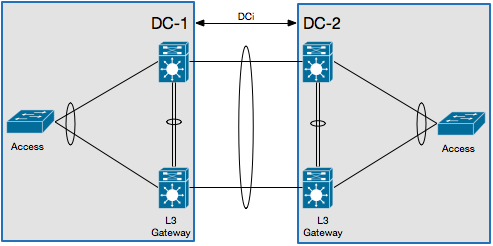
在此场景中,第3层(L3)网关配置在同一个vPC对上,并充当DCI。为了隔离HSRP,必须在DCI端口通道上配置端口访问控制列表(PACL),并为通过DCI移动的VLAN禁用交换虚拟接口(SVI)上的HSRP无端地址解析协议(ARP)(GARP)。
以下是配置示例:
ip access-list DENY_HSRP_IP
  10 deny udp any 224.0.0.2/32 eq 1985
  20 deny udp any 224.0.0.102/32 eq 1985
  30 permit ip any any

interface <DCI-Port-Channel>
  ip port access-group DENY_HSRP_IP in

interface Vlan <x>
  no ip arp gratuitous hsrp duplicate
用于聚合和DCI的多层vPC
此场景使用的拓扑如下:
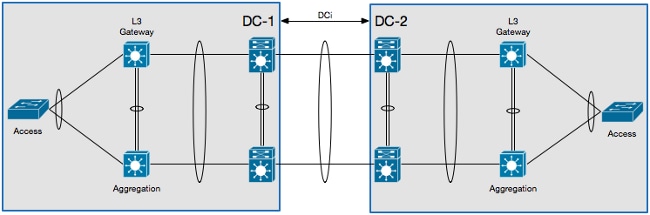
在此场景中,DCI被隔离在其自身的第2层虚拟设备环境(VDC)上,而第3层网关位于汇聚层设备上。为了隔离HSRP,您必须配置阻止HSRP控制流量的VLAN访问控制列表(VACL)和阻止第2层DCI VDC上的HSRP GARP的ARP检测过滤器。
以下是配置示例:
ip access-list ALL_IPs
  10 permit ip any any
mac access-list ALL_MACs
  10 permit any any
ip access-list HSRP_IP
  10 permit udp any 224.0.0.2/32 eq 1985
  20 permit udp any 224.0.0.102/32 eq 1985
mac access-list HSRP_VMAC
  10 permit 0000.0c07.ac00 0000.0000.00ff any
  20 permit 0000.0c9f.f000 0000.0000.0fff any
vlan access-map HSRP_Localization 10
        match ip address HSRP_IP
        match mac address HSRP_VMAC
        action drop
        statistics per-entry
vlan access-map HSRP_Localization 20
        match ip address ALL_IPs
        match mac address ALL_MACs
        action forward
        statistics per-entry
vlan filter HSRP_Localization vlan-list <DCI_Extended_VLANs>

feature dhcp

arp access-list HSRP_VMAC_ARP
  10 deny ip any mac 0000.0c07.ac00 ffff.ffff.ff00
  20 deny ip any mac 0000.0c9f.f000 ffff.ffff.f000
  30 permit ip any mac any

ip arp inspection filter HSRP_VMAC_ARP vlan <DCI_Extended_VLANs>
其他隔离配置
本部分提供了一个配置示例:
- 仅允许扩展远程数据中心所需的VLAN。
- 隔离每个数据中心的STP。
- 丢弃超过总链路速度1%的广播流量。
以下是配置示例:
 interface <DCI-Port-Channel>
  switchport trunk allowed vlan <DCI_Extended_VLANs>
  spanning-tree port type edge trunk
  spanning-tree bpdufilter enable
  storm-control broadcast level 1.0
MACSec加密
使用此信息配置MACSec加密:
feature dot1x
feature cts

! MACSec requires 24 additional bytes for encapsulation.
interface <DCI-Port-Channel>
  mtu 1524

interface <DCI-Physical-Port>
  cts manual
    no propagate-sgt
    sap pmk <Preshared-Key>
验证
使用本节中描述的信息以确认您的配置是否正常工作。
FHRP隔离
在CLI中输入show hsrp br命令,以验证HSRP网关在两个数据中心都处于活动状态:
!DC-1
N7K-A# show hsrp br
*:IPv6 group   #:group belongs to a bundle
                     P indicates configured to preempt.
                     |
 Interface   Grp  Prio P State    Active addr      Standby addr     Group addr
  Vlan10      10   120    Active   local            10.1.1.3         10.1.1.5
     (conf)

!DC-2
N7K-C# show hsrp br
*:IPv6 group   #:group belongs to a bundle
                     P indicates configured to preempt.
                     |
 Interface   Grp  Prio P State    Active addr      Standby addr     Group addr
  Vlan10      10   120    Active   local            10.1.1.3         10.1.1.5
     (conf)
在CLI中输入以下命令以验证ARP过滤器:
N7K-D# show log log | i DUP_VADDR
2015 Apr 10 21:16:45 N7K-A %ARP-3-DUP_VADDR_SRC_IP:  arp [7915]  Source address of
 packet received from 0000.0c9f.f00a on Vlan10(port-channel102) is duplicate of local
 virtual ip, 10.1.1.5
如果出现类似输出,则两个活动网关之间的GARP没有正确隔离。
其他隔离
在CLI中输入show spanning-tree root命令,以验证STP根不指向DCI端口通道:
N7K-A# show spanning-tree root

                                        Root  Hello Max Fwd
Vlan                   Root ID          Cost  Time  Age Dly  Root Port
---------------- -------------------- ------- ----- --- ---  ----------------
VLAN0010          4106 0023.04ee.be01       0    2   20  15  This bridge is root
在CLI中输入以下命令以验证是否已正确配置风暴控制:
N7K-A# show interfacecounters storm-control
--------------------------------------------------------------------------------
Port UcastSupp % McastSupp % BcastSupp % TotalSuppDiscards
--------------------------------------------------------------------------------
Po103 100.00 100.00 1.00 0
MACSec加密
在CLI中输入以下命令以验证MACSec加密是否已正确配置:
N7K-A# show cts interface
CTS Information for Interface Ethernet3/41:
...
    SAP Status:             CTS_SAP_SUCCESS
      Version: 1
      Configured pairwise ciphers: GCM_ENCRYPT
      Replay protection: Enabled
      Replay protection mode: Strict
      Selected cipher: GCM_ENCRYPT
      Current receive SPI: sci:e4c7220b98dc0000 an:0
      Current transmit SPI: sci:e4c7220b98d80000 an:0
...
故障排除
目前没有可用于FHRP或其他隔离配置的特定故障排除信息。
对于MACSec配置,如果链路两端未协商预共享密钥,则当您在CLI中输入show interface <DCI-Physical-Port>命令时,将会看到类似下面的输出:
N7K-A# show interface
Ethernet3/41 is down (Authorization pending)
admin state is up, Dedicated Interface
注意事项
以下警告与在Cisco Nexus 7000系列交换机上使用DCI有关:
- Cisco Bug ID CSCur69114 - HSRP PACL Filter Broken — 数据包泛洪到第2层域。此Bug仅在软件版本6.2(10)中发现。
- Cisco Bug ID CSCut75457 - HSRP VACL Filter Broken。此Bug仅在软件版本6.2(10)和6.2(12)中发现。
- 思科漏洞ID CSCut43413 - DCi:通过FHRP隔离PACL的HSRP虚拟MAC抖动。此Bug是由于硬件限制所致。
相关信息
修订历史记录
| 版本 | 发布日期 | 备注 |
|---|---|---|
1.0 |
14-Aug-2015
|
初始版本 |
 反馈
反馈