CAT9000上与GIADDR和选项82的DHCP监听交互

简介
本文档介绍与CAT9000上的GIADDR和选项82的DHCP监听交互。
先决条件
要求
Cisco 建议您了解以下主题:
- Cisco IOS® XE在配置和操作命令方面的熟练程度。
- 熟悉Cisco Catalyst 9000系列交换机硬件和架构。
- 深入了解DHCP协议操作和DHCP监听机制。
- 对DHCP选项82和中继代理的作用的概念性理解。
使用的组件
本文档中的信息基于以下软件和硬件版本:
- 核心/分布层交换机:Cisco Catalyst 9600X系列
- 接入交换机:Cisco Catalyst 9300系列
- DHCP客户端:终端主机设备
- DHCP服务器:集中式网络服务提供商
背景信息
本文档探讨核心/分布交换机上与DHCP选项82集成的DHCP监听的各种配置。本指南通过实际配置示例和对相应数据包捕获的分析,说明了Cisco Catalyst 9000系列环境中这些功能之间的交互。
网络图
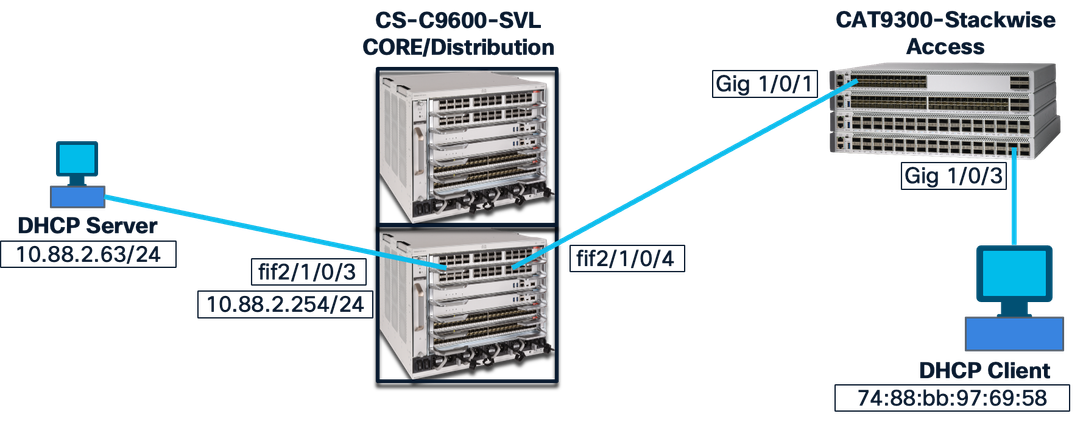
测试案例
已启用核心交换机DHCP监听
禁用接入交换机选项82
核心交换机:
!
int fif2/1/0/4   ——> Downlink to Access Switch
ip dhcp snooping trust
!
ip dhcp snooping vlan 1-2048
ip dhcp snooping
!
接入层交换机:
!
int gig1/0/1  —> uplink to Core
ip dhcp snooping trust
switchport mode trunk
!
ip dhcp snooping vlan 1-1400
no ip dhcp snooping information option
ip dhcp snooping
!
int gig1/0/3  —---> End device connected port
switchport mode access
switchport access vlan 287
!
结果:
成功。
终端设备获取IP地址时不会出现问题。
说明:
禁用接入交换机选项82,它将数据包发送到核心层,而不使用选项82。默认情况下启用核心层交换机选项82,并在数据包中添加带有中继代理IP地址的选项82,并将其发送到DHCP服务器。
客户端和接入交换机之间的链路上的数据包:
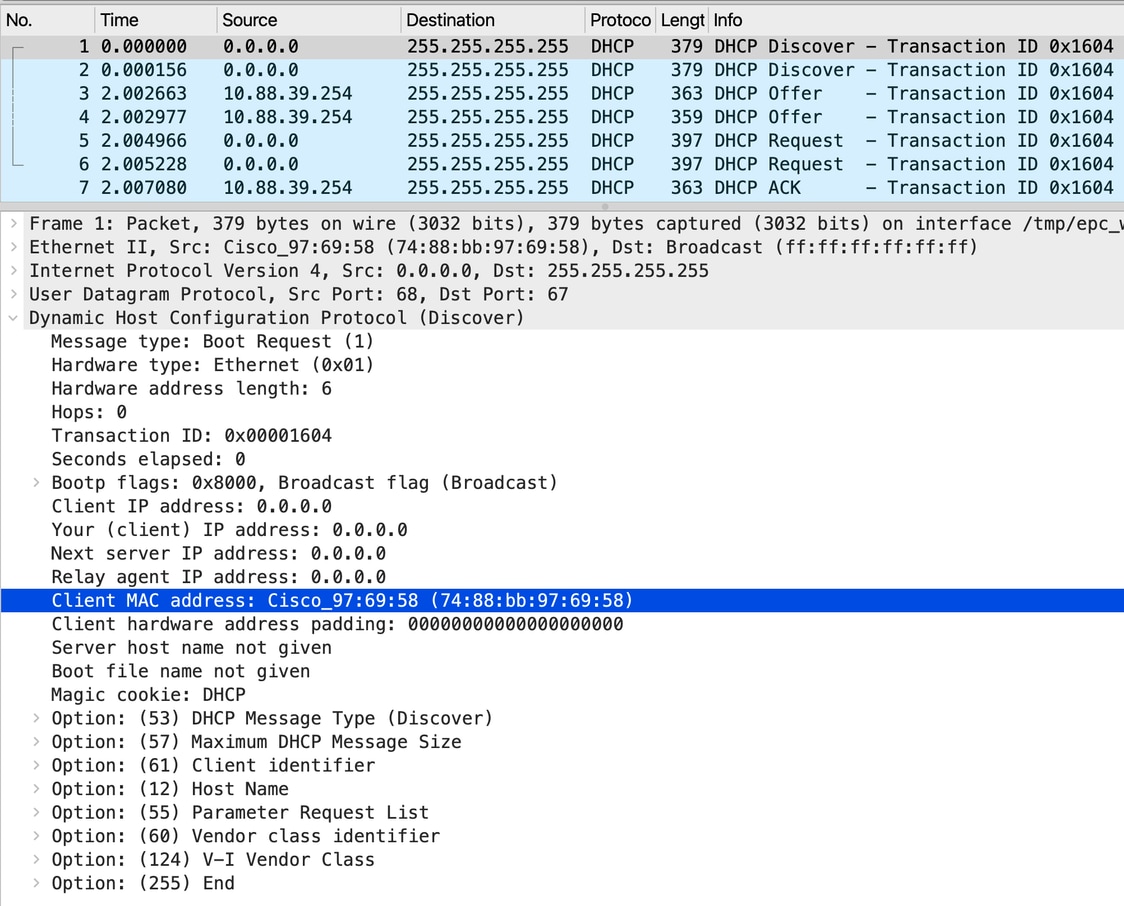

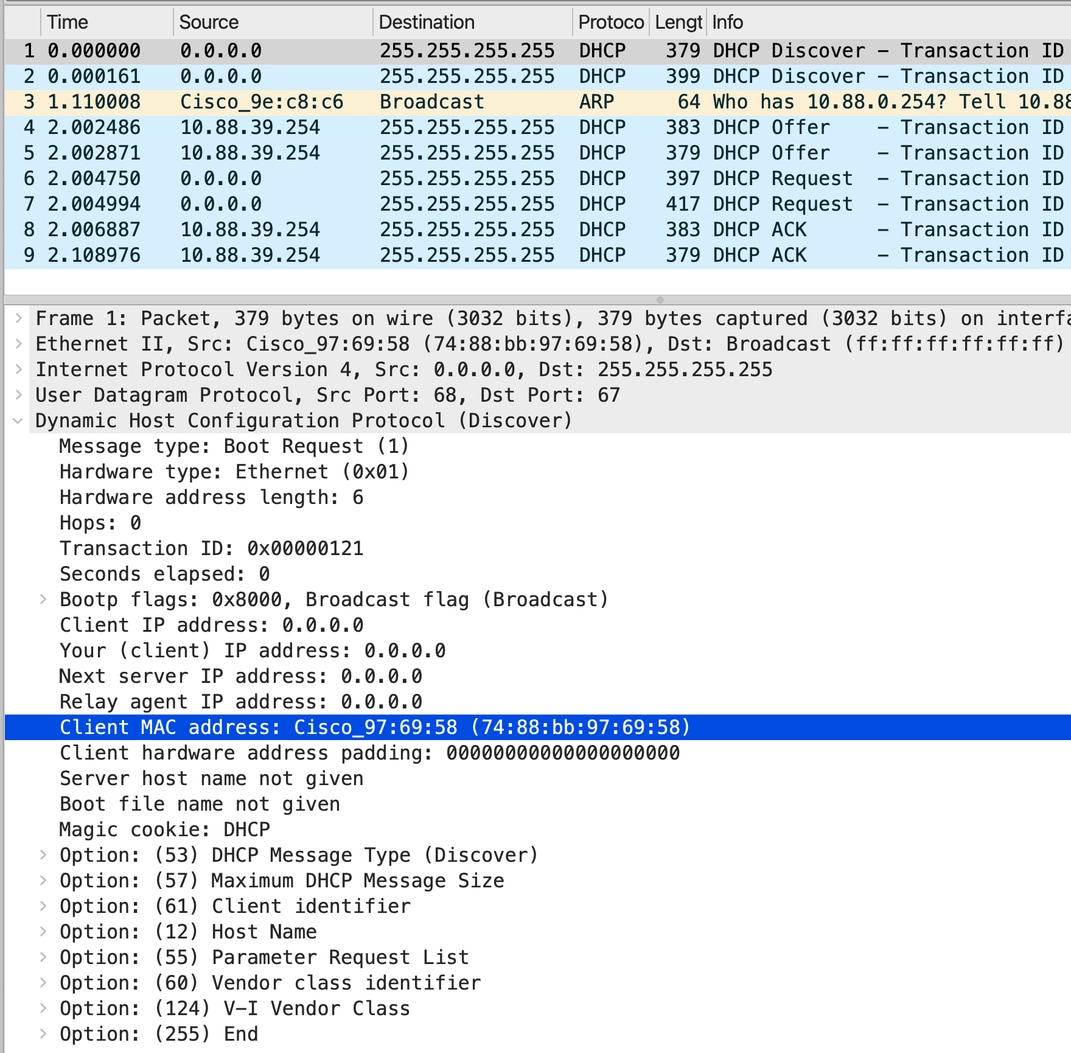
注意:同一客户端的数据包捕获多次并在多个捕获点进行;因此忽略事务id。
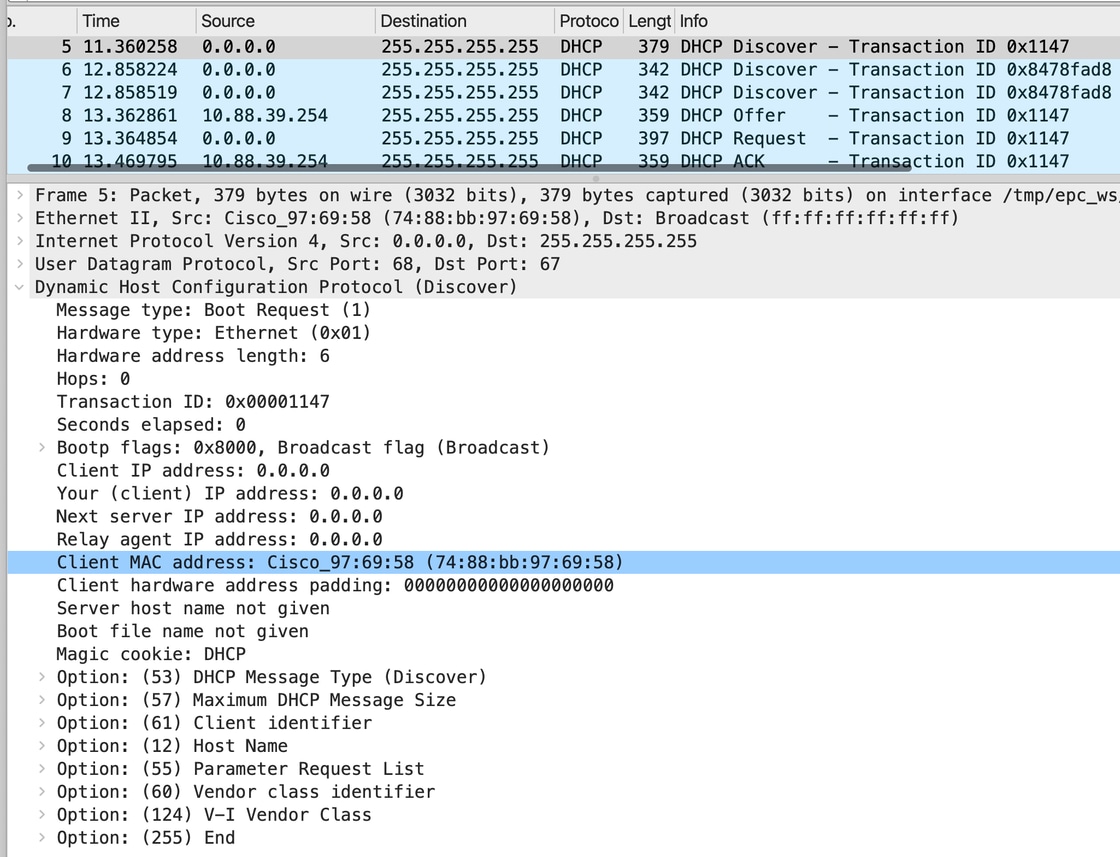
接入交换机和分布层/核心层交换机之间的链路上的数据包:
接入交换机没有监听信息选项插入,因此来自客户端的相同数据包被转发到分布交换机。
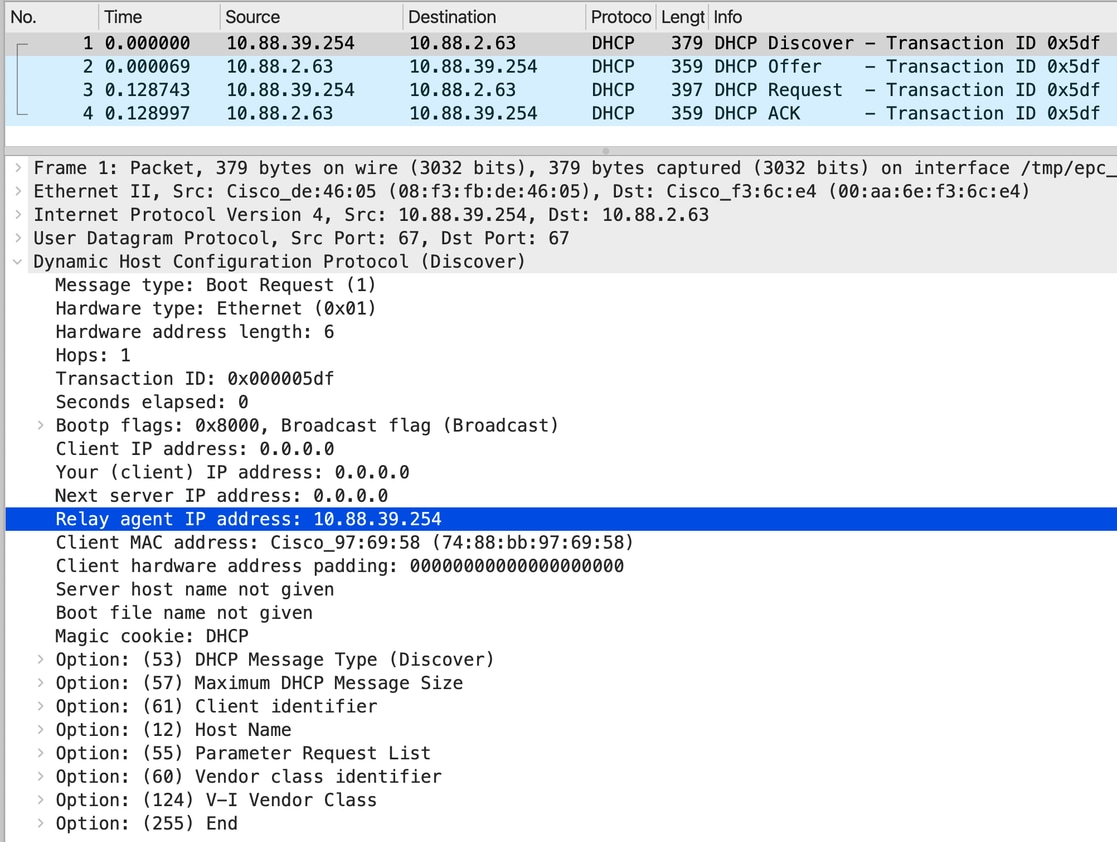
CORE交换机和DHCP服务器之间的数据包:
当启用DHCP监听并配置中继时,CORE交换机将数据包单播到具有中继代理IP的DHCP服务器10.88.2.63时会插入其自己的IP。
接入交换机选项82已启用
核心交换机:
!
int fif2/1/0/4  ——> Downlink to Access Switch
ip dhcp snooping trust
!
ip dhcp snooping vlan 1-2048
ip dhcp snooping
!
接入层交换机:
!
int gig1/0/1 —> uplink to Core
ip dhcp snooping trust
switchport mode trunk
!
ip dhcp snooping vlan 1-1400
ip dhcp snooping information option
ip dhcp snooping
!
int gig1/0/3
switchport mode access
switchport access vlan 287
!
结果:
成功。
终端设备获取IP地址时不会出现问题。
说明:
已启用接入交换机选项82,但此交换机未创建SVI,它会将数据包发送到核心层,而不使用选项82。核心层交换机选项82默认启用,它会在数据包中添加选项82和中继代理的IP地址,并将其发送到DHCP服务器。
从客户端到接入交换机的数据包:
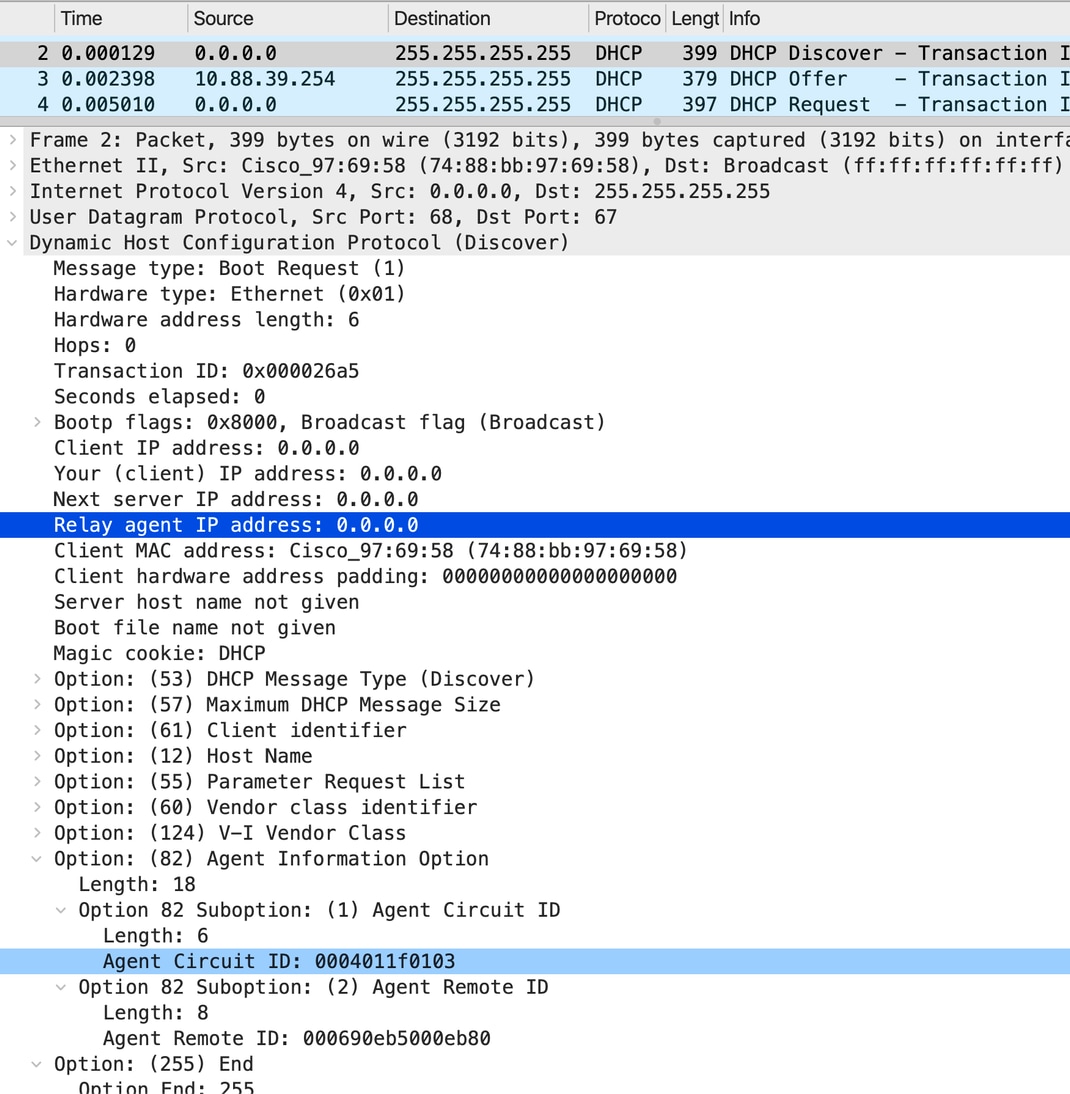
从接入交换机到CORE/Distribution交换机的数据包:
由于在接入交换机上默认启用“ip dhcp snooping information option”,接入交换机插入选项82,其中中继IP为0.0.0.0。
根据DHCP监听环境,这是一个非法数据包,必须被CORE交换机丢弃。但是,由于CORE交换机具有可信接口,因此数据包将被处理以中继到DHCP服务器。
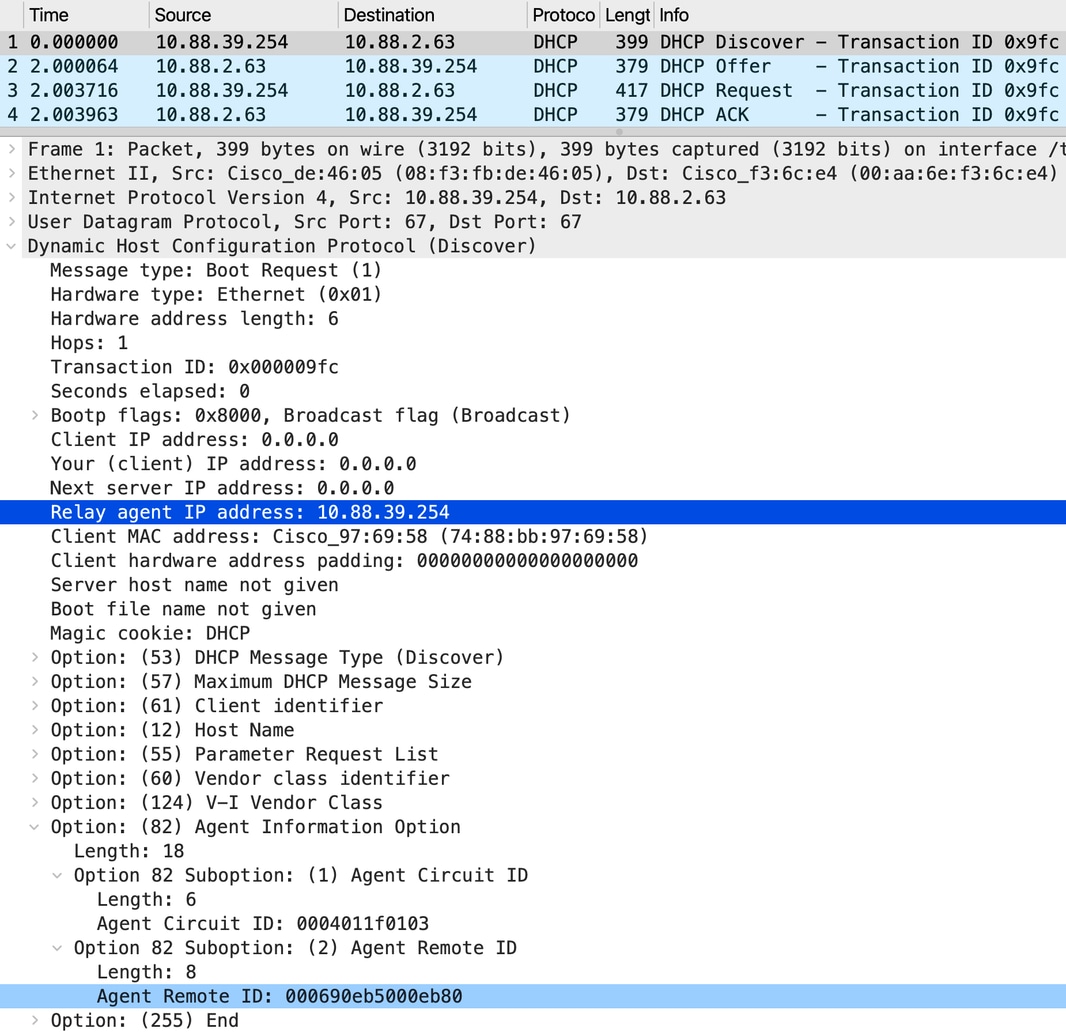
CORE交换机和DHCP服务器之间的数据包:
由于下行链路接口受信任,CORE交换机将中继代理从0.0.0.0替换为10.88.39.254,并将其发送到上行链路。
此外,DORA进程完成合法操作,客户端获得IP地址。
禁用核心交换机DHCP监听
接入交换机选项82已启用
核心交换机:
!
Int fif2/1/0/4   ——> Downlink to Access Switch
no Ip dhcp snooping trust
!
no ip dhcp snooping vlan 1-2048

no ip dhcp snooping
!
接入层交换机:
!
int gig1/0/1 —> uplink to Core
ip dhcp snooping trust
switchport mode trunk
!
ip dhcp snooping vlan 1-1400
ip dhcp snooping information option
ip dhcp snooping
!
int gig1/0/3
switchport mode access
switchport access vlan 287
!
结果:
失败。
终端设备无法获取IP地址。
说明:
接入交换机选项82已启用,但此交换机没有SVI或中继代理。因此,它使用选项82将数据包发送到CORE,并将Relay IP设置为0.0.0.0。因为CORE交换机上禁用了DHCP监听;在该处禁用了选项82的验证、编辑和插入。因此,CORE交换机无法添加中继并丢弃数据包。
客户端DHCP发现来自客户端并进入接入交换机的数据包:
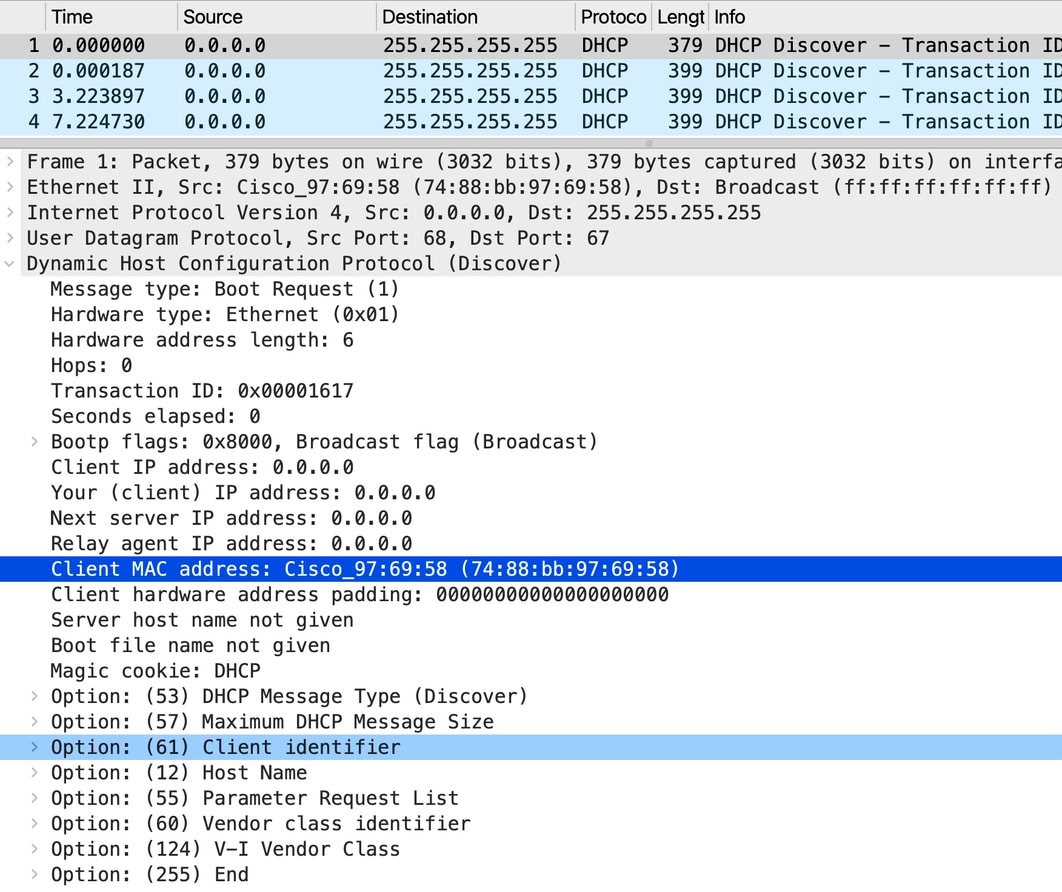
从接入交换机到CORE/分布交换机的数据包流:
·接入交换机启用了命令ip dhcp snooping information option,这会导致它将选项82插入DHCP数据包。在这种情况下,选项82中的中继代理IP地址设置为0.0.0.0。
·对于vLAN 287,接入交换机仅在第2层运行。
·从CORE交换机的角度来看,具有接入交换机插入的选项82的数据包被视为非法。但是,由于CORE交换机上的下行链路接口配置为trusted,因此CORE交换机处理数据包,而不是在接口级别丢弃数据包。
· CORE交换机禁用了DHCP监听,因此它不转发包含选项82的数据包。
使用DHCP发现数据包的核心交换机行为:
- CORE交换机尝试将DHCP发现数据包单播到已配置的帮助地址10.88.2.63。
- 为此,CORE交换机必须在DHCP数据包中设置中继IP地址(GIADDR)。
- 由于选项82已存在于接入交换机插入的数据中,因此CORE交换机必须在设置中继IP之前检验选项82。
- 由于CORE交换机上禁用了DHCP监听,因此它无法验证选项82。
- 由于无法验证和修改选项82,CORE交换机别无选择,只能丢弃DHCP发现数据包。
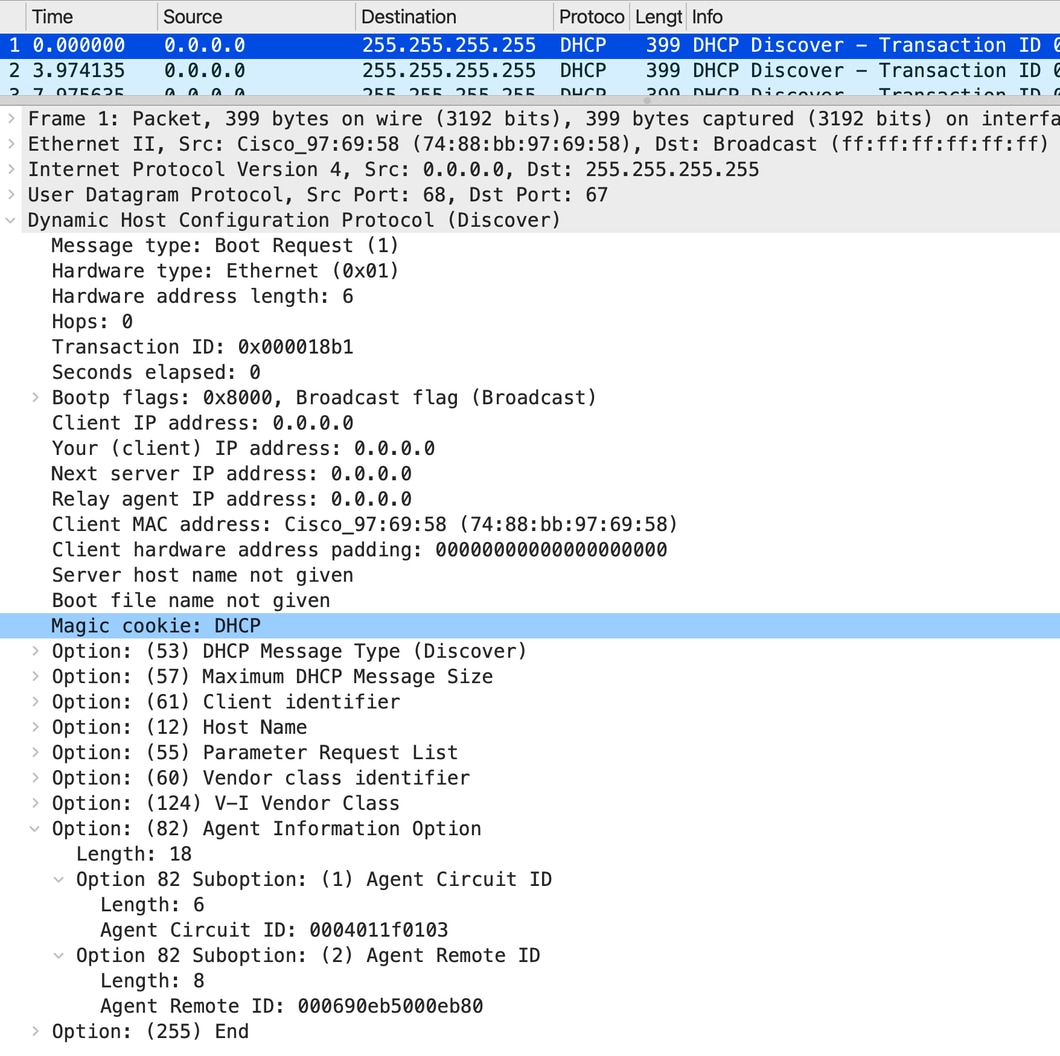
发现数据包不会从CORE交换机中继到DHCP服务器。
CORE交换机上非工作场景的调试:
DHCPD: Reload workspace interface Vlan287 tableid 0.
DHCPD: tableid for 10.88.39.254 on Vlan287 is 0
DHCPD: client's VPN is .
DHCPD: No option 125
DHCPD: Option 124: Vendor Class Information
DHCPD: Enterprise ID: 9
DHCPD: Vendor-class-data-len: 13
DHCPD: Data: 43~~~~~58
DHCPD: inconsistent relay information.
DHCPD: relay information option exists, but giaddr is zero.
禁用接入交换机选项82
核心交换机:
!
int fif2/1/0/4   ——> Downlink to Access Switch
no ip dhcp snooping trust
!
no ip dhcp snooping vlan 1-2048
no ip dhcp snooping
!
接入层交换机:
!
int gig1/0/1  —> uplink to Core
ip dhcp snooping trust
switchport mode trunk
!
ip dhcp snooping vlan 1-1400
no ip dhcp snooping information option
ip dhcp snooping
!
int gig1/0/3
switchport mode access
switchport access vlan 287
!
结果:
成功。
终端设备获取IP地址。
观察:
禁用接入交换机选项82,它将数据包发送到核心层,而不使用选项82,并且CORE交换机具有配置了中继的SVI。CORE交换机将中继代理IP地址添加到数据包并将其发送到DHCP服务器。
客户端DHCP发现到达接入交换机的数据包:
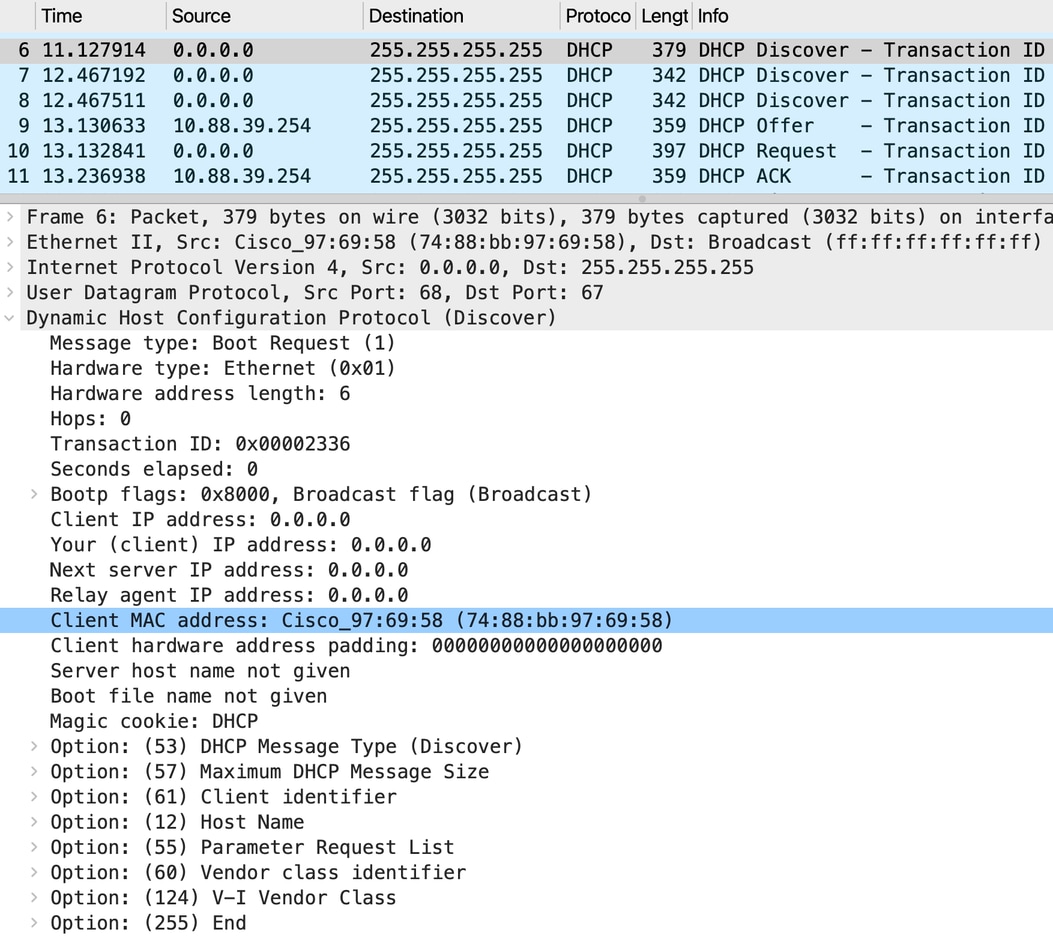
从接入交换机到CORE交换机的数据包:
由于选项82插入在接入交换机上禁用,接入交换机将转发广播数据包,因为它在上行链路中继上。
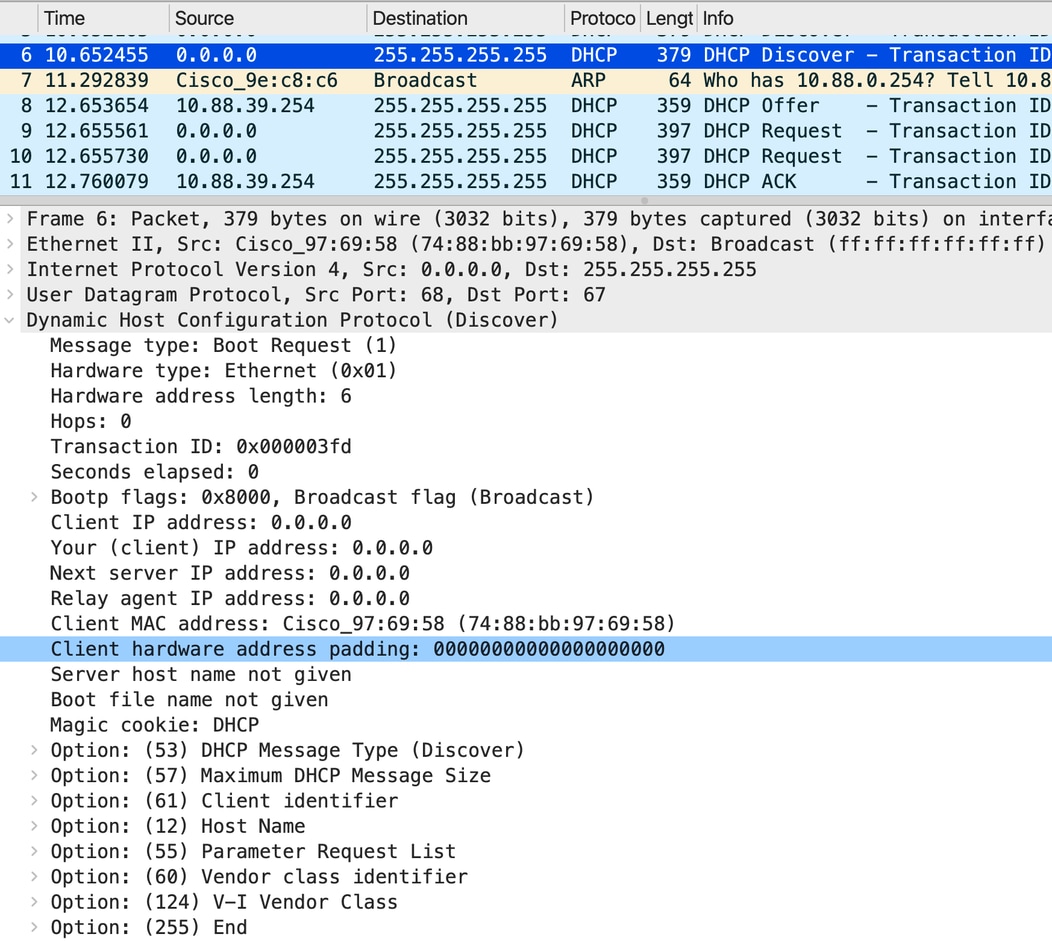
CORE交换机向DHCP服务器中继的数据包:
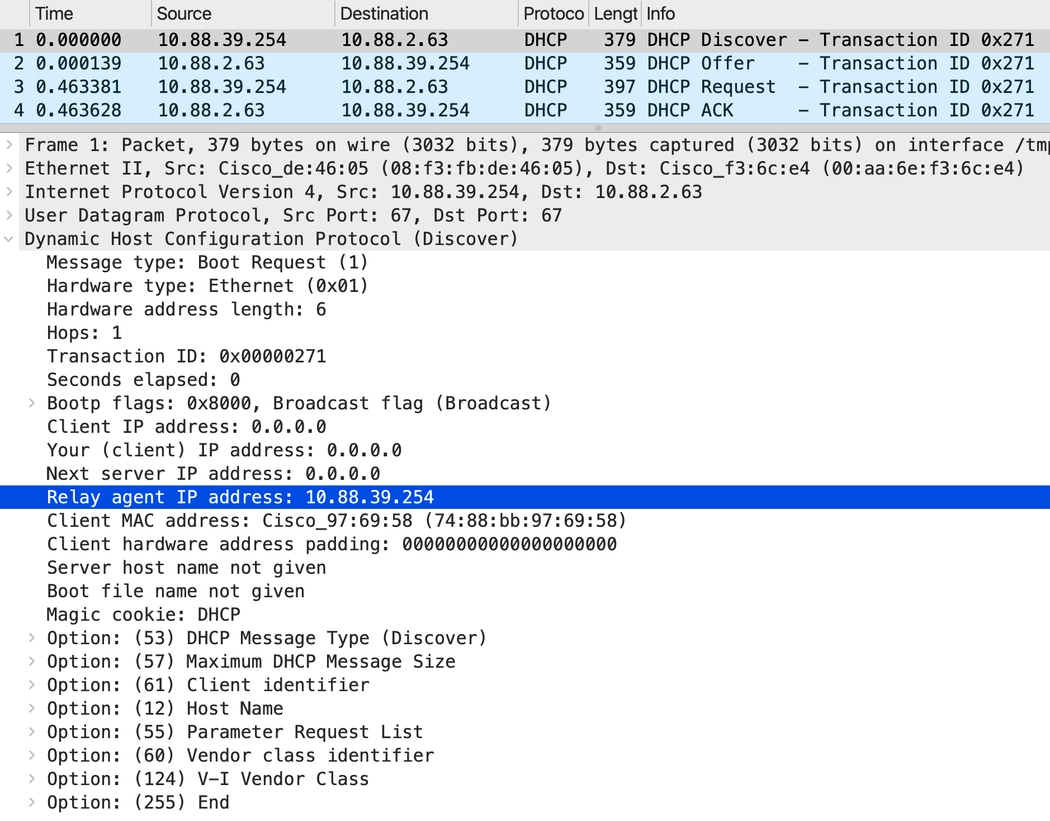
核心交换机上的调试:
Option 82 not present
DHCPD: Reload workspace interface Vlan287 tableid 0.
DHCPD: tableid for 10.88.39.254 on Vlan287 is 0
DHCPD: client's VPN is .
DHCPD: No option 125
DHCPD: No option 124
DHCPD: FSM state change INVALID
DHCPD: Workspace state changed from INIT to INVALID
DHCPD: Finding a relay for client ~~~~ on interface Vlan287.
DHCPD : Locating relay for Subnet 10.88.39.254
DHCPD: there is no pool for 10.88.39.254.
DHCPD: Looking up binding using address 10.88.39.254
DHCPD: setting giaddr to 10.88.39.254
在本例中,客户端接收IP地址。
摘要
- 必须启用DHCP监听,交换机才能插入、删除或验证DHCP选项82信息。
- 当禁用DHCP监听时,交换机不执行选项82的插入或移除功能。
- 选项82处理(包括丢弃或允许带有选项82的数据包)取决于是否启用和配置DHCP监听。
修订历史记录
| 版本 | 发布日期 | 备注 |
|---|---|---|
1.0 |
18-May-2026
|
初始版本 |
 反馈
反馈