排除EVPN VxLAN Cat9000的外部DHCP故障

简介
本文档介绍如何排除Cat9000平台上的外部EVPN VxLAN环境中的DHCP问题。
先决条件
要求
Cisco 建议您了解以下主题:
- Cat9000平台上的虚拟可扩展LAN
- VxLAN环境中的发现主机配置协议
- 边界网关协议 (BGP)
有关这些主题的详细信息,请参阅:
- 章节:在BGP EVPN VXLAN交换矩阵Cat9300中配置DHCP中继
- 章节:在BGP EVPN VXLAN交换矩阵Cat9400中配置DHCP中继
- 章节:在BGP EVPN VXLAN交换矩阵Cat9500中配置DHCP中继
- 章节:在BGP EVPN VXLAN交换矩阵Cat9600中配置DHCP中继
使用的组件
本文档中的信息基于Cisco IOS XE软件。
本文档中的信息都是基于特定实验室环境中的设备编写的。本文档中使用的所有设备最初均采用原始(默认)配置。如果您的网络处于活动状态,请确保您了解所有命令的潜在影响。
网络图
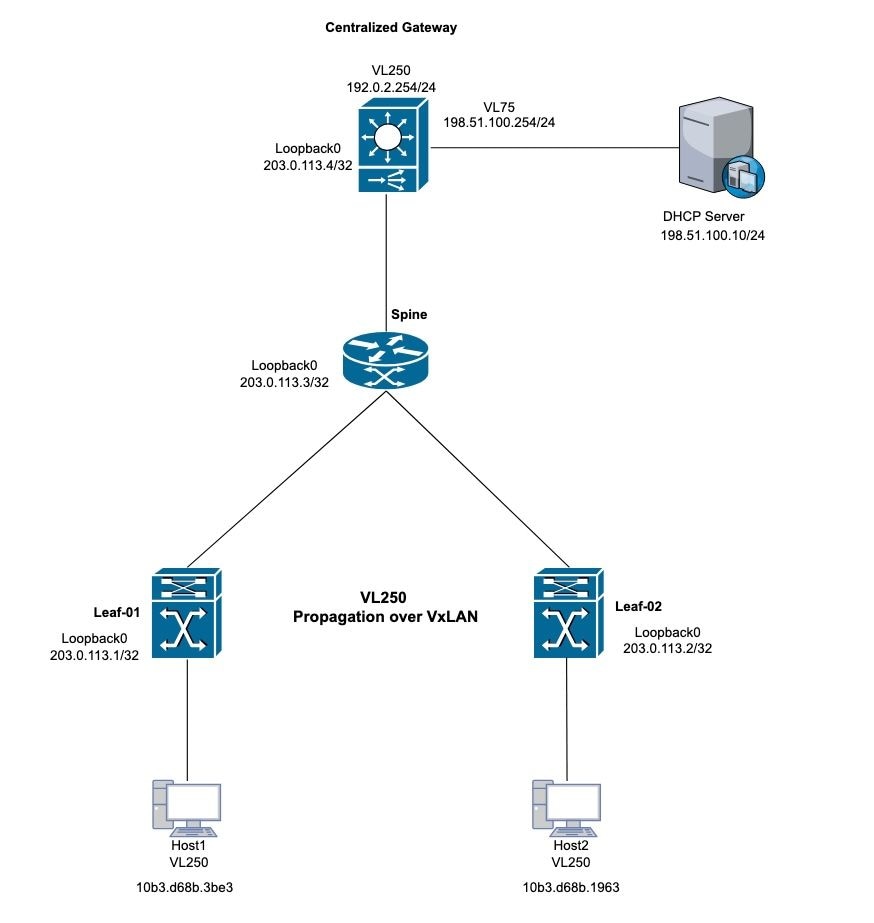 DHCP VxLAN拓扑
案例分析 1:无法从外部服务器获取IP地址(交换矩阵内的集中网关)
此拓扑将VxLAN第2层用于VLAN 250。主机需要来自外部DHCP服务器的IP地址。
Leaf-01验证
步骤1.在Leaf-1上,验证本地主机的MAC地址学习。
步骤2.此外,确认已获取默认网关MAC地址。确保已获取的MAC地址和默认网关IP地址都作为BGP表中的条目正确安装。
Leaf-1#show mac address-table address 10b3.d68b.3be3 (host mac address)
            Mac Address Table
-------------------------------------------

Vlan    Mac Address     Type     Ports
----   -----------      -------- -----
250    10b3.d68b.3be3   DYNAMIC  Twe1/0/1

Centralized-Gateway#show interface vlan 250 | include bia (remote mac address)
Hardware is Ethernet SVI, address is 3473.2db8.bee3 (bia 3473.2db8.bee3)
Leaf-1#show bgp l2vpn evpn 10b3.d68b.3be3 (local mac address)
BGP routing table entry for [2][203.0.113.1:250][0][48][10B3D68B3BE3][0][*]/20, version 3
Paths: (1 available, best #1, table evi_250)
 Advertised to update-groups:
    2
Refresh Epoch 1
Local
  0.0.0.0 (via default) from 0.0.0.0 (203.0.113.1)
    Origin incomplete, localpref 100, weight 32768, valid, sourced, local, best
    EVPN ESI: 00000000000000000000, Label1 10250
    Extended Community: RT:10:250 ENCAP:8
    Local irb vxlan vtep:
     vrf:not found, l3-vni:0
     local router mac:0000.0000.0000
     core-irb interface:(not found)
     vtep-ip:203.0.113.1
   rx pathid: 0, tx pathid: 0x0
   Updated on Oct 14 2025 22:27:32 UTC

Leaf-1#show bgp l2vpn evpn 3473.2db8.bee3 (remote mac address)
BGP routing table entry for [2][203.0.113.1:250][0][48][34732DB8BEE3][32][192.0.2.254]/24, version 9
Paths: (1 available, best #1, table evi_250)
  Flag: 0x100
  Not advertised to any peer
  Refresh Epoch 4
  Local, imported path from [2][203.0.113.4:250][0][48][34732DB8BEE3][32][192.0.2.254]/24 (global)
    203.0.113.4 (metric 3) (via default) from 203.0.113.3 (203.0.113.3)
      Origin incomplete, metric 0, localpref 100, valid, internal, best
      EVPN ESI: 00000000000000000000, Label1 10250
      Extended Community: RT:10:250 ENCAP:8 EVPN DEF GW:0:0
      Originator: 203.0.113.4, Cluster list: 203.0.113.3
      rx pathid: 0, tx pathid: 0x0
      Updated on Oct 14 2025 14:48:35 UTC
BGP routing table entry for [2][203.0.113.4:250][0][48][34732DB8BEE3][32][192.0.2.254]/24, version 8
Paths: (1 available, best #1, table EVPN-BGP-Table)
  Flag: 0x100
  Not advertised to any peer
  Refresh Epoch 4
  Local
    203.0.113.4 (metric 3) (via default) from 203.0.113.3 (203.0.113.3)
      Origin incomplete, metric 0, localpref 100, valid, internal, best
      EVPN ESI: 00000000000000000000, Label1 10250
      Extended Community: RT:10:250 ENCAP:8 EVPN DEF GW:0:0
      Originator: 203.0.113.4, Cluster list: 203.0.113.3
      rx pathid: 0, tx pathid: 0x0
      Updated on Oct 14 2025 14:48:35 UTC
步骤3.验证枝叶1和默认网关之间的MAC地址学习。枝叶1通过中继端口获取本地MAC地址,并通过BGP获取远程MAC地址。
Leaf-1#show l2route evpn mac
EVI         ETag  Prod    Mac Address                                          Next Hop(s) Seq Number
----- ---------- ----- -------------- ---------------------------------------------------- ----------
250            0 L2VPN 10b3.d68b.3b81                                         Twe1/0/1:250          0
250            0 L2VPN 10b3.d68b.3be3                                         Twe1/0/1:250          0 (Host local mac address)
250            0   BGP 3473.2db8.bee3                                  V:10250 203.0.113.4          0 (CGW SVI mac address)
步骤4.在L2VPN EVPN实例中的枝叶–1交换机上验证默认网关学习。
Leaf-1#show l2vpn evpn default-gateway
Valid Default Gateway Address                  EVI  VLAN  MAC Address    Source
----- --------------------------------------- ----- ----- -------------- -----------
Y     192.0.2.254                             250   250   3473.2db8.bee3 203.0.113.4
步骤5.如果VxLAN视角正确,请继续执行DHCP以排除故障。
步骤6.确认从Leaf-1到DHCP网关的DORA进程。在Leaf-01上,启用debug ip dhcp snooping packet并验证Discovery是否生成日志条目。如果未生成日志,请在连接到PC的接口上启用数据包捕获。
Leaf-1#debug ip dhcp snooping packet
DHCP Snooping Packet debugging is on
Leaf-1#
*Oct 21 19:33:16.358: DHCP_SNOOPING: received new DHCP packet from input interface (TwentyFiveGigE1/0/1)
*Oct 21 19:33:16.358: DHCP Memory dump is printed for process packet
<snip>
*Oct 21 19:33:16.367: DHCP_SNOOPING: process new DHCP packet, message type: DHCPDISCOVER, input interface: Twe1/0/1, MAC da: ffff.ffff.ffff, MAC sa: 10b3.d68b.3be3, IP da: 255.255.255.255, IP sa: 0.0.0.0, DHCP ciaddr: 0.0.0.0, DHCP yiaddr: 0.0.0.0, DHCP siaddr: 0.0.0.0, DHCP giaddr: 0.0.0.0, DHCP chaddr: 10b3.d68b.3be3, efp_id: -1865499306, vlan_id: 250, bootpflag:0x32768(Broadcast)
*Oct 21 19:33:16.367: DHCP_SNOOPING: add relay information option.
*Oct 21 19:33:16.367: DHCP_SNOOPING: Encoding opt82 CID in vlan-mod-port format
*Oct 21 19:33:16.367: DHCP_SNOOPING:VxLAN : vlan_id 250 VNI 10250 mod 1 port 1
*Oct 21 19:33:16.367: DHCP_SNOOPING: Encoding opt82 RID in MAC address format
*Oct 21 19:33:16.367: DHCP_SNOOPING: binary dump of relay info option, length: 26 data:
0x52 0x18 0x1 0xC 0x1 0xA 0x0 0x8 0x0 0x0 0x28 0xA 0x1 0x1 0x0 0x0 0x2 0x8 0x0 0x6 0x4C 0x5D 0x3C 0xEB 0x43 0x40
*Oct 21 19:33:16.367: DHCPS BRIDGE PAK: vlan=250 platform_flags=1
*Oct 21 19:33:16.367: DHCP_SNOOPING: bridge packet get invalid mat entry: FFFF.FFFF.FFFF, packet is flooded to ingress VLAN: (250)
*Oct 21 19:33:16.367: DHCP_SNOOPING: L2RELAY: sent unicast packet to default gw: 3473.2db8.bee3 vlan 0 src intf TwentyFiveGigE1/0/1
*Oct 21 19:33:20.058: DHCP_SNOOPING: received new DHCP packet from input interface (TwentyFiveGigE1/0/1)
*Oct 21 19:33:20.058: DHCP Memory dump is printed for process packet
步骤7.如果未触发调试,请捕获数据包以进行验证。使用指定的语法捕获入口发现数据包:
monitor capture <name> interface <int> in match ipv4 protocol udp any range 67 68 any range 67 68 start
monitor capture <name> stop
monitor capture export file flash:<name>.pcap
show monitor capture <name> buffer display-filter "eth.addr==[mac address]" detailed

注意:捕获符合Wireshark过滤器语法的显示过滤器字符串。
Leaf-1#monitor capture cap interface twe1/0/1 in match ipv4 protocol udp any range 67 68 any range 67 68 start
Started capture point : cap
Leaf-1#
*Oct 21 22:57:04.719: %BUFCAP-6-ENABLE: Capture Point cap enabled.
Leaf-1#
Leaf-1#monitor capture cap stop
Capture statistics collected at software:
        Capture duration - 96 seconds
        Packets received - 10
        Packets dropped - 0
        Packets oversized - 0

Bytes dropped in asic - 0

Capture buffer will exists till exported or cleared

Stopped capture point : cap

*Oct 21 22:58:40.810: %BUFCAP-6-DISABLE: Capture Point cap disabled.

Leaf-1#show monitor capture cap buffer display-filter "eth,addr==10:b3:d6:8b:3b:e3" detailed
Starting the packet display ........ Press Ctrl + Shift + 6 to exit
Frame 1: 371 bytes on wire (2968 bits), 371 bytes captured (2968 bits) on interface /tmp/epc_ws/wif_to_ts_pipe, id 0
    Interface id: 0 (/tmp/epc_ws/wif_to_ts_pipe)
        Interface name: /tmp/epc_ws/wif_to_ts_pipe
    Encapsulation type: Ethernet (1)
    Arrival Time: Oct 21, 2025 22:57:07.843851000 UTC
     [Time shift for this packet: 0.000000000 seconds]
    Epoch Time: 1761087427.843851000 seconds
  <snip>
    [Protocols in frame: eth:ethertype:vlan:ethertype:ip:udp:dhcp]
Ethernet II, Src: 10:b3:d6:8b:3b:e3 (10:b3:d6:8b:3b:e3), Dst: ff:ff:ff:ff:ff:ff (ff:ff:ff:ff:ff:ff)
   Destination: ff:ff:ff:ff:ff:ff (ff:ff:ff:ff:ff:ff)
       Address: ff:ff:ff:ff:ff:ff (ff:ff:ff:ff:ff:ff)
       .... ..1. .... .... .... .... = LG bit: Locally administered address (this is NOT the factory default)
       .... ...1 .... .... .... .... = IG bit: Group address (multicast/broadcast)
   Source: 10:b3:d6:8b:3b:e3 (10:b3:d6:8b:3b:e3)
       Address: 10:b3:d6:8b:3b:e3 (10:b3:d6:8b:3b:e3)
       .... ..0. .... .... .... .... = LG bit: Globally unique address (factory default)
       .... ...0 .... .... .... .... = IG bit: Individual address (unicast)
   Type: 802.1Q Virtual LAN (0x8100)
802.1Q Virtual LAN, PRI: 0, DEI: 0, ID: 250
    000. .... .... .... = Priority: Best Effort (default) (0)
    ...0 .... .... .... = DEI: Ineligible
    .... 0000 1111 1010 = ID: 250
Type: IPv4 (0x0800)

<snip>

User Datagram Protocol, Src Port: 68, Dst Port: 67
    Source Port: 68
    Destination Port: 67
    Length: 333
    Checksum: 0xdf55 [unverified]
    [Checksum Status: Unverified]
    [Stream index: 0]
    [Timestamps]
        [Time since first frame: 0.000000000 seconds]
        [Time since previous frame: 0.000000000 seconds]
Dynamic Host Configuration Protocol (Discover)
Message type: Boot Request (1)
Hardware type: Ethernet (0x01)
Hardware address length: 6
Hops: 0
Transaction ID: 0x3bd7aadb
Seconds elapsed: 7
Bootp flags: 0x8000, Broadcast flag (Broadcast)
    1... .... .... .... = Broadcast flag: Broadcast
    .000 0000 0000 0000 = Reserved flags: 0x0000
Client IP address: 0.0.0.0
Your (client) IP address: 0.0.0.0
Next server IP address: 0.0.0.0
Relay agent IP address: 0.0.0.0
Client MAC address: 10:b3:d6:8b:3b:e3 (10:b3:d6:8b:3b:e3)
Client hardware address padding: 00000000000000000000
Server host name not given
Boot file name not given
Magic cookie: DHCP
Option: (53) DHCP Message Type (Discover)
<snip>
步骤8.通过数据包捕获验证VxLAN数据包封装。对此验证应用各种过滤器。VxLAN使用UDP端口4789。
monitor capture cap interface <outgoing interface > out match ipv4 protocol udp any any eq 4789 (Interface that is pointing to the RR or VTEP via BGP)
Leaf-1#show ip bgp all summary
For address family: L2VPN E-VPN
<snip>
Neighbor       V           AS MsgRcvd MsgSent    TblVer InQ OutQ Up/Down   State/PfxRcd
203.0.113.3     4           10    4204    4122       365   0    0 2d13h            2

Leaf-1#show ip route 203.0.113.3
Routing entry for 203.0.113.3/32
Known via "ospf 1", distance 110, metric 2, type intra area
Last update from 172.x.x.2 on TwentyFiveGigE1/0/2, 2d13h ago
Routing Descriptor Blocks:
* 172.x.x.2, from 203.0.113.3, 2d13h ago, via TwentyFiveGigE1/0/2

Leaf-1#monitor capture cap interface twe1/0/2 out match ipv4 protocol udp any any eq 4789 start
*Oct 21 23:51:07.689: %BUFCAP-6-ENABLE: Capture Point cap enabled.

Leaf-1#show monitor capture cap buffer display-filter "eth.addr==10:b3:d6:8b:3b:e3" detailed
Starting the packet display ........ Press Ctrl + Shift + 6 to exit

Frame 1: 443 bytes on wire (3544 bits), 443 bytes captured (3544 bits) on interface /tmp/epc_ws/wif_to_ts_pipe, id 0
    Interface id: 0 (/tmp/epc_ws/wif_to_ts_pipe)
        Interface name: /tmp/epc_ws/wif_to_ts_pipe
    Encapsulation type: Ethernet (1)
    Arrival Time: Oct 21, 2025 23:51:34.848693000 UTC
    [Time shift for this packet: 0.000000000 seconds]
    Epoch Time: 1761090694.848693000 seconds
   <snip>
   [Protocols in frame: eth:ethertype:ip:udp:vxlan:eth:ethertype:ip:udp:dhcp]
Ethernet II, Src: 00:00:00:00:00:00 (00:00:00:00:00:00), Dst: 00:00:00:00:00:00 (00:00:00:00:00:00)
    Destination: 00:00:00:00:00:00 (00:00:00:00:00:00)
        Address: 00:00:00:00:00:00 (00:00:00:00:00:00)
        .... ..0. .... .... .... .... = LG bit: Globally unique address (factory default)
        .... ...0 .... .... .... .... = IG bit: Individual address (unicast)
    Source: 00:00:00:00:00:00 (00:00:00:00:00:00)
        Address: 00:00:00:00:00:00 (00:00:00:00:00:00)
        .... ..0. .... .... .... .... = LG bit: Globally unique address (factory default)
        .... ...0 .... .... .... .... = IG bit: Individual address (unicast)
Type: IPv4 (0x0800)
Internet Protocol Version 4, Src: 203.0.113.1, Dst: 203.0.113.4
    0100 .... = Version: 4
    .... 0101 = Header Length: 20 bytes (5)
    Differentiated Services Field: 0x00 (DSCP: CS0, ECN: Not-ECT)
        0000 00.. = Differentiated Services Codepoint: Default (0)
        .... ..00 = Explicit Congestion Notification: Not ECN-Capable Transport (0)
<snip>
User Datagram Protocol, Src Port: 65479, Dst Port: 4789
    Source Port: 65479
    Destination Port: 4789
    Length: 409
    [Checksum: [missing]]
    [Checksum Status: Not present]
    [Stream index: 0]
    [Timestamps]
        [Time since first frame: 0.000000000 seconds]
        [Time since previous frame: 0.000000000 seconds]
Virtual eXtensible Local Area Network
Flags: 0x0800, VXLAN Network ID (VNI)
    0... .... .... .... = GBP Extension: Not defined
    .... .... .0.. .... = Don't Learn: False
    .... 1... .... .... = VXLAN Network ID (VNI): True
    .... .... .... 0... = Policy Applied: False
    .000 .000 0.00 .000 = Reserved(R): 0x0000
Group Policy ID: 0
VXLAN Network Identifier (VNI): 10250
Reserved: 0
<snip>
User Datagram Protocol, Src Port: 68, Dst Port: 67
    Source Port: 68
    Destination Port: 67
    Length: 359
    Checksum: 0x767d [unverified]
    [Checksum Status: Unverified]
    [Stream index: 1]
    [Timestamps]
         [Time since first frame: 0.000000000 seconds]
         [Time since previous frame: 0.000000000 seconds]
Dynamic Host Configuration Protocol (Discover)
    Message type: Boot Request (1)
    Hardware type: Ethernet (0x01)
    Hardware address length: 6
    Hops: 0
    Transaction ID: 0xd4c42ec1
    Seconds elapsed: 0
    Bootp flags: 0x8000, Broadcast flag (Broadcast)
        1... .... .... .... = Broadcast flag: Broadcast
        .000 0000 0000 0000 = Reserved flags: 0x0000
    Client IP address: 0.0.0.0
    Your (client) IP address: 0.0.0.0
    Next server IP address: 0.0.0.0
    Relay agent IP address: 0.0.0.0
    Client MAC address: 10:b3:d6:8b:3b:e3 (10:b3:d6:8b:3b:e3)
    Client hardware address padding: 00000000000000000000
    Server host name not given
    Boot file name not given
    Magic cookie: DHCP
集中式网关验证
步骤1.验证在BGP和L2 EVPN路由上获知的主机MAC地址(此步骤反映了初始枝叶验证过程)。
Centralized-Gateway#show bgp l2vpn evpn 10b3.d68b.3be3 (remote host mac address)
BGP routing table entry for [2][203.0.113.1:250][0][48][10B3D68B3BE3][0][*]/20, version 12
Paths: (1 available, best #1, table EVPN-BGP-Table)
  Not advertised to any peer
  Refresh Epoch 1
  Local
 203.0.113.1 (metric 3) (via default) from 203.0.113.3 (203.0.113.3) (learned via RR)
  Origin incomplete, metric 0, localpref 100, valid, internal, best
  EVPN ESI: 00000000000000000000, Label1 10250
  Extended Community: RT:10:250 ENCAP:8
  Originator: 203.0.113.1, Cluster list: 203.0.113.3
  rx pathid: 0, tx pathid: 0x0
  Updated on Oct 27 2025 17:53:37 UTC
BGP routing table entry for [2][203.0.113.4:250][0][48][10B3D68B3BE3][0][*]/20, version 14
Paths: (1 available, best #1, table evi_250)
  Not advertised to any peer
  Refresh Epoch 1
  Local, imported path from [2][203.0.113.1:250][0][48][10B3D68B3BE3][0][*]/20 (global)
    203.0.113.1 (metric 3) (via default) from 203.0.113.3 (203.0.113.3)
    Origin incomplete, metric 0, localpref 100, valid, internal, best
    EVPN ESI: 00000000000000000000, Label1 10250
    Extended Community: RT:10:250 ENCAP:8
    Originator: 203.0.113.1, Cluster list: 203.0.113.3
    rx pathid: 0, tx pathid: 0x0
    Updated on Oct 27 2025 17:53:37 UTC

Centralized-Gateway#show l2route evpn mac mac-address 10b3.d68b.3be3
EVI         ETag  Prod    Mac Address                                          Next Hop(s) Seq Number
----- ---------- ----- -------------- ---------------------------------------------------- ----------
250            0   BGP 10b3.d68b.3be3                                  V:10250 203.0.113.1          0
步骤2.检验集中网关上的DHCP中继信息和DHCP监听配置。
Centralized-Gateway#show running-config | section dhcp
ip dhcp-relay source-interface Loopback0
ip dhcp relay information option vpn
ip dhcp relay information option
ip dhcp compatibility suboption link-selection standard
ip dhcp compatibility suboption server-override standard
ip dhcp snooping vlan 250
ip dhcp snooping
步骤3.检验与DHCP服务器的连通性并从VLAN 250接口发出ping命令。
Centralized-Gateway#ping 198.51.100.10 source vlan 250
Type escape sequence to abort.
Sending 5, 100-byte ICMP Echos to 198.51.100.10, timeout is 2 seconds:
Packet sent with a source address of 192.0.2.254
!!!!!
Success rate is 100 percent (5/5), round-trip min/avg/max = 1/1/1 ms
步骤4.执行数据包捕获,验证来自远程主机的发现消息是否到达集中网关。
Centralized-Gateway#monitor capture cap interface vlan250 in match ipv4 protocol udp any range 67 68 any range 67 68
Centralized-Gateway#monitor capture cap start
Started capture point : cap
Centralized-Gateway#show monitor capture cap buffer display-filter "eth.addr==10:b3:d6:8b:3b:e3" detailed
Starting the packet display ........ Press Ctrl + Shift + 6 to exit

Frame 1: 401 bytes on wire (3208 bits), 401 bytes captured (3208 bits) on interface /tmp/epc_ws/wif_to_ts_pipe, id 0
    Interface id: 0 (/tmp/epc_ws/wif_to_ts_pipe)
        Interface name: /tmp/epc_ws/wif_to_ts_pipe
    Encapsulation type: Ethernet (1)
    Arrival Time: Oct 27, 2025 20:43:30.774923000 UTC
    [Time shift for this packet: 0.000000000 seconds]
    Epoch Time: 1761597810.774923000 seconds
 <snip>
    [Protocols in frame: eth:ethertype:cmd:ethertype:ip:udp:dhcp]
Ethernet II, Src: 10:b3:d6:8b:3b:e3 (10:b3:d6:8b:3b:e3), Dst: 34:73:2d:b8:be:e3 (34:73:2d:b8:be:e3)
    Destination: 34:73:2d:b8:be:e3 (34:73:2d:b8:be:e3)
        Address: 34:73:2d:b8:be:e3 (34:73:2d:b8:be:e3)
        .... ..0. .... .... .... .... = LG bit: Globally unique address (factory default)
        .... ...0 .... .... .... .... = IG bit: Individual address (unicast)
    Source: 10:b3:d6:8b:3b:e3 (10:b3:d6:8b:3b:e3)
        Address: 10:b3:d6:8b:3b:e3 (10:b3:d6:8b:3b:e3)
        .... ..0. .... .... .... .... = LG bit: Globally unique address (factory default)
        .... ...0 .... .... .... .... = IG bit: Individual address (unicast)
   Type: CiscoMetaData (0x8909)
<snip>
Internet Protocol Version 4, Src: 0.0.0.0, Dst: 255.255.255.255
    0100 .... = Version: 4
    .... 0101 = Header Length: 20 bytes (5)
    Differentiated Services Field: 0x00 (DSCP: CS0, ECN: Not-ECT)
        0000 00.. = Differentiated Services Codepoint: Default (0)
        .... ..00 = Explicit Congestion Notification: Not ECN-Capable Transport (0)
    Total Length: 379
    Identification: 0x0230 (560)
    Flags: 0x00
        0... .... = Reserved bit: Not set
        .0.. .... = Don't fragment: Not set
        ..0. .... = More fragments: Not set
    Fragment Offset: 0
    Time to Live: 255
    Protocol: UDP (17)
    Header Checksum: 0xb842 [validation disabled]
    [Header checksum status: Unverified]
    Source Address: 0.0.0.0
    Destination Address: 255.255.255.255
User Datagram Protocol, Src Port: 68, Dst Port: 67
    Source Port: 68
    Destination Port: 67
    Length: 359
    Checksum: 0x8f64 [unverified]
    [Checksum Status: Unverified]
    [Stream index: 0]
    [Timestamps]
        [Time since first frame: 0.000000000 seconds]
        [Time since previous frame: 0.000000000 seconds]
    UDP payload (351 bytes)
Dynamic Host Configuration Protocol (Discover)
    Message type: Boot Request (1)
    Hardware type: Ethernet (0x01)
    Hardware address length: 6
    Hops: 0
    Transaction ID: 0xf23af863
    Seconds elapsed: 0
    Bootp flags: 0x8000, Broadcast flag (Broadcast)
        1... .... .... .... = Broadcast flag: Broadcast
        .000 0000 0000 0000 = Reserved flags: 0x0000
    Client IP address: 0.0.0.0
    Your (client) IP address: 0.0.0.0
    Next server IP address: 0.0.0.0
    Relay agent IP address: 0.0.0.0
    Client MAC address: 10:b3:d6:8b:3b:e3 (10:b3:d6:8b:3b:e3)
    Client hardware address padding: 00000000000000000000
    Server host name not given
    Boot file name not given
    Magic cookie: DHCP
    Option: (53) DHCP Message Type (Discover)
        Length: 1
        DHCP: Discover (1)
    Option: (57) Maximum DHCP Message Size
        Length: 2
        Maximum DHCP Message Size: 1200
    Option: (61) Client identifier
        Length: 27
        Type: 0
    Client Identifier: cisco-10b3.d68b.3be3-Vl250
<snip>
步骤5.在交换机上执行后续数据包捕获。验证发现出口和提供入口。
Centralized-Gateway#no monitor capture cap
Centralized-Gateway#monitor capture cap interface vlan 75 both match ipv4 protocol udp any range 67 68 any range 67 68
Centralized-Gateway#monitor capture cap start
Started capture point : cap

Centralized-Gateway#monitor capture cap stop
Capture statistics collected at software:
        Capture duration - 78 seconds
        Packets received - 0
        Packets dropped - 0
        Packets oversized - 0
Bytes dropped in asic - 0
步骤6.如果数据包捕获未显示数据包,请继续执行DHCP调试并验证平台上的数据包状态。
Centralized-Gateway#debug ip dhcp snooping packet
<snip>
*Oct 27 22:20:24.444: DHCP_SNOOPING: process new DHCP packet, message type: DHCPDISCOVER, input interface: Tu0, MAC da: 3473.2db8.bee3, MAC sa: 10b3.d68b.3be3, IP da: 255.255.255.255, IP sa: 0.0.0.0, DHCP ciaddr: 0.0.0.0, DHCP yiaddr: 0.0.0.0, DHCP siaddr: 0.0.0.0, DHCP giaddr: 0.0.0.0, DHCP chaddr: 10b3.d68b.3be3, efp_id: -1137609462, vlan_id: 250, bootpflag:0x32768(Broadcast)
*Oct 27 22:20:24.445: DHCPS BRIDGE PAK: vlan=250 platform_flags=1
*Oct 27 22:20:24.445: DHCP_SNOOPING: Packet destined to SVI Mac:3473.2db8.bee3
*Oct 27 22:20:24.445: DHCP_SNOOPING: bridge packet send packet to cpu port: Vlan250.
*Oct 27 22:20:24.445: DHCP_SNOOPING: bridge packet send packet to port: GigabitEthernet1/0/2, pak_vlan 250.
*Oct 27 22:20:27.952: DHCP_SNOOPING: received new DHCP packet from input interface (Tunnel0)
*Oct 27 22:20:27.952: DHCP Memory dump is printed for process packet.

Centralized-Gateway#debug ip dhcp server packet detail
*Oct 27 22:27:58.009: DHCPD: BOOTREQUEST from 0063.6973.636f.2d31.3062.332e.6436.3862.2e33.6265.332d.566c.3235.30 forwarded to 198.51.100.10.
*Oct 27 22:28:02.008: DHCPD: tableid for 192.0.2.254 on Vlan250 is 0
*Oct 27 22:28:02.008: DHCPD: client's VPN is .
*Oct 27 22:28:02.008: DHCPD: No option 125
*Oct 27 22:28:02.008: DHCPD: Option 124: Vendor Class Information
*Oct 27 22:28:02.008: DHCPD: Enterprise ID: 9
*Oct 27 22:28:02.008: DHCPD: Vendor-class-data-len: 13
*Oct 27 22:28:02.008: DHCPD: Data: 43393330304C2D3234502D3447
*Oct 27 22:28:02.008: DHCPD: Option 125 not present in the msg.
*Oct 27 22:28:02.008: DHCPD: Option 125 not present in the msg.
*Oct 27 22:28:02.008: DHCPD: Looking up binding using address 192.0.2.254
*Oct 27 22:28:02.008: DHCPD: setting giaddr to 192.0.2.254.
*Oct 27 22:28:02.008: DHCPD: relay information option before replacing suboptions
*Oct 27 22:28:02.008: DHCPD: 5218010c010a00080000280a01010000020800064c5d3ceb4340
*Oct 27 22:28:02.008: DHCPD: replacing suboptions in relay information option.
*Oct 27 22:28:02.008: DHCPD: relay information option content (add/replace):
*Oct 27 22:28:02.008: DHCPD: 52060504c00002fe
*Oct 27 22:28:02.008: DHCPD: giaddr changed to 203.0.113.4
步骤7.检验连接到DHCP服务器的接口是否包含指定的命令(这可防止DHCP数据包丢弃)。
Centralized-Gateway#sh running-config interface gi1/0/2
Building configuration...

Current configuration : 149 bytes
!
interface GigabitEthernet1/0/2
description to L2_switch
switchport trunk allowed vlan 75,250
switchport mode trunk
ip dhcp snooping trust
end
注意:ip dhcp snooping trust命令仅适用于第2层中继接口。
问题的解决方案
VxLAN配置按预期运行。但是,DHCP服务器中继会向IP地址203.0.113.4发送DHCP应答。DHCP服务器无法访问此IP地址。缺乏连接导致在集中网关处发生单播丢包。
为了解决此问题,配置了一个新的Loopback 1接口,并且建立了IP地址的路由以提供与此Loopback中继地址的连接。
DHCP日志:
DHCP-Server#debug ip dhcp server packet detail
DHCP server packet detail debugging is on.
*Oct 28 00:23:43.464: DHCPD: DHCPDISCOVER received from client 0063.6973.636f.2d31.3062.332e.6436.3862.2e33.6265.332d.566c.3235.30 through relay 203.0.113.4.DHCPD: Setting only requested parameters
*Oct 28 00:23:43.464: DHCPD: Option 125 not present in the msg.
*Oct 28 00:23:43.465: DHCPD: egress Interfce GigabitEthernet0/0/4.75
*Oct 28 00:23:43.465: DHCPD: unicasting BOOTREPLY for client 10b3.d68b.3be3 to relay 203.0.113.4.

DHCP-Server#ping 203.0.113.4
Type escape sequence to abort.
Sending 5, 100-byte ICMP Echos to 203.0.113.4, timeout is 2 seconds:
.....
Success rate is 0 percent (0/5)
DHCP-Server#
集中网关:为中继功能配置到新环回接口的连接。
Centralized-Gateway#configure terminal
Enter configuration commands, one per line. End with CNTL/Z.
Centralized-Gateway(config)#interface loopback 1
Centralized-Gateway(config-if)#ip address 198.51.100.25 255.255.255.255
Centralized-Gateway(config-if)#router eigrp 1
Centralized-Gateway(config-router)#network 198.51.100.25 0.0.0.0
Centralized-Gateway(config-router)#exit
Centralized-Gateway(config)#no ip dhcp-relay source-interface Loopback0
Centralized-Gateway(config)#ip dhcp-relay source-interface Loopback1

DHCP-Server#ping 198.51.100.25
Type escape sequence to abort.
Sending 5, 100-byte ICMP Echos to 198.51.100.25, timeout is 2 seconds:
!!!!!
Success rate is 100 percent (5/5), round-trip min/avg/max = 1/2/9 ms
DHCP-Server#
案例分析 2:无法从外部服务器获取IP地址(交换矩阵外部的集中网关)
此拓扑将VXLAN第2层用于VLAN 250。主机从位于交换矩阵外部的外部DHCP服务器获取其IP地址。
 外部DHCP VxLAN拓扑
Leaf-01验证
步骤1.在Leaf-1上,验证默认网关上的正确通告。由于DHCP服务器位于VxLAN交换矩阵外部,因此这是确保IP地址分配功能正常的关键要求。
Leaf-1#show l2vpn evpn default-gateway
Valid Default Gateway Address EVI VLAN MAC Address Source
----- --------------------------------------- ----- ----- -------------- -----------
步骤2.如果之前的输出为空,请继续执行DHCP故障排除。验证枝叶设备上是否存在相关的DHCP监听配置。
Leaf-1#show running-config | section dhcp
ip dhcp relay information option vpn
ip dhcp relay information option
ip dhcp compatibility suboption link-selection standard
ip dhcp compatibility suboption server-override standard
ip dhcp snooping vlan 250
ip dhcp snooping
Leaf-2#show running-config | section dhcp
ip dhcp relay information option vpn
ip dhcp relay information option
ip dhcp compatibility suboption link-selection standard
ip dhcp compatibility suboption server-override standard
ip dhcp snooping vlan 250
ip dhcp snooping
步骤3.如果设备正在使用DHCP主动请求IP地址,请启用适当的调试命令以验证平台上的数据包状态。
*Dec 6 22:42:19.568: DHCP_SNOOPING: received new DHCP packet from input interface (TwentyFiveGigE1/0/1)
*Dec 6 22:42:19.568: DHCP Memory dump is printed for process packet
<snip>
*Dec 6 22:42:19.578: DHCP_SNOOPING: process new DHCP packet, message type: DHCPDISCOVER, input interface: Twe1/0/1, MAC da: ffff.ffff.ffff, MAC sa: 10b3.d68b.3be3, IP da: 255.255.255.255, IP sa: 0.0.0.0, DHCP ciaddr: 0.0.0.0, DHCP yiaddr: 0.0.0.0, DHCP siaddr: 0.0.0.0, DHCP giaddr: 0.0.0.0, DHCP chaddr: 10b3.d68b.3be3, efp_id: 1984524378, vlan_id: 250, bootpflag:0x32768(Broadcast)
*Dec 6 22:42:19.578: DHCP_SNOOPING: add relay information option.
*Dec 6 22:42:19.578: DHCP_SNOOPING: Encoding opt82 CID in vlan-mod-port format
*Dec 6 22:42:19.578: DHCP_SNOOPING:VxLAN : vlan_id 250 VNI 10250 mod 1 port 1
*Dec 6 22:42:19.578: DHCP_SNOOPING: Encoding opt82 RID in MAC address format
*Dec 6 22:42:19.578: DHCP_SNOOPING: binary dump of relay info option, length: 26 data:
0x52 0x18 0x1 0xC 0x1 0xA 0x0 0x8 0x0 0x0 0x28 0xA 0x1 0x1 0x0 0x0 0x2 0x8 0x0 0x6 0x4C 0x5D 0x3C 0xEB 0x43 0x40
*Dec 6 22:42:19.579: DHCPS BRIDGE PAK: vlan=250 platform_flags=1
*Dec 6 22:42:19.579: DHCP_SNOOPING: bridge packet get invalid mat entry: FFFF.FFFF.FFFF, packet is flooded to ingress VLAN: (250)
*Dec 6 22:42:19.579: DHCP_SNOOPING: L2RELAY: cannot find default gw for bd 250: src intf TwentyFiveGigE1/0/1
注意:最后一条调试消息表明设备无法识别VLAN 250的默认网关。
Leaf-02验证
由于Leaf-2是VxLAN交换矩阵内的活动边界枝叶,因此它负责转发与默认网关相关的信息。
步骤1.继续验证L2VPN EVPN通告默认网关的功能。
Leaf-2#show l2vpn evpn summary
L2VPN EVPN
EVPN Instances (excluding point-to-point): 1
VLAN Based: 1
Vlans: 1
BGP: ASN 65000, address-family l2vpn evpn configured
Router ID: 203.0.113.2
Global Replication Type: Ingress
ARP/ND Flooding Suppression: Enabled
Connectivity to Core: UP
MAC Duplication: seconds 180 limit 5
MAC Addresses: 5
Local: 3
Remote: 2
Duplicate: 0
IP Duplication: seconds 180 limit 5
IP Addresses: 2
Local: 2
Remote: 0
Duplicate: 0
Advertise Default Gateway: No
Default Gateway Addresses: 0
Local: 0
Remote: 0
Maximum number of Route Targets per EAD-ES route: 200
Multi-home aliasing: Enabled
Multi-home send proxy MAC/IP: Enabled
Multi-home device ID: 0000.5e00.0101
Global IP Local Learn: Enabled
IP local learning limits
IPv4: 4 addresses per-MAC
IPv6: 12 addresses per-MAC
IP local learning timers
Down: 10 minutes
Poll: 1 minutes
Reachable: 5 minutes
Stale: 30 minutes
Auto route-target: vni-based
Advertise Multicast: No
Global Anycast Gateway MAC: No
步骤2.上述输出验证Leaf-2未向同一VxLAN交换矩阵中的其他Leaf-1通告默认网关。继续执行执行正确通告所需的配置。
Leaf-2(config)#l2vpn evpn
Leaf-2(config-evpn)#default-gateway advertise
步骤3.添加配置后,必须启用L2VPN EVPN功能。
Leaf-2#show l2vpn evpn summary
--snip--
Advertise Default Gateway: Yes
步骤4.启用后,为VxLAN交换矩阵内的其他枝叶配置足够的默认网关通告。
问题解决方案1
L2VPN EVPN和DHCP监听配置按预期运行。但是,未执行默认网关通告。因此,连接到Leaf-1的终端设备无法从DHCP服务器接收IP地址。
要解决此问题,必须配置通告。
步骤1.配置ACL和路由映射,以通过BGP向网络中的其他枝叶设备通告默认网关。
Leaf-2(config)#ip access-list extended GW250
Leaf-2(config-ext-nacl)#10 permit ip host 192.0.2.254 any (permit the IP address if the GW)

Leaf-2(config)#route-map CGW
Leaf-2(config-route-map)#match ip address GW250
Leaf-2(config-route-map)#match evpn route-type 2-mac-ip
Leaf-2(config-route-map)#set extcommunity default-gw

Leaf-2(config)#router bgp 65000
Leaf-2(config-router)#address-family l2vpn evpn
Leaf-2(config-router-af)#neighbor 203.0.113.3 route-map CGW out
步骤2.添加之前的配置后,验证枝叶1以查看正确的默认网关通告。
Leaf-1#show l2vpn evpn default-gateway
Valid Default Gateway Address                 EVI   VLAN  MAC Address    Source
----- --------------------------------------- ----- ----- -------------- -----------
  Y   192.0.2.254                             250   250   3473.2db8.bee3 203.0.113.2
注意:在边界VTEP上,验证默认网关显示空值。这是预期行为,因为集中式网关直接连接到边界VTEP。
Leaf-2#show l2vpn evpn default-gateway
Valid Default Gateway Address EVI VLAN MAC Address Source
----- --------------------------------------- ----- ----- -------------- -----------
现在,枝叶设备正确显示默认网关通告。验证终端设备是否正确从DHCP接收IP地址。
主机1验证
步骤1.在Host 1上,通过DHCP请求IP地址:
Host1#show running-config interface vlan 250
Building configuration...
Current configuration : 42 bytes
!
interface Vlan250
ip address dhcp
end
步骤2.验证是否已正确分配IP地址:
Host1#show ip interface brief | include DHCP
Vlan250   unassigned   YES    DHCP    up    up
步骤3.如果在边界枝叶正确通告默认网关后未正确分配IP地址,请继续DHCP故障排除。
枝叶2验证
步骤1.启用DHCP调试(特别是用于DHCP监听),以观察设备在将数据包转发到VXLAN交换矩阵外部时如何处理数据包。
Leaf-2#debug ip dhcp snooping packet
DHCP Snooping Packet debugging is on
步骤2.在主机设备上重新启动DHCP进程并查看日志:
Leaf-2#debug ip dhcp snooping packet
*Dec 12 20:11:43.891: DHCP_SNOOPING: received new DHCP packet from input interface (Tunnel0)
*Dec 12 20:11:43.891: DHCP Memory dump is printed for process packet
<snip>
*Dec 12 20:11:43.902: DHCP_SNOOPING: process new DHCP packet, message type: DHCPDISCOVER, input interface: Tu0, MAC da: 3473.2db8.bee3, MAC sa: 10b3.d68b.3be3, IP da: 255.255.255.255, IP sa: 0.0.0.0, DHCP ciaddr: 0.0.0.0, DHCP yiaddr: 0.0.0.0, DHCP siaddr: 0.0.0.0, DHCP giaddr: 0.0.0.0, DHCP chaddr: 10b3.d68b.3be3, efp_id: -2136403878, vlan_id: 250, bootpflag:0x32768(Broadcast)
*Dec 12 20:11:43.902: DHCPS BRIDGE PAK: vlan=250 platform_flags=1
*Dec 12 20:11:43.902: DHCP_SNOOPING: bridge packet output port set is null, packet is dropped.
步骤3.之前的日志指示数据包被丢弃。此消息表示交换机上的DHCP监听功能已收到由于输出端口无效而无法转发的DHCP数据包。当DHCP监听无法确定转发DHCP数据包的相应出口端口时,通常会发生这种情况。
步骤4.要解决此问题,必须将指向集中式网关的接口配置为受信任接口。
Leaf-2(config)#interface fortyGigabitEthernet 2/0/1
Leaf-2(config-if)#ip dhcp snooping trust
步骤5.验证通过DHCP分配的IP地址现在是否按预期工作。
Leaf-2#debug ip dhcp snooping packet
*Dec 12 20:33:54.156: DHCP Memory dump is printed for process packet

<snip>
*Dec 12 20:33:54.167: DHCP_SNOOPING: process new DHCP packet, message type: DHCPDISCOVER, input interface: Tu0, MAC da: 3473.2db8.bee3, MAC sa: 10b3.d68b.3be3, IP da: 255.255.255.255, IP sa: 0.0.0.0, DHCP ciaddr: 0.0.0.0, DHCP yiaddr: 0.0.0.0, DHCP siaddr: 0.0.0.0, DHCP giaddr: 0.0.0.0, DHCP chaddr: 10b3.d68b.3be3, efp_id: -2136403878, vlan_id: 250, bootpflag:0x32768(Broadcast)
*Dec 12 20:33:54.167: DHCPS BRIDGE PAK: vlan=250 platform_flags=1
*Dec 12 20:33:54.167: DHCP_SNOOPING: bridge packet send packet to port: FortyGigabitEthernet2/0/1, pak_vlan 250.
步骤6.证据显示设备现在已通过DHCPDISCOVER数据包正确识别物理接口,并且必须转发,因为从DHCP监听的角度而言,接口已标记为可信。但是,IP地址分配仍然没有按预期运行。
集中式网关验证
步骤1.边界枝叶现在通过适当的接口转发DHCP数据包,如果IP地址分配继续失败,请继续执行标准DHCP故障排除过程。
Centralized-Gateway#debug ip dhcp server packet
DHCP server packet debugging is on.

*Dec 12 20:39:36.029: DHCPD: tableid for 192.0.2.254 on Vlan250 is 0
*Dec 12 20:39:36.029: DHCPD: client's VPN is .
*Dec 12 20:39:36.029: DHCPD: No option 125
*Dec 12 20:39:36.029: DHCPD: Option 124: Vendor Class Information
*Dec 12 20:39:36.029: DHCPD: Enterprise ID: 9
*Dec 12 20:39:36.029: DHCPD: Vendor-class-data-len: 13
*Dec 12 20:39:36.029: DHCPD: Data: 43393330304C2D3234502D3447
*Dec 12 20:39:36.029: DHCPD: inconsistent relay information.
*Dec 12 20:39:36.029: DHCPD: relay information option exists, but giaddr is zero
步骤2.根据集中式网关的调试输出和数据包捕获结果,需要额外的配置来防止设备在giaddr字段设置为零时丢弃数据包。
当收到带有中继信息选项的DHCP数据包,但网关IP地址(giaddr)设置为全零时,默认情况下,DHCP中继代理会丢弃该数据包。要解决此行为,请配置ip dhcp relay information trusted命令。
步骤3.要检验设备是否收到数据包,请执行数据包捕获:
Configure an Access-list to filter the interested traffic.
Extended IP access list dhcp
 10 permit udp any any eq 67
 20 permit udp any eq 67 any

Configure the capture.
Centralized-Gateway#monitor capture tac interface gigabitethernet1/0/1 both access-list dhcp buffer size 10
Centralized-Gateway#monitor capture cap start
Started capture point : cap

Centralized-Gateway#monitor capture cap stop
Capture statistics collected at software:
 Capture duration - 58 seconds
 Packets received - 6
 Packets dropped - 0
 Packets oversized - 0
 Bytes dropped in asic - 0

Centralized-Gateway#show monitor capture cap buffer display-filter "eth.addr==10:b3:d6:8b:3b:e3" detailed
Starting the packet display ........ Press Ctrl + Shift + 6 to exit

Frame 1: 397 bytes on wire (3176 bits), 397 bytes captured (3176 bits) on interface /tmp/epc_ws/wif_to_ts_pipe, id 0
    Interface id: 0 (/tmp/epc_ws/wif_to_ts_pipe)
        Interface name: /tmp/epc_ws/wif_to_ts_pipe
    Encapsulation type: Ethernet (1)
    Arrival Time: Dec 12, 2025 18:35:21.821468000 UTC
    [Time shift for this packet: 0.000000000 seconds]
    Epoch Time: 1765564521.821468000 seconds
    [Time delta from previous captured frame: 0.000000000 seconds]
    [Time delta from previous displayed frame: 0.000000000 seconds]
    [Time since reference or first frame: 0.000000000 seconds]
    Frame Number: 1
    Frame Length: 397 bytes (3176 bits)
    Capture Length: 397 bytes (3176 bits)
    [Frame is marked: False]
    [Frame is ignored: False]
    [Protocols in frame: eth:ethertype:vlan:ethertype:ip:udp:dhcp]
Ethernet II, Src: 10:b3:d6:8b:3b:e3 (10:b3:d6:8b:3b:e3), Dst: 34:73:2d:b8:be:e3 (34:73:2d:b8:be:e3)
    Destination: 34:73:2d:b8:be:e3 (34:73:2d:b8:be:e3)
        Address: 34:73:2d:b8:be:e3 (34:73:2d:b8:be:e3)
        .... ..0. .... .... .... .... = LG bit: Globally unique address (factory default)
        .... ...0 .... .... .... .... = IG bit: Individual address (unicast)
    Source: 10:b3:d6:8b:3b:e3 (10:b3:d6:8b:3b:e3)
        Address: 10:b3:d6:8b:3b:e3 (10:b3:d6:8b:3b:e3)
        .... ..0. .... .... .... .... = LG bit: Globally unique address (factory default)
        .... ...0 .... .... .... .... = IG bit: Individual address (unicast)
    Type: 802.1Q Virtual LAN (0x8100)
802.1Q Virtual LAN, PRI: 0, DEI: 0, ID: 250
    000. .... .... .... = Priority: Best Effort (default) (0)
    ...0 .... .... .... = DEI: Ineligible
    .... 0000 1111 1010 = ID: 250
    Type: IPv4 (0x0800)
Internet Protocol Version 4, Src: 0.0.0.0, Dst: 255.255.255.255
    0100 .... = Version: 4
    .... 0101 = Header Length: 20 bytes (5)
    Differentiated Services Field: 0x00 (DSCP: CS0, ECN: Not-ECT)
        0000 00.. = Differentiated Services Codepoint: Default (0)
        .... ..00 = Explicit Congestion Notification: Not ECN-Capable Transport (0)
    Total Length: 379
    Identification: 0x4b04 (19204)
    Flags: 0x00
        0... .... = Reserved bit: Not set
        .0.. .... = Don't fragment: Not set
        ..0. .... = More fragments: Not set
    Fragment Offset: 0
    Time to Live: 255
    Protocol: UDP (17)
    Header Checksum: 0x6f6e [validation disabled]
    [Header checksum status: Unverified]
    Source Address: 0.0.0.0
    Destination Address: 255.255.255.255
User Datagram Protocol, Src Port: 68, Dst Port: 67
    Source Port: 68
    Destination Port: 67
    Length: 359
    Checksum: 0x2ae5 [unverified]
    [Checksum Status: Unverified]
    [Stream index: 0]
    [Timestamps]
        [Time since first frame: 0.000000000 seconds]
        [Time since previous frame: 0.000000000 seconds]
    UDP payload (351 bytes)
Dynamic Host Configuration Protocol (Discover)
    Message type: Boot Request (1)
    Hardware type: Ethernet (0x01)
    Hardware address length: 6
    Hops: 0
    Transaction ID: 0xe9986585
    Seconds elapsed: 0
    Bootp flags: 0x8000, Broadcast flag (Broadcast)
        1... .... .... .... = Broadcast flag: Broadcast
        .000 0000 0000 0000 = Reserved flags: 0x0000
    Client IP address: 0.0.0.0
    Your (client) IP address: 0.0.0.0
    Next server IP address: 0.0.0.0
    Relay agent IP address: 0.0.0.0
    Client MAC address: 10:b3:d6:8b:3b:e3 (10:b3:d6:8b:3b:e3)
    Client hardware address padding: 00000000000000000000
    Server host name not given
    Boot file name not given
    Magic cookie: DHCP
    Option: (53) DHCP Message Type (Discover)
        Length: 1
        DHCP: Discover (1)
    Option: (57) Maximum DHCP Message Size
        Length: 2
        Maximum DHCP Message Size: 1200
    Option: (61) Client identifier
        Length: 27
        Type: 0
        Client Identifier: cisco-10b3.d68b.3be3-Vl250
步骤4.根据前面捕获的数据包,设备正确接收了DHCP数据包。
问题解决方案2
步骤1.根据集中式网关的调试输出和数据包捕获的结果,需要额外的配置来防止设备在giaddr字段设置为零时丢弃数据包。
当收到带有中继信息选项的DHCP数据包,但网关IP地址(giaddr)设置为全零时,DHCP中继代理通常会丢弃该数据包。
要解决此行为,请配置ip dhcp relay information trusted命令。
Centralized-Gateway(config)#interface vlan 250
Centralized-Gateway(config-if)#ip dhcp relay information trusted
步骤2.继续从主机1请求IP地址的验证。
Host1#
*Dec 12 21:32:12.659: %DHCP-6-ADDRESS_ASSIGN: Interface Vlan250 assigned DHCP address 192.0.2.1, mask 255.255.255.0, hostname Host1

Leaf-2#
*Dec 12 21:36:03.232: DHCP_SNOOPING: received new DHCP packet from input interface (Tunnel0)
<snip>
*Dec 12 21:36:03.243: DHCP_SNOOPING: process new DHCP packet, message type: DHCPDISCOVER, input interface: Tu0, MAC da: 3473.2db8.bee3, MAC sa: 10b3.d68b.3be3, IP da: 255.255.255.255, IP sa: 0.0.0.0, DHCP ciaddr: 0.0.0.0, DHCP yiaddr: 0.0.0.0, DHCP siaddr: 0.0.0.0, DHCP giaddr: 0.0.0.0, DHCP chaddr: 10b3.d68b.3be3, efp_id: -2136403878, vlan_id: 250, bootpflag:0x32768(Broadcast)
*Dec 12 21:36:03.243: DHCPS BRIDGE PAK: vlan=250 platform_flags=1
*Dec 12 21:36:03.243: DHCP_SNOOPING: bridge packet send packet to port: FortyGigabitEthernet2/0/1, pak_vlan 250.
*Dec 12 21:36:03.245: DHCP_SNOOPING: received new DHCP packet from input interface (FortyGigabitEthernet2/0/1)
<snip>
*Dec 12 21:36:03.255: DHCP_SNOOPING: process new DHCP packet, message type: DHCPOFFER, input interface: Fo2/0/1, MAC da: ffff.ffff.ffff, MAC sa: 3473.2db8.bee3, IP da: 255.255.255.255, IP sa: 192.0.2.254, DHCP ciaddr: 0.0.0.0, DHCP yiaddr: 192.0.2.1, DHCP siaddr: 0.0.0.0, DHCP giaddr: 192.0.2.254, DHCP chaddr: 10b3.d68b.3be3, efp_id: -2136403878, vlan_id: 250, bootpflag:0x32768(Broadcast)
*Dec 12 21:36:03.255: DHCP_SNOOPING: binary dump of option 82, length: 26 data:
0x52 0x18 0x1 0xC 0x1 0xA 0x0 0x8 0x0 0x0 0x28 0xA 0x1 0x1 0x0 0x0 0x2 0x8 0x0 0x6 0x4C 0x5D 0x3C 0xEB 0x43 0x40
*Dec 12 21:36:03.256: DHCP_SNOOPING: binary dump of extracted circuit id, length: 14 data:
0x1 0xC 0x1 0xA 0x0 0x8 0x0 0x0 0x28 0xA 0x1 0x1 0x0 0x0
*Dec 12 21:36:03.256: DHCP_SNOOPING: binary dump of extracted remote id, length: 10 data:
0x2 0x8 0x0 0x6 0x4C 0x5D 0x3C 0xEB 0x43 0x40
*Dec 12 21:36:03.256: actual_fmt_cid OPT82_FMT_CID_VXLAN_MOD_PORT_INTF global_opt82_fmt_rid OPT82_FMT_RID_DEFAULT_GLOBAL global_opt82_fmt_cid OPT82_FMT_CID_DEFAULT_GLOBAL cid: sub_option_length 12
*Dec 12 21:36:03.256: dhcp_snooping_platform_is_local_dhcp_packet: VXLAN-MOD-PORT opt82 vni 10250, vlan_id 250
*Dec 12 21:36:03.256: DHCP_SNOOPING: opt82 data indicates not a local packet
*Dec 12 21:36:03.256: DHCP_SNOOPING: EVPN enabled Ex GW:fabric relay can't parse option 82 data of the message,it is either in wrong format or not inserted by local switch
*Dec 12 21:36:03.256: DHCP_SNOOPING: client address lookup failed to locate client interface, retry lookup using packet mac DA: ffff.ffff.ffff
*Dec 12 21:36:03.256: DHCP_SNOOPING: lookup packet destination port failed to get mat entry for mac: 10b3.d68b.3be3 vlan_id 250
*Dec 12 21:36:03.256: DHCP_SNOOPING: L2RELAY: Ex GW unicast bridge packet to fabric: vlan id 250 from Fo2/0/1
<snip>
*Dec 12 21:36:03.401: DHCP_SNOOPING: process new DHCP packet, message type: DHCPREQUEST, input interface: Tu0, MAC da: 3473.2db8.bee3, MAC sa: 10b3.d68b.3be3, IP da: 255.255.255.255, IP sa: 0.0.0.0, DHCP ciaddr: 0.0.0.0, DHCP yiaddr: 0.0.0.0, DHCP siaddr: 0.0.0.0, DHCP giaddr: 0.0.0.0, DHCP chaddr: 10b3.d68b.3be3, efp_id: -2136403878, vlan_id: 250, bootpflag:0x32768(Broadcast)
*Dec 12 21:36:03.401: DHCPS BRIDGE PAK: vlan=250 platform_flags=1
*Dec 12 21:36:03.401: DHCP_SNOOPING: bridge packet send packet to port: FortyGigabitEthernet2/0/1, pak_vlan 250.
*Dec 12 21:36:03.402: DHCP_SNOOPING: received new DHCP packet from input interface (FortyGigabitEthernet2/0/1)
<snip>
*Dec 12 21:36:03.413: DHCP_SNOOPING: process new DHCP packet, message type: DHCPACK, input interface: Fo2/0/1, MAC da: ffff.ffff.ffff, MAC sa: 3473.2db8.bee3, IP da: 255.255.255.255, IP sa: 192.0.2.254, DHCP ciaddr: 0.0.0.0, DHCP yiaddr: 192.0.2.1, DHCP siaddr: 0.0.0.0, DHCP giaddr: 192.0.2.254, DHCP chaddr: 10b3.d68b.3be3, efp_id: -2136403878, vlan_id: 250, bootpflag:0x32768(Broadcast)
*Dec 12 21:36:03.413: DHCP_SNOOPING: binary dump of option 82, length: 26 data:
0x52 0x18 0x1 0xC 0x1 0xA 0x0 0x8 0x0 0x0 0x28 0xA 0x1 0x1 0x0 0x0 0x2 0x8 0x0 0x6 0x4C 0x5D 0x3C 0xEB 0x43 0x40
*Dec 12 21:36:03.413: DHCP_SNOOPING: binary dump of extracted circuit id, length: 14 data:
0x1 0xC 0x1 0xA 0x0 0x8 0x0 0x0 0x28 0xA 0x1 0x1 0x0 0x0
*Dec 12 21:36:03.413: DHCP_SNOOPING: binary dump of extracted remote id, length: 10 data:
0x2 0x8 0x0 0x6 0x4C 0x5D 0x3C 0xEB 0x43 0x40
*Dec 12 21:36:03.413: actual_fmt_cid OPT82_FMT_CID_VXLAN_MOD_PORT_INTF global_opt82_fmt_rid OPT82_FMT_RID_DEFAULT_GLOBAL global_opt82_fmt_cid OPT82_FMT_CID_DEFAULT_GLOBAL cid: sub_option_length 12
*Dec 12 21:36:03.413: dhcp_snooping_platform_is_local_dhcp_packet: VXLAN-MOD-PORT opt82 vni 10250, vlan_id 250
*Dec 12 21:36:03.413: DHCP_SNOOPING: opt82 data indicates not a local packet
*Dec 12 21:36:03.413: DHCP_SNOOPING: EVPN enabled Ex GW:fabric relay can't parse option 82 data of the message,it is either in wrong format or not inserted by local switch
*Dec 12 21:36:03.413: DHCP_SNOOPING: client address lookup failed to locate client interface, retry lookup using packet mac DA: ffff.ffff.ffff
*Dec 12 21:36:03.413: DHCP_SNOOPING: lookup packet destination port failed to get mat entry for mac: 10b3.d68b.3be3 vlan_id 250
*Dec 12 21:36:03.413: DHCP_SNOOPING: can't find client's destination port, packet is assumed to be not from local switch, no binding update is needed.
*Dec 12 21:36:03.413: DHCP_SNOOPING: client address lookup failed to locate client interface, retry lookup using packet mac DA: ffff.ffff.ffff
*Dec 12 21:36:03.413: DHCP_SNOOPING: lookup packet destination port failed to get mat entry for mac: 10b3.d68b.3be3 vlan_id 250
*Dec 12 21:36:03.413: DHCP_SNOOPING: L2RELAY: Ex GW unicast bridge packet to fabric: vlan id 250 from Fo2/0/1
步骤3.已正确分配IP地址,建议从主机2的角度验证相同行为。
Host2#
*Dec 12 21:13:03.926: %DHCP-6-ADDRESS_ASSIGN: Interface Vlan250 assigned DHCP address 192.0.2.2, mask 255.255.255.0, hostname Host2

Leaf-2#
*Dec 12 22:08:15.417: DHCP_SNOOPING: received new DHCP packet from input interface (FortyGigabitEthernet2/0/2)
<snip>
*Dec 12 22:08:15.428: DHCP_SNOOPING: process new DHCP packet, message type: DHCPDISCOVER, input interface: Fo2/0/2, MAC da: ffff.ffff.ffff, MAC sa: 10b3.d68b.1963, IP da: 255.255.255.255, IP sa: 0.0.0.0, DHCP ciaddr: 0.0.0.0, DHCP yiaddr: 0.0.0.0, DHCP siaddr: 0.0.0.0, DHCP giaddr: 0.0.0.0, DHCP chaddr: 10b3.d68b.1963, efp_id: -2136403878, vlan_id: 250, bootpflag:0x32768(Broadcast)
*Dec 12 22:08:15.428: DHCP_SNOOPING: add relay information option.
*Dec 12 22:08:15.428: DHCP_SNOOPING: Encoding opt82 CID in vlan-mod-port format
*Dec 12 22:08:15.428: DHCP_SNOOPING:VxLAN : vlan_id 250 VNI 10250 mod 2 port 2
*Dec 12 22:08:15.428: DHCP_SNOOPING: Encoding opt82 RID in MAC address format
*Dec 12 22:08:15.428: DHCP_SNOOPING: binary dump of relay info option, length: 26 data:
0x52 0x18 0x1 0xC 0x1 0xA 0x0 0x8 0x0 0x0 0x28 0xA 0x2 0x2 0x0 0x0 0x2 0x8 0x0 0x6 0x68 0x7D 0xB4 0xA8 0xAF 0x0
*Dec 12 22:08:15.428: DHCPS BRIDGE PAK: vlan=250 platform_flags=1
*Dec 12 22:08:15.428: DHCP_SNOOPING: bridge packet get invalid mat entry: FFFF.FFFF.FFFF, packet is flooded to ingress VLAN: (250)
*Dec 12 22:08:15.428: DHCP_SNOOPING: L2RELAY: cannot find default gw for bd 250: src intf FortyGigabitEthernet2/0/2
*Dec 12 22:08:15.430: DHCP_SNOOPING: received new DHCP packet from input interface (FortyGigabitEthernet2/0/1)
<snip>
*Dec 12 22:08:15.440: DHCP_SNOOPING: process new DHCP packet, message type: DHCPOFFER, input interface: Fo2/0/1, MAC da: ffff.ffff.ffff, MAC sa: 3473.2db8.bee3, IP da: 255.255.255.255, IP sa: 192.0.2.254, DHCP ciaddr: 0.0.0.0, DHCP yiaddr: 192.0.2.2, DHCP siaddr: 0.0.0.0, DHCP giaddr: 192.0.2.254, DHCP chaddr: 10b3.d68b.1963, efp_id: -2136403878, vlan_id: 250, bootpflag:0x32768(Broadcast)
*Dec 12 22:08:15.440: DHCP_SNOOPING: binary dump of option 82, length: 26 data:
0x52 0x18 0x1 0xC 0x1 0xA 0x0 0x8 0x0 0x0 0x28 0xA 0x2 0x2 0x0 0x0 0x2 0x8 0x0 0x6 0x68 0x7D 0xB4 0xA8 0xAF 0x0
*Dec 12 22:08:15.440: DHCP_SNOOPING: binary dump of extracted circuit id, length: 14 data:
0x1 0xC 0x1 0xA 0x0 0x8 0x0 0x0 0x28 0xA 0x2 0x2 0x0 0x0
*Dec 12 22:08:15.440: DHCP_SNOOPING: binary dump of extracted remote id, length: 10 data:
0x2 0x8 0x0 0x6 0x68 0x7D 0xB4 0xA8 0xAF 0x0
*Dec 12 22:08:15.440: actual_fmt_cid OPT82_FMT_CID_VXLAN_MOD_PORT_INTF global_opt82_fmt_rid OPT82_FMT_RID_DEFAULT_GLOBAL global_opt82_fmt_cid OPT82_FMT_CID_DEFAULT_GLOBAL cid: sub_option_length 12
*Dec 12 22:08:15.440: dhcp_snooping_platform_is_local_dhcp_packet: VXLAN-MOD-PORT opt82 vni 10250, vlan_id 250
*Dec 12 22:08:15.440: DHCP_SNOOPING: opt82 data indicates local packet
*Dec 12 22:08:15.440: DHCP_SNOOPING: remove relay information option.
*Dec 12 22:08:15.440: DHCP_SNOOPING opt82_fmt_cid_intf OPT82_FMT_CID_VXLAN_MOD_PORT_INTF opt82_fmt_cid_global OPT82_FMT_CID_DEFAULT_GLOBAL cid: sub_option_length 12
*Dec 12 22:08:15.440: DHCP_SNOOPING: VxLAN vlan_id 250 VNI 10250 mod 2 port 2
*Dec 12 22:08:15.440: DHCP_SNOOPING: mod 2 port 2 idb Fo2/0/2 found for 10b3.d68b.1963
*Dec 12 22:08:15.441: DHCP_SNOOPING: calling forward_dhcp_reply
*Dec 12 22:08:15.441: platform lookup dest vlan for input_if: FortyGigabitEthernet2/0/1, is NOT tunnel, if_output: NULL, if_output->vlan_id: 99999, pak->vlan_id: 250
*Dec 12 22:08:15.441: DHCP_SNOOPING opt82_fmt_cid_intf OPT82_FMT_CID_VXLAN_MOD_PORT_INTF opt82_fmt_cid_global OPT82_FMT_CID_DEFAULT_GLOBAL cid: sub_option_length 12
*Dec 12 22:08:15.441: DHCP_SNOOPING: VxLAN vlan_id 250 VNI 10250 mod 2 port 2
*Dec 12 22:08:15.441: DHCP_SNOOPING: mod 2 port 2 idb Fo2/0/2 found for 10b3.d68b.1963
*Dec 12 22:08:15.441: DHCP_SNOOPING: vlan 250 after pvlan check
<snip>
*Dec 12 22:08:15.930: DHCP_SNOOPING: process new DHCP packet, message type: DHCPREQUEST, input interface: Fo2/0/2, MAC da: ffff.ffff.ffff, MAC sa: 10b3.d68b.1963, IP da: 255.255.255.255, IP sa: 0.0.0.0, DHCP ciaddr: 0.0.0.0, DHCP yiaddr: 0.0.0.0, DHCP siaddr: 0.0.0.0, DHCP giaddr: 0.0.0.0, DHCP chaddr: 10b3.d68b.1963, efp_id: -2136403878, vlan_id: 250, bootpflag:0x32768(Broadcast)
*Dec 12 22:08:15.930: DHCP_SNOOPING: add relay information option.
*Dec 12 22:08:15.930: DHCP_SNOOPING: Encoding opt82 CID in vlan-mod-port format
*Dec 12 22:08:15.930: DHCP_SNOOPING:VxLAN : vlan_id 250 VNI 10250 mod 2 port 2
*Dec 12 22:08:15.930: DHCP_SNOOPING: Encoding opt82 RID in MAC address format
*Dec 12 22:08:15.930: DHCP_SNOOPING: binary dump of relay info option, length: 26 data:
0x52 0x18 0x1 0xC 0x1 0xA 0x0 0x8 0x0 0x0 0x28 0xA 0x2 0x2 0x0 0x0 0x2 0x8 0x0 0x6 0x68 0x7D 0xB4 0xA8 0xAF 0x0
*Dec 12 22:08:15.930: DHCPS BRIDGE PAK: vlan=250 platform_flags=1
*Dec 12 22:08:15.930: DHCP_SNOOPING: bridge packet get invalid mat entry: FFFF.FFFF.FFFF, packet is flooded to ingress VLAN: (250)
*Dec 12 22:08:15.930: DHCP_SNOOPING: L2RELAY: cannot find default gw for bd 250: src intf FortyGigabitEthernet2/0/2
*Dec 12 22:08:15.932: DHCP_SNOOPING: received new DHCP packet from input interface (FortyGigabitEthernet2/0/1)
<snip>
*Dec 12 22:08:15.940: DHCP_SNOOPING: process new DHCP packet, message type: DHCPACK, input interface: Fo2/0/1, MAC da: ffff.ffff.ffff, MAC sa: 3473.2db8.bee3, IP da: 255.255.255.255, IP sa: 192.0.2.254, DHCP ciaddr: 0.0.0.0, DHCP yiaddr: 192.0.2.2, DHCP siaddr: 0.0.0.0, DHCP giaddr: 192.0.2.254, DHCP chaddr: 10b3.d68b.1963, efp_id: -2136403878, vlan_id: 250, bootpflag:0x32768(Broadcast)
*Dec 12 22:08:15.943: DHCP_SNOOPING: binary dump of option 82, length: 26 data:
0x52 0x18 0x1 0xC 0x1 0xA 0x0 0x8 0x0 0x0 0x28 0xA 0x2 0x2 0x0 0x0 0x2 0x8 0x0 0x6 0x68 0x7D 0xB4 0xA8 0xAF 0x0
*Dec 12 22:08:15.943: DHCP_SNOOPING: binary dump of extracted circuit id, length: 14 data:
0x1 0xC 0x1 0xA 0x0 0x8 0x0 0x0 0x28 0xA 0x2 0x2 0x0 0x0
<snip>
修订历史记录
| 版本 | 发布日期 | 备注 |
|---|---|---|
1.0 |
15-Jun-2026
|
初始版本 |
 反馈
反馈