Catalyst 9000交换机上的Mac地址表管理器故障排除

简介
本文档介绍如何了解Catalyst 9000系列交换机上的Mac地址表管理器并对其进行故障排除。
先决条件
要求
本文档没有任何特定的要求。
使用的组件
本文档中的信息基于以下软件和硬件版本:
- Cisco IOS® XE 16.x和17.x软件上的Cisco Catalyst 9500高性能9600系列交换机
- Cisco IOS® XE 16.x和17.x软件上的Cisco Catalyst 9200、9300、9400、9500非高性能系列交换机
本文档中的信息都是基于特定实验室环境中的设备编写的。本文档中使用的所有设备最初均采用原始(默认)配置。如果您的网络处于活动状态,请确保您了解所有命令的潜在影响。
背景信息
Mac地址表管理器(MATM)是写入和存储已知Mac地址的数据库。本文档中概述的两种类型的MATM是:
- IOS MATM(软件)
- FED MATM(硬件)
当终端主机首次向交换机发送数据包时,它会通过NIF/ASIC并进入FED。此时,FED将此新的终端主机信息传送到IOS,以便IOS MATM将该信息写入其数据库,同时将该信息写入到FED MATM,如图所示:
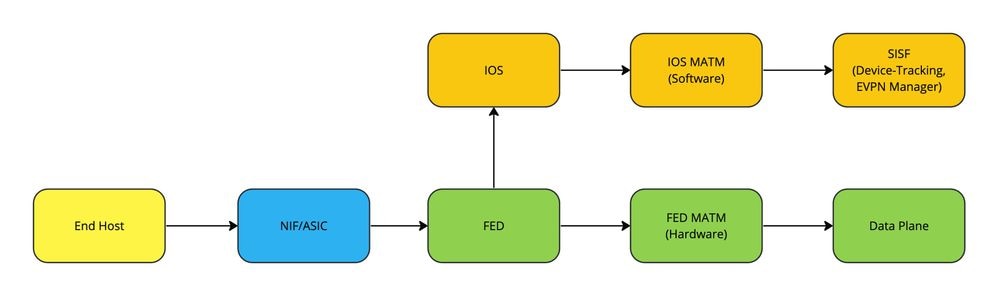
每个MATM的重要性取决于所传递的流量类型:
- 本地交换流量使用FED MATM在硬件(数据平面)中转发数据包。
- 控制平面功能,例如LISP(SDA交换矩阵)或EVPN,使用从IOS MATM构建的设备跟踪数据库

注意:当在交换机上创建SVI时,首先在IOS MATM中创建并写入SVI,然后将其向下推送到FED MATM进行学习。
术语
| MATLAB |
Mac地址表管理器 |
| Mac 地址 |
网络中设备的12位唯一硬件标识符 |
| diHandle |
目标索引句柄 |
| pmap_intf |
端口映射接口 |
| NIF |
网络接口 |
| 美联储 |
转发引擎驱动程序 |
| IOS |
网络操作系统 |
| 数据层面 |
流量在硬件上转发 |
| SISF |
交换机集成安全功能 |
| TCAM |
三重内容可寻址存储器 |
| SVI |
交换机虚拟接口 |
注意:对于每个平台,CLI有时可以包含术语switch(但是,并非总是)。(show platform soft fed switch <number|active|standby> matm macTable与show platform soft fed active matm macTable)。
配置
没有配置要求。
验证
FED MATM中的动态Mac地址学习
Switch#show platform software fed switch active matm macTable vlan 100 mac 9c54.1631.8bd1
VLAN   MAC                  Type  Seq#    EC_Bi  Flags  machandle           siHandle            riHandle            diHandle              *a_time  *e_time  ports                                                         Con
------------------------------------------------------------------------------------------------------------------------------------------------------------------------------------------------------------------------------
100    9c54.1631.8bd1        0x1     248      0      0  0x7f7490c93bd8      0x7f7490c73d98      0x0                 0x7f7490a4e108            300        8  TenGigabitEthernet2/1/1                                       Yes

======platform hardware details ======

Asic: 0

 htm-handle = 0x7f7490c80ce8 MVID = 5 gpn = 1
 SI = 0xb6 RI = 0x1a DI = 0x537d
 DI = 0x537d pmap = 0x00000000 0x00000000

Asic: 1
 SI = 0xb6 RI = 0x1a DI = 0x537d
 DI = 0x537d pmap = 0x00000000 0x10000000 pmap_intf : [TenGigabitEthernet2/1/1]


This is a snippet from the bottom of the output of show platform software fed switch active matm macTable to showcase the classification of Type to help indicate how the Mac Address is being learned on the Switch:

Type:
MAT_DYNAMIC_ADDR           0x1  MAT_STATIC_ADDR            0x2  MAT_CPU_ADDR               0x4  MAT_DISCARD_ADDR           0x8
MAT_ALL_VLANS             0x10  MAT_NO_FORWARD            0x20  MAT_IPMULT_ADDR           0x40  MAT_RESYNC                0x80
MAT_DO_NOT_AGE           0x100  MAT_SECURE_ADDR          0x200  MAT_NO_PORT              0x400  MAT_DROP_ADDR            0x800
MAT_DUP_ADDR            0x1000  MAT_NULL_DESTINATION    0x2000  MAT_DOT1X_ADDR          0x4000  MAT_ROUTER_ADDR         0x8000
MAT_WIRELESS_ADDR      0x10000  MAT_SECURE_CFG_ADDR    0x20000  MAT_OPQ_DATA_PRESENT   0x40000  MAT_WIRED_TUNNEL_ADDR  0x80000
MAT_DLR_ADDR          0x100000  MAT_MRP_ADDR          0x200000  MAT_MSRP_ADDR         0x400000  MAT_LISP_LOCAL_ADDR   0x800000
MAT_LISP_REMOTE_ADDR 0x1000000  MAT_VPLS_ADDR        0x2000000  MAT_LISP_GW_ADDR     0x4000000
注意:故障排除通常从检查IOS MATM开始,但FED确实首先了解了这一点(在本例中)。
IOS MATM中的动态Mac地址学习
Switch#show mac address-table address 9c54.1631.8bd1               <--- What IOS Matm sees
          Mac Address Table
-------------------------------------------

Vlan    Mac Address       Type        Ports
----    -----------       --------    -----
 100    9c54.1631.8bd1    DYNAMIC     Te2/1/1                      <--- Showcases which vlan, how its learned, and what port interface it is learned on
Total Mac Addresses for this criterion: 1
检查硬件编程与IOS编程是否匹配是否有任何不一致。
Switch#show platform software fed switch active matm macTable vlan 100 mac 9c54.1631.8bd1 detail
VLAN   MAC                  Type  Seq#    EC_Bi  Flags  machandle           siHandle            riHandle            diHandle              *a_time  *e_time  ports                                                         Con
------------------------------------------------------------------------------------------------------------------------------------------------------------------------------------------------------------------------------
100    9c54.1631.8bd1        0x1     248      0      0  0x7f7490c93bd8      0x7f7490c73d98      0x0                 0x7f7490a4e108            300        5                                                                Yes

Detailed Resource Information (ASIC_INSTANCE# 0)
----------------------------------------
Number of HTM Entries: 1

Entry 0: (handle 0x7f7490c80ce8)

Absolute Index: 6442
Time Stamp: 5
KEY - vlan:5 mac:0x9c5416318bd1 l3_if:0 gpn:125 epoch:0 static:0 flood_en:0 vlan_lead_wless_flood_en: 0 client_home_asic: 0 learning_peerid 0, learning_peerid_valid 0 lvx:1
MASK - vlan:0 mac:0x0 l3_if:0 gpn:0 epoch:0 static:0 flood_en:0 vlan_lead_wless_flood_en: 0 client_home_asic: 0 learning_peerid 0, learning_peerid_valid 0 lvx:0
SRC_AD - need_to_learn:0 lrn_v:0 catchall:0 static_mac:0 chain_ptr_v:0 chain_ptr: 0 static_entry_v:0 auth_state:0 auth_mode:0 auth_behavior_tag:0 traf_m:0 is_src_ce:0
DST_AD - si:0xb6 bridge:0 replicate:0 blk_fwd_o:0 v4_rmac:0 v6_rmac:0 catchall:0 ign_src_lrn:0 port_mask_o:0 afd_cli_f:0 afd_lbl:0 prio:3 dest_mod_idx:0 destined_to_us:0 pv_trunk:0 smr:0


==============================================================
Detailed Resource Information (ASIC_INSTANCE# 0)
----------------------------------------

Station Index (SI) [0xb6]
RI = 0x1a
DI = 0x537d
stationTableGenericLabel = 0
stationFdConstructionLabel = 0x7
lookupSkipIdIndex = 0
rcpServiceId = 0
dejaVuPreCheckEn = 0x1
Replication Bitmap: CD


Detailed Resource Information (ASIC_INSTANCE# 1)
----------------------------------------

Station Index (SI) [0xb6]
RI = 0x1a
DI = 0x537d
stationTableGenericLabel = 0
stationFdConstructionLabel = 0x7
lookupSkipIdIndex = 0
rcpServiceId = 0
dejaVuPreCheckEn = 0x1
Replication Bitmap: LD

==============================================================
Detailed Resource Information (ASIC_INSTANCE# 0)
----------------------------------------

Destination index   = 0x537d
pmap                = 0x00000000 0x00000000
cmi                 = 0x0
rcp_pmap            = 0x0
al_rsc_cmi
CPU Map Index (CMI) [0]
ctiLo0              = 0
ctiLo1              = 0
ctiLo2              = 0
cpuQNum0            = 0
cpuQNum1            = 0
cpuQNum2            = 0
npuIndex            = 0
stripSeg            = 0
copySeg             = 0

Detailed Resource Information (ASIC_INSTANCE# 1)           <--- Note the ASIC Instance # as it is based on what port interface is being used
----------------------------------------

Destination index   = 0x537d
pmap                = 0x00000000 0x10000000
pmap_intf : [TenGigabitEthernet2/1/1]                      <--- Port map interface is learned correctly
cmi                 = 0x0
rcp_pmap            = 0x0
al_rsc_cmi
CPU Map Index (CMI) [0]
ctiLo0              = 0
ctiLo1              = 0
ctiLo2              = 0
cpuQNum0            = 0
cpuQNum1            = 0
cpuQNum2            = 0
npuIndex            = 0
stripSeg            = 0
copySeg             = 0
==============================================================

警告:如果对语法为active的接口运行detailed命令,但该接口位于另一台交换机上,则不会收到任何端口映射接口输出。
IOS MATM中的静态Mac地址学习
此示例使用交换机SVI Mac地址来展示正确的编程:
Switch#show run interface vlan 100                                                           <--- Verify SVI configuration
Building configuration...

Current configuration : 82 bytes
!
interface Vlan100
 ip address 192.168.1.2 255.255.255.0
end


Switchk#show interface vlan 100
Vlan100 is up, line protocol is up , Autostate Enabled
  Hardware is Ethernet SVI, address is 706b.b929.f751 (bia 706b.b929.f751)                    <--- Mac Address assigned to SVI 100 by the Switch
  Internet address is 192.168.1.2/24
 <snippet>

Switch#show mac address-table address 706b.b929.f751                                          <--- Verify macTable in IOS is programmed correctly
          Mac Address Table
-------------------------------------------

Vlan    Mac Address       Type        Ports
----    -----------       --------    -----
 100    706b.b929.f751    STATIC      Vl100
Total Mac Addresses for this criterion: 1
FED MATM中的静态Mac地址学习
Switch#show platform software fed switch active matm macTable vlan 100                       <--- Verify macTable in Hardware is programmed correctly
VLAN   MAC                  Type  Seq#    EC_Bi  Flags  machandle           siHandle            riHandle            diHandle              *a_time  *e_time  ports                                                         Con
------------------------------------------------------------------------------------------------------------------------------------------------------------------------------------------------------------------------------
100    706b.b929.f751     0x8002       0      0     64  0x7fc210e57908      0x7fc210cb7d78      0x0                 0x0                         0        0  Vlan100                                                       Yes


100    0027.90be.20d1      0x101     192      0     64  0x7fc210cdc058      0x7fc210cd6da8      0x0                 0x7fc210ac81f8              0        0  TenGigabitEthernet2/1/2                                       Yes


Total Mac number of addresses:: 2
Summary:
Total number of secure addresses:: 0
Total number of drop addresses:: 0
Total number of lisp local addresses:: 0
Total number of lisp remote addresses:: 0
*a_time=aging_time(secs)  *e_time=total_elapsed_time(secs)
Type:
MAT_DYNAMIC_ADDR           0x1  MAT_STATIC_ADDR            0x2  MAT_CPU_ADDR               0x4  MAT_DISCARD_ADDR           0x8
MAT_ALL_VLANS             0x10  MAT_NO_FORWARD            0x20  MAT_IPMULT_ADDR           0x40  MAT_RESYNC                0x80
MAT_DO_NOT_AGE           0x100  MAT_SECURE_ADDR          0x200  MAT_NO_PORT              0x400  MAT_DROP_ADDR            0x800                 <--- Note 0x8000 + 0x2 == 0x8002 ---> Routed Address that is Statically assigned on the Switch (SVI)
MAT_DUP_ADDR            0x1000  MAT_NULL_DESTINATION    0x2000  MAT_DOT1X_ADDR          0x4000  MAT_ROUTER_ADDR         0x8000
MAT_WIRELESS_ADDR      0x10000  MAT_SECURE_CFG_ADDR    0x20000  MAT_OPQ_DATA_PRESENT   0x40000  MAT_WIRED_TUNNEL_ADDR  0x80000
MAT_DLR_ADDR          0x100000  MAT_MRP_ADDR          0x200000  MAT_MSRP_ADDR         0x400000  MAT_LISP_LOCAL_ADDR   0x800000
MAT_LISP_REMOTE_ADDR 0x1000000  MAT_VPLS_ADDR        0x2000000  MAT_LISP_GW_ADDR     0x4000000
注意:在交换机上创建的SVI没有diHandle,因为它是路由地址。
MATM中的EVPN Mac地址学习
确定Mac地址应学习的VLAN并检验MATM。
注意:有关EVPN的详细信息,请参阅BGP EVPN VXLAN配置指南。
Switch#show platform software fed switch active matm macTable vlan 201
VLAN   MAC                  Type  Seq#    EC_Bi  Flags  machandle           siHandle            riHandle            diHandle              *a_time  *e_time  ports                                                         Con
------------------------------------------------------------------------------------------------------------------------------------------------------------------------------------------------------------------------------
201    0006.f601.cd42        0x1   32436      0      0  0x71e058dc3368      0x71e058655018      0x0                 0x71e05877c888            300       14  GigabitEthernet1/0/1                                          Yes


201    0006.f601.cd01        0x1   32437      0      0  0x71e058dae308      0x71e058655018      0x0                 0x71e05877c888            300       15  GigabitEthernet1/0/1                                          Yes


201    0006.f617.ee81  0x1000001       0      0     64  0x71e059191ee8      0x71e058e11468      0x71e058ef0d18      0x0                         0  5335175  VTEP 172.16.255.4 adj_id 1376                                 No


Total Mac number of addresses:: 4
Summary:
Total number of secure addresses:: 0
Total number of drop addresses:: 0
Total number of lisp local addresses:: 0
Total number of lisp remote addresses:: 2                        <--- Remotely learned addresses from EVPN
*a_time=aging_time(secs)  *e_time=total_elapsed_time(secs)
Type:
MAT_DYNAMIC_ADDR           0x1  MAT_STATIC_ADDR            0x2  MAT_CPU_ADDR               0x4  MAT_DISCARD_ADDR           0x8
MAT_ALL_VLANS             0x10  MAT_NO_FORWARD            0x20  MAT_IPMULT_ADDR           0x40  MAT_RESYNC                0x80
MAT_DO_NOT_AGE           0x100  MAT_SECURE_ADDR          0x200  MAT_NO_PORT              0x400  MAT_DROP_ADDR            0x800
MAT_DUP_ADDR            0x1000  MAT_NULL_DESTINATION    0x2000  MAT_DOT1X_ADDR          0x4000  MAT_ROUTER_ADDR         0x8000.     <--- Note 0x1000000 + 0x1 == 0x1000001 ---> Mac Address remotely learned Dynamically via EVPN
MAT_WIRELESS_ADDR      0x10000  MAT_SECURE_CFG_ADDR    0x20000  MAT_OPQ_DATA_PRESENT   0x40000  MAT_WIRED_TUNNEL_ADDR  0x80000
MAT_DLR_ADDR          0x100000  MAT_MRP_ADDR          0x200000  MAT_MSRP_ADDR         0x400000  MAT_LISP_LOCAL_ADDR   0x800000
MAT_LISP_REMOTE_ADDR 0x1000000  MAT_VPLS_ADDR        0x2000000  MAT_LISP_GW_ADDR     0x4000000
注意:EVPN类型标志使用MAT_LISP_REMOTE_ADDR与LISP Mac Learning相同的表示法。
故障排除
网络连接问题
本示例使用2个C9300-48UN的交换机堆栈,其中SVI 100是网络上的L3网关,并且其自己的Mac地址未正确编程,包括:
-
目的设备连接到交换机2上的端口
-
源设备连接到交换机1上的端口
-
SVI 100是网关
-
没有从源设备到目的设备的连接(使用ICMP进行测试)
-
如果目的设备连接到交换机1,则连接恢复
检查目的设备的IP ARP和Mac地址
Switch#show ip arp 192.168.1.3 Protocol Address Age(min)Hardware Addr Type Interface Internet 192.168.1.3 6 9c54.1631.8bd1 ARPA Vlan100 < — 在Vlan 100上正确解析了ARP
Switch#show mac add address 9c54.1631.8bd1 Mac Address Table ------------------------------------------- Vlan Mac Address Type Ports ---- ----------- -------- ----- 100 9c54.1631.8bd1 DYNAMIC Te2/1/1 <— IOS编程目标Mac地址正确符合以下条件的总计量:1
检查连接到目标设备的端口上的出口和入口流量
主要目标是确保看到入口流量。这可以通过EPC完成,本示例使用ICMP流量。
Switch#monitor capture tac interface Te2/1/1 match any start
<请稍等片刻>
Switch#monitor capture tac stop
Switch#show monitor capture tac buffer brief | i ICMP
908 4.969635 192.168.1.2 -> 192.168.1.3 ICMP 114 Echo(ping)request id=0x0008, seq=0/0, ttl=255 909 4.970165 192.168.1.3 -> 192.168.1.2 ICMP 118 Echo(ping)reply id=0x008, seq=0/0, ttl=254(908中的请求)。 < — 在EPC上看到回复,表明流量到达目的设备后,它正确回复910 4.970425 168.1.2 -> 192.168.1.3 ICMP 114 Echo(ping)请求id=0x0008, seq=1/256, ttl=25911 4.970724 192.168.1.3 -> 192.168.1.2 ICMP 118 Echo(ping)应答id=0x0008, seq=1/256, ttl=254(910中的请求)912 4.970889 192.168.1.2 -> 192.168.1.3 ICMP 114 Echo(ping)请求id=0x0008, seq=2/512, ttl=253 9 4.971211 192.168.1.3 -> 192.168.1.2 ICMP 118 Echo(ping)reply id=0x0008, seq=2/512, ttl=254(请求912)914 4.971436 192.168.1.2 -> 192.168.1.3 ICMP 114 Echo(ping)请求id=0x0008, seq=3/768, ttl=255 915 4.971558 192.168.1.3 -> 192.168.1.2 ICMP 118 Echo(ping)reply id=0x0008, seq=3/768, ttl=254(914中的请求)
检查返回流量的详细输出
Switch#show monitor capture tac buffer detailed | begin Frame 909 Starting the packet display .......按Ctrl + Shift + 6退出第1帧:118个线路字节(944位),118个捕获字节(944位)在接口/tmp/epc_ws/wif_to_ts_pipe上,id 0接口id:0(/tmp/epc_ws/wif_to_ts_pipe)接口名称:/tmp/epc_ws/wif_to_ts_pipe封装类型:以太网(1)到达时间:2024年4月19日19:14:13.044770000 UTC [此数据包的时移:0.000000000秒]纪元时间:1713554053.044770000秒[捕获前一帧的时间增量:0.000000000秒] [与先前显示的帧相比的时间增量:0.000000000秒] [自引用或第一个帧以来的时间:0.000000000秒]帧号:1帧长度:118字节(944位)捕获长度:118字节(944位)[帧已标记:False] [忽略帧:False] [帧中的协议:eth:ethertype:vlan:ethertype:ip:icmp:data]以太网II,源:9c:54:16:31:8b:d1(9c:54:16:31:8b:d1),Dst:70:6b:b9:29:f7:51(70:6b:b9:29:f7:51)< — 验证此源mac是否与上面来自arp条目/ macTable的输出(对于192.168.1.3目标):70:6b:b9:29:f7:51(70:6b:b9:29:f7:51)< — 验证此DMAC(目标Mac地址)是否与网关(SVI 100)地址匹配:70:6b:b9:29:f7:51(70:6b:b9:29:f7:51).....0............. = LG位:全局唯一地址(出厂默认设置)。......0............. = IG位:单个地址(单播)来源:9c:54:16:31:8b:d1(9c:54:16:31:8b:d1)地址:9c:54:16:31:8b:d1(9c:54:16:31:8b:d1)。....0............. = LG位:全局唯一地址(出厂默认设置)。......0............. = IG位:单个地址(单播)
Switch#show interface vlan 100 Vlan100 is up, line protocol is up, Autostate Enabled Hardware is Ethernet SVI, address is 706b.b929.f751(bia 706b.b929.f751)<-Matches ICMP DMAC Reply Internet address is 192.168.1.4/24
检查SVI 100的Mac地址
Switch#show mac address-table address 706b.b929.f751 Mac Address Table ------------------------------------------- Vlan Mac Address Type Ports ---- ----------- -------- ----- <- IOS根本没有设置SVI 100 Mac地址(意外情况)
Switch#show platform software feed switch active matm macTable vlan 100 mac 706b.b929.f751 VLAN MAC类型Seq# EC_Bi Flags machandle siHandle diHandle *a_time *e_time ports Con ------------------------------------------------------------------------------------------------------------------------------------------------------------------------------------------------------------------------------ 100 706b.b929.f751 0x802 0 0 0 0 64 0x7fc210e57908 0x7fc210cb7d78 0x0 0x0 0 0 Vlan100是======平台硬件详======Asic:0 < — 交换机1上的矩阵(活动)已正确编程SVI 100 MAC,htm-handle = 0x7fc210cb9e68 MVID = 5 gpn = 1 SI = 0x2d RI = 0x1 DI = 0x5234 Asic:1 SI = 0x2d RI = 0x1 DI = 0x5234
注意:当目的设备连接到交换机1时,连接恢复的原因是,与交换机2相比,MATM仍被正确编程。
Switch#show platform software fed switch 2 matm macTable vlan 100 mac 706b.b929.f751 Mac地址总数:0 < — 交换机2上的矩阵没有SVI 100 MAC编程摘要:安全地址总数:0丢弃地址总数:0本地lisp地址总数:0所有lisp远程地址:0
可能的连接问题原因
检查MATM硬件资源
如果负责对Mac地址进行编程的交换机硬件资源耗尽,则无法获知更多地址
Switch#show platform hardware feed switch active fwd-asic resource tcam utilization Codes:EM - Exact_Match, I - Input, O - Output, IO - Input & Output, NA - Not Applicable CAM Utilization for ASIC [0] Table子类型Dir Max Used %Used V4 V6 MPLS Other ------------------------------------------------------------------------------------------------------ Mac Address Table EM I 32768 31788 97.01% 0 31788 < — 查找95%或更高值Mac Address Table TCAM I 10199.51 0 0 1019 L3组播EM I 8192 0 0.00% 0 0 0 L3组播TCAM I 512 9 1.76% 3 6 0 0 L2组播EM I 8192 0 0.00% 0 0 0 L2组播TCAM I 512 11 2.15% 3 8 0 IP路由表EM I 24576 3 0.01% 2 0 1 0 IP路由表TCAM i 8192 19 0.23% 6 10 2 1 QOS ACL TCAM IO 5120 85 1.66% 28 38 0 19 TCAM I 45 0.88% 15 20 0 10 TCAM O 40 0.78% 13 18 0 9安全ACL TCAM IO 5120 131 2.56% 26 60 0 45 TCAM I 8 1.72% 12 36 0 40 TCAM O 43 0.84% 14 24 0 5 Netflow ACL TCAM I 256 6 2.34% 2 0 2 PBR ACL TCAM I 1024 36 3.52% 30 6 0 Netflow ACL TCAM O 768 6 0.78% 2 0 2流跨度ACL TCAM IO 1024 13 1.27% 3 6 0 4 TCAM I 5 0.49% 1 2 0 2 TCAM O 8 0.78% 2 4 0 2控制平面TCAM I 512 290 56.64% 138 106 0 46隧道终端TCAM I 512 20 3.91% 8 12 0 0 Lisp Inst映射TCAM I 2048 1 0.05% 0 0 1 Security Association TCAM I 6 1.56% 2 2 0 0 CTS单元矩阵/VPN标签EM O 8192 0 0.00% 0 0 0 CTS单元矩阵/VPN标签TCAM O 512 1 0.20% 0 0 0 0 1客户端表EM I 4096 0 0.00% 0 0 0客户端表TCAM I 256 0 0.00% 0 0 0 0输入组LE TCAM I 1024 0 0.00% 0 0 0输出组LE TCAM O 1024 0 0.00% 0 0 0 Macsec SPD TCAM I 256 2 0.78% 0 0 2
注意:有关硬件资源的详细信息,请参阅了解Catalyst 9000交换机上的硬件资源指南。
MATM系统日志错误
| MATM日志消息 |
定义 |
恢复操作 |
| MATM-3-MAX_ENTRIES:交换机1 F0/0:美联储:已达到最大MAC地址数:32768 |
为Mac地址保留的硬件空间已用尽 |
减少交换机上学习的Mac地址扩展数量 |
可能的解决方法
选项#1:
减少在交换机上学习的Mac地址数量:
-
可能会发生网络环路,一旦解决了这个问题,硬件资源就会枯竭,正常的Mac学习会继续
-
网络扩展会产生影响,并使用具有更大硬件容量的交换机。(示例:C9300的最大Mac地址为32768,而C9500H的最大值为82,000)
选项#2:
正在发生合理的编程错误:
-
收集所有相关数据:
-
Show tech-support
-
Tracelog存档
-
调试MATM
-
-
重新通电设备
-
如果问题仍然存在,请向思科TAC提交支持请求。
-
相关信息
修订历史记录
| 版本 | 发布日期 | 备注 |
|---|---|---|
2.0 |
02-Jul-2026
|
更新的拼写、语法、间距、CCW警报、句子结构和更新的注释。 |
1.0 |
14-Jun-2024
|
初始版本 |
 反馈
反馈