解决由于云服务注册不匹配导致的FDM高可用性配置故障

目录
问题
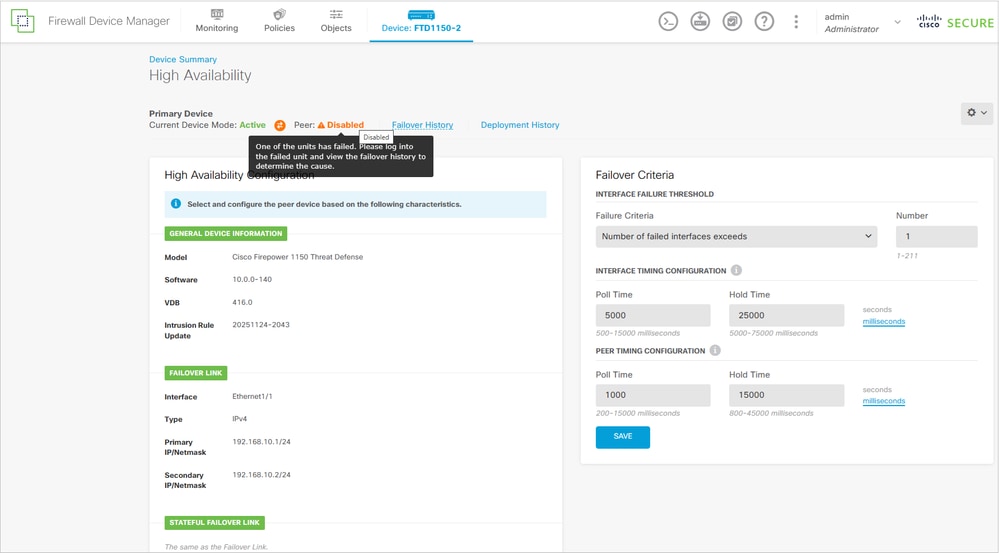
由防火墙设备管理器(FDM)管理的两台Firepower 1150设备之间的高可用性(HA)配置失败。 配置过程未成功完成,导致无法建立HA对。
主单元上的FDM UI显示:
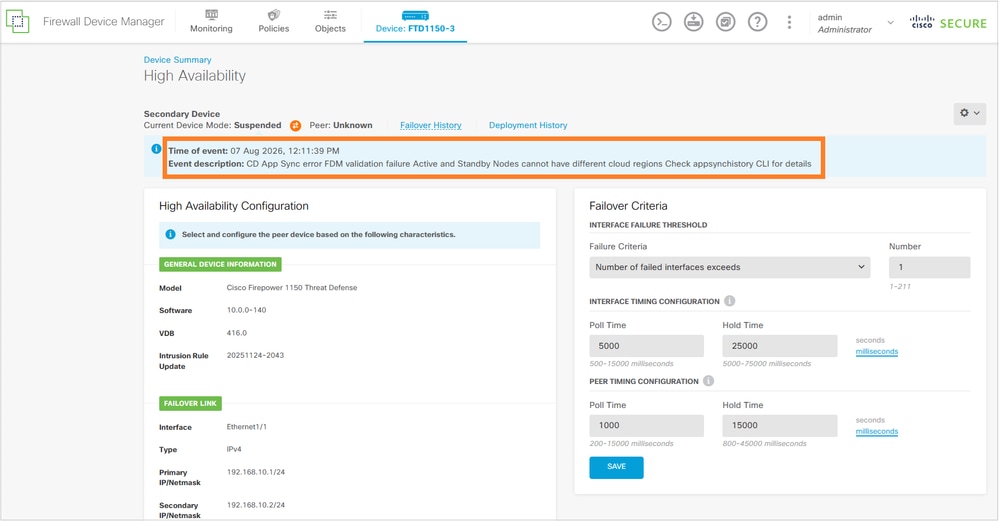
辅助FTD单元显示:
主FTD CLI:
> show app-sync-history
================================APP SYNC HISTORY================================
--------------------------------------------------------------------------------
App Sync Time: 10:11:10 UTC Aug 07 2026
Role:  Active Unit
App Sync Status: FAILURE
Failed Phase: WaitRemoteConfigApply
Failure Reason: Cluster App Un Archive failure on Standby/Slave Unit Node Id: 1 FDM validation failure - Active and Standby Nodes cannot have different cloud regions. Need to do App/Sensor Configuration Rollback  App/Sensor config apply fails on following slave nodes:1 App sync application failed on standby with reason=FDM validation failure - Active and Standby Nodes cannot have different cloud regions.
辅助FTD CLI:
device# show failover
Failover Off (pseudo-Standby)
Failover unit Secondary
Failover LAN Interface: failover-link Ethernet1/1 (up)
Reconnect timeout 0:00:00
Unit Poll frequency 1 seconds, holdtime 15 seconds
Interface Poll frequency 5 seconds, holdtime 25 seconds
Interface Policy 1
Monitored Interfaces 2 of 1288 maximum
MAC Address Move Notification Interval not set
failover replication http

> show app-sync-history
================================APP SYNC HISTORY================================
--------------------------------------------------------------------------------
App Sync Time: 10:11:06 UTC Aug 07 2026
Role:  Standby Unit
App Sync Status: FAILURE
Failed Phase: OnBoxValidators
Failure Reason: FDM validation failure - Active and Standby Nodes cannot have different cloud regions.
--------------------------------------------------------------------------------

device# show failover history
==========================================================================
From State                 To State                   Reason
==========================================================================
08:45:29 UTC Aug 7 2026
Not Detected               Disabled                   No Error
10:10:49 UTC Aug 7 2026
Disabled                   Negotiation                Set by the config command
                                                      (failover)
10:10:50 UTC Aug 7 2026
Negotiation                Cold Standby               Detected an Active peer
10:10:52 UTC Aug 7 2026
Cold Standby               App Sync                   Detected an Active peer
10:11:39 UTC Aug 7 2026
App Sync                   Disabled                   CD App Sync error
                                                      FDM validation failure - Active and Standby Nodes cannot have different cloud regions.. Check app-sync-history CLI for details
==========================================================================
环境
两台Firepower 1150 FTD设备。其他硬件平台也受到影响。
FTD软件版本7.2.8。其它软件版本也受到影响。
两个FTD单元均由FDM管理并在思科云服务中注册。
分辨率
解决方法包括在两个防火墙之间调整云服务注册状态。
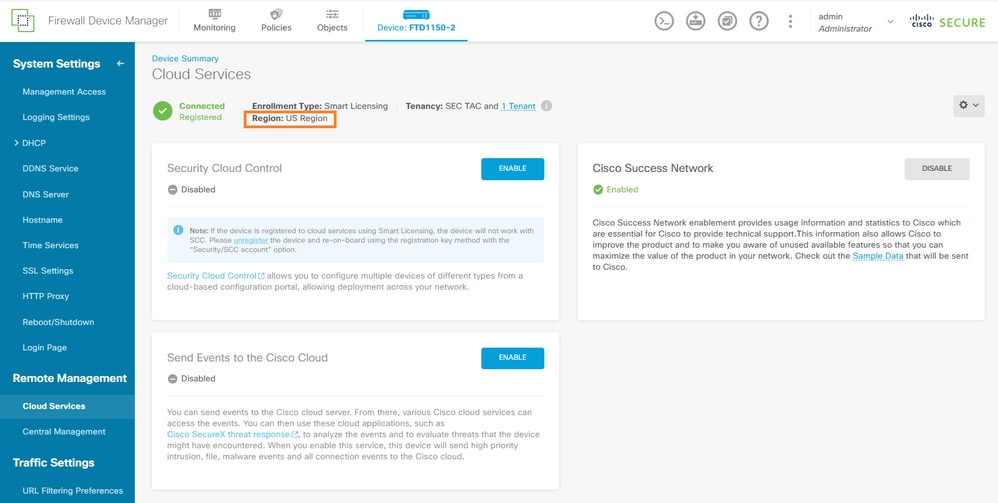
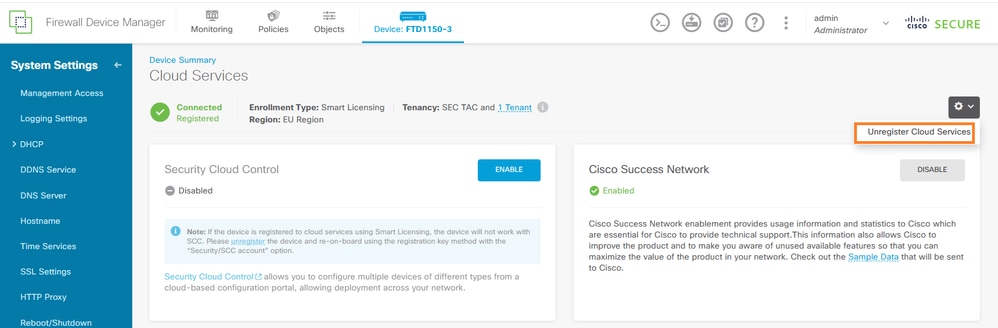
主要云服务在美国地区注册:
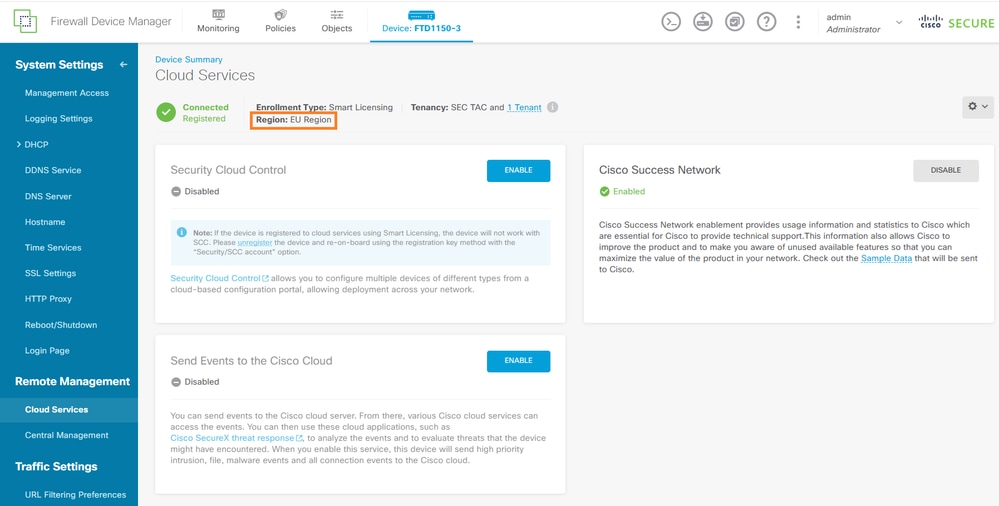
辅助云服务在欧盟地区注册:
在这种情况下,用户决定注册辅助防火墙(FW2)以匹配主防火墙(FW1)。
步骤 1:在思科云服务中注册FW2
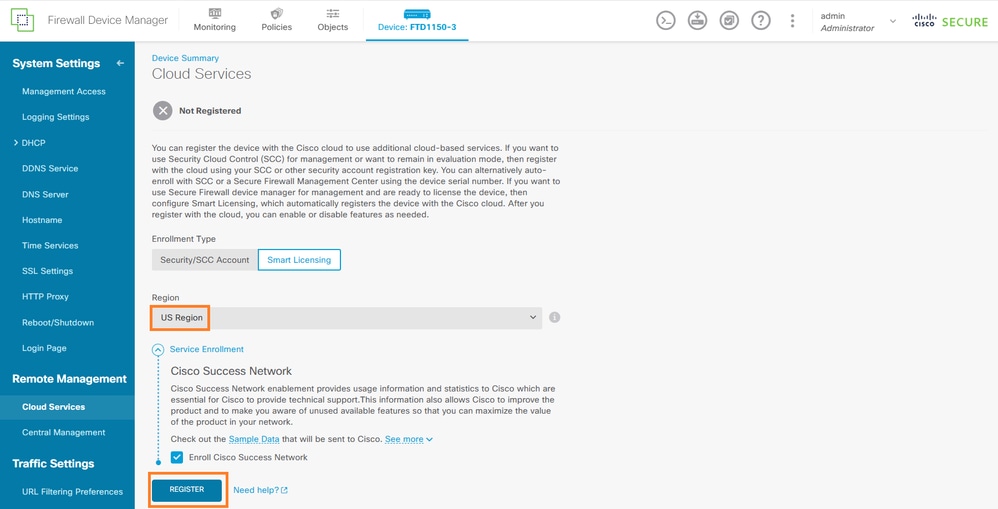
使用与FW1(美国地区)相同的云区域将FW2注册到思科云服务。
在FW2 FDM界面中,导航到设备>系统设置>云服务,然后注销云服务:
然后,将FW2注册到FW1使用的同一区域:
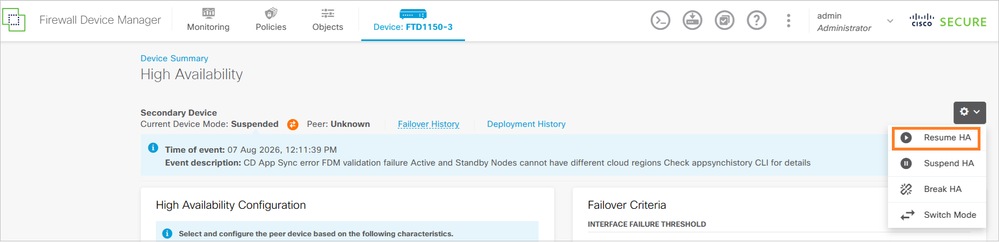
步骤 2:重试HA配置
在两台设备显示相同的云注册状态后,继续高可用性配置:
在辅助设备的CLI中,您会看到:
>
        Detected an Active mate
Secondary: Switching to Ok for reason Detected an Active peer.
几分钟后:
device# show failover state
               State          Last Failure Reason      Date/Time
This host  -   Secondary
               Standby Ready  None
Other host -   Primary
               Active         None

====Configuration State===
        Sync Done - STANDBY
====Communication State===
        Mac set
一般来说,两台设备必须在同一思科云服务区域进行注册,或者两者均不得进行注册。
原因
根本原因是两个Firepower 1150设备之间的思科云服务注册状态不匹配。当一个节点已云注册,而另一个节点未注册或注册到其他区域时,FDM会阻止HA应用同步。此验证可确保HA对中的两台设备保持一致的云连接和功能可用性。
具体的技术原因是FW1注册到Cisco Cloud Services US地区,而FW2注册到EU地区,导致HA对形成状态不兼容。
相关内容
修订历史记录
| 版本 | 发布日期 | 备注 |
|---|---|---|
2.0 |
17-Sep-2026
|
重新认证 |
1.0 |
07-Aug-2026
|
初始版本 |
 反馈
反馈