使用nameif nlp_int_tap和IP地址169.254.1.1说明内部数据接口的用途

简介
本文档介绍IP地址为169.254.1.1的内部数据nlp_int_tap接口的用途。
先决条件
要求
基本的产品知识。
使用的组件
本文档中的信息都是基于特定实验室环境中的设备编写的。本文档中使用的所有设备最初均采用原始(默认)配置。如果您的网络处于活动状态,请确保您了解所有命令的潜在影响。
本文档中的信息基于以下软件和硬件版本:
- 安全防火墙威胁防御(FTD)7.x、10.x,由安全防火墙设备管理器(FDM)或安全防火墙管理中心(FMC)管理。
- 保护ASA 9.18及更高版本。
背景信息
名为nlp_int_tap和169.254.1.1 IP地址的内部数据接口是一个内部接口,用于提供名为Lina的数据平面引擎与后端操作系统(OS)之间的连接。
它用于为以下服务提供一般连接:
- SNMP - SNMP守护程序作为单独的进程在操作系统中运行。
- 通过Cisco SSH协议栈对ASA进行SSH访问 — SSH守护程序作为单独的进程在操作系统中运行。
- 通过数据接口对FTD进行SSH访问 — SSH后台守护程序作为单独的进程在操作系统中运行。
- FTD上的VRF感知外部身份验证 — 通过全局或用户VRF中的数据接口提供对外部身份验证服务器的访问。
- 如果在数据接口上进行FTD管理,则可以通过管理接口访问管理服务,例如sftunnel、DNS解析、许可、外部身份验证、NTP或操作系统未明确配置静态路由的任何目标。
Lina验证
根据平台,在Lina引擎中,nameif nlp_int_tap被分配给Internal-DataX/Y接口,并且可在不同的命令输出中看到。
以下是来自不同防火墙的输出:
- 运行FTD的安全防火墙6170:
CSF6170-1# show interface ip brief
Interface                  IP-Address      OK?           Method Status      Protocol
…
Internal-Data1/1           169.254.1.1     YES           unset  up          up
…


CSF6170-1# show controller
Internal-Data1/1:
   ASA IPS/VM Internal Management Data Interface en_vtun rev00, port id 10
     Major Configuration Parameters
         Device Name           : en_vtun
         Linux Tun/Tap Device  : /dev/net/tun/tap_nlp
…

CSF6170-1# show interface detail | begin nlp_int_tap        <-- Output except Internal-Data slot and port ID is similar in other devices
Interface Internal-Data1/1 "nlp_int_tap", is up, line protocol is up
  Hardware is en_vtun rev00, BW Unknown Speed-Capability, DLY 1000 usec
        (Full-duplex), (1000 Mbps)
        Input flow control is unsupported, output flow control is unsupported
        MAC address 0000.0100.0001, MTU 1500
        IP address 169.254.1.1, subnet mask 255.255.255.248
        12409 packets input, 837229 bytes, 0 no buffer
        Received 0 broadcasts, 0 runts, 0 giants
        0 input errors, 0 CRC, 0 frame, 0 overrun, 0 ignored, 0 abort
        0 pause input, 0 resume input
        0 L2 decode drops, 0 demux drops
        12371 packets output, 816494 bytes, 0 underruns
        0 pause output, 0 resume output
        0 output errors, 0 collisions, 0 interface resets
        0 late collisions, 0 deferred
        0 input reset drops, 0 output reset drops
        input queue (blocks free curr/low): hardware (0/0)
        output queue (blocks free curr/low): hardware (0/0)
  Traffic Statistics for "nlp_int_tap":
        12409 packets input, 663503 bytes
        12371 packets output, 643300 bytes
        43 packets dropped
      1 minute input rate 0 pkts/sec,  0 bytes/sec
      1 minute output rate 0 pkts/sec,  0 bytes/sec
      1 minute drop rate, 0 pkts/sec
      5 minute input rate 0 pkts/sec,  0 bytes/sec
      5 minute output rate 0 pkts/sec,  0 bytes/sec
      5 minute drop rate, 0 pkts/sec
  Control Point Interface States:
        Interface number is 7
        Interface config status is active
        Interface state is active


CSF6170-1# capture nlp interface ?                  <-- Same as in other devices
  cplane       Capture packets on controlplane interface
  data-plane   Capture packets on dataplane interface
  nlp_int_tap  Capture packets on nlp_int_tap interface
Available interfaces to listen:
  eventing     Name of interface Management1/2
  inside       Name of interface Ethernet1/1
  management   Name of interface Management1/1


CSF6170-1# show asp table interfaces               <-- Same as in other devices
…
Soft-np interface 'nlp_int_tap' is up
    context single_vf, nicnum 10, mtu 1500
        vlan <None>, Not shared, seclvl 100
        12409 packets input, 12371 packets output
        flags 0x0
…


CSF6170-1# show asp table routing                  <-- Same as in other devices
route table timestamp: 37
…
in   169.254.1.0     255.255.255.248 nlp_int_tap
in   fd00:0:0:1::1   ffff:ffff:ffff:ffff:ffff:ffff:ffff:ffff nlp_int_tap
in   fd00:0:0:1::    ffff:ffff:ffff:ffff:: nlp_int_tap
out  255.255.255.255 255.255.255.255 nlp_int_tap
out  169.254.1.1     255.255.255.255 nlp_int_tap
out  169.254.1.0     255.255.255.248 nlp_int_tap
out  224.0.0.0       240.0.0.0       nlp_int_tap
out  fd00:0:0:1::1   ffff:ffff:ffff:ffff:ffff:ffff:ffff:ffff nlp_int_tap
out  fd00:0:0:1::    ffff:ffff:ffff:ffff:: nlp_int_tap
out  fe80::          ffc0::          nlp_int_tap
out  ff00::          ff00::          nlp_int_tap
…
- 运行ASA的Firepower 4145:
asa# show interface ip brief
Interface                  IP-Address      OK?           Method Status      Protocol
…
Internal-Data0/2           169.254.1.1     YES           unset  up          up
…

asa# show controller
Internal-Data0/2:
   ASA IPS/VM Internal Management Data Interface en_vtun rev00, port id 4102
     Major Configuration Parameters
         Device Name           : en_vtun
         Linux Tun/Tap Device  : /dev/net/tun/tap_nlp
…
- 虚拟FTD:
firewall# show interface ip brief
Interface                  IP-Address      OK? Method Status                Protocol
…
Internal-Data0/1           169.254.1.1     YES unset  up                    up
…

firewall# show controller
Internal-Data0/1:
ASA IPS/VM Internal Management Data Interface en_vtun rev00, port id 12
     Major Configuration Parameters
         Device Name           : en_vtun
         Linux Tun/Tap Device  : /dev/net/tun/tap_nlp
…
- 虚拟ASA:
asav# show interface ip brief
…
Internal-Data0/0           169.254.1.1     YES unset  up                    up
…
firewall# show controller
Internal-Data0/0:
   ASA IPS/VM Internal Management Data Interface en_vtun rev00, port id 4
     Major Configuration Parameters
         Device Name           : en_vtun
         Linux Tun/Tap Device  : /dev/net/tun/tap_nlp
…
关键点
- 名称if nlp_int_tap已分配给不同平台上的不同内部数据接口。
- 根据show asp table routing 命令输出,为名为nlp_int_tap 的Internal-Data接口分配IPv4地址169.254.1.1/29 和IPv6地址fd00:0:0:1::1/64。
- 根据show controller命令输出,此接口是/dev/net/tun/tap_nlp中可用的Linux Tun/Tap接口(特别是分路器)。
操作系统验证
/dev/net/tun/tap_nlp是Linux分路器接口,具有以下IP地址:
- IPV4:169.254.1.2/29(在虚拟设备上)和169.254.1.3/29(在硬件设备上)。
- IPV6:虚拟设备上的fd00:0:1::2/64和硬件设备上的fd00:0:0:1::3/64。
虚拟和硬件FTD设备中的验证:
- 虚拟FTD:
admin@firewall:~$ ip addr show dev tap_nlp
14: tap_nlp: <BROADCAST,MULTICAST,UP,LOWER_UP> mtu 1500 qdisc pfifo_fast state UP group default qlen 1000
    link/ether 06:dd:c8:b9:e9:cc brd ff:ff:ff:ff:ff:ff
    inet 169.254.1.2/29 brd 169.254.1.7 scope global tap_nlp:1
       valid_lft forever preferred_lft forever
    inet6 fd00:0:0:1::2/64 scope global
       valid_lft forever preferred_lft forever
    inet6 fe80::4dd:c8ff:feb9:e9cc/64 scope link
       valid_lft forever preferred_lft forever
- Secure Firewall 6170:
admin@CSF6170-1:~$ ip addr show dev tap_nlp
7: tap_nlp: <BROADCAST,MULTICAST,UP,LOWER_UP> mtu 1500 qdisc pfifo_fast state UP group default qlen 1000
    link/ether b2:5b:a0:bf:f6:69 brd ff:ff:ff:ff:ff:ff
    inet 169.254.1.3/29 brd 169.254.1.7 scope global tap_nlp:1
       valid_lft forever preferred_lft forever
    inet6 fd00:0:0:1::3/64 scope global
       valid_lft forever preferred_lft forever
    inet6 fe80::b05b:a0ff:febf:f669/64 scope link
       valid_lft forever preferred_lft forever
为了提供返回到Lina的连接,操作系统会安装路由规则,以使用tap_nlp接口的源IP地址查找数据包:
admin@firewall:~$ ip rule show
0:      from all lookup local
32765:  from 169.254.1.2 lookup 1 <-- For packets sourced from 169.254.1.2 (or .3 in case of hardware devices), the routing table 1 is used
32766:  from all lookup main
32767:  from all lookup default

admin@firewall:~$ ip -6 rule show
0:      from all lookup local
32765:  from fd00:0:0:1::2 lookup 1 <-- For packets sourced from xxxx::2 (or xxxx:3 in case of hardware devices), the routing table 1 is used
32766:  from all lookup main

admin@firewall:~$ ip route show table 1
default via 169.254.1.1 dev tap_nlp <-- Next hop for the default route in table 1 is 169.254.1.1 (Lina)

admin@firewall:~$ ip -6 route show table 1
default via fd00:0:0:1::1 dev tap_nlp metric 1024 pref medium <-- Next hop for the default route in table 1 is fd00:0:0:1::1 (Lina)
关键点
- IPv4和IPv6路由规则规定,在路由表1中执行源自于nlp_tap接口地址的数据包的路由查找。
- 路由表1的IPv4和IPv6版本包含默认路由,该路由的下一跳地址属于Lina nlp_int_tap接口。
数据包路径和捕获点
本部分显示了两种不同情况下的数据包路径和捕获点:
- 禁用数据接口管理。
- 启用数据接口管理。
数据接口管理已禁用
本节介绍如何在FTD上验证数据包路径和捕获点,并提供以下详细配置信息:
- FTD由FMC管理。
- 无需通过数据接口进行管理。这意味着管理接口用于提供操作系统和外部网络之间的连接:
> show network management-data-interface
Physical Interface               Name of the Interface <-- empty output indicates disabled feature
- 至少配置了以下功能之一:
- ASA或FTD上的SNMP。
- 通过Cisco SSH协议栈对ASA进行SSH访问。在ASA版本9.23及更高版本中,思科SSH堆栈已启用且无法禁用。
- 通过数据接口通过SSH访问FTD。
- 通过FDM管理的FTD上的数据接口进行HTTPS访问。
- 所有捕获点都配置数据包捕获。
如果配置了上述功能之一,则自动配置手动两次NAT规则。NAT规则因功能端口/协议而异。
以下是手动两次NAT规则的示例输出,用于通过数据接口进行FTD SSH访问:
firewall# show nat detail
Manual NAT Policies Implicit (Section 0)
1 (nlp_int_tap) to (inside) source static nlp_server__ssh_0.0.0.0_intf3 interface  destination static 0_0.0.0.0_1 0_0.0.0.0_1 service tcp ssh ssh
    translate_hits = 6, untranslate_hits = 6
    Source - Origin: 169.254.1.2/32, Translated: 192.0.2.1/24
    Destination - Origin: 0.0.0.0/0, Translated: 0.0.0.0/0
    Service - Protocol: tcp Real: ssh Mapped: ssh

2 (nlp_int_tap) to (inside) source static nlp_server__ssh_::_intf3 interface ipv6  destination static 0_::_2 0_::_2 service tcp ssh ssh
    translate_hits = 0, untranslate_hits = 0
    Source - Origin: fd00:0:0:1::2/128, Translated:
    Destination - Origin: ::/0, Translated: ::/0
    Service - Protocol: tcp Real: ssh Mapped: ssh

3 (nlp_int_tap) to (inside) source dynamic nlp_client_0_0.0.0.0_6proto22_intf3 interface  destination static nlp_client_0_ipv4_2 nlp_client_0_ipv4_2 service nlp_client_0_6svc22_1 nlp_client_0_6svc22_1
    translate_hits = 0, untranslate_hits = 0
    Source - Origin: 169.254.1.2/32, Translated: 192.0.2.1/24
    Destination - Origin: 0.0.0.0/0, Translated: 0.0.0.0/0
    Service - Origin: tcp destination eq ssh , Translated: tcp destination eq ssh

4 (nlp_int_tap) to (inside) source dynamic nlp_client_0_ipv6_::_6proto22_intf3 interface ipv6  destination static nlp_client_0_ipv6_4 nlp_client_0_ipv6_4 service nlp_client_0_6svc22_3 nlp_client_0_6svc22_3
    translate_hits = 0, untranslate_hits = 0
    Source - Origin: fd00:0:0:1::2/128, Translated:
    Destination - Origin: ::/0, Translated: ::/0
    Service - Origin: tcp destination eq ssh , Translated: tcp destination eq ssh
下图显示数据包路径和捕获点:
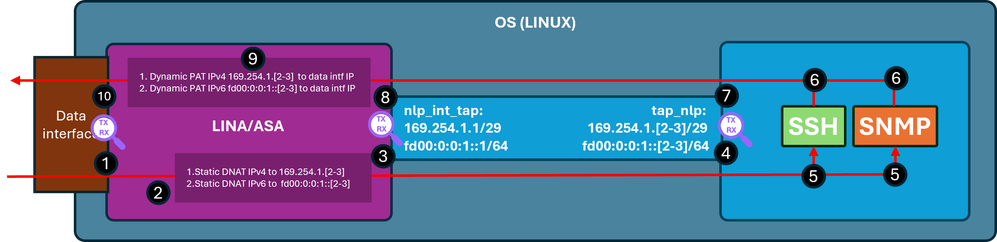
验证步骤(适用于前面提到的功能):
- 捕获点 — 端口22上从IP 192.0.2.2到IP 192.0.2.1的SSH入口TCP SYN数据包。 IP 192.0.2.1是内部接口的地址:
firewall# show run ssh
ssh 0.0.0.0 0.0.0.0 inside
ssh ::/0 inside

firewall# show ip
System IP Addresses:
Interface                Name                   IP address      Subnet mask     Method
GigabitEthernet0/0       inside                 192.0.2.1        255.255.255.0   manual
Current IP Addresses:
Interface                Name                   IP address      Subnet mask     Method
GigabitEthernet0/0       inside                 192.0.2.1        255.255.255.0   manual


firewall# show capture
capture capi type raw-data trace interface inside [Capturing - 218 bytes]
  match tcp any any

capture nlp type raw-data trace interface nlp_int_tap [Capturing - 218 bytes]
  match tcp any any

firewall# show capture capi
1 packets captured
   1: 19:52:27.776830       192.0.2.2.22420 > 192.0.2.1.22: S 240217016:240217016(0) win 8192
2.捕获跟踪指示匹配的NAT规则,该规则将目标IP从192.0.2.1转换为IP 169.254.1.2,并将数据包转移到nlp_int_tap出口接口:
firewall# show capture capi trace packet-number 1
Phase: 1
Type: CAPTURE
Subtype:
Result: ALLOW
Elapsed time: 22936 ns
Config:
Additional Information:
MAC Access list

Phase: 2
Type: ACCESS-LIST
Subtype:
Result: ALLOW
Elapsed time: 22936 ns
Config:
Implicit Rule
Additional Information:
MAC Access list

Phase: 3
Type: UN-NAT
Subtype: static
Result: ALLOW
Elapsed time: 11224 ns
Config:
nat (nlp_int_tap,inside) source static nlp_server__ssh_0.0.0.0_intf3 interface destination static 0_0.0.0.0_1 0_0.0.0.0_1 <-- matching NAT rule
Additional Information:
NAT divert to egress interface nlp_int_tap(vrfid:0)  <-- Egress interface is nlp_int_tap
Untranslate 192.0.2.1/22 to 169.254.1.2/22           <-- Destination address was translated to 169.254.1.2
…

Phase: 15
Type: INPUT-ROUTE-LOOKUP-FROM-OUTPUT-ROUTE-LOOKUP
Subtype: Resolve Preferred Egress interface
Result: ALLOW
Elapsed time: 13664 ns
Config:
Additional Information:
Found next-hop 169.254.1.2 using egress ifc  nlp_int_tap(vrfid:0) <-- next hop is the nlp_int_tap with IP 169.254.1.2

Phase: 16
Type: ADJACENCY-LOOKUP
Subtype: Resolve Nexthop IP address to MAC
Result: ALLOW
Elapsed time: 2440 ns
Config:
Additional Information:
Found adjacency entry for Next-hop 169.254.1.2 on interface  nlp_int_tap
Adjacency :Active
MAC address 06dd.c8b9.e9cc hits 1 reference 1 <-- next hop MAC address

Phase: 17
Type: CAPTURE
Subtype:
Result: ALLOW
Elapsed time: 8296 ns
Config:
Additional Information:
MAC Access list

Result:
input-interface: inside(vrfid:0)
input-status: up
input-line-status: up
output-interface: nlp_int_tap(vrfid:0)
output-status: up
output-line-status: up
Action: allow
Time Taken: 191292 ns
3.捕获点 — 目的IP为169.254.1.2 port 22的数据包从nlp_int_tap接口发送出去:
firewall# show capture nlp
1 packets captured
   1: 19:52:27.776998       192.0.2.2.22420 > 169.254.1.2.22: S 1456431278:1456431278(0) win 8192
4.捕获点 — 在OS tap_nlp接口上收到目的IP为169.254.1.2端口22的数据包:
admin@firewall:~$ sudo tcpdump -n -i tap_nlp tcp
Password:
HS_PACKET_BUFFER_SIZE is set to 4.
tcpdump: verbose output suppressed, use -v or -vv for full protocol decode
listening on tap_nlp, link-type EN10MB (Ethernet), capture size 262144 bytes

19:52:27.796029 IP 192.0.2.2.22420 > 169.254.1.2.22: Flags [S], seq 1456431278, win 8192, length 0
5. SSH后台守护程序在端口22上侦听,接收SYN数据包并对其进行处理:
admin@firewall:~$ sudo netstat -pan | grep :22
Password:
tcp        0      0 0.0.0.0:22              0.0.0.0:*               LISTEN      6026/sshd: /usr/sbi
tcp6       0      0 :::22                   :::*                    LISTEN      6026/sshd: /usr/sbi
6.SSH生成SYN ACK数据包。
7.捕获点 — 源IP为169.254.1.2端口22和目标IP为192.0.2.2的SYN ACK数据包从tap_nlp接口发送出去:
admin@firewall:~$ sudo tcpdump -n -i tap_nlp tcp
Password:
HS_PACKET_BUFFER_SIZE is set to 4.
tcpdump: verbose output suppressed, use -v or -vv for full protocol decode
listening on tap_nlp, link-type EN10MB (Ethernet), capture size 262144 bytes
19:52:27.796029 IP 192.0.2.2.22420 > 169.254.1.2.22: Flags [S], seq 1456431278, win 8192, length 0
19:52:27.796112 IP 169.254.1.2.22 > 192.0.2.2.22420: Flags [S.], seq 2122129677, ack 1456431279, win 64240, options [mss 1460], length 0
8.捕获点 — 在Lina nlp_int_tap接口上收到源IP为169.254.1.2端口22和目标IP地址为192.0.2.2的SYN ACK数据包:
firewall# show capture nlp
2 packets captured

   1: 19:52:27.776998       192.0.2.2.22420 > 169.254.1.2.22: S 1456431278:1456431278(0) win 8192
   2: 19:52:27.777776       169.254.1.2.22 > 192.0.2.2.22420: S 2122129677:2122129677(0) ack 1456431279 win 64240
9.此SYN ACK数据包作为现有/已建立连接的一部分处理,Lina引擎根据此连接应用反向NAT规则将数据包的源从IP 169.254.1.2转换到内部IP 192.0.2.1,并选择内部作为出口接口。如果通过Cisco SSH堆栈通过SSH连接到ASA,源端口将从4122转换回22:
firewall# show capture nlp trace packet-number 2
2 packets captured
   1: 19:52:27.776998       192.0.2.2.22420 > 169.254.1.2.22: S 1456431278:1456431278(0) win 8192
   2: 19:52:27.777776       169.254.1.2.22 > 192.0.2.2.22420: S 2122129677:2122129677(0) ack 1456431279 win 64240

Phase: 1
Type: CAPTURE
Subtype:
Result: ALLOW
Elapsed time: 2196 ns
Config:
Additional Information:
MAC Access list

Phase: 2
Type: ACCESS-LIST
Subtype:
Result: ALLOW
Elapsed time: 2196 ns
Config:
Implicit Rule
Additional Information:
MAC Access list

Phase: 3
Type: FLOW-LOOKUP
Subtype:
Result: ALLOW
Elapsed time: 2928 ns
Config:
Additional Information:
Found flow with id 239305, using existing flow

Phase: 4
Type: INPUT-ROUTE-LOOKUP-FROM-OUTPUT-ROUTE-LOOKUP
Subtype: Resolve Preferred Egress interface
Result: ALLOW
Elapsed time: 10736 ns
Config:
Additional Information:
Found next-hop 192.0.2.2 using egress ifc  inside(vrfid:0)

Phase: 5
Type: ADJACENCY-LOOKUP
Subtype: Resolve Nexthop IP address to MAC
Result: ALLOW
Elapsed time: 1952 ns
Config:
Additional Information:
Found adjacency entry for Next-hop 192.0.2.2 on interface  inside
Adjacency :Active
MAC address 0000.0000.1234 hits 0 reference 1

Phase: 6
Type: CAPTURE
Subtype:
Result: ALLOW
Elapsed time: 10736 ns
Config:
Additional Information:
MAC Access list

Result:
input-interface: nlp_int_tap(vrfid:0)
input-status: up
input-line-status: up
output-interface: inside(vrfid:0)
output-status: up
output-line-status: up
Action: allow
Time Taken: 30744 ns
10.捕获点 — 数据包离开内部接口到达目的地:
firewall# show capture capi
2 packets captured

   1: 19:52:27.776830       192.0.2.2.22420 > 192.0.2.1.22: S 240217016:240217016(0) win 8192
   2: 19:52:27.777807       192.0.2.1.22 > 192.0.2.2.22420: S 2835714564:2835714564(0) ack 240217017 win 64240
已启用数据接口管理
如果在FMC管理的FTD上启用数据接口管理,则这些更改会自动发生:
- 在CLISH上,默认网关是data-interface。操作系统级默认网关通过tap_nlp,下一跳指向Lina IP 169.254.1.1:
> show network management-data-interface

Physical Interface               Name of the Interface
Ethernet1/2              inside

> show network
===============[ System Information ]===============
Hostname                  : FPR1150-2
DNS from router           : enabled
Management port           : 8305
IPv4 Default route
  Gateway                 : data-interfaces

==================[ management0 ]===================
Admin State               : enabled
Admin Speed               : 1gbps
Operation Speed           : 1gbps
Link                      : up
Channels                  : Management & Events
Mode                      : Non-Autonegotiation
MDI/MDIX                  : Auto/MDIX
MTU                       : 1500
MAC Address               : 4C:E1:75:DD:89:00

----------------------[ IPv4 ]----------------------
Configuration             : Manual
Address                   : 192.0.2.29
Netmask                   : 255.255.255.0
----------------------[ IPv6 ]----------------------
Configuration             : Disabled

===============[ Proxy Information ]================
State                     : Disabled
Authentication            : Disabled

======[ System Information - Data Interfaces ]======
DNS Servers               :
Interfaces                : Ethernet1/2

==================[ Ethernet1/2 ]===================
State                     : Enabled
Link                      : Up
Name                      : inside
MTU                       : 1500
MAC Address               : 4C:E1:75:DD:89:25
----------------------[ IPv4 ]----------------------
Configuration             : Manual
Address                   : 198.51.100.254
Netmask                   : 255.255.255.0
Gateway                   : 198.51.100.1
----------------------[ IPv6 ]----------------------
Configuration             : Disabled

admin@firewall:~$ ip route show default
default via 169.254.1.1 dev tap_nlp
- 在Lina上,通常通过数据接口配置默认路由 — 这是从FMC部署的用户配置:
firewall# show route

Codes: L - local, C - connected, S - static, R - RIP, M - mobile, B - BGP
       D - EIGRP, EX - EIGRP external, O - OSPF, IA - OSPF inter area
       N1 - OSPF NSSA external type 1, N2 - OSPF NSSA external type 2
       E1 - OSPF external type 1, E2 - OSPF external type 2, V - VPN
       i - IS-IS, su - IS-IS summary, L1 - IS-IS level-1, L2 - IS-IS level-2
       ia - IS-IS inter area, * - candidate default, U - per-user static route
       o - ODR, P - periodic downloaded static route, + - replicated route
       SI - Static InterVRF, BI - BGP InterVRF
Gateway of last resort is 198.51.100.1 to network 0.0.0.0

S*       0.0.0.0 0.0.0.0 [1/0] via 198.51.100.1, inside
C        198.51.100.0 255.255.255.0 is directly connected, inside
L        198.51.100.254 255.255.255.255 is directly connected, inside
- 在Lina上,为IPv4和IPv6堆栈都安装了用于sftunnel端口8305的手动两次NAT规则。此外,为了允许从操作系统到外部网络的连接,需要在数据接口上为操作系统tap_nlp接口的IPv4和IPv6地址配置动态PAT。
firewall# show nat detail
Manual NAT Policies Implicit (Section 0)
1 (nlp_int_tap) to (inside) source static nlp_server__sftunnel_0.0.0.0_intf3 interface  destination static 0_0.0.0.0_5 0_0.0.0.0_5 service tcp 8305 8305
    translate_hits = 6, untranslate_hits = 6
    Source - Origin: 169.254.1.3/32, Translated: 198.51.100.254/24
    Destination - Origin: 0.0.0.0/0, Translated: 0.0.0.0/0
    Service - Protocol: tcp Real: 8305 Mapped: 8305

2 (nlp_int_tap) to (inside) source static nlp_server__sftunnel_::_intf3 interface ipv6  destination static 0_::_6 0_::_6 service tcp 8305 8305
    translate_hits = 0, untranslate_hits = 0
    Source - Origin: fd00:0:0:1::3/128, Translated:
    Destination - Origin: ::/0, Translated: ::/0
    Service - Protocol: tcp Real: 8305 Mapped: 8305

3 (nlp_int_tap) to (inside) source dynamic nlp_client_0_intf3 interface
    translate_hits = 64, untranslate_hits = 0
    Source - Origin: 169.254.1.3/32, Translated: 198.51.100.254/24 <-- Dynamic IPv4 PAT on inside interface

4 (nlp_int_tap) to (inside) source dynamic nlp_client_0_ipv6_intf3 interface ipv6
    translate_hits = 0, untranslate_hits = 0
    Source - Origin: fd00:0:0:1::3/128, Translated: <-- Dynamic IPv6 PAT on inside interface
下图显示数据包路径和捕获点:
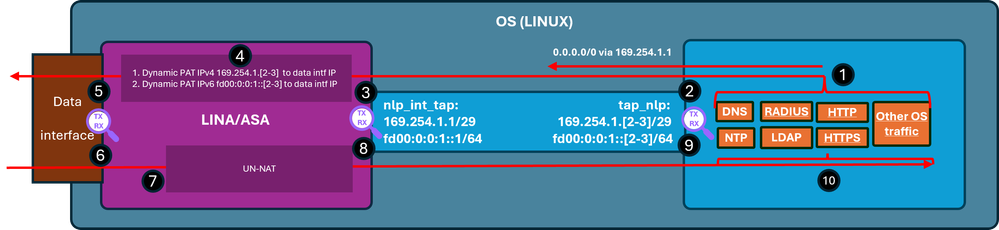
验证步骤(在本例中,验证步骤适用于NTP流量。同样的逻辑适用于任何由操作系统生成的流量(包括许可等):
- NTP客户端生成发往外部NTP服务器IP地址的数据包:
admin@firewall:~$ sudo ntpq -pn
Password:
     remote           refid      st t when poll reach   delay   offset  jitter
==============================================================================
*192.0.2.222  192.0.2.111    2 u   31   64  377   27.540   +0.104   0.105
 127.127.1.1     .LOCL.          10 l 1093   64    0    0.000   +0.000   0.000
从操作系统的角度来看,下一跳通过tap_nlp接口,使用相同的接口IP 169.254.1.3作为源地址:
admin@firewall:~$ ip route get 192.0.2.222
192.0.2.222 via 169.254.1.1 dev tap_nlp src 169.254.1.3 uid 101
    cache
- 捕获点 — 数据包从tap_nlp接口发送出去:
admin@firewall:~$ sudo tcpdump -n -i tap_nlp udp and port 123
HS_PACKET_BUFFER_SIZE is set to 4.
tcpdump: verbose output suppressed, use -v or -vv for full protocol decode
listening on tap_nlp, link-type EN10MB (Ethernet), capture size 262144 bytes
22:39:59.728791 IP 169.254.1.3.123 > 192.0.2.222.123: NTPv4, Client, length 48
- 捕获点 — 数据包到达Lina nlp_tap_interface接口:
firewall# show capture
capture nlp type raw-data trace interface nlp_int_tap [Capturing - 10600 bytes]
  match udp any any eq ntp

firewall# show capture nlp
96 packets captured
   3: 22:39:59.726112       169.254.1.3.123 > 192.0.2.222.123:  udp 48
- 根据路由查找,Lina将内部识别为出口接口,然后应用将数据包源IP地址从169.254.1.3更改为数据接口IP地址的动态PAT规则:
firewall# show capture nlp trace packet-number 3
96 packets captured

   3: 22:39:59.726112       169.254.1.3.123 > 192.0.2.222.123:  udp 48

Phase: 1
Type: CAPTURE
Subtype:
Result: ALLOW
Elapsed time: 4608 ns
Config:
Additional Information:
MAC Access list

Phase: 2
Type: ACCESS-LIST
Subtype:
Result: ALLOW
Elapsed time: 4608 ns
Config:
Implicit Rule
Additional Information:
MAC Access list

Phase: 3
Type: INPUT-ROUTE-LOOKUP
Subtype: Resolve Egress Interface
Result: ALLOW
Elapsed time: 24576 ns
Config:
Additional Information:
Found next-hop 198.51.100.1 using egress ifc  inside(vrfid:0)

…
Phase: 6
Type: NAT
Subtype:
Result: ALLOW
Elapsed time: 853 ns
Config:
nat (nlp_int_tap,inside) source dynamic nlp_client_0_intf3 interface
Additional Information:
Dynamic translate 169.254.1.3/123 to 198.51.100.254/58840

…
Phase: 13
Type: INPUT-ROUTE-LOOKUP-FROM-OUTPUT-ROUTE-LOOKUP
Subtype: Resolve Preferred Egress interface
Result: ALLOW
Elapsed time: 8192 ns
Config:
Additional Information:
Found next-hop 198.51.100.1 using egress ifc  inside(vrfid:0)

Phase: 14
Type: ADJACENCY-LOOKUP
Subtype: Resolve Nexthop IP address to MAC
Result: ALLOW
Elapsed time: 3072 ns
Config:
Additional Information:
Found adjacency entry for Next-hop 198.51.100.1 on interface  inside
Adjacency :Active
MAC address c02c.1782.2cbf hits 5 reference 3

Phase: 15
Type: CAPTURE
Subtype:
Result: ALLOW
Elapsed time: 11264 ns
Config:
Additional Information:
MAC Access list

Result:
input-interface: nlp_int_tap(vrfid:0)
input-status: up
input-line-status: up
output-interface: inside(vrfid:0)
output-status: up
output-line-status: up
Action: allow
Time Taken: 173567 ns

firewall# show route

Codes: L - local, C - connected, S - static, R - RIP, M - mobile, B - BGP
       D - EIGRP, EX - EIGRP external, O - OSPF, IA - OSPF inter area
       N1 - OSPF NSSA external type 1, N2 - OSPF NSSA external type 2
       E1 - OSPF external type 1, E2 - OSPF external type 2, V - VPN
       i - IS-IS, su - IS-IS summary, L1 - IS-IS level-1, L2 - IS-IS level-2
       ia - IS-IS inter area, * - candidate default, U - per-user static route
       o - ODR, P - periodic downloaded static route, + - replicated route
       SI - Static InterVRF, BI - BGP InterVRF
Gateway of last resort is 198.51.100.1 to network 0.0.0.0

S*       0.0.0.0 0.0.0.0 [1/0] via 198.51.100.1, inside
C        198.51.100.0 255.255.255.0 is directly connected, inside
L        198.51.100.254 255.255.255.255 is directly connected, inside
- 捕获点 — 通过出口接口发送数据包:
firewall# show capture capi
112 packets captured
   1: 22:39:59.726387       198.51.100.254.58840 > 192.0.2.222.123:  udp 48
- 捕获点 — NTP服务器发送应答数据包:
firewall# show capture capi
112 packets captured
   1: 22:39:59.726387       198.51.100.254.58840 > 192.0.2.222.123:  udp 48
   2: 22:39:59.756796       192.0.2.222.123 > 198.51.100.254.58840:  udp 48
- Lina将应答作为已建立连接的一部分处理,并应用反向NAT。 根据此信息,目标会转换为169.254.1.3,出口接口为nlp_int_tap:
firewall# show capture capi trace packet-number 2
120 packets captured
   2: 22:39:59.756796       192.0.2.222.123 > 198.51.100.254.58840:  udp 48
…

Phase: 3
Type: FLOW-LOOKUP
Subtype:
Result: ALLOW
Elapsed time: 6144 ns
Config:
Additional Information:
Found flow with id 1226, using existing flow

Phase: 4
Type: INPUT-ROUTE-LOOKUP-FROM-OUTPUT-ROUTE-LOOKUP
Subtype: Resolve Preferred Egress interface
Result: ALLOW
Elapsed time: 11264 ns
Config:
Additional Information:
Found next-hop 169.254.1.3 using egress ifc  nlp_int_tap(vrfid:0)

Phase: 5
Type: ADJACENCY-LOOKUP
Subtype: Resolve Nexthop IP address to MAC
Result: ALLOW
Elapsed time: 3072 ns
Config:
Additional Information:
Found adjacency entry for Next-hop 169.254.1.3 on interface  nlp_int_tap
Adjacency :Active
MAC address 9641.fdd8.1038 hits 4159 reference 4

Phase: 6
Type: CAPTURE
Subtype:
Result: ALLOW
Elapsed time: 17920 ns
Config:
Additional Information:
MAC Access list

Result:
input-interface: inside(vrfid:0)
input-status: up
input-line-status: up
output-interface: nlp_int_tap(vrfid:0)
output-status: up
output-line-status: up
Action: allow
Time Taken: 47104 nsw
- 捕获点 — 应答数据包从nlp_int_tap接口发出:
firewall# show capture nlp
132 packets captured

   3: 22:39:59.726112       169.254.1.3.123 > 192.0.2.222.123:  udp 48
   4: 22:39:59.756903       192.0.2.222.123 > 169.254.1.3.123:  udp 48
- 捕获点 — 重放数据包到达OS tap_nlp接口:
admin@firewall:~$ sudo tcpdump -n -i tap_nlp udp and port 123
HS_PACKET_BUFFER_SIZE is set to 4.
tcpdump: verbose output suppressed, use -v or -vv for full protocol decode
listening on tap_nlp, link-type EN10MB (Ethernet), capture size 262144 bytes
22:39:59.728791 IP 169.254.1.3.123 > 192.0.2.222.123: NTPv4, Client, length 48
22:39:59.759683 IP 192.0.2.222.123 > 169.254.1.3.123: NTPv4, Server, length 48
- 应答数据包由NTP客户端使用和处理。
摘要
OS /dev/net/tun/tap_nlp接口在Lina中以nlp_int_tap可见。此接口的目的是在Lina和操作系统之间提供连接。此接口以及所需的NAT规则由软件自动管理,无需用户干预。
参考
修订历史记录
| 版本 | 发布日期 | 备注 |
|---|---|---|
1.0 |
08-Jun-2026
|
初始版本 |
 反馈
反馈