排除ESA上的自定义CA列表证书过期警报故障

简介
本文档介绍升级到AsyncOS 14.x后安全邮件网关(ESA)上的自定义CA证书到期警报。
概述
症状是在升级期间附加到自定义证书颁发机构(CA)列表的证书到期警报。影响仅限于信息警报,因为自定义列表中的证书到期不会影响系统列表中的证书。解决方法是验证证书源,替换所需的自定义CA证书或从自定义列表中删除过期的证书。
使用的组件
本文档基于运行AsyncOS 14.0或更高版本的思科安全邮件网关。
本文档中的信息都是基于特定实验室环境中的设备编写的。本文档中使用的所有设备最初均采用原始(默认)配置。如果您的网络处于活动状态,请确保您了解所有命令的潜在影响。
背景信息
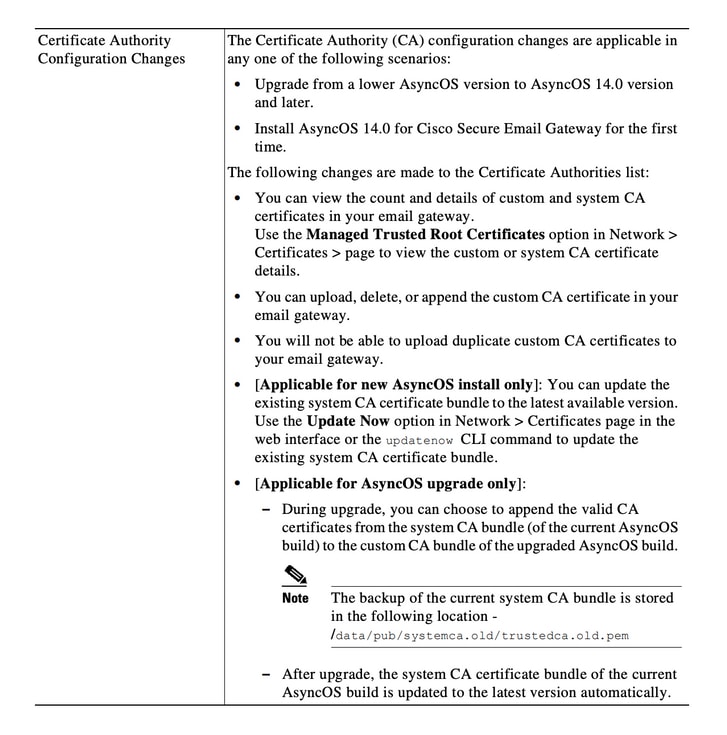
在升级到AsyncOS 14.x的过程中,会提示客户确认是否要将旧系统证书附加到自定义CA列表。此行为也记录在AsyncOS 14.0版本说明中,如图1所示。请参阅Cisco Secure Email Gateway Release Notes for AsyncOS 14.0。
映像1.版本说明摘录显示了用于将旧系统证书附加到自定义CA列表的升级提示。
问题
升级到AsyncOS 14.x后,附加到自定义列表的旧系统证书会随时间过期并生成警报(如本示例)。
2021年6月26日11:27:29 -0400您的证书CA:Root CA Generalitat Valenciana将在5天后过期。
这些警报表示升级时附加到自定义列表的旧系统证书或之前使用的自定义证书即将到期。
解决方案
自定义列表中旧系统证书的警报只是提供信息,您可以选择从自定义列表中删除这些证书或允许它们过期。
这种情况不会影响服务,但可能不需要警报。
如果您看到您的组织需要的自定义CA证书的警报,且当前未包含在系统列表中,请与CA联系以获取更新的证书,并按照Cisco Secure Email Gateway Admin Guide证书管理程序中的说明进行替换。
系统CA证书捆绑包在升级后自动更新,之后定期更新。自定义列表中的证书到期不会影响系统列表中的证书。
要验证系统列表和自定义列表是否已启用,请导航到网络>证书>证书颁发机构>编辑设置。
您也可以从同一菜单导出系统和自定义列表,或根据需要使用CLI命令certconfig和certauthority查看两个列表中的证书。
如果要删除在自定义CA列表中生成警报的证书,请以管理员身份通过SSH完成这些步骤。
- 运行certconfig。
- 输入certauthority,然后输入custom。
- 输入delete并选择与警报匹配的证书。
- 确认删除,然后运行commit以保存更改。
此CLI示例显示工作流程。
example.com> certconfig

Choose the operation you want to perform:
- CERTIFICATE - Import, Create a request, Edit or Remove Certificate Profiles
- CERTAUTHORITY - Manage System and Customized Authorities
- CRL - Manage Certificate Revocation Lists
[]> certauthority

Certificate Authority Summary
Custom List: Enabled
System List: Enabled

Choose the operation you want to perform:
- CUSTOM - Manage Custom Certificate Authorities
- SYSTEM - Manage System Certificate Authorities
[]> custom

Choose the operation you want to perform:
- DISABLE - Disable the custom certificate authorities list
- IMPORT - Import the list of custom certificate authorties
- EXPORT - Export the list of custom certificate authorties
- DELETE - Remove a certificate from the custom certificate authorty list
- PRINT - Print the list of custom certificate authorties
- CHECK_CA_FLAG - Check CA flag in uploaded custom CA certs
[]> delete

You must enter a value from 1 to 104.
...
59. [Root CA Generalitat Valenciana] <<< Select this certificate based on the sample alert in this example
...
93. [thawte Primary Root CA]

Select the custom CA certificate you want to delete
[]> 59

Are you sure you want to delete "Root CA Generalitat Valenciana"? [N]> Y
Custom CA certificate "Root CA Generalitat Valenciana" removed

Choose the operation you want to perform:
- DISABLE - Disable the custom certificate authorities list
- IMPORT - Import the list of custom certificate authorties
- EXPORT - Export the list of custom certificate authorties
- DELETE - Remove a certificate from the custom certificate authorty list
- PRINT - Print the list of custom certificate authorties
- CHECK_CA_FLAG - Check CA flag in uploaded custom CA certs
[]> [ENTER]

Certificate Authority Summary
Custom List: Enabled
System List: Enabled
Choose the operation you want to perform:
- CUSTOM - Manage Custom Certificate Authorities
- SYSTEM - Manage System Certificate Authorities
[]> [ENTER]

Choose the operation you want to perform:
- CERTIFICATE - Import, Create a request, Edit or Remove Certificate Profiles
- CERTAUTHORITY - Manage System and Customized Authorities
- CRL - Manage Certificate Revocation Lists
[]> [ENTER]

example.com> commit
确保在结束时运行commit。
相关信息
修订历史记录
| 版本 | 发布日期 | 备注 |
|---|---|---|
2.0 |
07-Jul-2026
|
重新认证。 |
1.0 |
29-Jun-2021
|
初始版本 |
 反馈
反馈