排除IOS XE上的第2层VPN虚拟专用LAN服务故障

简介
本文档介绍如何对Cisco IOS® XE技术的第2层VPN虚拟专用局域网服务(VPLS)进行故障排除。
先决条件
要求
Cisco 建议您了解以下主题:
- 基本 IP 路由
- 第2层VPN虚拟专用LAN服务
使用的组件
本文档中的信息基于Cisco IOS XE软件。
本文档中的信息都是基于特定实验室环境中的设备编写的。本文档中使用的所有设备最初均采用原始(默认)配置。如果您的网络处于活动状态,请确保您了解所有命令的潜在影响。
网络图
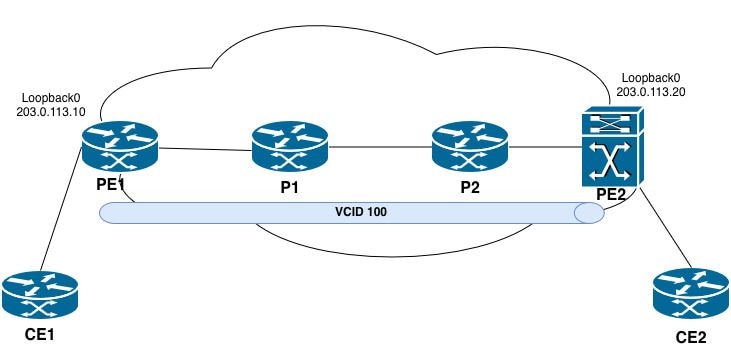 VPLS拓扑
VPLS交叉连接未运行
故障排除步骤
在会话意外终止后,VPLS交叉连接处于关闭状态。
PE2#show xconnect all
Legend: XC ST=Xconnect State S1=Segment1 State S2=Segment2 State
UP=Up DN=Down AD=Admin Down IA=Inactive
SB=Standby HS=Hot Standby RV=Recovering NH=No Hardware

XC ST  Segment 1                         S1 Segment 2                         S2
------+---------------------------------+--+---------------------------------+--
DN pri vfi 100                           UP mpls 203.0.113.10:100             DN
UP pri ac Vl100:100(Eth VLAN)            UP vfi 100                           UP
UP pri bd 100                            UP vfi 100                           UP
步骤1.确认准确的VC/VPLS状态。
PE2#show mpls l2transport vc 100 detail
Local interface: VFI 100 vfi up
   Interworking type is Ethernet
   Destination address: 203.0.113.10, VC ID: 100, VC status: down
     Last error: Local access circuit is not ready for label advertise << The local device is unable to advertise labels because the access circuit (AC) is not in a ready state.
     Output interface: none, imposed label stack {} << no MPLS labels are being imposed because no path exists.
     Preferred path: not configured << No explicit traffic engineering path is configured for this pseudowire.
     Default path: no route << No route to the remote PE (203.0.113.10) exists in the routing table.
     No adjacency
Create time: 10:50:35, last status change time: 00:17:39
  Last label FSM state change time: 00:17:33
Signaling protocol: LDP, peer x.x.x.x:0 up
  Targeted Hello: 203.0.113.20(LDP Id) -> 203.0.113.10, LDP is DOWN, no binding
  Graceful restart: not configured and not enabled
  Non stop routing: not configured and not enabled
  Status TLV support (local/remote) : enabled/None (no remote binding
    LDP route watch : enabled
    Label/status state machine : local ready, LruRnd
    Last local dataplane status rcvd: No fault
    Last BFD dataplane status rcvd: Not sent
    Last BFD peer monitor status rcvd: No fault
    Last local AC circuit status rcvd: No fault
    Last local AC circuit status sent: DOWN(hard-down) << The local device is advertising the access circuit as hard-down to the remote PE.
    Last local PW i/f circ status rcvd: No fault
    Last local LDP TLV status sent: No fault
    Last remote LDP TLV status rcvd: None (no remote binding) << No status has been received from the remote PE.
    Last remote LDP ADJ status rcvd: None (no remote binding) << No adjacency status received from the remote peer.
  MPLS VC labels: local 16, remote unassigned
  Group ID: local n/a, remote unknown
  MTU: local 1500, remote unknown
  Remote interface description:
Sequencing: receive disabled, send disabled
Control Word: On (configured: autosense)
SSO Descriptor: 203.0.113.10/100, local label: 16
Dataplane:
  SSM segment/switch IDs: 0/8194 (used), PWID: 1
VC statistics:
  transit packet totals: receive 0, send 0
  transit byte totals: receive 0, send 0
  transit packet drops: receive 0, seq error 0, send 0
VPLS交叉连接(VC ID 100)已转换为关闭状态。根本原因归结于下述情况:
1.没有到远程PE的路由 — 路由器在路由表中没有到203.0.113.10的路由(默认路径:无路由)。 如果没有有效路由,则无法建立MPLS标签交换路径(LSP)。
2.目标LDP会话关闭 — 从203.0.113.20到203.0.113.10的目标LDP会话未建立。这可防止PE路由器之间交换伪线标签。
3.没有远程标签绑定 — 因为目标LDP会话已关闭,所以没有为VC 100分配远程标签。没有本地和远程标签,伪线无法转发流量。
4.无邻接关系 — 如果没有有效路由和LDP会话,则不存在与远程PE的MPLS邻接关系。
步骤2.检查本地连接电路。
在VC关闭的PE上:
PE2#show interfaces vlan 100 | include up|errors
Vlan100 is up, line protocol is up , Autostate Disabled
Keepalive not supported
0 input errors, 0 CRC, 0 frame, 0 overrun, 0 ignored
0 output errors, 1 interface resets

PE2#show running-config interface vlan 100
Building configuration...

Current configuration : 72 bytes
!
interface Vlan100
no ip address
no autostate
xconnect vfi 100
end
步骤3.检验VFI配置。
PE2#show running-config | section l2 vfi
l2 vfi 100 manual
vpn id 100
neighbor 203.0.113.10 pw-class VPLS_100

PE2#show l2vpn vfi
Legend: RT=Route-target, S=Split-horizon, Y=Yes, N=No

VFI name: 100, state: up, type: multipoint, signaling: LDP
  VPN ID: 100
  Bridge-Domain 100 attachment circuits:
    Vlan100
  Pseudo-port interface: pseudowire100001
  Interface Peer Address VC ID S
  pseudowire100002 203.0.113.10 100 Y
主要观察结果
1. VFI运行正常 — 本地VFI实例处于活动状态,可以转发流量。
2.连接电路已绑定 — Vlan100与网桥域100和VFI正确关联。
3.配置伪线 — 使用VC ID 100向位于203.0.113.10的远程PE定义伪线(伪线100002)。
4.启用水平分割 — 这是在VPLS多点环境中防止第2层环路的预期行为。
步骤4.检验PE环回可达性:
PE2#ping 203.0.113.10
Type escape sequence to abort.
Sending 5, 100-byte ICMP Echos to 203.0.113.10, timeout is 2 seconds:
!!!!!
Success rate is 100 percent (5/5), round-trip min/avg/max = 1/1/1 ms

PE2#show ip route 203.0.113.10
Routing entry for 203.0.113.10/32
Known via "ospf 1", distance 110, metric 2, type intra area
Last update from 192.0.2.9 on TwentyFiveGigE1/0/3, 00:01:30 ago
Routing Descriptor Blocks:
* 192.0.2.9, from 198.51.100.2, 00:01:30 ago, via TwentyFiveGigE1/0/3
Route metric is 2, traffic share count is 1

PE2#ping mpls ipv4 203.0.113.10/32 source 203.0.113.20
Sending 5, 72-byte MPLS Echos to 203.0.113.10/32,
timeout is 2 seconds, send interval is 0 msec:

Codes: '!' - success, 'Q' - request not sent, '.' - timeout,
'L' - labeled output interface, 'B' - unlabeled output interface,
'D' - DS Map mismatch, 'F' - no FEC mapping, 'f' - FEC mismatch,
'M' - malformed request, 'm' - unsupported tlvs, 'N' - no label entry,
'P' - no rx intf label prot, 'p' - premature termination of LSP,
'R' - transit router, 'I' - unknown upstream index,
'l' - Label switched with FEC change, 'd' - see DDMAP for return code,
'X' - unknown return code, 'x' - return code 0

Type escape sequence to abort.
!!!!!
Success rate is 100 percent (5/5), round-trip min/avg/max = 1/1/2 ms
Total Time Elapsed 8 ms
标准Ping与MPLS LSP Ping:主要区别
即使MPLS LSP中断,标准ping也可能成功,因为:
·如果通过IP可以直接到达目的地,则ICMP数据包可以通过IP路由(非标签交换)。
·如果传输路由器未设置任何标签,则可使用IP查找转发ICMP数据包。
相反,ping mpls ipv4通过强制数据包通过标签交换路径来验证实际MPLS数据平面。这可确保:
·标签已正确分配和分发。
·每跳的LFIB条目一致。
· LSP端到端路径正常工作。
步骤5.验证核心中的MPLS和LDP:
PE2#show mpls ldp neighbor
    Peer LDP Ident: 203.0.113.10:0; Local LDP Ident 203.0.113.20:0
        TCP connection: 203.0.113.10.646 - 203.0.113.20.39001
        State: Oper; Msgs sent/rcvd: 16/15; Downstream
        Up time: 00:02:15
        LDP discovery sources:
          TwentyFiveGigE1/0/3, Src IP addr: 192.0.2.9
          Targeted Hello 203.0.113.20 -> 203.0.113.10, active, passive
        Addresses bound to peer LDP Ident:
          203.0.113.10 192.0.2.6 192.0.2.9
此命令显示本地路由器(PE2)和远程对等体之间的LDP邻居会话信息。输出中的每个字段都会详细介绍。
- 对等体标识:
对等LDP标识 |203.0.113.10:0 |远程对等设备的LDP路由器ID。:0表示默认平台范围的标签空间。这通常是远程路由器的环回地址。
本地LDP标识 |203.0.113.20:0 |本地路由器(PE2)的LDP路由器ID。 这通常是PE2的环回地址。
- TCP会话信息:
TCP 连接 | 203.0.113.10.646 - 203.0.113.20.39001 |用于LDP通信的TCP会话。远程对等体(203.0.113.10)使用公认LDP端口646,而本地路由器(203.0.113.20)使用临时端口39001。LDP使用TCP进行可靠的标签分发。
- 会话状态:
状态 |操作 | LDP会话处于运行状态,这意味着会话已完全建立且运行正常。
已发送邮件/rcvd |16/15 |自会话建立以来已发送(16)和已接收(15)的LDP消息数。这包括keepalive、标签映射和其他LDP消息。
下行 |- |表示标签分发模式。下游主动请求是指对等体将标签分发到PE2,而PE2未明确请求标签。这是LDP的默认模式。
运行时间 |00:02:15 |会话已运行2分15秒。 - LDP发现源:
TwentyFigGigE1/0/3 |源IP地址:192.0.2.9 |从接口TwentyFiveGigE1/0/3上的对等设备收到一个基本发现(链路级)hello,源IP地址为192.0.2.9。这表明两台路由器直接连接到此接口。
针对性Hello | 203.0.113.20 → 203.0.113.10,主动,被动 |本地路由器(203.0.113.20)和远程对等体(203.0.113.10)之间存在目标发现(扩展)hello。 - 绑定到对等LDP标识的地址:
绑定到对等体的地址 | 203.0.113.10、192.0.2.6、192.0.2.9 |远程对等体通过LDP地址消息通告的IP地址列表。这些接口代表远程路由器上的接口。
第5.1步检验到远程VPLS对等体的MPLS标签交换路径
PE2#show mpls forwarding-table 203.0.113.10
Local        Outgoing         Prefix               Bytes Label     Outgoing          Next Hop
Label        Label            or Tunnel Id         Switched        interface
25           Pop Label        203.0.113.10/32      0                Twe1/0/3         192.0.2.9

PE2#show mpls ldp bindings 203.0.113.10 32
  lib entry: 203.0.113.10/32, rev 69
        local binding: label: 25
        remote binding: lsr: 203.0.113.10:0, label: imp-null
PE2直接从PE1接收imp-null,绕过通过P2和P1的预期标签路径。这表示PE2和P2之间缺少LDP会话或MPLS配置问题。
第5.2步通过执行提供的命令验证下一跳信息:
- show mpls ldp neighbor
- show mpls forwarding-table
P2#show mpls forwarding-table 203.0.113.10
Local        Outgoing          Prefix Bytes          Label           Outgoing       Next Hop
Label        Label             or Tunnel Id          Switched        interface
None         No Label          203.0.113.10/32       0
关键观察
- 本地标签:无 | P2尚未为此前缀分配本地标签。
- 传出标签:无标签 |未执行任何标签操作。
- 无传出接口或下一跳 |前缀被视为本地所有 — 不会转发到PE1。
P2#show mpls ldp neighbor
    Peer LDP Ident: 203.0.113.20:0; Local LDP Ident 198.51.100.2:0
        TCP connection: 203.0.113.20.17326 - 198.51.100.2.646
        State: Oper; Msgs sent/rcvd: 30/29; Downstream
        Up time: 00:13:57
        LDP discovery sources:
           GigabitEthernet0/0/1, Src IP addr: 192.0.2.10
        Addresses bound to peer LDP Ident:
          203.0.113.20 192.0.2.10
Peer LDP Ident: 198.51.100.1:0; Local LDP Ident 198.51.100.2:0
    TCP connection: 198.51.100.1.646 - 198.51.100.2.12799
    State: Oper; Msgs sent/rcvd: 30/28; Downstream
    Up time: 00:13:56
    LDP discovery sources:
      GigabitEthernet0/0/0, Src IP addr: 192.0.2.5
    Addresses bound to peer LDP Ident:
      192.0.2.2 192.0.2.5 198.51.100.1

P2#show ip ospf neighbor

Neighbor ID       Pri   State           Dead Time    Address           Interface
198.51.100.3        0   FULL/ -         00:00:34     192.0.2.10        GigabitEthernet0/0/1
198.51.100.1        0   FULL/ -         00:00:34     192.0.2.5         GigabitEthernet0/0/0
关键观察
- P2与PE1(203.0.113.10)没有直接LDP邻接关系。 这是预期结果,因为P1位于拓扑中的P2和PE1之间。P2负责向P1发送标签交换流量,然后由P1将其转发到PE1。
- P2的LDP标识为198.51.100.2:0 | P2使用198.51.100.2作为其LDP路由器ID,而不是203.0.113.10。但是,203.0.113.10仍然配置在Loopback10上并导致路由冲突。
步骤6.检验到远程PE环回地址的路由:
P2#show ip route 203.0.113.10
Routing entry for 203.0.113.10/32
  Known via "connected", distance 0, metric 0 (connected, via interface)
  Routing Descriptor Blocks:
  * directly connected, via Loopback10
      Route metric is 0, traffic share count is 1
结论
- 重复的IP地址 — IP地址203.0.113.10配置在P2(环回接口10)和PE1(环回接口0)上,这会在MPLS域中造成冲突。
- 路由冲突 — P2将203.0.113.10/32安装为连接路由(管理距离0),该路由优先于PE1发起的任何IGP获知的路由。
- LSP故障 — 因为P2认为前缀是本地拥有的,所以它不会向PE2分配或通告203.0.113.10/32的传输标签。
- VPLS影响 — 从P2缺少有效的传输标签会阻止PE2建立到PE1的LSP。因此,无法形成VPLS伪线传输路径。
已建立VPLS交叉连接,但没有数据流量通过伪线
Catalyst 9000系列的VPLS运行验证
故障排除步骤
步骤1.确认伪线处于运行状态。
确保参数正确:
- VFI状态为up
- 列出伪线接口
- 将显示正确的对等体地址和VC ID
PE2#show mpls l2transport vc

Local intf    Local circuit              Dest address    VC ID      Status
------------- -------------------------- --------------- ---------- ----------
VFI 100        vfi                       203.0.113.10    100        UP
PE2#show mpls l2transport vc 100 detail
Local interface: VFI 100 vfi up
  Interworking type is Ethernet
  Destination address: 203.0.113.10, VC ID: 100, VC status: up
    Output interface: Twe1/0/3, imposed label stack {17 16}
    Preferred path: not configured
    Default path: active
    Next hop: 192.0.2.9
Create time: 1d11h, last status change time: 00:30:50
  Last label FSM state change time: 00:30:26
Signaling protocol: LDP, peer 203.0.113.10:0 up
  Targeted Hello: 203.0.113.20(LDP Id) -> 203.0.113.10, LDP is UP
  Graceful restart: not configured and not enabled
  Non stop routing: not configured and not enabled
  Status TLV support (local/remote) : enabled/supported
    LDP route watch : enabled
    Label/status state machine : established, LruRru
    Last local dataplane status rcvd: No fault
    Last BFD dataplane status rcvd: Not sent
    Last BFD peer monitor status rcvd: No fault
    Last local AC circuit status rcvd: No fault
    Last local AC circuit status sent: No fault
    Last local PW i/f circ status rcvd: No fault
    Last local LDP TLV status sent: No fault
    Last remote LDP TLV status rcvd: No fault
    Last remote LDP ADJ status rcvd: No fault
  MPLS VC labels: local 16, remote 16
  Group ID: local n/a, remote 0
  MTU: local 1500, remote 1500
  Remote interface description:
  MAC Withdraw: sent:1, received:0
Sequencing: receive disabled, send disabled
Control Word: On (configured: autosense)
SSO Descriptor: 203.0.113.10/100, local label: 16
Dataplane:
  SSM segment/switch IDs: 16395/8194 (used), PWID: 1
VC statistics:
transit packet totals: receive 0, send 0
transit byte totals: receive 0, send 0
transit packet drops: receive 0, seq error 0, send 0
- VFI状态 | up |本地设备上的VFI运行正常。
- 目的地址 |203.0.113.10 |远程PE路由器ID(PE1环回地址)。
- VC ID | 100 |此伪线的虚电路标识符。两台PE路由器必须匹配。
- VC状态 | up |伪线在运行中打开。本地和远程信令均表示没有故障。
- 强加的标签堆栈{17 16} |对进入伪线的数据包施加的双标签MPLS堆栈。标签17是用于通过MPLS核心到达远程PE的传输标签(外部)。标签16是用于识别远程PE上的伪线的VC标签(内部)。
- 针对性Hello | 203.0.113.20 → 203.0.113.10,LDP处于启用状态 |在PE2(本地)和PE1(远程)之间建立目标的LDP会话并正常运行。
- 本地标签 | 16 | PE2为此伪线分配的VC标签。远程PE(PE1)在向PE2发送流量时使用此标签。远程标签 | 16 | PE1为此伪线通告的VC标签。PE2在向PE1发送流量时施加此标签(内部标签)。
- 已发送MAC Withdraw | 1 | PE2已向远程PE发送1条MAC撤消消息。这用于在拓扑更改后刷新MAC地址表。
- 已收到MAC Withdraw | 0 |未从远程PE收到任何MAC撤消消息。
- VC统计信息 |任一方向均未转发流量(发送:0,接收:0)。
步骤2.检验连接电路(中继接口)状态。
确认TRUNK接口运行正常且与正确的VLAN关联。
验证:
- 接口处于打开/打开状态
- 与VPLS网桥域关联的VLAN在中继上允许且处于活动状态
- STP不会修剪或阻止VLAN
PE2#show interfaces twentyFiveGigE 1/0/2 status
Port       Name        Status        Vlan          Duplex       Speed  Type
Twe1/0/2               connected     trunk           full         10G  SFP-10GBase-SR
PE2#show interfaces trunk
Port         Mode        Encapsulation   Status       Native vlan
Twe1/0/2     on          802.1q          trunking     1

Port         Vlans allowed on trunk
Twe1/0/2     100

Port         Vlans allowed and active in management domain
Twe1/0/2     100

Port         Vlans in spanning tree forwarding state and not pruned
Twe1/0/2     100
步骤3.检验VLAN与网桥域的关联。
在具有中继配置的Catalyst 9000上(无EVC),vlan必须映射到网桥域。
确认:
- VLAN通过成员vfi或成员配置与桥接域关联。
- 网桥域配置引用正确的VFI。
PE2#show running-config interface vlan100
Building configuration...

Current configuration : 72 bytes
!
interface Vlan100
no ip address
xconnect vfi 100
步骤4.检验MAC地址学习。
确认正在从本地连接电路和远程伪线获取MAC地址。
验证:
- 本地CE1 MAC地址在中继接口上获取。
- 远程CE2 MAC地址是在伪线接口上获取的。
如果在伪线上没有获取MAC地址:
- 未从远程PE接收流量。
- 远程PE存在阻止流量进入伪线的配置问题。
- 网桥域未与伪线接口正确关联。
如果在本地中继上未获知MAC地址:
- CE设备未在预期的VLAN上传输流量。
- VLAN在TRUNK接口上处于阻塞或非活动状态。
PE2#show mac address-table vlan 100
          Mac Address Table
-------------------------------------------

Vlan Mac Address Type     Ports
---- ----------- -------- -----
100 cc7f.76b7.525f STATIC Vl100
100 e462.c4bb.17f1 DYNAMIC Twe1/0/2  >> CE2 Mac address learned over Twe1/0/2 interface.
步骤5.检验生成树协议(STP)状态。
STP可以阻止TRUNK接口上的VLAN,从而阻止流量进入网桥域。
验证:
·中继端口处于与VPLS网桥域关联的VLAN的转发状态
·端口未处于阻塞、侦听或学习状态
如果STP阻塞端口:
·调整STP优先级或端口成本
·考虑将中继端口配置为STP边缘端口(如果适用于拓扑)
PE2#show spanning-tree vlan 100

VLAN0100
  Spanning tree enabled protocol rstp
  Root ID    Priority 32868
           Address cc7f.76b7.51c0
           This bridge is the root
           Hello Time 2 sec Max Age 20 sec Forward Delay 15 sec

Bridge ID  Priority  32868 (priority 32768 sys-id-ext 100)
           Address   cc7f.76b7.51c0
           Hello Time 2 sec Max Age 20 sec Forward Delay 15 sec
           Aging Time 300 sec

Interface           Role Sts Cost      Prio.Nbr Type
------------------- ---- --- --------- -------- --------------------------------
Twe1/0/2            Desg FWD 2000      128.2    P2p
步骤6.检验MPLS标签堆栈和转发路径。
确认所施加的标签正确并且转发路径有效。
验证:
- 存在有效的传出标签(不是无标签或无标)
- 传出接口和下一跳正确
从PE2到P2 LSP路径:
PE2#show mpls forwarding-table 203.0.113.10 32
Local     Outgoing     Prefix            Bytes Label     Outgoing      Next Hop
Label     Label        or Tunnel Id      Switched        interface
22        17           203.0.113.10/32   810             Twe1/0/3      192.0.2.9 << For the transport path to the remote PE1 loopback, the imposed outgoing label is 17. The router at 192.0.2.9 assigned this value as its local label binding for the destination prefix.
从P2到P1 LSP路径:
P2#show mpls forwarding-table 203.0.113.10 32
Local     Outgoing    Prefix            Bytes Label     Outgoing       Next Hop
Label     Label       or Tunnel Id      Switched        interface
17        16          203.0.113.10/32   79290           Gi0/0/0        192.0.2.5 << Local label as 17 and the imposed outgoing label is 16. The router at 192.0.2.5 assigned this value as its local label binding for the destination prefix.
从P1到PE1 LSP路径:
P1#show mpls forwarding-table 203.0.113.10 32
Local     Outgoing    Prefix            Bytes Label     Outgoing       Next Hop
Label     Label       or Tunnel Id      Switched        interface
16        Pop Label   203.0.113.10/32   76184           Gi0/0/0        192.0.2.1 << Pop Label is performed before forwarding the packet to the next hop. This confirms that the next hop (PE1) advertised implicit null to P1.
从P1到PE1 LSP路径:
PE1#show mpls forwarding-table 203.0.113.10 32
Local      Outgoing   Prefix           Bytes Label         Outgoing       Next Hop
Label      Label      or Tunnel Id     Switched            interface
None       No Label   203.0.113.10/32  0
标签路径确认:
根据此输出以及PE2和P2之前的输出,从PE2到PE1的完整标签交换路径为:
[PE2] Packet leaves with label stack: | 17 | (transport label)
        ↓
[P2]  Receives label 17, swaps to 16: | 16 | (transport label)
        ↓
[P1]  Receives label 16, pops label:  | IP | (pure IP packet)
        ↓
[PE1] Receives pure IP packet - local delivery
当VPLS流量通过此LSP时,数据包将传输一个双标签堆栈(传输:VC标签)
[PE2] Packet leaves with label stack: | 17 | 16 | (transport + VC label)
       ↓
[P2] Receives label 17, swaps to 16:  | 16 | 16 | (transport + VC label)
       ↓
[P1] Receives label 16, pops label:   | 16 | (VC label only)
       ↓
[PE1] Receives VC label 16 - pseudowire disposition into bridge domain
结论
从PE2到PE1的MPLS传输LSP完全运行并且已在路径中的所有路由器上正确编程。VPLS伪线信令完整,本地和远程标签均会交换,且未报告故障。
但是,尽管完全建立了控制平面,但不会通过伪线转发用户流量。这可以确认问题位于MPLS核心和伪线信令之外,特别是位于一台或两台PE路由器上的连接电路层
路由器的VPLS运行验证
故障排除步骤
步骤1.确认准确的VC/VPLS状态。
确保参数正确:
PE1#show mpls l2transport vc

Local intf    Local circuit              Dest address     VC ID     Status
------------- -------------------------- --------------- ---------- ----------
VFI 100        vfi                       203.0.113.20    100         UP
PE1#show mpls l2transport vc 100 detail
Local interface: VFI 100 vfi up
  Interworking type is Ethernet
  Destination address: 203.0.113.20, VC ID: 100, VC status: up
    Output interface: Te0/0/4, imposed label stack {19 16}
    Preferred path: not configured
    Default path: active
    Next hop: 192.0.2.2
  Create time: 1d09h, last status change time: 08:38:02
    Last label FSM state change time: 08:38:25
  Signaling protocol: LDP, peer 203.0.113.20:0 up
    Targeted Hello: 203.0.113.10(LDP Id) -> 203.0.113.20, LDP is UP
    Graceful restart: not configured and not enabled
    Non stop routing: not configured and not enabled
    Status TLV support (local/remote) : enabled/supported
      LDP route watch : enabled
      Label/status state machine : established, LruRru
      Last local dataplane status rcvd: No fault
      Last BFD dataplane status rcvd: Not sent
      Last BFD peer monitor status rcvd: No fault
      Last local AC circuit status rcvd: No fault
      Last local AC circuit status sent: No fault
      Last local PW i/f circ status rcvd: No fault
      Last local LDP TLV status sent: No fault
      Last remote LDP TLV status rcvd: No fault
      Last remote LDP ADJ status rcvd: No fault
    MPLS VC labels: local 16, remote 16
    Group ID: local n/a, remote 0
    MTU: local 1500, remote 1500
    Remote interface description:
    MAC Withdraw: sent:0, received:1
  Sequencing: receive disabled, send disabled
  Control Word: On (configured: autosense)
  SSO Descriptor: 203.0.113.20/100, local label: 20
  Dataplane:
    SSM segment/switch IDs: 8199/4097 (used), PWID: 1
  VC statistics:
    transit packet totals: receive 336, send 0
    transit byte totals:   receive 27552, send 0
    transit packet drops: receive 0, seq error 0, send 0
- VFI状态 | up | PE1上的VFI运行正常。
- 目的地址 |203.0.113.20 |远程PE路由器ID(PE2环回地址)。
- VC ID | 100 |此伪线的虚电路标识符。此值在两个PE路由器上均匹配。
- VC状态 | up |伪线在运行中打开。本地和远程信令均表示没有故障。
- 本地接口 | VFI 100 |与此伪线关联的本地虚拟转发实例。
- 强加的标签堆栈 | {19 16} |对进入伪线的数据包施加的双标签MPLS堆栈。标签19是用于通过MPLS核心到达PE2的传输标签(外部)。标签16是用于标识PE2处的伪线的VC标签(内部)。
- 针对性Hello | 203.0.113.10 → 203.0.113.20,LDP处于启用状态 |从PE1(本地)到PE2(远程)的目标LDP会话已建立且运行正常。
- 本地标签 | 16 | PE1为此伪线分配的VC标签。PE2在向PE1发送流量时使用此标签(作为内部标签)。
- 已发送MAC Withdraw | 0 | PE1尚未向PE2发送任何MAC撤消消息。
- 已收到MAC Withdraw | 1 | PE1收到来自PE2的1 MAC withdraw消息。这表示PE2经历了拓扑更改,请求PE1刷新此VFI的MAC地址表。
- VC统计信息 |接收的中转数据包 | 336 | 336个数据包在此伪线上从PE2接收。
接收的传输字节 | 27,552 | 27,552字节已从PE2接收。
传输数据包已发送 | 0 |没有数据包从PE1发送到指向PE2的伪线。
发送的传输字节数| 0 |未向PE2发送任何字节。
步骤2.检验网桥域配置和成员资格。
确认网桥域具有正确的成员(服务实例接口和伪线)。
PE1#show running-config interface TenGigabitEthernet0/0/5
Building configuration...

Current configuration : 174 bytes
!
interface TenGigabitEthernet0/0/5
no ip address
service instance 100 ethernet
encapsulation dot1q 100
rewrite ingress tag pop 1 symmetric
bridge-domain 100
!
end

PE1#show interfaces tenGigabitEthernet 0/0/5 | include up|errors
TenGigabitEthernet0/0/5 is up, line protocol is up
  Keepalive not supported
  Full Duplex, 10000Mbps, link type is force-up, media type is H10GB-CU1M
     0 input errors, 0 CRC, 0 frame, 0 overrun, 0 ignored
     0 output errors, 0 collisions, 1 interface resets
步骤3.检验MAC地址学习。
确认正在从本地连接电路和远程伪线获取MAC地址。
PE1#show bridge-domain
Bridge-domain 100 (2 ports in all)
State: UP                 Mac learning: Enabled
Aging-Timer: 300 second(s)
Unknown Unicast Flooding Suppression: Disabled
Maximum address limit: 65536
    TenGigabitEthernet0/0/5 service instance 100
    vfi 100 neighbor 203.0.113.20 100
   AED MAC address Policy Tag Age Pseudoport
-----------------------------------------------------------------------------
网桥域本身已启动,但缺少学习到的MAC地址是关键细节。这通常表示尚未获悉流量,或者本地接口、网桥域和远程VFI之间的某个位置存在服务映射/转发问题。
步骤4.检验VFI配置:
PE1#show running-config | section vfi
l2 vfi 100 manual
 vpn id 100
 bridge-domain 100
neighbor 203.0.113.20 encapsulation mpls
步骤5.检验MPLS传输路径。
通过将MPLS traceroute发送到远程环回地址执行快速验证。
PE1#traceroute mpls ipv4 203.0.113.20 255.255.255.255 source 203.0.113.10
Tracing MPLS Label Switched Path to 203.0.113.20/32, timeout is 2 seconds

Codes: '!' - success, 'Q' - request not sent, '.' - timeout,
'L' - labeled output interface, 'B' - unlabeled output interface,
'D' - DS Map mismatch, 'F' - no FEC mapping, 'f' - FEC mismatch,
'M' - malformed request, 'm' - unsupported tlvs, 'N' - no label entry,
'P' - no rx intf label prot, 'p' - premature termination of LSP,
'R' - transit router, 'I' - unknown upstream index,
'l' - Label switched with FEC change, 'd' - see DDMAP for return code,
'X' - unknown return code, 'x' - return code 0

Type escape sequence to abort.
0 192.0.2.1 MRU 1500 [Labels: 17 Exp: 0]
L 1 192.0.2.2 MRU 1500 [Labels: 16 Exp: 0] 96 ms
L 2 192.0.2.6 MRU 1500 [Labels: implicit-null Exp: 0] 12 ms
! 3 192.0.2.10 2 ms
MPLS traceroute输出确认源PE路由器(203.0.113.10)和目标PE路由器(203.0.113.20)之间已成功建立标签交换路径(LSP)。
跟踪显示入口PE的标签实施、跨中转标签交换路由器(LSR)的标签交换操作以及到达出口PE之前的倒数第二跳跳跳跃(PHP)。
具体来说:
- 第0跳表示将标签17强加给发往目标FEC的流量。
- 第1跳显示从17到16的标签交换操作,确认通过核心的MPLS转发。
- 第2跳通告implicit-null,表示第2级路由器正在执行PHP。
- 第3跳成功到达目的地,如"!" 返回代码。
traceroute不报告任何MPLS转发异常,例如缺少标签绑定、FEC不匹配、LSP提前终止或标签操作不受支持。
PE1
Push 17
  ↓
P1
Swap 17 → 16
  ↓
P2
Pop label
  ↓
PE2 receives pure IP packet
步骤6.验证伪线数据平面。
PE1#ping mpls pseudowire 203.0.113.20 100 source 203.0.113.10
Sending 5, 72-byte MPLS Echos to 203.0.113.20,
timeout is 2 seconds, send interval is 0 msec:

Codes: '!' - success, 'Q' - request not sent, '.' - timeout,
'L' - labeled output interface, 'B' - unlabeled output interface,
'D' - DS Map mismatch, 'F' - no FEC mapping, 'f' - FEC mismatch,
'M' - malformed request, 'm' - unsupported tlvs, 'N' - no label entry,
'P' - no rx intf label prot, 'p' - premature termination of LSP,
'R' - transit router, 'I' - unknown upstream index,
'l' - Label switched with FEC change, 'd' - see DDMAP for return code,
'X' - unknown return code, 'x' - return code 0

Type escape sequence to abort.
!!!!!
Success rate is 100 percent (5/5), round-trip min/avg/max = 1/1/1 ms
Total Time Elapsed 6 ms
PE2#ping mpls pseudowire 203.0.113.10 100 source 203.0.113.20
Sending 5, 72-byte MPLS Echos to 203.0.113.10,
timeout is 2 seconds, send interval is 0 msec:

Codes: '!' - success, 'Q' - request not sent, '.' - timeout,
'L' - labeled output interface, 'B' - unlabeled output interface,
'D' - DS Map mismatch, 'F' - no FEC mapping, 'f' - FEC mismatch,
'M' - malformed request, 'm' - unsupported tlvs, 'N' - no label entry,
'P' - no rx intf label prot, 'p' - premature termination of LSP,
'R' - transit router, 'I' - unknown upstream index,
'l' - Label switched with FEC change, 'd' - see DDMAP for return code,
'X' - unknown return code, 'x' - return code 0

Type escape sequence to abort.
!!!!!
Success rate is 100 percent (5/5), round-trip min/avg/max = 1/1/2 ms
Total Time Elapsed 9 ms
ping mpls伪线测试成功验证了MPLS伪线数据平面。由于伪线ping成功,并且网桥域通过VPLS获取远程MAC,因此问题很可能出在本地连接电路或VLAN转发路径上,其中没有获取预期的本地MAC地址。
结论
成功的MPLS伪线ping确认MPLS传输LSP和伪线标签绑定在本地和远程PE路由器之间正常运行。结果表明,MPLS转发、标签分发和伪线信令功能正常,远程PE能够处理指定VC的伪线OAM数据包。
基于此结果,MPLS核心和伪线基础设施看起来运行正常。如果流量问题持续存在,进一步调查可集中于连接电路、VPLS转发行为、MAC学习、MTU一致性和面向CE的连接,而不是底层MPLS传输路径。
有关这些主题的详细信息,请参阅:
修订历史记录
| 版本 | 发布日期 | 备注 |
|---|---|---|
1.0 |
07-Jul-2026
|
初始版本 |
 反馈
反馈