为AsyncOS 13.0+配置邮箱自动补救

目录
问题
本文档介绍如何在AsyncOS 13.0及更高版本中为Exchange Online、Exchange内部部署、混合部署和多租户部署配置邮箱自动补救(MAR)功能。
MAR在AsyncOS 10.0中引入,仅支持Microsoft Office 365 Online。
AsyncOS 13.0和更新的功能包括:
- Microsoft Exchange Online - Microsoft Office 365上托管的邮箱
- Microsoft Exchange内部部署 — 本地Microsoft Exchange服务器
- 混合和多租户配置 — 跨Microsoft Exchange Online和Microsoft Exchange内部部署配置的邮箱组合
Microsoft Office 365原始MAR设置指南中提供了初始设置步骤,以及一个描述AsyncOS 13.0及更新版本更改的附录。
原始文章仍然有效,并包含对功能的说明,以及为Microsoft Office 365 Azure实施、ESA设置和常规故障排除生成证书的步骤。
如何配置ESA的Azure AD和Office 365邮箱设置
对13.0的Azure API权限的新更改
当前的用户指南提供了有关自动补救功能的更多详细信息。
请参阅标题为“自动修复邮箱中的邮件”的章节。
环境
- 适用于ESA的AsyncOS 13.0或更高版本
- 用于文件信誉和文件分析的许可证密钥
- Microsoft Office 365或Microsoft Exchange本地部署
分辨率
- 对于Exchange Online帐户配置文件,请先使用以下Azure配置文章创建AsyncOS 13.0及更高版本所需的Azure应用程序、证书和API权限:
- 在ESA中创建所需的帐户配置文件。
- 为每个配置文件配置域映射。
- 如果部署是混合或多租户,请配置链接配置文件。
- 测试每个客户简档。
ESA 13.0和更新的版本支持使用Exchange Online和/或Exchange内部部署创建多个帐户配置文件:
- 当域分离并驻留在不同的部署中时,具有复杂设置的组织可以使用多个帐户配置文件。
- 接受新收购的企业可以在MAR功能中包括收购的域。
- 与之前的ESA功能相比,创建多个帐户配置文件提供了更大的灵活性。
配置Exchange Online Microsoft Office 365配置文件
在Azure中为Microsoft Office 365创建帐户配置文件的说明包含在“问题”部分的参考文章中。
选择Office 365混合图形API以配置在Exchange Online上部署的邮箱,并输入以下详细信息:
- 在Azure管理门户中注册的应用程序的客户端ID和租户ID。
- 证书指纹($base64Thumbprint的值)。
- 单击Choose File,然后选择.pem文件以上传证书的私钥。
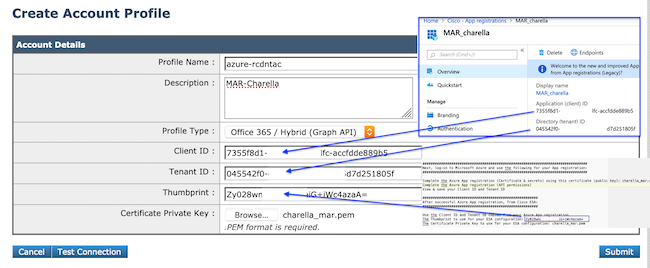 连接到O365的示例配置文件Exchange Online帐户配置文件示例
配置Exchange内部部署配置文件
为Exchange内部部署实例创建帐户配置文件需要具有ApplicationImpersonation角色和有效主机值的用户帐户。
此方法需要具有ApplicationImpersonation角色的指定Exchange内部部署服务帐户。
- 在浏览器中,打开Exchange内部部署环境的Exchange Admin Center URL。例如:https://
mail.example.com/ecp/。 - 登录后,导航到权限>管理员角色。
- 单击Add创建新的角色组。
- 如果角色组已存在,请将指定用户帐户添加为成员。
- 输入角色组名称和说明。
- 在Roles下,单击Add。
- 选择ApplicationImpersonation,然后单击Add。
- Click OK.
- 返回新创建的角色组,点击成员:+,找到指定用户帐户,并将其添加以在ESA上使用。
- 在Exchange中提交所有更改。有关详细信息,请参阅Microsoft支持文档。
- 在ESA Web界面中,导航至系统管理>帐户设置。
- 创建帐户配置文件,然后输入配置文件名称和说明。
- 从Profile Type下拉列表中,选择Exchange On-Premise。
- 输入username、password和Host值。
- 为Host值输入有效的Exchange server host名称。
- 单击Submit,然后单击Commit Changes。
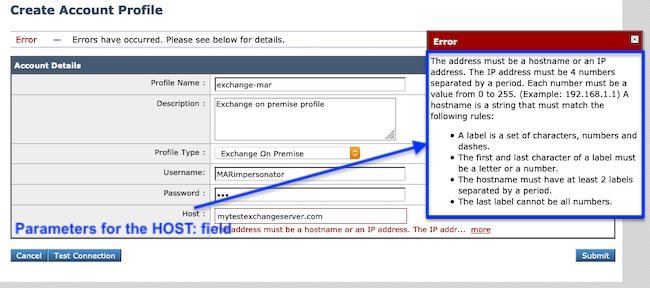 交换内部部署配置文件示例交换内部部署帐户配置文件示例
 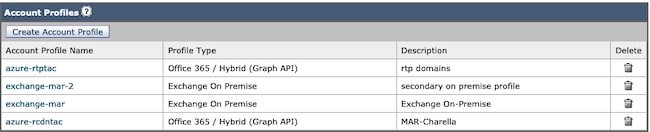 MAR帐户配置文件示例MAR帐户配置文件示例
配置域映射
域映射是将一个或多个域分配到帐户配置文件。
每个实施至少需要一个域映射:
- 在ESA Web界面中,导航到系统管理>帐户设置>创建域映射。
- 输入域名,用逗号分隔。图中显示了可接受的域格式。
- 如果配置中只有一个帐户配置文件,请在域名字段中输入ALL。
- 一个域只能使用一次。
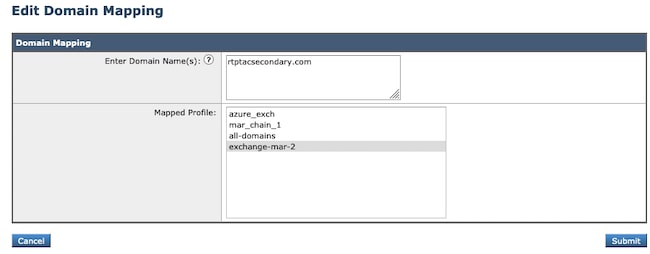 域映射示例域映射示例
 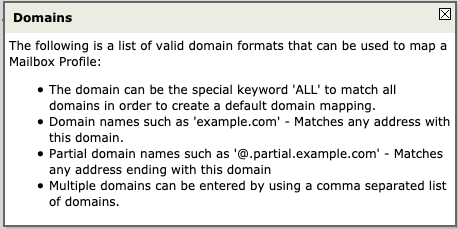 图1.可接受的域格式可接受的域格式
  域映射示例域映射示例
配置链接配置文件
仅当在属于混合部署或多租户部署的邮箱中修复邮件时,才配置链接配置文件。
按优先级顺序添加配置文件,首先使用最频繁的域配置文件。
- 在ESA Web界面中,导航至系统管理>帐户设置>创建链接配置文件。
- 输入Profile Name 和Description。
- 从MAR Profile下拉列表中选择域。
- 点击Add Account Profile以添加其他域配置文件,直到添加所有必需的配置文件。
- 单击Submit,然后单击Commit Changes。
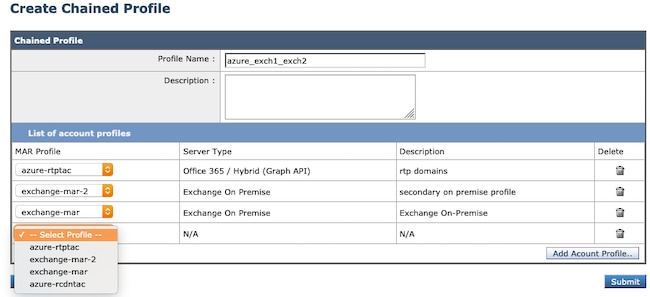 链配置文件创建。链接配置文件创建
测试每个客户简档
通过点击单个配置文件中的测试连接按钮确认每个帐户配置文件。
- 在ESA Web界面中,导航到系统管理 > 帐户设置,然后选择其中一个帐户配置文件。
- 单击左下角的Test Connection按钮。
- 在Email Address 字段中输入email 地址,然后单击Test Connection。
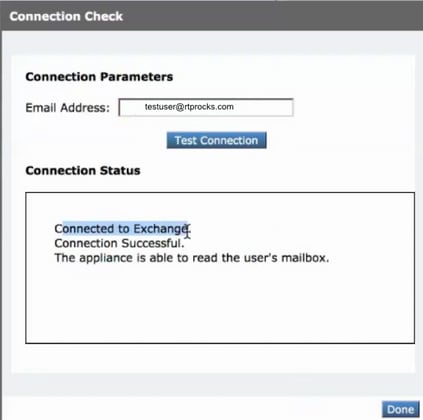 测试每个配置文件以验证连接是否成功测试帐户配置文件的连接
故障排除
日志包含:
- mail_logs:最终补救措施和总结
- mar_logs:执行补救的顺序
- UI中的Test Connection选项:用于验证连接和权限
许多信息都可以通过帐户设置中的邮件测试来确定。
使用测试连接进行故障排除
SMTP地址没有与其关联的邮箱。
正在使用的用户邮箱不存在。
Access is denied.请检查凭据并重试。
在Microsoft Azure中配置的应用程序没有访问Microsoft Office 365邮箱所需的API权限。
在目录<tenant_id>中找不到标识符为<client_id>的应用程序。
帐户配置文件设置页面上的客户端ID无效。
在数据存储中找不到名为<tenant_id>的服务命名空间。
帐户配置文件设置页面上的租户ID无效。
验证凭证时出错。凭据验证失败。
- 帐户配置文件页面上的证书指纹无效。
- 用于访问邮箱的配置文件类型可能不正确。例如,使用Microsoft Office 365配置文件访问内部邮箱。
- 可能缺少访问邮箱所需的权限。
为Exchange服务器输入的用户名或密码无效。
在配置文件中输入的模拟者帐户用户名和密码无效。
该帐户无权模拟所请求的用户。
未向配置文件中配置的用户帐户分配模拟器角色权限。
请检查主机<hostname>是否为有效的Exchange服务器地址。
在配置文件中输入的内部Exchange服务器主机名无效。
无法使用此配置文件访问邮箱,或者可能缺少所需的权限。
使用错误类型的配置文件访问有效邮箱。例如,使用Microsoft Office 365配置文件访问内部邮箱。
单个配置文件的成功补救示例:
Fri Aug 30 11:57:30 2019 Info: Process ready for Mailbox Remediation
Fri Aug 30 12:29:54 2019 Info: MID: 782107 Attempting to remediate using `o365-profile-1` profile for recipient user@example.com. Attempt number : 1
Fri Aug 30 12:29:54 2019 Info: MID: 782107 Trying to perform the forward and delete action on Office 365 or Hybrid exchange for SHA256:
1e6f324982d4eb71ad967e79261a6435aef928b57bc523dbb3e7de4ed65941ab recipient's (user@example.com) mailbox.
Fri Aug 30 12:29:58 2019 Info: MID: 782107 Message forwarded successfully to admin@example.com.
Fri Aug 30 12:29:58 2019 Info: MID: 782107 Message deleted successfully from user@example.com mailbox.
Fri Aug 30 12:29:58 2019 Info: MID: 782107 Remediation succeeded with `o365-profile-1` profile for recipient user@example.com.
链接配置文件的成功补救示例:
Mon Oct 14 15:01:01 2019 Info: MID: 24 Attempting to remediate using 'o365-profile-1' profile for recipient user@example.com. Attempt number : 1
Mon Oct 14 15:01:01 2019 Info: MID: 24 Trying to perform the delete action on Office 365 or Hybrid exchange for SHA256: 1e6f324982d4eb71ad967e79261a6435aef928b57bc523dbb3e7de4ed65941ab
recipient's (user@example.com) mailbox
Mon Oct 14 15:01:09 2019 Info: MID: 24 Unable to read message(s) from the recipient's (user@example.com) mailbox. Error: The mailbox cannot be accessed using this profile or the required
permissions can be missing
Mon Oct 14 15:01:09 2019 Info: MID: 24 Attempting to remediate using 'exchange-profile-1' profile for recipient user@example.com. Attempt number : 1
Mon Oct 14 15:01:09 2019 Info: MID: 24 Trying to perform the delete action on Exchange on-premises for SHA256: 1e6f324982d4eb71ad967e79261a6435aef928b57bc523dbb3e7de4ed65941ab
recipient's (user@example.com) mailbox.
Mon Oct 14 15:01:16 2019 Info: MID: 24 Message deleted successfully from user@example.com mailbox.
Mon Oct 14 15:01:16 2019 Info: MID: 24 Remediation succeeded with 'exchange-profile-1' profile for recipient user@example.com. Not trying further profile.
原因
AsyncOS 13.0及更高版本引入了扩展的MAR部署支持。此扩展支持需要额外的帐户配置文件、域映射和链接配置文件配置,具体取决于Exchange部署是Exchange Online、Exchange内部部署、混合部署还是多租户。
相关内容
- 如何配置ESA的Azure AD和Office 365邮箱设置
- Cisco技术支持和文档
- 思科邮件安全设备 — 产品支持
- 思科邮件安全设备 — 版本说明
- 思科邮件安全设备 — 最终用户指南
- 思科内容安全管理设备 — 产品支持
- 思科内容安全管理设备 — 版本说明
- 思科内容安全管理设备 — 最终用户指南
修订历史记录
| 版本 | 发布日期 | 备注 |
|---|---|---|
2.0 |
30-Sep-2026
|
重新认证 — 更新的SEO、可选文本、样式要求和格式。 |
1.0 |
17-Feb-2020
|
初始版本 |
 反馈
反馈