在vManage升级之前配置AURA部署

简介
本文档介绍如何在vManage升级之前配置AURA部署。
先决条件
要求
Cisco 建议您了解以下主题:
- 思科软件定义的广域网(SD-WAN)。
使用的组件
本文档中的信息基于Cisco vManager版本20.9.4。
本文档中的信息都是基于特定实验室环境中的设备编写的。本文档中使用的所有设备最初均采用原始(默认)配置。如果您的网络处于活动状态,请确保您了解所有命令的潜在影响。
背景信息
Cisco AURA SD-WAN(SURE)命令行工具在SD-WAN重叠的不同级别上执行总计30次(非集群模式)或36次(集群模式)检查。此工具旨在防止潜在故障,并为无缝升级过程推荐纠正措施。此工具使用GET API调用和show/shell命令检索数据。
基本概念
- 简单且直接地使用在vManage服务器上可用的默认python模块。
- 自动生成.TXT报告。
- 仅需要您的vManage和密码。
- vManage user with admin or RO network operator privileges。
- vManage用户密码不得包含“!” 字符.
- 要执行,只需将文件复制到vManage并在服务器上运行即可。
- 没有侵入性。
- 运行时通常少于60秒,具体取决于您的部署大小。
- 执行任何检查不需要根访问权限。
- 不会收集数据或将其共享给任何人。该工具使用的所有信息将保留在提供的报告和日志中。
- 不使用具有扩展限制的Real-Time API。
在vManage上下载脚本
根据vManage版本确定要执行的Python版本文件
| vManage版本 |
Python版本 |
要执行的Python文件 |
| 20.5之前 |
Python2 |
python2/py2_sure.py |
| 20.5以上 |
Python3 |
python3/py3_sure.py |

注意:vManage版本为20.9.4,您必须使用py3_sure.py文件。
注意:应用程序可以下载到任何所需的目录下,通常下载到用户主目录下。
方案1.隔离环境
1.从此网站获取文件内容,然后通过SCP将复制到服务器。
scp source_file.py {user}@{vManageIP}:/home/{user}
MAC OS
felix:Downloads felix$ scp -P 28215 py3_sure.py admin@10.124.x.x:/home/admin/
viptela 20.9.4
(admin@10.124.x.x) Password:
py3_sure.py                                                     100%  167KB 340.5KB/s   00:00
Windows操作系统
C:\Users\felix>scp C:\Users\felix\py3_sure.py admin@10.124.x.x:/home/admin/
viptela 20.9.4

(admin@10.124.x.x) Password:
py3_sure.py
选项2.粘贴方法
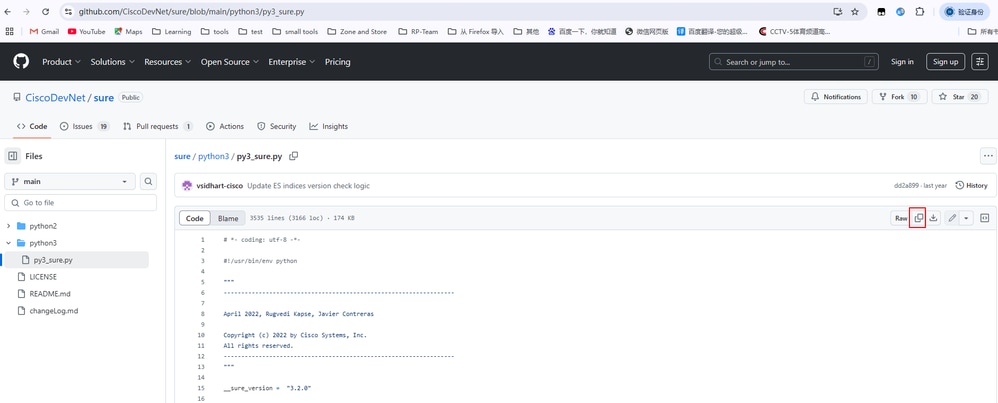
1.打开py2_sure.py或py3_sure.py文件,单击复制原始文件按钮。
2.通过SSH连接到vManage,然后运行vshell命令。
vmanage# vshell
3.打开vi,按Esc,然后按i(字母i),然后粘贴内容。
vmanage:~$ vi py3_sure.py
E1187: Failed to source defaults.vim
Press ENTER or type command to continue
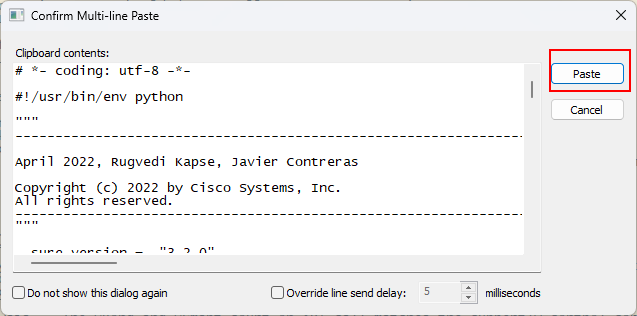
4.粘贴后,按Esc, :wq(符号:和字母w、q)来保存它。
:wq
注意:保存并退出:在命令模式下,按Esc键退出插入模式,然后键入:wq或:x,然后按enter保存修改并退出vi编辑器。
不保存exit:在命令模式下,按Esc键,然后键入:q! ,按enter键不保存修改,并强制退出vi编辑器。
选项3. WGET
1.登录vManage CLI会话:
vmanage# vs
vmanage:~$ wget https://raw.githubusercontent.com/CiscoDevNet/sure/main/python3/py3_sure.py
OR
vmanage:~$ wget https://raw.githubusercontent.com/CiscoDevNet/sure/main/python2/py2_sure.py

警告:如果使用WGET,则必须确保vManage可以访问GItHub。
如何运行
命令行选项
使用率:sure.py [-h] [-q] [-v] [-d] -u用户名
SURE - SDWAN升级就绪引擎 — v3.2.1
可选参数:
-h, -help显示此帮助消息并退出
-q, — 安静脚本的静默执行
-v, —verbose脚本的详尽执行
-d, —debug调试脚本执行
-u用户名, — 用户名用户名
vManage用户名
-vp VMANAGE_PORT、—vmanage_port VMANAGE_PORT
vManage密码
在正常执行模式下运行
vmanage:~$ python3 py3_sure.py -u admin vManage Password (Note: Tool doesn't support passwords containing "!") : ######################################################### ### AURA SDWAN (SURE) - Version 3.2.0 ### ######################################################### ### Performing SD-WAN Audit & Upgrade Readiness ### ######################################################### ****Collecting Preliminary Data *Starting Checks, this may take several minutes **** Performing Critical checks Critical Check:#01 Critical Check:#02 Critical Check:#03 Critical Check:#04 Critical Check:#05 Critical Check:#06 Critical Check:#07 Critical Check:#08 Critical Check:#09 Critical Check:#10 Critical Check:#11 Critical Check:#12 Critical Check:#13 Critical Check:#14 Critical Check:#15 Critical Check:#16 Critical Check:#17 **** Performing Warning checks Warning Check:#18 Warning Check:#19 Warning Check:#20 Warning Check:#21 Warning Check:#22 Warning Check:#23 Warning Check:#24 Warning Check:#25 **** Performing Informational checks Informational Check:#26 Informational Check:#27 Informational Check:#28 ****** Cisco AURA SDWAN tool execution completed. Total Checks Performed: 28 Overall Assessment: 4 Critical errors, 2 Warnings, please check report for details. -- Full Results Report: sdwan_sure/sure_report_08_07_2025_06_15_25.txt -- Logs: sdwan_sure/sure_logs_08_07_2025_06_15_25.log -- Json Summary: sdwan_sure/sure_json_summary_08_07_2025_06_16_22.json Reach out to sure-tool@cisco.com if you have any questions or feedback 检查报告
vmanage:~$ cat sdwan_sure/sure_report_08_07_2025_06_15_25.txt
E1187: Failed to source defaults.vim
Press ENTER or type command to continueCisco SDWAN AURA v3.2.0 Report Cisco SDWAN AURA command line tool performs a total of 26(Non Cluster Mode) or 32(Cluster Mode) checks at different levels of the SDWAN overlay. Reach out to sure-tool@cisco.com if you have any questions or feedback Summary of the Results: ----------------------------------------------------------------------------------------------------------------- AURA SDWAN Version: 3.2.0 vManage Details: Software Version: 20.9.4 System IP Address: 1.1.1.1 Script Execution Time: Start Time: 08-07-2025 06:15:20 End Time: 08-07-2025 06:16:22 ----------------------------------------------------------------------------------------------------------------- Overall upgrade evaluation: Critical issues found that need to be resolved before an upgrade ----------------------------------------------------------------------------------------------------------------- Check Results: Total Checks Performed: 28 Total Checks Passed: 24 out of 28 Total Checks Failed: 4 out of 28 Total Checks with Errors: 4 Total Checks with Warnings: 2 ----------------------------------------------------------------------------------------------------------------- Detailed list of failed checks, and actions recommended +----------+----------------------------------------------------+----------------------------------------------------+----------------------------------------------------+ | Check no | Check Name | Check Result | Check Actions | +----------+----------------------------------------------------+----------------------------------------------------+----------------------------------------------------+ | #03 | Memory size | Memory size is 67 GB, it is below the hardware siz | Correct the memory available to the server | | | | e recommendations when DPI is enabled. Memory size | | | | | should be 128 GB. For more information please che | | | | | ck: https://www.cisco.com/c/en/us/td/docs/routers/ | | | | | sdwan/release/notes/compatibility-and-server-recom | | | | | mendations/ch-server-recs-20-3.html | | +----------+----------------------------------------------------+----------------------------------------------------+----------------------------------------------------+ | #04 | CPU Count | No. of Processors is below minimum supported size | Allocate more processors | | | | when DPI is in use. CPU Count is 16, it should be | | | | | 32 or higher. | | +----------+----------------------------------------------------+----------------------------------------------------+----------------------------------------------------+ | #10 | NTP status across network | Devices with invalid ntp association found | Please validate the NTP time synchronization acros | | | | | s the network | +----------+----------------------------------------------------+----------------------------------------------------+----------------------------------------------------+ | #17 | Verify if stale entry of vManage+vSmart UUID prese | The vManage+vSmart UUIDs are not consistent in cEd | Contact TAC to find out why there are inconsistenc | | | nt on any one cEdge | ges | ies in the vManage+vSmart UUIDS in cEdges | +----------+----------------------------------------------------+----------------------------------------------------+----------------------------------------------------+ ----------------------------------------------------------------------------------------------------------------- Preliminary Tabulated data: +----------------------------------------------------+---------------+ | Parameters | Value | +----------------------------------------------------+---------------+ | vManage System IP address | 1.1.1.1 | +----------------------------------------------------+---------------+ | vManage CPU Speed | 2.198 | +----------------------------------------------------+---------------+ | vManage CPU Count | 16 | +----------------------------------------------------+---------------+ | xEdge Count | 10 | +----------------------------------------------------+---------------+ | vManage Cluster Size | 1 | +----------------------------------------------------+---------------+ | vManage Server Mode | Single Server | +----------------------------------------------------+---------------+ | vManage Disk Controller Type | /dev/sdb | +----------------------------------------------------+---------------+
将报告从vManage上传到本地计算机
选项1.Viptela CLI
vmanage# vs
vmanage:~$ scp sdwan_sure/sure_report_08_07_2025_06_15_25.txt /home/admin
vmanage:~$ ls -l
total 1812
-rw------- 1 admin admin 2 Jul 8 06:21 123
-rw------- 1 admin admin 0 Jul 8 06:21 456
-rw-r--r-- 1 admin admin 566 May 9 17:10 archive_id_rsa.pub
-rwxrwxr-x 1 vmanage admin 1235617 Jul 2 03:07 config_db.tar.gz
-rw------- 1 admin admin 178539 Jul 8 07:42 py2_sure.py
-rw------- 1 admin admin 178540 Jul 8 07:09 py3_sure.py
drwx------ 2 admin admin 4096 Jul 8 08:14 sdwan_sure
-rw------- 1 admin admin 25544 Jul 8 08:18 sure_report_08_07_2025_06_15_25.txt                     <<<<<<
-rw------- 1 admin admin 15260 Jul 4 05:34 test.pcap
-rw------- 1 admin admin 178540 Jul 8 06:13 test0708
-rw-r--r-- 1 admin admin 1216 Jan 15 2024 vmanage_csr
vmanage:~$ exit

vmanage# request upload vpn 512 scp://admin@10.207.x.x:/test.file sure_report_08_07_2025_06_15_25.txt
Warning: Permanently added '10.207.x.x' (ECDSA) to the list of known hosts.

admin@10.207.x.x's pasword:
sure_report_08_07_2025_06_15_25.txt 100% 25KB 479.5KB/s 00:00
Upload successful
选项2. Linux/Mac终端
命令语法 — 命令读取为:copy source_file_name从vManage复制到local_destination_path,并使用vManage用户名。
scp vManageUsername@PublicIp:<source_file_name> <local_destination_path>
示例:连接到本地Linux/Mac终端,并运行SCP命令将文件复制到所需目录:
adminIT@cisco:~$ scp admin@10.124.X.X:sure_report_08_07_2025_06_15_25.txt  /Users/adminIT/Downloads/
viptela 20.9.4

Password:
sure_report_08_07_2025_06_15_25.txt  100% 25KB 479.5KB/s
选项3. FileZilla或任何其他FTP或SFTP客户端
连接方式:
- SFTP作为协议或端口22
- vManage URL、Public IP或Private IP(如果vManage在内部使用)
- 使用有效的用户名和密码
在FTP或SFTP客户端上,会列出vManage用户主目录中的文件。只需拖放至左侧要传输文件的本地目标即可。
相关信息
修订历史记录
| 版本 | 发布日期 | 备注 |
|---|---|---|
2.0 |
12-Oct-2026
|
更新的拼写、语法、间距、插入的水平线到各个部分的可读性,固定CCW警报。 |
1.0 |
18-Sep-2025
|
初始版本 |
 反馈
反馈