在 Firepower Threat Defense 上配置 NetFlow 安全事件日志记录

简介
本文档介绍如何通过Firepower管理中心(FMC)在Firepower威胁防御(FTD)上配置NetFlow安全事件记录(NSEL)。
先决条件
要求
Cisco 建议您了解以下主题:
- FMC知识
- FTD知识
- FlexConfig策略知识
使用的组件
本文档中的信息基于以下软件和硬件版本:
- FTD版本6.6.1
- FMC版本6.6.1
本文档中的信息都是基于特定实验室环境中的设备编写的。本文档中使用的所有设备最初均采用原始(默认)配置。如果您的网络处于活动状态,请确保您了解所有命令的潜在影响。
背景信息
本文档介绍如何通过Firepower管理中心(FMC)在Firepower威胁防御(FTD)上配置NetFlow安全事件记录(NSEL)。
FlexConfig文本对象与预定义FlexConfig对象中使用的变量相关联。预定义的FlexConfig对象和关联的文本对象可在FMC中找到,以配置NSEL。FMC中有四个预定义的FlexConfig对象和三个预定义的文本对象。预定义的FlexConfig对象是只读的,不能修改。要修改NetFlow的参数,可以复制对象。
表中列出了四个预定义对象:

表格中列出了三个预定义文本对象:

配置
本节介绍如何通过FlexConfig策略在FMC上配置NSEL。
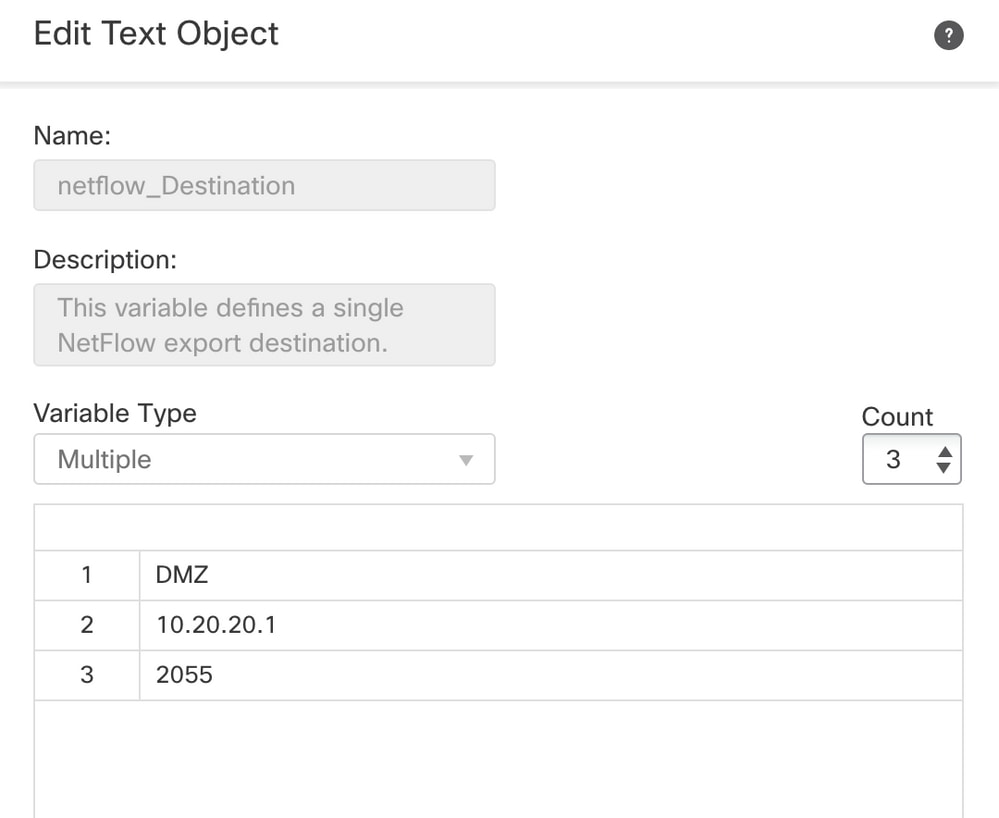
步骤1.设置Netflow的文本对象的参数。
- 要设置变量参数,请导航到对象> FlexConfig >文本对象。
- 编辑netflow_Destination对象。
- 定义多变量类型和计数设置为3。
- 设置接口名称、目标IP地址和端口。在此配置示例中,接口为DMZ,NetFlow收集器IP地址为10.20.20.1,UDP端口为2055。
步骤2.配置扩展访问列表对象以匹配特定流量。
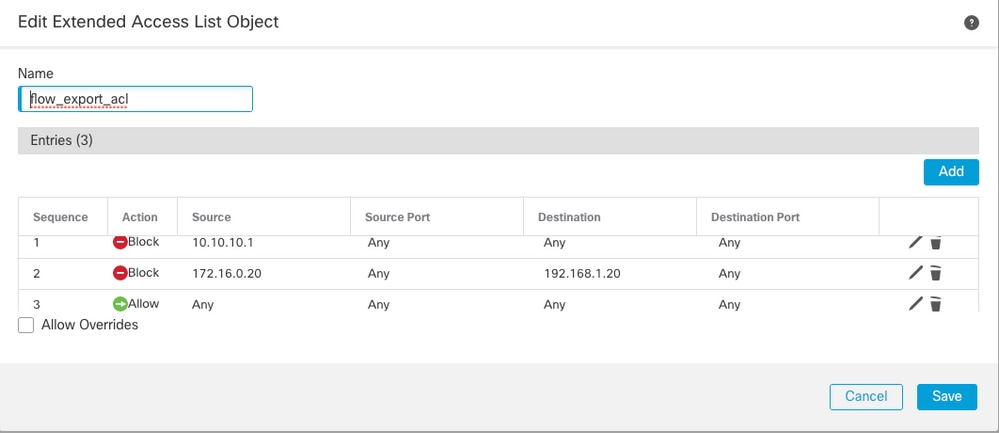
- 要在FMC上创建扩展访问列表,请导航到对象>对象管理,然后在左侧菜单的访问列表下选择扩展。
- 单击Add Extended Access List。
- 填写Name字段。在本示例中,名称为flow_export_acl。
- 单击 Add。
- 配置访问控制项以匹配特定流量。在本示例中,从主机10.10.10.1到任何目标的流量以及主机172.16.0.20和192.168.1.20之间的流量被排除。包括任何其他流量。
步骤3.配置FlexConfig对象。
- 要配置FlexConfig对象,请导航到对象> FlexConfig > FlexConfig对象,然后单击添加FlexConfig对象。
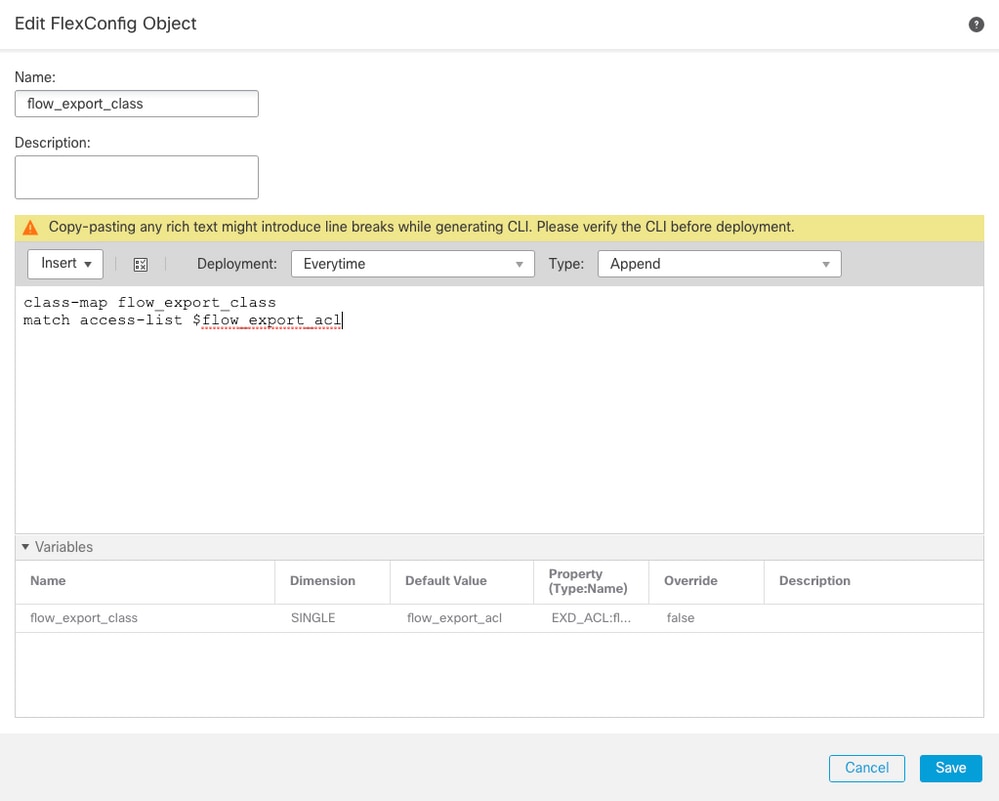
- 定义标识必须为其导出NetFlow事件的流量的类映射。
- 在本示例中,对象的名称为flow_export_class。
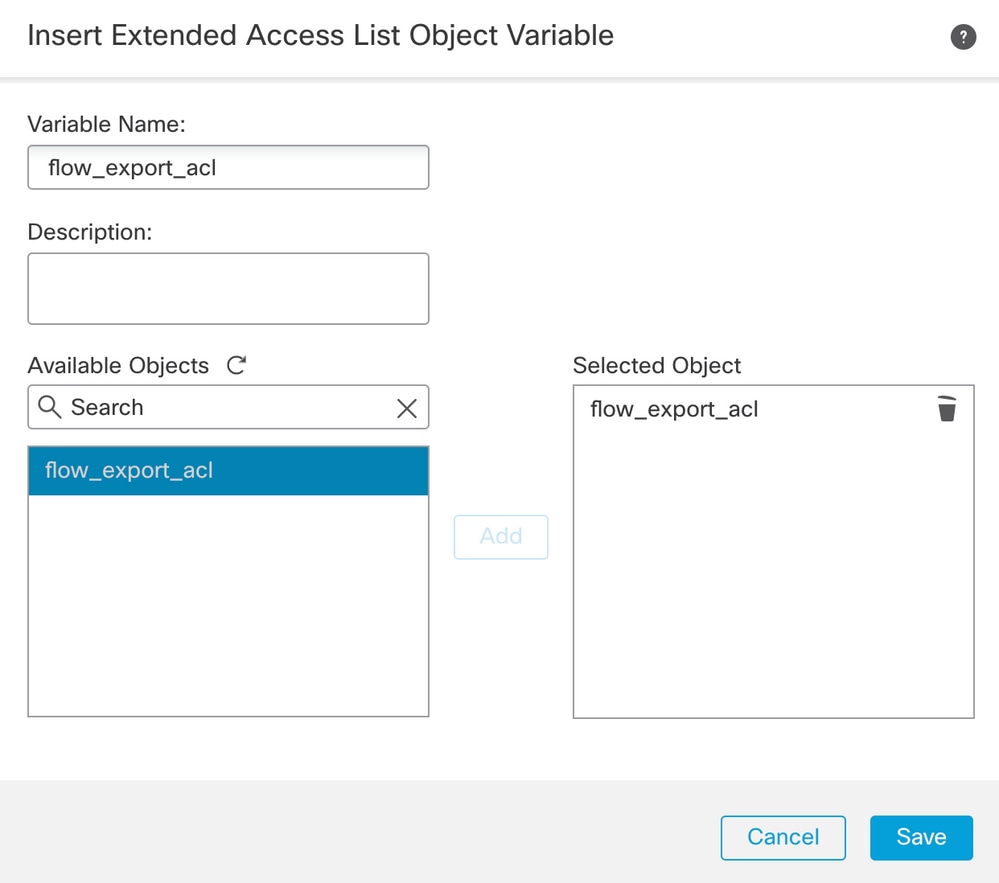
- 选择步骤2中创建的访问列表。
- 单击Insert > Insert Policy Object > Extended ACL Object并分配名称。
- 然后点击添加。在本示例中,变量的名称为flow_export_acl。
- Click Save.
在右侧的空白字段中添加后续配置行,并在match access-list配置行中包含以前定义的变量($flow_export_acl.)。
请注意,变量name开头是$。这有助于定义后面跟的变量。
class-map flow_export_class
match access-list $flow_export_acl
完成后单击Save。
步骤4.配置Netflow目标
- 要配置Netflow目标,请导航到对象 > FlexConfig > FlexConfig对象并按Netflow进行过滤。
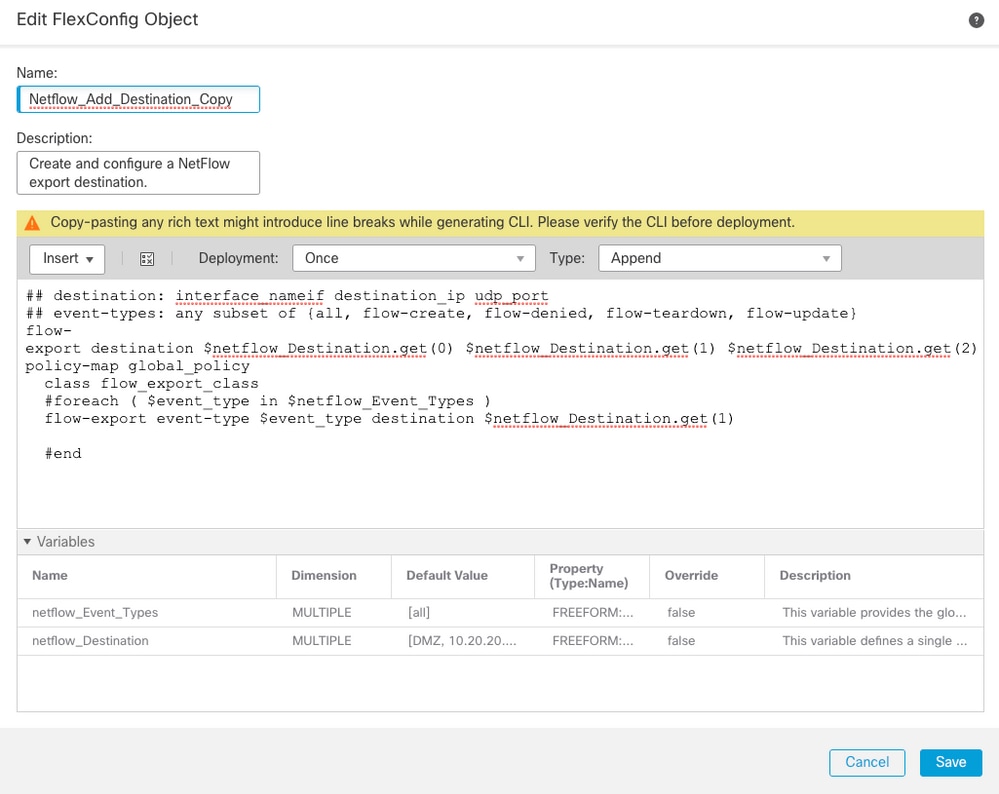
- 复制对象Netflow_Add_Destination。现在创建了Netflow_Add_Destination_Copy。
- 分配在步骤3中创建的类。您可以创建新策略映射以将流导出操作应用于已定义的类。在本示例中,类插入到当前策略(全局策略)中。
## destination: interface_nameif destination_ip udp_port
## event-types: any subset of {all, flow-create, flow-denied, flow-teardown, flow-update}
flow-export destination $netflow_Destination.get(0) $netflow_Destination.get(1) $netflow_Destination.get(2)
policy-map global_policy
  class flow_export_class
  #foreach ( $event_type in $netflow_Event_Types )
  flow-export event-type $event_type destination $netflow_Destination.get(1)
  #end
4.完成后单击Save。
步骤5.将FlexConfig策略分配到FTD
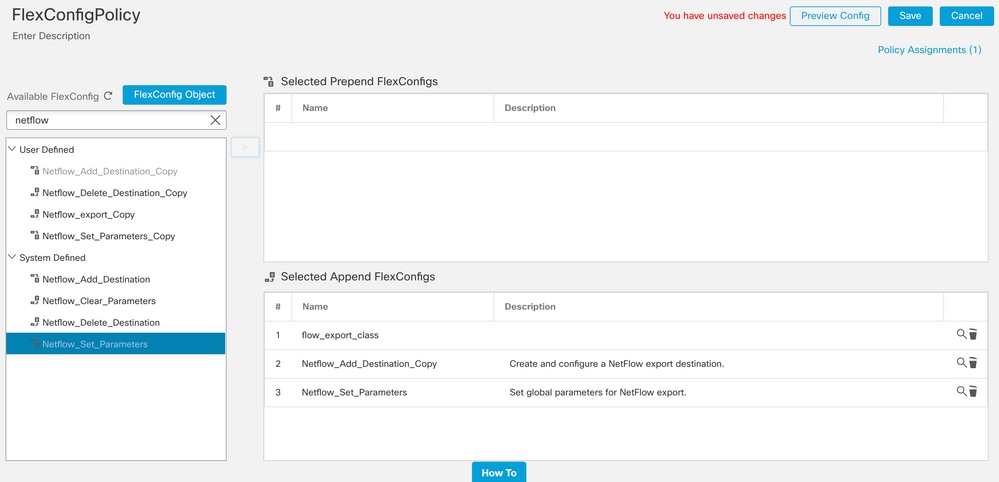
- 导航到设备(Devices)> FlexConfig并创建一个新策略(除非已经有一个策略为其他用途创建并分配给同一FTD)。 在本示例中,已创建FlexConfig。
- 编辑FlexConfig策略并选择在上一步中创建的FlexConfig对象。在本示例中,使用默认的Netflow导出参数,因此选择Netflow_Set_Parameters。
- 保存更改并进行部署。
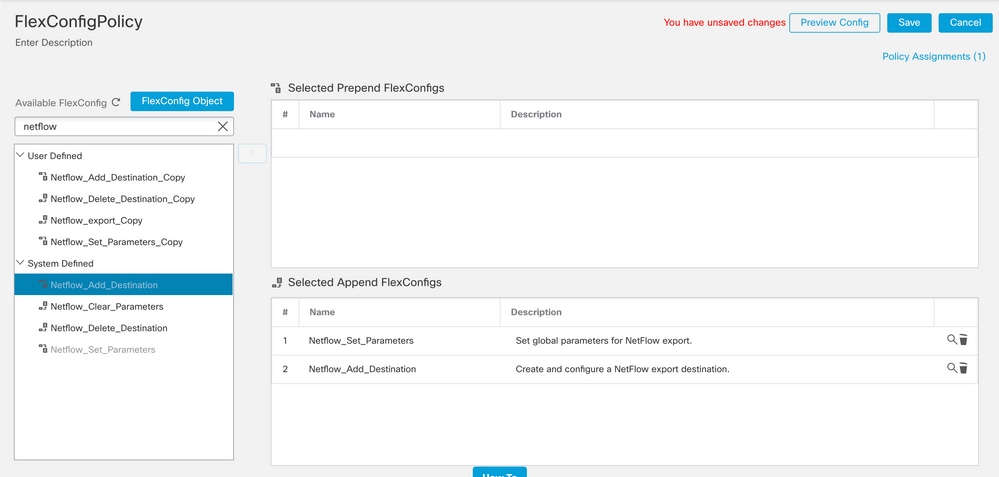

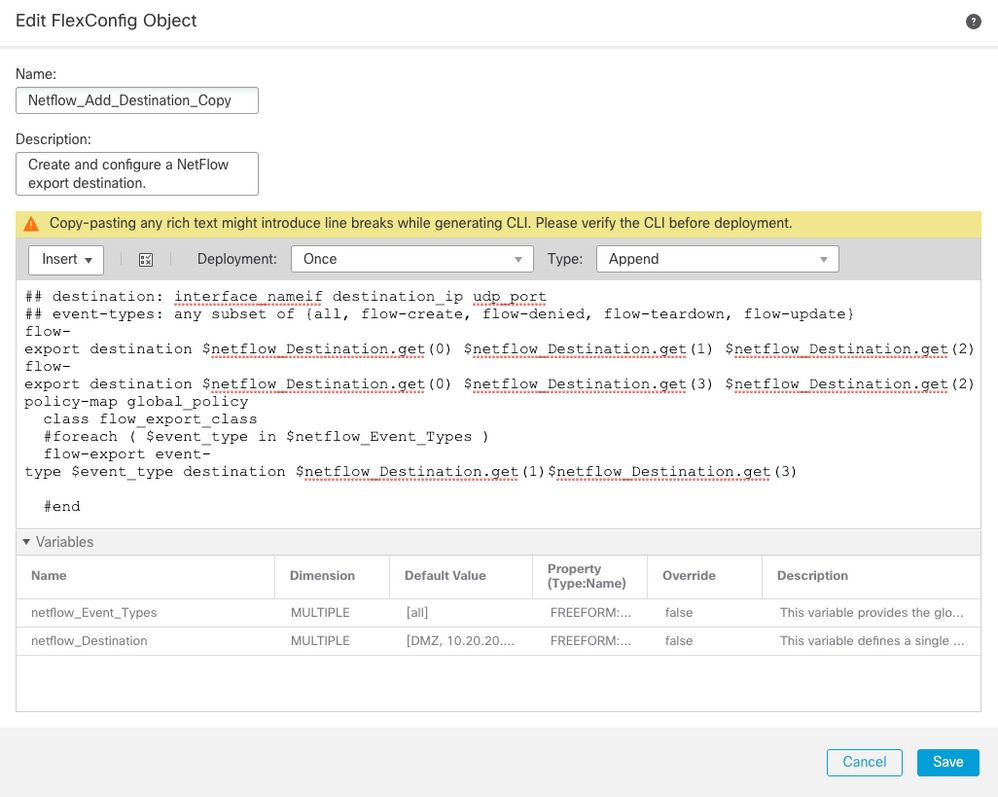
注意:添加发送NetFlow数据包的第二个NSEL收集器。在第1步中,添加4个变量以添加到第二个Netflow收集器IP地址。
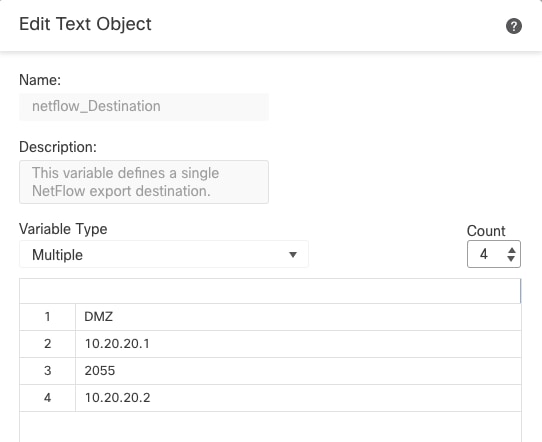
在第4步中添加配置行:flow-export destination $netflow_Destination.get(0)$netflow_Destination.get(1)$netflow_Destination.get(2)
编辑对应变量的变量$netflow_Destination.get。在本示例中,变量值为3。例如:
flow-export destination $netflow_Destination.get(0) $netflow_Destination.get(1) $netflow_Destination.get(2)
flow-export destination $netflow_Destination.get(0) $netflow_Destination.get(3) $netflow_Destination.get(2)
此外,在配置行中添加第二个变量$netflow_Destination.get: flow-export event-type $event_type destination $netflow_Destination.get(1)。 例如:
flow-export event-type $event_type destination $netflow_Destination.get(1) $netflow_Destination.get(3)
如下图所示验证此配置:
验证
可以在FlexConfig策略中验证NetFlow配置。要预览配置,请点击Preview Config和Select并验证配置。
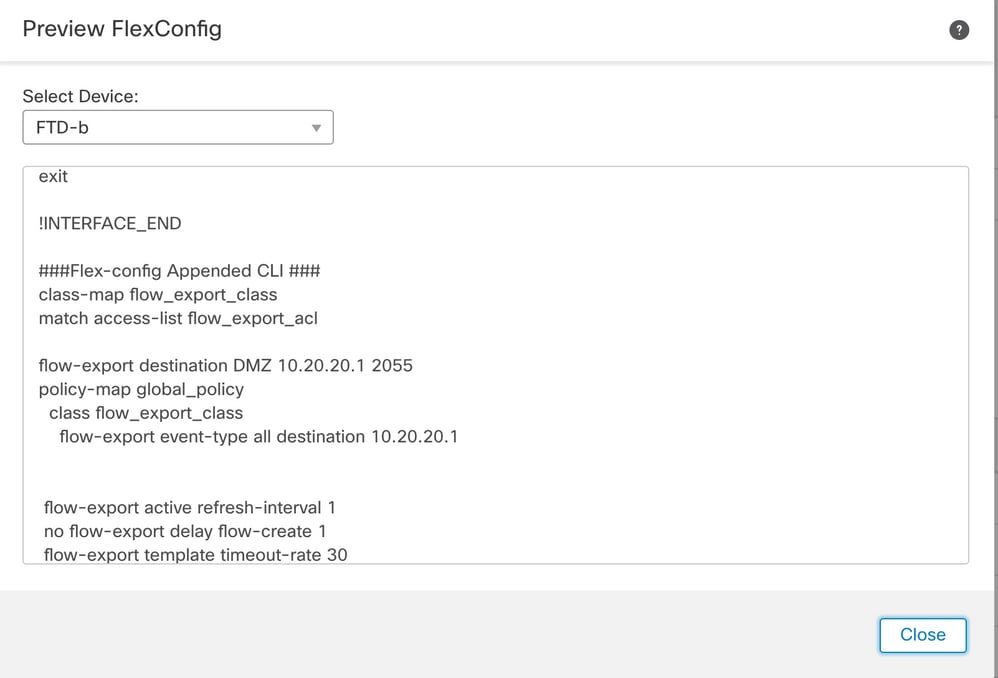
通过安全外壳(SSH)访问FTD,运行命令system support diagnostic-cli并运行以下命令:
> system support diagnostic-cli
Attaching to Diagnostic CLI ... Press 'Ctrl+a then d' to detach.
Type help or '?' for a list of available commands.
firepower# show access-list flow_export_acl
access-list flow_export_acl; 3 elements; name hash: 0xe30f1adf
access-list flow_export_acl line 1 extended deny object-group ProxySG_ExtendedACL_34359742097 object 10.10.10.1 any (hitcnt=0) 0x8edff419
access-list flow_export_acl line 1 extended deny ip host 10.10.10.1 any (hitcnt=0) 0x3d4f23a4
access-list flow_export_acl line 2 extended deny object-group ProxySG_ExtendedACL_34359742101 object 172.16.0.20 object 192.168.1.20 (hitcnt=0) 0x0ec22ecf
access-list flow_export_acl line 2 extended deny ip host 172.16.0.20 host 192.168.1.20 (hitcnt=0) 0x134aaeea
access-list flow_export_acl line 3 extended permit object-group ProxySG_ExtendedACL_30064776111 any any (hitcnt=0) 0x3726277e
access-list flow_export_acl line 3 extended permit ip any any (hitcnt=0) 0x759f5ecf
firepower# sh running-config class-map flow_export_class
class-map flow_export_class
match access-list flow_export_acl
firepower# show running-config policy-map
!
policy-map type inspect dns preset_dns_map
parameters
message-length maximum client auto
message-length maximum 512
no tcp-inspection
policy-map type inspect ip-options UM_STATIC_IP_OPTIONS_MAP
parameters
eool action allow
nop action allow
router-alert action allow
policy-map global_policy
class inspection_default
inspect dns preset_dns_map
inspect ftp
inspect h323 h225
inspect h323 ras
inspect rsh
inspect rtsp
inspect sqlnet
inspect skinny
inspect sunrpc
inspect xdmcp
inspect sip
inspect netbios
inspect tftp
inspect icmp
inspect icmp error
inspect ip-options UM_STATIC_IP_OPTIONS_MAP
inspect snmp
class flow_export_class
flow-export event-type all destination 10.20.20.1
class class-default
set connection advanced-options UM_STATIC_TCP_MAP
firepower# show running-config | include flow
access-list flow_export_acl extended deny object-group ProxySG_ExtendedACL_34359742097 object 10.10.10.1 any
access-list flow_export_acl extended deny object-group ProxySG_ExtendedACL_34359742101 object 172.16.0.20 object 192.168.1.20
access-list flow_export_acl extended permit object-group ProxySG_ExtendedACL_30064776111 any any
flow-export destination DMZ 10.20.20.1 2055
class-map flow_export_class
match access-list flow_export_acl
class flow_export_class
flow-export event-type all destination 10.20.20.1
相关信息
修订历史记录
| 版本 | 发布日期 | 备注 |
|---|---|---|
4.0 |
23-Jun-2026
|
更新的拼写、句子结构、步骤编号和间距。 |
3.0 |
16-Oct-2023
|
已更新具有不同IP地址的多个NetFlow对象的屏幕截图 |
2.0 |
10-Feb-2023
|
更新格式。已更正CCW警报。重新认证。 |
1.0 |
16-Oct-2020
|
初始版本 |
 反馈
反馈