阻止的事件处理队列
适用范围
Splunk企业描述
一些数据直接自注册到索引器,而一些源则通过大量转发器发送数据。调查
1.在splunkd.log中,对于某些源类型,存在换行和AggregatorMiningProcessor错误。
WARN  AggregatorMiningProcessor - Breaking event because limit of 256 has been exceeded - data_source="/path/to/the/logs/", data_host="hostname.com",
data_sourcetype="sourcetype_name"WARN  AggregatorMiningProcessor - Breaking event because limit of 1000 has been exceeded - data_source="/path/to/the/logs/"", data_host="other_hostname.com",
data_sourcetype="other_sourcetype_name"
2. Indexing Performance控制面板显示“Aggregator” Splunk处理器占用的CPU资源高。
3.修复导致错误的源类型无法解决(错误消失,问题依然存在)。
4.聚合队列中存在瓶颈,pstack显示聚合处理器正忙于将行合并为一个事件,从而造成瓶颈。
当聚合处理器将大量行合并到单个事件中时,会发生此问题。从代码中,只要有一行需要合并到当前事件,就会出现以下代码形式的字符串::reserve和内存移动。因此,如果一次活动有1000行,就会有1000次的保留和记录的次数。
void CowPipelineData::appendAndReset(CowPipelineData& other)
{
...
            _pd->_rawAsStr.reserve(_pd->_rawSeg.size() + other._pd->_rawSeg.size() + 1);
            append_other_raw:
            _pd->_rawAsStr.push_back('\n');
            _pd->_rawAsStr.append(other._pd->_rawSeg);
...
}
收集一些包含大量行的示例事件,以了解导致问题的事件,确定具有大量总行的前三种源类型:
| tstats count where index=* OR index=_* by linecount sourcetype
| where linecount > 2
| stats sum(eval(linecount*count)) as totallines by sourcetype
| sort -totallines
概念:
原因是:
- 通常将分析队列作为第一个队列,将汇聚队列作为第二个队列。
- 解析队列是指如果没有定义LINE_BREAKER,则按默认字符\r\n将流数据解析为行。
- 然后,聚合队列将根据TIME_FORMAT等配置合并行
- 通过设置LINE_BREAKER,它可以告知Splunk如何在分析阶段将流数据解析为行,并
- 通过设置SHOULD_LINEMERGE = false,表示聚合过程不应将行合并到事件中。
- 基本上,LINE_BREAKER和SHOULD_LINEMERGE = false是解决客户问题的方法。
分辨率
1.通过更改limits.conf来启用agg_processor的CPU时间度量以用于调试目的,如下所示:
.../limits.conf
[default]
agg_cpu_profiling = true
2.运行以下搜索以确定对聚合器处理器造成更大压力的源类型:
index=_internal source=*metrics.log* per_sourcetype_agg_cpu Metrics
| timechart span=10s avg(cpu) by series
3.将SHOULD_LINEMERGE设置为"false",并为进入搜索图中的每个源类型编写"LINE_BREAKER"的正则表达式。Exp是我从“故障排除”培训文档中选择的。
注意:屏幕截图显示了如何搜索regex处理器: 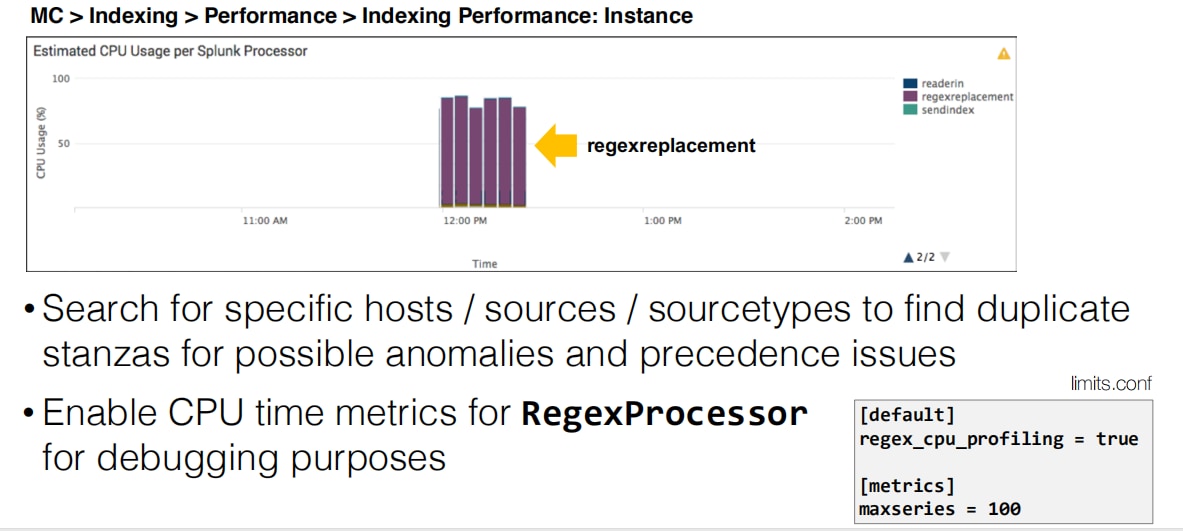
4.修复所有此类源类型将解决队列填充问题。
其他资源:
以下来自社区办公时间的视频展示了如何对受阻队列进行故障排除的更多内容。
相关链接
Limits.conf手册https://docs.splunk.com/Documentation/Splunk/7.3.0/Admin/Limitsconf
修订历史记录
| 版本 | 发布日期 | 备注 |
|---|---|---|
1.0 |
28-Sep-2026
|
初始版本 |
 反馈
反馈