| 功能 |
默认设置 |
|---|---|
| 交换机 802.1x 启用状态 |
禁用. |
| 每端口 802.1x 启用状态 |
禁用(强制授权)。 端口发送和接收正常流量,而无需对客户端进行基于 802.1x 的认证。 |
| AAA |
禁用. |
| RADIUS 服务器
|
|
| 主机模式 |
单主机模式。 |
| 控制方向 |
双向控制。 |
| 定期重新身份验证 |
禁用. |
| 重新身份验证尝试之间的间隔秒数 |
3600 秒. |
| 重新身份验证次数 |
两次(在端口变为未授权状态之前,交换机重新启动身份验证过程的次数)。 |
| 等待周期 |
60 秒(交换机在与客户端的身份验证交换失败后保持静默状态的秒数)。 |
| 重新传输时间 |
30 秒(交换机在重新发送请求前等待客户端对 EAP 请求/身份信息帧做出响应的秒数)。 |
| 最大重新传输次数 |
两次(交换机在重新启动身份验证过程之前发送EAP请求/身份帧的次数)。 |
| 客户端超时时限 |
30秒(将来自身份验证服务器的请求中继到客户端时,交换机在将请求重新发送到客户端之前等待响应的时间)。 |
| 身份验证服务器超时时限 |
30秒(将客户端的响应中继到身份验证服务器时,交换机在将响应重新发送到服务器之前等待应答的时间量)。 可以使用“dot1x timeout server-timeout interface configuration”命令更改此超时时限。 |
| 非活动超时 |
禁用. |
| 访客 VLAN |
未指定。 |
| 不可访问身份验证绕行 |
禁用. |
| 受限 VLAN |
未指定。 |
| 身份验证器(交换机)模式 |
未指定。 |
| MAC 身份验证绕行 |
禁用. |
| 语音感知安全 |
禁用. |
排查 Catalyst 9000 系列交换机上的 Dot1x 问题
简介
本文档介绍如何在Catalyst 9000系列交换机上配置、验证802.1x网络访问控制(NAC)并对其进行故障排除。
先决条件
要求
思科建议您先了解下列主题的相关知识:
- Catalyst 9000 系列交换机
- 身份服务引擎 (ISE)
使用的组件
本文档中的信息基于以下软件和硬件版本:
- Catalyst 9300
- Catalyst 9400
- Catalyst 9500
- Catalyst 9600
- Cisco IOS® XE 17.6.x 及更高版本
- ISE-VM-K9 版本 3.0.0.458

注意:有关在其他思科平台上启用这些功能所使用的命令,请参阅相应的配置指南。
本文档中的信息都是基于特定实验室环境中的设备编写的。本文档中使用的所有设备最初均采用原始(默认)配置。如果您的网络处于活动状态,请确保您了解所有命令的潜在影响。
背景信息
802.1x 标准定义了一种基于客户端-服务器的访问控制和身份验证协议,该协议可防止未经授权的客户端通过可公开访问的端口连接到 LAN,除非这些客户端经过相应的身份验证。在允许使用由交换机或 LAN 提供的任何服务之前,身份验证服务器会对连接到交换机端口的每个客户端进行身份验证。
802.1x身份验证包括三个不同的组件:
请求方 - 提交身份验证凭证的客户端
身份验证器 - 在客户端和网络之间提供网络连接并可以允许或阻塞网络流量的网络设备。
Authentication Server — 可以接收和响应网络访问请求的服务器,告知身份验证器是否可以允许连接以及适用于身份验证会话的各种其他设置。
本文档的目标受众是未必以安全为重点的工程师和支持人员。有关基于802.1x端口的身份验证和组件(如ISE)的详细信息,请参阅相应的配置指南。
基本配置
本部分介绍实现 802.1x 基于端口的身份验证所需的基本配置。有关其他功能说明,请参阅本文档的附录部分。不同版本的配置标准略有不同。请根据当前版本的配置指南验证您的配置。
在配置基于802.1x端口的身份验证之前,必须启用身份验证、授权和记帐(AAA),并且必须建立方法列表。
- 方式列表用于描述对用户进行身份验证时要查询的序列和身份验证方式。
- 还必须全局启用 802.1x。
C9300> enable
C9300# configure terminal
C9300(config)# aaa new-model
C9300(config)# aaa authentication dot1x default group radius
C9300(config)# dot1x system-auth-control
在交换机上定义RADIUS服务器。
C9300(config)# radius server RADIUS_SERVER_NAME
C9300(config-radius-server)# address ipv4 10.0.1.12
C9300(config-radius-server)# key rad123
C9300(config-radius-server)# exit
在客户端接口上启用 802.1x。
C9300(config)# interface TenGigabitEthernet 1/0/4
C9300(config-if)# switchport mode access
C9300(config-if)# authentication port-control auto
C9300(config-if)# dot1x pae authenticator
C9300(config-if)# end
IBNS 2.0
基于身份的网络服务(IBNS)2.0构建于并取代了传统的IBNS 1.0框架。它通过引入更精简和强大的策略引擎Access Session Manager解决了IBNS 1.0的复杂性和配置问题。
IBNS 2.0配置
— 要启用IBNS 2.0,您必须在Cisco交换机的特权模式下执行命令:
#authentication display new-style
— 使用如下所示的命令配置IBNS 2.0的交换机端口:
access-session host-mode {single-host | multi-domain | multi-auth | multi-host}
access-session port-control auto
dot1x pae authenticator
{mab}
service-policy type control subscriber TEST
这些命令在接口上启用dot1x身份验证,或者启用MAC身份验证绕行(MAB)。
使用新语法时,使用以access-session开头的命令。
这些命令的用途与使用旧语法的命令相同(以身份验证关键字开头)。
应用service-policy以指定可用于接口的策略映射。
— 所述的策略映射定义身份验证期间交换机(身份验证器)的行为。
例如,您可以指定在身份验证失败时会发生什么情况。
对于每个事件,可以根据在其下配置的类映射中匹配的事件类型配置多个操作。
例如,查看所示的列表(policy-map TEST)。
如果连接到应用此策略的接口的dot1x端点发生故障,则会执行DOT1X_FAILED中定义的操作。
如果要为MAB_FAILED和DOT1X_FAILED等类指定相同的行为,则可以使用默认类 — “class-map”always。
policy-map type control subscriber TEST
(...)
event authentication-failure match-first
10 class DOT1X_FAILED do-until-failure
10 terminate dot1x
(...)
40 class always do-until-failure
10 terminate mab
20 terminate dot1x
30 authentication-restart 60
(...)
— 用于IBNS 2.0的策略映射必须始终具有类型控制用户。
您可以通过以下方式查看可用事件的列表:
Switch(config-event-control-policymap)#event ?
aaa-available aaa-available event
absolute-timeout absolute timeout event
agent-found agent found event
authentication-failure authentication failure event
authentication-success authentication success event
authorization-failure authorization failure event
authorization-success authorization success event
identity-update identity update event
inactivity-timeout inactivity timeout event
remote-authentication-failure authentication failure event
remote-authentication-success authentication remote success event
remote-update update from remote device
session-disconnected session disconnected event
session-started session started event
tag-added tag to apply event
tag-removed tag to remove event
template-activated template activated event
template-activation-failed template activation failed event
template-deactivated template deactivated event
template-deactivation-failed template deactivation failed event
timer-expiry timer-expiry event
violation session violation event
— 在事件配置中,您可以定义如何评估类:
Switch(config-event-control-policymap)#event authentication-failure ?
match-all Evaluate all the classes
match-first Evaluate the first class
— 您可以为类映射定义类似的选项,不过您可以在此处指定如何在类匹配的情况下执行操作:
Switch(config-class-control-policymap)#10 class always ?
do-all Execute all the actions
do-until-failure Execute actions until one of them fails
do-until-success Execute actions until one of them is successful
— 新dot1x样式配置的最后一部分(可选)是类映射。
它还可以键入控制用户,用于匹配特定行为或流量。
配置类映射条件评估的要求。
您可以指定必须匹配所有条件或任何条件,或者不匹配任何条件。
Switch(config)#class-map type control subscriber ?
match-all TRUE if everything matches in the class-map
match-any TRUE if anything matches in the class-map
match-none TRUE if nothing matches in the class-map
— 这是用于匹配dot1x身份验证失败的类映射示例:
class-map type control subscriber match-all DOT1X_FAILED
match method dot1x
match result-type method dot1x authoritative
— 有关IBMS 2.0的详细信息,请参阅以下指南:
为单主机和M配置IBNS 2.0
验证配置和操作
本部分提供有关 801.1x 的背景信息,以及如何验证配置和操作。
802.1x 简介
802.1x涉及两种不同类型的流量 — 通过局域网可扩展身份验证协议(EAPoL)的客户端到身份验证器(点对点)流量和通过RADIUS封装的身份验证器到身份验证服务器流量。
下图表示简单的dot1x事务的数据流。
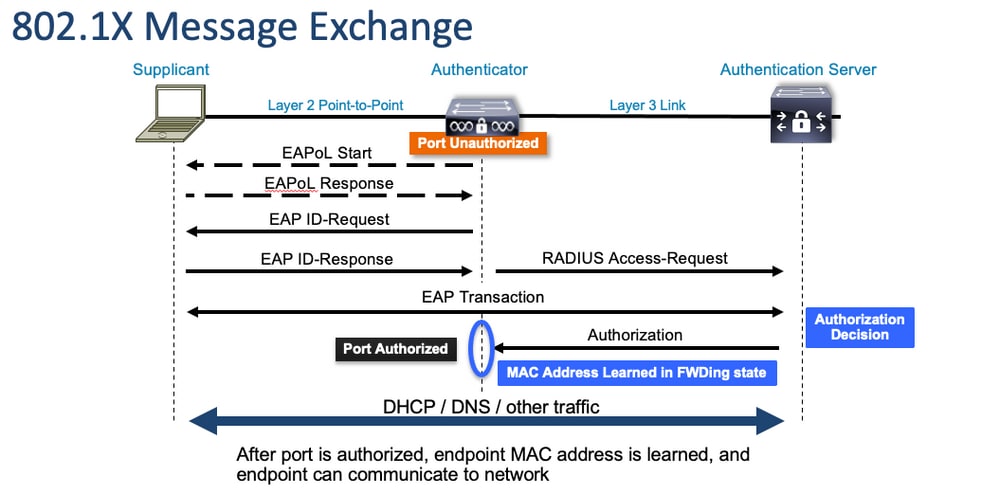
身份验证器(交换机)和身份验证服务器(例如ISE)通常由第3层分隔。RADIUS流量在身份验证器和服务器之间通过网络路由。EAPoL 流量在请求方(客户端)和身份验证器之间的直接链路上进行交换。MAC学习发生在身份验证和授权之后。
在处理涉及 802.1x 的问题时,请注意下列问题:
- 配置是否正确?
- 身份验证服务器是否可访问?
- 身份验证管理器的状态如何?
- 客户端与身份验证器之间或身份验证器与身份验证服务器之间的数据包传送是否存在任何问题?
配置
不同主要版本的某些配置略有不同。有关特定平台/代码的指南,请参阅相关配置指南。
AAA 必须配置为使用 802.1x 基于端口的身份验证。
必须为“dot1x”建立身份验证方法列表。这表示启用了802.1X的通用AAA配置。
C9300#show running-config | section aaa
aaa new-model <-- This enables AAA.
aaa group server radius ISEGROUP <-- This block establishes a RADIUS server group named "ISEGROUP".
 server name DOT1x
 ip radius source-interface Vlan1
aaa authentication dot1x default group ISEGROUP <-- This line establishes the method list for 802.1X authentication. Group ISEGROUP is be used.
aaa authorization network default group ISEGROUP
aaa accounting update newinfo periodic 2880
aaa accounting dot1x default start-stop group ISEGROUP

C9300#show running-config | section radius
aaa group server radius ISEGROUP
 server name DOT1x
 ip radius source-interface Vlan1 <-- Notice 'ip radius source-interface' configuration exists in both global configuration and the aaa server group block. These need to agree if configured in both places.
ip radius source-interface Vlan1
radius server DOT1x
 address ipv4 10.122.141.228 auth-port 1812 acct-port 1813 <-- 1812 and 1813 are default auth-port and acct-port, respectively.
 key secretKey
这是一个启用了 802.1x 的接口配置示例。MAB(MAC 身份验证绕行)是对不支持 dot1x 请求方的客户端进行身份验证的常见备用方式。
C9300#show running-config interface te1/0/4
Building configuration...

Current configuration : 148 bytes
!
interface TenGigabitEthernet1/0/4
 switchport access vlan 50
 switchport mode access
 authentication order dot1x mab <-- Specifies authentication order, dot1x and then mab
 authentication priority dot1x mab <-- Specifies authentication priority, dot1x and then mab
 authentication port-control auto <-- Enables 802.1x dynamic authentication on the port
 mab <-- Enables MAB
 dot1x pae authenticator <-- Puts interface into "authenticator" mode.
end
确定是否使用show mac address-table interface <interface>在接口上获取了MAC地址。接口仅在成功进行身份验证后才能获知 MAC 地址。
C9300#show mac address-table interface te1/0/4
          Mac Address Table
-------------------------------------------

Vlan    Mac Address       Type        Ports
----    -----------       --------    -----
  50    0800.2766.efc7    STATIC      Te1/0/4 <-- The "type" is STATIC and the MAC persists until the authentication session is cleared.
Total Mac Addresses for this criterion: 1
身份验证会话
show 命令可用于验证 802.1x 身份验证。
使用show authentication sessions或show authentication sessions <interface>显示有关当前身份验证会话的信息。在本示例中,仅 Te1/0/4 建立了有效身份验证会话。
C9300#show authentication sessions interface te1/0/4
Interface                MAC Address    Method  Domain  Status Fg  Session ID
--------------------------------------------------------------------------------------------
Te1/0/4                  0800.2766.efc7 dot1x   DATA    Auth        13A37A0A0000011DC85C34C5  <-- "Method" and "Domain" in this example are dot1x and DATA, respectively. Multi-domain authentication is supported.

Key to Session Events Blocked Status Flags:

  A - Applying Policy (multi-line status for details)
  D - Awaiting Deletion
  F - Final Removal in progress
  I - Awaiting IIF ID allocation
  P - Pushed Session
  R - Removing User Profile (multi-line status for details)
  U - Applying User Profile (multi-line status for details)
  X - Unknown Blocker

Runnable methods list:
  Handle  Priority  Name
      13         5  dot1xSup
       1         5  dot1x
       2        10  webauth
      14        15  mab
Show authentication sessions interface <interface> details提供有关特定接口身份验证会话的其他详细信息。
C9300#show authentication session interface te1/0/4 details
            Interface:  TenGigabitEthernet1/0/4
               IIF-ID:  0x14D66776
          MAC Address:  0800.2766.efc7
         IPv6 Address:  Unknown
         IPv4 Address:  Unknown
            User-Name:  alice
               Status:  Authorized
               Domain:  DATA
       Oper host mode:  multi-auth
     Oper control dir:  both
      Session timeout:  N/A
  Acct update timeout:  172800s (local), Remaining: 152363s
    Common Session ID:  13A37A0A0000011DC85C34C5
      Acct Session ID:  0x00000002
               Handle:  0xe8000015
       Current Policy:  POLICY_Te1/0/4 <-- If a post-authentication ACL is applied, it is listed here.


Local Policies:
	Service Template: DEFAULT_LINKSEC_POLICY_SHOULD_SECURE (priority 150)
      Security Policy:  Should Secure

Server Policies:


Method status list:
       Method           State
        dot1x           Authc Success <-- This example shows a successful 802.1x authentication session.
如果接口上已启用身份验证,但未建立有效的会话,则系统会列示出可运行的方式。系统不会显示与提供的条件匹配的会话。
C9300#show authentication sessions interface te1/0/5
No sessions match supplied criteria.

Runnable methods list:
  Handle  Priority  Name
      13         5  dot1xSup
       1         5  dot1x
       2        10  webauth
      14        15  mab
如果接口上未启用任何身份验证,则该接口上不会检测到身份验证管理器。系统不会显示与提供的条件匹配的会话。
C9300#show authentication sessions interface te1/0/6
No sessions match supplied criteria.
No Auth Manager presence on this interface
身份验证服务器的可访问性
能够访问身份验证服务器是 802.1x 身份验证成功的前提条件。
使用ping <server_ip>可快速测试连通性。确保 ping 源自 RADIUS 源接口。
C9300#ping 10.122.141.228 source vlan 1
Type escape sequence to abort.
Sending 5, 100-byte ICMP Echos to 10.122.141.228, timeout is 2 seconds:
Packet sent with a source address of 10.122.163.19
!!!!!
Success rate is 100 percent (5/5), round-trip min/avg/max = 1/1/1 ms
show aaa servers命令可识别服务器状态,并提供有关所有已配置AAA服务器事务的统计信息。
C9300#show aaa servers

RADIUS: id 3, priority 1, host 10.122.141.228, auth-port 1812, acct-port 1813, hostname DOT1x <-- Specific server
     State: current UP, duration 84329s, previous duration 0s <-- Current State
     Dead: total time 0s, count 1
     Platform State from SMD: current UP, duration 24024s, previous duration 0s
     SMD Platform Dead: total time 0s, count 45
     Platform State from WNCD (1) : current UP
     Platform State from WNCD (2) : current UP
     Platform State from WNCD (3) : current UP
     Platform State from WNCD (4) : current UP
     Platform State from WNCD (5) : current UP
     Platform State from WNCD (6) : current UP
     Platform State from WNCD (7) : current UP
     Platform State from WNCD (8) : current UP, duration 0s, previous duration 0s
     Platform Dead: total time 0s, count 0UP
     Quarantined: No
     Authen: request 510, timeouts 468, failover 0, retransmission 351   <-- Authentication Statistics
             Response: accept 2, reject 2, challenge 38
             Response: unexpected 0, server error 0, incorrect 12, time 21ms
             Transaction: success 42, failure 117
             Throttled: transaction 0, timeout 0, failure 0
             Malformed responses: 0
             Bad authenticators: 0
             Dot1x transactions:
             Response: total responses: 42, avg response time: 21ms
             Transaction: timeouts 114, failover 0
             Transaction: total 118, success 2, failure 116
             MAC auth transactions:
             Response: total responses: 0, avg response time: 0ms
             Transaction: timeouts 0, failover 0
             Transaction: total 0, success 0, failure 0
     Author: request 0, timeouts 0, failover 0, retransmission 0
             Response: accept 0, reject 0, challenge 0
             Response: unexpected 0, server error 0, incorrect 0, time 0ms
             Transaction: success 0, failure 0
             Throttled: transaction 0, timeout 0, failure 0
             Malformed responses: 0
             Bad authenticators: 0
             MAC author transactions:
             Response: total responses: 0, avg response time: 0ms
             Transaction: timeouts 0, failover 0
             Transaction: total 0, success 0, failure 0
     Account: request 3, timeouts 0, failover 0, retransmission 0
             Request: start 2, interim 0, stop 1
             Response: start 2, interim 0, stop 1
             Response: unexpected 0, server error 0, incorrect 0, time 11ms
             Transaction: success 3, failure 0
             Throttled: transaction 0, timeout 0, failure 0
             Malformed responses: 0
             Bad authenticators: 0
     Elapsed time since counters last cleared: 1d3h4m
     Estimated Outstanding Access Transactions: 0
     Estimated Outstanding Accounting Transactions: 0
     Estimated Throttled Access Transactions: 0
     Estimated Throttled Accounting Transactions: 0
     Maximum Throttled Transactions: access 0, accounting 0
     Consecutive Response Failures: total 115
             SMD Platform : max 113, current 0 total 113
             WNCD Platform: max 0, current 0 total 0
             IOSD Platform : max 2, current 2 total 2
     Consecutive Timeouts: total 466
             SMD Platform : max 455, current 0 total 455
             WNCD Platform: max 0, current 0 total 0
             IOSD Platform : max 11, current 11 total 11
     Requests per minute past 24 hours:
             high - 23 hours, 25 minutes ago: 4
             low  - 3 hours, 4 minutes ago: 0
             average: 0
使用test aaa实用程序确认从交换机到身份验证服务器的可达性。此实用程序已弃用,不能无限期使用。
C9300#debug radius <-- Classic Cisco IOS debugs are only useful in certain scenarios. See "Cisco IOS XE Debugs" for details.
C9300#test aaa group ISE username password new-code <-- This sends a RADIUS test probe to the identified server. The username and password is meant to elicit a rejection from RADIUS.
User rejected <-- This means that the RADIUS server received our test probe, but rejected our user. We can conclude the server is reachable and listening on the configured auth-port.
*Jul 16 21:05:57.632: %PARSER-5-HIDDEN: Warning!!! ' test platform-aaa group server-group ISE user-name username password new-code blocked count delay level profile rate users ' is a hidden command. Use of this command is not recommended/supported and will be removed in future.
*Jul 16 21:05:57.644: RADIUS/ENCODE(00000000):Orig. component type = Invalid
*Jul 16 21:05:57.644: RADIUS/ENCODE(00000000): dropping service type, "radius-server attribute 6 on-for-login-auth" is off
*Jul 16 21:05:57.644: RADIUS(00000000): Config NAS IP: 10.122.161.63
*Jul 16 21:05:57.644: vrfid: [65535] ipv6 tableid : [0]
*Jul 16 21:05:57.644: idb is NULL
*Jul 16 21:05:57.644: RADIUS(00000000): Config NAS IPv6: ::
*Jul 16 21:05:57.644: RADIUS(00000000): sending
*Jul 16 21:05:57.644: RADIUS/DECODE(00000000): There is no General DB. Want server details may not be specified
*Jul 16 21:05:57.644: RADIUS(00000000): Send Access-Request to 10.122.141.199:1812 id 1645/8, len 50 <-- Sending Access-Request to RADIUS server
RADIUS: authenticator 3B 65 96 37 63 E3 32 41 - 3A 93 63 B6 6B 6A 5C 68
*Jul 16 21:05:57.644: RADIUS: User-Password [2] 18 *
*Jul 16 21:05:57.644: RADIUS: User-Name [1] 6 "username"
*Jul 16 21:05:57.644: RADIUS: NAS-IP-Address [4] 6 10.122.161.63
*Jul 16 21:05:57.644: RADIUS(00000000): Sending a IPv4 Radius Packet
*Jul 16 21:05:57.644: RADIUS(00000000): Started 5 sec timeout
*Jul 16 21:05:57.669: RADIUS: Received from id 1645/8 10.122.141.199:1812, Access-Reject, len 20 <-- Receiving the Access-Reject from RADIUS server
RADIUS: authenticator 1A 11 32 19 12 F9 C3 CC - 6A 83 54 DF 0F DB 00 B8
*Jul 16 21:05:57.670: RADIUS/DECODE(00000000): There is no General DB. Reply server details may not be recorded
*Jul 16 21:05:57.670: RADIUS(00000000): Received from id 1645/8
故障排除
本部分提供如何在 Catalyst 交换机上排查大多数 802.1x 问题的指南。
方法
有条不紊地排查涉及 802.1x 和身份验证的问题,以获得最佳结果。以下是一些需要回答的问题:
- 问题是否仅涉及一台交换机?一个端口?一种客户端类型?
- 配置是否经过验证?身份验证服务器是否可访问?
- 问题是每次都发生,还是间歇性发生?问题是否仅在重新进行身份验证或更改授权时才会发生?
如果在排除明显问题后,相关问题仍然存在,请对单个失败的事务执行端到端检查。用于调查从客户端到服务器的 802.1x 事务的最佳、最完整的数据集包括:
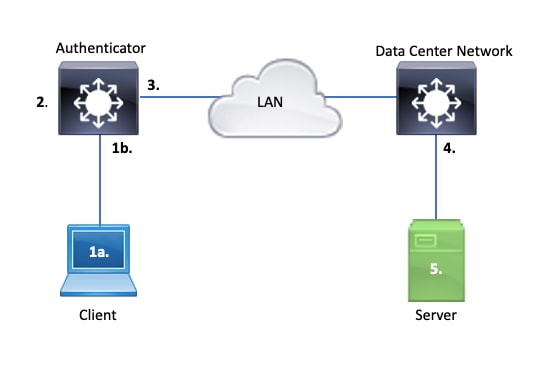
1a.客户端上的捕获和/或
1b.客户端连接的接入接口上的捕获
此参考点对于帮助我们深入了解启用了 dot1x 的接入端口与客户端之间交换的 EAPoL 数据包至关重要。SPAN 是查看客户端与身份验证器之间流量的最可靠的工具。
2. 身份验证器上的调试
通过调试,可以跟踪整个身份验证器中的事务。
- 身份验证器必须将接收到的 EAPoL 数据包转发出去,并生成发往身份验证服务器的单播 RADIUS 封装流量。
- 确保设置适当的调试级别,以达到最佳效果。
3. 身份验证器相关的捕获
通过此捕获,可以查看身份验证器和身份验证服务器之间的通信过程。
- 此捕获从身份验证器的角度准确展示整个通信过程。
- 配合第 4 点中的捕获,可以确定身份验证服务器和身份验证器之间是否存在丢包问题。
4. 身份验证服务器相关的捕获
此捕获可与第 3 点中的捕获配合使用。
- 此捕获从身份验证服务器的角度展示整个通信过程。
- 配合第 3 点中的捕获,可以确定身份验证器和身份验证服务器之间是否存在丢包问题。
5. 身份验证服务器上的捕获、调试和日志
最后,通过服务器调试,可以了解服务器掌握的事务相关信息。
- 借助此端到端数据集,网络工程师可以确定事务中断的位置,并排除与问题无关的组件。
症状示例
本部分列示了常见症状和问题场景。
- 客户端无响应
如果交换机生成的 EAPoL 流量未引起响应,则系统会显示以下系统日志:
Aug 23 11:23:46.387 EST: %DOT1X-5-FAIL: Switch 1 R0/0: sessmgrd: Authentication failed for client (aaaa.bbbb.cccc) with reason (No Response from Client) on Interface Gi6/0/32 AuditSessionID CBFF000A000001056EFE9E73
原因代码No Response from Client表示交换机已启动dot1x进程,但在超时期内未收到来自客户端的响应。
这意味着客户端未接收到或无法识别交换机端口发送的身份验证流量,或者交换机端口上未接收到客户端的响应。
- 客户端放弃会话
如果身份验证会话已启动但未完成,则身份验证服务器(例如 ISE)会报告客户端已启动会话,但在完成之前放弃了该会话。
通常,这意味着只能部分完成身份验证过程。
确保身份验证器交换机和身份验证服务器之间的整个事务以端到端方式传送,并由身份验证服务器正确解释。
如果RADIUS流量在网络上丢失,或以无法正确组合的方式传输,则事务不完整,客户端将重试身份验证。服务器则报告客户端已放弃会话。
- MAB 客户端 DHCP 失败/回退到 APIPA
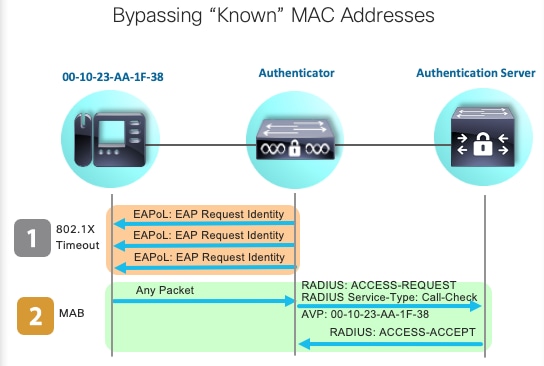
MAC 身份验证绕行 (MAB) 允许基于 MAC 地址进行身份验证。通常,不支持请求方软件的客户端通过 MAB 进行身份验证。
如果将 MAB 用作身份验证的备用方法,而 dot1x 是在交换机端口上运行的首选初始方法,则可能会出现客户端无法完成 DHCP 的情况。
问题可以归结为操作顺序。在 dot1x 运行时,交换机端口使用除 EAPoL 之外的数据包,直至身份验证完成或 dot1x 超时。但是,客户端会立即尝试获取 IP 地址并广播其 DHCP 发现消息。这些发现消息由交换机端口使用,直至 dot1x 超过其配置的超时值且 MAB 能够运行。如果客户端 DHCP 超时时限小于 dot1x 超时时限,则 DHCP 会失败,并且客户端会回退到 APIPA 或遵循其预设的备用策略。
可通过多种方式避免此问题。优先考虑在经过 MAB 身份验证的客户端连接的接口上使用 MAB。如果必须先运行 dot1x,请注意客户端 DHCP 行为并适当调整超时值。
使用 dot1x 和 MAB 时,请务必注意客户端行为。如前所述,有效的配置可能导致技术问题。
平台特定实用程序
本部分概述了Catalyst 9000系列交换机上提供的许多平台特定实用程序,这些实用程序可用于对dot1x问题进行故障排除。
- 交换端口分析器 (SPAN)
SPAN 允许用户将流量从一个或多个端口镜像到目的端口,以进行捕获和分析。本地SPAN是最值得使用的捕获实用程序。
- 嵌入式数据包捕获 (EPC)
EPC 利用 CPU 和内存资源提供内置的本地数据包捕获功能。
EPC 存在一些局限性,这会影响其调查某些问题的有效性。EPC 速率限制为每秒 1000 个数据包。EPC 也无法在物理接口的出口可靠地捕获 CPU 注入的数据包。如果需要重点查看身份验证器交换机和身份验证服务器之间的 RADIUS 事务,这一点非常重要。通常,连接服务器的接口上的流量速率会大大超过每秒 1000 个数据包。此外,连接服务器的接口的出口上的 EPC 无法捕获身份验证器交换机生成的流量。
使用双向访问列表过滤EPC,以避免受到每秒1000数据包限制的影响。如果需要关注身份验证器和服务器之间的 RADIUS 流量,请重点查看身份验证器 RADIUS 源接口地址和服务器地址之间的流量。
如果通往身份验证服务器的下一个上游设备是 Catalyst 交换机,请在通往身份验证器交换机的下行链路上使用经过过滤的 EPC,以获得最佳效果。
有关配置和实施的详细信息,请参阅此配置指南。
- Cisco IOS XE 调试
从 Cisco IOS XE 版本 16.3.2 开始,软件架构发生更改,已将 AAA 组件移至单独的 Linux 后台守护程序。一些常见的调试不再在日志记录缓冲区中启用可查看的调试。

提示:传统IOS AAA调试不再在系统日志中为系统日志缓冲区内的前面板端口身份验证提供输出。
相反,这些用于dot1x和RADIUS的传统Cisco IOS调试不再启用交换机的交换机日志缓冲区中的可视调试:
debug radius
debug access-session all
debug dot1x all
AAA组件调试现在可以通过会话管理器后台守护程序(SMD)下的系统跟踪访问。
- 与传统系统日志一样,Catalyst 系统跟踪以默认级别进行报告,必须得到指示才能收集更深入的日志。
- 使用set platform software trace smd switch active r0 <component> debug命令更改所需子组件的例行跟踪级别。
Switch#set platform software trace smd switch active R0 auth-mgr debug <<<--- This sets the "auth-mgr" subcomponent to "debug" log level.
下表显示了传统 IOS 调试命令与其跟踪命令之间的对应关系。
| 旧式命令 |
新式命令 |
| #debug radius |
#set platform software trace smd switch active R0 radius debug |
| #debug dot1x all |
#set platform software trace smd switch active R0 dot1x-all debug |
| #debug access-session all |
#set platform software trace smd switch active R0 auth-mgr-all debug |
| #debug epm all |
#set platform software trace smd switch active R0 epm-all debug |
传统调试支持所有相关的组件跟踪到调试级别。平台命令还用于根据需要启用特定跟踪。
使用命令show platform software trace level smd switch active R0显示SMD子组件的当前跟踪级别。
Switch#show platform software trace level smd switch active R0
Module Name                    Trace Level
-----------------------------------------------
aaa                            Notice <--- Default level is "Notice"
aaa-acct                       Notice
aaa-admin                      Notice
aaa-api                        Notice
aaa-api-attr                   Notice
<snip>
auth-mgr                       Debug <--- Subcomponent "auth-mgr" traces at "debug" level
auth-mgr-all                   Notice
<snip>
可通过两种方式将子组件跟踪级别恢复为默认级别。
- 请使用undebug all或set platform software trace smd switch active R0 <sub-component> notice进行恢复。
- 如果设备重新加载,跟踪级别也会恢复为默认级别。
Switch#undebug all
All possible debugging has been turned off

or

Switch#set platform software trace smd switch active R0 auth-mgr notice <--- Sets sub-component "auth-mgr" to trace level "Notice", the system default.
组件跟踪日志可以在控制台上查看,也可以写入存档并离线查看。 跟踪以压缩的二进制存档文件存档,需要解码。在处理存档跟踪时,请联系 TAC 以获取调试帮助。以下工作流程介绍如何在 CLI 中查看跟踪信息。
Show logging process是Cisco IOS XE 17.9.x及更高版本中用于跟踪和标准的更新实用程序。
C9300#show logging process smd ?
  <0-25>            instance number
  end               specify log filtering end location
  extract-pcap      Extract pcap data to a file
  filter            specify filter for logs
  fru               FRU specific commands
  internal          select all logs. (Without the internal keyword only
                    customer curated logs are displayed)
  level             select logs above specific level
  metadata          CLI to display metadata for every log message
  module            select logs for specific modules
  reverse           show logs in reverse chronological order
  start             specify log filtering start location
  switch            specify switch number
  to-file           decode files stored in disk and write output to file
  trace-on-failure  show the trace on failure summary
  |                 Output modifiers
Show logging process提供与show platform software trace相同的功能,其格式更简洁且易于访问。
C9300#clear auth sessions
C9300#show logging process smd reverse
Logging display requested on 2023/05/02 16:44:04 (UTC) for Hostname: [C9300], Model: [C9300X-24HX], Version: [17.09.01], SN: [FOC263569FP], MD_SN: [FOC2641Y2MK]

Displaying logs from the last 0 days, 0 hours, 10 minutes, 0 seconds
executing cmd on chassis 1 ...
===========================================================
 UTM [LUID NOT FOUND] .............. 0
 UTM [PCAP] ........................ 0
 UTM [MARKER] ...................... 0
 UTM [APP CONTEXT] ................. 0
 UTM [TDL TAN] ..................... 5
 UTM [MODULE ID] ................... 0
 UTM [DYN LIB] ..................... 0
 UTM [PLAIN TEXT] .................. 6
 UTM [ENCODED] ..................... 85839
 UTM [Skipped / Rendered / Total] .. 85128 / 722 / 85850
 Last UTM TimeStamp ................ 2023/05/02 16:44:03.775663010
 First UTM TimeStamp ............... 2023/05/02 15:52:18.763729918
===========================================================
----------------- Decoder Output Information --------------
===========================================================
 MRST Filter Rules ...... 1
 UTM Process Filter ..... smd
 Total UTM To Process ... 85850
 Total UTF To Process ... 1
 Num of Unique Streams .. 1
===========================================================
----------------- Decoder Input Information ---------------
===========================================================
======= Unified Trace Decoder Information/Statistics ======
===========================================================
2023/05/02 16:44:03.625123675 {smd_R0-0}{1}: [radius] [22624]: (ERR): Failed to mark Identifier for reuse
2023/05/02 16:44:03.625123382 {smd_R0-0}{1}: [radius] [22624]: (ERR): RSPE-  Set Identifier Free for Reuse : Input Validation Failed Level-2
2023/05/02 16:44:03.625116747 {smd_R0-0}{1}: [radius] [22624]: (info): Valid Response Packet, Free the identifier
2023/05/02 16:44:03.625091040 {smd_R0-0}{1}: [radius] [22624]: (info): RADIUS:  authenticator 2b f4 ea 87 d9 db 75 3a - 2c 8a c4 36 56 46 b5 57
2023/05/02 16:44:03.625068520 {smd_R0-0}{1}: [radius] [22624]: (info): RADIUS: Received from id 1813/9 10.122.141.228:0, Accounting-response, len 20
2023/05/02 16:44:03.610151863 {smd_R0-0}{1}: [radius] [22624]: (info): RADIUS: Started 5 sec timeout
2023/05/02 16:44:03.610097362 {smd_R0-0}{1}: [radius] [22624]: (info): RADIUS:  Acct-Delay-Time     [41]     6  0
2023/05/02 16:44:03.610090044 {smd_R0-0}{1}: [radius] [22624]: (info): RADIUS:  Event-Timestamp     [55]     6  1683045843
2023/05/02 16:44:03.610085857 {smd_R0-0}{1}: [radius] [22624]: (info): RADIUS:  Acct-Status-Type    [40]     6  Start                     [1]
2023/05/02 16:44:03.610040912 {smd_R0-0}{1}: [radius] [22624]: (info): RADIUS:  Class               [25]    63  ...
2023/05/02 16:44:03.610037444 {smd_R0-0}{1}: [radius] [22624]: (info): RADIUS:  Acct-Authentic      [45]     6  Remote                    [3]
2023/05/02 16:44:03.610032802 {smd_R0-0}{1}: [radius] [22624]: (info): RADIUS:  Acct-Session-Id     [44]    10  "00000004"
2023/05/02 16:44:03.610028677 {smd_R0-0}{1}: [radius] [22624]: (info): RADIUS:  Called-Station-Id   [30]    19  "00-01-02-02-AA-BF"
2023/05/02 16:44:03.610024641 {smd_R0-0}{1}: [radius] [22624]: (info): RADIUS:  Nas-Identifier      [32]     7  "C9300"
2023/05/02 16:44:03.610020641 {smd_R0-0}{1}: [radius] [22624]: (info): RADIUS:  Calling-Station-Id  [31]    19  "08-00-27-66-EF-C7"
2023/05/02 16:44:03.610016809 {smd_R0-0}{1}: [radius] [22624]: (info): RADIUS:  NAS-Port            [5]      6  50104
2023/05/02 16:44:03.610012487 {smd_R0-0}{1}: [radius] [22624]: (info): RADIUS:  NAS-Port-Type       [61]     6  Ethernet                  [15]
2023/05/02 16:44:03.610007504 {smd_R0-0}{1}: [radius] [22624]: (info): RADIUS:  NAS-Port-Id         [87]    25  "TenGigabitEthernet1/0/4"
2023/05/02 16:44:03.610003581 {smd_R0-0}{1}: [radius] [22624]: (info): RADIUS:  NAS-IP-Address      [4]      6  10.122.163.19
2023/05/02 16:44:03.609998136 {smd_R0-0}{1}: [radius] [22624]: (info): RADIUS:  Calling-Station-Id  [31]    19  "08-00-27-66-EF-C7"
2023/05/02 16:44:03.609994109 {smd_R0-0}{1}: [radius] [22624]: (info): RADIUS:  Called-Station-Id   [30]    19  "00-01-02-02-AA-BF"
2023/05/02 16:44:03.609989329 {smd_R0-0}{1}: [radius] [22624]: (info): RADIUS:   Cisco AVpair       [1]     14  "method=dot1x"
2023/05/02 16:44:03.609985171 {smd_R0-0}{1}: [radius] [22624]: (info): RADIUS:  Vendor, Cisco       [26]    20
2023/05/02 16:44:03.609981606 {smd_R0-0}{1}: [radius] [22624]: (info): RADIUS:   Cisco AVpair       [1]     43  "audit-session-id=13A37A0A0000011FDD598189"
2023/05/02 16:44:03.609976961 {smd_R0-0}{1}: [radius] [22624]: (info): RADIUS:  Vendor, Cisco       [26]    49
2023/05/02 16:44:03.609969166 {smd_R0-0}{1}: [radius] [22624]: (info): RADIUS:  User-Name           [1]      7  "alice"
2023/05/02 16:44:03.609963241 {smd_R0-0}{1}: [radius] [22624]: (info): RADIUS:  authenticator 0b 99 e3 50 d8 d3 8c 26 - e8 41 c3 f6 11 b9 ab 2f
2023/05/02 16:44:03.609953614 {smd_R0-0}{1}: [radius] [22624]: (info): RADIUS: Send Accounting-Request to 10.122.141.228:1813 id 1813/9, len 319
2023/05/02 16:44:03.609863172 {smd_R0-0}{1}: [auth-mgr] [22624]: (info): [0800.2766.efc7:Te1/0/4] Handling external PRE event AuthZ Success
2023/05/02 16:44:03.609695649 {smd_R0-0}{1}: [dot1x] [22624]: (info): [0800.2766.efc7:Te1/0/4] EAPOL packet sent to client
2023/05/02 16:44:03.609689224 {smd_R0-0}{1}: [dot1x] [22624]: (info): [0000.0000.0000:unknown] Pkt body: 03 68 00 04
2023/05/02 16:44:03.609686794 {smd_R0-0}{1}: [dot1x] [22624]: (info): [0800.2766.efc7:Te1/0/4] EAP Packet - SUCCESS, ID : 0x68
2023/05/02 16:44:03.609683919 {smd_R0-0}{1}: [dot1x] [22624]: (info): [0800.2766.efc7:Te1/0/4] Sent EAPOL packet - Version : 3,EAPOL Type : EAP, Payload Length : 4, EAP-Type = 0
2023/05/02 16:44:03.609334292 {smd_R0-0}{1}: [dot1x] [22624]: (info): [0000.0000.0000:Te1/0/4] Sending out EAPOL packet
2023/05/02 16:44:03.609332867 {smd_R0-0}{1}: [dot1x] [22624]: (info): [0000.0000.0000:Te1/0/4] Setting EAPOL eth-type to 0x888e, destination mac to 0800.2766.efc7
2023/05/02 16:44:03.609310820 {smd_R0-0}{1}: [dot1x] [22624]: (info): [0800.2766.efc7:Te1/0/4] Posting AUTHZ_SUCCESS on Client
2023/05/02 16:44:03.609284841 {smd_R0-0}{1}: [auth-mgr] [22624]: (info): [0800.2766.efc7:Te1/0/4] Raising ext evt AuthZ Success (21) on this session, client (unknown) (0)
跟踪示例
本部分包括 dot1x 和 RADIUS 组件的会话管理器跟踪,涉及一次完整但失败的事务(服务器拒绝客户端凭证), 旨在为浏览与前面板身份验证相关的系统跟踪信息提供基本指南。
- 测试客户端尝试连接到 GigabitEthernet1/0/2,但被拒绝。
在本示例中,SMD组件跟踪设置为“debug”。
C9300#set platform software trace smd sw active r0 dot1x-all
C9300#set platform software trace smd sw active r0 radius debug
EAPoL:开始
[dot1x]: [16498]: UUID: 0, ra: 0 (debug): [0000.0000.0000:unknown] Received EAPOL pkt (size=92) on l2 socket
[dot1x]: [16498]: UUID: 0, ra: 0 (info): [0000.0000.0000:Gi1/0/2] queuing an EAPOL pkt on Auth Q
[dot1x]: [16498]: UUID: 0, ra: 0 (info): [0000.0000.0000:Gi1/0/2] Dequeued pkt: CODE= 0,TYPE= 0,LEN= 0
[dot1x]: [16498]: UUID: 0, ra: 0 (info): [0000.0000.0000:Gi1/0/2] Received pkt saddr = 0040.E93E.0000 , daddr = 0180.C200.0003, pae-ether-type = 0x888E
[dot1x]: [16498]: UUID: 0, ra: 0 (info): [0000.0000.0000:Gi1/0/2] Couldn't find the supplicant in the list
[dot1x]: [16498]: UUID: 0, ra: 0 (info): [0040.E93E.0000:Gi1/0/2] New client detected, sending session start event for 0040.E93E.0000
[dot1x]: [16498]: UUID: 0, ra: 0 (debug): [0040.E93E.0000:Gi1/0/2] 0x0A00000E: initialising
[dot1x]: [16498]: UUID: 0, ra: 0 (debug): [0040.E93E.0000:Gi1/0/2] 0x0A00000E: disconnected
[dot1x]: [16498]: UUID: 0, ra: 0 (debug): [0040.E93E.0000:Gi1/0/2] 0x0A00000E: entering restart
[dot1x]: [16498]: UUID: 0, ra: 0 (info): [0040.E93E.0000:Gi1/0/2] Sending create new context event to EAP for 0x0A00000E (0040.E93E.0000)
[dot1x]: [16498]: UUID: 0, ra: 0 (debug): [0040.E93E.0000:Gi1/0/2] 0x0A00000E: entering init state
[dot1x]: [16498]: UUID: 0, ra: 0 (debug): [0040.E93E.0000:Gi1/0/2] 0x0A00000E:entering idle state
[dot1x]: [16498]: UUID: 0, ra: 0 (info): [0040.E93E.0000:Gi1/0/2] Created a client entry (0x0A00000E)
[dot1x]: [16498]: UUID: 0, ra: 0 (info): [0040.E93E.0000:Gi1/0/2] Dot1x authentication started for 0x0A00000E (0040.E93E.0000)
[dot1x]: [16498]: UUID: 0, ra: 0 (debug): [0040.E93E.0000:Gi1/0/2] Posting !EAP_RESTART on Client 0x0A00000E
[dot1x]: [16498]: UUID: 0, ra: 0 (debug): [0040.E93E.0000:Gi1/0/2] 0x0A00000E:enter connecting state
[dot1x]: [16498]: UUID: 0, ra: 0 (debug): [0040.E93E.0000:Gi1/0/2] 0x0A00000E: restart connecting
[dot1x]: [16498]: UUID: 0, ra: 0 (debug): [0040.E93E.0000:Gi1/0/2] Posting RX_REQ on Client 0x0A00000E
[dot1x]: [16498]: UUID: 0, ra: 0 (debug): [0040.E93E.0000:Gi1/0/2] 0x0A00000E: authenticating state entered
[dot1x]: [16498]: UUID: 0, ra: 0 (debug): [0040.E93E.0000:Gi1/0/2] 0x0A00000E:connecting authenticating action
[dot1x]: [16498]: UUID: 0, ra: 0 (debug): [0040.E93E.0000:Gi1/0/2] Posting AUTH_START for 0x0A00000E
[dot1x]: [16498]: UUID: 0, ra: 0 (debug): [0040.E93E.0000:Gi1/0/2] 0x0A00000E:entering request state
EAPoL:EAP 请求身份
[dot1x]: [16498]: UUID: 0, ra: 0 (info): [0000.0000.0000:Gi1/0/2] Sending EAPOL packet
[dot1x]: [16498]: UUID: 0, ra: 0 (info): [0000.0000.0000:Gi1/0/2] Sending out EAPOL packet
[dot1x]: [16498]: UUID: 0, ra: 0 (info): [0040.E93E.0000:Gi1/0/2] EAPOL packet sent to client 0x0A00000E
[dot1x]: [16498]: UUID: 0, ra: 0 (debug): [0040.E93E.0000:Gi1/0/2] 0x0A00000E:idle request action
EAPoL:EAP 响应
[dot1x]: [16498]: UUID: 0, ra: 0 (debug): [0000.0000.0000:unknown] Received EAPOL pkt (size=92) on l2 socket
[dot1x]: [16498]: UUID: 0, ra: 0 (info): [0000.0000.0000:Gi1/0/2] Queuing an EAPOL pkt on Authenticator Q
[dot1x]: [16498]: UUID: 0, ra: 0 (info): [0000.0000.0000:Gi1/0/2] Dequeued pkt: CODE= 2,TYPE= 1,LEN= 14
[dot1x]: [16498]: UUID: 0, ra: 0 (info): [0000.0000.0000:Gi1/0/2] Received pkt saddr = 0040.E93E.0000 , daddr = 0180.C200.0003, pae-ether-type = 0x888E
[dot1x]: [16498]: UUID: 0, ra: 0 (debug): [0040.E93E.0000:Gi1/0/2] Posting EAPOL_EAP for 0x0A00000E
[dot1x]: [16498]: UUID: 0, ra: 0 (debug): [0040.E93E.0000:Gi1/0/2] 0x0A00000E:entering response state
[dot1x]: [16498]: UUID: 0, ra: 0 (info): [0040.E93E.0000:Gi1/0/2] Response sent to the server from 0x0A00000E
[dot1x]: [16498]: UUID: 0, ra: 0 (debug): [0040.E93E.0000:Gi1/0/2] 0x0A00000E:request response action
[aaa-authen]: [16498]: UUID: 0, ra: 0 (debug): AAA/AUTHEN/8021X (00000000): Pick method list 'default'
[radius]: [16498]: UUID: 0, ra: 0 (debug): RADIUS/ENCODE: Best Local IP-Address 172.28.99.147 for Radius-Server 172.28.99.252
[radius-failover]: [16498]: UUID: 0, ra: 0 (debug): RADIUS/ENCODE: Nas-Identifier "C9300"
[aaa-author]: [16498]: UUID: 0, ra: 0 (debug): VALID SG handle
RADIUS:访问-请求
[radius]: [16498]: UUID: 0, ra: 0 (debug): RADIUS(00000000): Send Access-Request to 172.28.99.252:1645 id 1812/82, len 242
[radius]: [16498]: UUID: 0, ra: 0 (debug): RADIUS: authenticator 59 c9 e0 be 4d b5 1c 11 - 02 cb 5b eb 78 d0 4b ad
[radius]: [16498]: UUID: 0, ra: 0 (debug): RADIUS: User-Name [1] 11 "ixia_data"
[radius]: [16498]: UUID: 0, ra: 0 (debug): RADIUS: Service-Type [6] 6 Framed [2]
[radius]: [16498]: UUID: 0, ra: 0 (debug): RADIUS: Vendor, Cisco [26] 27
[radius]: [16498]: UUID: 0, ra: 0 (debug): RADIUS: Cisco AVpair [1] 21 "service-type=Framed"
[radius]: [16498]: UUID: 0, ra: 0 (debug): RADIUS: Framed-MTU [12] 6 1500
[radius]: [16498]: UUID: 0, ra: 0 (debug): RADIUS: Calling-Station-Id [31] 19 "00-40-E9-3E-00-00"
0e 01 69 78 69 61 5f 64 61 74 61 [ ixia_data]
[radius]: [16498]: UUID: 0, ra: 0 (debug): RADIUS: EAP-Message [79] 16
69 87 3c 61 80 3a 31 a8 73 2b 55 76 f4 [ Ei<a:1s+Uv]
[radius]: [16498]: UUID: 0, ra: 0 (debug): RADIUS: Message-Authenticator[80] 18
[radius]: [16498]: UUID: 0, ra: 0 (debug): RADIUS: EAP-Key-Name [102] 2 *
[radius]: [16498]: UUID: 0, ra: 0 (debug): RADIUS: Vendor, Cisco [26] 49
[radius]: [16498]: UUID: 0, ra: 0 (debug): RADIUS: Cisco AVpair [1] 43 "audit-session-id=AC1C639300000017E53C6E8E"
[radius]: [16498]: UUID: 0, ra: 0 (debug): RADIUS: Vendor, Cisco [26] 20
[radius]: [16498]: UUID: 0, ra: 0 (debug): RADIUS: Cisco AVpair [1] 14 "method=dot1x"
[radius]: [16498]: UUID: 0, ra: 0 (debug): RADIUS: NAS-IP-Address [4] 6 172.28.99.147
[radius]: [16498]: UUID: 0, ra: 0 (debug): RADIUS: Nas-Identifier [32] 8 "C9300"
[radius]: [16498]: UUID: 0, ra: 0 (debug): RADIUS: NAS-Port-Id [87] 22 "GigabitEthernet1/0/2"
[radius]: [16498]: UUID: 0, ra: 0 (debug): RADIUS: NAS-Port-Type [61] 6 Ethernet [15]
[radius]: [16498]: UUID: 0, ra: 0 (debug): RADIUS(00000000): Sending a IPv4 Radius Packet
[radius]: [16498]: UUID: 0, ra: 0 (debug): RADIUS(00000000): Started 5 sec timeout
RADIUS:访问-质询
[radius]: [16498]: UUID: 0, ra: 0 (debug): RADIUS: Received from id 1645/82 172.28.99.252:0, Access-Challenge, len 127
[radius]: [16498]: UUID: 0, ra: 0 (debug): RADIUS: NAS-Port [5] 6 50014 RADIUS: authenticator 82 71 61 a5 30 bc 98 78 - fa f1 48 ec 05 fb ca 3a
RADIUS: 33 37 43 50 4d 53 65 73 73 69 6f 6e 49 44 3d 41 [37CPMSessionID=A]
[radius]: [16498]: UUID: 0, ra: 0 (debug): RADIUS: State [24] 81
[radius]: [16498]: UUID: 0, ra: 0 (debug): RADIUS: 43 31 43 36 33 39 33 30 30 30 30 30 30 31 37 45 [C1C639300000017E]
[radius]: [16498]: UUID: 0, ra: 0 (debug): RADIUS: 35 33 43 36 45 38 45 3b 33 36 53 65 73 73 69 6f [53C6E8E;36Sessio]
[radius]: [16498]: UUID: 0, ra: 0 (debug): RADIUS: 6e 49 44 3d 69 73 65 2d 70 6f 6c 2d 65 73 63 2f [nID=ise-pol-esc/]
[radius]: [16498]: UUID: 0, ra: 0 (debug): RADIUS: 32 34 30 31 39 38 34 32 39 2f 38 39 32 34 3b [ 240198429/8924;]
RADIUS: 01 f9 00 06 0d 20 [ ]
02/15 14:01:28.986 [radius]: [16498]: UUID: 0, ra: 0 (debug): RADIUS: EAP-Message [79] 8
RADIUS: 78 66 ec be 2c a4 af 79 5e ec c6 47 8b da 6a c2 [ xf,y^Gj]
[radius]: [16498]: UUID: 0, ra: 0 (debug): RADIUS: Message-Authenticator[80] 18
[radius]: [16498]: UUID: 0, ra: 0 (debug): RADIUS:rad_code 11, suppress reject flag 0
[radius-authen]: [16498]: UUID: 0, ra: 0 (debug): RADIUS(00000000): Received from id 1645/82
[dot1x]: [16498]: UUID: 0, ra: 0 (debug): [0040.E93E.0000:Gi1/0/2] Posting EAP_REQ for 0x0A00000E
[dot1x]: [16498]: UUID: 0, ra: 0 (debug): [0040.E93E.0000:Gi1/0/2] 0x0A00000E:exiting response state
[dot1x]: [16498]: UUID: 0, ra: 0 (debug): [0040.E93E.0000:Gi1/0/2] 0x0A00000E:entering request state########## EAPoL: EAP-REQUEST ##########
[dot1x]: [16498]: UUID: 0, ra: 0 (info): [0000.0000.0000:Gi1/0/2] Sending EAPOL packet
[dot1x]: [16498]: UUID: 0, ra: 0 (info): [0000.0000.0000:Gi1/0/2] Sending out EAPOL packet
[dot1x]: [16498]: UUID: 0, ra: 0 (info): [0040.E93E.0000:Gi1/0/2] EAPOL packet sent to client 0x0A00000E
[dot1x]: [16498]: UUID: 0, ra: 0 (debug): [0040.E93E.0000:Gi1/0/2] 0x0A00000E:response request action
EAPoL:EAP 响应
02/15 14:01:28.988 [dot1x]: [16498]: UUID: 0, ra: 0 (debug): [0000.0000.0000:unknown] Received EAPOL pkt (size=92) on l2 socket
02/15 14:01:28.989 [dot1x]: [16498]: UUID: 0, ra: 0 (info): [0000.0000.0000:Gi1/0/2] Queuing an EAPOL pkt on Authenticator Q
02/15 14:01:28.989 [dot1x]: [16498]: UUID: 0, ra: 0 (info): [0000.0000.0000:Gi1/0/2] Dequeued pkt: CODE= 2,TYPE= 3,LEN= 6
02/15 14:01:28.989 [dot1x]: [16498]: UUID: 0, ra: 0 (info): [0000.0000.0000:Gi1/0/2] Received pkt saddr = 0040.E93E.0000 , daddr = 0180.C200.0003, pae-ether-type = 0x888E
02/15 14:01:28.989 [dot1x]: [16498]: UUID: 0, ra: 0 (debug): [0040.E93E.0000:Gi1/0/2] Posting EAPOL_EAP for 0x0A00000E
02/15 14:01:28.989 [dot1x]: [16498]: UUID: 0, ra: 0 (debug): [0040.E93E.0000:Gi1/0/2] 0x0A00000E:entering response state
02/15 14:01:28.989 [dot1x]: [16498]: UUID: 0, ra: 0 (info): [0040.E93E.0000:Gi1/0/2] Response sent to the server from 0x0A00000E
02/15 14:01:28.989 [dot1x]: [16498]: UUID: 0, ra: 0 (debug): [0040.E93E.0000:Gi1/0/2] 0x0A00000E:request response action
02/15 14:01:28.989 [aaa-authen]: [16498]: UUID: 0, ra: 0 (debug): AAA/AUTHEN/8021X (00000000): Pick method list 'default'
02/15 14:01:28.990 [radius]: [16498]: UUID: 0, ra: 0 (debug): RADIUS/ENCODE: Best Local IP-Address 172.28.99.147 for Radius-Server 172.28.99.252
02/15 14:01:28.990 [radius-failover]: [16498]: UUID: 0, ra: 0 (debug): RADIUS/ENCODE: Nas-Identifier "C9300"
02/15 14:01:28.990 [aaa-author]: [16498]: UUID: 0, ra: 0 (debug): VALID SG handle
RADIUS:访问-请求
[radius]: [16498]: UUID: 0, ra: 0 (debug): RADIUS(00000000): Send Access-Request to 172.28.99.252:1645 id 1812/83, len 315
[radius]: [16498]: UUID: 0, ra: 0 (debug): RADIUS: authenticator 3d 31 3f ee 14 b8 9d 63 - 7a 8b 52 90 5f 77 6d b8
[radius]: [16498]: UUID: 0, ra: 0 (debug): RADIUS: User-Name [1] 11 "ixia_data"
[radius]: [16498]: UUID: 0, ra: 0 (debug): RADIUS: Service-Type [6] 6 Framed [2]
[radius]: [16498]: UUID: 0, ra: 0 (debug): RADIUS: Vendor, Cisco [26] 27
[radius]: [16498]: UUID: 0, ra: 0 (debug): RADIUS: Cisco AVpair [1] 21 "service-type=Framed"
[radius]: [16498]: UUID: 0, ra: 0 (debug): RADIUS: Framed-MTU [12] 6 1500
[radius]: [16498]: UUID: 0, ra: 0 (debug): RADIUS: Calling-Station-Id [31] 19 "00-40-E9-3E-00-00"
RADIUS: 02 f9 00 06 03 04
02/15 14:01:28.991 [radius]: [16498]: UUID: 0, ra: 0 (debug): RADIUS: EAP-Message [79] 8
RADIUS: 8b 2a 2e 75 90 a2 e1 c9 06 84 c9 fe f5 d0 98 39 [ *.u9]
[radius]: [16498]: UUID: 0, ra: 0 (debug): RADIUS: Message-Authenticator[80] 18
[radius]: [16498]: UUID: 0, ra: 0 (debug): RADIUS: EAP-Key-Name [102] 2 *
[radius]: [16498]: UUID: 0, ra: 0 (debug): RADIUS: Vendor, Cisco [26] 49
[radius]: [16498]: UUID: 0, ra: 0 (debug): RADIUS: Cisco AVpair [1] 43 "audit-session-id=AC1C639300000017E53C6E8E"
[radius]: [16498]: UUID: 0, ra: 0 (debug): RADIUS: Vendor, Cisco [26] 20
[radius]: [16498]: UUID: 0, ra: 0 (debug): RADIUS: Cisco AVpair [1] 14 "method=dot1x"
[radius]: [16498]: UUID: 0, ra: 0 (debug): RADIUS: NAS-IP-Address [4] 6 172.28.99.147
[radius]: [16498]: UUID: 0, ra: 0 (debug): RADIUS: Nas-Identifier [32] 8 "C9300"
[radius]: [16498]: UUID: 0, ra: 0 (debug): RADIUS: NAS-Port-Id [87] 22 "GigabitEthernet1/0/2"
[radius]: [16498]: UUID: 0, ra: 0 (debug): RADIUS: NAS-Port-Type [61] 6 Ethernet [15]
[radius]: [16498]: UUID: 0, ra: 0 (debug): RADIUS: NAS-Port [5] 6 50014
RADIUS: 33 37 43 50 4d 53 65 73 73 69 6f 6e 49 44 3d 41 [37CPMSessionID=A]
[radius]: [16498]: UUID: 0, ra: 0 (debug): RADIUS: State [24] 81
[radius]: [16498]: UUID: 0, ra: 0 (debug): RADIUS: 43 31 43 36 33 39 33 30 30 30 30 30 30 31 37 45 [C1C639300000017E]
[radius]: [16498]: UUID: 0, ra: 0 (debug): RADIUS: 35 33 43 36 45 38 45 3b 33 36 53 65 73 73 69 6f [53C6E8E;36Sessio]
[radius]: [16498]: UUID: 0, ra: 0 (debug): RADIUS: 6e 49 44 3d 69 73 65 2d 70 6f 6c 2d 65 73 63 2f [nID=ise-pol-esc/]
[radius]: [16498]: UUID: 0, ra: 0 (debug): RADIUS: 32 34 30 31 39 38 34 32 39 2f 38 39 32 34 3b [ 240198429/8924;]
[radius]: [16498]: UUID: 0, ra: 0 (debug): RADIUS(00000000): Sending a IPv4 Radius Packet
[radius]: [16498]: UUID: 0, ra: 0 (debug): RADIUS(00000000): Started 5 sec timeout
RADIUS:访问-质询
[radius]: [16498]: UUID: 0, ra: 0 (debug): RADIUS: Received from id 1645/83 172.28.99.252:0, Access-Challenge, len 154
[radius]: [16498]: UUID: 0, ra: 0 (debug): RADIUS: authenticator 0c 8d 49 80 0f 51 89 fa - ba 22 2f 96 41 99 c2 4e
RADIUS: 33 37 43 50 4d 53 65 73 73 69 6f 6e 49 44 3d 41 [37CPMSessionID=A]
[radius]: [16498]: UUID: 0, ra: 0 (debug): RADIUS: State [24] 81
[radius]: [16498]: UUID: 0, ra: 0 (debug): RADIUS: 43 31 43 36 33 39 33 30 30 30 30 30 30 31 37 45 [C1C639300000017E]
[radius]: [16498]: UUID: 0, ra: 0 (debug): RADIUS: 35 33 43 36 45 38 45 3b 33 36 53 65 73 73 69 6f [53C6E8E;36Sessio]
[radius]: [16498]: UUID: 0, ra: 0 (debug): RADIUS: 6e 49 44 3d 69 73 65 2d 70 6f 6c 2d 65 73 63 2f [nID=ise-pol-esc/]
[radius]: [16498]: UUID: 0, ra: 0 (debug): RADIUS: 32 34 30 31 39 38 34 32 39 2f 38 39 32 34 3b [ 240198429/8924;]
RADIUS: 01 fa 00 21 04 10 5b d0 b6 4e 68 37 6b ca 5e 6f 5a 65 78 04 77 bf 69 73 65 2d [![Nh7k^oZexwise-]
[radius]: [16498]: UUID: 0, ra: 0 (debug): RADIUS: EAP-Message [79] 35
[radius]: [16498]: UUID: 0, ra: 0 (debug): RADIUS: 70 6f 6c 2d 65 73 63 [ pol-esc]
RADIUS: a3 0d b0 02 c8 32 85 2c 94 bd 03 b3 22 e6 71 1e [ 2,"q]
[radius]: [16498]: UUID: 0, ra: 0 (debug): RADIUS: Message-Authenticator[80] 18
[radius]: [16498]: UUID: 0, ra: 0 (debug): RADIUS:rad_code 11, suppress reject flag 0
[radius-authen]: [16498]: UUID: 0, ra: 0 (debug): RADIUS(00000000): Received from id 1645/83
[dot1x]: [16498]: UUID: 0, ra: 0 (debug): [0040.E93E.0000:Gi1/0/2] Posting EAP_REQ for 0x0A00000E
[dot1x]: [16498]: UUID: 0, ra: 0 (debug): [0040.E93E.0000:Gi1/0/2] 0x0A00000E:exiting response state
[dot1x]: [16498]: UUID: 0, ra: 0 (debug): [0040.E93E.0000:Gi1/0/2] 0x0A00000E:entering request state
EAPoL:EAP 请求
[dot1x]: [16498]: UUID: 0, ra: 0 (info): [0000.0000.0000:Gi1/0/2] Sending EAPOL packet
[dot1x]: [16498]: UUID: 0, ra: 0 (info): [0000.0000.0000:Gi1/0/2] Sending out EAPOL packet
[dot1x]: [16498]: UUID: 0, ra: 0 (info): [0040.E93E.0000:Gi1/0/2] EAPOL packet sent to client 0x0A00000E
[dot1x]: [16498]: UUID: 0, ra: 0 (debug): [0040.E93E.0000:Gi1/0/2] 0x0A00000E:response request action
EAPoL:EAP 响应
[dot1x]: [16498]: UUID: 0, ra: 0 (debug): [0000.0000.0000:unknown] Received EAPOL pkt (size=92) on l2 socket
[dot1x]: [16498]: UUID: 0, ra: 0 (info): [0000.0000.0000:Gi1/0/2] Queuing an EAPOL pkt on Authenticator Q
[dot1x]: [16498]: UUID: 0, ra: 0 (info): [0000.0000.0000:Gi1/0/2] Dequeued pkt: CODE= 2,TYPE= 4,LEN= 31
[dot1x]: [16498]: UUID: 0, ra: 0 (info): [0000.0000.0000:Gi1/0/2] Received pkt saddr = 0040.E93E.0000 , daddr = 0180.C200.0003, pae-ether-type = 0x888E
[dot1x]: [16498]: UUID: 0, ra: 0 (debug): [0040.E93E.0000:Gi1/0/2] Posting EAPOL_EAP for 0x0A00000E
[dot1x]: [16498]: UUID: 0, ra: 0 (debug): [0040.E93E.0000:Gi1/0/2] 0x0A00000E:entering response state
[dot1x]: [16498]: UUID: 0, ra: 0 (info): [0040.E93E.0000:Gi1/0/2] Response sent to the server from 0x0A00000E
[dot1x]: [16498]: UUID: 0, ra: 0 (debug): [0040.E93E.0000:Gi1/0/2] 0x0A00000E:request response action
[aaa-authen]: [16498]: UUID: 0, ra: 0 (debug): AAA/AUTHEN/8021X (00000000): Pick method list 'default'
[radius]: [16498]: UUID: 0, ra: 0 (debug): RADIUS/ENCODE: Best Local IP-Address 172.28.99.147 for Radius-Server 172.28.99.252
[radius-failover]: [16498]: UUID: 0, ra: 0 (debug): RADIUS/ENCODE: Nas-Identifier "C9300"
[aaa-author]: [16498]: UUID: 0, ra: 0 (debug): VALID SG handle
RADIUS:访问-请求
radius]: [16498]: UUID: 0, ra: 0 (debug): RADIUS(00000000): Send Access-Request to 172.28.99.252:1645 id 1812/84, len 340
[radius]: [16498]: UUID: 0, ra: 0 (debug): RADIUS: authenticator 41 4d 76 8e 03 93 9f 05 - 5e fa f1 d6 ca 3c 84 08
[radius]: [16498]: UUID: 0, ra: 0 (debug): RADIUS: User-Name [1] 11 "ixia_data"
[radius]: [16498]: UUID: 0, ra: 0 (debug): RADIUS: Service-Type [6] 6 Framed [2]
[radius]: [16498]: UUID: 0, ra: 0 (debug): RADIUS: Vendor, Cisco [26] 27
[radius]: [16498]: UUID: 0, ra: 0 (debug): RADIUS: Cisco AVpair [1] 21 "service-type=Framed"
[radius]: [16498]: UUID: 0, ra: 0 (debug): RADIUS: Framed-MTU [12] 6 1500
[radius]: [16498]: UUID: 0, ra: 0 (debug): RADIUS: Calling-Station-Id [31] 19 "00-40-E9-3E-00-00"
RADIUS: 02 fa 00 1f 04 10 02 b6 bc aa f4 91 2b d6 cf 9e 3b d5 44 96 78 d5 69 78 69 61 5f 64 61 74 61 [ +;Dxixia_data]
[radius]: [16498]: UUID: 0, ra: 0 (debug): RADIUS: EAP-Message [79] 33
RADIUS: 3b 70 b1 dd 97 ac 47 ae 81 ca f8 78 5b a3 7b fe [ ;pGx[{]
[radius]: [16498]: UUID: 0, ra: 0 (debug): RADIUS: Message-Authenticator[80] 18
[radius]: [16498]: UUID: 0, ra: 0 (debug): RADIUS: EAP-Key-Name [102] 2 *
[radius]: [16498]: UUID: 0, ra: 0 (debug): RADIUS: Vendor, Cisco [26] 49
[radius]: [16498]: UUID: 0, ra: 0 (debug): RADIUS: Cisco AVpair [1] 43 "audit-session-id=AC1C639300000017E53C6E8E"
[radius]: [16498]: UUID: 0, ra: 0 (debug): RADIUS: Vendor, Cisco [26] 20
[radius]: [16498]: UUID: 0, ra: 0 (debug): RADIUS: Cisco AVpair [1] 14 "method=dot1x"
[radius]: [16498]: UUID: 0, ra: 0 (debug): RADIUS: NAS-IP-Address [4] 6 172.28.99.147
[radius]: [16498]: UUID: 0, ra: 0 (debug): RADIUS: Nas-Identifier [32] 8 "C9300"
[radius]: [16498]: UUID: 0, ra: 0 (debug): RADIUS: NAS-Port-Id [87] 22 "GigabitEthernet1/0/2"
[radius]: [16498]: UUID: 0, ra: 0 (debug): RADIUS: NAS-Port-Type [61] 6 Ethernet [15]
[radius]: [16498]: UUID: 0, ra: 0 (debug): RADIUS: NAS-Port [5] 6 50014
RADIUS: 33 37 43 50 4d 53 65 73 73 69 6f 6e 49 44 3d 41 [37CPMSessionID=A]
[radius]: [16498]: UUID: 0, ra: 0 (debug): RADIUS: State [24] 81
[radius]: [16498]: UUID: 0, ra: 0 (debug): RADIUS: 43 31 43 36 33 39 33 30 30 30 30 30 30 31 37 45 [C1C639300000017E]
[radius]: [16498]: UUID: 0, ra: 0 (debug): RADIUS: 35 33 43 36 45 38 45 3b 33 36 53 65 73 73 69 6f [53C6E8E;36Sessio]
[radius]: [16498]: UUID: 0, ra: 0 (debug): RADIUS: 6e 49 44 3d 69 73 65 2d 70 6f 6c 2d 65 73 63 2f [nID=ise-pol-esc/]
[radius]: [16498]: UUID: 0, ra: 0 (debug): RADIUS: 32 34 30 31 39 38 34 32 39 2f 38 39 32 34 3b [ 240198429/8924;]
[radius]: [16498]: UUID: 0, ra: 0 (debug): RADIUS(00000000): Sending a IPv4 Radius Packet
[radius]: [16498]: UUID: 0, ra: 0 (debug): RADIUS(00000000): Started 5 sec timeout
RADIUS:访问拒绝
[radius]: [16498]: UUID: 0, ra: 0 (debug): RADIUS: Received from id 1645/84 172.28.99.252:0, Access-Reject, len 44---------->User not authenticaded
[radius]: [16498]: UUID: 0, ra: 0 (debug): RADIUS: authenticator d1 a3 eb 43 11 45 6b 8f - 07 a7 34 dd 3a 49 67 c6
RADIUS: 04 fa 00 04
[radius]: [16498]: UUID: 0, ra: 0 (debug): RADIUS: EAP-Message [79] 6
RADIUS: 80 77 07 f7 4d f8 a5 60 a6 b0 30 e4 67 85 ae ba [ wM`0g]
[radius]: [16498]: UUID: 0, ra: 0 (debug): RADIUS: Message-Authenticator[80] 18
[radius]: [16498]: UUID: 0, ra: 0 (debug): RADIUS:rad_code 3, suppress reject flag 0
[radius-authen]: [16498]: UUID: 0, ra: 0 (debug): RADIUS(00000000): Received from id 1645/84
[dot1x]: [16498]: UUID: 0, ra: 0 (info): [0040.E93E.0000:Gi1/0/2] Received an EAP Fail
[dot1x]: [16498]: UUID: 0, ra: 0 (debug): [0040.E93E.0000:Gi1/0/2] Posting EAP_FAIL for 0x0A00000E
[dot1x]: [16498]: UUID: 0, ra: 0 (debug): [0040.E93E.0000:Gi1/0/2] 0x0A00000E:exiting response state
[dot1x]: [16498]: UUID: 0, ra: 0 (debug): [0040.E93E.0000:Gi1/0/2] 0x0A00000E:entering fail state
[dot1x]: [16498]: UUID: 0, ra: 0 (debug): [0040.E93E.0000:Gi1/0/2] 0x0A00000E:response fail action
[dot1x]: [16498]: UUID: 0, ra: 0 (debug): [0040.E93E.0000:Gi1/0/2] 0x0A00000E:entering idle state
[dot1x]: [16498]: UUID: 0, ra: 0 (debug): [0040.E93E.0000:Gi1/0/2] Posting AUTH_FAIL on Client 0x0A00000E
[dot1x]: [16498]: UUID: 0, ra: 0 (debug): [0040.E93E.0000:Gi1/0/2] 0x0A00000E:exiting authenticating state
[dot1x]: [16498]: UUID: 0, ra: 0 (debug): [0040.E93E.0000:Gi1/0/2] 0x0A00000E:entering authc result state
[errmsg]: [16498]: UUID: 0, ra: 0 (note): %DOT1X-5-FAIL: Authentication failed for client (0040.E93E.0000) on Interface Gi1/0/2 AuditSessionID AC1C639300000017E53C6E8E
[dot1x]: [16498]: UUID: 0, ra: 0 (info): [0040.E93E.0000:Gi1/0/2] Added username in dot1x
[dot1x]: [16498]: UUID: 0, ra: 0 (info): [0040.E93E.0000:Gi1/0/2] Dot1x did not receive any key data
[dot1x]: [16498]: UUID: 0, ra: 0 (info): [0040.E93E.0000:Gi1/0/2] Received Authz fail (result: 2) for the client 0x0A00000E (0040.E93E.0000)
[dot1x]: [16498]: UUID: 0, ra: 0 (debug): [0040.E93E.0000:Gi1/0/2] Posting_AUTHZ_FAIL on Client 0x0A00000E
[dot1x]: [16498]: UUID: 0, ra: 0 (debug): [0040.E93E.0000:Gi1/0/2] 0x0A00000E: held
EAPoL:EAP 拒绝
[dot1x]: [16498]: UUID: 0, ra: 0 (info): [0000.0000.0000:Gi1/0/2] Sending EAPOL packet
[dot1x]: [16498]: UUID: 0, ra: 0 (info): [0000.0000.0000:Gi1/0/2] Sending out EAPOL packet
[dot1x]: [16498]: UUID: 0, ra: 0 (info): [0040.E93E.0000:Gi1/0/2] EAPOL packet sent to client 0x0A00000E
[dot1x]: [16498]: UUID: 0, ra: 0 (debug): [0040.E93E.0000:Gi1/0/2] Posting FAILOVER_RETRY on Client 0x0A00000E
[dot1x]: [16498]: UUID: 0, ra: 0 (debug): [0040.E93E.0000:Gi1/0/2] 0x0A00000E: exiting held state
[dot1x]: [16498]: UUID: 0, ra: 0 (debug): [0040.E93E.0000:Gi1/0/2] 0x0A00000E: entering restart
[dot1x]: [16498]: UUID: 0, ra: 0 (info): [0040.E93E.0000:Gi1/0/2] Sending create new context event to EAP for 0x0A00000E (0040.E93E.0000)
[dot1x]: [16498]: UUID: 0, ra: 0 (debug): [0040.E93E.0000:Gi1/0/2] 0x0A00000E:restart action called
[dot1x]: [16498]: UUID: 0, ra: 0 (debug): [0040.E93E.0000:Gi1/0/2] Posting RESTART on Client 0x0A00000E
[dot1x]: [16498]: UUID: 0, ra: 0 (debug): [0040.E93E.0000:Gi1/0/2] Posting !EAP_RESTART on Client 0x0A00000E
[dot1x]: [16498]: UUID: 0, ra: 0 (debug): [0040.E93E.0000:Gi1/0/2] 0x0A00000E:enter connecting state
[dot1x]: [16498]: UUID: 0, ra: 0 (debug): [0040.E93E.0000:Gi1/0/2] 0x0A00000E: restart connecting
[dot1x]: [16498]: UUID: 0, ra: 0 (debug): [0040.E93E.0000:Gi1/0/2] Posting RX_REQ on Client 0x0A00000E
[dot1x]: [16498]: UUID: 0, ra: 0 (debug): [0040.E93E.0000:Gi1/0/2] 0x0A00000E: authenticating state entered
[dot1x]: [16498]: UUID: 0, ra: 0 (debug): [0040.E93E.0000:Gi1/0/2] 0x0A00000E:connecting authenticating action
[dot1x]: [16498]: UUID: 0, ra: 0 (debug): [0040.E93E.0000:Gi1/0/2] Posting AUTH_START for 0x0A00000E
[dot1x]: [16498]: UUID: 0, ra: 0 (debug): [0040.E93E.0000:Gi1/0/2] 0x0A00000E:entering request state
Additional Information
默认设置
可选设置
定期重新身份验证:
可以启用定期 802.1x 客户端重新身份验证,并指定其执行频率:
- authentication periodic — 启用客户端的定期重新身份验证。
-
inactivity — 时间间隔(以秒为单位),如果客户端没有活动,则表示未授权
-
reauthenticate — 启动自动重新身份验证尝试之前经过的时间(秒)。
-
restart value — 尝试对未授权端口进行身份验证的间隔(以秒为单位)。
-
unauthorized value — 删除未授权会话的间隔(以秒为单位)。
authentication periodic
authentication timer {{[inactivity | reauthenticate | restart | unauthorized]} {value}}
违规模式:
可以配置 802.1x 端口,以便在发生以下情况时关闭端口、生成系统日志错误或丢弃来自新设备的数据包:有设备连接到启用了 802.1x 的端口,或者端口上经过身份验证的设备达到了允许的最大数量。
-
shutdown — 禁用端口时出错。
-
restrict — 生成系统日志错误。
-
保护 — 丢弃来自向端口发送流量的任何新设备的数据包。
-
replace — 删除当前会话并使用新主机进行身份验证。
authentication violation {shutdown | restrict | protect | replace}
更改静默期:
authentication timer restart 接口配置命令用于控制空闲期,该空闲期规定了交换机在无法对客户端进行身份验证后保持空闲状态的设定时间段。该值的范围为 1 至 65535 秒。
authentication timer restart {seconds}
更改交换机到客户端的重新传输时间:
客户端使用 EAP 响应/身份帧响应来自交换机的 EAP 请求/身份帧。如果交换机未接收到该响应,它会等待一段设定的时间(称为重新传输时间),然后重新发送帧。
authentication timer reauthenticate {seconds}
设置交换机到客户端的帧重新传输次数:
可以更改交换机在重新启动身份验证进程之前向客户端发送 EAP 请求/身份帧(假设未接收到响应)的次数。范围为 1 至 10 次。
dot1x max-reauth-req {count}
配置主机模式:
可以在 802.1x 授权端口上允许多个主机(客户端)。
-
multi-auth — 允许语音VLAN和数据VLAN上存在多个经过身份验证的客户端。
-
多主机 — 在单个主机通过身份验证后,允许802.1x授权端口上有多个主机。
- 多域 — 允许主机和语音设备(例如IP电话(思科或非思科))在IEEE 802.1x授权端口上进行身份验证。
authentication host-mode [multi-auth | multi-domain | multi-host | single-host]
启用 MAC 移动:
MAC 移动允许经过身份验证的主机从设备上的一个端口移动到另一个端口。
authentication mac-move permit
启用 MAC 替换:
MAC 替换允许主机替换端口上经过验证的主机。
-
protect -端口丢弃具有意外MAC地址的数据包,而不生成系统消息。
-
restrict - CPU丢弃违规数据包并生成系统消息。
-
shutdown — 当端口收到意外的MAC地址时,该端口被错误禁用。
authentication violation {protect | replace | restrict | shutdown}
设置重新身份验证次数:
还可以更改设备在端口变为未授权状态之前重新启动身份验证过程的次数。范围为0到10。
dot1x max-req {count}
配置访客 VLAN:
配置访客 VLAN 时,当服务器未接收到对其 EAP 请求/身份帧的响应时,不支持 802.1x 的客户端将被放入访客 VLAN 中。
authentication event no-response action authorize vlan {vlan-id}
配置受限 VLAN:
在设备上配置受限 VLAN 时,如果身份验证服务器未接收到有效的用户名和密码时,符合 IEEE 802.1x 的客户端将被移动到受限 VLAN 中。
authentication event fail action authorize vlan {vlan-id}
配置受限 VLAN 上的身份验证尝试次数:
您可以使用authentication event fail retry retry count 接口配置命令,配置在将用户分配到受限制的VLAN之前允许的最大身份验证尝试次数。允许的身份验证尝试次数范围为 1 至 3 次。
authentication event fail retry {retry count}
配置802.1x不可访问的身份验证旁路与关键语音VLAN:
可以在端口上配置关键语音 VLAN 并启用不可访问身份验证绕行功能。
- authorize -将尝试进行身份验证的所有新主机移动到用户指定的关键VLAN。
- reinitialize — 将端口上的所有授权主机移至用户指定的关键VLAN。
authentication event server dead action {authorize | reinitialize} vlan vlan-id]
authentication event server dead action authorize voice
使用WoL配置802.1x身份验证:
您可以启用LAN唤醒功能(WoL)的802.1x身份验证。
authentication control-direction both
配置 MAC 身份验证绕行:
mab
配置灵活身份验证顺序:
authentication order [ dot1x | mab ] | {webauth}
authentication priority [ dot1x | mab ] | {webauth}
配置语音感知802.1x安全:
可以在设备上利用语音感知 802.1x 安全功能仅禁用发生安全违规的 VLAN,无论是数据 VLAN 还是语音 VLAN,均可禁用。如果在数据 VLAN 上发现安全违规,只会导致数据 VLAN 被关闭。这是一项全局配置。
errdisable detect cause security-violation shutdown vlan
errdisable recovery cause security-violation
流程图
身份验证流程图:
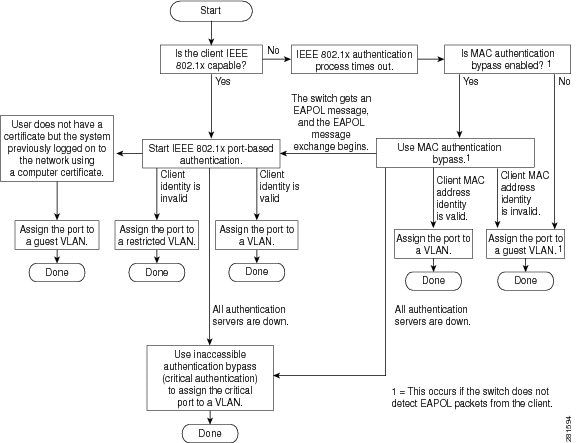
基于端口的身份验证发起和消息交换:
此图显示客户端向RADIUS服务器发起消息交换。
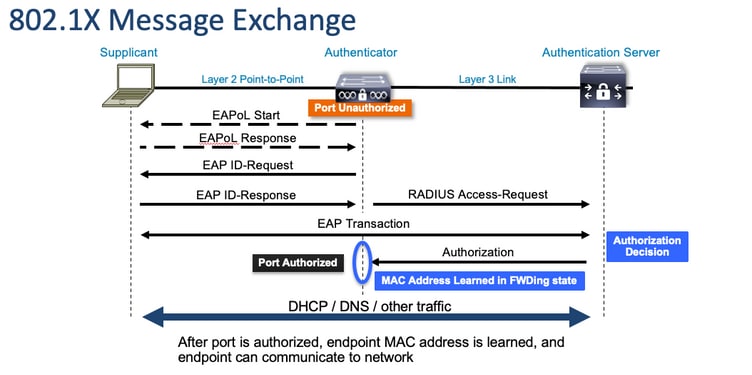
MAB 身份验证发起和消息交换:
此图显示了MAC身份验证绕行(MAB)期间的消息交换。
相关信息
- 揭秘 RADIUS 服务器配置
- MAC 身份验证绕行部署指南
- 有线 802.1x 部署指南
- Catalyst 9300 SPAN 配置指南
- Catalyst 9300 EPC 配置指南
- 思科技术支持和下载
修订历史记录
| 版本 | 发布日期 | 备注 |
|---|---|---|
2.0 |
06-Oct-2026
|
重新认证 — 更新的Alt文本和格式。已移除无法工作的链接。 |
1.0 |
21-Sep-2023
|
初始版本 |

 反馈
反馈