为IOS企业路由平台配置智能许可

简介
本文档介绍思科智能许可(SL)部署的类型和所需的配置。
先决条件
要求
- 可访问思科智能软件管理器(CSSM)门户的智能帐户
- Cisco IOS®版本在16.5.1到17.3.1之间的设备
- 思科智能软件管理器内部服务器
- 设备与CSSM或内部服务器之间的HTTPS连接
使用的组件
本文档适用于Cisco IOS XE企业路由平台。
本文档中的信息基于以下硬件和软件版本:
- 采用Cisco IOS XE版本16.9.4的Cisco ASR1001-X和采用Cisco IOS XE版本16.12.1的Cisco ISR4351
- 智能软件管理器服务器,8-202108版本
本文档中的信息都是基于特定实验室环境中的设备编写的。本文档中使用的所有设备最初均采用原始(默认)配置。如果您的网络处于活动状态,请确保您了解所有命令的潜在影响。
部署类型
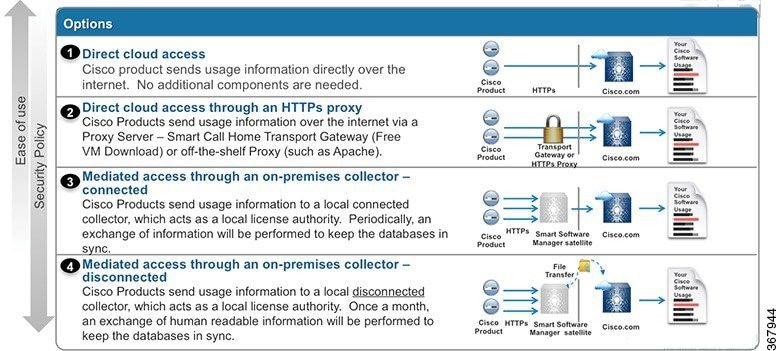
智能许可注册和使用提供四个主要部署选项:
- 直接CSSM访问
- 使用代理进行直接CSSM访问
- SSM内部访问
- 特定许可证保留(SLR)
直接CSSM访问
此部署选项允许您通过HTTPS通过Internet将使用信息直接传输到Cisco。
在Cisco IOS XE 16.10.1a中,智能许可默认启用,是唯一可用的许可模式。对于此部署,需要第3层配置,并且可以从正确的接口(需要DNS配置)到达HTTPS端口(443)中的tools.cisco.com。
确认连接后,注册设备的步骤如下:
1.在设备上启用智能许可证(可选)。 在Version16.10.1a中,默认情况下启用此功能。
Router#configure terminal
Enter configuration commands, one per line.  End with CNTL/Z.
Router(config)#license smart enable

注意:此命令可根据需要启用service call-home。
2.为思科的Tools(工具)配置域名系统(DNS)服务器或静态主机条目。
Router(config)#ip name-server X.X.X.X
or
Router(config)#ip host tools.cisco.com X.X.X.X
步骤3.从思科智能软件管理器生成新令牌。
- 登录到Cisco Smart Software Manager并导航到Smart Software Manager部分。
- 选择Inventory选项卡,然后从Virtual Account下拉列表中选择Virtual Account。
- 选择General选项卡,然后选择New Token。
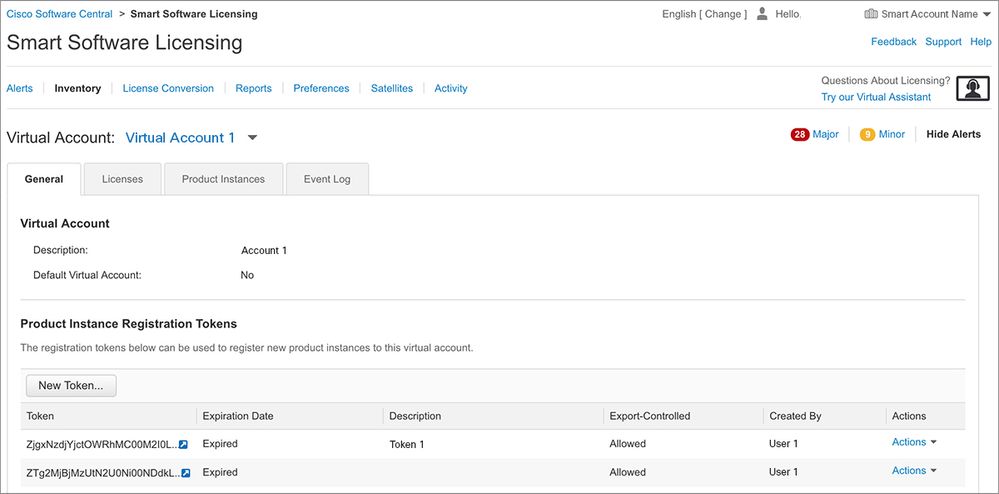
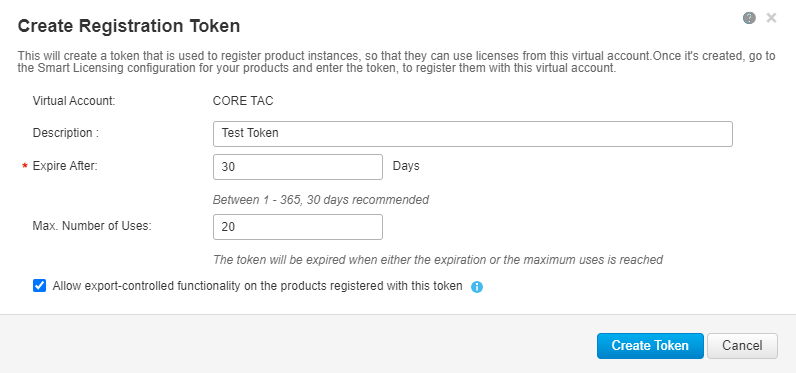
- 输入Token Description并指定Number of令牌必须处于活动状态。
- 对使用此令牌注册的产品启用允许导出控制功能。这允许在已注册的设备中请求高加密许可证。
- 选择Create Token;创建令牌后,选择Copy。
4.可选:更改call-home配置。
默认call-home配置文件配置足以注册设备。您可以在此处验证当前的Call-Home配置文件配置:
Router#show run | sec call-home
service call-home
call-home
! If contact email address in call-home is configured as sch-smart-licensing@cisco.com
! the email address configured in Cisco Smart License Portal will be used as
contact email address to send SCH notifications.
contact-email-addr sch-smart-licensing@cisco.com
profile "CiscoTAC-1"
active
destination transport-method http
no destination transport-method email
5.使用令牌向CSSM注册设备。
Router#license smart register idtoken < token from CSSM portal > force
注意:force关键字会立即强制进行注册尝试。如果未使用,注册过程可能需要较长时间。
6.验证设备是否已正确注册到CSSM。
Router#show license status
Smart Licensing is ENABLED

Registration:
 Status: REGISTERED
 Smart Account: TAC Cisco Systems, Inc.
 Virtual Account: CORE TAC
 Export-Controlled Functionality: Allowed
 Initial Registration: SUCCEEDED on Sep 01 12:54:22 2017 UTC
 Last Renewal Attempt: None
 Next Renewal Attempt: Feb 28 12:54:22 2018 UTC
 Registration Expires: Sep 01 12:49:04 2018 UTC

License Authorization:
 Status: AUTHORIZED on Sep 01 12:54:28 2017 UTC
 Last Communication Attempt: SUCCEEDED on Sep 01 12:54:28 2017 UTC
 Next Communication Attempt: Oct 01 12:54:28 2017 UTC
 Communication Deadline: Nov 30 12:49:12 2017 UTC
使用虚拟路由和转发(VRF)进行直接CSSM访问
如果设备使用VRF到达CSSM,则需要在call-home配置文件配置下配置源VRF和源接口。要配置此部署,您必须从直接CSSM访问部分查看步骤1-3。然后,使用正确的VRF和源接口编辑call-home配置以访问CSSM URL。接下来,您可以看到管理接口与GigabitEthernet0一起使用,GigabitEthernet0在Mgmt-intf VRF中用作示例:
Router#configure terminal
Enter configuration commands, one per line. End with CNTL/Z.
Router(config)#call-home
Router(cfg-call-home)#source-interface gigabitEthernet 0
Router(cfg-call-home)#vrf Mgmt-intf
使用分配给VRF的正确接口配置源HTTP接口。此配置会影响HTTP和HTTPS流量。
Router#configure terminal
Enter configuration commands, one per line. End with CNTL/Z.
Router(config)#ip http client source-interface gigabitEthernet 0
为特定VRF配置DNS:
Router#configure terminal
Enter configuration commands, one per line. End with CNTL/Z.
Router(config)#ip name-server vrf Mgmt-intf X.X.X.X
完成VRF配置后,您可以继续执行直接CSSM访问部分中的步骤5和步骤6。
使用代理进行直接CSSM访问
如果需要代理服务器实现与CSSM的HTTPS连接,则需要查看“直接CSSM访问”部分中的步骤,并在call-home配置中运行http-proxy命令:
Router#configure terminal
Enter configuration commands, one per line. End with CNTL/Z.
Router(config)#call-home
Router(cfg-call-home)#http-proxy "10.118.47.99" port 8080
SSM内部访问
此部署类型允许您在本地管理产品和许可证,而无需直接连接到思科托管的CSSM。要实施此功能,您的网络中必须已安装SSM本地M。本地安装SSM的步骤不在本文档的讨论范围之内。
将SSM内部服务器与设备连接的配置步骤如下:
1.在设备上启用智能许可:
Router#configure terminal
Enter configuration commands, one per line.  End with CNTL/Z.
Router(config)#license smart enable
步骤2.确保可以与CSSM内部服务器通信。
Router#ping X.X.X.X
Type escape sequence to abort.
Sending 5, 100-byte ICMP Echos to X.X.X.X, timeout is 2 seconds:
!!!!!
Success rate is 100 percent (5/5), round-trip min/avg/max = 8/9/10 ms
3.从SSM本地生成新令牌。
3.1.登录到SSM服务器。
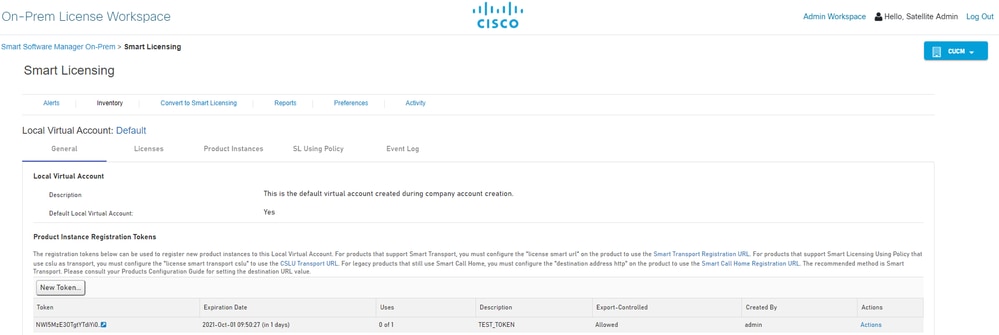
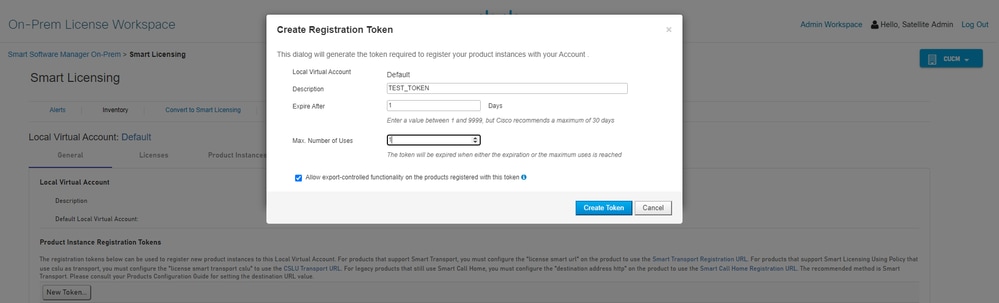
3.2令牌创建
- 输入Token Description:指定Number of Days,表示令牌必须处于活动状态。
- 启用允许使用此令牌注册的产品上的导出控制功能复选框。
- 选择Create Token。
- 创建令牌后,请选择复制以复制新创建的令牌。
4.在设备上配置call-home。需要使用本地服务器(http://X.X.X.X/Transportgateway/services/DeviceRequestHandler)的IP地址更改destination address http命令并删除默认命令:
Router(config)#call-home
Router(cfg-call-home)#profile CiscoTAC-1
Router(cfg-call-home-profile)#destination transport-method http
Router(cfg-call-home-profile)#destination address http http://X.X.X.X/Transportgateway/services/DeviceRequestHandler
Router(cfg-call-home-profile)#no destination address http https://tools.cisco.com/its/service/oddce/services/DDCEService
Router(cfg-call-home-profile)#active
Router(cfg-call-home-profile)#exit
Router(cfg-call-home)#contact-email-addr test@cisco.com
Router(cfg-call-home)#service call-home
Router(cfg-call-home)#end
5.在SLA-TrustPoint信任点上配置revocation-check none:
Router#configure terminal
Router(config)#crypto pki trustpoint SLA-TrustPoint
Router(ca-trustpoint)#revocation-check none
6.使用从本地SSM检索到的令牌注册设备:
Router#license smart register idtoken < token from SSM On-Prem portal > force
7.验证设备是否已正确注册到SSM本地:
Router#show license status
Smart Licensing is ENABLED
Utility:
  Status: DISABLEDData Privacy:
 Sending Hostname: yes
 Callhome hostname privacy: DISABLED
 Smart Licensing hostname privacy: DISABLED
 Version privacy: DISABLED

Transport:
 Type: Callhome

Registration:
 Status: REGISTERED
 Smart Account: manudiaz
 Virtual Account: Default
 Export-Controlled Functionality: ALLOWED
 Initial Registration: SUCCEEDED on Jan 20 15:22:12 2020 UTC
 Last Renewal Attempt: None
 Next Renewal Attempt: Sept 30 14:22:12 2021 UTC
 Registration Expires: Oct 19 04:35:44 2021 UTC
使用VRF配置的SSM内部访问
如果使用VRF访问SSM本地,则必须配置源VRF,以便设备从正确的VRF生成请求。
查看SSM内部访问(SSM On-Prem Access)部分中的步骤,直到步骤3。
1.使用正确的VRF和源接口编辑Call-home配置,您可以在源接口上访问SSM On-Prem:
Router#configure terminal
Enter configuration commands, one per line. End with CNTL/Z.
Router(config)#call-home
Router(cfg-call-home)#source-interface gigabitEthernet 0
Router(cfg-call-home)#vrf Mgmt-intf
2.使用分配给VRF的正确接口配置源http-client接口:
Router#configure terminal
Enter configuration commands, one per line. End with CNTL/Z.
Router(config)#ip http client source-interface gigabitEthernet 0
3.为特定VRF配置DNS。您可以在本地环境中配置DNS服务器以解析SSM本地服务器的名称:
Router#configure terminal
Enter configuration commands, one per line. End with CNTL/Z.
Router(config)#ip name-server vrf Mgmt-intf X.X.X.X X.X.X.X
在这些更改后,您可以继续执行SSM内部访问中的步骤5和步骤6。
特定许可证保留(SLR)
SLR功能使您能够在设备上部署软件许可证,而无需直接将使用信息传达给思科。此功能在高度安全的网络中非常有用,在拥有智能许可门户的平台上受支持。本配置指南假设您已请求并已授权使用SLR。
要在设备中配置SLR,需要从路由器端和CSSM门户执行这些步骤
1.配置SLR的路由器。您必须运行license smart reservation命令并请求具有本地许可证智能预留请求的SLR功能。
Router# enable
Router# configure terminal
Router(config)# license smart reservation
Router(config)# exit
Router# license smart reservation request local
UDI: PID:ASR1002-X,SN:JAE170XXXXX
  Request code: CB-ZASR1002-X:JAE17010XXXX-AxFL8XXXX-XX
在CSSM上,需要保留所需的许可证。
2.登录CSSM。您必须使用思科凭证登录门户。
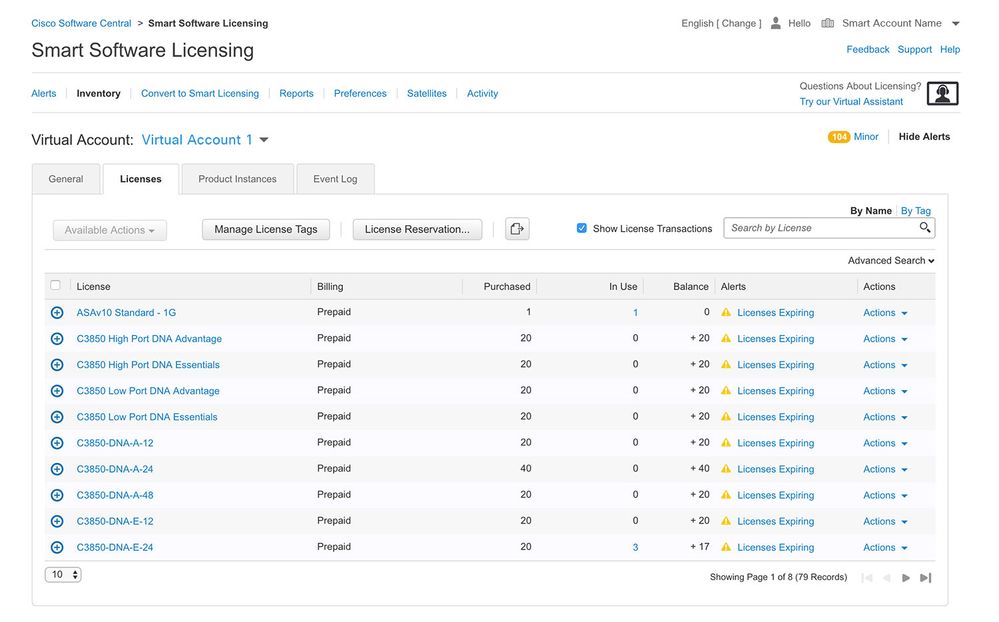
3.选择“资产”选项卡。从Virtual Account下拉列表中,选择您的Smart Account。
4.从许可证选项卡中选择许可证保留。
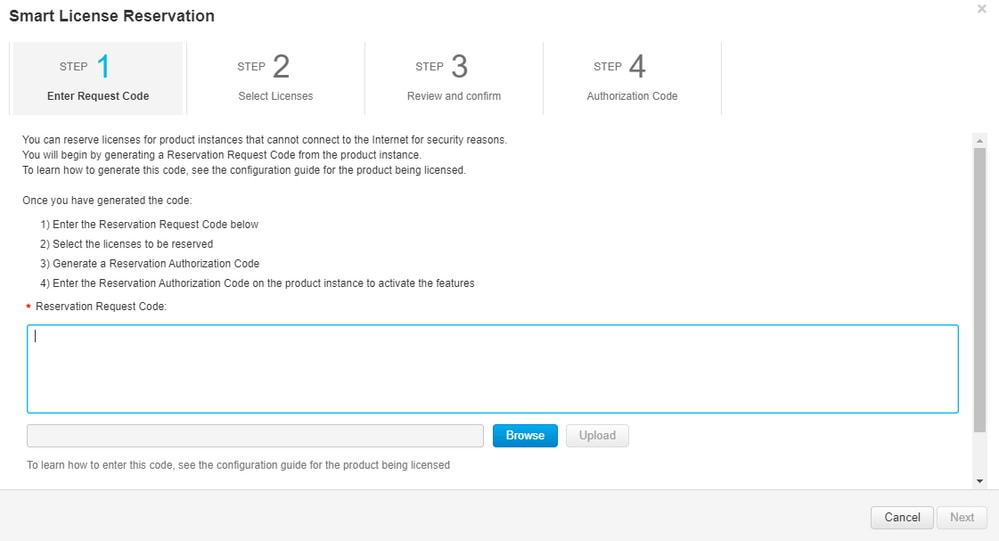
5.在输入请求代码页上,输入或附加从路由器生成的保留请求代码,然后选择下一步。
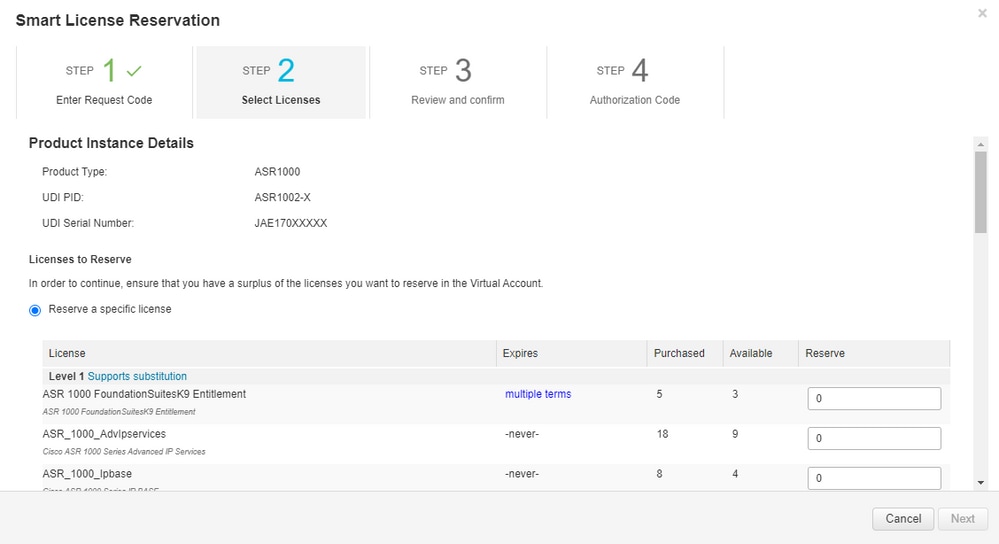
6.选中Reserve a Specific License框并选择license和每个设备所需的保留许可证数量。
7.在“复查并确认”选项卡中,选择生成授权码。
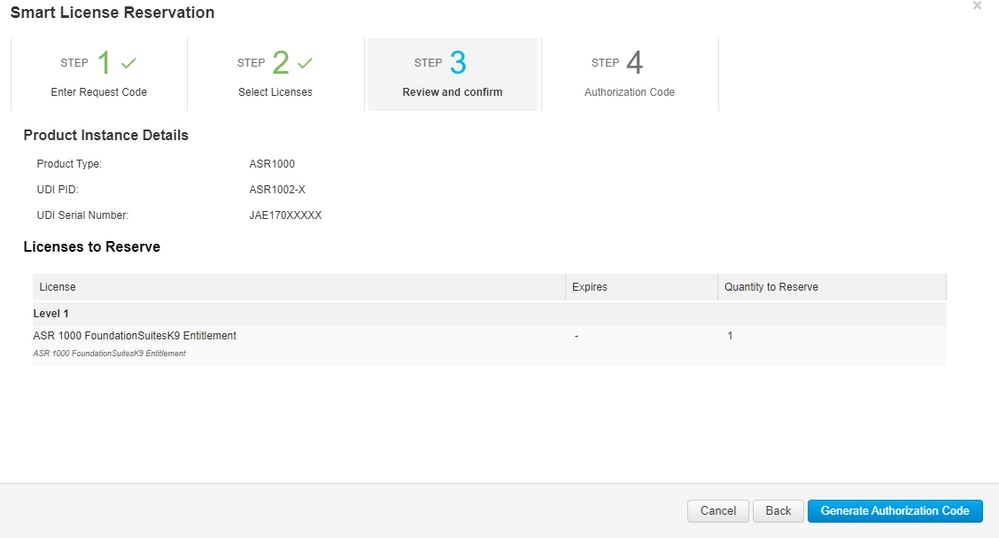
8.选择复制到剪贴板以复制代码,或选择下载作为文件。您必须将代码或文件复制到您的设备才能继续此过程。
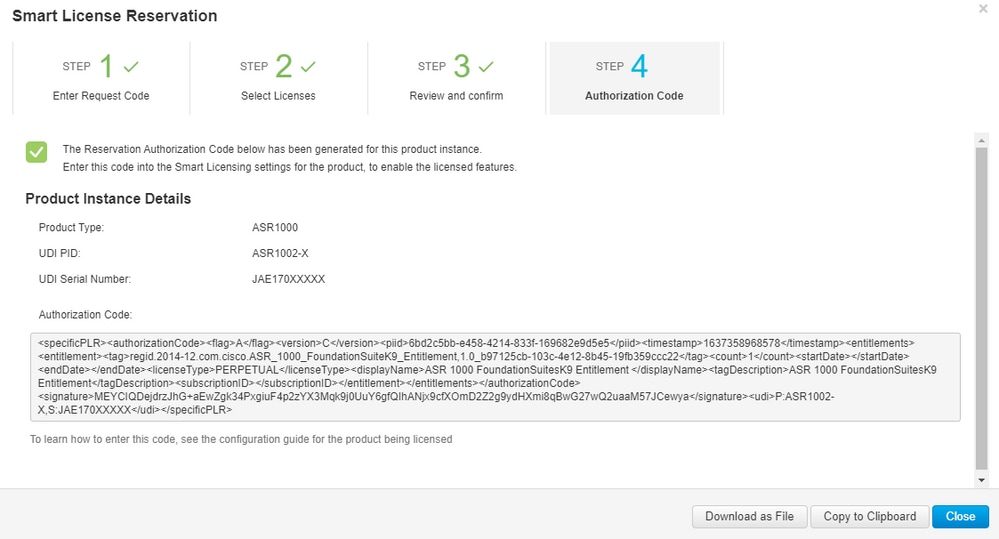
如果配置SLR,可以下载或安装授权码文本文件。如果配置永久许可证保留(PLR),则可以复制并粘贴授权码。
9.登录到设备并运行安装命令license smart reservation install file bootflash:<SLR file>
Router#enable
Router#license smart reservation install file bootflash:
如果需要,您可以返回在设备中保留的许可证,并返回到未注册状态。系统会生成一个返回代码,必须在CSSM中输入该代码才能删除产品实例:
Router#enable
Router#license smart reservation return local
更新特定许可证预留
成功注册设备后,如果需要,可以使用新功能或许可证更新预留:
1.登录到Cisco Smart Software Manager。您必须使用思科提供的用户名和密码登录门户。
2.定位至资产选项卡,然后从“虚拟帐户”下拉列表中选择智能帐户。
3.在产品实例选项卡中,为需要更新的设备选择操作。
4.选择更新保留的许可证。
5.选择要更新的许可证。
6.选择下一步。
7.在“复查并确认”选项卡中,选择生成授权码。系统将显示Authorization Code选项卡,并显示生成的授权码。
8.选择复制到剪贴板以复制代码或将其作为文件下载。您必须复制代码或下载文件到您的设备。
9.登录要更新的设备。
10.运行license smart reservation install file命令。
Router#enable
Router#license smart reservation install file bootflash:
取消注册特定许可证保留
要取消注册设备的特定许可证保留,您必须在CLI中返回许可证保留并从CSSM中删除实例。
1.登录要注销的设备。
2.要删除许可证预留授权码,请运行license smart reservation return命令。
Router#license smart reservation return local
This command will remove the license reservation authorization code and the device will transition
back to the unregistered state. Some features may not function properly.
Do you want to continue? [yes/no]: yes
Enter this return code in Cisco Smart Software Manager portal:
UDI: PID:ISR4351/K9,SN:FDO210305DQ
    CBURR4-cTgMun-arvYME-gta6ir-yqnXQm-yMKxWM-2ajywD-5kADgZ-a33
3.登录CSSM。
4.选择“资产”选项卡。从Virtual Account下拉列表中,选择您的智能帐户。
5.在产品实例选项卡中,对于要取消注册的设备,选择操作。
6.选择删除。
7.出现提示时,输入返回代码。
故障排除
设备无法解析tools.cisco.com
验证您已为正确的VRF或全局路由表正确配置了DNS服务器。如果需要,您还可以创建静态DNS条目:
Router(config)#ip host tools.cisco.com 72.163.4.38 173.37.145.8
路由器无法与tools.cisco.com通信
- 确保配置了到Internet的默认路由。
- 确保设备和CSSM之间没有防火墙或代理。
- 确保端口443和80未被阻塞。
Router#telnet tools.cisco.com 443
Trying tools.cisco.com (72.163.4.38, 80)... Open
- 使用VRF远程登录。
Router#telnet tools.cisco.com 443 /vrf Mgmt-intf
Trying tools.cisco.com (72.163.4.38, 443)... Open
处于“不合规”状态的许可证
当设备使用授权且不合规时(负平衡),会发生此状态。 当注册思科设备的虚拟帐户中没有所需的许可证时,就会发生这种情况。
Router#show license all

License Authorization:
  Status: OUT OF COMPLIANCE on Mar 25 15:00:27 2019 CDT
  Last Communication Attempt: SUCCEEDED on Mar 25 15:12:32 2019 CDT
  Next Communication Attempt: Mar 26 03:12:31 2019 CDT
  Communication Deadline: Jun 23 15:06:30 2019 CDT
- 要进入合规性/授权状态,您必须将正确的许可证数量和类型添加到智能帐户
- 当设备处于此状态时,它每天自动发送授权续订请求
智能许可调试
一些调试可用于解决call-home和智能许可注册问题,包括:
- debug call-home trace
- debug call-home error
- debug call-home smart-licensing all
- debug ip http client all
- debug crypto pki <all options>
- debug ssl openssl <all options>
相关信息
修订历史记录
| 版本 | 发布日期 | 备注 |
|---|---|---|
4.0 |
23-Jul-2026
|
更新的说明(添加了1个字母)、拼写、语法、插入的水平线分别显示各个部分/可读性、更新的URL和CCW警报。 |
3.0 |
29-Aug-2024
|
更新的标题、品牌要求、机器翻译、样式要求、拼写和格式。 |
2.0 |
27-Jun-2023
|
添加了Alt文本。更新的标题、品牌要求、机器翻译、样式要求、拼写和格式。 |
1.0 |
24-May-2022
|
初始版本 |
 反馈
反馈