使用NSO配置智能许可证

简介
本文档介绍各种网络服务协调器(NSO)许可证,以及如何使用思科许可证中心激活它们。
先决条件
要求
Cisco 建议您了解以下主题:
- 如何使用NSO CLI
- NSO故障排除
- Linux基础知识
使用的组件
本文档中的信息基于以下软件和硬件版本:
- NSO 6.x
- NSO 5.x
- NSO 4.5及更高版本
- NSO 4.4
- NSO 4.1/4.2/4.3
本文档中的信息都是基于特定实验室环境中的设备编写的。本文档中使用的所有设备最初均采用原始(默认)配置。如果您的网络处于活动状态,请确保您了解所有命令的潜在影响。
NSO许可证
NSO使用的许可证如下:
| PID | 在思科许可证中心显示 | 类型 | 描述 |
| R-NSO-K 9 | 顶级 | 每个NSO实例都需要 | |
| NSO-P-PAK | NSO平台生产 | 服务器 | 活动节点必需 |
| NSO-HA-LIC-P | NSO平台 — 生产 — 备用 | 服务器 | 备用节点必需 |
| NSO-DEV-P-PAK | NSO-platform-development-test | 服务器 | 开发环境所需 |
| NSO-PNF-() | NSO-network-element | 网络元素 | 南向如果连接的设备是物理设备 |
| NSO-VNF-() | NSO-network-element | 网络元素 | 南向连接的设备是虚拟设备 |
| NED-() | 每个最终用户不同 示例: Cisco-ios-NED |
NED | 对于NED。每种类型的各种设备都需要。 示例: NED-IOS-P:对于IOS NED |
智能帐户和虚拟帐户
每个产品(包括NSO)都要求思科服务器获取许可证以激活自身。实质上,它会检查您是否已购买了足够数量的产品许可证,以及许可证是否可用。
一个智能帐户分配给一个组织。以公司A为例:
- 公司A可以有X、Y和Z部门,他们希望单独管理其许可证。
- 虚拟帐户可以分配给每个部门。
可为每个虚拟帐户生成令牌。我们使用该令牌从产品访问虚拟帐户。
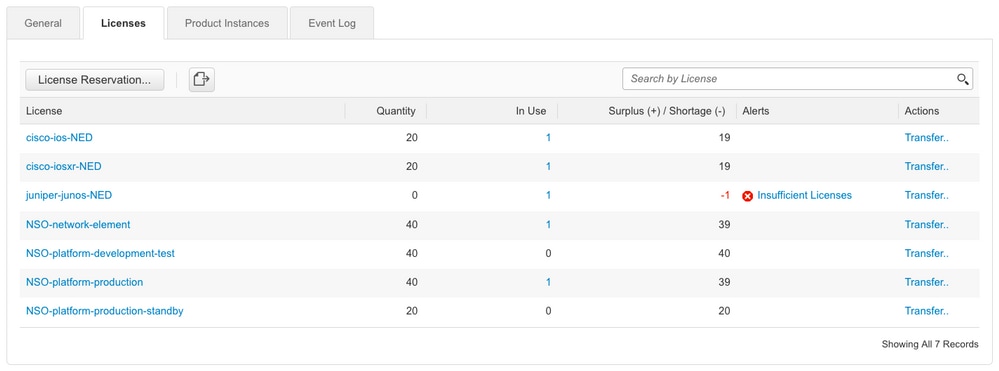
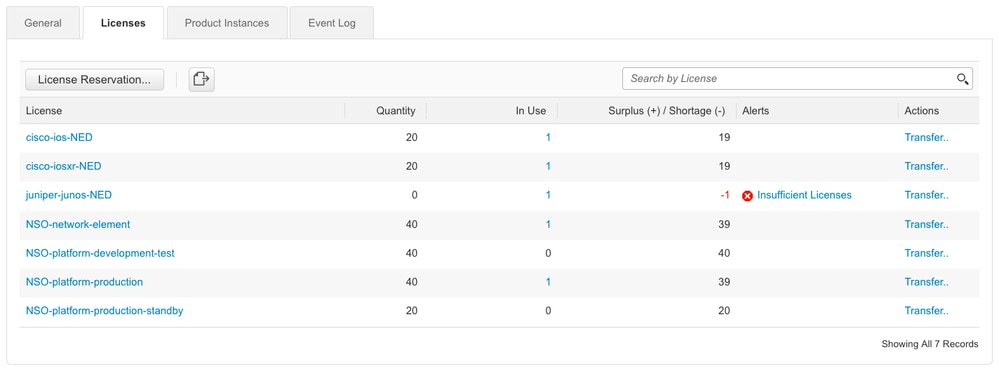
从思科许可证中心,虚拟帐户中的许可证状态如下所示:
配置
NSO如何连接到智能许可服务器有多种方法,具体取决于安装NSO的环境。本文档还概述了NSO和思科许可服务器之间的不同集成。
步骤1.生成令牌
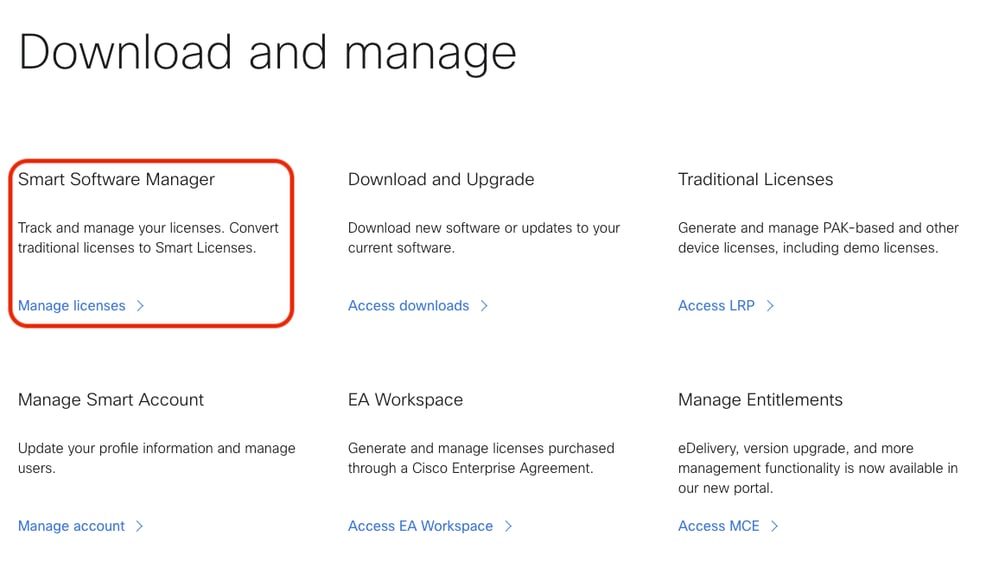
1.要创建新令牌,请使用用户ID/或CCO ID登录Cisco License Central,然后选择适当的虚拟帐户。单击Manage licenses以继续。
2.单击资产选项卡,然后选择要使用的虚拟帐户。
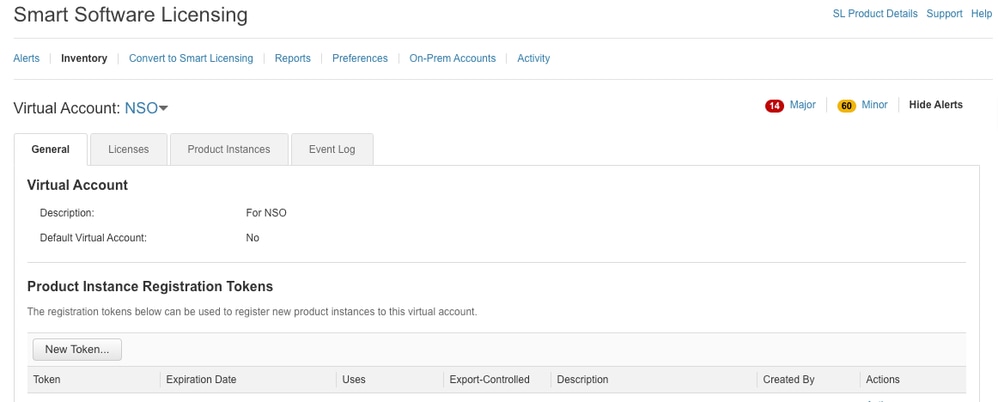
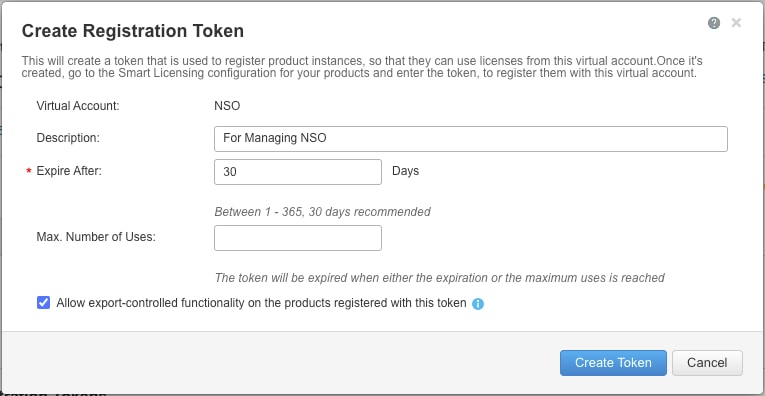
3.在思科许可证中心,点击新建令牌。
填写所需信息。请注意,到期日期指示令牌的有效时间,因此用户需要在天内使用创建的令牌。“短”和“长”需要在便利性和安全风险之间取得平衡。此外,这并不是许可证的有效期。
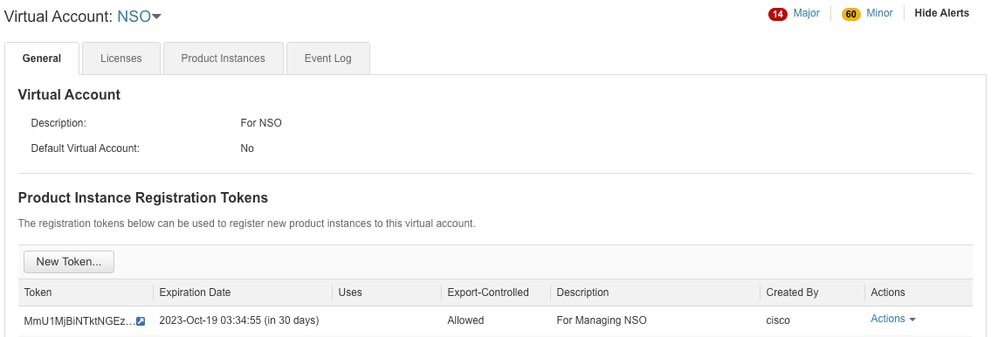
5.新创建的令牌在表中。
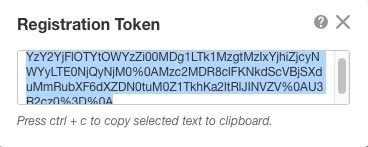
6.单击标记链接以显示弹出窗口。将令牌从对话框窗口复制到剪贴板中。
步骤2.令牌注册准备
以下是注册方法(直接/代理/卫星)。
如果NSO或任何思科产品需要智能许可证,请咨询思科许可证中心(或思科云)进行自我注册。
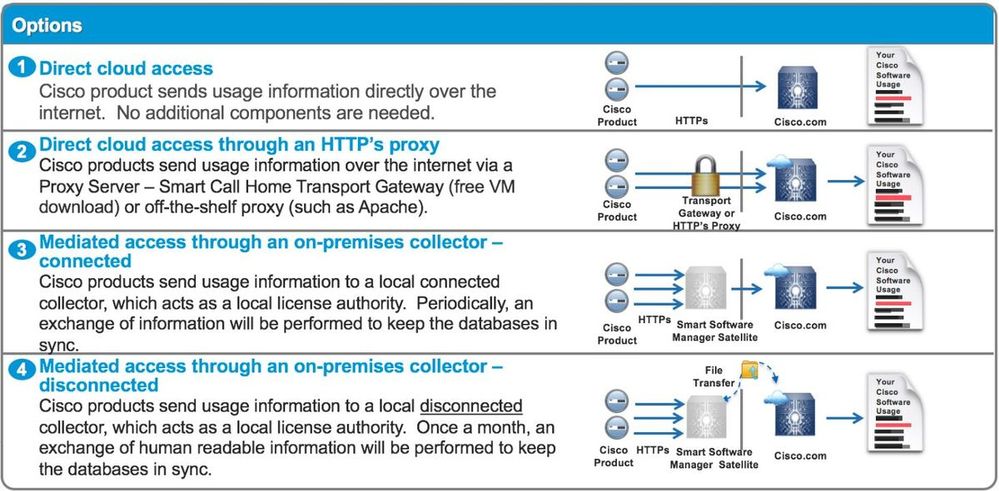
设置支持智能许可证的环境有四个主要选项:
选项1.直接云访问
使用此方法,NSO服务器需要能够使用https直接与思科云通信。支持使用HTTP,但出于安全原因,不建议使用HTTP。
在这种方法中,无需特殊配置即可启动注册过程。
选项2.通过HTTPS代理直接访问云
如果需要使用HTTP(S)代理服务器连接到Internet上的Web,则必须使用NSO中的智能代理配置代理服务器信息。
使用选项2时,需要指示智能代理将其注册请求发送到代理服务器,而不是直接发送到思科。
配置取决于版本。
NSO 4.5或更高版本
从NSO 4.5,现在可以通过ncs.conf配置智能许可证配置。如果ncs.conf和NSO CDB中都存在智能许可证配置,则ncs.conf中的配置优先。
这意味着smart-license smart-agent override-url url https://10.1.2.3/ 等命令在ncs.conf中存在其他配置时不会生效。执行NSO系统安装时,ncs.conf默认包括以下内容:
<smart-license>
  <smart-agent>
    <java-executable>DEFAULT</java-executable>
    <java-options>DEFAULT</java-options>
    <production-url>DEFAULT</production-url>
    <alpha-url>DEFAULT</alpha-url>
    <override-url>
      <url>DEFAULT</url>
    </override-url>
    <proxy>
      <url>DEFAULT</url>
    </proxy>
  </smart-agent>
</smart-license>
DEFAULT表示它使用$install_dir/src/ncs/yang/tailf-ncs-smart-license.yang中定义的默认值。
要改为在NSO CDB中配置ncs.conf中列出的枝叶,请确保从ncs.conf中删除相应的条目并执行/etc/init.d/ncs reload。
NSO 4.4
在此路径上配置代理URL。
smart-license smart-agent proxy url <proxy url>
admin@ncs(config)# smart-license smart-agent proxy url https://10.10.10.10:8080
admin@ncs(config)#
在默认配置中,NSO连接到 https://tools.cisco.com/its/service/oddce/services/
此代理配置自动设置HTTPS和HTTP,因此,如果您将目标URL更改为HTTP,以便使用选项3.或4.中介绍的卫星,则一个配置仍然能够处理这两个情况。
选项3.通过本地收集器连接的媒介访问
在许多情况下,NSO网络不直接连接到Internet。除选项2.外,还可引入思科许可中心卫星;因此,NSO不需要直接将消息交换到思科云。
有关如何安装,请在链接中找到安装指南。
当您使用此方法时,NSOl与卫星通信,而不是与思科云通信。
要更改目标,可以修改override-url:
admin@ncs(config)# smart-license smart-agent override-url url https://10.1.2.3/
admin@ncs(config)#
此URL可在思科许可证中心卫星的管理Web中找到。
选项 4:通过内部收集器进行中介访问 — 断开连接
从NSO的角度来看,此方法与方法(3)完全相同。区别仅在于如何从思科许可证中心卫星与思科云同步。
步骤3.令牌注册
使用令牌后,使用生成的令牌激活NSO到Cisco服务器。该令牌用于NSO CLI上,以注册到思科许可证中心。输入命令后,会异步启动注册过程。
admin@ncs# smart-license register idtoken YWVlMmQ3ZjEtYT....
result Registration process in progress. Use the 'show license status' command to check the progress and result.
admin@ncs#
验证
使用本部分可确认配置能否正常运行。
注册前
始终启用智能许可。输出表明NSO未注册,并且处于EVAL模式(在89天23小时内到期)。
admin@ncs# show license status

Smart Licensing is ENABLED

Registration:
  Status: UNREGISTERED
  Export-Controlled Functionality: Allowed

License Authorization:
  Status: EVAL MODE
  Evaluation Period Remaining: 89 days, 23 hr, 17 min, 36 sec
  Last Communication Attempt: NONE
  Next Communication Attempt: NONE
Development mode: enabled
admin@ncs#
可使用show license status命令检查注册状态。如果注册仍在进行中,命令将显示此输出并显示:"注册挂起"。
<仍在注册……>
admin@ncs# show license status

Smart Licensing is ENABLED

Registration:
  Status: UNREGISTERED - REGISTRATION PENDING
  Initial Registration: First Attempt Pending
  Export-Controlled Functionality: Allowed

License Authorization:
  Status: EVAL MODE
  Evaluation Period Remaining: 89 days, 23 hr, 16 min, 36 sec
  Last Communication Attempt: SUCCEEDED on Aug 3 09:41:56 2016 UTC
  Next Communication Attempt: NONE
Development mode: enabled
admin@ncs#
一段时间后,注册完成。当您看到状态REGISTERED时,系统注册到思科许可证中心。
<Registered!!>
admin@ncs# show license status

Smart Licensing is ENABLED

Registration:
  Status: REGISTERED
  Smart Account: BU Production Test
  Virtual Account: TAC-Japan-Cloudorch
  Export-Controlled Functionality: Allowed
  Initial Registration: SUCCEEDED on Aug 4 05:29:52 2016 UTC
  Last Renewal Attempt: SUCCEEDED on Aug 4 05:30:03 2016 UTC
  Next Renewal Attempt: Jan 31 05:30:03 2017 UTC
  Registration Expires: Aug 4 05:24:56 2017 UTC
  Export-Controlled Functionality: Allowed

License Authorization:

License Authorization:
  Status: AUTHORIZED on Aug 4 05:30:05 2016 UTC
  Last Communication Attempt: SUCCEEDED on Aug 4 05:25:02 2016 UTC
  Next Communication Attempt: Sep 3 05:30:07 2016 UTC
  Communication Deadline: Aug 4 05:24:56 2017 UTC
Development mode: enabled
admin@ncs#
使用(授权状态)
使用show license summary命令可以查看所使用的许可证。在本示例中,NSO-platform-production、NSO-network-element和cisco-ios-NED用于系统中。请注意,许可证授权状态为“AUTHORIZED”。 这意味着需要许可证的所有组件都在合法状态下正常工作。
admin@ncs# show license summary Smart Licensing is ENABLED Registration: Status: REGISTERED Smart Account: COMPANY A Virtual Account: Network Department Last Renewal Attempt: None Next Renewal Attempt: Jan 31 05:33:02 2017 UTC License Authorization: Status: AUTHORIZED Last Communication Attempt: SUCCEEDED Next Communication Attempt: Sep 3 05:33:06 2016 UTC License Usage: License Entitlement Tag Count Status ---------------------------------------------------------------------------------------------------- ------------------------------------------ 348fbb21-7edf-42bb-baa7-198903058a54regid.2016-04. com.cisco.NSO-platform-production,4.2_348fbb21-7ed f-42bb-baa7-198903058a54 1 InCompliance 5d641fa0-757d-43b0-a926-166cb6e3cfddregid.2015-10. com.cisco.NSO-network-element,1.0_5d641fa0-757d-43 b0-a926-166cb6e3cfdd 3 InCompliance d9eca34d-1f6a-4595-ad74-9c0c57e03c27regid.2015-10. com.cisco.cisco-ios-NED,1.0_d9eca34d-1f6a-4595-ad7 4-9c0c57e03c27 1 InCompliance Development mode: disabled admin@ncs#
这是show license usage命令在不同示例中的输出。在本示例中,还添加了cisco-iosxr-NED,状态为OutOfCompliance。这表示注册到思科许可证中心没有问题,但是cisco-iosxr-NED的许可证在虚拟帐户中不足。由于cisco-iosxr-NED的合规性状态不合规,因此整体状态为OUT_OF_COMPLIANCE。
admin@ncs # show license usage

License Authorization Status : OUT_OF_COMPLIANCE as of Oc 24 06:14:11 2016 UTC

NSO-platform-production (regid.2016-04.com.cisco.NSO-platform-production, 1.0_d1445dab-9d96-4593-99f2-6f633b8a759c)
 Description : API unavailable
 Count : 1
 Version : 1.0
 Status : InCompliance

NSO-network-element (regid.2015-10.com.cisco.NSO-network-element, 1.0_5d641fa0-757d-43b0-a926-166cb6e3cfdd)
 Description : API unavailable
 Count : 3
 Version : 1.0
 Status : InCompliance

cisco-ios-NED (regid.2015-10.com.cisco.cisco-ios-NED, 1.0_d9eca34d-1f6a-4595-ad74-9c0c57e03c27)
 Description : API unavailable
 Count : 1
 Version : 1.0
 Status : InCompliance

cisco-iosxr-NED (regid.2015-10.com.cisco.cisco.cisco-iosxr-NED, 1.0_9956fc34-cbed-4d13-a1ea-6a36f4e40a99)
 Description : API unavailable
 Count : 1
 Version : 1.0
 Status : OutOfCompliance
故障排除
尝试启用智能许可证功能上的调试。启用调试后,调试日志会生成到/smart-license/smart-agent/stdout-capture/file中指定的文件中。智能许可证调试会生成大量日志,建议在收集数据后禁用调试。
Debug enable
admin@ncs# debug smart_lic all
ok
admin@ncs#
Debug disable
admin@ncs# no debug smart_lic all
ok
admin@ncs#
智能许可证日志配置
admin@ncs# show running-config smart-license
smart-license smart-agent stdout-capture disabled
smart-license smart-agent stdout-capture file ./logs/ncs-smart-licensing.log
admin@ncs#
启用智能许可证日志
admin@ncs(config)# smart-license smart-agent stdout-capture enabled
admin@ncs(config)# commit
Commit complete.
admin@ncs(config)#
续订思科许可证中心内置SSL证书
对于拥有内部思科许可证中心的客户,如果SSL证书已过期,NSO可能无法连接到服务器。
以下是通过生成onprem.crt文件来修复问题的步骤:
1.使用openssl(通常使用的端口为443)从思科许可证中心服务器收集新证书:
openssl s_client -showcerts -connect <>:443 | openssl x509 -out onprem.crt 2.查找用于导入证书的目录。默认目录为/etc/pki/ca-trust/extracted/java/cacerts。为了找到该目录,以下是用于在系统中搜索cacerts目录的命令,以及输出示例:
[root@localhost /]# find / -name cacerts 2>/dev/null | xargs -I {} ls -l {}
-r--r--r--. 1 root root 156478 Jun 26 08:02 /etc/pki/ca-trust/extracted/java/cacerts
lrwxrwxrwx. 1 root root 40 Aug 25  2022 /etc/pki/java/cacerts -> /etc/pki/ca-trust/extracted/java/cacerts
lrwxrwxrwx. 1 root root 21 Jun 15 04:52 /etc/java/java-17-openjdk/java-17-openjdk-17.0.15.0.6-3.el9.x86_64/lib/security/cacerts -> /etc/pki/java/cacerts
[root@localhost /]# 3.加载证书。密钥库的默认密码是changeit:
sudo keytool -import -alias ssm_onprem -file onprem.crt -keystore /etc/pki/ca-trust/extracted/java/cacerts3.1(可选)要确认证书已正确加载,请执行以下命令:
root@Ubuntu-24-9:/home/nso# keytool -list -keystore /etc/ssl/certs/java/cacerts -storepass changeit -alias ssm_onprem
Warning: use -cacerts option to access cacerts keystore
ssm_onprem, Aug 4, 2025, trustedCertEntry,
Certificate fingerprint (SHA-256): F7:00:C9:74:34:57:5E:BE:70:A7:0E:D2:9B:A8:2D:44:F1:CE:14:55:C3:D9:06:3F:83:68:95:A1:C6:B5:7F:26
root@Ubuntu-24-9:/home/nso#
4.重新启动智能代理(在配置模式下):
admin@ncs(config)# smart-license smart-agent restart
result Started
5.重新注册证书:
admin@ncs# license smart deregister
ok
admin@ncs# license smart register idtoken TOKEN
Registration process in progress. Use the 'show license status' command to check the progress and result.
admin@ncs# 6.使用show license summary命令确认注册成功,该命令的输出如本文所示。
修订历史记录
| 版本 | 发布日期 | 备注 |
|---|---|---|
6.0 |
27-May-2026
|
更新了“思科智能软件管理器(SSM)”和“思科许可证中心”。 |
5.0 |
04-Aug-2025
|
更新了作者姓名、格式、语法和写作风格。 |
4.0 |
01-Aug-2024
|
初始版本 — 纠正了主要的格式和样式问题。 |
1.0 |
06-Jun-2017
|
初始版本 |
 反馈
反馈