Wachtwoord voor Catalyst Fixed Configuration-Switches herstellen

Inleiding
In dit document worden de wachtwoordherstelprocedures beschreven voor bestaande switches met vaste configuratie van Cisco Catalyst Layer 2 en Layer 3.
Voorwaarden
Vereisten
Er zijn geen specifieke vereisten van toepassing op dit document.
Gebruikte componenten
Dit document is gebaseerd op de Switches 2900XL/3500XL, 2940, 2950/2955, 2960, 2970, 3550, 3560 en 3750-reeks.

Opmerking: dit document wordt bewaard als referentie voor wachtwoordherstel in de oudere Cisco Catalyst switch-reeks die eerder is vermeld. Het heeft geen betrekking op de huidige Cisco Catalyst-platforms.
De informatie in dit document is gebaseerd op de apparaten in een specifieke laboratoriumomgeving. Alle apparaten die in dit document worden beschreven, hadden een opgeschoonde (standaard)configuratie. Als uw netwerk live is, moet u zorgen dat u de potentiële impact van elke opdracht begrijpt.
Conventies
Raadpleeg Cisco Technical Tips Conventions (Conventies voor technische tips van Cisco) voor meer informatie over documentconventies.
Achtergrondinformatie
Dit document beschrijft de wachtwoordherstelprocedure voor de Cisco Catalyst Layer 2-switches met vaste configuratie 2900XL/3500XL, 2940, 2950/2955, 2960 en 2970-reeks en de Cisco Catalyst Layer 3-switches met vaste configuratie 3550, 3560 en 3750-reeks.
terugvorderingsprocedure
Om het wachtwoord te herstellen:
1. Sluit een terminal of pc met terminalemulatie (bijvoorbeeld Hyper Terminal) aan op de consolepoort van de switch.
Gebruik de volgende terminalinstellingen:
-
Bits per seconde (baud): 9600
-
Gegevensbits: 8
-
Pariteit: geen
-
Stopbits: 1
-
Stroomregeling: Xon/Xoff
1. Koppel de voedingskabel los.
2. Draai de switch aan en breng hem naar de switch:
Voer voor de Switches 2900XL, 3500XL, 2940, 2950, 2960, 2970, 3550, 3560 en 3750 de volgende stappen uit:
3. Houd de knop Modus links van het voorpaneel ingedrukt terwijl u de voedingskabel weer op de switch aansluit.
| Catalyst Series switch |
LED-gedrag en actie bij loslaten knop Mode |
|---|---|
| 2900XL, 3500XL, 3550 |
Laat de knop Modus los wanneer de LED boven Port1X uitvalt. |
| 2940, 2950 |
Laat de knop Mode na ongeveer 5 seconden los wanneer de status-LED (STAT) uit gaat. Wanneer u de knop Mode los laat, gaat het systeem-LED SYST oranje knipperen. |
| 2960, 2970 |
Laat de knop Mode los wanneer het systeem-LED SYST oranje knippert en vervolgens continu groen brandt. Wanneer u de knop Mode los laat, gaat het systeem-LED SYST groen knipperen. |
| 3560, 3750 |
Laat de knop Mode na ongeveer 15 seconden los wanneer het systeem-LED SYST continu groen blijft branden. Wanneer u de knop Mode los laat, gaat het systeem-LED SYST groen knipperen. |
Catalyst 3524XL
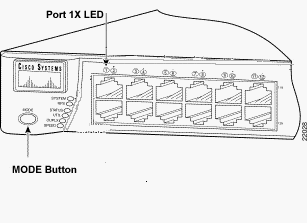 Catalyst 3524XL
Catalyst 2950-24
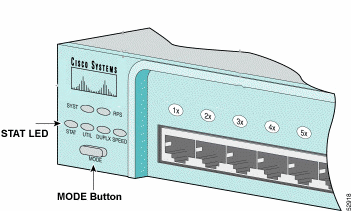 Catalyst 2950-24
Alleen voor 2955 Series switches:
De switches van de Catalyst 2955-reeks gebruiken geen externe modeknop voor wachtwoordherstel. In plaats daarvan gebruikt de switch boot loader de break-key detectie om de automatische opstartvolgorde te stoppen voor wachtwoordherstel doeleinden. De toetscombinatie voor een break hangt af van de gebruikte terminaltoepassing en het gebruikte besturingssysteem. Hyperterm die op Windows 2000 wordt uitgevoerd, maakt gebruik van Ctrl + Break. Op een werkstation waarop UNIX wordt uitgevoerd, is Ctrl-C de afbreeksleutel. Het volgende voorbeeld gebruikt Hyperterm om in te breken in de switch: modus op een 2955.
C2955 Boot Loader (C2955-HBOOT-M) Version 12.1(0.0.514), CISCO DEVELOPMENT TEST
VERSION
Compiled Fri 13-Dec-02 17:38 by madison
WS-C2955T-12 starting...
Base ethernet MAC Address: 00:0b:be:b6:ee:00
Xmodem file system is available.
Initializing Flash...
flashfs[0]: 19 files, 2 directories
flashfs[0]: 0 orphaned files, 0 orphaned directories
flashfs[0]: Total bytes: 7741440
flashfs[0]: Bytes used: 4510720
flashfs[0]: Bytes available: 3230720
flashfs[0]: flashfs fsck took 7 seconds.
...done initializing flash.
Boot Sector Filesystem (bs:) installed, fsid: 3
Parameter Block Filesystem (pb:) installed, fsid: 4

*** The system will autoboot in 15 seconds ***
Send break character to prevent autobooting.


!--- Wait until you see this message before !--- you issue the break sequence.
!--- Ctrl+Break is entered using Hyperterm.


The system has been interrupted prior to initializing the flash file system to finish
loading the operating system software:

flash_init
load_helper
boot
switch:
4. Voer de opdracht flash_init uit.
switch: flash_init
Initializing Flash...
flashfs[0]: 143 files, 4 directories
flashfs[0]: 0 orphaned files, 0 orphaned directories
flashfs[0]: Total bytes: 3612672
flashfs[0]: Bytes used: 2729472
flashfs[0]: Bytes available: 883200
flashfs[0]: flashfs fsck took 86 seconds
....done Initializing Flash.
Boot Sector Filesystem (bs:) installed, fsid: 3
Parameter Block Filesystem (pb:) installed, fsid: 4
switch:

!--- This output is from a 2900XL switch. Output from
!--- other switches will vary slightly.
5. Voer de opdracht load_helper uit.
switch: load_helper
switch:
6. Voer de opdracht dir flash: uit.
Het bestandssysteem van de switch wordt getoond:
switch: dir flash:
Directory of flash:/
2    -rwx  1803357   <date>               c3500xl-c3h2s-mz.120-5.WC7.bin

!--- This is the current version of software.

4    -rwx  1131      <date>               config.text

!--- This is the configuration file.

5    -rwx  109       <date>               info
6    -rwx  389       <date>               env_vars
7    drwx  640       <date>               html
18   -rwx  109       <date>               info.ver
403968 bytes available (3208704 bytes used)
switch:

!--- This output is from a 3500XL switch. Output from
!--- other switches will vary slightly.
7. Voer de naam flash:config.text flash:config.old in om de naam van het configuratiebestand te wijzigen.
switch: rename flash:config.text flash:config.old
switch:

!--- The config.text file contains the password
!--- definition.
8. Voer de opdracht Boot uit om het systeem op te starten.
switch: boot
Loading "flash:c3500xl-c3h2s-mz.120-5.WC7.bin"...###############################
################################################################################
######################################################################
File "flash:c3500xl-c3h2s-mz.120-5.WC7.bin" uncompressed and installed, entry po
int: 0x3000
executing...

!--- Output suppressed.
!--- This output is from a 3500XL switch. Output from other switches
!--- will vary slightly.
9. Voer "n" in bij de prompt om het dialoogvenster Initiële configuratie af te breken.
--- System Configuration Dialog ---
At any point you can enter a question mark '?' for help.
Use ctrl-c to abort configuration dialog at any prompt.
Default settings are in square brackets '[]'.
Continue with configuration dialog? [yes/no]: n

!--- Type "n" for no.

Press RETURN to get started.

!--- Press Return or Enter.

Switch>

!--- The Switch> prompt is displayed.
10. Typ bij de switch-prompt en om de activeringsmodus in te schakelen.
Switch>en
Switch#
11. Typ flash:config.old flash:config.text hernoemen om het configuratiebestand een andere naam te geven met de oorspronkelijke naam.
Switch#rename flash:config.old flash:config.text
Destination filename [config.text]

!--- Press Return or Enter.

Switch#
12. Kopieer het configuratiebestand naar het geheugen.
Switch#copy flash:config.text system:running-config
Destination filename [running-config]?

!--- Press Return or Enter.

1131 bytes copied in 0.760 secs
Sw1#
Het configuratiebestand is nu opnieuw geladen.
13. Overschrijf de huidige wachtwoorden die u niet kent. Kies een sterk wachtwoord met ten minste één hoofdletter, één cijfer en één speciaal teken.
Sw1#configure terminal


!--- To overwrite existing secret password

Sw1(config)#enable secret <new_secret_password>


!--- To overwrite existing enable password

Sw1(config)#enable password <new_enable_password>


!--- To overwrite existing vty password

Sw1(config)#line vty 0 15
Sw1(config-line)#password <new_vty_password>

Sw1(config-line)#login


!--- To overwrite existing console password

Sw1(config-line)#line con 0
Sw1(config-line)#password <new_console_password>
14. Schrijf de actieve configuratie naar het configuratiebestand met de opdracht Schrijfgeheugen.
Sw1#write memory
Building configuration...
[OK]
Sw1#
Gerelateerde informatie
Revisiegeschiedenis
| Revisie | Publicatiedatum | Opmerkingen |
|---|---|---|
2.0 |
08-Oct-2026
|
Bijgewerkte spelling, grammatica, ingevoegde horizontale lijnen om secties te scheiden voor leesbaarheid, dit is een herhaling. |
1.0 |
04-May-2014
|
Eerste vrijgave |
 Feedback