Voer een MDS 9000-serie Switch niet-onderbrekende NX-OS-upgrade uit
Inleiding
In dit document worden de instructies beschreven voor een niet-onderbrekende upgrade van NX-OS-software op de MDS 9000-reeks (MDS) Multilayer Director-Switches (MDS) van Cisco.
Achtergrondinformatie
Overzicht van niet-storende upgrades
Dit proces is van toepassing op zowel open systemen als FICON MDS-switches.
Alle MDS-switches ondersteunen niet-onderbrekende upgrades en downgrades, afhankelijk van de beperkingen die worden vermeld in de Cisco MDS 9000 NX-OS- en SAN-OS-software-installatie- en upgradehandleiding. Raadpleeg de MDS-documentatie, inclusief Release Notes: Cisco MDS 9000 - Release 9.x Documentation Suite.
De doelrelease is de NX-OS-release waarvoor de MDS wordt geüpgraded of gedowngraded naar in een installatiestap. De uiteindelijke doelrelease is de NX-OS release die de gewenste uiteindelijke release is. Het kan twee of meer installaties van deze intermediaire doellozingen vergen om de uiteindelijke doellozing te bereiken. De niet-verstorende upgradematrices voor zowel open systemen als FICON zijn te vinden: Cisco MDS 9000 NX-OS Software and Firmware Upgrade and Downgrade Guide, Release 9.x.
Deze zijn gewijzigd en vereisen alle upgrades van een NX-OS-versie voorafgaand aan 9.4(1a) naar een uiteindelijke NX-OS-versie later dan 9.4(1a) eerste upgrade naar NX-OS 9.4(1a). Het is absoluut noodzakelijk dat de Cisco MDS 9000 NX-OS Software and Firmware Upgrade and Downgrade Guide wordt geraadpleegd voor meer informatie.
Op de MDS uit de 97xx-reeks met dubbele supervisors worden tijdens de NX-OS-installatie de nieuwe beelden op de standby-supervisor geladen. Er vindt dan een switchover plaats om de standby-supervisor die de nieuwe code uitvoert actief te maken. De code wordt geladen op de eerder actieve supervisor en wordt de nieuwe standby supervisor. Het gegevensvliegtuig blijft Fibre Channel-verkeer passeren. De modules starten vervolgens zonder onderbreking het upgradeproces op de laagst genummerde module en gaan door naar de hoogste.
MDS 91xx-, 92xx- of 93xx-switches hebben slechts één supervisor. De supervisor (controlevlak) wordt na voltooiing van de upgrade zonder onderbreking opnieuw geladen. Het gegevensvliegtuig blijft Fibre Channel-verkeer zonder onderbreking passeren.
Als u van plan bent te upgraden via Telnet, Secure Shell (SSH) of Simple Network Management Protocol (SNMP) (Fabric Manager/Device Manager), moet u ervoor zorgen dat u een Ethernet-verbinding hebt met beide supervisors. Wanneer de supervisor niet-storend opnieuw start, gaat uw terminalsessie verloren. U moet opnieuw verbinding maken met de switch en u moet verbinding maken met de vorige standby-supervisor.
Meerdere switches binnen dezelfde structuur kunnen gelijktijdig worden geüpgraded. Zodra alle switches in de stof zijn geüpgraded, kan het functioneren van alle apparatuur worden beoordeeld over een periode van ongeveer zeven dagen. Als er geen problemen worden gevonden, kunnen de switches in het redundante weefsel worden bijgewerkt.
Bijgewerkte MDS-upgradeinstructies - van toepassing op alle MDS-platforms
De best practices voor het upgraden van switches uit de MDS 9000-reeks zijn bijgewerkt om een soepele ervaring met ISSU's te garanderen. Voordat u de opdracht install all kickstart... system... uitvoert, moet u zich precies aan deze procedure houden.

Opmerking: De doelversie is de NX-OS-versie waarvoor de MDS wordt geüpgraded of gedowngraded naar in een installatiestap. De uiteindelijke doelrelease is de NX-OS release die de gewenste uiteindelijke release is. Het kan twee of meer installaties van deze tussentijdse doellozingen nodig hebben om de uiteindelijke doellozing te bereiken. Dit proces kan worden herhaald voor elke tussentijdse doelrelease en de uiteindelijke doelrelease.
Opmerking: controleer het ondersteunde niet-storende upgrade- of downgradepad naar de uiteindelijke doelrelease. Dit is te vinden in het hoofdstuk Ondersteunde Cisco MDS NX-OS Software Non-disruptive Downgrade Path in de Cisco MDS 9000 NX-OS Software and Firmware Upgrade and Downgrade Guide, versie 9.x.
1. Sla een kopie van een Show Tech-Support-detail op als een Gzipped-bestand.
Deze bevat de huidige switch configuratie, logbestanden en de status van alle interfaces. Als er tijdens of na een upgrade een afwijking is opgetreden, helpt de status van de switch voorafgaand aan de upgrade bij het oplossen van problemen en vermindert deze de tijd om eventuele problemen te diagnosticeren. In NX-OS releases 8.4(2b) en later kan de tac-pac opdracht worden gebruikt. In eerdere releases kan de opdracht Technische ondersteuningsdetails weergeven worden gebruikt:
mds9124V# tac-pac
Collecting show tech-support details...
Show tech details will take 4-8 minutes to complete. Please Wait ...
Collecting show logging onboard...
tacpac file volatile:mds9124V_tacpac_2025-08-22.gz created.
mds9124V#
2. Sla het tac-pac/techsupport-bestand op buiten de switch.
Kopieer de tac-pac/techsupport die u op uw TFTP-server hebt opgeslagen en hernoem deze naar 'before_install'. Hiermee worden drie dingen bereikt:
- Het controleert of u een operationele TFTP-server hebt.
- Het controleert of u de server via het IP-netwerk kunt bereiken.
- Het plaatst een kopie van de configuratie op een locatie die zich buiten de switch bevindt, zodat u een back-up hebt in het geval van een storing in de switch.
MDS9124V# move volatile:F241-16-10-9124V-3_tacpac_2025-08-22.gz volatile:F241-16-10-9124V-3_tacpac_2025-08-22_before_install.gz
MDS9124V# copy volatile: tftp:
<prompts for file name> mds9124V_tacpac_2025-08-22_before_install.gz
<prompts for tftp server name or ip address> 192.168.1.1
Opmerking: In het vorige voorbeeld wordt TFTP gebruikt, de MDS ondersteunt ook FTP, SCP en SFTP.
3. (Optioneel) Sla huidige images die buiten de switch in gebruik zijn op.
Controleer of u een kopie van de huidige afbeeldingen op uw TFTP-server hebt, zodat u een back-up hebt als u naar de oorspronkelijke versie moet terugkeren. Als u dat niet doet, kopieert u het nu van de switch naar de TFTP-server. Als u de huidige afbeeldingen wilt bepalen, voert u de opdracht Weergaveversie uit. Zie deze voorbeelden:
MDS9124V# copy bootflash: tftp:
<prompts for file name> m9124v-s8ek9-kickstart-mz.9.3.2a.bin
<prompt for tftp server name or ip address> 192.168.1.1

MDS9148V# copy bootflash: tftp:
<prompts for file name> m9124v-s8ek9-mz.9.3.2a.bin
<prompt for tftp server name or ip address> 192.168.1.1
Opmerking: Gebruik de huidige versie voor de aanwijzingen voor de bestandsnaaminvoer.
In het vorige voorbeeld wordt TFTP gebruikt. MDS ondersteunt ook FTP, SCP en SFTP.
4. Download het doelsysteem en kickstart-afbeeldingen.
Download de nieuwe NX-OS-afbeeldingen van Cisco Software Download. Je hebt zowel een kickstart als een systeemimage nodig. Plaats ze op de TFTP-server in de standaard TFTP-directory.
Cisco biedt twee soorten NX-OS-software. Payload Non-Crypto, ook bekend als Non-Payload Encryption (NPE), releases zijn voor landen of overheden die het Amerikaanse ministerie van Handel hebben vermeld als een niet-exportlijst van software die codering bevat. Bepaalde geavanceerde mogelijkheden voor probleemoplossing zijn niet opgenomen in NPE-releases. NPE-releases kunnen ook de mogelijkheid voor Cisco beperken om workarounds of hotfixes te bieden. Alleen klanten die onder de exportbeperkingen vallen, kunnen NPE-releases uitvoeren.
Deze tabel kan worden gebruikt in om uw switch serie, en switch software afbeelding te selecteren:
| Cisco MDS-reeks Switch type | IBM MDS-serie Switch Type |
naamgevingsconventie |
| SAN24C-7 |
De bestandsnaam begint met m9124v-s8ek9 |
|
| SAN32C-6 |
De bestandsnaam begint met m9100-s6ek9 |
|
| None |
De bestandsnaam begint met m9100-s5ek9 |
|
| SAN48C-6 |
De bestandsnaam begint met m9148-s6ek9 |
|
| SAN48C-7 |
De bestandsnaam begint met m9148v-s8ek9 |
|
| SAN16C R |
De bestandsnaam begint met m9220-s7ek9 |
|
| SAN50C R |
De bestandsnaam begint met m9250-s5ek9 |
|
| None |
De bestandsnaam begint met m9300-s1ek9 |
|
| SAN96C-6 |
De bestandsnaam begint met m9300-s2ek9 |
|
| SAN96C-7 |
De bestandsnaam begint met m9396v-s3ek9 |
|
| MDS 9710, 9706 en 9718-serie, Supervisor Module-3 |
01FT600 SF1 en 01FT601 SF1E |
De bestandsnaam begint met m9700-sf3ek9 |
| MDS 9710-, 9706- en 9718-serie, supervisormodule 4 |
02JD753 SF4 |
De bestandsnaam begint met m9700-sf4ek9 |
Opmerking: Op de Cisco-downloadpagina, zweef over de bestandsnaam om het bericht Digest5 (MD5) op te halen.
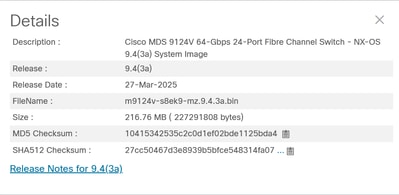
5. Controleer of er voldoende vrije ruimte beschikbaar is op de bootflash om de nieuwe afbeeldingen toe te voegen.
Als er onvoldoende ruimte op de bootflash is om het doelsysteem vast te houden en afbeeldingen te starten, moet u ten minste het systeemafbeeldingsbestand wissen. Houd de kickstart-afbeelding en als er een storing is, kunt u de switch naar een punt brengen waar u (TFTP) een nieuwe afbeelding kunt laden. Nadat u een upgrade hebt uitgevoerd, kunt u de oude versie verwijderen.
Opmerking: de huidige afbeeldingen kunnen niet worden verwijderd.
Voer de dir-opdracht uit om de beschikbare bootflash-vrije ruimte te controleren:
MDS9124V# dir bootflash:
Als u een MDS 9700-switch met dubbele supervisor uitvoert, voert u deze opdracht uit om te controleren of er voldoende vrije ruimte is op de standby-supervisor:
MDS9700# dir bootflash://sup-standby/
6. Download nieuwe afbeeldingen naar de bootflash op de switch vanaf de TFTP-server.
MDS9124V# copy tftp: bootflash:
<prompts for file name> m9124v-s8ek9-kickstart-mz.9.4.3a.bin
<prompt for tftp server name or ip address> 192.168.1.1

MDS9124V# copy tftp: bootflash:
<prompts for file name> m9124v-s8ek9-mz.9.4.3a.bin
<prompt for tftp server name or ip address> 192.168.1.1
Opmerking: In het vorige voorbeeld wordt TFTP gebruikt. De MDS ondersteunt ook FTP, SCP en SFTP.
Valideer de controlesom en de MD5-controlesom:
Geldig MD5 checksum voorbeeld:
MDS9124V# show version image m9124v-s8ek9-mz.9.4.3a.bin
MD5 Verification Passed
image name: m9124v-s8ek9-mz.9.4.3a.bin
bios: v1.11.0(11/27/2024)
system: version 9.4(3a)
compiled: 3/1/2025 12:00:00 [03/25/2025 00:13:28]
MDS9124V#
Voorbeeld van MD5-controlesom die ongeldig is en opnieuw moet worden gedownload.
MDS9124V# show version image m9124v-s8ek9-mz.9.4.3a.bin
MD5 Verification Failed
Image integrity check failed
Als de te upgraden MDS een 9700-serie is, kopieert u zowel de kickstart- als de systeemimages naar de bootflash op de standby-supervisor:
mds-9706# copy bootflash:m9700-sf4ek9-kickstart-mz.9.4.4.bin bootflash://sup-standby/
Copy progress 100% 80165KB
Copy complete, now saving to disk (please wait)...
mds-9706# copy bootflash:m9700-sf4ek9-mz.9.4.4.bin bootflash://sup-standby/
Copy progress 100% 542544KB
Copy complete, now saving to disk (please wait)...
mds-9706#
7. Sla de SAN-analyseconfiguratie op en schakel de SAN-analysefunctie tijdelijk uit.
Deze stap moet worden voltooid als zowel a als b waar zijn:
- SAN-analyse is ingeschakeld.
- Het switch model is een van de volgende:
- Een MDS 9700-switch en bevat een of meer 32 Gbps-modules "4/8/16/32 Gbps Advanced FC Module DS-X9648-1536K9" of
- De switch is een MDS 9132T, MDS 9148T of MDS 9396T.
Opmerking voor IBM 9700-switches is het IBM-model voor de "4/8/16/32 Gbps Advanced FC Module 01FT644."
Wanneer het niet-storende upgradepad meer dan één upgrade naar de uiteindelijke doelrelease omvat, moet deze stap alleen worden voltooid bij de eerste NX-OS-upgrade.
Dit is te wijten aan een probleem dat TCAM-corruptie kan veroorzaken wanneer analytics is ingeschakeld en een NX-OS-upgrade is voltooid. Analytics wordt opnieuw ingeschakeld in stap 15 zodra de upgrade is voltooid. Als de opdracht Show feature analytics is uitgeschakeld, kunnen deze stap en stap 14 worden overgeslagen. Dit probleem is gedocumenteerd in Cisco bug ID CSCwo03706.
Dit commando toont een 32 Gbps module in slot 12 is een MDS 9718:
MDS9718# show module
Mod  Ports  Module-Type                         Model              Status
---  -----  ----------------------------------- ------------------ ----------
1    48     2/4/8/10/16 Gbps Advanced FC Module DS-X9448-768K9     ok
4    48     2/4/8/10/16 Gbps Advanced FC Module DS-X9448-768K9     ok
9    0      Supervisor Module-4                 DS-X97-SF4-K9      ha-standby
10   0      Supervisor Module-4                 DS-X97-SF4-K9      active *
11   34     1/10/40G IPS,2/4/8/10/16G FC Module DS-X9334-K9        ok
12   48     4/8/16/32 Gbps Advanced FC Module   DS-X9648-1536K9    ok
13   48     8/16/32/64 Gbps Advanced FC Module  DS-X9748-3072K9    ok
Dit commando toont een 32 Gbps module in slot 12 in een IBM branded SAN192C (9706):
 SAN192C# show module
Mod  Ports  Module-Type                         Model              Status
---  -----  ----------------------------------- ------------------ ----------
1    48     4/8/16/32 Gbps Advanced FC Module   01FT644 48x32 FC   ok
2    48     8/16/32/64 Gbps Advanced FC Module  03FR076 48x64 FC   ok
3    0      Supervisor Module-4                 02JD753 SF4        active *
4    0      Supervisor Module-4                 02JD753 SF4        ha-standby
5    34     1/10/40G IPS,2/4/8/10/16G FC Module 01FT645 24/10 EX   ok
6    48     8/16/32/64 Gbps Advanced FC Module  03FR076 48x64 FC   ok
Deze opdracht geeft aan dat het type switch een 9148T is:
MDS9148T# show version
Cisco Nexus Operating System (NX-OS) Software
TAC support: http://www.cisco.com/tac
Documents: http://www.cisco.com/en/US/products/ps9372/tsd_products_support_serie
s_home.html
Copyright (c) 2002-2025, Cisco Systems, Inc. All rights reserved.
The copyrights to certain works contained herein are owned by
other third parties and are used and distributed under license.
Some parts of this software are covered under the GNU Public
License. A copy of the license is available at
http://www.gnu.org/licenses/gpl.html.

Software
  BIOS:      version 1.11.0
  loader:    version N/A
  kickstart: version 9.4(3b)
  system:    version 9.4(3b)
  BIOS compile time:       11/27/2024
  kickstart image file is: bootflash:///m9148-s6ek9-kickstart-mz.9.4.3b.bin
  kickstart compile time:  5/24/2025 12:00:00 [05/28/2025 12:25:54]
  system image file is:    bootflash:///m9148-s6ek9-mz.9.4.3b.bin
  system compile time:     5/24/2025 12:00:00 [05/28/2025 13:58:43]


Hardware
  cisco MDS 9148T 48X32G FC (1 RU) Chassis ("4/8/16/32 Gbps FC/Sup-4")
  Intel(R) Xeon(R) CPU D-1530 @ 2.40GHz with 5735444 kB of memory.
  Processor Board ID JAE22500MUN

  Device name: F241-14-08-9148T-2
  bootflash:    3735552 kB

Kernel uptime is 8 day(s), 1 hour(s), 27 minute(s), 47 second(s)

Last reset at 462831 usecs after Thu Aug 14 19:44:56 2025
  Reason: Reset due to upgrade
  System version: 8.4(2d)
  Service:

plugin
  Core Plugin
MDS9148T#
Deze opdracht toont aan dat functie-analyse is ingeschakeld:
MDS9718# show feature | i analytics
analytics 1 enabled Als SAN Analytics is ingeschakeld, slaat u een kopie van de SAN Analytics-configuratie op bij beide supervisors:
MDS9718# echo "configure terminal" > before_issu_analytics.cfg
MDS9718# show running-config analytics >> before_issu_analytics.cfg
Als dit een MDS 9700 of een IBM 9700 is, kopieert u de analyseconfiguratie naar de standby-supervisor:
MDS9718# copy before_issu_analytics.cfg bootflash://sup-standby/Schakel de SAN Analytics-functie tijdelijk uit:
MDS9718# configure terminal
MDS9718(config)# no feature analytics
MDS9718(config)# end
MDS9718# copy running-config startup-config
8. Voer een systeemomschakeling uit (alleen MDS 9700s).
Deze stap moet worden voltooid als de switch een MDS 9700-switch is.
Voer een opdracht voor systeemomschakeling uit vanuit de actieve supervisor. Zodra de systeemomschakeling is voltooid, sluit u de nieuw actieve supervisor opnieuw aan en wacht u totdat de standby-supervisor de 'ha-standby'-status bereikt.
Dit is een voorbeeld van de opdracht System Switchover van de consoleverbinding op de actieve supervisor:
MDS9710# system switchover
MDS9710#
User Access Verification
MDS9710 login: [703536.990233]  writing reset reason 7,

ME Firmware Status #1: 0x000F0345
ME Firmware Status #2: 0x38000000
ME Current State: Operational
ME Error Code: No Error
ME Operational Firmware Version: 06:3.0.3.214

  CPU Signature - 0x00050663: Version - 0x00050660
  CPU - 1 : Cores - 8 : HTEn - 1 : HT - 2 : Features - 0xBFEBFBFF
  MicroCode Version : 0x0700001E

...etc...
Maak opnieuw verbinding met de nieuw actieve supervisor en voer de opdracht module tonen uit. Zodra de supervisor de 'ha-standby'-status heeft bereikt, is deze stap voltooid:
MDS9710# show module
Mod  Ports  Module-Type                         Model              Status
---  -----  ----------------------------------- ------------------ ----------
1    48     2/4/8/10/16 Gbps Advanced FC Module DS-X9448-768K9     ok
4    48     2/4/8/10/16 Gbps Advanced FC Module DS-X9448-768K9     ok
5    0      Supervisor Module-4                                    powered-up
6    0      Supervisor Module-4                 DS-X97-SF4-K9      active *
8    34     1/10/40G IPS,2/4/8/10/16G FC Module DS-X9334-K9        ok
9    48     4/8/16/32 Gbps Advanced FC Module   DS-X9648-1536K9    ok
10   48     8/16/32/64 Gbps Advanced FC Module  DS-X9748-3072K9    ok
...

MDS9710# show module
Mod  Ports  Module-Type                         Model              Status
---  -----  ----------------------------------- ------------------ ----------
1    48     2/4/8/10/16 Gbps Advanced FC Module DS-X9448-768K9     ok
4    48     2/4/8/10/16 Gbps Advanced FC Module DS-X9448-768K9     ok
5    0      Supervisor Module-4                 DS-X97-SF4-K9      ha-standby
6    0      Supervisor Module-4                 DS-X97-SF4-K9      active *
8    34     1/10/40G IPS,2/4/8/10/16G FC Module DS-X9334-K9        ok
9    48     4/8/16/32 Gbps Advanced FC Module   DS-X9648-1536K9    ok
10   48     8/16/32/64 Gbps Advanced FC Module  DS-X9748-3072K9    ok
...
9. Controleer op onverenigbaarheden tussen NX-OS-releases.
Voer de opdracht show incompatibility system<target system image name> uit om te controleren op incompatibiliteit tussen NX-OS-releases en eventuele switch-gebeurtenissen die u ervan weerhouden om te upgraden. Dit zorgt er ook voor dat het /var/volatile/tmp bestandssysteem voldoende ruimte heeft om door te gaan. Hierna volgt een voorbeeld:
MDS9124V# show incompatibility system m9124v-s8ek9-mz.9.4.3a.bin
Checking incompatible configuration(s):
No incompatible configurations

Checking dynamic incompatibilities:
No incompatible configurations
MDS9124V#
10. Bepaal de eventuele gevolgen voor de installatie.
Dit controleert afbeeldingen en zorgt ervoor dat ze compatibel zijn met de switch. Het geeft ook aan of er een BIOS-upgrade in het image is opgenomen. Dit wordt voltooid via de opdracht Alle impact installeren weergeven:
MDS9124V# show install all impact system m9124v-s8ek9-mz.9.4.3a.bin kickstart m9124v-s8ek9-kickstart-mz.9.4.3a.bin
Installer will perform impact only check. Please wait.

Verifying image bootflash:/m9124v-s8ek9-kickstart-mz.9.4.3a.bin for boot variable "kickstart".
[####################] 100% -- SUCCESS

Verifying image bootflash:/m9124v-s8ek9-mz.9.4.3a.bin for boot variable "system".
[####################] 100% -- SUCCESS

Performing module support checks.                                                 [####################] 100% -- SUCCESS

Verifying image type.
[####################] 100% -- SUCCESS

Extracting "system" version from image bootflash:/m9124v-s8ek9-mz.9.4.3a.bin.
[####################] 100% -- SUCCESS

Extracting "kickstart" version from image bootflash:/m9124v-s8ek9-kickstart-mz.9.4.3a.bin.
[####################] 100% -- SUCCESS

Extracting "bios" version from image bootflash:/m9124v-s8ek9-mz.9.4.3a.bin.
[####################] 100% -- SUCCESS

Performing Compact Flash and TCAM sanity test.
[####################] 100% -- SUCCESS

Notifying services about system upgrade.                                          [####################] 100% -- SUCCESS


Compatibility check is done:
Module  bootable          Impact  Install-type  Reason
------  --------  --------------  ------------  ------
     1       yes  non-disruptive         reset


Images will be upgraded according to following table:
Module       Image                  Running-Version(pri:alt)           New-Version  Upg-Required
------  ----------  ----------------------------------------  --------------------  ------------
     1      system                                   9.3(2a)               9.4(3a)           yes
     1   kickstart                                   9.3(2a)               9.4(3a)           yes
     1        bios   v1.11.0(11/27/2024):v1.11.0(11/27/2024)   v1.11.0(11/27/2024)            no


MDS9124V#
Opmerking: deze opdracht moet worden ingevoerd als één regel, niet als twee afzonderlijke regels. Deze opdracht wordt niet gebruikt voor de installatie, maar kan wel worden gebruikt om het installatieproces te verifiëren en een rapport op te stellen met de versies die van en naar komen. Het geeft ook aan of de upgrade storend of niet-storend is bij het uitvoeren van de upgrade.
Opmerking: alle sessies voor bestandsoverdracht (zoals SFTP/SCP) naar de switch moeten worden afgesloten voordat het upgrade-/downgradeproces wordt gestart. Elke geopende bestandsoverdracht kan ervoor zorgen dat de switch op het moment van ISSU/D storend opnieuw wordt geladen.
Zie Cisco bug ID CSCvo22269 en Cisco bug ID CSCvu52058 voor meer informatie. Klanten hebben geklaagd dat de MobaXterm een SFTP-sessie opent bij het openen van een SSH-sessie en voorkomt dat de upgrade plaatsvindt.
Opmerking: Specifieke richtlijnen voor 32 Gbps Fabric-Switches:
- Beginnend met NX-OS 9.4(5), is bij het upgraden naar een latere NX-OS-release het activeringsmechanisme voor Supervisor CPU BIOS-updates op 32 Gbps fabric-switches gewijzigd. Standaard worden BIOS-updates geïnstalleerd, maar niet geladen door de CPU, tenzij de switch storend opnieuw wordt geladen. De ISSU install all command is uitgebreid met een disruptive optie om de disruptive reload automatisch uit te voeren aan het einde van de ISSU. Als alternatief kan de storende herlaad worden voltooid na de ISSU als een latere en afzonderlijke bewerking met behulp van de herlaad opdracht. Gebruik de opdracht Systeem opnieuw laden zonder onderbreking niet. Om te bepalen of de upgrade ook een BIOS-upgrade bevat, controleert u de uitvoer van de opdracht Installeer alle gevolgen van de show.
- Voor 32 Gbps fabric-switches met NX-OS-versies die lager zijn dan NX-OS 9.4(5), is het activeringsmechanisme voor Supervisor CPU-BIOS tijdens ISSU niet betrouwbaar. Alleen als de nieuwe NX-OS-versie een BIOS-update bevat, kan het BIOS in het nieuwe NX-OS voorafgaand aan de upgrade worden geïnstalleerd met de opdracht verborgen installatiemodule 1 bios-systeem newNxosSystemImage. Vervolgens kan de switch onderbroken opnieuw worden geladen met behulp van de opdracht Reload CLI. Gebruik de opdracht Systeem opnieuw laden zonder onderbreking niet. Vervolgens kan de ISSU van NX-OS zonder onderbreking worden uitgevoerd, omdat de ISSU kan detecteren dat het BIOS al is geüpgraded.
- Zie stap 12 en 14 voor meer informatie.
Opmerking: specifieke richtlijnen voor 64 Gbps Fabric-Switches:
Het systeem voor het activeren van BIOS-updates op 64 Gbps-switches is gewijzigd. Na de eerste upgrade naar NX-OS 9.4(5) of later wordt aanbevolen om ook de switch EPLD te upgraden. Deze EPLD bevat nieuwe functies waarmee de CPU van de switch onafhankelijk van de stroomcyclus kan worden gebruikt, terwijl het doorsturen van verkeer zonder onderbrekingen blijft plaatsvinden. Alle EPLD-upgrades zijn storend omdat de switch opnieuw wordt geladen als onderdeel van de EPLD-upgrade. Dit moet slechts eenmaal worden voltooid na de eerste upgrade naar NX-OS 9.4(5) of later.
Zie stap 14 voor meer informatie.
11. Controleer of de tmp-bestandsdirectory niet meer dan 9% in gebruik heeft.
Sommige MDS-switches gebruiken de map /var/volatile/tmp en andere gebruiken de map /var/tmp. Voer de opdracht show system internal flash | inc "/var/tmp|/var/volatile/tmp" uit om te controleren of er op beide punten ruimte beschikbaar is:
MDS9124V# show  system internal flash | inc "/var/tmp|/var/volatile/tmp"
Mount-on                  1K-blocks      Used   Available   Use%  Filesystem
/var/volatile/tmp            614400       104      614296      1   none

MDS9124V#
Opmerking: In het vorige voorbeeld wordt aangegeven dat het bestandssysteem 1% heeft gebruikt, dus het is veilig om door te gaan naar de volgende stap. Als de map /var/volatile/tmp of de map /var/tmp voor meer dan 9% is gebruikt, gaat u niet verder met de installatie en neemt u contact op met Cisco TAC.
12. Upgrade het BIOS van de supervisor(s) van het nieuwe systeemimage.
Elk specifiek type hardware heeft zijn eigen BIOS-versies. De nummering varieert sterk afhankelijk van het specifieke type hardware, zoals supervisor, schakelmodule, enzovoort. Als de uitvoer van de opdracht Install all impact in stap 10 aangeeft dat er een BIOS-upgrade is in de doelversie, gaat u verder met deze stappen.
Opmerking: In NX-OS 9.4(2) is een nieuwe supervisor-BIOS geïntroduceerd voor CVE-2024-20397.
Deze procedure is van toepassing op alle switch-modellen wanneer de huidige switch NX-OS-release tussen 8.4(2) en 9.3(2a) ligt en de beoogde NX-OS-release 9.4(2) of hoger is. Het is ook van belang voor 32 Gbps fabric-switches met NX-OS-versies lager dan NX-OS 9.4(5). Zorg ervoor dat NX-OS-images al naar de supervisor zijn gekopieerd voordat u doorgaat met deze stappen.
- Installeer handmatig het nieuwste supervisor-BIOS op elke supervisor die de verborgen opdracht uitvoert: installeer module module_number bios-systeem newNxosSystemImage. Op een MDS 9700 met dubbele toezichthouders moet dit bij elke toezichthouder gebeuren. Voor MDS-switches is het modulenummer altijd 1. Op switches van de stof kan de switch opnieuw worden geladen nadat de BIOS-upgrade is voltooid. Dit gebeurt via het reload commando. In dit voorbeeld wordt het BIOS geüpgraded van het 9.4(3a)-systeemimage op een MDS 9124V-switch:
MDS9124V# install module 1 bios system m9124v-s8ek9-mz.9.4.3a.bin
Collecting bios version from module 1 and system image. This may take a while.
Warning: Please do not remove or power off the module at this time
Upgrading primary bios
Started bios programming .... please wait
[############################100%############################]
BIOS install succeeded for module 1
Upgrading alternate bios
Started bios programming .... please wait
[############################100%############################]
BIOS install succeeded for module 1
MDS9124V#
MDS9124V# reload
This command will reboot the system. (y/n)?  [n] y
2026 May 14 18:20:00 MDS9124V %PLATFORM-2-PFM_SYSTEM_RESET: Manual system restart from Command Line Interface
...
In dit voorbeeld wordt het BIOS in een MDS 9718 met supervisors in sleuven 9 en 10 opgewaardeerd naar 9.4(2a):
MDS9718# show module | include Supervisor
9    0      Supervisor Module-4                 DS-X97-SF4-K9     active *
10   0      Supervisor Module-4                 DS-X97-SF4-K9     ha-standby
MDS9718#
MDS9718# install module 9 bios system m9700-sf4ek9-mz.9.4.2a.bin
Collecting bios version from module 1 and system image. This may take a while.
Warning: Please do not remove or power off the module at this time
Upgrading primary bios
Started bios programming .... please wait
[############################100%############################]
BIOS install succeeded for module 9
Upgrading alternate bios
Started bios programming .... please wait
[############################100%############################]
BIOS install succeeded for module 9
MDS9718#
MDS9718# install module 10 bios system m9700-sf4ek9-mz.9.4.2a.bin
Collecting bios version from module 1 and system image. This may take a while.
Warning: Please do not remove or power off the module at this time
Upgrading primary bios
Started bios programming .... please wait
[############################100%############################]
BIOS install succeeded for module 10
Upgrading alternate bios
Started bios programming .... please wait
[############################100%############################]
BIOS install succeeded for module 10
MDS9718#
13. Upgrade het NX-OS op de switch.
Ga verder met de upgrade naar de nieuwe versie van NX-OS met de opdracht 'alles installeren':
Dit is een voorbeeld van het upgraden van een MDS 9124V naar NX-OS 9.4(4):
MDS9124V# install all kickstart m9124v-s8ek9-kickstart-mz.9.4.4.bin system m9124v-s8ek9-mz.9.4.4.bin
Installer will perform compatibility check first. Please wait.

Verifying image bootflash:/m9124v-s8ek9-kickstart-mz.9.4.4.bin for boot variable "kickstart".
[####################] 100% -- SUCCESS

Verifying image bootflash:/m9124v-s8ek9-mz.9.4.4.bin for boot variable "system".
[####################] 100% -- SUCCESS

Performing module support checks.                                                                          [####################] 100% -- SUCCESS

Verifying image type.
[####################] 100% -- SUCCESS

Extracting "system" version from image bootflash:/m9124v-s8ek9-mz.9.4.4.bin.
[####################] 100% -- SUCCESS

Extracting "kickstart" version from image bootflash:/m9124v-s8ek9-kickstart-mz.9.4.4.bin.
[####################] 100% -- SUCCESS

Extracting "bios" version from image bootflash:/m9124v-s8ek9-mz.9.4.4.bin.
[####################] 100% -- SUCCESS

Performing Compact Flash and TCAM sanity test.
[####################] 100% -- SUCCESS

Notifying services about system upgrade.                                                                   [####################] 100% -- SUCCESS


Compatibility check is done:
Module  bootable          Impact  Install-type  Reason
------  --------  --------------  ------------  ------
     1       yes  non-disruptive         reset


Images will be upgraded according to following table:
Module       Image                  Running-Version(pri:alt)           New-Version  Upg-Required
------  ----------  ----------------------------------------  --------------------  ------------
     1      system                                   9.4(1a)                9.4(4)           yes
     1   kickstart                                   9.4(1a)                9.4(4)           yes
     1        bios   v1.11.0(11/27/2024):v1.11.0(11/27/2024)   v1.11.0(11/27/2024)            no


Do you want to continue with the installation (y/n)?  [n] y

Install is in progress, please wait.

Performing runtime checks.                                                                                 [####################] 100% -- SUCCESS

Notifying services about the upgrade.                                                                      [####################] 100% -- SUCCESS

Setting boot variables.
[####################] 100% -- SUCCESS

Performing configuration copy.
[####################] 100% -- SUCCESS

Module 1: Refreshing compact flash and Upgrading bios/loader/bootrom/power-seq.
Warning: please do not remove or power off the module at this time.
[####################] 100% -- SUCCESS

Upgrade can no longer be aborted, any failure will result in a disruptive upgrade.

Freeing memory in the file system.                                                                         [####################] 100% -- SUCCESS

Loading images into memory.                                                                                [####################] 100% -- SUCCESS

Saving linecard runtime state.                                                                             [####################] 100% -- SUCCESS

Saving supervisor runtime state.                                                                           [####################] 100% -- SUCCESS

Saving mts state.                                                                                          [####################] 100% -- SUCCESS

Reloading the kernel to proceed with the upgrade.
All telnet and ssh connections will now be temporarily terminated.
F241-16-11-9124V-1#

MDS BIOS: v1.11.0 Date: 11/27/2024 15:45:42
System Date: 08/27/2025  Time: 18:43:44.0
Booting bootflash:/m9124v-s8ek9-kickstart-mz.9.4.4.bin
Trying diskboot
 Filesystem type is ext2fs, partition type msdos.
Image SWID valid
Image MD5Sum match
OS Image Key Type: Development KEY


Image Signature verification was Successful.

Boot Time: 8/27/2025  18:43:51
INIT: version 2.88 booting
USB device found..

boot device node /dev/sda
obfl flash device node /dev/sdb
Checking obfl filesystem. done.
Checking all filesystems.... done.
ACT2: ACT2 AUTHENTICATION TEST STATUS : SUCCESS
/etc/rc.d/rcS.d/S81mcelog-init: line 33: boot_debug: command not found
Starting mcelog daemon
Loading system software
isanimg_passed_by_sycli::
System image digital signature verification successful.
Uncompressing system image: bootflash:/m9124v-s8ek9-mz.9.4.4.bin Wed Aug 27 18:44:37 UTC 2025
blogger: nothing to do.
CCCCCCCCCCCCCCCCCCCCCCCCCCCCCCCCCCCCCCCCCCCCCCCCCCCCCCCCC
..done Wed Aug 27 18:44:39 UTC 2025
INIT: Entering runlevel: 3
starting statd: done
2025 Aug 27 18:44:50 F241-16-11-9124V-1 %SYSLOG-2-SYSTEM_MSG : Syslogs wont be logged into logflash until logflash is online
2025 Aug 27 18:44:53 F241-16-11-9124V-1 %KERN-2-SYSTEM_MSG: [   14.911303] igb_probe: Could not do igb_proc_init - kernel
2025 Aug 27 18:45:10 F241-16-11-9124V-1 %CARDCLIENT-2-REG: OK
2025 Aug 27 18:45:17 F241-16-11-9124V-1 %PMON-SLOT1-2-PMON_CRIT_INFO: Port Monitor Critical Information: Config download success .
2025 Aug 27 18:45:19 F241-16-11-9124V-1 %PLATFORM-2-PS_DETECT: Power supply 1 detected but shutdown (Serial number LIT24512HRP)
2025 Aug 27 18:45:19 F241-16-11-9124V-1 %PLATFORM-2-PS_OK: Power supply 2 ok(Serial number LIT24512HSG)
2025 Aug 27 18:45:19 F241-16-11-9124V-1 %PLATFORM-2-PS_FANOK: Fan in Power supply 2 ok

User Access Verification

Continuing with installation process, please wait.
The login will be disabled until the installation is completed.

Status for linecard upgrade.                                                                               [####################] 100% -- SUCCESS

Performing supervisor state verification.                                                                  [####################] 100% -- SUCCESS

Supervisor non-disruptive upgrade successful.

Install has been successful.
Dit is een voorbeeld van het upgraden van een MDS 9710 naar NX-OS 9.4(3a):
MDS9710# install all kickstart m9700-sf4ek9-kickstart-mz.9.4.3a.bin system m9700-sf4ek9-mz.9.4.3a.bin
Installer will perform compatibility check first. Please wait.

Verifying image bootflash:/m9700-sf4ek9-kickstart-mz.9.4.3a.bin for boot variable "kickstart".
[####################] 100% -- SUCCESS

Verifying image bootflash:/m9700-sf4ek9-mz.9.4.3a.bin for boot variable "system".
[####################] 100% -- SUCCESS

Performing module support checks. [####################] 100% -- SUCCESS

Verifying image type.
[####################] 100% -- SUCCESS

Extracting "slc4xb" version from image bootflash:/m9700-sf4ek9-mz.9.4.3a.bin.
[####################] 100% -- SUCCESS

Extracting "bios" version from image bootflash:/m9700-sf4ek9-mz.9.4.3a.bin.
[####################] 100% -- SUCCESS

Extracting "system" version from image bootflash:/m9700-sf4ek9-mz.9.4.3a.bin.
[####################] 100% -- SUCCESS

Extracting "kickstart" version from image bootflash:/m9700-sf4ek9-kickstart-mz.9.4.3a.bin.
[####################] 100% -- SUCCESS

Extracting "lctsh" version from image bootflash:/m9700-sf4ek9-mz.9.4.3a.bin.
[####################] 100% -- SUCCESS

Extracting "slcf32" version from image bootflash:/m9700-sf4ek9-mz.9.4.3a.bin.
[####################] 100% -- SUCCESS

Extracting "slc-hindon" version from image bootflash:/m9700-sf4ek9-mz.9.4.3a.bin.
[####################] 100% -- SUCCESS

Notifying services about system upgrade. [####################] 100% -- SUCCESS


Compatibility check is done:
Module bootable Impact Install-type Reason
------ -------- -------------- ------------ ------
1 yes non-disruptive rolling
4 yes non-disruptive rolling
5 yes non-disruptive reset
6 yes non-disruptive reset
8 yes non-disruptive rolling
9 yes non-disruptive rolling
10 yes non-disruptive rolling


Other miscellaneous information for installation:
Module info
------ ----------------------------------
8 FC ports 1-24 are hitless, IPS 1-8 are hitful, and Intelligent Applications running are hitful


Images will be upgraded according to following table:
Module Image Running-Version(pri:alt) New-Version Upg-Required
------ ---------- ---------------------------------------- -------------------- ------------
1 slc4xb 9.4(2a) 9.4(3a) yes
1 bios v1.10.23(04/07/20):v1.10.23(04/07/20) v1.10.23(04/07/20) no
4 slc4xb 9.4(2a) 9.4(3a) yes
4 bios v1.10.23(04/07/20):v1.10.23(04/07/20) v1.10.23(04/07/20) no
5 system 9.4(2a) 9.4(3a) yes
5 kickstart 9.4(2a) 9.4(3a) yes
5 bios v2.21.0(11/27/2024):v2.21.0(11/27/2024) v2.21.0(11/27/2024) no
6 system 9.4(2a) 9.4(3a) yes
6 kickstart 9.4(2a) 9.4(3a) yes
6 bios v2.21.0(11/27/2024):v2.21.0(11/27/2024) v2.21.0(11/27/2024) no
8 lctsh 9.4(2a) 9.4(3a) yes
8 bios v4.2.19(05/16/2023):v4.2.19(05/16/2023) v4.2.19(05/16/2023) no
9 slcf32 9.4(2a) 9.4(3a) yes
9 bios v4.1.56(05/16/2023):v4.1.56(05/16/2023) v4.1.56(05/16/2023) no
10 slc-hindon 9.4(2a) 9.4(3a) yes
10 bios v1.11.0(11/27/2024):v1.11.0(11/27/2024) v1.11.0(11/27/2024) no


Do you want to continue with the installation (y/n)? [n] y

Install is in progress, please wait.

Performing runtime checks. [####################] 100% -- SUCCESS

Syncing image bootflash:/m9700-sf4ek9-kickstart-mz.9.4.3a.bin to standby.
[####################] 100% -- SUCCESS

Syncing image bootflash:/m9700-sf4ek9-mz.9.4.3a.bin to standby.
[####################] 100% -- SUCCESS

Setting boot variables.
[####################] 100% -- SUCCESS

Performing configuration copy.
[####################] 100% -- SUCCESS

Module 1: Upgrading bios/loader/bootrom/power-seq.
Warning: please do not remove or power off the module at this time.
[####################] 100% -- SUCCESS

Module 4: Upgrading bios/loader/bootrom/power-seq.
Warning: please do not remove or power off the module at this time.
[####################] 100% -- SUCCESS

Module 5: Upgrading bios/loader/bootrom/power-seq.
Warning: please do not remove or power off the module at this time.
[####################] 100% -- SUCCESS

Module 6: Upgrading bios/loader/bootrom/power-seq.
Warning: please do not remove or power off the module at this time.
[####################] 100% -- SUCCESS

Module 8: Upgrading bios/loader/bootrom/power-seq.
Warning: please do not remove or power off the module at this time.
[####################] 100% -- SUCCESS

Module 9: Upgrading bios/loader/bootrom/power-seq.
Warning: please do not remove or power off the module at this time.
[####################] 100% -- SUCCESS

Module 10: Upgrading bios/loader/bootrom/power-seq.
Warning: please do not remove or power off the module at this time.
[####################] 100% -- SUCCESS

ME Firmware Status #1: 0x000F0345
ME Firmware Status #2: 0x3800E000
ME Current State: Operational
ME Error Code: No Error
ME Operational Firmware Version: 06:3.0.3.214

CPU Signature - 0x00050663: Version - 0x00050660
CPU - 1 : Cores - 8 : HTEn - 1 : HT - 2 : Features - 0xBFEBFBFF
MicroCode Version : 0x0700001E

Banzai FPGA Information:
BANZAI BusNum 3B Tornado VenID = 0x1137 DevId = 0x141 PCI address 0xF800000C
BANZAI FPGA BusNum 3C VenID = 0x10EE DevId = 0x7 PCI address 0xBC000000
BANZAI LPC VenID = 0x8086 DevId = 0x8C54
Revison Number = 0x14
BIOS = Primary 0x200

Primary SB_Result: 0x18C3140
SB_Address: 0xFFDE008C
SB_Error: 0x0

Secondary SB_Result: 0x0
SB_Address: 0x0
SB_Error: 0x0

Enable OS Watchdog timer. Value 0x7FC00
Punch SPI boot timer Stop. Value 0x300
IOFPGA MISC RESET REG 0x18. Default Value 0x0
IOFPGA MISC RESET REG 0x18. Value 0x400
Config S2S Command register 0x704. Value 0x4
Config S2S Config register 0x700. Value 0x800000F
IDROM MAC Address = 10:B3:D6:8E:19:04

Disable GBE ASPM

SATA Port 0: Micron_5100_MT - 240.0 GB

NEXUS OS Boot Mode = 0x0

Selected Boot Option:
NEXUS OS: GRUB Boot

CISCO SUP3DC3X BIOS: v2.21.0 Date: 11/27/2024 12:29:13

Pre OS Boot Entry:

IO-FPGA: Disabled OS Watch Dog Timer!

PMB2_REG(0x8)=0xaa

S2S_REG(0x24)=0x1
Booting bootflash:/m9700-sf4ek9-kickstart-mz.9.4.3a.bin
Trying diskboot
Filesystem type is ext2fs, partition type 0x83
Image SWID valid


Image Signature verification was Successful.

Boot Time: 8/27/2025 12:41:37

Cisco OS Boot Entry:

IO-FPGA: Enabled the OS Watch Dog Timer!
INIT: version 2.88 booting
Checking Bootflash
Bootflash firmware upgrade not required
Checking SSD
Checking firmware version for SSD
Firmware is already at latest version


OBFL device found as /dev/sda
usb device (2-1:1.0) /dev/sdb found after 0 iterations
boot device node /dev/sdb
cat: /sys/bus/usb/devices/1-1.1/dev: No such file or directory
mknod: invalid minor device number ''
Checking obfl filesystems...[ 35.469121] OBFL Error: (line 1265):obfl_global_header_check: number of blocks 5 not valid, expected 6

Checking all filesystems..r.r.r.R.r done.
[ 59.398556] SUP booted with primary IO-FPGA
[ 59.448706] in cctrl2 module
[ 59.483190] registering callback
Starting mcelog daemon
Starting rpcbind daemon...done.
creating NFS state directory: done
starting 8 nfsd kernel threads: done
starting mountd: done
starting statd: done
Loading system software
/bootflash//m9700-sf4ek9-mz.9.4.3a.bin read done
System image digital signature verification successful.
Uncompressing system image: bootflash:/m9700-sf4ek9-mz.9.4.3a.bin Wed Aug 27 12:43:13 UTC 2025
blogger: nothing to do.
C
..done Wed Aug 27 12:43:19 UTC 2025
INIT: Entering runlevel: 3
System is coming up ... Please wait ...
System is coming up ... Please wait ...
System is coming up ... Please wait ...
System is coming up ... Please wait ...
System is coming up ... Please wait ...
System is coming up ... Please wait ...
System is coming up ... Please wait ...
System is coming up ... Please wait ...
System is coming up ... Please wait ...
System is coming up ... Please wait ...

User Access Verification

Continuing with installation, please wait
2025 Aug 27 12:45:31 MDS9710 %USBHSD-2-MOUNT: logflash: online

Module 5: Waiting for module online.
-- SUCCESS
2025 Aug 27 12:50:50 MDS9710 %KERN-2-SYSTEM_MSG: [ 523.196775] Switchover started by redundancy driver - kernel
2025 Aug 27 12:50:50 MDS9710 %SYSMGR-2-HASWITCHOVER_PRE_START: This supervisor is becoming active (pre-start phase).
2025 Aug 27 12:50:50 MDS9710 %SYSMGR-2-HASWITCHOVER_START: Supervisor 5 is becoming active.
2025 Aug 27 12:50:51 MDS9710 %SYSMGR-2-SWITCHOVER_OVER: Switchover completed.
2025 Aug 27 12:50:54 MDS9710 %PLATFORM-1-PFM_ALERT: Disabling ejector based shutdown on sup in slot 5
2025 Aug 27 12:50:55 MDS9710 %IVR-2-IVR_NAT_INFO: Only IVR NAT is supported on this platform in this NX-OS release. IVR NAT is not enabled by default - it must be explicitly enabled.
2025 Aug 27 12:55:17 MDS9710 %USBHSD-STANDBY-2-MOUNT: logflash: online
2025 Aug 27 12:55:17 MDS9710 %USBHSD-STANDBY-2-MOUNT: slot0: online
2025 Aug 27 12:58:49 MDS9710 %PLATFORM-1-PFM_ALERT: Enabling ejector based shutdown on sup in slot 6


Module 1: Non-disruptive upgrading.
[# ] 0%2025 Aug 27 12:59:45 MDS9710 %PLATFORM-1-PFM_ALERT: Enabling ejector based shutdown on sup in slot 5
2025 Aug 27 13:00:33 MDS9710 %MODULE-2-MOD_EOL_WARN: module 1 (DS-X9448-768K9) is approaching End of Life date. Refer to https://www.cisco.com/c/en/us/products/collateral/storage-networking/mds-9700-series-multilayer-directors/eos-eol-notice-c51-742195.html for EOL notice
2025 Aug 27 13:00:43 MDS9710 %PMON-SLOT1-2-PMON_CRIT_INFO: Port Monitor Critical Information: Con[####################] 100% -- SUCCESS


Module 4: Non-disruptive upgrading.
[# ] 0%2025 Aug 27 13:01:59 MDS9710 %MODULE-2-MOD_EOL_WARN: module 4 (DS-X9448-768K9) is approaching End of Life date. Refer to https://www.cisco.com/c/en/us/products/collateral/storage-networking/mds-9700-series-multilayer-directors/eos-eol-notice-c51-742195.html for EOL notice
2025 Aug 27 13:02:08 MDS9710 %PMON-SLOT4-2-PMON_CRIT_INFO: Port Monitor Critical Information: Con[####################] 100% -- SUCCESS


Module 8: Non-disruptive upgrading.
[# ] 0%2025 Aug 27 13:05:32 MDS9710 %PMON-SLOT8-2-PMON_CRIT_INFO: Port Monitor Critical Information: Config download success .


Module 9: Non-disruptive upgrading.
[# ] 0%2025 Aug 27 13:10:19 MDS9710 %PMON-SLOT9-2-PMON_CRIT_INFO: Port Monitor Critical Information: Config download success . [####################] 100% -- SUCCESS


Module 10: Non-disruptive upgrading.
[# ] 0%2025 Aug 27 13:12:31 MDS9710 %PMON-SLOT10-2-PMON_CRIT_INFO: Port Monitor Critical Information: Config download success . [####################] 100% -- SUCCESS

Install has been successful.
14. Herlaad of installeer EPLD voor switches.
- Specifieke richtlijnen voor 32 Gbps fabric-switches: Als een upgrade is uitgevoerd na NX-OS 9.4(5) of hoger en een BIOS-upgrade bevat, laadt u de switch opnieuw met de opdracht Reload CLI. Voer de opdracht Niet-verstorend systeem opnieuw laden niet uit.
- Specifieke richtsnoeren voor 64 Gbps-switches: het systeem voor het activeren van BIOS-updates op 64 Gbps-switches is gewijzigd. Het nieuwe systeem vereist een eenmalige, storende EPLD-upgrade van de switch naar IO FPGA-versies of hoger:
Tabel-IO FPGA-versies voor niet-onderbrekende BIOS-updates:
| Switch | Minimale IO FPGA-versie (IO SPI 2) |
| MDS 9124V | 0.018 |
| MDS 9148V | 0.018 |
| MDS 9396V | 0.016 |
Deze versies worden uitgebracht als onderdeel van NX-OS 9.4(5) en kunnen worden geïnstalleerd zodra de switch NX-OS 9.4(5) (of later) draait. De EPLD wordt geüpgraded met de installatiemodule 1 epld CLI-opdracht. Dit omvat een automatische storende herbelasting van de switch om de EPLD-update te activeren. Als de EPLD niet wordt geüpgraded, wordt het oude herlaadmechanisme gebruikt, wat kan resulteren in het ophangen van de switch tijdens een ISSU, dit omvat een BIOS-update. Deze mogelijkheid bestaat niet op switches van 16 Gbps en 32 Gbps.
Zodra de EPLD is bijgewerkt, kunnen volgende ISSU's alle nieuwe BIOS-versies in het image activeren zonder storende herladen. Om de huidige EPLD-versies te bepalen, voert u de opdracht show version module 1 epld uit. Het EPLD-apparaat 'IO SPI 2' is de versie die moet overeenkomen met de vorige tabel.
Dit is een voorbeeld van een MDS 9148V-switch die laat zien dat de 'IO SPI 2'-versie 0.013 is, wat minder is dan de vereiste versie van 0.018:
MDS9148V# show version module 1 epld

EPLD Device                     Version
---------------------------------------
MI IO SPI                         0.011
IO SPI 2                          0.013
Raadpleeg voor meer informatie over de installatie en updates van EPLD de Release Notes for MDS 9000 Series EPLD Firmware, Release 9.4(5), die alle MDS-documentatie bevat.
15. Controleer de installatie.
Controleer of de installatie succesvol en voltooid is door de opdracht show version uit te voeren en te noteren dat de systeem- en kickstart-versies de verwachte versies zijn:
MDS9124V# show version
Cisco Nexus Operating System (NX-OS) Software
TAC support: http://www.cisco.com/tac
Documents: http://www.cisco.com/en/US/products/ps9372/tsd_products_support_serie
s_home.html
Copyright (c) 2002-2025, Cisco Systems, Inc. All rights reserved.
The copyrights to certain works contained herein are owned by
other third parties and are used and distributed under license.
Some parts of this software are covered under the GNU Public
License. A copy of the license is available at
http://www.gnu.org/licenses/gpl.html.

Software
  BIOS:      version 1.11.0
  loader:    version N/A
  kickstart: version 9.4(3a)
  system:    version 9.4(3a)
  BIOS compile time:       11/27/2024
  kickstart image file is: bootflash:///m9124v-s8ek9-kickstart-mz.9.4.3a.bin
  kickstart compile time:  3/1/2025 12:00:00 [03/24/2025 22:26:25]
  system image file is:    bootflash:///m9124v-s8ek9-mz.9.4.3a.bin
  system compile time:     3/1/2025 12:00:00 [03/25/2025 00:13:28]


Hardware
  cisco MDS 9124V 24X64G FC (1 RU) Chassis ("24X8/16/32/64 Gbps FC/Sup-4")
  Intel(R) Xeon(R) CPU D-1633N @ 2.50GHz with 8053200 kB of memory.
  Processor Board ID JAE26220SYR

  Device name: F241-16-10-9124V-3
  bootflash:    7364608 kB

Kernel uptime is 0 day(s), 0 hour(s), 2 minute(s), 53 second(s)

Last reset at 356414 usecs after Fri Aug 22 20:22:16 2025
  Reason: Reset due to upgrade
  System version: 9.3(2a)
  Service:

plugin
  Core Plugin
MDS9124V#
Controleer op de MDS 9700s of alle modules het juiste NX-OS-niveau hebben via de opdracht Show Module:
MDS9710# show module
Mod  Ports  Module-Type                         Model              Status
---  -----  ----------------------------------- ------------------ ----------
1    48     2/4/8/10/16 Gbps Advanced FC Module DS-X9448-768K9     ok
4    48     2/4/8/10/16 Gbps Advanced FC Module DS-X9448-768K9     ok
5    0      Supervisor Module-4                 DS-X97-SF4-K9      active *
6    0      Supervisor Module-4                 DS-X97-SF4-K9      ha-standby
8    34     1/10/40G IPS,2/4/8/10/16G FC Module DS-X9334-K9        ok
9    48     4/8/16/32 Gbps Advanced FC Module   DS-X9648-1536K9    ok
10   48     8/16/32/64 Gbps Advanced FC Module  DS-X9748-3072K9    ok

Mod  Power-Status  Reason
---  ------------  ---------------------------
2    powered-dn     Configured Power down
3    powered-dn     Configured Power down

Mod  Sw               Hw
---  ---------------  ------
1    9.4(3a)          1.1
4    9.4(3a)          1.3
5    9.4(3a)          1.0
6    9.4(3a)          1.0
8    9.4(3a)          1.0
9    9.4(3a)          1.0
10   9.4(3a)          1.0
...
16. Analytics opnieuw inschakelen.
Wanneer het niet-storende upgradepad meer dan één upgrade naar de uiteindelijke doelrelease bevat, moet deze stap alleen worden voltooid bij de laatste NX-OS-upgrade. Dat wil zeggen, de upgrade naar de uiteindelijke doelrelease. Zodra de upgrade naar de uiteindelijke doelrelease is voltooid, kan de analysefunctie opnieuw worden ingeschakeld als de analysefunctie in stap 7 is uitgeschakeld:
MDS9718# run before_issu_analytics.cfg17. Sla een kopie van een Show Tech-Support Details op nadat de upgrade is voltooid.
mds9124V# tac-pac
Collecting show tech-support details...
Show tech details will take 4-8 minutes to complete. Please Wait ...
Collecting show logging onboard...
tacpac file volatile:mds9124V_tacpac_2025-08-22.gz created.
mds9124V#18. Kopieer de tac-pac/techsupport die u zojuist hebt opgeslagen op uw TFTP-server.
Voor vragen over de installatie aan de tac-pac voorafgaand aan de installatie, kunt u vergelijken met de tac-pac na de installatie. Controleer de opdracht 'verplaatsen', die de naam van het bestand wijzigt:
MDS9124V# move volatile:F241-16-10-9124V-3_tacpac_2025-08-22.gz volatile:F241-16-10-9124V-3_tacpac_2025-08-22_after_install.gz
MDS9124V#
MDS9124V# copy volatile:F241-16-10-9124V-3_tacpac_2025-08-22_after_install.gz tftp://192.168.1.1
Trying to connect to tftp server......
Connection to server Established. Copying Started.....
-
TFTP put operation was successful
Copy complete.
MDS9124V#
Revisiegeschiedenis
| Revisie | Publicatiedatum | Opmerkingen |
|---|---|---|
7.0 |
01-Jul-2026
|
Bijgewerkte introductie (verkort), spelling, spatiëring, grammatica, zinsstructuur en CCW-waarschuwingen. |
6.0 |
15-Apr-2026
|
Specifieke instructies toegevoegd voor 32G- en 64G-switches vanaf NX-OS 9.4(5). |
5.0 |
04-Sep-2025
|
Toegevoegd 'systeem switchover' en omgekeerd de volgorde van de controle op onverenigbaarheden en impact. |
4.0 |
28-Aug-2025
|
Bijgewerkte speciale instructies voor Cisco MDS 9700-serie regisseurs |
2.0 |
26-Nov-2024
|
Hercertificering, opnieuw geschreven om alle MDS-hardware voor verzending op te nemen, bijgewerkt naar de huidige best practices, waaronder het vastleggen van logbestanden en MD5-controlesommen. |
1.0 |
01-Sep-2021
|
Eerste vrijgave |

 Feedback
Contact Cisco
- Een ondersteuningscase openen

- (Vereist een Cisco-servicecontract)