NAT-reflectie configureren op de ASA voor de VCS Expressway Tele Presence Devices

Downloadopties
Inclusief taalgebruik
De documentatie van dit product is waar mogelijk geschreven met inclusief taalgebruik. Inclusief taalgebruik wordt in deze documentatie gedefinieerd als taal die geen discriminatie op basis van leeftijd, handicap, gender, etniciteit, seksuele oriëntatie, sociaaleconomische status of combinaties hiervan weerspiegelt. In deze documentatie kunnen uitzonderingen voorkomen vanwege bewoordingen die in de gebruikersinterfaces van de productsoftware zijn gecodeerd, die op het taalgebruik in de RFP-documentatie zijn gebaseerd of die worden gebruikt in een product van een externe partij waarnaar wordt verwezen. Lees meer over hoe Cisco gebruikmaakt van inclusief taalgebruik.
Over deze vertaling
Cisco heeft dit document vertaald via een combinatie van machine- en menselijke technologie om onze gebruikers wereldwijd ondersteuningscontent te bieden in hun eigen taal. Houd er rekening mee dat zelfs de beste machinevertaling niet net zo nauwkeurig is als die van een professionele vertaler. Cisco Systems, Inc. is niet aansprakelijk voor de nauwkeurigheid van deze vertalingen en raadt aan altijd het oorspronkelijke Engelstalige document (link) te raadplegen.
Inhoud
Inleiding
In dit document wordt beschreven hoe u een NAT-reflectieconfiguratie (Network Address Translation) kunt implementeren op de Cisco Adaptive Security Appliances voor speciale Cisco TelePresence-scenario's die een dergelijke NAT-configuratie op de firewall vereisen.
Voorwaarden
Vereisten
Cisco raadt kennis van de volgende onderwerpen aan:
-
Cisco ASA (Adaptive Security Appliance) basis-NAT-configuratie.
-
Cisco TelePresence Video Communication Server (VCS)-besturing en VCS Expressway-basisconfiguratie.
Opmerking: Dit document is alleen bedoeld voor gebruik wanneer de aanbevolen implementatiemethode van een VCS-Expressway of Expressway-Edge met beide NIC-interfaces in verschillende DMZ's niet kan worden gebruikt. Raadpleeg de volgende koppeling op pagina 60 voor meer informatie over de aanbevolen implementatie met behulp van dubbele NIC's: Basisconfiguratie van Cisco TelePresence Video Communication Server (besturing met Expressway) Implementatiehandleiding
Gebruikte componenten
De informatie in dit document is gebaseerd op de volgende software- en hardware-versies:
-
Cisco ASA 5500- en 5500-X-serie-apparaten waarop softwareversie 8.3 en hoger wordt uitgevoerd.
-
Cisco VCS versie X8.x en hoger.
De informatie in dit document is gebaseerd op de apparaten in een specifieke laboratoriumomgeving. Alle apparaten die in dit document worden beschreven, hadden een opgeschoonde (standaard)configuratie. Als uw netwerk live is, moet u de potentiële impact van elke opdracht begrijpen.
Opmerking: In het hele document worden VCS-apparaten aangeduid als VCS Expressway en VCS Control. Dezelfde configuratie is echter van toepassing op Expressway-E- en Expressway-C-apparaten.
Achtergrondinformatie
Volgens de Cisco TelePresence-documentatie zijn er twee soorten TelePresence-scenario's waarbij de NAT-reflectieconfiguratie op de FW's vereist is om de VCS-besturing in staat te stellen via het openbare IP-adres van de VCS Expressway met de VCS Expressway te communiceren.
Het eerste scenario omvat een enkel subnet De-Militarized Zone (DMZ) dat een enkele VCS Expressway LAN-interface gebruikt, en het tweede scenario omvat een FW DMZ met 3 poorten die een enkele VCS Expressway LAN-interface gebruikt.
Tip: raadpleeg de implementatiehandleiding voor de Cisco TelePresence Video Communication Server Basic Configuration (Control with Expressway) voor meer informatie over de TelePresence-implementatie.
Cisco-topologieën niet aanbevolen voor de VCS- en E-implementatie
Het is belangrijk op te merken dat de volgende topologieën NIET worden aanbevolen door Cisco. De aanbevolen implementatiemethode voor een VCS Expressway of Expressway edge is het gebruik van twee verschillende DMZ's, waarbij de Expressway een NIC heeft in elk van de DMZ's. Deze handleiding is bedoeld voor gebruik in omgevingen waar de aanbevolen implementatiemethode niet kan worden gebruikt.
Single Subnet DMZ met Single VCS Expressway LAN-interface
In dit scenario kan FWA het verkeer naar FWB leiden (en vice versa). Met de VCS Expressway kan videoverkeer door FW B worden geleid zonder dat de verkeersstroom op FW B van buiten naar binnen wordt verminderd. De VCS Expressway verwerkt ook FW traversal aan zijn openbare kant.
Hier is een voorbeeld van dit scenario:

Deze implementatie maakt gebruik van deze onderdelen:
- Een enkel subnet DMZ (10.0.10.0/24) dat het volgende bevat:
- De interne interface van FWA (10.0.10.1)
- De externe interface van FW B (10.0.10.2)
- De LAN1-interface van de VCS Expressway (10.0.10.3)
- Een LAN-subnet (10.0.30.0/24) dat het volgende bevat:
- De interne interface van FW B (10.0.30.1)
- De LAN1-interface van de VCS-besturing (10.0.30.2)
- De netwerkinterface van de Cisco TelePresence Management Server (TMS) (10.0.30.3)
Op FWA is een statische één-op-één NAT geconfigureerd, die de NAT uitvoert voor het publieke adres 64.100.0.10 naar het LAN1 IP-adres van de VCS Expressway. De statische NAT-modus is ingeschakeld voor de LAN1-interface op de VCS Expressway, met een statisch NAT IP-adres van 64.100.0.10.
Opmerking: U moet de volledig gekwalificeerde domeinnaam (FQDN) van de VCS Expressway invoeren op de beveiligde traversal-clientzone (peer-adres) van VCS-besturing zoals deze wordt weergegeven van buiten het netwerk. De reden hiervoor is dat in de statische NAT-modus de VCS Expressway vraagt dat inkomende signalering en mediaverkeer worden verzonden naar de externe FQDN in plaats van de privénaam. Dit betekent ook dat de externe FW het verkeer van de VCS-besturing naar de externe FQDN van de VCS Expressway moet toestaan. Dit staat bekend als NAT-reflectie en wordt mogelijk niet door alle typen FW's ondersteund.
In dit voorbeeld moet FWB de NAT-weergave van verkeer toestaan dat afkomstig is van de VCS-besturing die is bestemd voor het externe IP-adres (64.100.0.10) van de VCS Expressway. De traversale zone op de VCS-besturing moet 64.100.0.10 als peer-adres hebben (na FQDN naar IP-conversie).
De VCS Expressway moet worden geconfigureerd met een standaardgateway van 10.0.10.1. Of de statische routes in dit scenario vereist zijn, hangt af van de mogelijkheden en instellingen van FW A en FW B. De communicatie van de VCS-besturing naar de VCS Expressway verloopt via het IP-adres 64.100.0.10 van de VCS Expressway; en het retourverkeer van de VCS Expressway naar de VCS-besturing moet mogelijk via de standaardgateway verlopen.
De VCS Expressway kan aan het Cisco TMS worden toegevoegd met het IP-adres 10.0.10.3 (of met het IP-adres 64.100.0.10, als FWB dit toestaat), aangezien de communicatie over het Cisco TMS-beheer niet wordt beïnvloed door de statische NAT-modus-instellingen op de VCS Expressway.
FW DMZ met 3 poorten en Single VCS Expressway LAN-interface
Hier is een voorbeeld van dit scenario:
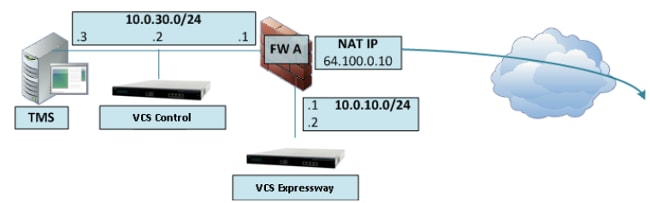
In deze implementatie wordt een FW met 3 poorten gebruikt om het volgende te maken:
- Een DMZ-subnet (10.0.10.0/24) dat het volgende bevat:
- De DMZ-interface van FWA (10.0.10.1)
- De LAN1-interface van de VCS Expressway (10.0.10.2)
- Een LAN-subnet (10.0.30.0/24) dat het volgende bevat:
- De LAN-interface van FWA (10.0.30.1)
- De LAN1-interface van de VCS-besturing (10.0.30.2)
- De netwerkinterface van het Cisco TMS (10.0.30.3)
Op FWA is een statische één-op-één NAT geconfigureerd, die de NAT van het openbare IP-adres 64.100.0.10 naar het LAN1 IP-adres van de VCS Expressway uitvoert. De statische NAT-modus is ingeschakeld voor de LAN1-interface op de VCS Expressway, met een statisch NAT IP-adres van 64.100.0.10.
De VCS Expressway moet worden geconfigureerd met een standaardgateway van 10.0.10.1. Aangezien deze gateway moet worden gebruikt voor al het verkeer dat de VCS Expressway verlaat, zijn er geen statische routes vereist bij dit type implementatie.
De traversal-clientzone op de VCS-besturing moet worden geconfigureerd met een peer-adres dat overeenkomt met het statische NAT-adres van de VCS Expressway (64.100.0.10 in dit voorbeeld) om dezelfde redenen als beschreven in het vorige scenario.
Opmerking: Dit betekent dat FWA verkeer vanaf de VCS-besturing moet toestaan met een IP-adres van 64.100.0.10. Dit wordt ook wel NAT-reflectie genoemd en opgemerkt moet worden dat dit niet door alle typen FW's wordt ondersteund.
De VCS Expressway kan aan het Cisco TMS worden toegevoegd met het IP-adres van 10.0.10.2 (of met het IP-adres 64.100.0.10, als FWA dit toestaat), omdat de communicatie over het Cisco TMS-beheer niet wordt beïnvloed door de statische NAT-modus-instellingen op de VCS Expressway.
Configureren
In dit gedeelte wordt beschreven hoe de NAT-reflectie in de ASA kan worden geconfigureerd voor de twee verschillende VCS C- en E-implementatiescenario's.
Single Subnet DMZ met Single VCS Expressway LAN-interface
Voor het eerste scenario moet u deze NAT-reflectieconfiguratie op FWA toepassen om de communicatie van de VCS-besturing (10.0.30.2) mogelijk te maken die is bestemd voor het externe IP-adres (64.100.0.10) van de VCS Expressway:

In dit voorbeeld is het IP-adres voor VCS-besturing 10.0.30.2/24 en het IP-adres voor VCS Expressway 10.0.10.3/24.
Als u veronderstelt dat het IP-adres 10.0.30.2 van VCS-besturing blijft wanneer het van de binnenkant naar de buiteninterface van FW B wordt verplaatst wanneer u op zoek bent naar de VCS Expressway met het IP-adres van de bestemming 64.100.0.10, wordt de NAT-reflectieconfiguratie die u op FW B moet implementeren in deze voorbeelden weergegeven.
Voorbeeld voor ASA versie 8.3 en hoger:
object network obj-10.0.30.2
 host 10.0.30.2

object network obj-10.0.10.3
 host 10.0.10.3

object network obj-64.100.0.10
 host 64.100.0.10

nat (inside,outside) source static obj-10.0.30.2 obj-10.0.30.2 destination static
 obj-64.100.0.10 obj-10.0.10.3

NOTE: After this NAT is applied in the ASA you will receive a warning message as the following:

WARNING: All traffic destined to the IP address of the outside interface is being redirected.
WARNING: Users may not be able to access any service enabled on the outside interface.
Voorbeeld voor ASA versie 8.2 en eerder:
access-list IN-OUT-INTERFACE extended permit ip host 10.0.30.2 host 64.100.0.10
static (inside,outside) 10.0.30.2 access-list IN-OUT-INTERFACE

access-list OUT-IN-INTERFACE extended permit ip host 10.0.10.3 host 10.0.30.2
static (outside,inside) 64.100.0.10 access-list OUT-IN-INTERFACE
Opmerking: Het hoofddoel van deze NAT-reflectieconfiguratie is om de VCS-besturing in staat te stellen de VCS-expressway te bereiken, maar met behulp van het openbare IP-adres van de VCS-expressway in plaats van het privé-IP-adres. Als het IP-adres van de bron van de VCS-besturing tijdens deze NAT-vertaling wordt gewijzigd met een tweemaal NAT-configuratie in plaats van de zojuist weergegeven voorgestelde NAT-configuratie, waardoor VCS Expressway verkeer vanaf zijn eigen openbare IP-adres ziet, komen de telefoonservices voor de MRA-apparaten niet naar boven. Dit is geen ondersteunde implementatie zoals beschreven in deel 3 van de sectie Aanbevelingen hieronder.
FW DMZ met 3 poorten en Single VCS Expressway LAN-interface
Voor het tweede scenario moet u deze NAT-reflectieconfiguratie toepassen op FWA om de NAT-reflectie van inkomend verkeer van de VCS-besturing 10.0.30.2 mogelijk te maken die is bestemd voor het externe IP-adres (64.100.0.10) van de VCS Expressway:
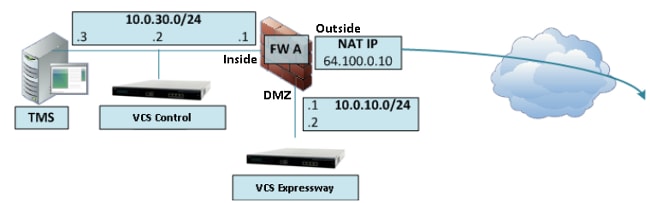
In dit voorbeeld is het IP-adres voor VCS-besturing 10.0.30.2/24 en het IP-adres voor VCS Expressway 10.0.10.2/24.
Als u veronderstelt dat het IP-adres 10.0.30.2 van VCS-besturing blijft wanneer het van binnenuit naar de DMZ-interface van FWA wordt verplaatst wanneer u op zoek bent naar de VCS Expressway met het IP-adres van de bestemming 64.100.0.10, wordt de NAT-reflectieconfiguratie die u op FWA moet implementeren in deze voorbeelden weergegeven.
Voorbeeld voor ASA versie 8.3 en hoger:
object network obj-10.0.30.2
 host 10.0.30.2

object network obj-10.0.10.2
 host 10.0.10.2

object network obj-64.100.0.10
 host 64.100.0.10

nat (inside,DMZ) source static obj-10.0.30.2 obj-10.0.30.2 destination static
 obj-64.100.0.10 obj-10.0.10.2

NOTE: After this NAT is applied you will receive a warning message as the following:

WARNING: All traffic destined to the IP address of the DMZ interface is being redirected.
WARNING: Users may not be able to access any service enabled on the DMZ interface.
Voorbeeld voor ASA versie 8.2 en eerder:
access-list IN-DMZ-INTERFACE extended permit ip host 10.0.30.2 host 64.100.0.10
static (inside,DMZ) 10.0.30.2 access-list IN-DMZ-INTERFACE

access-list DMZ-IN-INTERFACE extended permit ip host 10.0.10.2 host 10.0.30.2
static (DMZ,inside) 64.100.0.10 access-list DMZ-IN-INTERFACE
Opmerking: Het hoofddoel van deze NAT-reflectieconfiguratie is om de VCS-besturing in staat te stellen de VCS-expressway te bereiken, maar met het openbare IP-adres van de VCS-expressway in plaats van het privé-IP-adres. Als het IP-adres van de bron van de VCS-besturing tijdens deze NAT-vertaling wordt gewijzigd met een tweemaal NAT-configuratie in plaats van de voorgestelde NAT-configuratie die zojuist is weergegeven, waardoor VCS Expressway verkeer vanaf zijn eigen openbare IP-adres ziet, komen de telefoonservices voor de MRA-apparaten niet naar boven. Dit is geen ondersteunde implementatie zoals beschreven in sectie 3 in de sectie Aanbevelingen hieronder.
Verifiëren
Dit gedeelte bevat de pakkettraceruitgangen die u in de ASA kunt zien om te bevestigen dat de NAT-reflectieconfiguratie werkt zoals nodig in zowel de VCS- als de E-implementatiescenario's.
Single Subnet DMZ met Single VCS Expressway LAN-interface
Hier is de FW B packet tracer output voor ASA Versies 8.3 en hoger:
FW-B# packet-tracer input inside tcp 10.0.30.2 1234 64.100.0.10 80

Phase: 1
Type: UN-NAT
Subtype: static
Result: ALLOW
Config:
nat (inside,outside) source static obj-10.0.30.2 obj-10.0.30.2 destination
 static obj-64.100.0.10 obj-10.0.10.3
Additional Information:
NAT divert to egress interface outside
Untranslate 64.100.0.10/80 to 10.0.10.3/80

Phase: 2
Type: IP-OPTIONS
Subtype:
Result: ALLOW
Config:
Additional Information:

Phase: 3
Type: NAT
Subtype:
Result: ALLOW
Config:
nat (inside,outside) source static obj-10.0.30.2 obj-10.0.30.2 destination
 static obj-64.100.0.10 obj-10.0.10.3
Additional Information:
Static translate 10.0.30.2/1234 to 10.0.30.2/1234

Phase: 4
Type: NAT
Subtype: rpf-check
Result: ALLOW
Config:
nat (inside,outside) source static obj-10.0.30.2 obj-10.0.30.2 destination
 static obj-64.100.0.10 obj-10.0.10.3
Additional Information:

Phase: 5
Type: IP-OPTIONS
Subtype:
Result: ALLOW
Config:
Additional Information:

Phase: 6
Type: FLOW-CREATION
Subtype:
Result: ALLOW
Config:
Additional Information:
New flow created with id 2, packet dispatched to next module

Result:
input-interface: inside
input-status: up
input-line-status: up
output-interface: outside
output-status: up
output-line-status: up
Action: allow
Hier is de FW B packet tracer output voor ASA Versies 8.2 en eerder:
FW-B# packet-tracer input inside tcp 10.0.30.2 1234 64.100.0.10 80

Phase: 1
Type: UN-NAT
Subtype: static
Result: ALLOW
Config:
static (outside,inside) 64.100.0.10 access-list OUT-IN-INTERFACE
 match ip outside host 10.0.10.3 inside host 10.0.30.2
 static translation to 64.100.0.10
 translate_hits = 0, untranslate_hits = 2
Additional Information:
NAT divert to egress interface outside
Untranslate 64.100.0.10/0 to 10.0.10.3/0 using netmask 255.255.255.255

Phase: 2
Type: IP-OPTIONS
Subtype:
Result: ALLOW
Config:
Additional Information:

Phase: 3
Type: NAT
Subtype:
Result: ALLOW
Config:
static (inside,outside) 10.0.30.2 access-list IN-OUT-INTERFACE
 match ip inside host 10.0.30.2 outside host 64.100.0.10
 static translation to 10.0.30.2
 translate_hits = 1, untranslate_hits = 0
Additional Information:
Static translate 10.0.30.2/0 to 10.0.30.2/0 using netmask 255.255.255.255

Phase: 4
Type: NAT
Subtype: host-limits
Result: ALLOW
Config:
static (inside,outside) 10.0.30.2 access-list IN-OUT-INTERFACE
 match ip inside host 10.0.30.2 outside host 64.100.0.10
 static translation to 10.0.30.2
 translate_hits = 1, untranslate_hits = 0
Additional Information:

Phase: 5
Type: NAT
Subtype: rpf-check
Result: ALLOW
Config:
static (outside,inside) 64.100.0.10 access-list OUT-IN-INTERFACE
 match ip outside host 10.0.10.3 inside host 10.0.30.2
 static translation to 64.100.0.10
 translate_hits = 0, untranslate_hits = 2
Additional Information:

Phase: 6
Type: NAT
Subtype: host-limits
Result: ALLOW
Config:
static (outside,inside) 64.100.0.10 access-list OUT-IN-INTERFACE
 match ip outside host 10.0.10.3 inside host 10.0.30.2
 static translation to 64.100.0.10
 translate_hits = 0, untranslate_hits = 2
Additional Information:

Phase: 7
Type: IP-OPTIONS
Subtype:
Result: ALLOW
Config:
Additional Information:

Phase: 8
Type: FLOW-CREATION
Subtype:
Result: ALLOW
Config:
Additional Information:
New flow created with id 1166, packet dispatched to next module

Result:
input-interface: inside
input-status: up
input-line-status: up
output-interface: outside
output-status: up
output-line-status: up
Action: allow
FW DMZ met 3 poorten en Single VCS Expressway LAN-interface
Hier is de FW A packet tracer output voor ASA Versies 8.3 en hoger:
FW-A# packet-tracer input inside tcp 10.0.30.2 1234 64.100.0.10 80

Phase: 1
Type: UN-NAT
Subtype: static
Result: ALLOW
Config:
nat (inside,DMZ) source static obj-10.0.30.2 obj-10.0.30.2 destination
 static obj-64.100.0.10 obj-10.0.10.2
Additional Information:
NAT divert to egress interface DMZ
Untranslate 64.100.0.10/80 to 10.0.10.2/80

Phase: 2
Type: IP-OPTIONS
Subtype:
Result: ALLOW
Config:
Additional Information:

Phase: 3
Type: NAT
Subtype:
Result: ALLOW
Config:
nat (inside,DMZ) source static obj-10.0.30.2 obj-10.0.30.2 destination
 static obj-64.100.0.10 obj-10.0.10.2
Additional Information:
Static translate 10.0.30.2/1234 to 10.0.30.2/1234

Phase: 4
Type: NAT
Subtype: rpf-check
Result: ALLOW
Config:
nat (inside,DMZ) source static obj-10.0.30.2 obj-10.0.30.2 destination
 static obj-64.100.0.10 obj-10.0.10.2
Additional Information:

Phase: 5
Type: IP-OPTIONS
Subtype:
Result: ALLOW
Config:
Additional Information:

Phase: 6
Type: FLOW-CREATION
Subtype:
Result: ALLOW
Config:
Additional Information:
New flow created with id 7, packet dispatched to next module

Result:
input-interface: inside
input-status: up
input-line-status: up
output-interface: DMZ
output-status: up
output-line-status: up
Action: allow
Hier is de FW A packet tracer uitgang voor ASA Versies 8.2 en eerder:
FW-A# packet-tracer input inside tcp 10.0.30.2 1234 64.100.0.10 80

Phase: 1
Type: UN-NAT
Subtype: static
Result: ALLOW
Config:
static (DMZ,inside) 64.100.0.10 access-list OUT-IN-INTERFACE
 match ip DMZ host 10.0.10.2 inside host 10.0.30.2
 static translation to 64.100.0.10
 translate_hits = 0, untranslate_hits = 2
Additional Information:
NAT divert to egress interface DMZ
Untranslate 64.100.0.10/0 to 10.0.10.2/0 using netmask 255.255.255.255

Phase: 2
Type: IP-OPTIONS
Subtype:
Result: ALLOW
Config:
Additional Information:

Phase: 3
Type: NAT
Subtype:
Result: ALLOW
Config:
static (inside,DMZ) 10.0.30.2 access-list IN-OUT-INTERFACE
 match ip inside host 10.0.30.2 DMZ host 64.100.0.10
 static translation to 10.0.30.2
 translate_hits = 1, untranslate_hits = 0
Additional Information:
Static translate 10.0.30.2/0 to 10.0.30.2/0 using netmask 255.255.255.255

Phase: 4
Type: NAT
Subtype: host-limits
Result: ALLOW
Config:
static (inside,DMZ) 10.0.30.2 access-list IN-OUT-INTERFACE
 match ip inside host 10.0.30.2 DMZ host 64.100.0.10
 static translation to 10.0.30.2
 translate_hits = 1, untranslate_hits = 0
Additional Information:

Phase: 5
Type: NAT
Subtype: rpf-check
Result: ALLOW
Config:
static (DMZ,inside) 64.100.0.10 access-list OUT-IN-INTERFACE
 match ip DMZ host 10.0.10.2 inside host 10.0.30.2
 static translation to 64.100.0.10
 translate_hits = 0, untranslate_hits = 2
Additional Information:

Phase: 6
Type: NAT
Subtype: host-limits
Result: ALLOW
Config:
static (DMZ,inside) 64.100.0.10 access-list OUT-IN-INTERFACE
 match ip DMZ host 10.0.10.2 inside host 10.0.30.2
 static translation to 64.100.0.10
 translate_hits = 0, untranslate_hits = 2
Additional Information:

Phase: 7
Type: IP-OPTIONS
Subtype:
Result: ALLOW
Config:
Additional Information:

Phase: 8
Type: FLOW-CREATION
Subtype:
Result: ALLOW
Config:
Additional Information:
New flow created with id 1166, packet dispatched to next module

Result:
input-interface: inside
input-status: up
input-line-status: up
output-interface: DMZ
output-status: up
output-line-status: up
Action: allow
Problemen oplossen
U kunt pakketopnames configureren op de ASA-interfaces om de NAT-vertaling te bevestigen wanneer de pakketten de betrokken FW-interfaces binnenkomen en verlaten.
Packet Capture toegepast voor het scenario "3-Port FW DMZ with Single VCS Expressway LAN Interface"
FW-A# sh cap
capture capin type raw-data interface inside [Capturing - 5735 bytes]
  match ip host 10.0.30.2 host 64.100.0.10
capture capdmz type raw-data interface DMZ [Capturing - 5735 bytes]
  match ip host 10.0.10.2 host 10.0.30.2
FW-A# sh cap capin

71 packets captured
   1: 22:21:37.095270 10.0.30.2 > 64.100.0.10: icmp: echo request
   2: 22:21:37.100672 64.100.0.10 > 10.0.30.2: icmp: echo reply
   3: 22:21:37.101313 10.0.30.2 > 64.100.0.10: icmp: echo request
   4: 22:21:37.114373 64.100.0.10 > 10.0.30.2: icmp: echo reply
   5: 22:21:37.157371 10.0.30.2 > 64.100.0.10: icmp: echo request
   6: 22:21:37.174429 64.100.0.10 > 10.0.30.2: icmp: echo reply
   7: 22:21:39.234164 10.0.30.2 > 64.100.0.10: icmp: echo request
   8: 22:21:39.238528 64.100.0.10 > 10.0.30.2: icmp: echo reply
   9: 22:21:39.261110 10.0.30.2 > 64.100.0.10: icmp: echo request
  10: 22:21:39.270234 64.100.0.10 > 10.0.30.2: icmp: echo reply
  11: 22:21:47.170614 10.0.30.2.38953 > 64.100.0.10.23: S 1841210281:1841210281(0)
win 4128 <mss 536>
  12: 22:21:47.198933 64.100.0.10.23 > 10.0.30.2.38953: S 3354834096:3354834096(0)
ack 1841210282 win 4128 <mss 536>
  13: 22:21:47.235186 10.0.30.2.38953 > 64.100.0.10.23: . ack 3354834097
win 4128
  14: 22:21:47.242815 64.100.0.10.23 > 10.0.30.2.38953: P 3354834097:3354834109(12)
ack 1841210282 win 4128
  15: 22:21:47.243014 10.0.30.2.38953 > 64.100.0.10.23: P 1841210282:1841210294(12)
ack 3354834097 win 4128
  16: 22:21:47.243258 10.0.30.2.38953 > 64.100.0.10.23: . ack 3354834097
win 4128
  17: 22:21:47.261094 64.100.0.10.23 > 10.0.30.2.38953: P 3354834109:3354834151(42)
ack 1841210282 win 4128
  18: 22:21:47.280411 64.100.0.10.23 > 10.0.30.2.38953: P 3354834151:3354834154(3)
ack 1841210294 win 4116
  19: 22:21:47.280625 64.100.0.10.23 > 10.0.30.2.38953: P 3354834154:3354834157(3)
ack 1841210294 win 4116
  20: 22:21:47.280838 64.100.0.10.23 > 10.0.30.2.38953: P 3354834157:3354834163(6)
ack 1841210294 win 4116
  21: 22:21:47.281082 10.0.30.2.38953 > 64.100.0.10.23: P 1841210294:1841210297(3)
ack 3354834109 win 4116
  22: 22:21:47.281296 10.0.30.2.38953 > 64.100.0.10.23: P 1841210297:1841210300(3)
ack 3354834109 win 4116

FW-A# sh cap capdmz

71 packets captured
   1: 22:21:37.095621 10.0.30.2 > 10.0.10.2: icmp: echo request
   2: 22:21:37.100626 10.0.10.2 > 10.0.30.2: icmp: echo reply
   3: 22:21:37.101343 10.0.30.2 > 10.0.10.2: icmp: echo request
   4: 22:21:37.114297 10.0.10.2 > 10.0.30.2: icmp: echo reply
   5: 22:21:37.157920 10.0.30.2 > 10.0.10.2: icmp: echo request
   6: 22:21:37.174353 10.0.10.2 > 10.0.30.2: icmp: echo reply
   7: 22:21:39.234713 10.0.30.2 > 10.0.10.2: icmp: echo request
   8: 22:21:39.238452 10.0.10.2 > 10.0.30.2: icmp: echo reply
   9: 22:21:39.261659 10.0.30.2 > 10.0.10.2: icmp: echo request
  10: 22:21:39.270158 10.0.10.2 > 10.0.30.2: icmp: echo reply
  11: 22:21:47.170950 10.0.30.2.38953 > 10.0.10.2.23: S 2196345248:2196345248(0)
win 4128 <mss 536>
  12: 22:21:47.198903 10.0.10.2.23 > 10.0.30.2.38953: S 1814294604:1814294604(0)
ack 2196345249 win 4128 <mss 536>
  13: 22:21:47.235263 10.0.30.2.38953 > 10.0.10.2.23: . ack 1814294605 win 4128
  14: 22:21:47.242754 10.0.10.2.23 > 10.0.30.2.38953: P 1814294605:1814294617(12)
ack 2196345249 win 4128
  15: 22:21:47.243105 10.0.30.2.38953 > 10.0.10.2.23: P 2196345249:2196345261(12)
ack 1814294605 win 4128
  16: 22:21:47.243319 10.0.30.2.38953 > 10.0.10.2.23: . ack 1814294605 win 4128
  17: 22:21:47.260988 10.0.10.2.23 > 10.0.30.2.38953: P 1814294617:1814294659(42)
ack 2196345249 win 4128
  18: 22:21:47.280335 10.0.10.2.23 > 10.0.30.2.38953: P 1814294659:1814294662(3)
ack 2196345261 win 4116
  19: 22:21:47.280564 10.0.10.2.23 > 10.0.30.2.38953: P 1814294662:1814294665(3)
ack 2196345261 win 4116
  20: 22:21:47.280777 10.0.10.2.23 > 10.0.30.2.38953: P 1814294665:1814294671(6)
ack 2196345261 win 4116
  21: 22:21:47.281143 10.0.30.2.38953 > 10.0.10.2.23: P 2196345261:2196345264(3)
ack 1814294617 win 4116
  22: 22:21:47.281357 10.0.30.2.38953 > 10.0.10.2.23: P 2196345264:2196345267(3)
ack 1814294617 win 4116
Packet Capture toegepast voor het scenario "Single Subnet DMZ with Single VCS Expressway LAN Interface"
FW-B# sh cap
capture capin type raw-data interface inside [Capturing - 5815 bytes]
  match ip host 10.0.30.2 host 64.100.0.10
capture capout type raw-data interface outside [Capturing - 5815 bytes]
  match ip host 10.0.10.3 host 10.0.30.2

FW-B# sh cap capin

72 packets captured
   1: 22:30:06.783681 10.0.30.2 > 64.100.0.10: icmp: echo request
   2: 22:30:06.847856 64.100.0.10 > 10.0.30.2: icmp: echo reply
   3: 22:30:06.877624 10.0.30.2 > 64.100.0.10: icmp: echo request
   4: 22:30:06.900710 64.100.0.10 > 10.0.30.2: icmp: echo reply
   5: 22:30:06.971598 10.0.30.2 > 64.100.0.10: icmp: echo request
   6: 22:30:06.999551 64.100.0.10 > 10.0.30.2: icmp: echo reply
   7: 22:30:07.075649 10.0.30.2 > 64.100.0.10: icmp: echo request
   8: 22:30:07.134499 64.100.0.10 > 10.0.30.2: icmp: echo reply
   9: 22:30:07.156409 10.0.30.2 > 64.100.0.10: icmp: echo request
  10: 22:30:07.177496 64.100.0.10 > 10.0.30.2: icmp: echo reply
  11: 22:30:13.802525 10.0.30.2.41596 > 64.100.0.10.23: S 1119515693:1119515693(0)
win 4128 <mss 536>
  12: 22:30:13.861100 64.100.0.10.23 > 10.0.30.2.41596: S 2006020203:2006020203(0)
ack 1119515694 win 4128 <mss 536>
  13: 22:30:13.935864 10.0.30.2.41596 > 64.100.0.10.23: . ack 2006020204 win 4128
  14: 22:30:13.946804 10.0.30.2.41596 > 64.100.0.10.23: P 1119515694:1119515706(12)
ack 2006020204 win 4128
  15: 22:30:13.952679 10.0.30.2.41596 > 64.100.0.10.23: . ack 2006020204 win 4128
  16: 22:30:14.013686 64.100.0.10.23 > 10.0.30.2.41596: P 2006020204:2006020216(12)
ack 1119515706 win 4116
  17: 22:30:14.035352 64.100.0.10.23 > 10.0.30.2.41596: P 2006020216:2006020256(40)
ack 1119515706 win 4116
  18: 22:30:14.045758 64.100.0.10.23 > 10.0.30.2.41596: P 2006020256:2006020259(3)
ack 1119515706 win 4116
  19: 22:30:14.046781 64.100.0.10.23 > 10.0.30.2.41596: P 2006020259:2006020262(3)
ack 1119515706 win 4116
  20: 22:30:14.047788 64.100.0.10.23 > 10.0.30.2.41596: P 2006020262:2006020268(6)
ack 1119515706 win 4116
  21: 22:30:14.052151 10.0.30.2.41596 > 64.100.0.10.23: P 1119515706:1119515709(3)
ack 2006020256 win 4076
  22: 22:30:14.089183 10.0.30.2.41596 > 64.100.0.10.23: P 1119515709:1119515712(3)
ack 2006020256 win 4076


ASA1# show cap capout

72 packets captured
   1: 22:30:06.784871 10.0.30.2 > 10.0.10.3: icmp: echo request
   2: 22:30:06.847688 10.0.10.3 > 10.0.30.2: icmp: echo reply
   3: 22:30:06.878769 10.0.30.2 > 10.0.10.3: icmp: echo request
   4: 22:30:06.900557 10.0.10.3 > 10.0.30.2: icmp: echo reply
   5: 22:30:06.972758 10.0.30.2 > 10.0.10.3: icmp: echo request
   6: 22:30:06.999399 10.0.10.3 > 10.0.30.2: icmp: echo reply
   7: 22:30:07.076808 10.0.30.2 > 10.0.10.3: icmp: echo request
   8: 22:30:07.134422 10.0.10.3 > 10.0.30.2: icmp: echo reply
   9: 22:30:07.156959 10.0.30.2 > 10.0.10.3: icmp: echo request
  10: 22:30:07.177420 10.0.10.3 > 10.0.30.2: icmp: echo reply
  11: 22:30:13.803104 10.0.30.2.41596 > 10.0.10.3.23: S 2599614130:2599614130(0)
win 4128 <mss 536>
  12: 22:30:13.860947 10.0.10.3.23 > 10.0.30.2.41596: S 4158597009:4158597009(0)
ack 2599614131 win 4128 <mss 536>
  13: 22:30:13.936017 10.0.30.2.41596 > 10.0.10.3.23: . ack 4158597010 win 4128
  14: 22:30:13.946941 10.0.30.2.41596 > 10.0.10.3.23: P 2599614131:2599614143(12)
ack 4158597010 win 4128
  15: 22:30:13.952801 10.0.30.2.41596 > 10.0.10.3.23: . ack 4158597010 win 4128
  16: 22:30:14.013488 10.0.10.3.23 > 10.0.30.2.41596: P 4158597010:4158597022(12)
ack 2599614143 win 4116
  17: 22:30:14.035108 10.0.10.3.23 > 10.0.30.2.41596: P 4158597022:4158597062(40)
ack 2599614143 win 4116
  18: 22:30:14.045377 10.0.10.3.23 > 10.0.30.2.41596: P 4158597062:4158597065(3)
ack 2599614143 win 4116
  19: 22:30:14.046384 10.0.10.3.23 > 10.0.30.2.41596: P 4158597065:4158597068(3)
ack 2599614143 win 4116
  20: 22:30:14.047406 10.0.10.3.23 > 10.0.30.2.41596: P 4158597068:4158597074(6)
ack 2599614143 win 4116
  21: 22:30:14.052395 10.0.30.2.41596 > 10.0.10.3.23: P 2599614143:2599614146(3)
ack 4158597062 win 4076
  22: 22:30:14.089427 10.0.30.2.41596 > 10.0.10.3.23: P 2599614146:2599614149(3)
ack 4158597062 win 4076
Aanbevelingen
1. Vermijd de implementatie van niet-ondersteunde topologie
Als u bijvoorbeeld zowel de VCS-besturing als de VCS Expressway hebt aangesloten achter de ASA-interface binnenin, zoals in dit scenario wordt weergegeven:
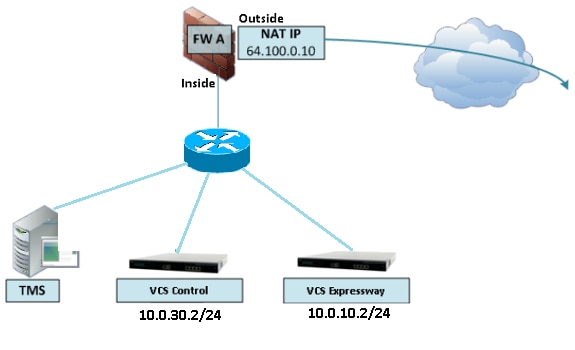
Dit soort implementatie vereist dat het IP-adres van de VCS-controle wordt vertaald naar het IP-adres binnen de ASA om het retourverkeer te dwingen terug te keren naar de ASA om asymmetrische routeproblemen voor de NAT-reflectie te voorkomen.
Opmerking: Als het IP-adres van de bron van de VCS-besturing tijdens deze NAT-vertaling wordt gewijzigd met een tweemaal NAT-configuratie in plaats van de voorgestelde NAT-reflectieconfiguratie, ziet de VCS Expressway verkeer vanaf zijn eigen openbare IP-adres, dan zullen de telefoonservices voor de MRA-apparaten niet verschijnen. Dit is geen ondersteunde implementatie zoals beschreven in sectie 3 in de sectie Aanbevelingen hieronder.
Dat gezegd hebbende, wordt het ten zeerste aanbevolen om de VCS Expressway te implementeren als een Expressway-E Dual Network Interfaces-implementatie in plaats van de enkele NIC met NAT-reflectie.
2. Zorg ervoor dat SIP/H.323 inspectie volledig is uitgeschakeld op de betrokken firewalls
Het wordt ten zeerste aanbevolen om SIP- en H.323-inspectie uit te schakelen op firewalls die netwerkverkeer van of naar een Expressway-E afhandelen. Wanneer de SIP/H.323-inspectie is ingeschakeld, wordt vaak vastgesteld dat de ingebouwde firewall/NAT-traversale functionaliteit van de Expressway negatief wordt beïnvloed.
Dit is een voorbeeld van hoe SIP- en H.323-inspecties op de ASA kunnen worden uitgeschakeld.
policy-map global_policy
 class inspection_default
  no inspect h323 h225
  no inspect h323 ras
  no inspect sip
3. Zorg ervoor dat uw daadwerkelijke Expressway-implementatie voldoet aan de volgende vereisten die worden voorgesteld door de Cisco telepresence-ontwikkelaars
- De NAT-configuratie tussen de Expressway-C en Expressway-E wordt niet ondersteund.
- Het wordt niet ondersteund wanneer de Expressway-C en Expressway-E NATed naar hetzelfde openbare IP-adres krijgen, bijvoorbeeld:
Expressway-C is geconfigureerd met IP-adres 10.1.1.1
Expressway-E heeft één NIC geconfigureerd met IP-adres 10.2.2.1 en een statische NAT is geconfigureerd in de firewall met openbaar IP-adres 64.100.0.10
Dan kan de Expressway-C niet NATted worden naar hetzelfde publieke adres 64.100.0.10
Aanbevolen implementatie van VCS Expressway
De aanbevolen implementatie voor de VCS Expressway in plaats van de VCS Expressway met de NAT-reflectieconfiguratie is de implementatie van dubbele netwerkinterfaces/dubbele NIC VCS Expressway, voor meer informatie raadpleegt u de volgende koppeling.
Gerelateerde informatie
Revisiegeschiedenis
| Revisie | Publicatiedatum | Opmerkingen |
|---|---|---|
1.0 |
30-Oct-2017
|
Eerste vrijgave |
Bijgedragen door Cisco-engineers
- Christian G Hernandez RCisco TAC Engineer
- Geregisseerd door Lidiya BogdanovaCisco TAC Engineer
- Geregisseerd door Steven JanssensCisco TAC Engineer
 Feedback
Contact Cisco
- Een ondersteuningscase openen

- (Vereist een Cisco-servicecontract)