ISE 3.3 integreren met JAMF als MDM-server
Inhoud
Inleiding
In dit document worden procedures beschreven die nodig zijn om Identity Services Engine v3.3 met JAMF PRO-exemplaar 10.48.X te implementeren.
Voorwaarden
Vereisten
Cisco raadt kennis aan over deze onderwerpen:
- Identity Services Engine (ISE)
- JAMF als MDM-oplossing
Gebruikte componenten
De informatie in dit document is gebaseerd op deze software en versies:
- Cisco Identity Services Engine (ISE) v3.3
- JAMF PRO v10.48.1-t1689600654
De informatie in dit document is gebaseerd op de apparaten in een specifieke laboratoriumomgeving. Alle apparaten die in dit document worden beschreven, hadden een opgeschoonde (standaard)configuratie. Als uw netwerk live is, moet u zorgen dat u de potentiële impact van elke opdracht begrijpt.
Achtergrondinformatie
Cisco ISE ondersteunt JAMF als een MDM-server voor het beheer van Windows-computers. Wanneer deze computers (beheerd door JAMF) zijn verbonden en geverifieerd, haalt ISE nalevingsinformatie op van JAMF-servers om verdere informatie op te halen voor de beveiligingspositie van die apparaten.
Het gebruikt de informatie om veilige toegangsbeveiliging af te dwingen door deze computers toe te staan / te weigeren, afhankelijk van de criteria en voorwaarden die zijn geconfigureerd in ISE. Daarom helpt deze implementatie om potentiële kwetsbaarheden en beveiligingszwakheden te identificeren die door aanvallers kunnen worden uitgebuit.
Configureren
JAMF PRO voorbereiden op de MDM-verbinding
Stap 1. Log in met uw JAMF-cloud met het account voor beheerdersrechten op: https://YOUR_ACCOUNT.jamfcloud.com/index.html.
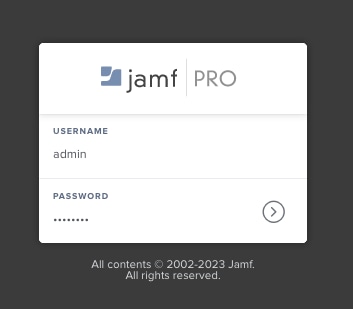 Loginpagina JAMF PRO
Stap 2. Selecteer in het hoofdmenu het tandwielpictogram.
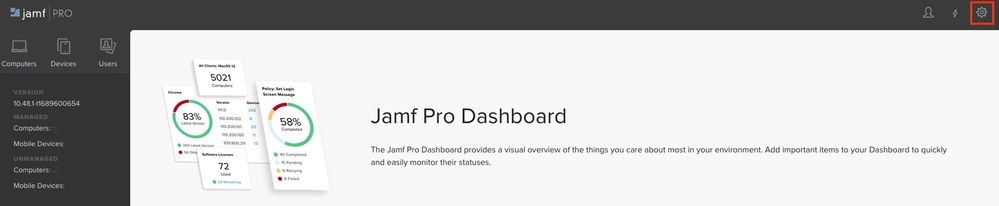 JAMF PRO-dashboard
Stap 3. Kies in het hoofdmenu Systeem > Gebruikersaccounts en groepen.
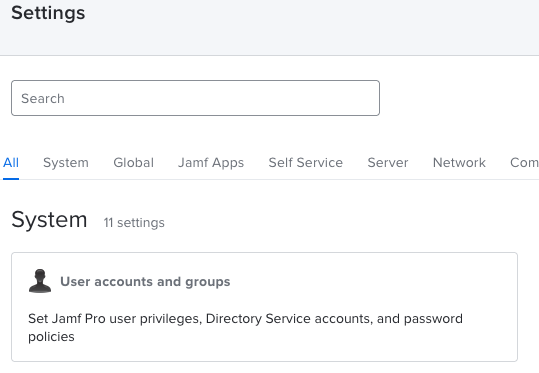 JAMF PRO-systeeminstellingen
Stap 4. Selecteer de optie Wachtwoordbeleid.
 JAMF PRO-gebruikersaccounts en -groepen
Stap 5. Bevestig in dit gedeelte dat u de optie Basisverificatie toestaan naast Tokenverificatie aan toonder hebt.

Opmerking: vanaf JAMF PRO v10.35 is de basisverificatie voor de API standaard niet ingeschakeld. Daarom moet u deze functies inschakelen om ervoor te zorgen dat de MDM-integratie werkt.
Zie voor meer informatie de wijzigingen in de klassieke API-verificatie.
Stap 6. Zodra u de laatste functie hebt ingeschakeld, gaat u naar de menu-instellingen die worden beschreven in stap 3, zoekt u vervolgens het netwerk-integratie-menu en selecteert u het.
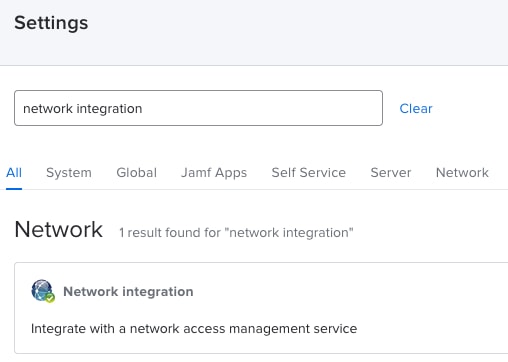 JAMF PRO-netwerkintegratie
Stap 7. Selecteer + Nieuw om een nieuwe instantie toe te voegen voor ISE 3.3.
 Instellingen voor JAMF PRO-netwerkintegratie
Stap 8. Laat in het vervolgkeuzemenu onder Network Access Management Service de optie gemarkeerd als Cisco ISE.
- Geef vervolgens een naam op in het menu Display Name zoals wordt weergegeven in dit voorbeeld.
- Voor de initiële instellingen en de verbinding voor ISE kan de configuratie worden overgelaten aan deze standaardconfiguraties.
- Ga verder met de configuratie opslaan.
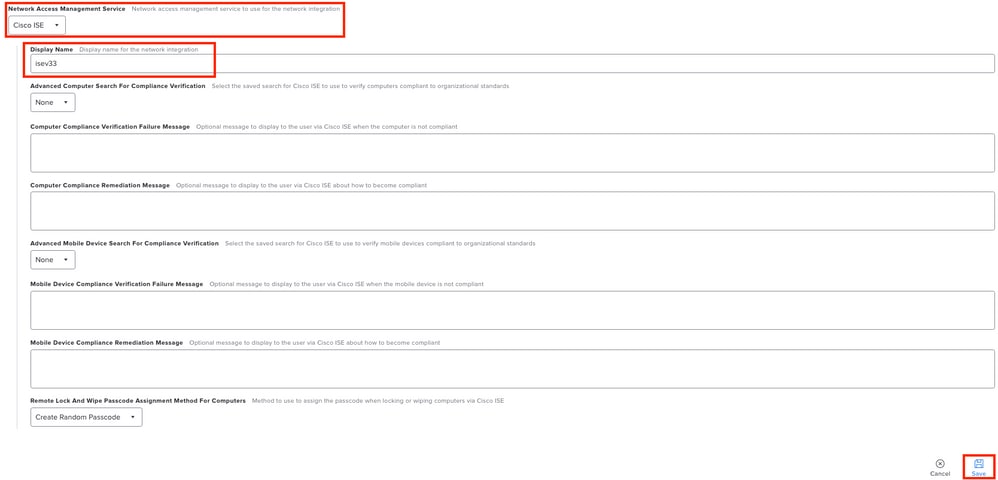 Configuratievoorbeeld Netwerkintegratie met ISE
Stap 9. De integratie genereert een URL voor netwerkintegratie met dit formaat: https://YOUR_ACCOUNT.jamfcloud.com/networkIntegrationEndpoint/ID. Sla deze URL op omdat u deze later moet gebruiken om verbinding te maken met ISE.
ISE voorbereiden op de MDM-verbinding
Stap 1. Selecteer het menu > Beheer > Netwerkbronnen > Externe MDM en klik vervolgens op Toevoegen.
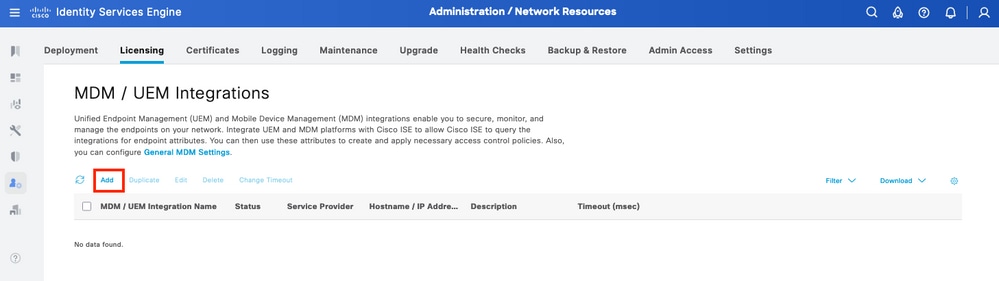 Menu ISE MDM-integratie
Stap 2. Geef de installatie een naam in het segment MDM/UEM Integration Name.
- In de sectie Hostname / IP Address selecteert u YOUR_ACCOUNT.jamfcloud.com uit de URL die in de vorige stappen is gegenereerd.
- Selecteer in Port de 443 voor de HTTPS-verbinding met uw JAMF PRO-instantie.
- Ga in de sectie Instantienaam verder met het invoeren van de waarden waarbij de sectie ontbreekt in de gemaakte URL (in dit geval: /networkIntegrationEndpoint/ID).
- Voer een gebruikersnaam in met volledige toegang tot de JAMF PRO-instantie naast het bijbehorende wachtwoord.
- Wijzig de status van de MDM-server in Ingeschakeld.
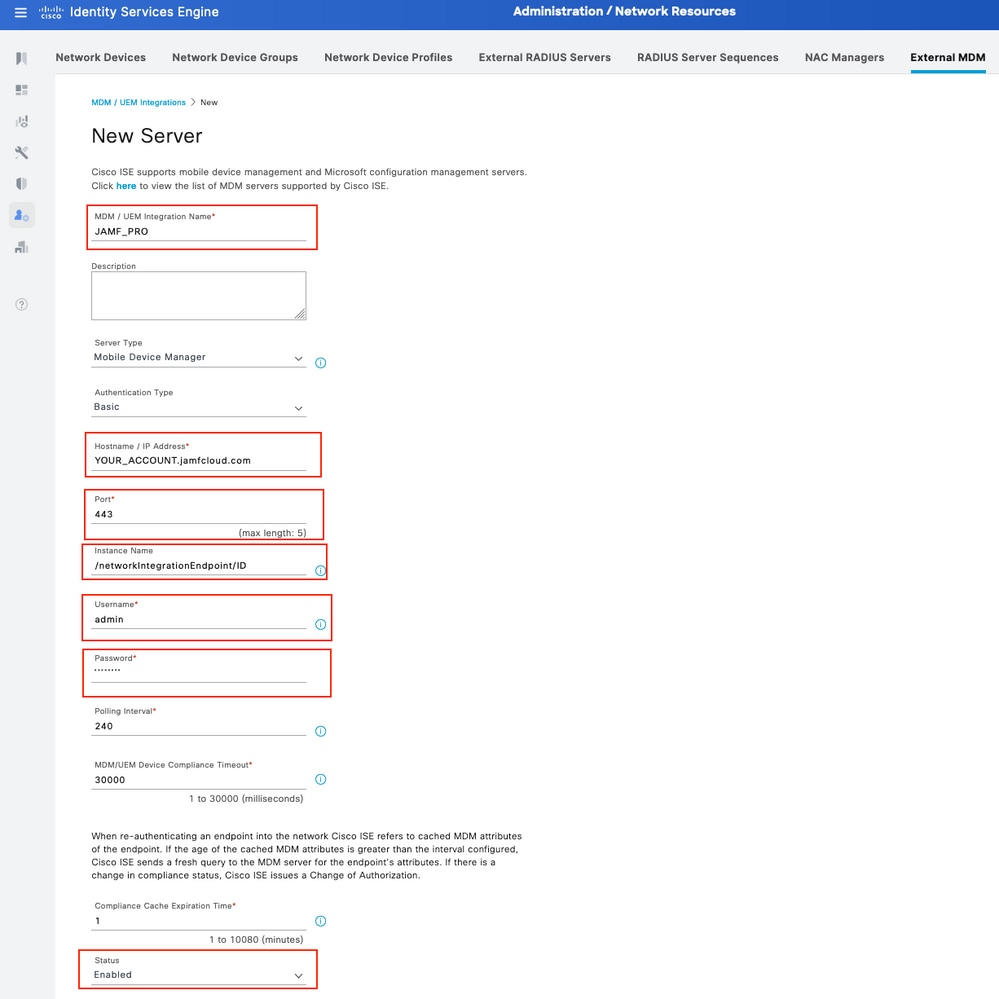 ISE MDM JAMF PRO configuratievoorbeeld
Stap 3. Blader omlaag en ga verder met Verbinding testen. Als de verbinding succesvol is, wordt dit beeld weergegeven. Als u niet dezelfde uitvoer ontvangt, raadpleegt u de sectie Problemen oplossen in dit document.
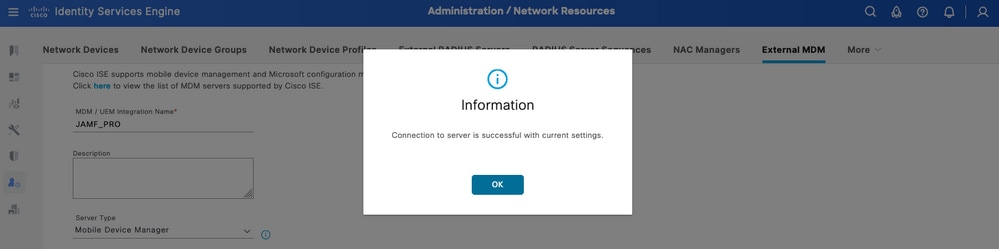 Succesvolle verbinding met de MDM JAMF-account
Stap 4. Selecteer OK in de vorige optie. Zoek onderaan de pagina de Apparaat-ID waar de ISE-koppeling van de sessie van het eindpunt staat.
- Afhankelijk van uw scenario kunt u het MAC-adres van het apparaat of de kenmerken van het certificaat selecteren.
- Nadat u dit gedeelte hebt aangepast, slaat u de configuratie op.
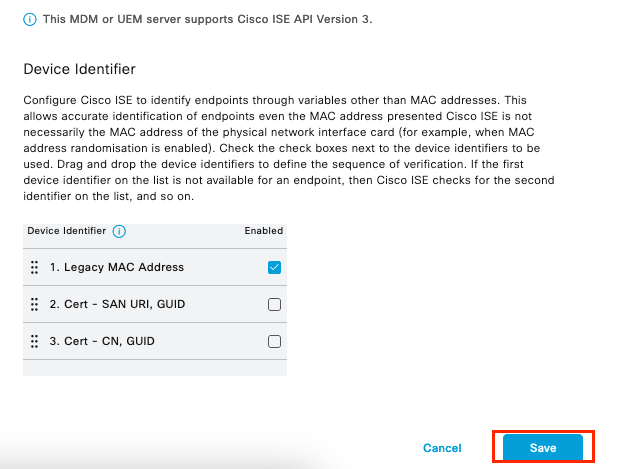 Extra configuratie voor MDM-server
Verifieer de initiële connectiviteit van de integratie met JAMF PRO.
Packet Capture: In het geval van een succesvolle connectiviteit kunt u het HTTPS-verkeer bekijken dat van de ISE PAN-server naar de JAMF PRO-instantie wordt verzonden:
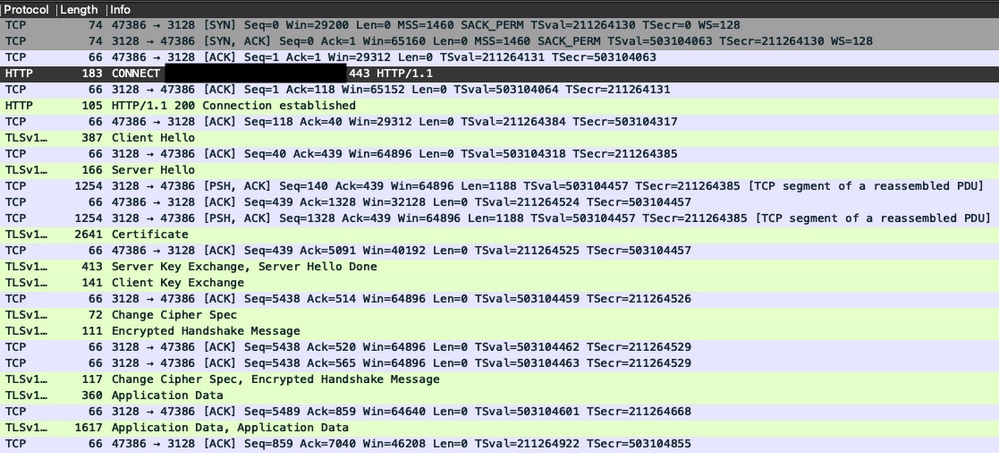 Packet capture-voorbeeld van connectiviteit met JAMF-instantie
Logs op ISE: De ISE verwerkt en analyseert de gegevens overeenkomstig zoals weergegeven in het ise-psc.log:
DEBUG [admin-http-pool16][[]] cisco.cpm.mdm.api.MdmServerInfoApi -:::::- inside the method : callMdmServerInfoApiOnMdmServer()
TRACE [admin-http-pool16][[]] cisco.cpm.mdm.apiimpl.MDMVerifyServer -:::::- Inside MDMVerifyServer.verify, connectToServer is called
DEBUG [admin-http-pool16][[]] cisco.cpm.mdm.apiimpl.MDMVerifyServer -:::::- apiVersionSb : 3, mdmApiVersionSb : , tryWithV3 : false
DEBUG [admin-http-pool16][[]] cisco.cpm.mdm.apiimpl.MDMVerifyServer -:::::- MDM Rest API Server Query String -> /ciscoise/mdminfo/?ise_api_version=3
DEBUG [admin-http-pool16][[]] cisco.cpm.mdm.apiimpl.MDMVerifyServer -:::::- MDM Rest API Server Query PATH String -> /ciscoise/mdminfo/?ise_api_version=3
DEBUG [admin-http-pool16][[]] cisco.cpm.mdm.apiimpl.MDMVerifyServer -:::::- 1. Connecting to the MDM server host YOUR_ACCOUNTusing apiVersion 3
DEBUG [admin-http-pool16][[]] cisco.cpm.mdm.util.MdmRESTClient -:::::- sendGETRequestDom: start  HTTP request - connectionsUsed: 1, connectionsAvailable: 199
DEBUG [admin-http-pool16][[]] cisco.cpm.mdm.util.MdmRESTClient -:::::- sendGETRequestDomNonComp: start  HTTP request - connectionsUsed: 0, connectionsAvailable: 200
DEBUG [admin-http-pool16][[]] cisco.cpm.mdm.util.MdmRESTClient -:::::- ===mdmFlowInfo===null,=====serverType=====MobileDeviceManager,===serverAuthType===Basic
DEBUG [admin-http-pool16][[]] cisco.cpm.mdm.util.MdmRESTClient -:::::- QueryType is heartbeatQuery
DEBUG [admin-http-pool16][[]] cisco.cpm.mdm.util.MdmRESTClient -:::::- using httpClient for http query - [parameters={http.route.default-proxy=http://PROXY_IP:PORT, http.socket.timeout=30000, http.connection.timeout=5000}]
INFO  [admin-http-pool16][[]] cisco.cpm.mdm.util.MdmRESTClient -:::::- GET: MDM Server URL: https://YOUR_ACCOUNT:443//networkIntegrationEndpoint/ID/ciscoise/mdminfo/?ise_api_version=3
DEBUG [admin-http-pool16][[]] cisco.cpm.mdm.util.MdmRESTClient -:::::- Proxy Config in request  = [,PROXY_IP,PORT,nullnull2fpwHJhtoIMf+jKzFKazgg==%/ZFdElAGn4odZaRIZxeiZQ==]
.
.
INFO  [admin-http-pool16][[]] cisco.cpm.mdm.util.MdmRESTClient -:::::- MDM Server Response Code: 200
TRACE [admin-http-pool16][[]] cisco.cpm.mdm.util.MdmRESTClient -:::::-
Response data received from the MDM server : <?xml version="1.0" encoding="UTF-8"?><ise_api><name>mdminfo</name><api_version>3</api_version><api_path>/networkIntegrationEndpoint/ID/ciscoise/v3</api_path><redirect_url>https://YOUR_ACCOUNT.jamfcloud.com/enroll</redirect_url><query_max_size>1000</query_max_size><messaging_support>true</messaging_support><vendor>JAMF Software</vendor><product_name>JSS</product_name><product_version>10.48.1-t1689600654</product_version></ise_api>
DEBUG [admin-http-pool16][[]] cisco.cpm.mdm.util.MdmRESTClient -:::::- sendGETRequestDom: end  HTTP request - connectionsUsed: 1, connectionsAvailable: 199
DEBUG [admin-http-pool16][[]] cisco.cpm.mdm.util.MdmRESTClient -:::::- sendGETRequestDomNonComp: end  HTTP request - connectionsUsed: 0, connectionsAvailable: 200
TRACE [admin-http-pool16][[]] cisco.cpm.mdm.apiimpl.MDMVerifyServer -:::::- isMdmSettingsIdNotNull flag Value : false,tryWithV3 : false, isMdmSettingsUpdateRequired : false
DEBUG [admin-http-pool16][[]] cisco.cpm.mdm.api.MdmServerInfoApi -:::::- returning from the method : callMdmServerInfoApiOnMdmServer() -> com.cisco.cpm.mdm.api.MdmServerInfoData Object {
  apiPath: /ID/ciscoise/v3
  redirectUrl: https://YOUR_ACCOUNT.jamfcloud.com/enroll
  queryMaxSize: 1000
  apiVersion: 3
  vendor: JAMF Software
  productName: JSS
  productVersion: 10.48.1-t1689600654
  COMMA: ,
  errorMsg: null
  errorOccurred: false
}
Problemen oplossen MDM Server is niet bereikbaar
De basis van deze integratie bestaat uit query's die ISE periodiek uitvoert naar de JAMF-PRO-instantie. Het referentiepunt waar de probleemoplossing wordt uitgevoerd (in dit geval) is de primaire beheernode (PAN). De PAN-node is de locatie waar de connectiviteitsmethode is geconfigureerd om de MDM-server te bereiken. Dezelfde methode wordt gerepliceerd in alle knooppunten voor de implementatie.
De volgende stappen kunnen worden toegepast voor het oplossen van problemen met bereikbaarheid.
Stap 1. Schakel de component external-mdm in op TRACE-niveau op de PAN-node.
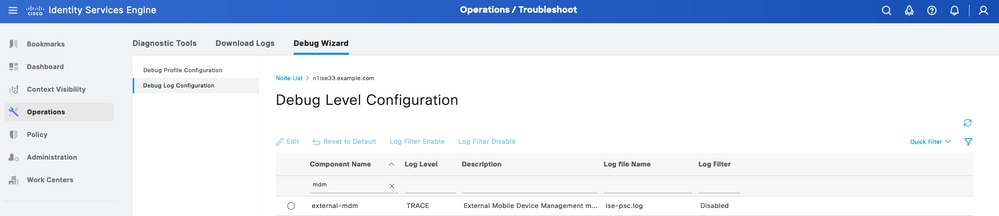 Externe MDM-component in TRACE-niveau om problemen op te lossen
Stap 2. Stel een opname in vanaf de PAN-node en sla uw configuratie op.
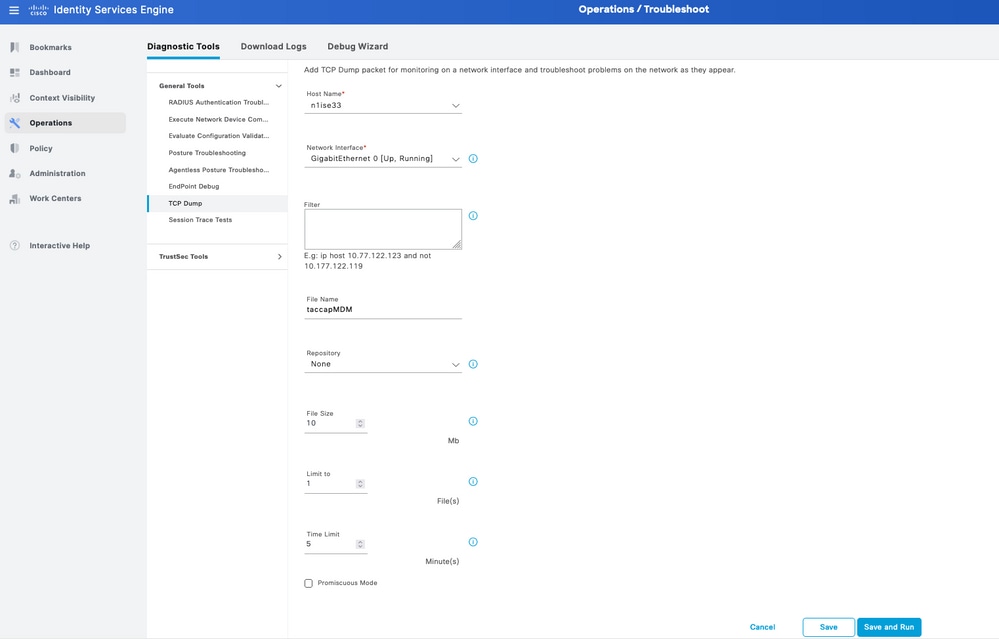 Packet capture voorbeeld om informatie over MDM-verbinding te verzamelen
Stap 3. Navigeer door het externe MDM-menu. Voer de opname uit vanaf stap 2 en selecteer de knop Verbinding testen. Wacht tot de fout verschijnt.
Stap 4. Stop de opname van stap 2. Controleer de logs die corresponderen met ise-psc.log om het gedrag te analyseren.
Scenario 1. Er is een time-out voor de verbinding opgetreden
In het scenario, wanneer u deze fout in ISE ontvangt tijdens het testen van de verbinding met JAMF:
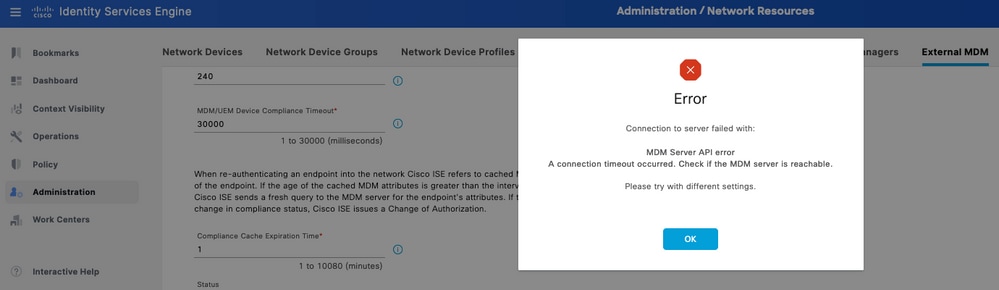 Time-out MDM-fout verbinding
De logs met betrekking tot externe MDM onthullen deze informatie:
TRACE [admin-http-pool26][[]] cisco.cpm.mdm.apiimpl.MDMVerifyServer -:::::- Inside MDMVerifyServer.verify, connectToServer is called
DEBUG [admin-http-pool26][[]] cisco.cpm.mdm.apiimpl.MDMVerifyServer -:::::- API version retrieved from MDM server : 3
DEBUG [admin-http-pool26][[]] cisco.cpm.mdm.apiimpl.MDMVerifyServer -:::::- apiVersionSb : 3, mdmApiVersionSb : 3, tryWithV3 : false
DEBUG [admin-http-pool26][[]] cisco.cpm.mdm.apiimpl.MDMVerifyServer -:::::- MDM Rest API Server Query String -> /ciscoise/mdminfo/?ise_api_version=3
DEBUG [admin-http-pool26][[]] cisco.cpm.mdm.apiimpl.MDMVerifyServer -:::::- MDM Rest API Server Query PATH String -> /ciscoise/mdminfo/?ise_api_version=3
DEBUG [admin-http-pool26][[]] cisco.cpm.mdm.apiimpl.MDMVerifyServer -:::::- 1. Connecting to the MDM server host YOUR_ACCOUNT.jamfcloud.com using apiVersion 3
DEBUG [admin-http-pool26][[]] cisco.cpm.mdm.util.MdmRESTClient -:::::- sendGETRequestDom: start  HTTP request - connectionsUsed: 0, connectionsAvailable: 200
DEBUG [admin-http-pool26][[]] cisco.cpm.mdm.util.MdmRESTClient -:::::- sendGETRequestDomNonComp: start  HTTP request - connectionsUsed: 0, connectionsAvailable: 200
DEBUG [admin-http-pool26][[]] cisco.cpm.mdm.util.MdmRESTClient -:::::- ===mdmFlowInfo===null,=====serverType=====MobileDeviceManager,===serverAuthType===Basic
DEBUG [admin-http-pool26][[]] cisco.cpm.mdm.util.MdmRESTClient -:::::- QueryType is heartbeatQuery
DEBUG [admin-http-pool26][[]] cisco.cpm.mdm.util.MdmRESTClient -:::::- using httpClient for http query - [parameters={http.socket.timeout=30000, http.connection.timeout=5000}]
INFO  [admin-http-pool26][[]] cisco.cpm.mdm.util.MdmRESTClient -:::::- GET: MDM Server URL: https://YOUR_ACCOUNT:443//networkIntegrationEndpoint/ID/ciscoise/mdminfo/?ise_api_version=3
INFO  [Timer-12][[]] cisco.mnt.common.utility.AlarmMessageDiskQueue -:::::- Inside dequeue
INFO  [Timer-12][[]] cisco.mnt.common.utility.AlarmMessageDiskQueue -:::::- root exists
INFO  [Timer-12][[]] cisco.mnt.common.utility.AlarmMessageDiskQueue -:::::- alarm.1692086243915 deleted true
INFO  [admin-http-pool26][[]] cisco.cpm.mdm.util.MdmServersCache -:::::- MDM server - Status : Active, mdm server id : ID and mdm server name : JAMF_PRO
ERROR [admin-http-pool26][[]] cisco.cpm.mdm.util.MdmRESTClient -:::::- Error message while connecting to MDM server :
Connection Failed to the MDM server host – YOUR_ACCOUNT.jamfcloud.com, and port - 443 : Connection timeout occurred. Check if the MDM server is reachable : SocketTimeoutException message = connect timed out
DEBUG [admin-http-pool26][[]] cisco.cpm.mdm.util.MdmRESTClient -:::::- sendGETRequestDom: end  HTTP request - connectionsUsed: 0, connectionsAvailable: 200
DEBUG [admin-http-pool26][[]] cisco.cpm.mdm.util.MdmRESTClient -:::::- sendGETRequestDomNonComp: end  HTTP request - connectionsUsed: 0, connectionsAvailable: 200
ERROR [admin-http-pool26][[]] cisco.cpm.mdm.apiimpl.MDMVerifyServer -:::::- Exception occurred while connecting to the MDM server A connection timeout occurred. Check if the MDM server is reachable.
ERROR [admin-http-pool26][[]] cisco.cpm.mdm.api.MdmClient -:::::- A connection timeout occurred. Check if the MDM server is reachable.
DEBUG [admin-http-pool26][[]] cisco.cpm.mdm.api.MdmServerInfoApi -:::::- returning from the method : callMdmServerInfoApiOnMdmServer() -> com.cisco.cpm.mdm.api.MdmServerInfoData Object {
  apiPath: null
  redirectUrl: null
  queryMaxSize: null
  apiVersion: null
  vendor: null
  productName: null
  productVersion: null
  COMMA: ,
  errorMsg: null
  errorOccurred: true
}
Bekijk de volgende informatie uit de pakketopname:
DNS-verkeer - De ISE voert een query uit naar uw JAMF-gerelateerde instantie als u de hostnaam invoert in het installatiegedeelte van de integratie. Als u de resolutie van de hostnaam niet ziet, probeert u het IP-adres te gebruiken. Deze optie is beschikbaar om te configureren in plaats van de hostnaam.
 DNS-verkeer in een MDM-stroom
Heruitzendingen in de MDM-verbindingspoort - Als u het IP-adres rechtstreeks opvraagt (verstrekt in de DNS-query of de MDM-installatie), kunt u mogelijk de herhaalde SYN-pakketten zien. Dit geeft geen directe route aan naar de JAMF-instantie of een extern apparaat dat de communicatie op de 443-poort verstoort.
 Voorbeeld van verbinding met MDM-time-out
Scenario 2. Verbinding mislukt: 404
Deze gebeurtenis geeft aan dat u verbinding hebt met uw JAMF-account die u hebt geconfigureerd tijdens het instellen van de MDM-server. De instantie die u hebt aangegeven om verbinding te maken, bestaat echter niet of bevat een fout omdat deze niet is gevonden.
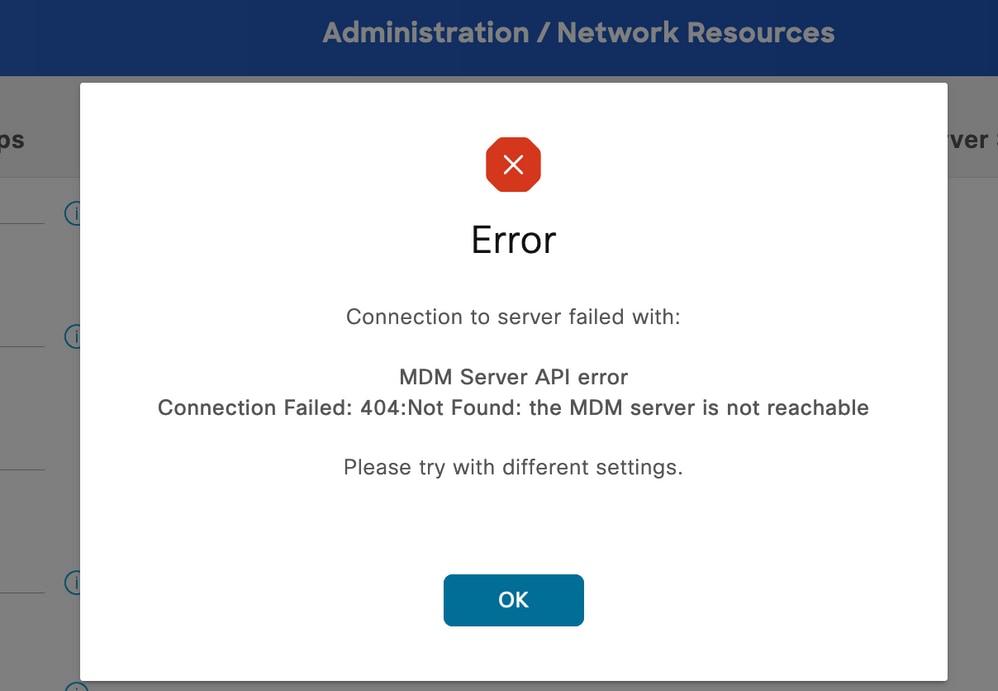 MDM-fout 404 voorbeeld
De logs die bij deze gebeurtenis horen, worden weergegeven:
DEBUG [admin-http-pool32][[]] cisco.cpm.mdm.api.MdmServerInfoApi -:::::- inside the method : callMdmServerInfoApiOnMdmServer()
TRACE [admin-http-pool32][[]] cisco.cpm.mdm.apiimpl.MDMVerifyServer -:::::- Inside MDMVerifyServer.verify, connectToServer is called
DEBUG [admin-http-pool32][[]] cisco.cpm.mdm.apiimpl.MDMVerifyServer -:::::- API version retrieved from MDM server : 3
DEBUG [admin-http-pool32][[]] cisco.cpm.mdm.apiimpl.MDMVerifyServer -:::::- apiVersionSb : 3, mdmApiVersionSb : 3, tryWithV3 : false
DEBUG [admin-http-pool32][[]] cisco.cpm.mdm.apiimpl.MDMVerifyServer -:::::- MDM Rest API Server Query String -> /ciscoise/mdminfo/?ise_api_version=3
DEBUG [admin-http-pool32][[]] cisco.cpm.mdm.apiimpl.MDMVerifyServer -:::::- MDM Rest API Server Query PATH String -> /ciscoise/mdminfo/?ise_api_version=3
DEBUG [admin-http-pool32][[]] cisco.cpm.mdm.apiimpl.MDMVerifyServer -:::::- 1. Connecting to the MDM server host YOUR_ACCOUNT.jamfcloud.com using apiVersion 3
DEBUG [admin-http-pool32][[]] cisco.cpm.mdm.util.MdmRESTClient -:::::- sendGETRequestDom: start  HTTP request - connectionsUsed: 1, connectionsAvailable: 199
DEBUG [admin-http-pool32][[]] cisco.cpm.mdm.util.MdmRESTClient -:::::- sendGETRequestDomNonComp: start  HTTP request - connectionsUsed: 0, connectionsAvailable: 200
DEBUG [admin-http-pool32][[]] cisco.cpm.mdm.util.MdmRESTClient -:::::- ===mdmFlowInfo===null,=====serverType=====MobileDeviceManager,===serverAuthType===Basic
DEBUG [admin-http-pool32][[]] cisco.cpm.mdm.util.MdmRESTClient -:::::- QueryType is heartbeatQuery
DEBUG [admin-http-pool32][[]] cisco.cpm.mdm.util.MdmRESTClient -:::::- using httpClient for http query - [parameters={http.route.default-proxy=http://PROXY_IP:PROXY_PORT, http.socket.timeout=30000, http.connection.timeout=5000}]
INFO  [admin-http-pool32][[]] cisco.cpm.mdm.util.MdmRESTClient -:::::- GET: MDM Server URL: https://YOUR_ACCOUNT.jamfcloud.com:443//networkIntegrationEndpoint/1/ewe/ciscoise/mdminfo/?ise_api_version=3
DEBUG [admin-http-pool32][[]] cisco.cpm.mdm.util.MdmRESTClient -:::::- Proxy Config in request  = [,PROXY_IP,PROXY_PORT,nullnullglhhcSIWnCC7y8FvGQvm/Q==%fZ4PXgBMdoIDfbwdgIhSeA==]
INFO  [admin-http-pool37][[]] cpm.admin.infra.spring.ISEAdminControllerUtils -::admin:::- mapping path found in global-forwards, forwarding to: /pages/jsonResponse.jsp
INFO  [admin-http-pool37][[]] cpm.admin.infra.spring.ISEAdminControllerUtils -::admin:::- mapping path found in global-forwards, forwarding to: /pages/jsonResponse.jsp
INFO  [admin-http-pool32][[]] cisco.cpm.mdm.util.MdmServersCache -:::::- MDM server - Status : Active, mdm server id : ID and mdm server name : JAMF_PRO
ERROR [admin-http-pool32][[]] cisco.cpm.mdm.util.MdmRESTClient -:::::- Error message while connecting to MDM server : Failed to connect to MDM Server JAMF_PRO : 404
DEBUG [admin-http-pool32][[]] cisco.cpm.mdm.util.MdmRESTClient -:::::- sendGETRequestDom: end  HTTP request - connectionsUsed: 1, connectionsAvailable: 199
DEBUG [admin-http-pool32][[]] cisco.cpm.mdm.util.MdmRESTClient -:::::- sendGETRequestDomNonComp: end  HTTP request - connectionsUsed: 0, connectionsAvailable: 200
ERROR [admin-http-pool32][[]] cisco.cpm.mdm.apiimpl.MDMVerifyServer -:::::- Exception occurred while connecting to the MDM server Connection Failed: 404:: the MDM server is not reachable
ERROR [admin-http-pool32][[]] cisco.cpm.mdm.api.MdmClient -:::::- Connection Failed: 404:: the MDM server is not reachable
DEBUG [admin-http-pool32][[]] cisco.cpm.mdm.api.MdmServerInfoApi -:::::- returning from the method : callMdmServerInfoApiOnMdmServer() -> com.cisco.cpm.mdm.api.MdmServerInfoData Object {
  apiPath: null
  redirectUrl: null
  queryMaxSize: null
  apiVersion: null
  vendor: null
  productName: null
  productVersion: null
  COMMA: ,
  errorMsg: null
  errorOccurred: true
}
DEBUG [admin-http-pool32][[]] cisco.cpm.mdm.util.MdmServersCache -:::::- mdm Guid: GUID is found in cache and status is: false
De pakketopname op dit moment biedt een HTTPS-verbinding die toepassingsgegevens bevat die worden overgedragen tussen de JAMF-site en de ISE-server.
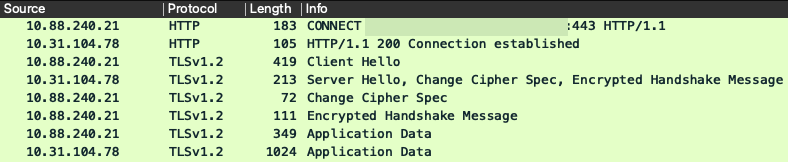 Pakketten betrokken bij fout 404 MDM
Scenario 3. Verbinding mislukt: 401
Deze fout in de verbinding geeft aan dat er een probleem is met de gebruiker die u implementeert in de MDM-installatie voor integratie.
Controleer of de gebruiker:
- Bestaat binnen het JAMF-account.
- Beschikt over de juiste bevoegdheden om de integratie met ISE te voltooien.
- En kan worden gebruikt om API-verificatie uit te voeren (zoals eerder beschreven in deze handleiding).
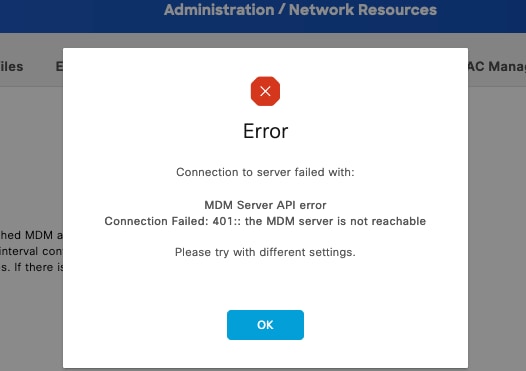 MDM-verbindingsfoutcode 401
De logs op ISE geven dit gedrag aan:
INFO  [admin-http-pool8][[]] cisco.cpm.mdm.util.MdmRESTClient -:::::- GET: MDM Server URL: https://YOUR_ACCOUNT.jamfcloud.com:443/networkIntegrationEndpoint/1/79fu/ciscoise/mdminfo/?ise_api_version=3
DEBUG [admin-http-pool8][[]] cisco.cpm.mdm.util.MdmRESTClient -:::::- Proxy Config in request  = [,PROXY_PORT,PROXY_PORT,nullnull2fpwHJhtoIMf+jKzFKazgg==%/ZFdElAGn4odZaRIZxeiZQ==]
ERROR [admin-http-pool8][[]] cisco.cpm.mdm.util.MdmRESTClient -:::::- Error message while connecting to MDM server : Failed to connect to MDM Server YOUR_ACCOUNT.jamfcloud.com : 401
DEBUG [admin-http-pool8][[]] cisco.cpm.mdm.util.MdmRESTClient -:::::- sendGETRequestDom: end  HTTP request - connectionsUsed: 4, connectionsAvailable: 196
DEBUG [admin-http-pool8][[]] cisco.cpm.mdm.util.MdmRESTClient -:::::- sendGETRequestDomNonComp: end  HTTP request - connectionsUsed: 0, connectionsAvailable: 200
DEBUG [admin-http-pool8][[]] cisco.cpm.mdm.apiimpl.MDMVerifyServer -:::::- retry connecting using api v2 after 5 seconds.
DEBUG [admin-http-pool8][[]] cisco.cpm.mdm.apiimpl.MDMVerifyServer -:::::- MDM Rest API Server Query String -> /ciscoise/mdminfo/?ise_api_version=2
DEBUG [admin-http-pool8][[]] cisco.cpm.mdm.apiimpl.MDMVerifyServer -:::::- MDM Rest API Server Query PATH String -> /ciscoise/mdminfo/?ise_api_version=2
DEBUG [admin-http-pool8][[]] cisco.cpm.mdm.apiimpl.MDMVerifyServer -:::::- 2. On Error : re-connecting to the MDM server host YOUR_ACCOUNT.jamfcloud.com using api version-2
DEBUG [admin-http-pool8][[]] cisco.cpm.mdm.util.MdmRESTClient -:::::- sendGETRequestDom: start  HTTP request - connectionsUsed: 4, connectionsAvailable: 196
DEBUG [admin-http-pool8][[]] cisco.cpm.mdm.util.MdmRESTClient -:::::- sendGETRequestDomNonComp: start  HTTP request - connectionsUsed: 0, connectionsAvailable: 200
DEBUG [admin-http-pool8][[]] cisco.cpm.mdm.util.MdmRESTClient -:::::- ===mdmFlowInfo===null,=====serverType=====MobileDeviceManager,===serverAuthType===Basic
DEBUG [admin-http-pool8][[]] cisco.cpm.mdm.util.MdmRESTClient -:::::- QueryType is heartbeatQuery
DEBUG [admin-http-pool8][[]] cisco.cpm.mdm.util.MdmRESTClient -:::::- using httpClient for http query - [parameters={http.route.default-proxy=http://PROXY_IP:PROXY_PORT, http.socket.timeout=30000, http.connection.timeout=5000}]
INFO  [admin-http-pool8][[]] cisco.cpm.mdm.util.MdmRESTClient -:::::- GET: MDM Server URL: https://YOUR_ACCOUNT.jamfcloud.com:443/networkIntegrationEndpoint/1/79fu/ciscoise/mdminfo/?ise_api_version=2
DEBUG [admin-http-pool8][[]] cisco.cpm.mdm.util.MdmRESTClient -:::::- Proxy Config in request  = [,PROXY_IP,PROXY_PORT,nullnull2fpwHJhtoIMf+jKzFKazgg==%/ZFdElAGn4odZaRIZxeiZQ==]
ERROR [admin-http-pool8][[]] cisco.cpm.mdm.util.MdmRESTClient -:::::- Error message while connecting to MDM server : Failed to connect to MDM Server YOUR_ACCOUNT.jamfcloud.com : 401
DEBUG [admin-http-pool8][[]] cisco.cpm.mdm.util.MdmRESTClient -:::::- sendGETRequestDom: end  HTTP request - connectionsUsed: 4, connectionsAvailable: 196
DEBUG [admin-http-pool8][[]] cisco.cpm.mdm.util.MdmRESTClient -:::::- sendGETRequestDomNonComp: end  HTTP request - connectionsUsed: 0, connectionsAvailable: 200
DEBUG [admin-http-pool8][[]] cisco.cpm.mdm.apiimpl.MDMVerifyServer -:::::- retry connecting using api v1 after 5 seconds.
De pakketopname onthult een vergelijkbaar gedrag zoals in deze afbeelding:
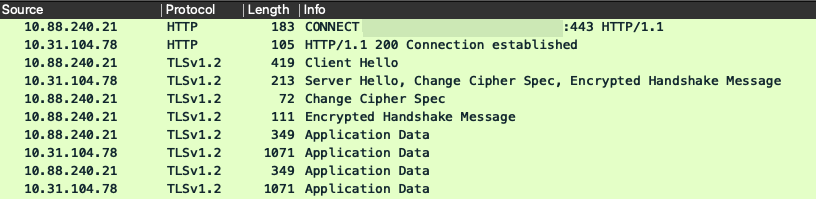 MDM-pakketten betrokken bij fout 401
Gerelateerde informatie
- JAMF-integratie met ISE 2.X als MDM
- Troubleshooten en foutsporing inschakelen op ISE
- Debugs inschakelen op ISE 3.x-versies.
Revisiegeschiedenis
| Revisie | Publicatiedatum | Opmerkingen |
|---|---|---|
2.0 |
16-Jun-2026
|
Bijgewerkte spelling, spatiëring, grammatica, zinsstructuur, inleiding, alt-tekst, bijgewerkte URL's, titel, enz. |
1.0 |
18-Aug-2023
|
Eerste vrijgave |

 Feedback
Contact Cisco
- Een ondersteuningscase openen

- (Vereist een Cisco-servicecontract)