AURA-implementatie configureren vóór vManage Upgrade
Inhoud
Inleiding
In dit document wordt beschreven hoe u AURA Deployment configureert vóór de vManage Upgrade.
Voorwaarden
Vereisten
Cisco raadt kennis van de volgende onderwerpen aan:
- Cisco Software-defined Wide Area Network (SD-WAN).
Gebruikte componenten
De informatie in dit document is gebaseerd op Cisco vManager versie 20.9.4.
De informatie in dit document is gebaseerd op de apparaten in een specifieke laboratoriumomgeving. Alle apparaten die in dit document worden beschreven, hadden een opgeschoonde (standaard)configuratie. Als uw netwerk live is, moet u zorgen dat u de potentiële impact van elke opdracht begrijpt.
Achtergrondinformatie
Het Cisco AURA SD-WAN (SURE) Command Line-gereedschap voert in totaal 30 (niet-clustermodus) of 36 (clustermodus) controles uit op verschillende niveaus van de SD-WAN-overlay. Het doel van deze tool is om mogelijke storingen te voorkomen en corrigerende maatregelen aan te bevelen voor een naadloos upgradeproces. Deze tool haalt gegevens op met behulp van GET API-aanroepen en show / shell-opdrachten.
basisconcept
- Eenvoudig en eenvoudig, maakt gebruik van standaard python-modules die al beschikbaar zijn op de vManage-server.
- Genereert automatisch een .TXT-rapport.
- Hiervoor hebt u alleen uw vManage en wachtwoord nodig.
- vManage gebruiker met beheerdersrechten of rechten van RO-netwerkoperator.
- Het vManage-gebruikerswachtwoord mag niet het teken "!" bevatten.
- Om uit te voeren, kopieert u het bestand naar vManage en voert u het op de server uit.
- Niet opdringerig.
- De runtime is meestal minder dan 60 seconden, afhankelijk van de grootte van de implementatie.
- Root access is niet nodig om een controle uit te voeren.
- Er worden geen gegevens verzameld of gedeeld met anderen. Alle informatie die door de tool wordt gebruikt, blijft in het verstrekte rapport en de logboeken.
- Maakt geen gebruik van real-time API's die schaalbeperkingen hebben.
Download het script op vManage
Bepaal welk Python-versiebestand moet worden uitgevoerd op basis van de vManage-versie
| vManage-versie |
Python-versie |
Python bestand om uit te voeren |
| Vóór 20,5 |
Python2 |
python2/py2_sure.py |
| 20,5 en verder |
Python3 |
python3/py3_sure.py |

Opmerking: De vManage-versie is 20.9.4, u moet het py3_sure.py-bestand gebruiken.
Opmerking: de toepassing kan worden gedownload onder elke gewenste map, meestal wordt deze gedownload onder de startmap van de gebruiker.
Optie 1. geïsoleerde omgeving
1. Verkrijg de bestandsinhoud van deze site en kopieer deze vervolgens via SCP naar de server.
scp source_file.py {user}@{vManageIP}:/home/{user}
MAC OS
felix:Downloads felix$ scp -P 28215 py3_sure.py admin@10.124.x.x:/home/admin/
viptela 20.9.4
(admin@10.124.x.x) Password:
py3_sure.py                                                     100%  167KB 340.5KB/s   00:00
Windows-besturingssysteem
C:\Users\felix>scp C:\Users\felix\py3_sure.py admin@10.124.x.x:/home/admin/
viptela 20.9.4

(admin@10.124.x.x) Password:
py3_sure.py
Optie 2. Plakmethode
1. Open het bestand py2_sure.py of py3_sure.py en klik op de knop RAW-bestand kopiëren.
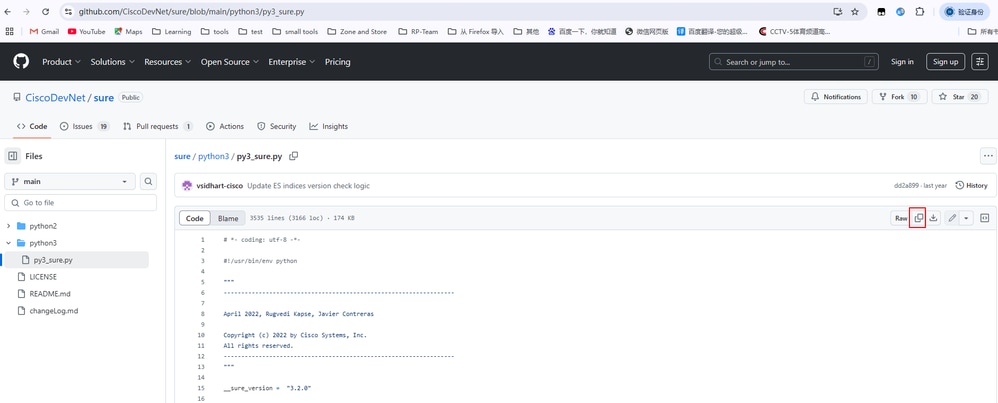
2. SSH naar vManage en voer de opdracht vshell uit.
vmanage# vshell
3. Open vi, druk op Esc en vervolgens op i (letter i), en daarna op paste.
vmanage:~$ vi py3_sure.py
E1187: Failed to source defaults.vim
Press ENTER or type command to continue
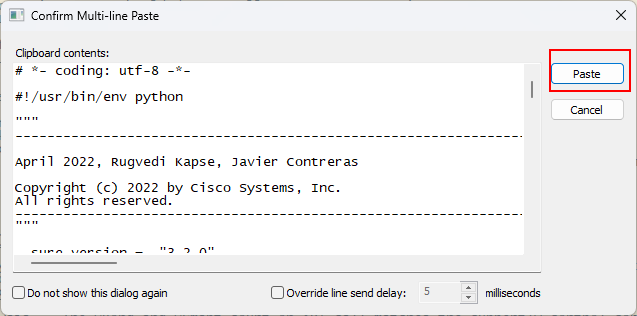
4. Druk na het plakken op Esc, :wq (symbool : en letters w, q) om het bestand op te slaan.
:wq
Opmerking: Opslaan en afsluiten : Druk in de opdrachtmodus op de Esc-toets om de invoegmodus af te sluiten, typ vervolgens :wq of :x en druk op enter om de wijzigingen op te slaan en de vi-editor te verlaten.
Sla geen op: Druk in de opdrachtmodus op de Esc-toets en typ vervolgens :q! , drukt u op de toets ENTER om de wijzigingen niet op te slaan en dwingt u de VI-editor af te sluiten.
Optie 3. WEGGEN
1. Inloggen bij vManage CLI-sessie:
vmanage# vs
vmanage:~$ wget https://raw.githubusercontent.com/CiscoDevNet/sure/main/python3/py3_sure.py
OR
vmanage:~$ wget https://raw.githubusercontent.com/CiscoDevNet/sure/main/python2/py2_sure.py

Waarschuwing: Als u WGET gebruikt, moet u ervoor zorgen dat uw vManage toegang heeft tot GitHub.
Hoe te rennen
Opties voor opdrachtregel
Gebruik: sure.py [-h] [-q] [-v] [-d] -u GEBRUIKERSNAAM
SURE - SDWAN Upgrade Readiness Engine - v3.2.1
Optionele argumenten:
-h, --Help Dit Help-bericht weergeven en afsluiten
-q, --stille uitvoering van het script
-v, --verbose uitvoering van het script
-d, --debug Debug uitvoering van het script
-u GEBRUIKERSNAAM, --gebruikersnaam GEBRUIKERSNAAM
vManage-gebruikersnaam
-vp VMANAGE_PORT, --vmanage_port VMANAGE_PORT
vManage-wachtwoord
Uitvoeren in normale uitvoeringsmodus
vmanage:~$ python3 py3_sure.py -u admin vManage Password (Note: Tool doesn't support passwords containing "!") : ######################################################### ### AURA SDWAN (SURE) - Version 3.2.0 ### ######################################################### ### Performing SD-WAN Audit & Upgrade Readiness ### ######################################################### ****Collecting Preliminary Data *Starting Checks, this may take several minutes **** Performing Critical checks Critical Check:#01 Critical Check:#02 Critical Check:#03 Critical Check:#04 Critical Check:#05 Critical Check:#06 Critical Check:#07 Critical Check:#08 Critical Check:#09 Critical Check:#10 Critical Check:#11 Critical Check:#12 Critical Check:#13 Critical Check:#14 Critical Check:#15 Critical Check:#16 Critical Check:#17 **** Performing Warning checks Warning Check:#18 Warning Check:#19 Warning Check:#20 Warning Check:#21 Warning Check:#22 Warning Check:#23 Warning Check:#24 Warning Check:#25 **** Performing Informational checks Informational Check:#26 Informational Check:#27 Informational Check:#28 ****** Cisco AURA SDWAN tool execution completed. Total Checks Performed: 28 Overall Assessment: 4 Critical errors, 2 Warnings, please check report for details. -- Full Results Report: sdwan_sure/sure_report_08_07_2025_06_15_25.txt -- Logs: sdwan_sure/sure_logs_08_07_2025_06_15_25.log -- Json Summary: sdwan_sure/sure_json_summary_08_07_2025_06_16_22.json Reach out to sure-tool@cisco.com if you have any questions or feedback Controleverslag
vmanage:~$ cat sdwan_sure/sure_report_08_07_2025_06_15_25.txt
E1187: Failed to source defaults.vim
Press ENTER or type command to continueCisco SDWAN AURA v3.2.0 Report Cisco SDWAN AURA command line tool performs a total of 26(Non Cluster Mode) or 32(Cluster Mode) checks at different levels of the SDWAN overlay. Reach out to sure-tool@cisco.com if you have any questions or feedback Summary of the Results: ----------------------------------------------------------------------------------------------------------------- AURA SDWAN Version: 3.2.0 vManage Details: Software Version: 20.9.4 System IP Address: 1.1.1.1 Script Execution Time: Start Time: 08-07-2025 06:15:20 End Time: 08-07-2025 06:16:22 ----------------------------------------------------------------------------------------------------------------- Overall upgrade evaluation: Critical issues found that need to be resolved before an upgrade ----------------------------------------------------------------------------------------------------------------- Check Results: Total Checks Performed: 28 Total Checks Passed: 24 out of 28 Total Checks Failed: 4 out of 28 Total Checks with Errors: 4 Total Checks with Warnings: 2 ----------------------------------------------------------------------------------------------------------------- Detailed list of failed checks, and actions recommended +----------+----------------------------------------------------+----------------------------------------------------+----------------------------------------------------+ | Check no | Check Name | Check Result | Check Actions | +----------+----------------------------------------------------+----------------------------------------------------+----------------------------------------------------+ | #03 | Memory size | Memory size is 67 GB, it is below the hardware siz | Correct the memory available to the server | | | | e recommendations when DPI is enabled. Memory size | | | | | should be 128 GB. For more information please che | | | | | ck: https://www.cisco.com/c/en/us/td/docs/routers/ | | | | | sdwan/release/notes/compatibility-and-server-recom | | | | | mendations/ch-server-recs-20-3.html | | +----------+----------------------------------------------------+----------------------------------------------------+----------------------------------------------------+ | #04 | CPU Count | No. of Processors is below minimum supported size | Allocate more processors | | | | when DPI is in use. CPU Count is 16, it should be | | | | | 32 or higher. | | +----------+----------------------------------------------------+----------------------------------------------------+----------------------------------------------------+ | #10 | NTP status across network | Devices with invalid ntp association found | Please validate the NTP time synchronization acros | | | | | s the network | +----------+----------------------------------------------------+----------------------------------------------------+----------------------------------------------------+ | #17 | Verify if stale entry of vManage+vSmart UUID prese | The vManage+vSmart UUIDs are not consistent in cEd | Contact TAC to find out why there are inconsistenc | | | nt on any one cEdge | ges | ies in the vManage+vSmart UUIDS in cEdges | +----------+----------------------------------------------------+----------------------------------------------------+----------------------------------------------------+ ----------------------------------------------------------------------------------------------------------------- Preliminary Tabulated data: +----------------------------------------------------+---------------+ | Parameters | Value | +----------------------------------------------------+---------------+ | vManage System IP address | 1.1.1.1 | +----------------------------------------------------+---------------+ | vManage CPU Speed | 2.198 | +----------------------------------------------------+---------------+ | vManage CPU Count | 16 | +----------------------------------------------------+---------------+ | xEdge Count | 10 | +----------------------------------------------------+---------------+ | vManage Cluster Size | 1 | +----------------------------------------------------+---------------+ | vManage Server Mode | Single Server | +----------------------------------------------------+---------------+ | vManage Disk Controller Type | /dev/sdb | +----------------------------------------------------+---------------+
Rapport uploaden van vManage naar lokale computer
Optie 1. Viptela CLI
vmanage# vs
vmanage:~$ scp sdwan_sure/sure_report_08_07_2025_06_15_25.txt /home/admin
vmanage:~$ ls -l
total 1812
-rw------- 1 admin admin 2 Jul 8 06:21 123
-rw------- 1 admin admin 0 Jul 8 06:21 456
-rw-r--r-- 1 admin admin 566 May 9 17:10 archive_id_rsa.pub
-rwxrwxr-x 1 vmanage admin 1235617 Jul 2 03:07 config_db.tar.gz
-rw------- 1 admin admin 178539 Jul 8 07:42 py2_sure.py
-rw------- 1 admin admin 178540 Jul 8 07:09 py3_sure.py
drwx------ 2 admin admin 4096 Jul 8 08:14 sdwan_sure
-rw------- 1 admin admin 25544 Jul 8 08:18 sure_report_08_07_2025_06_15_25.txt                     <<<<<<
-rw------- 1 admin admin 15260 Jul 4 05:34 test.pcap
-rw------- 1 admin admin 178540 Jul 8 06:13 test0708
-rw-r--r-- 1 admin admin 1216 Jan 15 2024 vmanage_csr
vmanage:~$ exit

vmanage# request upload vpn 512 scp://admin@10.207.x.x:/test.file sure_report_08_07_2025_06_15_25.txt
Warning: Permanently added '10.207.x.x' (ECDSA) to the list of known hosts.

admin@10.207.x.x's pasword:
sure_report_08_07_2025_06_15_25.txt 100% 25KB 479.5KB/s 00:00
Upload successful
Optie 2. Linux/Mac Terminal
Opdrachtsyntaxis - De opdracht wordt gelezen als: source_file_name kopiëren van vManage naar local_destination_path met vManage-gebruikersnaam.
scp vManageUsername@PublicIp:<source_file_name> <local_destination_path>
Voorbeeld: Verbind met uw lokale Linux/Mac-terminal en voer de SCP-opdracht uit om het bestand naar de gewenste directory te kopiëren:
adminIT@cisco:~$ scp admin@10.124.X.X:sure_report_08_07_2025_06_15_25.txt  /Users/adminIT/Downloads/
viptela 20.9.4

Password:
sure_report_08_07_2025_06_15_25.txt  100% 25KB 479.5KB/s
Optie 3. FileZilla of een andere FTP- of SFTP-client
Verbinding maken met:
- SFTP als protocol of poort 22
- vManage-URL, openbaar IP of privé-IP (als vManage on-prem is)
- Gebruik een geldige gebruikersnaam en wachtwoord
Op de FTP- of SFTP-client worden de bestanden in de hoofddirectory van vManage-gebruiker weergegeven. Gewoon slepen-en-neerzetten naar de lokale bestemming aan de linkerkant waar u uw bestand wilt overbrengen.
Gerelateerde informatie
- SD-WAN-controllers upgraden met vManage GUI of CLI
- AURA-SD-WAN (SURE)
- Bestanden overzetten tussen een cEdge en vManage
Revisiegeschiedenis
| Revisie | Publicatiedatum | Opmerkingen |
|---|---|---|
2.0 |
12-Oct-2026
|
Bijgewerkte spelling, grammatica, spatiëring, ingevoegde horizontale lijnen naar afzonderlijke secties voor leesbaarheid, vaste CCW-waarschuwingen. |
1.0 |
18-Sep-2025
|
Eerste vrijgave |

 Feedback
Contact Cisco
- Een ondersteuningscase openen

- (Vereist een Cisco-servicecontract)