Inleiding
In dit document wordt beschreven hoe u de HSEC-licentie in de Catalyst 8300 Router in de online modus kunt installeren.
Voorwaarden
Kennis van deze onderwerpen:
- Kennis van Smart Licensing
- Kennis van Cisco IOS® XE
- Kennis van de HSEC-licentie. Deze vergunning staat ook wel bekend als de exportvergunning.
Routervereisten:
Achtergrondinformatie
Er is een officiële gids bij Configure Licenses and Throughput for Catalyst 8000 Series Physical Platforms, maar het beschrijft een mix van licentiefuncties tussen de verschillende Catalyst 8000-routerplatforms.
Deze handleiding is alleen bedoeld voor de 8300 die in de modus Autonoom wordt uitgevoerd wanneer de installatie rechtstreeks is verbonden met de Cisco Smart Software Manager (CSSM).
Gebruikte componenten
Gebruik in dit artikel deze elementen:

Opmerking: Zorg ervoor dat u de software up-to-date hebt met een stabiele gouden ster of aanbevolen versie.
De informatie in dit document is gebaseerd op de apparaten in een specifieke laboratoriumomgeving. Alle apparaten die in dit document worden beschreven, hadden een opgeschoonde (standaard)configuratie. Als uw netwerk live is, moet u zorgen dat u de potentiële impact van elke opdracht begrijpt.
Concepten
Smart License Authorization Code (SLAC)
De Smart License Authorization Code is een code die in het apparaat moet worden geïnstalleerd om de HSEC-licentie te kunnen gebruiken.
Deze code moet door het apparaat worden aangevraagd en erop worden geïnstalleerd. Daarna kunt u hogere doorvoerniveaus configureren voor gecodeerd verkeer.
Raadpleeg de sectie Richtlijnen voor het gebruik van een HSECK9-licentie uit de officiële documentatie bij Configure Licenses and Throughput for Catalyst 8000 Series Physical Platforms.
Meer informatie vindt u in Hoofdstuk: Taakbibliotheek voor slimme licenties met behulp van beleid.
Cisco Software Smart Manager (CSSM)
Dit is de externe serverentiteit in de cloud die de licenties beheert.
Het CSSM is toegankelijk via Cisco Software Central waar legacy Smart Software Manager toegankelijk is of u kunt de bijgewerkte versie van de webpagina openen via Cisco License Central.
Stappen
Stap 1. Zorg ervoor dat het apparaat een Cisco DNA-opstartniveau heeft
Zie Matrix Cisco DNA Software, SD-WAN en Routing Matrices om de opstartniveaus en -functies van Cisco DNA te verkennen.
Zorg ervoor dat uw apparaat een opstartniveau heeft met de opdrachtregelversie:
Router#show version

Technology Package License Information:

-----------------------------------------------------------------
Technology     Type         Technology-package Technology-package
                            Current            Next Reboot
-----------------------------------------------------------------
Smart License  Perpetual    network-advantage  network-advantage
Smart License  Subscription dna-advantage      dna-advantage
Stap 2. Smart Transport en standaard-URL definiëren
Router(config)#license smart transport smart
Router(config)#license smart url default
Stap 3. Proxy definiëren indien nodig
Router(config)#license smart proxy address
Router(config)#license smart proxy port
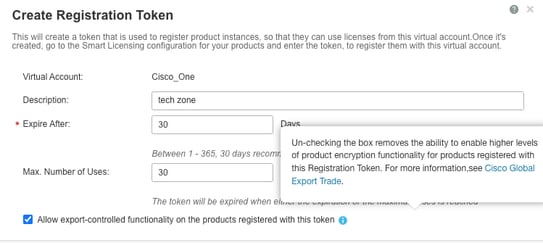
Stap 4. Zorgen dat token wordt gebruikt voor registratie Toegestane exportcontrolefunctionaliteit
Wanneer het apparaat is geregistreerd bij CSSM, moet u ervoor zorgen dat het token waarmee de functionaliteit voor exportcontrole is toegestaan, is toegestaan, zoals wordt geïllustreerd in deze schermafbeelding:
Stap 5. De token in het apparaat configureren
Router#license smart trust idtoken all force
U kunt de communicatie met CSSM teruggezet zien in show log en trust code geïnstalleerd
*Dec  1 23:42:28.633: %SMART_LIC-5-COMM_RESTORED: Communications with Cisco Smart Software Manager (CSSM) restored
*Dec  1 23:42:28.656: %SMART_LIC-6-POLICY_INSTALL_SUCCESS: A new licensing policy was successfully installed
*Dec  1 23:42:28.720: %SMART_LIC-6-TRUST_INSTALL_SUCCESS: A new licensing trust code was successfully installed on P:C8300-1N1S-4T2X,S:.
Stap 6. Verifieer dat de vertrouwenscode is geïnstalleerd en dat de ACK is ontvangen met de opdracht licentiestatus weergeven
Router#show license status
Utility:
  Status: DISABLED

Smart Licensing Using Policy:
  Status: ENABLED

Account Information:
  Smart Account:  As of Dec 01 23:41:50 2025 UTC
  Virtual Account:

Data Privacy:
  Sending Hostname: yes
    Callhome hostname privacy: DISABLED
    Smart Licensing hostname privacy: DISABLED
  Version privacy: DISABLED

Transport:
  Type: Smart
  URL: https://smartreceiver.cisco.com/licservice/license
  Proxy:
    Address:
    Port:
    Username:
    Password:
  VRF:

Policy:
  Policy in use: Installed On Dec 01 23:42:28 2025 UTC
  Policy name: SLE Policy
  Reporting ACK required: yes (Customer Policy)
  Unenforced/Non-Export Perpetual Attributes:
    First report requirement (days): 30 (Customer Policy)
    Reporting frequency (days): 60 (Customer Policy)
    Report on change (days): 60 (Customer Policy)
  Unenforced/Non-Export Subscription Attributes:
    First report requirement (days): 120 (Customer Policy)
    Reporting frequency (days): 111 (Customer Policy)
    Report on change (days): 111 (Customer Policy)
  Enforced (Perpetual/Subscription) License Attributes:
    First report requirement (days): 30 (Customer Policy)
    Reporting frequency (days): 90 (Customer Policy)
    Report on change (days): 60 (Customer Policy)
  Export (Perpetual/Subscription) License Attributes:
    First report requirement (days): 30 (Customer Policy)
    Reporting frequency (days): 30 (Customer Policy)
    Report on change (days): 30 (Customer Policy)

Miscellaneous:
  Custom Id:

Usage Reporting:
  Last ACK received: Dec 01 23:48:00 2025 UTC<<<<<<<< ACK
  Next ACK deadline: Jan 30 23:48:00 2026 UTC
  Reporting push interval: 30  days
  Next ACK push check:
  Next report push: Dec 31 23:43:03 2025 UTC
  Last report push: Dec 01 23:43:03 2025 UTC
  Last report file write:

Trust Code Installed: Dec 01 23:42:28 2025 UTC<<<<<<<<<<

Device Telemetry Report Summary:
================================
Data Channel: AVAILABLE
Reports on disk: 1
Stap 7. Bestaande autorisatie controleren met de opdracht Licentieautorisatie tonen
De licentieautorisatie tonen geeft aan of de autorisatiecode voor HSEC of Exportcontrole al is geïnstalleerd.
Opmerking: op sommige apparaten is deze Smart License Authorization Code (SLAC) al in de fabriek geïnstalleerd, als deze in de bestelling is opgenomen.
Router#show license authorization
Last Data Push:
Last File Export:

Overall status:
  Active: PID:C8300-1N1S-4T2X,SN:
    Status: NOT INSTALLED

Purchased Licenses:
  No Purchase Information Available


Router#
Als deze niet is geïnstalleerd, gaat u verder met de volgende stap.
Stap 8. Vraag de SLAC aan
Als de autorisatiecode nog niet is geïnstalleerd, vraagt u de SLAC-code op bij de productinstantie, namelijk het apparaat.
Als u SLAC wilt aanvragen, gebruikt u de opdrachtregelfunctie hseck9:
Router(config)#license feature hseck9
Daarna kunt u zien dat SLAC-code is geïmporteerd:
Router(config)#
*Dec  1 23:55:06.978: %SMART_LIC-6-AUTHORIZATION_INSTALL_SUCCESS: A new licensing authorization code was successfully installed on PID:C8300-1N1S-4T2X,SN:
*Dec  1 23:55:07.004: %SMART_LIC-6-EXPORT_CONTROLLED: Usage of export controlled features is allowed for feature hseck9
Stap 9. Autorisatie controleren
Nadat de SLAC is aangevraagd, kunt u controleren of u de autorisatiecode op de juiste manier hebt geïnstalleerd door de autorisatie voor show-licenties uit te voeren:
Router#show license authorization
Last Data Push: Dec 01 23:55:06 2025 UTC via Smart
Last File Export:

Overall status:
  Active: PID:C8300-1N1S-4T2X,SN:
    Status: SMART AUTHORIZATION INSTALLED on Dec 01 23:55:06 2025 UTC
    Last Confirmation code:

Authorizations:
  Router US Export Lic. for DNA (DNA_HSEC):
    Description: U.S. Export Restriction Compliance license for DNA based Routers
    Total available count: 1
    Enforcement type: EXPORT RESTRICTED
    Term information:
      Active: PID:C8300-1N1S-4T2X,SN:
        Authorization type: SMART AUTHORIZATION INSTALLED
        License type: PERPETUAL
          Term Count: 1

Purchased Licenses:
  No Purchase Information Available


Router#
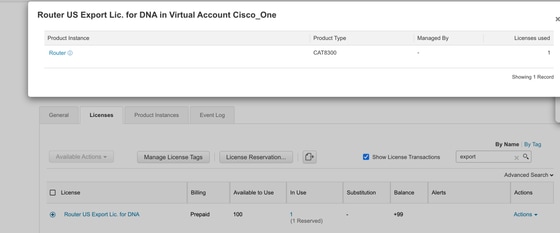
Controleer in het portaal of de licentie is gebruikt en gereserveerd:
Doorvoer wijzigen
Als SLAC is geïnstalleerd, wijzigt u de doorvoer dienovereenkomstig:
Router(config)#platform hardware throughput crypto 2.5G
% These values don't take effect until the next reboot. Please save the configuration.
Router(config)#
*Dec  2 00:01:19.108: %CRYPTO_SL_TP_LEVELS-6-SAVE_CONFIG_AND_RELOAD: New throughput level not applied until reload; please save config
Router(config)#do wr
Building configuration...
[OK]
Router(config)#
*Dec  2 00:01:28.776: %SYS-6-PRIVCFG_ENCRYPT_SUCCESS: Successfully encrypted private config file
Router(config)#do reload
WARNING:
Boot variable either does not exist or buffer is too small
This may impact autoboot of the router. Proceed with caution
Do you wish to proceed with reload anyway[confirm]
Proceed with reload? [confirm]
Opmerking: niet-versleuteld verkeer is standaard ongehinderd.
Verifieer de huidige crypto-doorvoer via de opdracht show platform hardware throughput crypto:
Router#show platform hardware throughput crypto
Current configured crypto throughput level: 2.5G

 Feedback