Nexus 3524- en 3548 NX-OS-software upgraden
Inhoud
Inleiding
In dit document worden de disruptieve NX-OS-software-upgradeprocessen beschreven voor Cisco Nexus 3524- en 3548-serie-switches tussen de belangrijkste softwarereleases.
Voorwaarden
Vereisten
Cisco raadt u aan de basisprincipes van het kopiëren van bestanden in Cisco NX-OS te begrijpen. Voor meer informatie over deze functie raadpleegt u een van de toepasselijke documenten:
- Configuratiehandleiding voor Cisco Nexus 3548 Switch NX-OS Fundamentals, versie 9.3 (x)
- Cisco Nexus 3548 Switch NX-OS Fundamentals Configuration Guide, versie 9.2(x)
- Configuratiehandleiding voor Cisco Nexus 3548 Switch NX-OS Fundamentals, versie 7.x
- Cisco Nexus 3548 Switch NX-OS Fundamentals Configuration Guide, versie 6.x
Cisco raadt u aan de basisprincipes van het upgraden van NX-OS-software op Cisco Nexus 3524- en 3548-serie switches te begrijpen. Voor meer informatie over deze procedure verwijzen wij u naar een van de toepasselijke documenten:
- Cisco Nexus 3500 Series NX-OS Software Upgrade en Downgrade Guide, release 9.3(x)
- Cisco Nexus 3500 Series NX-OS Software Upgrade en Downgrade Guide, release 9.2(x)
- Cisco Nexus 3500 Series NX-OS Software Upgrade en Downgrade Guide, release 7.x
- Cisco Nexus 3500 Series NX-OS Software Upgrade en Downgrade Guide, release 6.x
Gebruikte componenten
De informatie in dit document is gebaseerd op de switches van de Cisco Nexus 3524- en 3548-reeks die worden vermeld in de sectie Toepasselijke hardware van dit document. De uitvoer van het apparaat in dit document is afkomstig van een Nexus 3548 (modelnummer N3K-C3548-10G) met verschillende NX-OS-softwarereleases.
De informatie in dit document is gebaseerd op de apparaten in een specifieke laboratoriumomgeving. Alle apparaten die in dit document worden beschreven, hadden een opgeschoonde (standaard)configuratie. Als uw netwerk live is, moet u zorgen dat u de potentiële impact van elke opdracht begrijpt.
Achtergrondinformatie
In dit document worden de stappen beschreven die worden gebruikt voor het upgraden van Cisco NX-OS-software op Cisco Nexus-switches uit de 3524- en 3548-reeks van en naar verschillende NX-OS-softwarereleases met behulp van ondersteunde disruptieve upgradepaden. De bedoeling van dit document is om stapsgewijze instructies te geven voor het uitvoeren van ondersteunde NX-OS software-upgrades tussen gewone kleine en grote NX-OS software releases.
In dit document worden geen stappen beschreven die worden gebruikt voor het uitvoeren van niet-verstorende upgrades naar Cisco NX-OS-software op Cisco Nexus-switches uit de 3524- en 3548-reeks. ISSU-software-upgrades vallen buiten het toepassingsgebied van dit document.
NX-OS Software Release Version Taxonomy
Cisco NX-OS software release namen bevatten een aantal componenten waarnaar regelmatig wordt verwezen in dit document. De namen van deze componenten zijn gedefinieerd in de sectie Cisco NX-OS Software Release Naming van de Cisco IOS® en Cisco NX-OS Software Release Reference Guide. Wees je bewust van deze termen:
- Belangrijkste releasenummer
- Nummer van kleine release
- onderhoudsvrijgavenummer
- platformaanwijzer
- Minor-releasenummer van platform
- Releasenummer voor platformonderhoud
- Platform Rebuild Identifier
De NX-OS software release 7.0(3)I7(5a) bevat de volgende onderdelen:
| Naam component | componentwaarde |
|---|---|
| Belangrijkste releasenummer | 7 |
| Nummer van kleine release | 0 |
| onderhoudsvrijgavenummer | 3 |
| platformaanwijzer | I |
| Minor-releasenummer van platform | 7 |
| Releasenummer voor platformonderhoud | 5 |
| Platform Rebuild Identifier | a |
Een ander voorbeeld, NX-OS software release 9.3(5) heeft deze componenten:
| Naam component | componentwaarde |
|---|---|
| Belangrijkste releasenummer | 9 |
| Nummer van kleine release | 3 |
| onderhoudsvrijgavenummer | 5 |
Cisco Nexus-configuratiehandleidingen worden meestal gegroepeerd op basis van de belangrijkste releasenummers van NX-OS. In de titel van deze configuratiehandleidingen worden NX-OS major-releasenummers meestal weergegeven door het major-releasenummer en hebben ze een variabele x toegevoegd, die verwijst naar de minor-release (zoals 6.x, 7.x, enzovoort). Bijvoorbeeld, de Cisco Nexus 9000 Series NX-OS Fundamentals Configuration Guide, Release 7.x is van toepassing op alle NX-OS 7 grote releases (hoewel specifieke kanttekeningen, beperkingen en configuratie voorbeelden kunnen specifiek zijn voor bepaalde kleine of onderhoud release nummers).
De uitzondering op deze regel is de NX-OS 9 major release. Voor de NX-OS 9 major release worden Cisco Nexus configuratiehandleidingen gegroepeerd door de NX-OS minor en major release nummers, met een variabele x toegevoegd verwijzend naar de onderhoudsrelease (zoals 9.2 (x) en 9.3 (x)).
Dit document gebruikt opmaak op basis van de titels van de Cisco Nexus-configuratiehandleidingen (6.x, 7.x, 9.2(x), 9.3(x), enzovoort) om standaard disruptieve NX-OS-software-upgrades tussen twee NX-OS-softwarereleases te beschrijven.
NX-OS-terminologie voor software-upgrade
Bronreleases, doelreleases en tussenliggende releases
NX-OS software-upgrades worden meestal uitgevoerd tussen twee releases, een bronversie (dat is de NX-OS-softwarerelease waarvan u een upgrade uitvoert) en een doelversie (dat is de NX-OS-softwarerelease waarnaar u een upgrade uitvoert). Als u bijvoorbeeld een Nexus 3548-switch upgradet van een NX-OS-softwarerelease 7.0(3)I7(8) naar NX-OS-softwarerelease 9.3(5), zou 7.0(3)I7(8) uw bronrelease zijn, terwijl 9.3(5) uw doelrelease zou zijn.
Om te upgraden van een specifieke bronrelease naar een specifieke doelrelease, kan uw upgradepad een upgrade naar een of meer tussenliggende releases vereisen. Als u bijvoorbeeld een Nexus 3548-switch upgradet van NX-OS-softwarerelease 7.0(3)I7(5a) naar NX-OS-softwarerelease 9.3(5), moet u upgraden naar een tussentijdse release van 7.0(3)I7(8) of 9.2(4) voordat u met succes kunt upgraden naar NX-OS-softwarerelease 9.3(5).
Soorten NX-OS-software-upgrades
NX-OS software-upgrades kunnen worden onderverdeeld in twee categorieën:
- Disruptieve upgrades - Een disruptieve upgrade tussen een bronrelease en een doelrelease waarbij de Nexus-switch opnieuw wordt geladen aan het einde van het upgradeproces. Het opnieuw laden zorgt ervoor dat het datavlak, het controlevlak en het beheervlak van de Nexus-switch in korte tijd offline gaan.
- In-Service Software Upgrade (ISSU) - Een niet-verstorende upgrade tussen een bronrelease en een doelrelease waarbij het gegevensvlak van de Nexus-switch online blijft en verkeer doorstuurt als gevolg van Non-Stop Forwarding (NSF).
De procedure voor niet-verstorende ISSU NX-OS software-upgrades valt buiten de reikwijdte van dit document. Dit document heeft alleen betrekking op de standaard disruptieve NX-OS software-upgrades.
Toepasselijke hardware
De procedures in dit document zijn van toepassing op de hardware in deze lijst:
- N3K-C3524P-10G
- N3K-C3524P-10GX
- N3K-C3524P-XL
- N3K-C3548P-10G
- N3K-C3548P-10GX
- N3K-C3548P-XL
Upgradeprocedures voor NX-OS-software
In dit gedeelte wordt beschreven hoe u standaard disruptieve NX-OS-software-upgrades kunt uitvoeren van verschillende bronversies naar verschillende doelversies.
Upgrade van NX-OS 6.x naar NX-OS 6.x
In dit gedeelte wordt beschreven hoe u een standaard disruptieve NX-OS software-upgrade uitvoert van een bronversie in de hoofdversie van NX-OS 6.x naar een doelversie in de hoofdversie van NX-OS 6.x.
Een voorbeeld van een standaard disruptieve NX-OS software upgrade wordt uitgevoerd op een Cisco Nexus 3548 switch van een source release van 6.0(2)A4(5) naar een target release van 6.0(2)A8(11b):
N3K-C3548# show module
Mod Ports Module-Type                         Model                  Status
--- ----- ----------------------------------- ---------------------- ------------
1   48    48x10GE Supervisor                  N3K-C3548P-10G-SUP     active *

Mod  Sw              Hw      World-Wide-Name(s) (WWN)
---  --------------  ------  ----------------------------------------------------
1    6.0(2)A4(5)     1.0     --
Overzicht van upgradepad
Een samenvatting van het upgradepad van een bronversie in de hoofdversie van NX-OS 6.x naar een doelversie in de hoofdversie van NX-OS 6.x:
6,x -> 6,x
Stap 1. Download de doelversie van Cisco Software Download
NX-OS 6.x software vereist in totaal twee NX-OS binaire beeldbestanden: een systeem image en een kickstart image. U moet deze afbeeldingen downloaden van de Cisco Software Download Website naar uw lokale computer. De specifieke stappen die u moet nemen om software te downloaden van de Cisco Software Download Website vallen buiten de reikwijdte van dit document.
Stap 2. Doelrelease kopiëren naar Cisco Nexus Switch
Kopieer de NX-OS 6.x kickstart- en systeembinaire afbeeldingsbestanden naar de Nexus 3524- of 3548-serie-switch die u storend wilt upgraden naar het gebruik van uw bestandsoverdrachtprotocol naar keuze. In dit voorbeeld wordt getoond hoe u de kickstart- en systeembinaire afbeeldingsbestanden voor de NX-OS 6.0(2)A8(11b)-softwarerelease via FTP (File Transfer Protocol) van FTP-server 192.0.2.100 kunt kopiëren die via de VRF-beheerfunctie bereikbaar is.
N3K-C3548# dir | include bin
   36742656    Nov 19 14:24:14 2020  n3500-uk9-kickstart.6.0.2.A4.5.bin
  166878338    Nov 19 14:22:40 2020  n3500-uk9.6.0.2.A4.5.bin
N3K-C3548# copy ftp://username@192.0.2.100/n3500-uk9-kickstart.6.0.2.A8.11b.bin bootflash: vrf management
Password:
Copy complete, now saving to disk (wait)...
Copy complete.
N3K-C3548# copy ftp://username@192.0.2.100/n3500-uk9.6.0.2.A8.11b.bin bootflash: vrf management
Password:
Copy complete, now saving to disk (wait)...
Copy complete.
N3K-C3548# dir | include bin
   36742656    Nov 19 14:24:14 2020  n3500-uk9-kickstart.6.0.2.A4.5.bin
   37739008    Nov 19 18:13:12 2020  n3500-uk9-kickstart.6.0.2.A8.11b.bin
  166878338    Nov 19 14:22:40 2020  n3500-uk9.6.0.2.A4.5.bin
  197055713    Nov 19 18:14:46 2020  n3500-uk9.6.0.2.A8.11b.bin
Stap 3. MD5- of SHA512-controlesom van doelrelease verifiëren
Nadat de NX-OS 6.x kickstart en systeem binaire beeldbestanden zijn gekopieerd naar de Nexus 3524 of 3548 Series switch, wilt u storend upgraden met behulp van uw bestandsoverdrachtsprotocol naar keuze, controleren of de binaire beeldbestanden niet beschadigd zijn tijdens het vervoer door ervoor te zorgen dat de MD5 of SHA512 checksums overeenkomen met wat wordt gepubliceerd op de Cisco Software Download Website.
U kunt de MD5- en SHA512-controlesom van NX-OS binaire afbeeldingsbestanden identificeren via de Cisco Software Download Website door uw cursor over de afbeelding op de website te bewegen. Verwijs naar het voorbeeld:
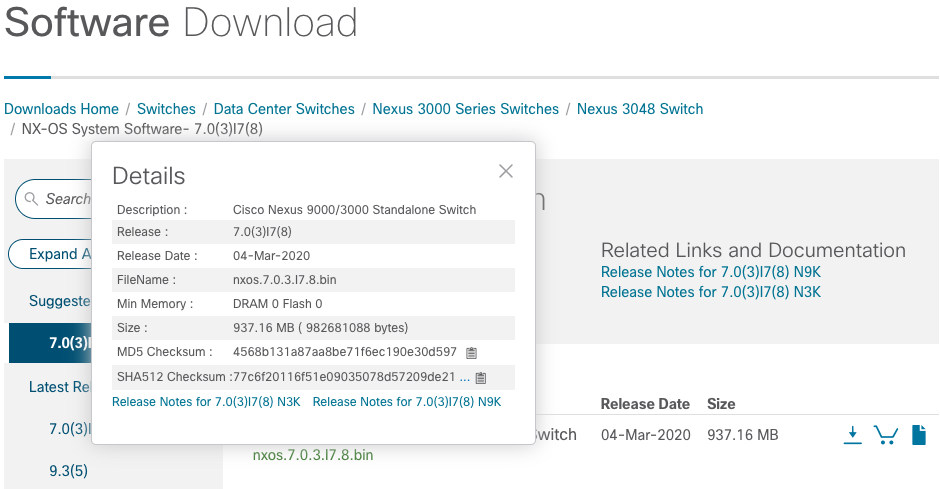
Dit voorbeeld laat zien hoe de MD5 checksum van de kickstart en systeem binaire beeldbestanden voor de NX-OS 6.0(2)A8(11b) software release te verifiëren door middel van de show file bootflash:{bestandsnaam} md5sum opdracht. De verwachte MD5 checksum voor de NX-OS6.0(2)A8(11b) kickstart binaire afbeelding bestand is 1b025734ed34aeb7a0ea48f55897b09a, terwijl de verwachte MD5 checksum voor de NX-OS 6.0(2)A8(11b) systeem binaire afbeelding bestand is 1F8BFB0B3D59049D5BF385ED7866EE25.
N3K-C3548# show file bootflash:n3500-uk9-kickstart.6.0.2.A8.11b.bin md5sum
1b025734ed34aeb7a0ea48f55897b09a
N3K-C3548# show file bootflash:n3500-uk9.6.0.2.A8.11b.bin md5sum
1f8bfb0b3d59049d5bf385ed7866ee25
Stap 4. Upgrade NX-OS-software via Install All Command
Begin een standaard disruptieve NX-OS software-upgrade via de opdracht Alles installeren. Deze opdracht vereist dat zowel de kickstart- als de systeemparameters worden doorgegeven met het absolute bestandspad van de NX-OS-kickstart en de binaire systeemafbeeldingsbestanden die overeenkomen met de doelrelease.
Dit voorbeeld toont de opdracht install all waarbij de parameter kickstart verwijst naar het absolute bestandspad van het binaire afbeeldingsbestand van NX-OS kickstart (bootflash:n3500-uk9-kickstart.6.0.2.A8.11b.bin) en de systeemparameter verwijst naar het absolute bestandspad van het binaire afbeeldingsbestand van het NX-OS-systeem (bootflash:n3500-uk9.6.0.2.A8.11b.bin).
N3K-C3548# install all kickstart bootflash:n3500-uk9-kickstart.6.0.2.A8.11b.bin system bootflash:n3500-uk9.6.0.2.A8.11b.bin
Installer is forced disruptive

Verifying image bootflash:/n3500-uk9-kickstart.6.0.2.A8.11b.bin for boot variable "kickstart".
[########################################] 100% -- SUCCESS

Verifying image bootflash:/n3500-uk9.6.0.2.A8.11b.bin for boot variable "system".
[########################################] 100% -- SUCCESS

Verifying image type.
[########################################] 100% -- SUCCESS

Extracting "system" version from image bootflash:/n3500-uk9.6.0.2.A8.11b.bin.
[########################################] 100% -- SUCCESS

Extracting "kickstart" version from image bootflash:/n3500-uk9-kickstart.6.0.2.A8.11b.bin.
[########################################] 100% -- SUCCESS

Extracting "bios" version from image bootflash:/n3500-uk9.6.0.2.A8.11b.bin.
[########################################] 100% -- SUCCESS

Performing module support checks.
[########################################] 100% -- SUCCESS

Notifying services about system upgrade.
[########################################] 100% -- SUCCESS


Compatibility check is done:
Module  bootable          Impact  Install-type  Reason
------  --------  --------------  ------------  ------
     1       yes      disruptive         reset  Forced by the user


Images will be upgraded according to this table:
Module             Image         Running-Version             New-Version  Upg-Required
------  ----------------  ----------------------  ----------------------  ------------
     1            system             6.0(2)A4(5)           6.0(2)A8(11b)           yes
     1         kickstart             6.0(2)A4(5)           6.0(2)A8(11b)           yes
     1              bios      v1.9.0(10/13/2012)      v1.9.0(10/13/2012)            no
     1         power-seq                    v2.1                    v2.1            no


Switch will be reloaded for disruptive upgrade.
Do you want to continue with the installation (y/n)?  [n] y
Time Stamp: Thu Nov 19 18:32:15 2020


Install is in progress, please wait.

Performing runtime checks.
[########################################] 100% -- SUCCESS

Setting boot variables.
[########################################] 100% -- SUCCESS

Performing configuration copy.
[########################################] 100% -- SUCCESS
Time Stamp: Thu Nov 19 18:32:39 2020


Finishing the upgrade, switch will reboot in 10 seconds.
Stap 5. Controleren of de NX-OS-software is bijgewerkt
Nadat de Nexus 3524- of 3548-switch opnieuw is geladen, controleert u of de upgrade is geslaagd met de opdracht Show Module. De uitvoer van deze opdracht toont de gewenste doelrelease. Raadpleeg dit voorbeeld waarin de switch is bijgewerkt naar NX-OS-softwarerelease 6.0(2)A8(11b).
N3K-C3548# show module
Mod Ports Module-Type                         Model                  Status
--- ----- ----------------------------------- ---------------------- ------------
1   48    48x10GE Supervisor                  N3K-C3548P-10G-SUP     active *

Mod  Sw              Hw      World-Wide-Name(s) (WWN)
---  --------------  ------  ----------------------------------------------------
1    6.0(2)A8(11b)   1.0     --
Stap 6. Verwijder Source Release Binary Image Files van Cisco Nexus Switch
Nadat u hebt geverifieerd dat de NX-OS-software-upgrade van de bronversie naar de doelversie is geslaagd, behoudt u vrije ruimte op de bootflash-switch door de kickstart- en systeembinaire afbeeldingsbestanden van de bronversie te verwijderen uit de bootflash van het apparaat. Dit kan worden aangevuld met de opdracht delete bootflash:{filename}.
Raadpleeg dit voorbeeld waar de NX-OS 6.0(2)A4(5) kickstart en systeem binaire beeldbestanden worden verwijderd uit de bootflash switch.
N3K-C3548# dir | include bin
   36742656    Nov 19 14:24:14 2020  n3500-uk9-kickstart.6.0.2.A4.5.bin
   37739008    Nov 19 18:13:12 2020  n3500-uk9-kickstart.6.0.2.A8.11b.bin
  166878338    Nov 19 14:22:40 2020  n3500-uk9.6.0.2.A4.5.bin
  197055713    Nov 19 18:14:46 2020  n3500-uk9.6.0.2.A8.11b.bin
N3K-C3548# delete bootflash:n3500-uk9-kickstart.6.0.2.A4.5.bin
N3K-C3548# delete bootflash:n3500-uk9.6.0.2.A4.5.bin
N3K-C3548# dir | include bin
   37739008    Nov 19 18:13:12 2020  n3500-uk9-kickstart.6.0.2.A8.11b.bin
  197055713    Nov 19 18:14:46 2020  n3500-uk9.6.0.2.A8.11b.bin
Stap 7. Voer het script voor de eerste installatie uit om het CoPP-beleid opnieuw toe te passen
Voer het eerste installatiescript uit met de opdracht Setup. Voer het dialoogvenster Basisconfiguratie in door ja in te voeren en accepteer vervolgens alle standaardopties door herhaaldelijk op de toets Enter te drukken totdat de NX-OS CLI-prompt wordt geretourneerd.
Verwijs naar dit voorbeeld:
N3K-C3548# setup


         ---- Basic System Configuration Dialog ----

This setup utility will guide you through the basic configuration of
the system. Setup configures only enough connectivity for management
of the system.

*Note: setup is mainly used for configuring the system initially,
when no configuration is present. So setup always assumes system
defaults and not the current system configuration values.

Press Enter at anytime to skip a dialog. Use ctrl-c at anytime
to skip the remaining dialogs.

Would you like to enter the basic configuration dialog (yes/no): yes


  Create another login account (yes/no) [n]:

  Configure read-only SNMP community string (yes/no) [n]:

  Configure read-write SNMP community string (yes/no) [n]:

  Enter the switch name :

  Continue with Out-of-band (mgmt0) management configuration? (yes/no) [y]:

    Mgmt0 IPv4 address :

  Configure the default gateway? (yes/no) [y]:

    IPv4 address of the default gateway :

  Enable the telnet service? (yes/no) [n]:

  Enable the ssh service? (yes/no) [y]:

    Type of ssh key you would like to generate (dsa/rsa) :

  Configure the ntp server? (yes/no) [n]:

  Configure default interface layer (L3/L2) [L2]:

  Configure default switchport interface state (shut/noshut) [noshut]:

  Configure CoPP System Policy Profile ( default / l2 / l3 ) [default]:

This configuration will be applied:
  no telnet server enable
  system default switchport
  no system default switchport shutdown
  policy-map type control-plane copp-system-policy ( default )

Would you like to edit the configuration? (yes/no) [n]:

Use this configuration and save it? (yes/no) [y]:

[########################################] 100%
Copy complete, now saving to disk (wait)...
Copy complete.
Upgrade van NX-OS 6.x naar NX-OS 7.x
In dit gedeelte wordt beschreven hoe u een standaard disruptieve NX-OS software-upgrade uitvoert van een bronversie in de hoofdversie van NX-OS 6.x naar een doelversie in de hoofdversie van NX-OS 7.x.
Een voorbeeld van een standaard disruptieve NX-OS software upgrade wordt uitgevoerd op een Cisco Nexus 3548 switch van een source release van 6.0(2)A4(5) naar een target release van 7.0(3)I7(9):
N3K-C3548# show module
Mod Ports Module-Type                         Model                  Status
--- ----- ----------------------------------- ---------------------- ------------
1   48    48x10GE Supervisor                  N3K-C3548P-10G-SUP     active *

Mod  Sw              Hw      World-Wide-Name(s) (WWN)
---  --------------  ------  ----------------------------------------------------
1    6.0(2)A4(5)     1.0     --
Overzicht van upgradepad
Een samenvatting van het upgradepad van een bronrelease in de hoofdrelease van NX-OS 6.x naar een doelrelease in de hoofdrelease van NX-OS 7.x via een tussenrelease van 6.0(2)A8(11b):
6.x -> 6.0(2)A8(11b) -> 7.x
Stap 1. Upgrade van NX-OS 6.x naar NX-OS 6.0(2)A8(11b)
Gebruik het gedeelte Upgrade van NX-OS 6.x naar NX-OS 6.x van dit document om een standaard disruptieve NX-OS software-upgrade uit te voeren van uw bronversie naar een tussenversie van NX-OS software versie 6.0(2)A8(11b). Dit is nodig om een upgrade naar een doelrelease in de NX-OS 7.x major-release succesvol te laten zijn.
Stap 2. Download de doelversie van Cisco Software Download
NX-OS 7.x software maakt gebruik van een enkel NX-OS binair beeldbestand (soms aangeduid als een uniform beeldbestand). U moet deze afbeelding downloaden van de Cisco Software Download Website naar uw lokale computer. De specifieke stappen die u moet nemen om software te downloaden van de Cisco Software Download Website vallen buiten de reikwijdte van dit document.
Stap 3. Doelrelease kopiëren naar Cisco Nexus-Switch via Compact Image Procedure via SCP
Kopieer het uniforme binaire afbeeldingsbestand van de doelrelease naar de Nexus 3524- of 3548-serie switch die u wilt upgraden door de NX-OS Compact Image Procedure via SCP uit te voeren.
Raadpleeg voor meer informatie over deze procedure het document voor de procedure van de NX-OS Compact Image Procedure voor de Nexus 3000, 3100 en 3500.
In dit voorbeeld wordt getoond hoe u het NX-OS 7.0(3)I7(9)-softwarebestand met uniforme binaire afbeeldingen kunt kopiëren via de Compact Image Procedure (aangeduid met het compacte trefwoord) via SCP van SCP-server 192.0.2.100, bereikbaar via de VRF-beheerfunctie.
N3K-C3548# dir | include bin
   37739008    Nov 19 18:13:12 2020  n3500-uk9-kickstart.6.0.2.A8.11b.bin
  197055713    Nov 19 18:14:46 2020  n3500-uk9.6.0.2.A8.11b.bin
N3K-C3548# copy scp://username@192.0.2.100/nxos.7.0.3.I7.9.bin bootflash: compact vrf management
The authenticity of host '192.0.2.100 (192.0.2.100)' can't be established.
ECDSA key fingerprint is SHA1:00:11:06:bf:16:10:7b:e4:95:41:f3:75:4d:cb:41:d7:c7:8a:63:d1.
Are you sure you want to continue connecting (yes/no)? yes
Warning: Permanently added '192.0.2.100' (ECDSA) to the list of known hosts.
username@192.0.2.100's password:
nxos.7.0.3.I7.9.bin                                100%  937MB   2.6MB/s   06:06
Copy complete, now saving to disk (wait)...
Copy complete.
N3K-C3548# dir | include bin
   37739008    Nov 19 18:13:12 2020  n3500-uk9-kickstart.6.0.2.A8.11b.bin
  197055713    Nov 19 18:14:46 2020  n3500-uk9.6.0.2.A8.11b.bin
  459209441    Nov 19 20:28:50 2020  nxos.7.0.3.I7.9.bin
Stap 3a. Controleer de compatibiliteit van de doelrelease (optioneel)
Controleer tijdens het uitvoeren van een upgrade de impact van deze opdracht:
nexus-3500# show install all impact kickstart bootflash:system bootflash:
Deze opdracht is niet van toepassing op de verenigde afbeeldingen in de 7.x-releasetrein omdat er slechts één bestand is. Als u de vorige opdracht probeert aan te passen zodat deze alleen het systeemimage bevat, kan dit met dit bericht mislukken:
nexus-3500# show install all impact system bootflash:nxos.7.0.3.I7.8.bin
Installer is forced disruptive

Verifying image bootflash:/n3500-uk9-kickstart.6.0.2.A8.11b.bin for boot variable "kickstart".
[########################################] 100% -- SUCCESS

Verifying image bootflash:/nxos.7.0.3.I7.8.bin for boot variable "system".
[########################################] 100% -- SUCCESS

Verifying image type.
[########################################] 100% -- SUCCESS

Extracting "system" version from image bootflash:/nxos.7.0.3.I7.8.bin.
[# ] 0% -- FAIL. Return code 0x404F0003 (SRG file not present/cannot be opened).
Pre-upgrade check failed. Return code 0x40930012 (SRG extraction failed).
Om een upgrade compatibiliteitscontrole op een Nexus 3500-switch met succes uit te voeren, moet u de opdracht uitvoeren met alleen het kickstart-gedeelte van de opdracht en het compacte image. Het niet gebruiken van de compacte afbeelding tijdens het uitvoeren van de kickstart-versie van de opdracht kan ook een fout genereren:
nexus-3500# show install all impact kickstart bootflash:nxos.7.0.3.I7.8.bin
Verifying image bootflash:/nxos.7.0.3.I7.8.bin for boot variable "kickstart".
[# ] 2% -- FAIL. Return code 0x40930084 (Upgrade cannot be continued with non-compact image!. Please use scp compacting for a compact image and retry ISSU.).
Pre-upgrade check failed. Return code 0x40930011 (Image verification failed).

nexus-3500#
nexus-3500# show install all impact kickstart bootflash:n3500-compact.7.0.3.I7.8.bin
Installer is forced disruptive

Verifying image bootflash:/nxos.7.0.3.I7.8.bin for boot variable "kickstart".
[########################################] 100% -- SUCCESS

Verifying image bootflash:/n3500-uk9-kickstart.6.0.2.A8.11b.bin for boot variable "system".
[########################################] 100% -- SUCCESS

Verifying image type.
[########################################] 100% -- SUCCESS

Extracting "system" version from image bootflash:/n3500-uk9-kickstart.6.0.2.A8.11b.bin
[########################################] 100% -- SUCCESS

Extracting "kickstart" version from image bootflash:/nxos.7.0.3.I7.8.bin.
[########################################] 100% -- SUCCESS

Extracting "bios" version from image bootflash:/n3500-uk9-kickstart.6.0.2.A8.11b.bin
[########################################] 100% -- SUCCESS

Collecting "running" plugin(s) information.
[########################################] 100% -- SUCCESS

Collecting plugin(s) information from "new" image.
[########################################] 100% -- SUCCESS

Performing runtime checks.
[########################################] 100% -- SUCCESS

Performing module support checks.
[########################################] 100% -- SUCCESS

Notifying services about system upgrade.
[########################################] 100% -- SUCCESS


Compatibility check is done:
Module bootable Impact Install-type Reason
------ -------- -------------- ------------ ------
1 no n/a n/a Wrong image


Module Image Running-Version New-Version Upg-Required
------ ---------------- ---------------------- ---------------------- ------------
1 system 6.0(2)A8(11b) 6.0(2)A8(11b) no
1 kickstart 6.0(2)A8(11b) 7.0(3)I5(2) no
1 bios v4.0.0(12/05/2016) v2.8.0(12/22/2015) no
1 SFP-uC v2.12 v2.12 no


Additional info for this installation:
--------------------------------------

Service "stp" : Port: Ethernet1/1 in VLAN0001 is Designated. Topology change could occur during upgrade.
Upgrade will be disruptive!!!
Stap 4. Upgrade NX-OS-software via Install All Command
Begin een standaard disruptieve NX-OS software-upgrade via de opdracht Alles installeren. Deze opdracht vereist dat de nxos-parameter wordt doorgegeven met het absolute bestandspad van het NX-OS unified binary image-bestand dat overeenkomt met de doelrelease.
Dit voorbeeld toont de opdracht install all waarbij de nxos-parameter verwijst naar het absolute bestandspad van het NX-OS 7.0(3)I7(9) unified binary image file (bootflash:nxos.7.0.3.I7.9.bin).
N3K-C3548# install all nxos bootflash:nxos.7.0.3.I7.9.bin
Installer is forced disruptive

Verifying image bootflash:/nxos.7.0.3.I7.9.bin for boot variable "nxos".
[########################################] 100% -- SUCCESS

Verifying image type.
[########################################] 100% -- SUCCESS

Extracting "nxos" version from image bootflash:/nxos.7.0.3.I7.9.bin.
[########################################] 100% -- SUCCESS

Extracting "bios" version from image bootflash:/nxos.7.0.3.I7.9.bin.
[########################################] 100% -- SUCCESS

Performing runtime checks.
[########################################] 100% -- SUCCESS

Performing module support checks.
[########################################] 100% -- SUCCESS

Notifying services about system upgrade.
[########################################] 100% -- SUCCESS


Compatibility check is done:
Module  bootable          Impact  Install-type  Reason
------  --------  --------------  ------------  ------
     1       yes      disruptive         reset  Unsupported in new image, module needs to be powered off


Images will be upgraded according to this table:
Module             Image         Running-Version             New-Version  Upg-Required
------  ----------------  ----------------------  ----------------------  ------------
     1         kickstart           6.0(2)A8(11b)             7.0(3)I7(9)           yes
     1              bios      v1.9.0(10/13/2012)      v5.4.0(10/23/2019)           yes
     1         power-seq                    v2.1                    v2.1            no


Switch will be reloaded for disruptive upgrade.
Do you want to continue with the installation (y/n)?  [n] y

Time Stamp: Thu Nov 19 21:41:54 2020


Install is in progress, please wait.

Performing runtime checks.
[########################################] 100% -- SUCCESS

Setting boot variables.
[########################################] 100% -- SUCCESS

Performing configuration copy.
[########################################] 100% -- SUCCESS

Module 1: Refreshing compact flash and upgrading bios/loader/bootrom/power-seq.
Warning: please do not remove or power off the module at this time.
Note: Power-seq upgrade needs a power-cycle to take into effect.
On success of power-seq upgrade, SWITCH OFF THE POWER to the system and then, power it up.
[#                                       ]   0%
Time Stamp: Thu Nov 19 21:46:02 2020


Finishing the upgrade, switch will reboot in 10 seconds.
Stap 5. Controleren of de NX-OS-software is bijgewerkt
Nadat de Nexus 3524- of 3548-switch opnieuw is geladen, controleert u of de upgrade is geslaagd met de opdracht Show Module. De uitvoer van deze opdracht toont de gewenste doelrelease. Raadpleeg dit voorbeeld waar de switch is bijgewerkt naar NX-OS-softwarerelease 7.0(3)I7(9).
N3K-C3548# show module
Mod Ports             Module-Type                       Model          Status
--- ----- ------------------------------------- --------------------- ---------
1    48   48x10GE Supervisor                    N3K-C3548P-10G        active *

Mod  Sw                Hw     Slot
---  ----------------  ------ ----
1    7.0(3)I7(9)       1.0    NA
Stap 6. Tussentijdse release binaire afbeeldingsbestanden verwijderen uit Cisco Nexus Switch
Nadat u hebt geverifieerd dat de NX-OS-software-upgrade van de tussenliggende release naar de doelrelease is geslaagd, behoudt u vrije ruimte op de bootflash-switch door de kickstart- en systeembinaire afbeeldingsbestanden van de tussenliggende release te verwijderen uit de bootflash van het toestel. Dit kan worden gedaan met de opdracht delete bootflash:{filename}.
Raadpleeg dit voorbeeld waar de NX-OS 6.0(2)A8(11b) kickstart en systeem binaire beeldbestanden worden verwijderd uit de bootflash switch.
N3K-C3548# dir | include bin
   37739008    Nov 19 18:13:12 2020  n3500-uk9-kickstart.6.0.2.A8.11b.bin
  197055713    Nov 19 18:14:46 2020  n3500-uk9.6.0.2.A8.11b.bin
  459209441    Nov 19 20:28:50 2020  nxos.7.0.3.I7.9.bin
N3K-C3548# delete bootflash:n3500-uk9-kickstart.6.0.2.A8.11b.bin
Do you want to delete "/n3500-uk9-kickstart.6.0.2.A8.11b.bin" ? (yes/no/abort)   [y]
N3K-C3548# delete bootflash:n3500-uk9.6.0.2.A8.11b.bin
Do you want to delete "/n3500-uk9.6.0.2.A8.11b.bin" ? (yes/no/abort)   [y]
N3K-C3548# dir | include bin
  459209441    Nov 19 20:28:50 2020  nxos.7.0.3.I7.9.bin
Stap 7. Voer het script voor de eerste installatie uit om het CoPP-beleid opnieuw toe te passen
Voer het eerste installatiescript uit met de opdracht Setup. Voer het dialoogvenster Basisconfiguratie in door ja in te voeren en accepteer vervolgens alle standaardopties door herhaaldelijk op de toets Enter te drukken totdat de NX-OS CLI-prompt wordt geretourneerd.
Verwijs naar dit voorbeeld:
N3K-C3548# setup


         ---- Basic System Configuration Dialog ----

This setup utility will guide you through the basic configuration of
the system. Setup configures only enough connectivity for management
of the system.

*Note: setup is mainly used for configuring the system initially,
when no configuration is present. So setup always assumes system
defaults and not the current system configuration values.

Press Enter at anytime to skip a dialog. Use ctrl-c at anytime
to skip the remaining dialogs.

Would you like to enter the basic configuration dialog (yes/no): yes


  Create another login account (yes/no) [n]:

  Configure read-only SNMP community string (yes/no) [n]:

  Configure read-write SNMP community string (yes/no) [n]:

  Enter the switch name :

  Continue with Out-of-band (mgmt0) management configuration? (yes/no) [y]:

    Mgmt0 IPv4 address :

  Configure the default gateway? (yes/no) [y]:

    IPv4 address of the default gateway :

  Enable the telnet service? (yes/no) [n]:


  Enable the ssh service? (yes/no) [y]:


    Type of ssh key you would like to generate (dsa/rsa) :

  Configure the ntp server? (yes/no) [n]:

  Configure default interface layer (L3/L2) [L2]:


  Configure default switchport interface state (shut/noshut) [noshut]:

  Configure CoPP System Policy Profile ( default / l2 / l3 ) [default]:

This configuration will be applied:
  no telnet server enable
  system default switchport
  no system default switchport shutdown
  policy-map type control-plane copp-system-policy ( default )

Would you like to edit the configuration? (yes/no) [n]:


Use this configuration and save it? (yes/no) [y]:

MTC:Executing copp config


[########################################] 100%
Copy complete, now saving to disk (wait)...
Copy complete.
Upgrade van NX-OS 6.x naar NX-OS 9.2(x)
In dit gedeelte wordt beschreven hoe u een standaard disruptieve NX-OS-software-upgrade uitvoert van een bronversie in de hoofdversie van NX-OS 6.x naar een doelversie in de kleine versie van NX-OS 9.2(x).
Een voorbeeld van een standaard disruptieve NX-OS software upgrade wordt uitgevoerd op een Cisco Nexus 3548 switch van een source release van 6.0(2)A4(5) naar een target release van 9.2(4):
N3K-C3548# show module
Mod Ports Module-Type                         Model                  Status
--- ----- ----------------------------------- ---------------------- ------------
1   48    48x10GE Supervisor                  N3K-C3548P-10G-SUP     active *

Mod  Sw              Hw      World-Wide-Name(s) (WWN)
---  --------------  ------  ----------------------------------------------------
1    6.0(2)A4(5)     1.0     --
Overzicht van upgradepad
Een samenvatting van het upgradepad van een bronrelease in de NX-OS 6.x major release naar een doelrelease in de NX-OS 9.2(x) minor release via een tussenrelease van 6.0(2)A8(11b):
6,x -> 6,0(2)A8(11b) -> 9,2(x)
Stap 1. Upgrade van NX-OS 6.x naar NX-OS 6.0(2)A8(11b)
Gebruik het gedeelte Upgrade van NX-OS 6.x naar NX-OS 6.x van dit document om een standaard disruptieve NX-OS software-upgrade uit te voeren van uw bronversie naar een tussenversie van NX-OS software versie 6.0(2)A8(11b). Dit is nodig om een upgrade naar een doelrelease in de kleine versie van NX-OS 9.2(x) succesvol te laten zijn.
Stap 2. Download de doelversie van Cisco Software Download
NX-OS 9.2 (x) software maakt gebruik van een enkel NX-OS binaire beeldbestand (soms aangeduid als een verenigd beeldbestand). U moet deze afbeelding downloaden van de Cisco Software Download Website naar uw lokale computer. De specifieke stappen die u moet nemen om software te downloaden van de Cisco Software Download Website vallen buiten de reikwijdte van dit document.
Stap 3. Doelrelease kopiëren naar Cisco Nexus-Switch via Compact Image Procedure via SCP
Kopieer het uniforme binaire afbeeldingsbestand van de doelrelease naar de Nexus 3524- of 3548-serie switch die u wilt upgraden door de NX-OS Compact Image Procedure via SCP uit te voeren.
Raadpleeg voor meer informatie over deze procedure het document voor de procedure van de NX-OS Compact Image Procedure voor de Nexus 3000, 3100 en 3500
Dit voorbeeld laat zien hoe je het NX-OS 9.2(4) software release unified binary image bestand kunt kopiëren via de Compact Image Procedure (aangeduid met het compacte trefwoord) via SCP van SCP server 192.0.2.100 bereikbaar via het VRF-beheer.
N3K-C3548# dir | include bin
   37739008    Nov 19 22:06:28 2020  n3500-uk9-kickstart.6.0.2.A8.11b.bin
  197055713    Nov 19 22:15:20 2020  n3500-uk9.6.0.2.A8.11b.bin
N3K-C3548# copy scp://username@192.0.2.100/nxos.9.2.4.bin bootflash: compact vrf management
The authenticity of host '192.0.2.100 (192.0.2.100)' can't be established.
ECDSA key fingerprint is SHA1:00:11:06:bf:16:10:7b:e4:95:41:f3:75:4d:cb:41:d7:c7:8a:63:d1.
Are you sure you want to continue connecting (yes/no)? yes
Warning: Permanently added '192.0.2.100' (ECDSA) to the list of known hosts.
username@192.0.2.100's password:
nxos.9.2.4.bin                                100% 1278MB   2.4MB/s   08:45
Copy complete, now saving to disk (wait)...
Copy complete.
N3K-C3548# dir | include bin
   37739008    Nov 19 22:06:28 2020  n3500-uk9-kickstart.6.0.2.A8.11b.bin
  197055713    Nov 19 22:15:20 2020  n3500-uk9.6.0.2.A8.11b.bin
  530509806    Nov 19 22:41:28 2020  nxos.9.2.4.bin
Stap 4. Upgrade NX-OS-software via Install All Command
Begin een standaard disruptieve NX-OS software-upgrade via de opdracht Alles installeren. Deze opdracht vereist dat de nxos-parameter wordt doorgegeven met het absolute bestandspad van het NX-OS unified binary image-bestand dat overeenkomt met de doelrelease.
Dit voorbeeld toont de opdracht install all waarbij de nxos-parameter verwijst naar het absolute bestandspad van het NX-OS 9.2(4) unified binary image file (bootflash: nxos.9.2.4.bin).
N3K-C3548# install all nxos bootflash:nxos.9.2.4.bin
Installer is forced disruptive

Verifying image bootflash:/nxos.9.2.4.bin for boot variable "nxos".
[########################################] 100% -- SUCCESS

Verifying image type.
[########################################] 100% -- SUCCESS

Extracting "nxos" version from image bootflash:/nxos.9.2.4.bin.
[########################################] 100% -- SUCCESS

Extracting "bios" version from image bootflash:/nxos.9.2.4.bin.
[########################################] 100% -- SUCCESS

Performing runtime checks.
[########################################] 100% -- SUCCESS

Performing module support checks.
[########################################] 100% -- SUCCESS

Notifying services about system upgrade.
[########################################] 100% -- SUCCESS


Compatibility check is done:
Module  bootable          Impact  Install-type  Reason
------  --------  --------------  ------------  ------
     1       yes      disruptive         reset  Unsupported in new image, module needs to be powered off


Images will be upgraded according to this table:
Module             Image         Running-Version             New-Version  Upg-Required
------  ----------------  ----------------------  ----------------------  ------------
     1         kickstart           6.0(2)A8(11b)             9.2(4)I9(1)           yes
     1              bios      v1.9.0(10/13/2012)      v5.3.0(06/08/2019)           yes
     1         power-seq                    v2.1                    v2.1            no


Switch will be reloaded for disruptive upgrade.
Do you want to continue with the installation (y/n)?  [n] y

Time Stamp: Thu Nov 19 22:56:09 2020


Install is in progress, please wait.

Performing runtime checks.
[########################################] 100% -- SUCCESS

Setting boot variables.
[########################################] 100% -- SUCCESS

Performing configuration copy.
[########################################] 100% -- SUCCESS

Module 1: Refreshing compact flash and upgrading bios/loader/bootrom/power-seq.
Warning: please do not remove or power off the module at this time.
Note: Power-seq upgrade needs a power-cycle to take into effect.
On success of power-seq upgrade, SWITCH OFF THE POWER to the system and then, power it up.
[#                                       ]   0%
Time Stamp: Thu Nov 19 23:00:22 2020


Finishing the upgrade, switch will reboot in 10 seconds.
Stap 5. Controleren of de NX-OS-software is bijgewerkt
Nadat de Nexus 3524- of 3548-switch opnieuw is geladen, controleert u of de upgrade is geslaagd met de opdracht Show Module. De uitvoer van deze opdracht toont de gewenste doelrelease. Raadpleeg dit voorbeeld waarin de switch met succes is bijgewerkt naar NX-OS-softwarerelease 9.2(4).
N3K-C3548# show module
Mod Ports             Module-Type                       Model          Status
--- ----- ------------------------------------- --------------------- ---------
1    48   48x10GE Supervisor                    N3K-C3548P-10G        active *

Mod  Sw                       Hw    Slot
---  ----------------------- ------ ----
1    9.2(4)                   1.0    NA
Stap 6. Tussentijdse release binaire afbeeldingsbestanden verwijderen uit Cisco Nexus Switch
Nadat u hebt geverifieerd dat de NX-OS-software-upgrade van de tussenliggende release naar de doelrelease is geslaagd, behoudt u vrije ruimte op de bootflash-switch door de kickstart- en systeembinaire afbeeldingsbestanden van de tussenliggende release te verwijderen uit de bootflash van het toestel. Dit kan worden gedaan met de opdracht delete bootflash:{filename}. Raadpleeg dit voorbeeld waar de NX-OS 6.0(2)A8(11b) kickstart en systeem binaire beeldbestanden worden verwijderd uit de bootflash switch.
N3K-C3548# dir | include bin
   37739008    Nov 19 22:06:28 2020  n3500-uk9-kickstart.6.0.2.A8.11b.bin
  197055713    Nov 19 22:15:20 2020  n3500-uk9.6.0.2.A8.11b.bin
  530509806    Nov 19 22:41:28 2020  nxos.9.2.4.bin
N3K-C3548# delete bootflash:n3500-uk9-kickstart.6.0.2.A8.11b.bin
Do you want to delete "/n3500-uk9-kickstart.6.0.2.A8.11b.bin" ? (yes/no/abort)   [y]
N3K-C3548# delete bootflash:n3500-uk9.6.0.2.A8.11b.bin
Do you want to delete "/n3500-uk9.6.0.2.A8.11b.bin" ? (yes/no/abort)   [y]
N3K-C3548# dir | include bin
  530509806    Nov 19 22:41:28 2020  nxos.9.2.4.bin
Stap 7. Voer het script voor de eerste installatie uit om het CoPP-beleid opnieuw toe te passen
Voer het eerste installatiescript uit met de opdracht Setup. Voer het dialoogvenster Basisconfiguratie in door ja in te voeren en accepteer vervolgens alle standaardopties door herhaaldelijk op de toets Enter te drukken totdat de NX-OS CLI-prompt wordt geretourneerd.
Verwijs naar dit voorbeeld:
N3K-C3548# setup


         ---- Basic System Configuration Dialog ----

This setup utility will guide you through the basic configuration of
the system. Setup configures only enough connectivity for management
of the system.

*Note: setup is mainly used for configuring the system initially,
when no configuration is present. So setup always assumes system
defaults and not the current system configuration values.

Press Enter at anytime to skip a dialog. Use ctrl-c at anytime
to skip the remaining dialogs.

Would you like to enter the basic configuration dialog (yes/no): yes


  Create another login account (yes/no) [n]:

  Configure read-only SNMP community string (yes/no) [n]:

  Configure read-write SNMP community string (yes/no) [n]:

  Enter the switch name :

  Continue with Out-of-band (mgmt0) management configuration? (yes/no) [y]:

    Mgmt0 IPv4 address :

  Configure the default gateway? (yes/no) [y]:

    IPv4 address of the default gateway :

  Enable the telnet service? (yes/no) [n]:

  Enable the ssh service? (yes/no) [y]:

    Type of ssh key you would like to generate (dsa/rsa) :

  Configure the ntp server? (yes/no) [n]:

  Configure default interface layer (L3/L2) [L2]:

  Configure default switchport interface state (shut/noshut) [noshut]:

  Configure CoPP System Policy Profile ( default / l2 / l3 ) [default]:

This configuration will be applied:
  no telnet server enable
  system default switchport
  no system default switchport shutdown
  policy-map type control-plane copp-system-policy ( default )

Would you like to edit the configuration? (yes/no) [n]:

Use this configuration and save it? (yes/no) [y]:
MTC:Executing copp config

[########################################] 100%
Copy complete, now saving to disk (wait)...
Copy complete.
Upgrade van NX-OS 6.x naar NX-OS 9.3(x)
In dit gedeelte wordt beschreven hoe u een standaard disruptieve NX-OS-software-upgrade uitvoert van een bronversie in de hoofdversie van NX-OS 6.x naar een doelversie in de kleine versie van NX-OS 9.3(x).
Een voorbeeld van een standaard disruptieve NX-OS software upgrade wordt uitgevoerd op een Cisco Nexus 3548 switch van een source release van 6.0(2)A4(5) naar een target release van 9.3(6):
N3K-C3548# show module
Mod Ports Module-Type                         Model                  Status
--- ----- ----------------------------------- ---------------------- ------------
1   48    48x10GE Supervisor                  N3K-C3548P-10G-SUP     active *

Mod  Sw              Hw      World-Wide-Name(s) (WWN)
---  --------------  ------  ----------------------------------------------------
1    6.0(2)A4(5)     1.0     --
Overzicht van upgradepad
Een samenvatting van het upgradepad van een bronrelease in de hoofdrelease van NX-OS 6.x naar een doelrelease in de kleine release van NX-OS 9.3(x) via tussenliggende releases van 6.0(2)A8(11b) en 7.0(3)I7(9):
6,x -> 6,0(2)A8(11b) -> 7,0(3)I7(9) -> 9,3(x)
Stap 1. Upgrade van NX-OS 6.x naar NX-OS 6.0(2)A8(11b)
Gebruik het gedeelte Upgrade van NX-OS 6.x naar NX-OS 6.x van dit document om een standaard disruptieve NX-OS software-upgrade uit te voeren van uw bronversie naar een tussenversie van NX-OS software versie 6.0(2)A8(11b). Dit is nodig om een upgrade naar een tussenliggende versie van 7.0(3)I7(9) succesvol te laten zijn.
Stap 2. Upgrade van NX-OS 6.0(2)A8(11b) naar NX-OS 7.0(3)I7(9)
Gebruik het gedeelte Upgrade van NX-OS 6.x naar NX-OS 7.x van dit document om een standaard disruptieve NX-OS software upgrade uit te voeren van een intermediate release van 6.0(2)A8(11b) naar een intermediate release van 7.0(3)I7(9). Dit is nodig om een upgrade naar een doelrelease in de kleine versie van NX-OS 9.2(x) succesvol te laten zijn.
Stap 3. Upgrade van NX-OS 7.0(3)I7(9) naar NX-OS 9.3(x)
Gebruik het gedeelte Upgrade van NX-OS 7.x naar NX-OS 9.3(x) van dit document om een standaard disruptieve NX-OS software upgrade uit te voeren van een intermediate release van 7.0(3)I7(9) naar de gewenste doelrelease in de NX-OS 9.3(x) minor release.
Upgrade van NX-OS 7.x naar NX-OS 7.x
In dit gedeelte van het document wordt beschreven hoe u een standaard disruptieve NX-OS-software-upgrade uitvoert van een bronversie in de hoofdversie van NX-OS 7.x naar een doelversie in de hoofdversie van NX-OS 7.x.
Een voorbeeld van een standaard disruptieve NX-OS software upgrade wordt uitgevoerd op een Cisco Nexus 3548 switch van een source release van 7.0(3)I7(2) naar een target release van 7.0(3)I7(9):
N3K-C3548# show module
Mod Ports             Module-Type                       Model          Status
--- ----- ------------------------------------- --------------------- ---------
1    48   48x10GE Supervisor                    N3K-C3548P-10G        active *

Mod  Sw                Hw     Slot
---  ----------------  ------ ----
1    7.0(3)I7(2)       1.0    NA
Overzicht van upgradepad
Een samenvatting van het upgradepad van een bronversie in de hoofdversie van NX-OS 7.x naar een doelversie in de hoofdversie van NX-OS 7.x:
7,x -> 7,x
Stap 1. Download de doelversie van Cisco Software Download
NX-OS 7.x software maakt gebruik van een enkel NX-OS binair beeldbestand (soms aangeduid als een uniform beeldbestand). U moet deze afbeelding downloaden van de Cisco Software Download Website naar uw lokale computer. De specifieke stappen die u moet nemen om software te downloaden van de Cisco Software Download Website vallen buiten de reikwijdte van dit document.
Stap 2. Doelrelease kopiëren naar Cisco Nexus-Switch via Compact Image Procedure via SCP
Kopieer het uniforme binaire afbeeldingsbestand van de doelrelease naar de Nexus 3524- of 3548-serie switch die u wilt upgraden door de NX-OS Compact Image Procedure via SCP uit te voeren.
Raadpleeg voor meer informatie over deze procedure het document voor de procedure van de NX-OS Compact Image Procedure voor de Nexus 3000, 3100 en 3500
In dit voorbeeld wordt getoond hoe u het NX-OS 7.0(3)I7(9)-softwarebestand met uniforme binaire afbeeldingen kunt kopiëren via de Compact Image Procedure (aangeduid met het compacte trefwoord) via SCP van SCP-server 192.0.2.100, bereikbaar via de VRF-beheerfunctie.
N3K-C3548# dir | include bin
  416939523    Nov 20 03:26:37 2020  nxos.7.0.3.I7.2.bin
N3K-C3548# copy scp://username@192.0.2.100/nxos.7.0.3.I7.9.bin bootflash: compact vrf management
The authenticity of host '192.0.2.100 (192.0.2.100)' can't be established.
ECDSA key fingerprint is SHA256:TwkQiylhtFDFPPwqh3U2Oq9ugrDuTQ50bB3boV5DkXM.
Are you sure you want to continue connecting (yes/no)? yes
Warning: Permanently added '192.0.2.100' (ECDSA) to the list of known hosts.
username@192.0.2.100's password:
nxos.7.0.3.I7.9.bin                                100%  937MB   3.6MB/s   04:24
Copy complete, now saving to disk (wait)...
Copy complete.
N3K-C3548# dir | include bin
  416939523    Nov 20 03:26:37 2020  nxos.7.0.3.I7.2.bin
  459209441    Nov 20 03:43:38 2020  nxos.7.0.3.I7.9.bin
Stap 3. Upgrade NX-OS-software via Install All Command
Begin een standaard disruptieve NX-OS software-upgrade via de opdracht Alles installeren. Deze opdracht vereist dat de nxos-parameter wordt doorgegeven met het absolute bestandspad van het NX-OS unified binary image-bestand dat overeenkomt met de doelrelease.
Dit voorbeeld toont de opdracht install all waarbij de nxos-parameter verwijst naar het absolute bestandspad van het NX-OS 7.0(3)I7(9) unified binary image file (bootflash:nxos.7.0.3.I7.9.bin).
N3K-C3548# install all nxos bootflash:nxos.7.0.3.I7.9.bin
Installer will perform compatibility check first. Please wait.
Installer is forced disruptive

Verifying image bootflash:/nxos.7.0.3.I7.9.bin for boot variable "nxos".
[####################] 100% -- SUCCESS

Verifying image type.
[####################] 100% -- SUCCESS

Preparing "nxos" version info using image bootflash:/nxos.7.0.3.I7.9.bin.
[####################] 100% -- SUCCESS

Preparing "bios" version info using image bootflash:/nxos.7.0.3.I7.9.bin.
[####################] 100% -- SUCCESS

Collecting "running" plugin(s) information.
[####################] 100% -- SUCCESS

Collecting plugin(s) information from "new" image.
[####################] 100% -- SUCCESS
[####################] 100% -- SUCCESS

Performing module support checks.
[####################] 100% -- SUCCESS

Notifying services about system upgrade.
[####################] 100% -- SUCCESS


Compatibility check is done:
Module  bootable          Impact  Install-type  Reason
------  --------  --------------  ------------  ------
     1       yes      disruptive         reset  default upgrade is not hitless


Images will be upgraded according to this table:
Module       Image                  Running-Version(pri:alt)           New-Version  Upg-Required
------  ----------  ----------------------------------------  --------------------  ------------
     1        nxos                               7.0(3)I7(2)           7.0(3)I7(9)           yes
     1        bios                        v5.4.0(10/23/2019)    v5.4.0(10/23/2019)            no


Switch will be reloaded for disruptive upgrade.
Do you want to continue with the installation (y/n)?  [n] y


Install is in progress, please wait.

Performing runtime checks.
[####################] 100% -- SUCCESS

Setting boot variables.
[####################] 100% -- SUCCESS

Performing configuration copy.
[####################] 100% -- SUCCESS

Module 1: Refreshing compact flash and upgrading bios/loader/bootrom.
Warning: please do not remove or power off the module at this time.
[####################] 100% -- SUCCESS


Finishing the upgrade, switch will reboot in 10 seconds.
Stap 4. Controleren of de NX-OS-software is bijgewerkt
Nadat de Nexus 3524- of 3548-switch opnieuw is geladen, controleert u of de upgrade is geslaagd met de opdracht show module. De uitvoer van deze opdracht toont de gewenste doelrelease. Raadpleeg dit voorbeeld waar de switch is bijgewerkt naar NX-OS-softwarerelease 7.0(3)I7(9).
N3K-C3548# show module
Mod Ports             Module-Type                       Model          Status
--- ----- ------------------------------------- --------------------- ---------
1    48   48x10GE Supervisor                    N3K-C3548P-10G        active *

Mod  Sw                Hw     Slot
---  ----------------  ------ ----
1    7.0(3)I7(9)       1.0    NA
Stap 5. Verwijder Source Release Binary Image Files van Cisco Nexus Switch
Nadat u hebt geverifieerd dat de NX-OS-software-upgrade van de bronversie naar de doelversie is geslaagd, behoudt u vrije ruimte op de bootflash-switch door het verenigde binaire afbeeldingsbestand van de bronversie te verwijderen uit de bootflash van het toestel. Dit kan worden gedaan met de opdracht delete bootflash:{filename}. Raadpleeg dit voorbeeld waar het NX-OS 7.0(3)I7(2) unified binary image-bestand wordt verwijderd uit de bootflash-switch.
N3K-C3548# dir | include bin
  416939523    Nov 20 03:26:37 2020  nxos.7.0.3.I7.2.bin
  459209441    Nov 20 03:43:38 2020  nxos.7.0.3.I7.9.bin
N3K-C3548# delete bootflash:nxos.7.0.3.I7.2.bin
Do you want to delete "/nxos.7.0.3.I7.2.bin" ? (yes/no/abort)   [y]
N3K-C3548# dir | include bin
  459209441    Nov 20 03:43:38 2020  nxos.7.0.3.I7.9.bin
Stap 6. Voer het script voor de eerste installatie uit om het CoPP-beleid opnieuw toe te passen
Voer het eerste installatiescript uit met de opdracht Setup. Voer het dialoogvenster Basisconfiguratie in door ja in te voeren en accepteer vervolgens alle standaardopties door herhaaldelijk op de toets Enter te drukken totdat de NX-OS CLI-prompt wordt geretourneerd.
Verwijs naar dit voorbeeld:
N3K-C3548# setup


         ---- Basic System Configuration Dialog ----

This setup utility will guide you through the basic configuration of
the system. Setup configures only enough connectivity for management
of the system.

*Note: setup is mainly used for configuring the system initially,
when no configuration is present. So setup always assumes system
defaults and not the current system configuration values.

Press Enter at anytime to skip a dialog. Use ctrl-c at anytime
to skip the remaining dialogs.

Would you like to enter the basic configuration dialog (yes/no): yes


  Create another login account (yes/no) [n]:

  Configure read-only SNMP community string (yes/no) [n]:

  Configure read-write SNMP community string (yes/no) [n]:

  Enter the switch name :

  Continue with Out-of-band (mgmt0) management configuration? (yes/no) [y]:

    Mgmt0 IPv4 address :

  Configure the default gateway? (yes/no) [y]:

    IPv4 address of the default gateway :

  Enable the telnet service? (yes/no) [n]:

  Enable the ssh service? (yes/no) [y]:

    Type of ssh key you would like to generate (dsa/rsa) :

  Configure the ntp server? (yes/no) [n]:

  Configure default interface layer (L3/L2) [L2]:

  Configure default switchport interface state (shut/noshut) [noshut]:

  Configure CoPP System Policy Profile ( default / l2 / l3 ) [default]:

This configuration will be applied:
  no telnet server enable
  system default switchport
  no system default switchport shutdown
  policy-map type control-plane copp-system-policy ( default )

Would you like to edit the configuration? (yes/no) [n]:

Use this configuration and save it? (yes/no) [y]:
MTC:Executing copp config

[########################################] 100%
Copy complete, now saving to disk (please wait)...
Copy complete.
Upgrade van NX-OS 7.x naar NX-OS 9.2(x)
In dit gedeelte van het document wordt beschreven hoe u een standaard disruptieve NX-OS-software-upgrade uitvoert van een bronversie in de hoofdversie van NX-OS 7.x naar een doelversie in de kleine versie van NX-OS 9.2(x).
Een voorbeeld van een standaard disruptieve NX-OS software upgrade wordt uitgevoerd op een Cisco Nexus 3548 switch van een source release van 7.0(3)I7(2) naar een target release van 9.2(4):
N3K-C3548# show module
Mod Ports             Module-Type                       Model          Status
--- ----- ------------------------------------- --------------------- ---------
1    48   48x10GE Supervisor                    N3K-C3548P-10G        active *

Mod  Sw                Hw     Slot
---  ----------------  ------ ----
1    7.0(3)I7(2)       1.0    NA
Overzicht van upgradepad
Een samenvatting van het upgradepad van een bronrelease in de NX-OS 7.x major release naar een doelrelease in de NX-OS 9.2(x) minor release via een tussenrelease van 7.0(3)I7(9) wordt hier weergegeven:
7,x -> 7,0(3)I7(9) -> 9,2(x)
Stap 1. Upgrade van NX-OS 7.x naar NX-OS 7.0(3)I7(9)
Gebruik het gedeelte Upgrade van NX-OS 7.x naar NX-OS 7.x van dit document om een standaard disruptieve NX-OS software-upgrade uit te voeren van uw bronversie naar een tussenversie van NX-OS-softwareversie 7.0(3)I7(9). Dit is nodig om een upgrade naar een doelrelease in de kleine versie van NX-OS 9.2(x) succesvol te laten zijn.
Stap 2. Download de doelversie van Cisco Software Download
NX-OS 9.2 (x) software maakt gebruik van een enkel NX-OS binaire beeldbestand (soms aangeduid als een verenigd beeldbestand). U moet deze afbeelding downloaden van de Cisco Software Download Website naar uw lokale computer. De specifieke stappen die u moet nemen om software te downloaden van de Cisco Software Download Website vallen buiten de reikwijdte van dit document.
Stap 3. Doelrelease kopiëren naar Cisco Nexus-Switch via Compact Image Procedure via SCP
Kopieer het uniforme binaire afbeeldingsbestand van de doelrelease naar de Nexus 3524- of 3548-serie switch die u wilt upgraden door de NX-OS Compact Image Procedure via SCP uit te voeren.
Raadpleeg voor meer informatie over deze procedure het document voor de procedure van de NX-OS Compact Image Procedure voor de Nexus 3000, 3100 en 3500
Dit voorbeeld laat zien hoe je het NX-OS 9.2(4) software release unified binary image bestand kunt kopiëren via de Compact Image Procedure (aangeduid met het compacte trefwoord) via SCP van SCP server 192.0.2.100 bereikbaar via het VRF-beheer.
N3K-C3548# dir | include bin
  459209441    Nov 20 03:43:38 2020  nxos.7.0.3.I7.9.bin
N3K-C3548# copy scp://username@192.0.2.100/nxos.9.2.4.bin bootflash: compact vrf management
The authenticity of host '192.0.2.100 (192.0.2.100)' can't be established.
ECDSA key fingerprint is SHA256:TwkQiylhtFDFPPwqh3U2Oq9ugrDuTQ50bB3boV5DkXM.
Are you sure you want to continue connecting (yes/no)? yes
Warning: Permanently added '192.0.2.100' (ECDSA) to the list of known hosts.
username@192.0.2.100's password:
nxos.9.2.4.bin                                100% 1278MB   3.0MB/s   07:09
Copy complete, now saving to disk (please wait)...
Copy complete.
N3K-C3548# dir | include bin
  459209441    Nov 20 03:43:38 2020  nxos.7.0.3.I7.9.bin
  530509806    Nov 20 04:30:47 2020  nxos.9.2.4.bin
Stap 4. Upgrade NX-OS-software via Install All Command
Begin een standaard disruptieve NX-OS software-upgrade via de opdracht Alles installeren. Deze opdracht vereist dat de nxos-parameter wordt doorgegeven met het absolute bestandspad van het NX-OS unified binary image-bestand dat overeenkomt met de doelrelease.
Dit voorbeeld toont de opdracht install all waarbij de nxos-parameter verwijst naar het absolute bestandspad van het NX-OS 9.2(4) unified binary image file (bootflash: nxos.9.2.4.bin).
N3K-C3548# install all nxos bootflash:nxos.9.2.4.bin
Installer will perform compatibility check first. Please wait.
Installer is forced disruptive

Verifying image bootflash:/nxos.9.2.4.bin for boot variable "nxos".
[####################] 100% -- SUCCESS

Verifying image type.
[####################] 100% -- SUCCESS
[##                  ]   5% -- SUCCESS

Preparing "nxos" version info using image bootflash:/nxos.9.2.4.bin.
[####################] 100% -- SUCCESS

Preparing "bios" version info using image bootflash:/nxos.9.2.4.bin.
[####################] 100% -- SUCCESS

Collecting "running" plugin(s) information.
[####################] 100% -- SUCCESS

Collecting plugin(s) information from "new" image.
[####################] 100% -- SUCCESS
[####################] 100% -- SUCCESS

Performing module support checks.
[####################] 100% -- SUCCESS

Notifying services about system upgrade.
[####################] 100% -- SUCCESS


Compatibility check is done:
Module  bootable          Impact  Install-type  Reason
------  --------  --------------  ------------  ------
     1       yes      disruptive         reset  default upgrade is not hitless


Images will be upgraded according to this table:
Module       Image                  Running-Version(pri:alt)           New-Version  Upg-Required
------  ----------  ----------------------------------------  --------------------  ------------
     1        nxos                               7.0(3)I7(9)                9.2(4)           yes
     1        bios                        v5.4.0(10/23/2019)    v5.3.0(06/08/2019)            no


Switch will be reloaded for disruptive upgrade.
Do you want to continue with the installation (y/n)?  [n] y


Install is in progress, please wait.

Performing runtime checks.
[####################] 100% -- SUCCESS

Setting boot variables.
[####################] 100% -- SUCCESS

Performing configuration copy.
[####################] 100% -- SUCCESS

Module 1: Refreshing compact flash and upgrading bios/loader/bootrom.
Warning: please do not remove or power off the module at this time.
[####################] 100% -- SUCCESS


Finishing the upgrade, switch will reboot in 10 seconds.
Stap 5. Controleren of de NX-OS-software is bijgewerkt
Nadat de Nexus 3524- of 3548-switch opnieuw is geladen, controleert u of de upgrade is geslaagd met de opdracht Show Module. De uitvoer van deze opdracht toont de gewenste doelrelease. Raadpleeg dit voorbeeld waarin de switch met succes is bijgewerkt naar NX-OS-softwarerelease 9.2(4).
N3K-C3548# show module
Mod Ports             Module-Type                       Model          Status
--- ----- ------------------------------------- --------------------- ---------
1    48   48x10GE Supervisor                    N3K-C3548P-10G        active *

Mod  Sw                       Hw    Slot
---  ----------------------- ------ ----
1    9.2(4)                   1.0    NA
Stap 6. Tussentijdse release binaire afbeeldingsbestanden verwijderen uit Cisco Nexus Switch
Nadat u hebt geverifieerd dat de NX-OS-software-upgrade van de tussenliggende release naar de doelrelease is geslaagd, behoudt u vrije ruimte op de bootflash-switch door het uniforme afbeeldingsbestand van de tussenliggende release te verwijderen uit de bootflash van het toestel. Dit kan worden gedaan met de opdracht delete bootflash:{filename}. Raadpleeg dit voorbeeld waar het NX-OS 7.0(3)I7(9) unified binary image-bestand wordt verwijderd uit de bootflash-switch.
N3K-C3548# dir | include bin
  459209441    Nov 20 03:43:38 2020  nxos.7.0.3.I7.9.bin
  530509806    Nov 20 04:30:47 2020  nxos.9.2.4.bin
N3K-C3548# delete bootflash:nxos.7.0.3.I7.9.bin
Do you want to delete "/nxos.7.0.3.I7.9.bin" ? (yes/no/abort)   [y]
N3K-C3548# dir | include bin
  530509806    Nov 20 04:30:47 2020  nxos.9.2.4.bin
Stap 7. Voer het script voor de eerste installatie uit om het CoPP-beleid opnieuw toe te passen
Voer het eerste installatiescript uit met de opdracht Setup. Voer het dialoogvenster Basisconfiguratie in door ja in te voeren en accepteer vervolgens alle standaardopties door herhaaldelijk op de toets Enter te drukken totdat de NX-OS CLI-prompt wordt geretourneerd.
Verwijs naar dit voorbeeld:
N3K-C3548# setup


         ---- Basic System Configuration Dialog ----

This setup utility will guide you through the basic configuration of
the system. Setup configures only enough connectivity for management
of the system.

*Note: setup is mainly used for configuring the system initially,
when no configuration is present. So setup always assumes system
defaults and not the current system configuration values.

Press Enter at anytime to skip a dialog. Use ctrl-c at anytime
to skip the remaining dialogs.

Would you like to enter the basic configuration dialog (yes/no): yes


  Create another login account (yes/no) [n]:

  Configure read-only SNMP community string (yes/no) [n]:

  Configure read-write SNMP community string (yes/no) [n]:

  Enter the switch name :

  Continue with Out-of-band (mgmt0) management configuration? (yes/no) [y]:

    Mgmt0 IPv4 address :

  Configure the default gateway? (yes/no) [y]:

    IPv4 address of the default gateway :

  Enable the telnet service? (yes/no) [n]:

  Enable the ssh service? (yes/no) [y]:

    Type of ssh key you would like to generate (dsa/rsa) :

  Configure the ntp server? (yes/no) [n]:

  Configure default interface layer (L3/L2) [L2]:

  Configure default switchport interface state (shut/noshut) [noshut]:

  Configure CoPP System Policy Profile ( default / l2 / l3 ) [default]:

This configuration will be applied:
  no telnet server enable
  system default switchport
  no system default switchport shutdown
  policy-map type control-plane copp-system-policy ( default )

Would you like to edit the configuration? (yes/no) [n]:

Use this configuration and save it? (yes/no) [y]:
MTC:Executing copp config

[########################################] 100%
Copy complete, now saving to disk (wait)...
Copy complete.
Upgrade van NX-OS 7.x naar NX-OS 9.3(x)
In dit gedeelte wordt beschreven hoe u een standaard disruptieve NX-OS-software-upgrade uitvoert van een bronversie in de hoofdversie van NX-OS 7.x naar een doelversie in de kleine versie van NX-OS 9.3(x).
Een voorbeeld van een standaard disruptieve NX-OS software upgrade wordt uitgevoerd op een Cisco Nexus 3548 switch van een source release van 7.0(3)I7(2) naar een target release van 9.3(6):
N3K-C3548# show module
Mod Ports             Module-Type                       Model          Status
--- ----- ------------------------------------- --------------------- ---------
1    48   48x10GE Supervisor                    N3K-C3548P-10G        active *

Mod  Sw                Hw     Slot
---  ----------------  ------ ----
1    7.0(3)I7(2)       1.0    NA
Overzicht van upgradepad
Een samenvatting van het upgradepad van een bronrelease in de NX-OS 7.x major release naar een doelrelease in de NX-OS 9.3(x) minor release via een tussenrelease van 7.0(3)I7(9):
7,x -> 7,0(3)I7(9) -> 9,3(x)
Stap 1. Upgrade van NX-OS 7.x naar NX-OS 7.0(3)I7(9)
Gebruik het gedeelte Upgrade van NX-OS 7.x naar NX-OS 7.x van dit document om een standaard disruptieve NX-OS software-upgrade uit te voeren van uw bronversie naar een tussenversie van NX-OS-softwareversie 7.0(3)I7(9). Dit is nodig om een upgrade naar een doelrelease in de kleine versie van NX-OS 9.3(x) succesvol te laten zijn.
Stap 2. Download de doelversie van Cisco Software Download
NX-OS 9.3(x) software maakt gebruik van een enkel NX-OS binair beeldbestand (soms aangeduid als een uniform beeldbestand). U moet deze afbeelding downloaden van de Cisco Software Download Website naar uw lokale computer. De specifieke stappen die u moet nemen om software te downloaden van de Cisco Software Download Website vallen buiten de reikwijdte van dit document.
Stap 3. Doelrelease kopiëren naar Cisco Nexus-Switch via Compact Image Procedure via SCP
Kopieer het uniforme binaire afbeeldingsbestand van de doelrelease naar de Nexus 3524- of 3548-serie switch die u wilt upgraden door de NX-OS Compact Image Procedure via SCP uit te voeren.
Raadpleeg voor meer informatie over deze procedure het document voor de procedure van de NX-OS Compact Image Procedure voor de Nexus 3000, 3100 en 3500
Dit voorbeeld laat zien hoe je het NX-OS 9.3(6) software release unified binary image bestand kunt kopiëren via de Compact Image Procedure (aangeduid met het compacte trefwoord) via SCP van SCP server 192.0.2.100 bereikbaar via het VRF-beheer.
N3K-C3548# dir | include bin
  459209441    Nov 19 23:44:19 2020  nxos.7.0.3.I7.9.bin
N3K-C3548# copy scp://username@192.0.2.100/nxos.9.3.6.bin bootflash: compact vrf management
The authenticity of host '192.0.2.100 (192.0.2.100)' can't be established.
ECDSA key fingerprint is SHA256:TwkQiylhtFDFPPwqh3U2Oq9ugrDuTQ50bB3boV5DkXM.
Are you sure you want to continue connecting (yes/no)? yes
Warning: Permanently added '192.0.2.100' (ECDSA) to the list of known hosts.
username@192.0.2.100's password:
nxos.9.3.6.bin                                100% 1882MB   3.1MB/s   10:09
Copy complete, now saving to disk (wait)...
Copy complete.
N3K-C3548# dir | include bin
  459209441    Nov 19 23:44:19 2020  nxos.7.0.3.I7.9.bin
  671643688    Nov 20 00:47:00 2020  nxos.9.3.6.bin
Stap 4. Upgrade NX-OS-software via Install All Command
Begin een standaard disruptieve NX-OS software-upgrade via de opdracht Alles installeren. Deze opdracht vereist dat de nxos-parameter wordt doorgegeven met het absolute bestandspad van het NX-OS unified binary image-bestand dat overeenkomt met de doelrelease.
Dit voorbeeld toont de opdracht install all waarbij de nxos-parameter verwijst naar het absolute bestandspad van het NX-OS 9.3(6) unified binary image file (bootflash:nxos.9.3.6.bin).
N3K-C3548# install all nxos bootflash:nxos.9.3.6.bin
Installer will perform compatibility check first. Please wait.
Installer is forced disruptive

Verifying image bootflash:/nxos.9.3.6.bin for boot variable "nxos".
[####################] 100% -- SUCCESS

Verifying image type.
[####################] 100% -- SUCCESS

Preparing "nxos" version info using image bootflash:/nxos.9.3.6.bin.
[####################] 100% -- SUCCESS

Preparing "bios" version info using image bootflash:/nxos.9.3.6.bin.
[####################] 100% -- SUCCESS

Collecting "running" plugin(s) information.
[####################] 100% -- SUCCESS

Collecting plugin(s) information from "new" image.
[####################] 100% -- SUCCESS

Performing module support checks.
[####################] 100% -- SUCCESS

Notifying services about system upgrade.
[####################] 100% -- SUCCESS


Compatibility check is done:
Module  bootable          Impact  Install-type  Reason
------  --------  --------------  ------------  ------
     1       yes      disruptive         reset  default upgrade is not hitless


Images will be upgraded according to this table:
Module       Image                  Running-Version(pri:alt)           New-Version  Upg-Required
------  ----------  ----------------------------------------  --------------------  ------------
     1        nxos                               7.0(3)I7(9)                9.3(6)           yes
     1        bios                        v5.4.0(10/23/2019)    v5.4.0(10/23/2019)            no


Switch will be reloaded for disruptive upgrade.
Do you want to continue with the installation (y/n)?  [n] y


Install is in progress, please wait.

Performing runtime checks.
[####################] 100% -- SUCCESS

Setting boot variables.
[####################] 100% -- SUCCESS

Performing configuration copy.
[####################] 100% -- SUCCESS

Module 1: Refreshing compact flash and upgrading bios/loader/bootrom.
Warning: please do not remove or power off the module at this time.
[####################] 100% -- SUCCESS


Finishing the upgrade, switch will reboot in 10 seconds.
Stap 5. Controleren of de NX-OS-software is bijgewerkt
Nadat de Nexus 3524- of 3548-switch opnieuw is geladen, controleert u of de upgrade is geslaagd met de opdracht Show Module. De uitvoer van deze opdracht toont de gewenste doelrelease. Raadpleeg dit voorbeeld waarin de switch met succes is bijgewerkt naar NX-OS-softwarerelease 9.3(6).
N3K-C3548# show module
Mod Ports             Module-Type                      Model           Status
--- ----- ------------------------------------- --------------------- ---------
1    48   48x10GE Supervisor                    N3K-C3548P-10G        active *

Mod  Sw                       Hw    Slot
---  ----------------------- ------ ----
1    9.3(6)                   1.0    NA
Stap 6. Tussentijdse release binaire afbeeldingsbestanden verwijderen uit Cisco Nexus Switch
Nadat u hebt geverifieerd dat de NX-OS-software-upgrade van de tussenliggende release naar de doelrelease is geslaagd, behoudt u vrije ruimte op de bootflash-switch door het verenigde binaire afbeeldingsbestand van de tussenliggende release te verwijderen uit de bootflash van het toestel. Dit kan worden gedaan met de opdracht delete bootflash:{filename}. Raadpleeg dit voorbeeld waar het NX-OS 7.0(3)I7(9) unified binary image-bestand wordt verwijderd uit de bootflash-switch.
N3K-C3548# dir | include bin
  459209441    Nov 19 23:44:19 2020  nxos.7.0.3.I7.9.bin
  671643688    Nov 20 00:47:00 2020  nxos.9.3.6.bin
N3K-C3548# delete bootflash:nxos.7.0.3.I7.9.bin
Do you want to delete "/nxos.7.0.3.I7.9.bin" ? (yes/no/abort)   [y]
N3K-C3548# dir | include bin
  671643688    Nov 20 00:47:00 2020  nxos.9.3.6.bin
Stap 7. Voer het script voor de eerste installatie uit om het CoPP-beleid opnieuw toe te passen
Voer het eerste installatiescript uit met de opdracht Setup. Voer het dialoogvenster Basisconfiguratie in door ja in te voeren en accepteer vervolgens alle standaardopties door herhaaldelijk op de toets Enter te drukken totdat de NX-OS CLI-prompt wordt geretourneerd.
Verwijs naar dit voorbeeld:
N3K-C3548# setup


         ---- Basic System Configuration Dialog ----

This setup utility will guide you through the basic configuration of
the system. Setup configures only enough connectivity for management
of the system.

*Note: setup is mainly used for configuring the system initially,
when no configuration is present. So setup always assumes system
defaults and not the current system configuration values.

Press Enter at anytime to skip a dialog. Use ctrl-c at anytime
to skip the remaining dialogs.

Would you like to enter the basic configuration dialog (yes/no): yes


  Create another login account (yes/no) [n]:

  Configure read-only SNMP community string (yes/no) [n]:

  Configure read-write SNMP community string (yes/no) [n]:

  Enter the switch name :

  Continue with Out-of-band (mgmt0) management configuration? (yes/no) [y]:

    Mgmt0 IPv4 address :

  Configure the default gateway? (yes/no) [y]:

    IPv4 address of the default gateway :

  Enable the telnet service? (yes/no) [n]:

  Enable the ssh service? (yes/no) [y]:

    Type of ssh key you would like to generate (dsa/rsa) :

  Configure the ntp server? (yes/no) [n]:

  Configure default interface layer (L3/L2) [L2]:

  Configure default switchport interface state (shut/noshut) [noshut]:

  Configure CoPP System Policy Profile ( default / l2 / l3 ) [default]:

This configuration will be applied:
  no telnet server enable
  system default switchport
  no system default switchport shutdown
  policy-map type control-plane copp-system-policy ( default )

Would you like to edit the configuration? (yes/no) [n]:

Use this configuration and save it? (yes/no) [y]:
MTC:Executing copp config

[########################################] 100%
Copy complete, now saving to disk (please wait)...
Copy complete.
Upgrade van NX-OS 9.2(x) naar NX-OS 9.2(x)
In deze sectie wordt beschreven hoe u een standaard disruptieve NX-OS-software-upgrade uitvoert van een bronversie in de kleine versie van NX-OS 9.2(x) naar een doelversie in de kleine versie van NX-OS 9.2(x).
Een voorbeeld van een standaard disruptieve NX-OS software upgrade wordt uitgevoerd op een Cisco Nexus 3548 switch van een source release van 9.2(1) naar een target release van 9.2(4):
N3K-C3548# show module
Mod Ports             Module-Type                       Model          Status
--- ----- ------------------------------------- --------------------- ---------
1    48   48x10GE Supervisor                    N3K-C3548P-10G        active *

Mod  Sw                       Hw    Slot
---  ----------------------- ------ ----
1    9.2(1)                   1.0    NA
Overzicht van upgradepad
Een samenvatting van het upgradepad van een bronrelease in de kleine versie van NX-OS 9.2(x) naar een doelrelease in de NX-OS 9.2(x):
9.2(x) -> 9.2(x)
Stap 1. Download de doelversie van Cisco Software Download
NX-OS 9.2 (x) software maakt gebruik van een enkel NX-OS binaire beeldbestand (soms aangeduid als een verenigd beeldbestand). U moet deze afbeelding downloaden van de Cisco Software Download Website naar uw lokale computer. De specifieke stappen die u moet nemen om software te downloaden van de Cisco Software Download Website vallen buiten de reikwijdte van dit document.
Stap 2. Doelrelease kopiëren naar Cisco Nexus-Switch via Compact Image Procedure via SCP
Kopieer het uniforme binaire afbeeldingsbestand van de doelrelease naar de Nexus 3524- of 3548-serie switch die u wilt upgraden door de NX-OS Compact Image Procedure via SCP uit te voeren.
Raadpleeg voor meer informatie over deze procedure het document voor de procedure van de NX-OS Compact Image Procedure voor de Nexus 3000, 3100 en 3500
Dit voorbeeld laat zien hoe je het NX-OS 9.2(4) software release unified binary image bestand kunt kopiëren via de Compact Image Procedure (aangeduid met het compacte sleutelwoord) via SCP (Secure Copy Protocol) vanaf SCP server 192.0.2.100 bereikbaar via het VRF-beheer.
N3K-C3548# dir | include bin
  512339094    Nov 20 16:58:21 2020  nxos.9.2.1.bin
N3K-C3548# copy scp://username@192.0.2.100/nxos.9.2.4.bin bootflash: compact vrf management
The authenticity of host '192.0.2.100 (192.0.2.100)' can't be established.
ECDSA key fingerprint is SHA256:TwkQiylhtFDFPPwqh3U2Oq9ugrDuTQ50bB3boV5DkXM.
Are you sure you want to continue connecting (yes/no)? yes
Warning: Permanently added '192.0.2.100' (ECDSA) to the list of known hosts.
username@192.0.2.100's password:
nxos.9.2.4.bin                                100% 1278MB   3.9MB/s   05:31
Copy complete, now saving to disk (please wait)...
Copy complete.
N3K-C3548# dir | include bin
  512339094    Nov 20 16:58:21 2020  nxos.9.2.1.bin
  530509806    Nov 23 18:58:45 2020  nxos.9.2.4.bin
Stap 3. Upgrade NX-OS-software via Install All Command
Begin een standaard disruptieve NX-OS software-upgrade via de opdracht Alles installeren. Deze opdracht vereist dat de nxos-parameter wordt doorgegeven met het absolute bestandspad van het NX-OS unified binary image-bestand dat overeenkomt met de doelrelease.
Dit voorbeeld toont de opdracht install all waarbij de nxos-parameter verwijst naar het absolute bestandspad van het NX-OS 9.2(4) unified binary image file (bootflash: nxos.9.2.4.bin).
N3K-C3548# install all nxos bootflash:nxos.9.2.4.bin
Installer will perform compatibility check first. Please wait.
Installer is forced disruptive

Verifying image bootflash:/nxos.9.2.4.bin for boot variable "nxos".
[####################] 100% -- SUCCESS

Verifying image type.
[####################] 100% -- SUCCESS

Preparing "nxos" version info using image bootflash:/nxos.9.2.4.bin.
[####################] 100% -- SUCCESS

Preparing "bios" version info using image bootflash:/nxos.9.2.4.bin.
[####################] 100% -- SUCCESS

Collecting "running" plugin(s) information.
[####################] 100% -- SUCCESS

Collecting plugin(s) information from "new" image.
[####################] 100% -- SUCCESS
[####################] 100% -- SUCCESS

Performing module support checks.
[####################] 100% -- SUCCESS

Notifying services about system upgrade.
[####################] 100% -- SUCCESS


Compatibility check is done:
Module  bootable          Impact  Install-type  Reason
------  --------  --------------  ------------  ------
     1       yes      disruptive         reset  default upgrade is not hitless


Images will be upgraded according to this table:
Module       Image                  Running-Version(pri:alt)           New-Version  Upg-Required
------  ----------  ----------------------------------------  --------------------  ------------
     1        nxos                                    9.2(1)                9.2(4)           yes
     1        bios                        v5.4.0(10/23/2019)    v5.3.0(06/08/2019)            no


Switch will be reloaded for disruptive upgrade.
Do you want to continue with the installation (y/n)?  [n] y


Install is in progress, please wait.

Performing runtime checks.
[####################] 100% -- SUCCESS

Setting boot variables.
[####################] 100% -- SUCCESS

Performing configuration copy.
[####################] 100% -- SUCCESS

Module 1: Refreshing compact flash and upgrading bios/loader/bootrom.
Warning: please do not remove or power off the module at this time.
[####################] 100% -- SUCCESS


Finishing the upgrade, switch will reboot in 10 seconds.
Stap 4. Controleren of de NX-OS-software is bijgewerkt
Nadat de Nexus 3524- of 3548-switch opnieuw is geladen, controleert u of de upgrade is geslaagd met de opdracht Show Module. De uitvoer van deze opdracht toont de gewenste doelrelease. Raadpleeg dit voorbeeld waarin de switch met succes is bijgewerkt naar NX-OS-softwarerelease 9.2(4).
N3K-C3548# show module
Mod Ports             Module-Type                       Model          Status
--- ----- ------------------------------------- --------------------- ---------
1    48   48x10GE Supervisor                    N3K-C3548P-10G        active *

Mod  Sw                       Hw    Slot
---  ----------------------- ------ ----
1    9.2(4)                   1.0    NA
Stap 5. Verwijder Source Release Binary Image Files van Cisco Nexus Switch
Nadat u hebt geverifieerd dat de NX-OS-software-upgrade van de bronversie naar de doelversie is geslaagd, behoudt u vrije ruimte op de bootflash-switch door het verenigde binaire afbeeldingsbestand van de bronversie te verwijderen uit de bootflash van het toestel. Dit kan worden gedaan met de opdracht delete bootflash:{filename}. Raadpleeg dit voorbeeld waar het NX-OS 9.2(1) unified binary image file wordt verwijderd uit de bootflash switch.
N3K-C3548# dir | include bin
  512339094    Nov 20 16:58:21 2020  nxos.9.2.1.bin
  530509806    Nov 23 18:58:45 2020  nxos.9.2.4.bin
N3K-C3548# delete bootflash:nxos.9.2.1.bin
Do you want to delete "/nxos.9.2.1.bin" ? (yes/no/abort)   [y]
N3K-C3548# dir | include bin
  530509806    Nov 23 18:58:45 2020  nxos.9.2.4.bin
Stap 6. Voer het script voor de eerste installatie uit om het CoPP-beleid opnieuw toe te passen
Voer het eerste installatiescript uit met de opdracht Setup. Voer het dialoogvenster Basisconfiguratie in door ja in te voeren en accepteer vervolgens alle standaardopties door herhaaldelijk op de toets Enter te drukken totdat de NX-OS CLI-prompt wordt geretourneerd.
Verwijs naar dit voorbeeld:
N3K-C3548# setup


         ---- Basic System Configuration Dialog ----

This setup utility will guide you through the basic configuration of
the system. Setup configures only enough connectivity for management
of the system.

*Note: setup is mainly used for configuring the system initially,
when no configuration is present. So setup always assumes system
defaults and not the current system configuration values.

Press Enter at anytime to skip a dialog. Use ctrl-c at anytime
to skip the remaining dialogs.

Would you like to enter the basic configuration dialog (yes/no): yes


  Create another login account (yes/no) [n]:

  Configure read-only SNMP community string (yes/no) [n]:

  Configure read-write SNMP community string (yes/no) [n]:

  Enter the switch name :

  Continue with Out-of-band (mgmt0) management configuration? (yes/no) [y]:

    Mgmt0 IPv4 address :

  Configure the default gateway? (yes/no) [y]:

    IPv4 address of the default gateway :

  Enable the telnet service? (yes/no) [n]:

  Enable the ssh service? (yes/no) [y]:

    Type of ssh key you would like to generate (dsa/rsa) :

  Configure the ntp server? (yes/no) [n]:

  Configure default interface layer (L3/L2) [L2]:

  Configure default switchport interface state (shut/noshut) [noshut]:

  Configure CoPP System Policy Profile ( default / l2 / l3 ) [default]:

This configuration will be applied:
  no telnet server enable
  system default switchport
  no system default switchport shutdown
  policy-map type control-plane copp-system-policy ( default )

Would you like to edit the configuration? (yes/no) [n]:

Use this configuration and save it? (yes/no) [y]:
MTC:Executing copp config

[########################################] 100%
Copy complete, now saving to disk (please wait)...
Copy complete.
Upgrade van NX-OS 9.2(x) naar NX-OS 9.3(x)
In deze sectie wordt beschreven hoe u een standaard disruptieve NX-OS-software-upgrade uitvoert van een bronversie in de kleine versie van NX-OS 9.2(x) naar een doelversie in de kleine versie van NX-OS 9.3(x).
Een voorbeeld van een standaard disruptieve NX-OS software upgrade wordt uitgevoerd op een Cisco Nexus 3548 switch van een source release van 9.2(1) naar een target release van 9.3(6):
N3K-C3548# show module
Mod Ports             Module-Type                       Model          Status
--- ----- ------------------------------------- --------------------- ---------
1    48   48x10GE Supervisor                    N3K-C3548P-10G        active *

Mod  Sw                       Hw    Slot
---  ----------------------- ------ ----
1    9.2(1)                   1.0    NA
Overzicht van upgradepad
Een samenvatting van het upgradepad van een bronversie in de kleine versie van NX-OS 9.2(x) naar een doelversie in de kleine versie van NX-OS 9.3(x):
9.2(x) -> 9.2(4) -> 9.3(x)
Stap 1. Upgrade van NX-OS 9.2(x) naar NX-OS 9.2(4)
Gebruik het gedeelte Upgrade van NX-OS 9.2(x) naar NX-OS 9.2(x) van dit document om een standaard disruptieve NX-OS software-upgrade uit te voeren van uw bronversie naar een tussenliggende versie van NX-OS software versie 9.2(4). Dit is nodig om een upgrade naar een doelrelease in de kleine versie van NX-OS 9.3(x) succesvol te laten zijn.
Stap 2. Download de doelversie van Cisco Software Download
NX-OS 9.3(x) software maakt gebruik van een enkel NX-OS binair beeldbestand (soms aangeduid als een uniform beeldbestand). U moet deze afbeelding downloaden van de Cisco Software Download Website naar uw lokale computer. De specifieke stappen die u moet nemen om software te downloaden van de Cisco Software Download Website vallen buiten de reikwijdte van dit document.
Stap 3. Doelrelease kopiëren naar Cisco Nexus-Switch via Compact Image Procedure via SCP
Kopieer het uniforme binaire afbeeldingsbestand van de doelrelease naar de Nexus 3524- of 3548-serie switch die u wilt upgraden door de NX-OS Compact Image Procedure via SCP uit te voeren.
Raadpleeg voor meer informatie over deze procedure het document voor de procedure van de NX-OS Compact Image Procedure voor de Nexus 3000, 3100 en 3500
Dit voorbeeld laat zien hoe je het NX-OS 9.3(6) software release unified binary image bestand kunt kopiëren via de Compact Image Procedure (aangeduid met het compacte trefwoord) via SCP van SCP server 192.0.2.100 bereikbaar via het VRF-beheer.
N3K-C3548# dir | include bin
  530509806    Nov 23 18:58:45 2020  nxos.9.2.4.bin
N3K-C3548# copy scp://username@192.0.2.100/nxos.9.3.6.bin bootflash: compact vrf management
The authenticity of host '192.0.2.100 (192.0.2.100)' can't be established.
ECDSA key fingerprint is SHA256:TwkQiylhtFDFPPwqh3U2Oq9ugrDuTQ50bB3boV5DkXM.
Are you sure you want to continue connecting (yes/no)? yes
Warning: Permanently added '192.0.2.100' (ECDSA) to the list of known hosts.
username@192.0.2.100's password:
nxos.9.3.6.bin                                100% 1882MB   3.9MB/s   08:09
Copy complete, now saving to disk (please wait)...
Copy complete.
N3K-C3548# dir | include bin
  530509806    Nov 23 18:58:45 2020  nxos.9.2.4.bin
  671643688    Nov 23 19:51:21 2020  nxos.9.3.6.bin
Stap 4. Upgrade NX-OS-software via Install All Command.
Begin een standaard disruptieve NX-OS software-upgrade via de opdracht Alles installeren. Deze opdracht vereist dat de nxos-parameter wordt doorgegeven met het absolute bestandspad van het NX-OS unified binary image-bestand dat overeenkomt met de doelrelease.
Dit voorbeeld toont de opdracht install all waarbij de nxos-parameter verwijst naar het absolute bestandspad van het NX-OS 9.3(6) unified binary image file (bootflash:nxos.9.3.6.bin).
N3K-C3548# install all nxos bootflash:nxos.9.3.6.bin
Installer will perform compatibility check first. Please wait.
Installer is forced disruptive

Verifying image bootflash:/nxos.9.3.6.bin for boot variable "nxos".
[####################] 100% -- SUCCESS

Verifying image type.
[####################] 100% -- SUCCESS
[##                  ]   5% -- SUCCESS

Preparing "nxos" version info using image bootflash:/nxos.9.3.6.bin.
[####################] 100% -- SUCCESS

Preparing "bios" version info using image bootflash:/nxos.9.3.6.bin.
[####################] 100% -- SUCCESS

Collecting "running" plugin(s) information.
[####################] 100% -- SUCCESS

Collecting plugin(s) information from "new" image.
[####################] 100% -- SUCCESS
[####################] 100% -- SUCCESS

Performing module support checks.
[####################] 100% -- SUCCESS

Notifying services about system upgrade.
[####################] 100% -- SUCCESS


Compatibility check is done:
Module  bootable          Impact  Install-type  Reason
------  --------  --------------  ------------  ------
     1       yes      disruptive         reset  default upgrade is not hitless


Images will be upgraded according to this table:
Module       Image                  Running-Version(pri:alt)           New-Version  Upg-Required
------  ----------  ----------------------------------------  --------------------  ------------
     1        nxos                                    9.2(4)                9.3(6)           yes
     1        bios                        v5.4.0(10/23/2019)    v5.4.0(10/23/2019)            no


Switch will be reloaded for disruptive upgrade.
Do you want to continue with the installation (y/n)?  [n] y


Install is in progress, please wait.

Performing runtime checks.
[####################] 100% -- SUCCESS

Setting boot variables.
[####################] 100% -- SUCCESS

Performing configuration copy.
[####################] 100% -- SUCCESS

Module 1: Refreshing compact flash and upgrading bios/loader/bootrom.
Warning: please do not remove or power off the module at this time.
[####################] 100% -- SUCCESS


Finishing the upgrade, switch will reboot in 10 seconds.
Stap 5. Controleren of de NX-OS-software is bijgewerkt
Nadat de Nexus 3524- of 3548-switch opnieuw is geladen, controleert u of de upgrade is geslaagd met de opdracht show module. De uitvoer van deze opdracht toont de gewenste doelrelease. Raadpleeg dit voorbeeld waarin de switch met succes is bijgewerkt naar NX-OS-softwarerelease 9.3(6).
N3K-C3548# show module
Mod Ports             Module-Type                      Model           Status
--- ----- ------------------------------------- --------------------- ---------
1    48   48x10GE Supervisor                    N3K-C3548P-10G        active *

Mod  Sw                       Hw    Slot
---  ----------------------- ------ ----
1    9.3(6)                   1.0    NA
Stap 6. Tussentijdse release binaire afbeeldingsbestanden verwijderen uit Cisco Nexus Switch
Nadat u hebt geverifieerd dat de NX-OS-software-upgrade van de bronversie naar de doelversie is geslaagd, behoudt u vrije ruimte op de bootflash-switch door het verenigde binaire afbeeldingsbestand van de bronversie te verwijderen uit de bootflash van het toestel. Dit kan worden gedaan met de opdracht delete bootflash:{filename}. Raadpleeg dit voorbeeld waar het NX-OS 9.2(4) unified binary image file wordt verwijderd uit de bootflash switch.
N3K-C3548# dir | include bin
  530509806    Nov 23 18:58:45 2020  nxos.9.2.4.bin
  671643688    Nov 23 19:51:21 2020  nxos.9.3.6.bin
N3K-C3548# delete bootflash:nxos.9.2.4.bin
Do you want to delete "/nxos.9.2.4.bin" ? (yes/no/abort)   [y]
N3K-C3548# dir | include bin
  671643688    Nov 23 19:51:21 2020  nxos.9.3.6.bin
Stap 7. Voer het script voor de eerste installatie uit om het CoPP-beleid opnieuw toe te passen
Voer het eerste installatiescript uit met de opdracht Setup. Voer het dialoogvenster Basisconfiguratie in door ja in te voeren en accepteer vervolgens alle standaardopties door herhaaldelijk op de toets Enter te drukken totdat de NX-OS CLI-prompt wordt geretourneerd.
Verwijs naar dit voorbeeld:
N3K-C3548# setup


         ---- Basic System Configuration Dialog ----

This setup utility will guide you through the basic configuration of
the system. Setup configures only enough connectivity for management
of the system.

*Note: setup is mainly used for configuring the system initially,
when no configuration is present. So setup always assumes system
defaults and not the current system configuration values.

Press Enter at anytime to skip a dialog. Use ctrl-c at anytime
to skip the remaining dialogs.

Would you like to enter the basic configuration dialog (yes/no): yes


  Create another login account (yes/no) [n]:

  Configure read-only SNMP community string (yes/no) [n]:

  Configure read-write SNMP community string (yes/no) [n]:

  Enter the switch name :

  Continue with Out-of-band (mgmt0) management configuration? (yes/no) [y]:

    Mgmt0 IPv4 address :

  Configure the default gateway? (yes/no) [y]:

    IPv4 address of the default gateway :

  Enable the telnet service? (yes/no) [n]:

  Enable the ssh service? (yes/no) [y]:


    Type of ssh key you would like to generate (dsa/rsa) :

  Configure the ntp server? (yes/no) [n]:

  Configure default interface layer (L3/L2) [L2]:

  Configure default switchport interface state (shut/noshut) [noshut]:

  Configure CoPP System Policy Profile ( default / l2 / l3 ) [default]:

This configuration will be applied:
  no telnet server enable
  system default switchport
  no system default switchport shutdown
  policy-map type control-plane copp-system-policy ( default )

Would you like to edit the configuration? (yes/no) [n]:

Use this configuration and save it? (yes/no) [y]:
MTC:Executing copp config

[########################################] 100%
Copy complete, now saving to disk (please wait)...
Copy complete.
Upgrade van NX-OS 9.3(x) naar NX-OS 9.3(x)
In deze sectie wordt beschreven hoe u een standaard disruptieve NX-OS-software-upgrade uitvoert van een bronversie in de kleine versie van NX-OS 9.3(x) naar een doelversie in de kleine versie van NX-OS 9.3(x).
Een voorbeeld van een standaard disruptieve NX-OS software upgrade wordt uitgevoerd op een Cisco Nexus 3548 switch van een source release van 9.3(1) naar een target release van 9.3(6):
N3K-C3548# show module
Mod Ports             Module-Type                       Model          Status
--- ----- ------------------------------------- --------------------- ---------
1    48   48x10GE Supervisor                    N3K-C3548P-10G        active *

Mod  Sw                       Hw    Slot
---  ----------------------- ------ ----
1    9.3(1)                   1.0    NA
Overzicht van upgradepad
Een samenvatting van het upgradepad van een bronversie in de kleine versie van NX-OS 9.3(x) naar een doelversie in de kleine versie van NX-OS 9.3(x):
9.3(x) -> 9.3(x)
Stap 1. Download de doelversie van Cisco Software Download
NX-OS 9.3(x) software maakt gebruik van een enkel NX-OS binair beeldbestand (soms aangeduid als een uniform beeldbestand). U moet deze afbeelding downloaden van de Cisco Software Download Website naar uw lokale computer. De specifieke stappen die u moet nemen om software te downloaden van de Cisco Software Download-website vallen buiten het bereik van dit document.
Stap 2. Doelrelease kopiëren naar Cisco Nexus-Switch via Compact Image Procedure via SCP
Kopieer het uniforme binaire afbeeldingsbestand van de doelrelease naar de Nexus 3524- of 3548-serie switch die u wilt upgraden door de NX-OS Compact Image Procedure via SCP uit te voeren.
Raadpleeg voor meer informatie over deze procedure het document Compact Image Procedure voor Nexus 3000, 3100 en 3500 NX-OS
Dit voorbeeld laat zien hoe je het NX-OS 9.3(6) software release unified binary image bestand kunt kopiëren via de Compact Image Procedure (aangeduid met het compacte trefwoord) via SCP van SCP server 192.0.2.100 bereikbaar via het VRF-beheer.
N3K-C3548# dir | include bin
  511694599    Nov 23 20:34:22 2020  nxos.9.3.1.bin
N3K-C3548# copy scp://username@192.0.2.100/nxos.9.3.6.bin bootflash: compact vrf management
The authenticity of host '192.0.2.100 (192.0.2.100)' can't be established.
ECDSA key fingerprint is SHA256:TwkQiylhtFDFPPwqh3U2Oq9ugrDuTQ50bB3boV5DkXM.
Are you sure you want to continue connecting (yes/no)? yes
Warning: Permanently added '192.0.2.100' (ECDSA) to the list of known hosts.
username@192.0.2.100's password:
nxos.9.3.6.bin                                100% 1882MB   4.4MB/s   07:09
Copy complete, now saving to disk (please wait)...
Copy complete.
N3K-C3548# dir | include bin
  511694599    Nov 23 20:34:22 2020  nxos.9.3.1.bin
  671643688    Nov 23 20:52:16 2020  nxos.9.3.6.bin
Stap 3. Upgrade NX-OS-software via Install All Command
Begin een standaard disruptieve NX-OS software-upgrade via de opdracht Alles installeren. Deze opdracht vereist dat de nxos-parameter wordt doorgegeven met het absolute bestandspad van het NX-OS unified binary image-bestand dat overeenkomt met de doelrelease.
Dit voorbeeld toont de opdracht install all waarbij de nxos-parameter verwijst naar het absolute bestandspad van het NX-OS 9.3(6) unified binary image file (bootflash:nxos.9.3.6.bin).
N3K-C3548# install all nxos bootflash:nxos.9.3.6.bin
Installer will perform compatibility check first. Please wait.
Installer is forced disruptive

Verifying image bootflash:/nxos.9.3.6.bin for boot variable "nxos".
[####################] 100% -- SUCCESS

Verifying image type.
[####################] 100% -- SUCCESS

Preparing "nxos" version info using image bootflash:/nxos.9.3.6.bin.
[####################] 100% -- SUCCESS

Preparing "bios" version info using image bootflash:/nxos.9.3.6.bin.
[####################] 100% -- SUCCESS

Collecting "running" plugin(s) information.
[####################] 100% -- SUCCESS

Collecting plugin(s) information from "new" image.
[####################] 100% -- SUCCESS
[####################] 100% -- SUCCESS

Performing module support checks.
[####################] 100% -- SUCCESS

Notifying services about system upgrade.
[####################] 100% -- SUCCESS


Compatibility check is done:
Module  bootable          Impact  Install-type  Reason
------  --------  --------------  ------------  ------
     1       yes      disruptive         reset  default upgrade is not hitless


Images will be upgraded according to this table:
Module       Image                  Running-Version(pri:alt)           New-Version  Upg-Required
------  ----------  ----------------------------------------  --------------------  ------------
     1        nxos                                    9.3(1)                9.3(6)           yes
     1        bios                        v5.4.0(10/23/2019)    v5.4.0(10/23/2019)            no


Switch will be reloaded for disruptive upgrade.
Do you want to continue with the installation (y/n)?  [n] y


Install is in progress, please wait.

Performing runtime checks.
[####################] 100% -- SUCCESS

Setting boot variables.
[####################] 100% -- SUCCESS

Performing configuration copy.
[####################] 100% -- SUCCESS

Module 1: Refreshing compact flash and upgrading bios/loader/bootrom.
Warning: please do not remove or power off the module at this time.
[####################] 100% -- SUCCESS


Finishing the upgrade, switch will reboot in 10 seconds.
Stap 4. Controleren of de NX-OS-software is bijgewerkt
Nadat de Nexus 3524- of 3548-switch opnieuw is geladen, controleert u of de upgrade is geslaagd met de opdracht Show Module. De uitvoer van deze opdracht toont de gewenste doelrelease. Raadpleeg dit voorbeeld waarin de switch met succes is bijgewerkt naar NX-OS-softwarerelease 9.3(6).
N3K-C3548# show module
Mod Ports             Module-Type                      Model           Status
--- ----- ------------------------------------- --------------------- ---------
1    48   48x10GE Supervisor                    N3K-C3548P-10G        active *

Mod  Sw                       Hw    Slot
---  ----------------------- ------ ----
1    9.3(6)                   1.0    NA
Stap 5. Verwijder Source Release Binary Image Files van Cisco Nexus Switch
Nadat u hebt geverifieerd dat de NX-OS-software-upgrade van de bronversie naar de doelversie is geslaagd, behoudt u vrije ruimte op de bootflash-switch door het verenigde binaire afbeeldingsbestand van de bronversie te verwijderen uit de bootflash van het toestel. Dit kan worden gedaan met de opdracht delete bootflash:{filename}. Raadpleeg dit voorbeeld waar het NX-OS 9.3(1) unified binary image file wordt verwijderd uit de bootflash switch.
N3K-C3548# dir | include bin
  511694599    Nov 23 20:34:22 2020  nxos.9.3.1.bin
  671643688    Nov 23 20:52:16 2020  nxos.9.3.6.bin
N3K-C3548# delete bootflash:nxos.9.3.1.bin
Do you want to delete "/nxos.9.3.1.bin" ? (yes/no/abort)   [y]
N3K-C3548# dir | include bin
  671643688    Nov 23 20:52:16 2020  nxos.9.3.6.bin
Stap 6. Voer het script voor de eerste installatie uit om het CoPP-beleid opnieuw toe te passen
Voer het eerste installatiescript uit met de opdracht Setup. Voer het dialoogvenster Basisconfiguratie in door ja in te voeren en accepteer vervolgens alle standaardopties door herhaaldelijk op de toets Enter te drukken totdat de NX-OS CLI-prompt wordt geretourneerd.
Verwijs naar dit voorbeeld:
N3K-C3548# setup


         ---- Basic System Configuration Dialog ----

This setup utility will guide you through the basic configuration of
the system. Setup configures only enough connectivity for management
of the system.

*Note: setup is mainly used for configuring the system initially,
when no configuration is present. So setup always assumes system
defaults and not the current system configuration values.

Press Enter at anytime to skip a dialog. Use ctrl-c at anytime
to skip the remaining dialogs.

Would you like to enter the basic configuration dialog (yes/no): yes


  Create another login account (yes/no) [n]:

  Configure read-only SNMP community string (yes/no) [n]:

  Configure read-write SNMP community string (yes/no) [n]:

  Enter the switch name :

  Continue with Out-of-band (mgmt0) management configuration? (yes/no) [y]:

    Mgmt0 IPv4 address :

  Configure the default gateway? (yes/no) [y]:

    IPv4 address of the default gateway :

  Enable the telnet service? (yes/no) [n]:

  Enable the ssh service? (yes/no) [y]:

    Type of ssh key you would like to generate (dsa/rsa) :

  Configure the ntp server? (yes/no) [n]:

  Configure default interface layer (L3/L2) [L2]:

  Configure default switchport interface state (shut/noshut) [noshut]:

  Configure CoPP System Policy Profile ( default / l2 / l3 ) [default]:

This configuration will be applied:
  no telnet server enable
  system default switchport
  no system default switchport shutdown
  policy-map type control-plane copp-system-policy ( default )

Would you like to edit the configuration? (yes/no) [n]:

Use this configuration and save it? (yes/no) [y]:
MTC:Executing copp config

[########################################] 100%
Copy complete, now saving to disk (please wait)...
Copy complete.
Gerelateerde informatie
- Documentatie die moet worden gecontroleerd vóór een NX-OS-software-upgrade
- NX-OS Software Upgrade van NX-OS 7.x naar NX-OS 7.x Voorbeeld
- NX-OS Software Upgrade van NX-OS 6.x naar NX-OS 7.x Voorbeeld
- Switches van de Cisco Nexus 3000-reeks Installatie- en upgradehandleidingen
- Cisco Nexus 3500 Series NX-OS Software Upgrade en Downgrade Guide, release 9.3(x)
- Cisco Nexus 3500 Series NX-OS Software Upgrade en Downgrade Guide, release 9.2(x)
- Cisco Nexus 3500 Series NX-OS Software Upgrade en Downgrade Guide, release 7.x
- Cisco Nexus 3500 Series NX-OS Software Upgrade en Downgrade Guide, release 6.x
- Cisco Nexus 3000-serie Switches Release Notes
- Nexus 3000, 3100 en 3500 NX-OS Compact Image Procedure
- Technische ondersteuning en documentatie – Cisco Systems
Revisiegeschiedenis
| Revisie | Publicatiedatum | Opmerkingen |
|---|---|---|
4.0 |
12-Jun-2026
|
Bijgewerkte spelling, spatiëring, grammatica, zinsstructuur en alle CCW-aanbevelingen. |
3.0 |
06-Jan-2025
|
Wijzigingen in opmaak, stijl en machinevertaling. |
2.0 |
25-Jul-2023
|
Technische update.
Bijgewerkte PII, Branding eisen, Machine vertaling, Stijl eisen, Grammatica en opmaak. |
1.0 |
26-Nov-2020
|
Eerste vrijgave |

 Feedback
Contact Cisco
- Een ondersteuningscase openen

- (Vereist een Cisco-servicecontract)