Prime Cable Provisioning 6.1.5 RDU-implementatie met hoge beschikbaarheid en redundantie in geomodus

Downloadopties
Inclusief taalgebruik
De documentatie van dit product is waar mogelijk geschreven met inclusief taalgebruik. Inclusief taalgebruik wordt in deze documentatie gedefinieerd als taal die geen discriminatie op basis van leeftijd, handicap, gender, etniciteit, seksuele oriëntatie, sociaaleconomische status of combinaties hiervan weerspiegelt. In deze documentatie kunnen uitzonderingen voorkomen vanwege bewoordingen die in de gebruikersinterfaces van de productsoftware zijn gecodeerd, die op het taalgebruik in de RFP-documentatie zijn gebaseerd of die worden gebruikt in een product van een externe partij waarnaar wordt verwezen. Lees meer over hoe Cisco gebruikmaakt van inclusief taalgebruik.
Over deze vertaling
Cisco heeft dit document vertaald via een combinatie van machine- en menselijke technologie om onze gebruikers wereldwijd ondersteuningscontent te bieden in hun eigen taal. Houd er rekening mee dat zelfs de beste machinevertaling niet net zo nauwkeurig is als die van een professionele vertaler. Cisco Systems, Inc. is niet aansprakelijk voor de nauwkeurigheid van deze vertalingen en raadt aan altijd het oorspronkelijke Engelstalige document (link) te raadplegen.
Inhoud
Inleiding
Dit document beschrijft de installatie van Prime Cable Provisioning 6.1.5 in High Availability (HA) met geo-redundantie.
Voorwaarden
Vereisten
Cisco raadt kennis van de volgende onderwerpen aan:
- Redhat Linux kennis en begrip van bestandssysteem en partitionering.
- Installeer 6.1.5 RHEL 7.4/Kernel 3.10.0-693.11.6.x86_64 op een nieuwe primaire en secundaire virtuele/fysieke machine. RDU HA met geo-modus is alleen compatibel met deze RHEL OS- en kernelversie en de rpm-pakketten.
- Kennis van Linux DRBD-bestandsopslagreplicatiemethode en Corosync-pacemaker-clusterconcept.
- Het netwerkconfiguratiebestand mag alleen de systeemhostnaam bevatten, niet de volledig gekwalificeerde domeinnaam (FQDN).
Componenten
De informatie in dit document is gebaseerd op de volgende software- en hardware-versies:
- Ontwikkelaar: Red Hat Linux 7.4
- Software: Prime Cable provisioning 6.1.5 image.
De informatie in dit document is gebaseerd op de apparaten in een specifieke laboratoriumomgeving. Alle apparaten die in dit document worden beschreven, hadden een opgeschoonde (standaard)configuratie. Als uw netwerk live is, moet u zorgen dat u de potentiële impact van elke opdracht begrijpt.
Installatie
Netwerkdiagram
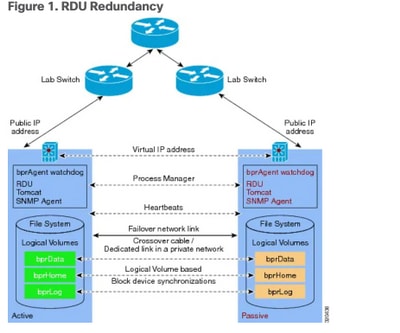
1. LVM maakt volume voor LVBPRHOME, LVBPRDATA en LVBPRDBLOG op beide servers.
2. Linux 7.4-server voorbereiden op RDU HA-implementatie op beide servers.
3. Installatie van RDU-server in Geo-redundantiemodus
- Installatie van RDU-server in Geo-redundantiemodus.
- Controleer vooraf HA. -RDU HA instellen in primaire- secundaire modus.
- HA. installeren - Installeer 6.1.5 PCP-installatie.
- Controle achteraf HA.
4. Voorwaarde voor Layer-3-routering voor implementatie van Geo-redundantie.
1. LVM-volume maken voor LVBPRHOME, LVBPRDATA en LVBPRDBLOG op beide servers
Deze illustratie is gemaakt voor de secundaire server. Dezelfde procedure moet ook op de primaire server worden voltooid.
- Voeg nieuwe partitie toe als sda3 en wijs schijf toe met behulp van de opdracht fdisk.
[root@pcprdusecondary ~]# fdisk -l


Disk /dev/sda: 107.4 GB, 107374182400 bytes, 209715200 sectors

Units = sectors of 1 * 512 = 512 bytes

Sector size (logical/physical): 512 bytes / 512 bytes

I/O size (minimum/optimal): 512 bytes / 512 bytes

Disk label type: dos

Disk identifier: 0x00025a26


   Device Boot      Start         End      Blocks   Id  System

/dev/sda1   *        2048     2099199     1048576   83  Linux

/dev/sda2         2099200    31211519    14556160   8e  Linux LVM


Disk /dev/mapper/rhel-root: 4294 MB, 4294967296 bytes, 8388608 sectors

Units = sectors of 1 * 512 = 512 bytes

Sector size (logical/physical): 512 bytes / 512 bytes

I/O size (minimum/optimal): 512 bytes / 512 bytes


Disk /dev/mapper/rhel-swap: 8455 MB, 8455716864 bytes, 16515072 sectors

Units = sectors of 1 * 512 = 512 bytes

Sector size (logical/physical): 512 bytes / 512 bytes

I/O size (minimum/optimal): 512 bytes / 512 bytes


Disk /dev/mapper/rhel-home: 2147 MB, 2147483648 bytes, 4194304 sectors

Units = sectors of 1 * 512 = 512 bytes

Sector size (logical/physical): 512 bytes / 512 bytes

I/O size (minimum/optimal): 512 bytes / 512 bytes


[root@pcprdusecondary ~]# fdisk /dev/sda

Welcome to fdisk (util-linux 2.23.2).


Changes will remain in memory only, until you decide to write them.

Be careful before using the write command.


Command (m for help): m

Command action

   a   toggle a bootable flag

   b   edit bsd disklabel

   c   toggle the dos compatibility flag

   d   delete a partition

   g   create a new empty GPT partition table

   G   create an IRIX (SGI) partition table

   l   list known partition types

   m   print this menu

   n   add a new partition

   o   create a new empty DOS partition table

   p   print the partition table

   q   quit without saving changes

   s   create a new empty Sun disklabel

   t   change a partition's system id

   u   change display/entry units

   v   verify the partition table

   w   write table to disk and exit

   x   extra functionality (experts only)


Command (m for help): p


Disk /dev/sda: 107.4 GB, 107374182400 bytes, 209715200 sectors

Units = sectors of 1 * 512 = 512 bytes

Sector size (logical/physical): 512 bytes / 512 bytes

I/O size (minimum/optimal): 512 bytes / 512 bytes

Disk label type: dos

Disk identifier: 0x00025a26


   Device Boot      Start         End      Blocks   Id  System

/dev/sda1   *        2048     2099199     1048576   83  Linux

/dev/sda2         2099200    31211519    14556160   8e  Linux LVM


Command (m for help): n

Partition type:

   p   primary (2 primary, 0 extended, 2 free)

   e   extended

Select (default p): p

Partition number (3,4, default 3): 3

First sector (31211520-209715199, default 31211520):

Using default value 31211520

Last sector, +sectors or +size{K,M,G} (31211520-209715199, default 209715199):

Using default value 209715199

Partition 3 of type Linux and of size 85.1 GiB is set


Command (m for help): p


Disk /dev/sda: 107.4 GB, 107374182400 bytes, 209715200 sectors

Units = sectors of 1 * 512 = 512 bytes

Sector size (logical/physical): 512 bytes / 512 bytes

I/O size (minimum/optimal): 512 bytes / 512 bytes

Disk label type: dos

Disk identifier: 0x00025a26


   Device Boot      Start         End      Blocks   Id  System

/dev/sda1   *        2048     2099199     1048576   83  Linux

/dev/sda2         2099200    31211519    14556160   8e  Linux LVM

/dev/sda3        31211520   209715199    89251840   83  Linux


Command (m for help): t

Partition number (1-3, default 3): 3

Hex code (type L to list all codes): L


 0  Empty           24  NEC DOS         81  Minix / old Lin bf  Solaris

 1  FAT12           27  Hidden NTFS Win 82  Linux swap / So c1  DRDOS/sec (FAT-

 2  XENIX root      39  Plan 9          83  Linux           c4  DRDOS/sec (FAT-

 3  XENIX usr       3c  PartitionMagic  84  OS/2 hidden C:  c6  DRDOS/sec (FAT-

 4  FAT16 <32M      40  Venix 80286     85  Linux extended  c7  Syrinx

 5  Extended        41  PPC PReP Boot   86  NTFS volume set da  Non-FS data

 6  FAT16           42  SFS             87  NTFS volume set db  CP/M / CTOS / .

 7  HPFS/NTFS/exFAT 4d  QNX4.x          88  Linux plaintext de  Dell Utility

 8  AIX             4e  QNX4.x 2nd part 8e  Linux LVM       df  BootIt

 9  AIX bootable    4f  QNX4.x 3rd part 93  Amoeba          e1  DOS access

 a  OS/2 Boot Manag 50  OnTrack DM      94  Amoeba BBT      e3  DOS R/O

 b  W95 FAT32       51  OnTrack DM6 Aux 9f  BSD/OS          e4  SpeedStor

 c  W95 FAT32 (LBA) 52  CP/M            a0  IBM Thinkpad hi eb  BeOS fs

 e  W95 FAT16 (LBA) 53  OnTrack DM6 Aux a5  FreeBSD         ee  GPT

 f  W95 Ext'd (LBA) 54  OnTrackDM6      a6  OpenBSD         ef  EFI (FAT-12/16/

10  OPUS            55  EZ-Drive        a7  NeXTSTEP        f0  Linux/PA-RISC b

11  Hidden FAT12    56  Golden Bow      a8  Darwin UFS      f1  SpeedStor

12  Compaq diagnost 5c  Priam Edisk     a9  NetBSD          f4  SpeedStor

14  Hidden FAT16  61  SpeedStor       ab  Darwin boot     f2  DOS secondary

16  Hidden FAT16    63  GNU HURD or Sys af  HFS / HFS+      fb  VMware VMFS

17  Hidden HPFS/NTF 64  Novell Netware  b7  BSDI fs         fc  VMware VMKCORE

18  AST SmartSleep  65  Novell Netware  b8  BSDI swap       fd  Linux raid auto

1b  Hidden W95 FAT3 70  DiskSecure Mult bb  Boot Wizard hid fe  LANstep

1c  Hidden W95 FAT3 75  PC/IX           be  Solaris boot    ff  BBT

1e  Hidden W95 FAT1 80  Old Minix

Hex code (type L to list all codes): 8e

Changed type of partition 'Linux' to 'Linux LVM'


Command (m for help): w

The partition table has been altered!


Calling ioctl() to re-read partition table.


WARNING: Re-reading the partition table failed with error 16: Device or resource busy.

The kernel still uses the old table. The new table will be used at

the next reboot or after you run partprobe(8) or kpartx(8)

Syncing disks.
Deze foutmelding wordt verwacht. U moet de Linux-machine opnieuw laden om nieuwe wijzigingen van kracht te laten worden.
[root@pcprdusecondary ~]# df -h

Filesystem             Size  Used Avail Use% Mounted on

/dev/mapper/rhel-root  4.0G  946M  3.1G  24% /

devtmpfs               3.9G     0  3.9G   0% /dev

tmpfs                  3.9G     0  3.9G   0% /dev/shm

tmpfs                  3.9G  8.6M  3.9G   1% /run

tmpfs                  3.9G     0  3.9G   0% /sys/fs/cgroup

/dev/sda1             1014M  143M  872M  15% /boot

/dev/mapper/rhel-home  2.0G   33M  2.0G   2% /home

tmpfs                  781M     0  781M   0% /run/user/0

[root@pcprdusecondary ~]# fdisk -l


Disk /dev/sda: 107.4 GB, 107374182400 bytes, 209715200 sectors

Units = sectors of 1 * 512 = 512 bytes

Sector size (logical/physical): 512 bytes / 512 bytes

I/O size (minimum/optimal): 512 bytes / 512 bytes

Disk label type: dos

Disk identifier: 0x00025a26


   Device Boot      Start         End      Blocks   Id  System

/dev/sda1   *        2048     2099199     1048576   83  Linux

/dev/sda2         2099200    31211519    14556160   8e  Linux LVM

/dev/sda3        31211520   209715199    89251840   8e  Linux LVM


Disk /dev/mapper/rhel-root: 4294 MB, 4294967296 bytes, 8388608 sectors

Units = sectors of 1 * 512 = 512 bytes

Sector size (logical/physical): 512 bytes / 512 bytes

I/O size (minimum/optimal): 512 bytes / 512 bytes


Disk /dev/mapper/rhel-swap: 8455 MB, 8455716864 bytes, 16515072 sectors

Units = sectors of 1 * 512 = 512 bytes

Sector size (logical/physical): 512 bytes / 512 bytes

I/O size (minimum/optimal): 512 bytes / 512 bytes


Disk /dev/mapper/rhel-home: 2147 MB, 2147483648 bytes, 4194304 sectors

Units = sectors of 1 * 512 = 512 bytes

Sector size (logical/physical): 512 bytes / 512 bytes

I/O size (minimum/optimal): 512 bytes / 512 bytes
- Maak fysiek volume voor sda3.
[root@pcprdusecondary ~]# pvcreate /dev/sda3

- PvScan – scan en lijst fysieke volumegroep.
- VGScan – Logische volumegroep scannen en opsommen.
- LvScan – Logische volumes scannen en opsommen die zijn gemaakt onder volumegroep
Deze Linux LVM-creatie is de voorwaarde voor de installatie van een RDU-server.
- Op zowel primaire als secundaire RDU-knooppunten moet een logische volumegroep worden gemaakt met drie logische volumes erop. De logische volumes worden gemaakt op basis van deze specificaties:
1. <logisch volume voor installatiemap Prime Cable Provisioning> - Gemonteerd in /bprHome-directory. Bijvoorbeeld LVBPRHOME.
2. <logisch volume voor gegevensdirectory voor Prime Cable Provisioning> - Gemonteerd in /bprData-directory. Bijvoorbeeld LVBPRDATA
3. <logisch volume voor logboekdirectory Prime Cable Provisioning > - Gemonteerd in /bprLog-directory. Bijvoorbeeld LVBPRDBLOG
- Maak volumegroepen en logische volumes volgens de vereisten en koppel deze aan directory /bprData, bprHome en /bprLog-directory's.
Bijvoorbeeld: Deze procedure is om logische volumes te maken voor BPRHOME met 3 GB schijfruimte, BPRDATA met 15 GB schijfruimte en BPRDBLOG met 5 GB schijfruimte toewijzing. U moet schijfruimte kiezen om uit te breiden op basis van toewijzing.
- Volumegroep maken.
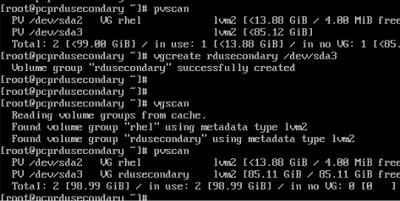
vgcreate <vg_name> <pvname>
[root@pcprdusecondary ~]# vgcreate rdusecondary /dev/sda3
- Logische volumes maken:
lvcreate -L <waarde in GB> -n <logische volumenaam> <volumegroepnaam>
[root@pcprdusecondary ~]# lvcreate -L +3GB -n LVBPRHOME rdusecondary
[root@pcprdusecondary ~]# lvcreate -L +15GB -n LVBPRDATA rdusecondary
[root@pcprdusecondary ~]# lvcreate -L +5GB -n LVBPRDBLOG rdusecondary
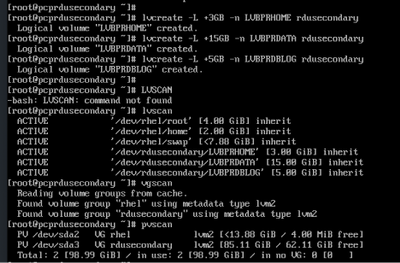
bprHome - installatietoepassingspad (standaarddirectory - /opt/CSCObac)
bprData - installatiegegevenspad.(Standaarddirectory - /var/CSCObac)
bprLog - installatielogpad. (Standaarddirectory - /var/CSCObac)
- XFS-bestandssysteem maken op lvm-partitie.
mkfs.xfs /dev/<volumegroupname>/<logisch volume>
[root@pcprdusecondary ~]# mkfs.xfs   /dev/rdusecondary/LVBPRHOME
[root@pcprdusecondary ~]# mkfs.xfs   /dev/rdusecondary/LVBPRDATA
[root@pcprdusecondary ~]# mkfs.xfs   /dev/rdusecondary/LVBPRDBLOG
- Directory maken – bprHome, bprData, bprLog en logische volumes op deze directory’s koppelen.
[root@pcprdusecondary ~]# mkdir bprHome
[root@pcprdusecondary ~]# mkdir bprData
[root@pcprdusecondary ~]# mkdir bprLog
- Het logische volume dat in deze mappen is gemaakt, koppelen.
[root@pcprdusecondary ~]# mount /dev/RDUPRIMARY/LVBPRHOME   /bprHome/
[root@pcprdusecondary ~]# mount /dev/RDUPRIMARY/LVBPRDATA   /bprData/
[root@pcprdusecondary ~]# mount /dev/RDUPRIMARY/LVBPRDBLOG   /bprLog
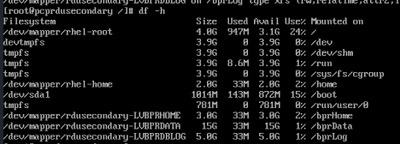
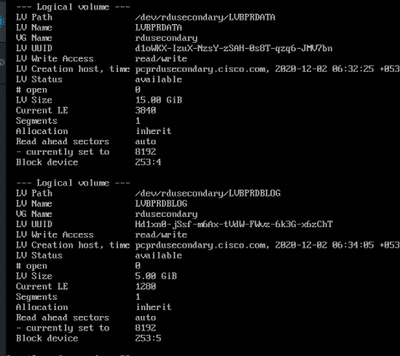
- Deze opdrachten kunnen worden gebruikt om nieuwe partitiestatus, nieuwe fysieke en logische volumestatus, bestandsysteemtype en toewijzingsblokken aan te roepen en te verifiëren.
[root@pcprdusecondary ~]# fdisk -l
[root@pcprdusecondary ~]# pvdisplay
[root@pcprdusecondary ~]# vgdisplay
[root@pcprdusecondary ~]# lvdisplay
Opmerking:
-
De fstab-vermeldingen voor de logische volumes hoeven niet te worden toegevoegd. Het Corosync-cluster zorgt voor de montage van de volumes. In het verleden hebben enkele klanten problemen ondervonden als gevolg van deze inzendingen. Tijdens het opnieuw opstarten van het systeem, soms als gevolg van timing probleem, zowel primaire als secundaire zou proberen om de volumes te monteren.
-
De naam van de volumegroep en de logische volumes (LVBPRHOME, LVBPRDATA, LVBPRDBLOG) moeten voor beide servers hetzelfde zijn. Ze moeten op beide servers dezelfde schijfruimte delen.
-
De bestandssysteemsynchronisatie van het DRBD-blokapparaat werkt alleen als de schijfgrootte op beide servers hetzelfde is.
-
CentOS Linux versie moet 7.4 zijn en de kernel moet 3.10.0-693.11.6.el7.x86_64 zijn.
-
Zorg ervoor dat beide servers dezelfde interface gebruiken voor het openbare IP-adres waar VIP wordt geadverteerd - ens192.
2. Linux 7.4-server voorbereiden voor RDU HA-implementatie op beide servers
3. Installeer de RDU-server in Geo-Redundancy Mode
Raadpleeg de snelstartgids voor meer informatie:
4. Voorwaarde voor Layer-3-routering voor implementatie van geo-redundantie
Geo-redundantie RDU
RDU Geo Redundancy is een verbeterde functie van RDU HA ondersteund op RHEL 7.4 of CentOS 7.4 (beide 64-bits), waarbij de primaire en secundaire node van de RDU zich op verschillende geografische locaties kunnen bevinden of beide knooppunten zich in een ander subnet kunnen bevinden.
- In de Geo-redundantie-modus kan de VIP zich in elk subnet bevinden, het is niet nodig om in het subnetbereik te zijn dat beide knooppunten gemeen hebben.
- In de Geo-redundantie-modus moet de CIDR-waarde van VIP 32 zijn.
- De VIP wordt geadverteerd als een RIP-advertentie van de actieve server, dus op de ingangsrouter van beide knooppunten moet routeinjectie worden gedaan.
- In de Geo-redundantiemodus wordt de VIP bewaakt met behulp van de resource agent (res_VIPArip).
Vereisten voor PCP-georedundantie
Route-injectie voor Virtual IP (VIP) moet worden gedaan op de ingangsrouters waarmee primaire en secundaire servers zijn verbonden.
De VIP wordt geadverteerd als RIP2-advertentie vanaf de actieve server, dus routeherverdeling moet worden gedaan voor RIP2 naar het dynamische routeringsprotocol dat in de gebruikersomgeving wordt uitgevoerd.
Hoe de RIP2-route naar OSPF IGRP te herverdelen en te adverteren. Dezelfde herverdeling kan worden gebruikt voor andere protocollen zoals EIGRP / IBGP.
Voor PCP Geo-redundantie oplossing moet de CIDR waarde van VIP 32 zijn.
- Als VIP-reclame via quagga is ingeschakeld, voert u de interface in waarmee u de VIP wilt adverteren, standaard is het eth0, zorg ervoor dat deze interfacenaam hetzelfde is op zowel primaire als secundaire servers, zorg er ook voor dat deze interface is verbonden met de ingangsrouter waar routeinjectie wordt uitgevoerd.
- Als VIP-reclame via quagga is uitgeschakeld, voert u de CIDR-waarde voor VIP in
- /etc/quagga/ripd.conf. – pad waar RIP2 conf wordt toegevoegd in Geo-modus. https://www.nongnu.org/quagga/docs/quagga.html#RIP
- RIP-nabijheid moet worden geïnjecteerd in de aangrenzende router die is aangesloten op zowel de primaire als de secundaire server. Voorbeeldconfiguratie zoals deze:
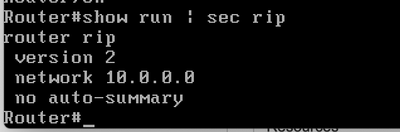
- Configuratie van de nabijheid voor buurman-peer. Dit moet in beide routers worden geïmplementeerd. VIP- en openbare IP-netwerken moeten worden toegevoegd aan de advertentie-interface.
- Route naar het VIP-adres.
- Adverteer dit RIP-netwerk via ospf/eigrp/static op basis van de route die is ingeschakeld om naar de buitenwereld te adverteren.
Example: Here OSPF is the dynamic protocol
router ospf <processed>
redistribute rip metric-type 1 subnets. For RIP2, it uses metric as hop count.
Example: Here ISIS is the dynamic protocol
router isis
redistribute rip metric
HA na controle
- Controleer de status van het RDU HA-cluster met behulp van de opdracht: /bprHome/CSCObac/agent/HA/bin/monitor_ha_cluster.sh.
- Zorg ervoor dat RDU HA zonder problemen werkt in de Geo-Redundantie-modus. Wacht tot de primaire en secundaire DRBD-schijven zijn gesynchroniseerd en de status up-to-date zijn (cat /proc/drbd).
Bijgedragen door Cisco-engineers
- Renjith GCisco TAC Engineer
 Feedback
Contact Cisco
- Een ondersteuningscase openen

- (Vereist een Cisco-servicecontract)