WAAS - Problemen oplossen met WAAS Express
Hoofdstuk: Problemen oplossen met WAAS Express
In dit artikel wordt beschreven hoe u problemen met de werking van WAAS Express kunt oplossen.
hoofdartikel
Inzicht in de WAAS-architectuur en verkeersstroom
Voorlopige probleemoplossing WAAS
Optimalisatie van probleemoplossing
Toepassingsversnelling voor probleemoplossing
Problemen oplossen met CIFS AO
Problemen oplossen met de HTTP AO
Problemen oplossen met de EPM AO
Problemen oplossen met de MAPI AO
Problemen oplossen met NFS AO
Problemen met het SSL-AO oplossen
Problemen oplossen met de video-AO
Problemen oplossen met de generieke AO
Problemen oplossen bij overbelasting
Problemen oplossen met WCCP
Problemen oplossen met AppNav
Problemen met harde schijven en hardware oplossen
Problemen oplossen met seriële inline clusters
Problemen oplossen vWAAS
Problemen oplossen met WAAS Express
Problemen oplossen met NAM-integratie
Inhoud
- 1 Versie van WAAS Express-image controleren
- 2 WAAS Express-licentie controleren
- 3 WAAS-compatibele interfaces controleren
- 4 WAAS-geoptimaliseerde verbindingen controleren
- 5 WAAS-geoptimaliseerde gegevens controleren
- 6 WAAS Express-alarmen controleren
- 7 WAAS Express-peers verifiëren
- 8 Offline alarmen
- 9 WAAS Express HTTPS-configuratie controleren
- 10 WAAS-Express - WAE - Compatibiliteit met WAAS CM
- 11 Onverwachte verlopen WAAS-Express-licentie
- 12 Interactieproblemen met WAAS-Express en WAAS CM
- 13 Verbindingen worden niet geoptimaliseerd
- 14 Verbindingen krijgen niet het gewenste optimalisatieniveau
- 14.1 Symptoom: Gevestigde verbindingen krijgen niet het gewenste of geconfigureerde beleid voor het gebruik van CIFS, SSL of HTTP-Express AO
- 14.2 Symptoom: Verwachte verbindingsoptimalisatie is THDL, maar gevestigde verbinding heeft TDL
- 14.3 Symptoom: Verwachte verbindingsoptimalisatie is TCDL, maar gevestigde verbinding heeft TDL
- 14.4 Symptoom: Verwachte verbindingsoptimalisatie is TSDL, maar gevestigde verbinding heeft TDL
- 14.5 Verwachte verbindingsoptimalisatie is TSHDL, maar de vaste verbinding heeft alleen TSDL of THDL
- 15 Symptoom: Onverwachte verbindingsreset
- 16 Routercrash/tracebacks
- 17 Trage verbinding/minder goede prestaties
- 18 Verbindingen ophangen
- 19 SSL-Express Accelerator-problemen:
- 20 WAAS-Express-apparaat verplaatsen tussen apparaatgroepen op CM
- 21 Overige nuttige informatie
WAAS Express is een WAAS-functionaliteit die is ingebouwd in IOS en wordt uitgevoerd op een apparaat zoals een router. De WAAS Central Manager kan een WAAS Express-apparaat beheren samen met andere WAAS-apparaten in het WAAS-netwerk. In dit artikel wordt beschreven hoe u problemen met de werking van het WAAS Express-apparaat kunt oplossen.
 Opmerking: WAAS Express Central Manager-ondersteuning werd geïntroduceerd in WAAS versie 4.3.1. Dit gedeelte is niet van toepassing op eerdere WAAS-versies.
Versie van WAAS Express-image controleren
Als u de WAAS Express-versie van het image wilt controleren, gebruikt u de opdracht waas-status weergeven op de WAAS Express-router. Als u de WAAS Express-versie van het image wilt bekijken vanuit WAAS Central Manager, kiest u Mijn WAN > Apparaten beheren.
waas-express# show waas status

IOS Version: 15.1(20101018:232707)       <----- IOS version
WAAS Express Version: 1.1.0              <----- WAAS Express version
. . .
WAAS Express-licentie controleren
De WAAS Express-licentie is verkrijgbaar in twee varianten: evaluatievergunning (12 jaar geldig) en permanente vergunning. Gebruik de opdracht waas-status weergeven op het WAAS Express-apparaat om de licentiegegevens weer te geven.
waas-express# show waas status

IOS Version: 15.1(20101018:232707)
WAAS Express Version: 1.1.0
. . .

WAAS Feature License
License Type:                           Evaluation          <----- Indicates an evaluation license
Evaluation total period:                625 weeks 0  day
Evaluation period left:                 622 weeks 6  days
Waas-compatibele interfaces controleren
Gebruik de opdracht waas-status weergeven op het WAAS Express-apparaat om de set interfaces weer te geven waarop WAAS is ingeschakeld. Deze opdracht geeft ook het soort optimalisatie weer dat door het apparaat wordt ondersteund. Sommige van de WAAS Express-routermodellen ondersteunen DRE niet.
waas-express# show waas status

IOS Version: 15.1(20101018:232707)
WAAS Express Version: 1.1.0
WAAS Enabled Interface        Policy Map
GigabitEthernet0/1            waas_global        <----- Interfaces on which optimization is enabled
GigabitEthernet0/2            waas_global
Virtual-TokenRing1            waas_global
Virtual-TokenRing2            waas_global
GigabitEthernet0/0            waas_global
Virtual-TokenRing10           waas_global
WAAS Feature License
License Type:                           Evaluation
Evaluation total period:                625 weeks 0  day
Evaluation period left:                 622 weeks 6  days
DRE Status                        : Enabled                    <----- Indicates DRE is supported
LZ Status                         : Enabled + Entropy
Maximum Flows                     : 50                         <----- Number of optimized connections supported
Total Active connections          : 0                          <----- Total number of connections active
Total optimized connections       : 0                          <----- Total number of optimized connections
Opmerking: WAAS mag alleen worden ingeschakeld op WAN-interfaces. Als verbindingen, om te worden geoptimaliseerd, worden gerouteerd over meerdere WAN-interfaces, moet WAAS worden toegepast op al die WAN-interfaces.
Opmerking: Als WAAS is ingeschakeld op een logische of virtuele interface, hoeft deze niet te worden geïmplementeerd op de bijbehorende fysieke interface.
WAAS-geoptimaliseerde verbindingen controleren
Gebruik op het WAAS Express-apparaat de opdracht waas-verbinding weergeven om de set geoptimaliseerde verbindingen weer te geven. Doorvoerverbindingen zijn niet inbegrepen.
waas-express#  show waas  status
ConnID     Source IP:Port         Dest IP:Port           PeerID            Accel
1999       64.103.255.217 :59211  192.168.4.2    :1742   0021.5e57.a768    TLD     <----- TFO, LZ and DRE are applied
1910       64.103.255.217 :56860  192.168.4.2    :61693  0021.5e57.a768    TLD
1865       64.103.255.217 :59206  192.168.4.2    :23253  0021.5e57.a768    TLD
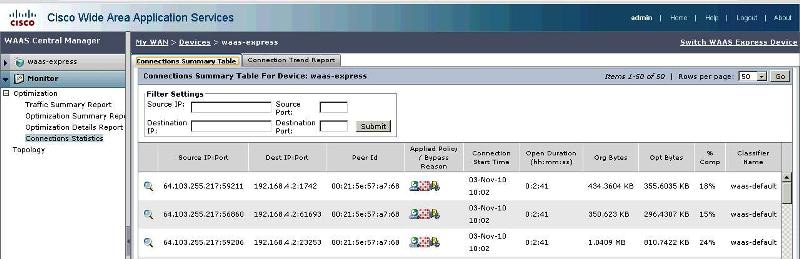
Als u vergelijkbare informatie wilt bekijken vanuit Centraal beheer, kiest u het WAAS Express-apparaat en kiest u Monitor > Optimalisatie > Verbindingsstatistieken om de overzichtstabel voor verbindingen te bekijken.
- Afbeelding 1. Overzichtstabel voor verbindingen
WAAS-geoptimaliseerde gegevens controleren
Gebruik op het WAAS Express-apparaat de opdracht show waas statistics application om de geoptimaliseerde gegevens die in elke toepassing zijn geclassificeerd weer te geven. Het WAAS Express-apparaat toont geen gegevens over de doorvoer. Deze gegevens worden gebruikt om de TCP-gerelateerde grafieken te genereren in de WAAS Central Manager.
waas-express# show waas statistics application

Number of applications :        1
Application:     waas-default
TCP Data Volumes
Connection Type     Inbound                             Outbound
Opt TCP Plus        53001765483                         41674120
Orig TCP Plus       0                                87948683030
Opt TCP Only        1165                                     863
Orig TCP Only       60                                         0
Internal Client     0                                          0
Internal Server     0                                          0

TCP Connection Counts
Connection Type     Active               Completed
Opt TCP Plus        50                         126
Opt TCP Only        0                           71
Internal Client     0                            0
Internal Server     0                            0

Pass Through Connection Counts
Connection Type     Completed
PT Asymmetric       0
PT Capabilities     0
PT Intermediate     0
PT_Other            0
Connection Reset:   0
Cleared connections 0
Waas Express-alarmen controleren
Gebruik op het WAAS Express-apparaat de opdracht waas-alarmen tonen om de alarmen weer te geven die aanwezig zijn in het apparaat en hun status.
waas-express# show waas alarms
WAAS status:        enabled
Alarms
Connection limit exceeded:              on      <----- on indicates this alarm is active. off indicates inactive
Too many peers discovered:              off
WAAS license expired:                   off
WAAS license revoked:                   off
WAAS license deleted:                   off
High CPU:                               off
Kies Mijn WAN > Waarschuwingen om alarmen voor alle apparaten in Centraal beheer weer te geven. Naast de hierboven vermelde alarmen gaat er een alarm af als de klokken van de WAAS Express- en WAAS Central Manager-apparaten niet worden gesynchroniseerd.
Waas Express-peers verifiëren
Gebruik op het WAAS Express-apparaat de opdracht show waas statistics peer om de peer-apparaten van het WAAS Express-apparaat weer te geven.
waas-express# show waas statistics peer
Number of Peers :   1
Peer:               0021.5e57.a768
TCP Data Volumes
Connection Type     Inbound                             Outbound
Opt TCP Plus        597068158                            5212151
Orig TCP Plus       0                                 6867128187
Opt TCP Only        0                                          0
Orig TCP Only       0                                          0
Internal Client     0                                          0
Internal Server     0                                          0

TCP Connection Counts
Connection Type     Active               Completed
Opt TCP Plus        50                           0
Opt TCP Only        0                            0
Internal Client     0                            0
Internal Server     0                            0

Pass Through Connection Counts
Connection Type     Completed
PT Asymmetric       0
PT Capabilities     0
PT Intermediate     0
PT_Other            0
Connection Reset:   0
Cleared connections 0

Router#show waas statistics aoim
Total number of peer syncs:                       1
Current number of peer syncs in progress:         0
Number of peers:                                  1
Number of local application optimizations (AO):   3
Number of AO discovery successful:                1
Number of AO discovery failure:                   0

Local AO statistics
    Local AO:                                     TFO
        Total number of incompatible connections: 0
        Version:                                  0.11
        Registered:                               Yes
    Local AO:                                     HTTP
        Total number of incompatible connections: 0
        Version:                                  1.1
        Registered:                               Yes
    Local AO:                                     SSL
        Total number of incompatible connections: 0
        Version:                                  1.0
        Registered:                               Yes

Peer AOIM Statistics
Number of Peers :   1
    Peer:                               0027.0d79.c215    <--- Peer ID
    Peer IP:                            20.0.0.2          <--- Peer IP
    Peer Expiry Time:                   00:00:02
    Peer Compatible:                    Yes
    Peer active connections:            0
    Peer Aoim Version:                  1.0
    Peer sync in progress:              No
    Peer valid:                         Yes
    Peer Software Version:              4.4.3(b4)
    Peer AOs:
        Peer AO:                            TFO
            Compatible:                     Yes
            Version:                        0.20
        Peer AO:                            HTTP
            Compatible:                     Yes
            Version:                        1.4
        Peer AO:                            SSL
            Compatible:                     Yes
            Version:                        1.0

Router#show waas statistics dre peer
DRE Status:                                 Enabled

Current number of connected peers           0
Current number of active peers              1

Peer-ID                                     0027.0d79.c215           <--- Peer ID
Hostname                                    waasx1-b-wae.cisco.com   <--- Peer hostname
IP reported from peer                       20.0.0.2                 <--- Peer IP
Peer version                                4.4.3(b4)

Cache:
    Cache in storage                        0 B
    Age                                     00:00:00

AckQ:
    AckQ in storage                         0 B

WaitQ:
    WaitQ in storage                        0 B
    WaitQ size                              0 B

Sync-clock:
    Local-head                              0 ms
    Local-tail                              0 ms
    Remote-head                             18609143000 ms
    Curr-sync-clock                         24215235228 ms

Encode Statistics
    DRE msgs:                               1
    R-tx total:                             0
    R-tx chunk-miss:                        0
    R-tx collision:                         0
    Bytes in:                               0
    Bytes out:                              0
    Bypass bytes:                           178
    Compression gain:                       0%
Decode Statistics
    DRE msgs:                               4
    Bytes in:                               299
    Bytes out:                              277
    Bypass bytes:                           51
    Compression gain:                       0%
    Nacks generated:                        0
Kies Monitor > Topologie om vergelijkbare informatie uit Centraal beheer weer te geven.
Offline alarmen
Het WAAS Express-apparaat kan offline gaan in Centraal beheer vanwege de volgende problemen:
- Central Manager heeft geen WAAS Express-apparaatreferenties.
- Inloggegevens zijn niet geconfigureerd voor dit WAAS Express-apparaat in Centraal beheer. De WAAS Central Manager heeft de WAAS Express-gebruikersnaam en het wachtwoord nodig om te communiceren met het WAAS Express-apparaat. U kunt referenties configureren in Centraal beheer door Mijn WAN (of een WAAS Express-apparaat of apparaatgroep) > Beheer > WAAS Express-referenties te kiezen.
- Verificatie mislukt tijdens communicatie met WAAS Express-apparaat.
- De centrale manager kan niet communiceren met de WAAS Express omdat verkeerde referenties zijn geconfigureerd. U kunt referenties configureren in Centraal beheer door Mijn WAN (of een WAAS Express-apparaat of apparaatgroep) > Beheer > WAAS Express-referenties te kiezen.
- SSL-handshake is mislukt tijdens de communicatie met het WAAS Express-apparaat.
- Het WAAS Express-apparaatcertificaat wordt gewijzigd en hetzelfde certificaat wordt niet geïmporteerd voor dit apparaat in Centraal beheer. Als u het WAAS Express-apparaatcertificaat opnieuw wilt importeren, kiest u het WAAS Express-apparaat en kiest u Beheer > Certificaat.
- Geen route naar WAAS Express-apparaat.
- De centrale beheerder kan het WAAS Express-apparaat niet bereiken. Configureer het juiste WAAS Express-beheer-IP-adres door het WAAS Express-apparaat te kiezen en vervolgens Apparaatnaam > Activering te kiezen.
- De verbinding wordt geweigerd door het WAAS Express-apparaat.
- De HTTPS-serverpoort die is geconfigureerd op het WAAS Express-apparaat is niet dezelfde als de poort die wordt weergegeven op de activeringspagina Apparaatnaam > van Centraal Beheer. Configureer de juiste WAAS Express HTTPS-serverpoort op deze pagina.
- WAAS-ondersteuning is niet beschikbaar op WAAS Express-apparaat.
- Het WAAS Express-apparaat wordt gedowngraded naar een IOS-versie zonder WAAS-ondersteuning. Installeer een IOS-image met WAAS-ondersteuning.
- Time-out van verbinding tijdens communicatie met WAAS Express-apparaat.
- Het WAAS Express-apparaat heeft meer dan 30 seconden nodig om te reageren op de centrale manager. Het kan zijn dat het WAAS Express-apparaat overbelast is of dat het netwerk traag is.
- Licentie is verlopen op WAAS Express-apparaat.
- De Evaluatielicentie op het WAAS Express-apparaat is verlopen. Installeer een permanente licentie met de opdracht WAAS Express-licentie installeren.
- De SSL-verbinding is onjuist gesloten tijdens de communicatie met het WAAS Express-apparaat.
- Het WAAS Express-apparaat en Central Manager gebruiken het coderingssysteem rc4-128-md5 voor SSL-communicatie. Soms slaagt de centrale manager er niet in om de SSL-gegevens die door de WAAS Express worden verzonden, te decoderen. Configureer de cijfers 3des-ede-cbc-sha, des-cbc-sha en rc4-128 met behulp van het WAAS Express-commando ip http secure-ciphersuite 3des-ede-cbc-sha des-cbc-sha rc4-128-sha.
- De status van het WAAS Express-apparaat is niet gecontroleerd.
- De configuratiestatus van de centrale beheerder wordt niet ontvangen van het WAAS Express-apparaat. Neem contact op met Cisco TAC voor hulp bij het oplossen van problemen.
- De beheerstatus is offline.
- Als u deze foutmelding ziet, neemt u contact op met Cisco TAC voor hulp bij het oplossen van problemen.
WAAS Express HTTPS-configuratie controleren
Als u de HTTPS-serverconfiguratie op het WAAS Express-apparaat wilt controleren, gebruikt u de opdracht veilige status van de IP-http-server tonen.
waas-express# show ip http server secure status

HTTP secure server status: Enabled
HTTP secure server port: 443
HTTP secure server ciphersuite: 3des-ede-cbc-sha des-cbc-sha rc4-128-sha
HTTP secure server client authentication: Disabled
HTTP secure server trustpoint: local
HTTP secure server active session modules: ALL
WAAS-Express - WAE - compatibiliteit met WAAS CM
WAAS-Express versie 1.0, 1.5
Deze versie van WAAS-Express ondersteunt de transportoptimalisatie die TFO, LZ en DRE omvat.
WAAS-Express versie 1.0 wordt geïntroduceerd in IOS-softwarerelease 15.1(3)T1
WAAS-Express versie 1.5 wordt geïntroduceerd in IOS-softwarerelease 15.1(4)M. Naast optimalisatie voegt deze release ondersteuning toe voor ingebedde bewakingsmogelijkheden, genaamd Performance Agent (PA). Voor meer informatie over PA, zie PA pagina op CCO
Recommended WAAS-Express IOS image: 15.1(3)T1
Recommended WAE version: >= 4.3.1
Recommended WCM version: 4.4.5a
Bekende problemen
| IOS-versie | WAE-versie | WAAS CM-versie | Bekende problemen |
|---|---|---|---|
| 15.1(3)T1 | 5.0.1 | 4.4.5 bis | Verbindingen die afkomstig zijn van datacenterzijde worden niet geoptimaliseerd: CSCtz82646 |
WAAS-Express versie 2.0.0
Deze versie van WAAS-Express ondersteunt naast transportoptimalisatie ook geselecteerde toepassingsoptimalisatie, met name HTTP Express, SSL Express en CIFS Express AO.
Recommended WAAS-Express IOS image: 15.2(4)M1
Recommended WAE version: 5.0.1
Recommended WCM version: 5.0.1
Bekende problemen
| IOS-versie | WAE-versie | WAAS CM-versie | Bekende problemen |
|---|---|---|---|
| 15,2(4)M1 | < 4.4.3 quater | < 5.0.1 | HTTP-Express Accelerator vereist 4.4.3c of hoger. Verbindingen zullen geen http-optimalisatie hebben, maar wel TDL. |
| 15,2(4)M1 | < 5.0.1 | < 4.4.5 bis | Ontbrekende classificatienaam in verbindingsstatistieken die op WCM worden gezien. |
| 15,2(4)M1 | < 5.0.1 | < 5.0.1 | CSCub21189: Wijzigingen in beleidskaart niet correct gesynchroniseerd met WAAS-Express-apparaat CSCtw50988: SMB: verbinding herstellen tijdens downloaden van een bestand CSCtr07216: Transactie met ongeldige hdr niet correct afgehandeld in WAAS-X <-> WAE-geval CSCua49764: Https heeft WExp-certificaat gemaakt - WExp ging offline na upgrade |
| 15.2(3)T1 | < 5.0.1 | < 5.0.1 | CSCub21189: Wijzigingen in beleidskaart niet correct gesynchroniseerd met WAAS-Express-apparaat CSCtw50988: SMB: verbinding herstellen tijdens downloaden van een bestand CSCtr07216: Transactie met ongeldige hdr niet correct afgehandeld in WAAS-X <-> WAE-geval CSCua49764: Https heeft WExp-certificaat gemaakt - WExp ging offline na upgrade |
| 15,2(3)T | < 5.0.1 | < 5.0.1 | CSCtx82427: IOS-WAAS: SSL-verbindingsreset aan het einde van de overdracht (EOT) CSCtz08485: Incompatibele HTTP-AO-detectiefout (%WAAS-3-WAAS_LZ_CONN_ABORT) CSCtu19564: Crash waargenomen in dt21 met Waas+VPN+ZBFW+NAT+NETFLOW CSCtz85134: WAAS Express SSL-Express wijzigt zelfondertekende trustpoint na opnieuw laden CSCua22313: HTTPS-pagina wordt niet weergegeven met IE6 conn optim door WAAS Express 2.0 CSCtw50988: SMB: verbinding herstellen tijdens downloaden van een bestand CSCty04359: Handmatig WExp-certificaat gemaakt - na upgrade is Wexp offline gegaan CSCtr07216: Transactie met ongeldige hdr niet correct afgehandeld in WAAS-X <-> WAE-geval |
Onverwachte verlopen WAAS-Express-licentie
- De WAAS-Express-licentie is actief in de showlicentie. De WAAS-Express-licentie is echter verlopen in de status show waas. Dit is mogelijk een bekende bug, CSCtw86624. Controleer dit door de volgende show-opdrachten uit te voeren. WAAS CM denkt dat de licentie is verlopen en toont het apparaat als offline. De verbindingen moeten echter worden geoptimaliseerd, omdat op basis van de licentie de functie actief is.
- Oplossing: Upgrade naar een aanbevolen WAAS-Express versie 2-image - 15.2(4)M1 of installeer een permanente licentie.
Router#sh license | beg WAAS_Express
Index 12 Feature: WAAS_Express
Period left: Life time
License Type: RightToUse
License State: Active, In Use <---- License is Active
License Count: Non-Counted
License Priority: Low

Router#show waas status
IOS Version: 15.2(2.9)T
WAAS Express Version: 2.0.0

WAAS Enabled Interface        Policy Map
GigabitEthernet0/1            waas_global

WAAS Feature License
License Type:                           Evaluation
Evaluation total period:                0 seconds <---- License is expired.
Evaluation period left:                 0 seconds
Interactieproblemen met WAAS-Express en WAAS CM
Raadpleeg het volgende document voor een stapsgewijze en gedetailleerde WAAS-Express-registratieprocedure: Implementatiegids voor WAAS Express
Symptoom: WAAS-Express kan zich niet registreren bij de WAAS CM
Mogelijke oorzaak #1: Connectiviteitsprobleem
- Kan de WAAA-Express router WAAS CM bereiken?
- Stappen voor probleemoplossing: Controleer of WAAS CM ping'able is vanaf de router. Als de WAAS-Express-router zich achter NAT en/of firewall bevindt, is bovendien een statische NAT-regel voor invoer en/of firewallvergunning vereist om WAAS-CM in staat te stellen verbinding te maken met de WAAS-Express HTTPS-server. Om WAAS-Express-apparaten achter NAT/Firewall te beheren, stelt WAAS CM de gebruiker in staat om het adres van WAAS-Express-apparaat handmatig te wijzigen/op te geven voor gebruik door WAAS CM. De gebruiker kan het adres wijzigen vanaf de activeringspagina van het apparaat.
- Oplossing: controleer de route en netwerktopologie om ervoor te zorgen dat WAAS CM bereikbaar is vanaf de router en vice versa, schakel de volgende debugs in op WAAS-Express-apparaat.
- Controleer indien nodig de volgende foutmeldingen om erachter te komen of de SSL-handshake tijdens de registratie mislukt:
debug ip http all
 debug ssl openssl errors
 debug ssl openssl ext
 debug ssl openssl msg
 debug ssl openssl states
- Opmerking: De bovenstaande SSL-debugs zijn uitgebreid.
- Is het certificaat gewijzigd bij het opnieuw laden van de router?
- Controleer dit door de vervaldatum van het WAAS-Express-routercertificaat te vergelijken die is opgeslagen op de WAAS-CM. Navigeer naar deze pagina vanaf de WAAS-Express apparaatpagina, Admin->Certificaat. Vergelijk de certificaatinformatie met de uitvoer van show crypto pki certificaat output op de WAAS-Express router. Als er een mismatch is, is het zeer waarschijnlijk dat het certificaat opnieuw wordt gegenereerd.
- Oplossing: Upgrade naar 15.2(3)T1 of 15.2(4)M1 en hoger
Symptoom: WAAS CM toont dat WAAS-Express offline gaat na succesvolle registratie
Mogelijke oorzaak #1: wijzigingen in WAAS-Express-apparaatcertificaat
- Controleer dit door de vervaldatum van het WAAS-Express-routercertificaat te vergelijken die is opgeslagen op de WAAS-CM. Navigeer naar deze pagina vanaf de WAAS-Express apparaatpagina, Admin->Certificaat. Vergelijk de certificaatinformatie met de uitvoer van show crypto pki certificaat output op de WAAS-Express router. Als er een mismatch is, is het zeer waarschijnlijk dat het certificaat opnieuw wordt gegenereerd.
- Uitgifteshow uitvoeren | crypto pki trustpoint opnemen. Niet-persistente trustpoint-naamgeving is in het formaat TP-self-signed-xxxxxxxxx.
router#show run | include crypto pki trustpoint
crypto pki trustpoint TP-self-signed-4046801426 <-- Indicate this is non-persistent trustpoint
- Oplossing: Volg deze link om een permanent vertrouwenspunt te maken.
- Er zijn verschillende gevallen waarin het certificaat opnieuw kan worden gegenereerd, maar de belangrijkste reden is dat vertrouwen wordt gemaakt als niet-persistent. Als u SSL Express AO inschakelt met 15.2(3)T, kunt u mogelijk ook CSCtz85134 raken.
- Oplossing: Upgrade naar 15.2(4)M1 en maak opnieuw een aanhoudend trustpoint. Verwijder het certificaat uit WAAS CM en registreer opnieuw.
- Was dit een upgrade van 15.1(3)T naar 15.2(3)T?
- In 15.2(3)T is er een verplichte configuratie binnen het crypto pki-trustpoint, waarvoor rsa-keypair moet worden geconfigureerd. Als deze configuratie niet wordt weergegeven vóór de upgrade, kan dit ertoe leiden dat de router het vertrouwenspunt niet kan detecteren. Hierdoor zal de HTTPS-connectiviteit uitvallen. Dit probleem is gedocumenteerd in CSCty04359.
- Oplossing: Verwijder het vertrouwenspunt en maak opnieuw. Verwijder het certificaat uit WAAS CM en registreer opnieuw.
Mogelijke oorzaak # 2: onjuiste certificaten of vertrouwenspunten worden gebruikt
- Heeft de router meerdere trustpoints geconfigureerd?
- Tijdens WAAS CM registratie selecteert de WAAS-Express router het trustpoint dat hij gebruikt voor het verzenden van certificaten naar WAAS CM. Dit kan anders zijn dan wat de lokale HTTPS-server op de WAAS-Express-router gebruikt.
- Oplossing: Controleer of dezelfde vertrouwensrelatie is geconfigureerd in ip http secure-trustpoint <trustpoint_name> en ip http-client secure-trustpoint <trustpoint_name>
Mogelijke oorzaak # 3: probleem met apparaatverificatie
- Valt authenticatie niet?
- Controleer of u zich kunt aanmelden bij de WAAS-Express-router door uw browser via HTTPS naar de WAAS-Express-router te leiden en probeer de verificatie handmatig uit te voeren.
- Oplossing: Controleer of handmatige verificatie is geslaagd.
foutopsporingsinformatie
- Als u denkt dat u problemen ondervindt met certificaten, geeft u hieronder informatie aan het ondersteuningsteam.
Router#show crypto pki trustpoints status
State:
Keys generated ............. Yes (General Purpose, non-exportable) <--- check if this shows “No” for the self-signed certificate
Issuing CA authenticated ....... Yes <--- check if this shows “No” for the self-signed certificate
Certificate request(s) ..... Yes <--- check if this shows “No” for the self-signed certificate

Router#show crypto pki trustpoints status
Trustpoint TP-self-signed-2330253483:
Issuing CA certificate configured:
Subject Name:
cn=IOS-Self-Signed-Certificate-2330253483
Fingerprint MD5: 3F5E9EB4 6BD680FE 8A1C1664 0939ADCB <--- Check fingerprints before and after upgrade
Fingerprint SHA1: DFF10AF4 83A90CAD 71528B3C CCD4EF0C E338E501
Router General Purpose certificate configured:
Subject Name:
cn=IOS-Self-Signed-Certificate-2330253483
Fingerprint MD5: 3F5E9EB4 6BD680FE 8A1C1664 0939ADCB
Fingerprint SHA1: DFF10AF4 83A90CAD 71528B3C CCD4EF0C E338E501
State:
Keys generated ............. Yes (General Purpose, non-exportable)
Issuing CA authenticated ....... Yes
Certificate request(s) ..... Yes

Router#show crypto pki certificates
…
Validity Date:
start date: 20:16:14 UTC May 26 2011 <--- Check whether these dates are valid
end   date: 20:16:14 UTC May 24 2016
…

Provide outputs for following commands:

show crypto pki certificates storage
show crypto pki trustpoints
show crypto key storage
show crypto key pubkey-chain rsa
show crypto key mypubkey all
show crypto key mypubkey rsa
show ip http server all
Symptoom: Mismatch Statistiek tussen WAAS CM en WAAS-Express
Mogelijke oorzaak #1: Klokken worden niet gesynchroniseerd
WAAS CM en WAAS-Express klok moeten worden gesynchroniseerd en daarom is het configureren van NTP-server om klokken te synchroniseren sterk aanbevolen.
- Worden er klokmismatch-berichten gezien op WAAS CM?
- Controleer of de routerklok hetzelfde is als de WAAS CM-klok in UTC-indeling. Verwijder elke tijdzone en zomertijd configuratie en vergelijk de UTC tijd tussen WAAS CM en WAAS-Express router.
- Bekende DDTS'en: CSCtz32667, CSCtz97973, CSCtk74707, CSCtl24210. Identificeer of uw probleem lijkt op een van deze DDTS en volg de workaround voorgesteld in de DDTS.
- Controleer of de routerklok hetzelfde is als de WAAS CM-klok in UTC-indeling. Verwijder elke tijdzone en zomertijd configuratie en vergelijk de UTC tijd tussen WAAS CM en WAAS-Express router.
- Oplossing: Configureer NTP en controleer of de klok van alle apparaten is gesynchroniseerd. Volg de workaround in de hierboven genoemde DDTS of upgrade naar de nieuwste 15.2(4)M1 of hoger.
Verbindingen worden niet geoptimaliseerd
Symptoom: Verbindingen worden doorgegeven
Valideer pass-through statistieken/reden met behulp van show waas statistieken pass-through. Zoek naar de reden waarom verbindingen worden doorgegeven.
Router#show waas statistics pass-through
Pass Through Statistics:
Overall:                                0
No Peer:                                0
Rejected due to Capabilities:           0
Rejected due to Resources:              0
Interface Application config:           0       <---- Traffic classified for pass-through?
Interface Global config:                0       <---- Asymmetric route in the setup?
Assymmetric setup:                      0
Peer sync was in progress:              0
IOS WAAS is intermediate router:        0
Internal error:                         0
Other end is in  black list:            0
AD version mismatch:                    0
Incompatable AO:                        0        <---- Incompatible peer?
Connection limit exceeded:              0
AOIM peertable full:                    0
AOIM multiple sync request passthrough: 0
Others:                                 0
Controleer de statistieken voor automatische detectie (en/of gebruik debugs voor automatische detectie).
Use the following command to check the reason '''show waas statistics auto-discovery'''

Enable following debugs for more information:

debug waas infra error
debug waas infra events
debug waas auto-discovery error
debug waas auto-discovery event
debug waas auto-discovery op <---- Verbose debug
- Als de teller voor de configuraties van de interfacetoepassing is ingesteld, is het waarschijnlijk dat uw beleid is geconfigureerd om deze deeltjesverbinding door te geven. Controleer uw WAAS-beleid op zowel WAAS-Express als zijn peer.
- Oplossing: Controleer en valideer uw optimalisatiebeleid. Gebruik hieronder debug om te ontdekken of verkeer is gemarkeerd als pass-through in het beleid.
show policy-map type waas interface
debug waas infra events
- Als de teller voor Global Interface Config toeneemt, kan dit worden veroorzaakt door asymmetrische routering in uw netwerk. Dit is het geval wanneer WAAS-Express of zijn peer niet beide richtingen van het TCP-verkeer ziet. Dit kan worden veroorzaakt door echte asymmetrische routering in het netwerk, of kan worden veroorzaakt doordat sommige pakketten worden gedropt door apparaten in het verkeerspad (ACL, firewall, enz.)
- Oplossing: controleer of er asymetrische routering van gedropte pakketten in het netwerk is.Zie wat asymetrische routering of gedropte pakketten in het onderstaande netwerk kan veroorzaken.
- Verbindingen kunnen ook worden doorgegeven als de peers niet compatibel zijn met elkaar. Dit kan gebeuren als u de niet-compatibele versie tussen WAAS-Express en WAE uitvoert. Controleer de compatibiliteitstabel hierboven voor aanbevolen softwarereleases.
- Oplossing #1: Controleer of de peer niet compatibel is met behulp van show waas statistics aoim
- Oplossing # 2: Als u denkt dat u een asymmetrisch routeringsscenario in uw netwerk hebt, controleert u het volgende.
Wat kan leiden tot asymmetrische routering of gedropte pakketten in het netwerk?
- Meerdere WAN-koppelingen in de WAAS-Express-router of de peer. WAAS-Express wordt niet ondersteund op actieve/actieve of actieve/standby-routers, omdat zowel het verkeer dat het WAN verlaat als dat het WAN binnenkomt, op dezelfde WAAS-Express-router moet staan. Als er meerdere WAN-koppelingen zijn, moet u ervoor zorgen dat alle WAN-koppelingen zijn voorzien van config waas. Zorg ervoor dat alle WAN-links en routers op de peer routers zijn geconfigureerd om het verkeer om te leiden naar WAAS.
- Controlepakketten (SYN, SYN-ACK, ACK) zijn niet gelabeld met WAAS option.This zou kunnen gebeuren als het verkeer niet wordt omgeleid naar WAAS aan de peer kant. Controleer uw WCCP ACL.
Informatie voor het ontwikkelteam:
Network topology
IOS version
Configuration

Following debugs and show commands:

debug waas auto-discovery error
debug waas auto-discovery event
debug waas auto-discovery operation
debug waas infra error
debug waas infra event

show waas statistics auto-disc
show waas statistics pass
show waas statistics aoim
- Opmerking: Pass-through-verbindingen worden niet meegeteld in de limiet voor de verbinding per platform. WAAS-Express volgt geen doorvoerverbindingen, daarom zijn er geen statistieken met betrekking tot doorvoerstromen. Er zijn echter tellers die aangeven hoeveel stromen er in pass-through zijn gestopt en waarom.
Verbindingen krijgen niet het gewenste optimalisatieniveau
Dit wordt meestal veroorzaakt door een verkeerde configuratie. HTTP-Express Accelerator en CIFS-Express Accelerator zijn standaard uitgeschakeld in WAAS-Express versie 2-image. Controleer of Express Accelerator wereldwijd is ingeschakeld.
Symptoom: Gevestigde verbindingen krijgen niet het gewenste of geconfigureerde beleid voor het gebruik van CIFS, SSL of HTTP-Express AO
- Controleer of CIFS, SSL of HTTP-Express AO wereldwijd is ingeschakeld
router#show waas status

IOS Version: 15.2(4)M1
WAAS Express Version: 2.0.0

WAAS Enabled Interface Policy Map
FastEthernet8 waas_global

WAAS Feature License
License Type: EvalRightToUse
Evaluation total period: 8 weeks 4 days
Evaluation period left: 7 weeks 4 days

DRE Status : Enabled
LZ Status : Enabled + Entropy
CIFS-Express AO Status : Disabled
SSL-Express AO Status : Enabled
HTTP-Express AO Status : Disabled <---- HTTP Express AO is disabled by default

Maximum Flows : 75
Total Active connections : 4
Total optimized connections : 4
Symptoom: Verwachte verbindingsoptimalisatie is THDL, maar de vaste verbinding heeft TDL
- Dit wordt meestal veroorzaakt door verkeerde configuratie van het beleid.
Opmerking: HTTP-Express AO is standaard niet ingeschakeld.
- Oplossing #1: Controleer of het WAAS-kernapparaat compatibel is. Deze controle kan worden gedaan met behulp van show waas statistieken aoim
- Oplossing # 2: Controleer of HTTP-Express Accelerator wordt onderhandeld tijdens automatische detectie met behulp van automatische detectie-debugs. Dit kan zijn omdat het gaspedaal globaal is uitgeschakeld (houd er rekening mee dat HTTP-gaspedaal standaard niet is ingeschakeld), of omdat de HTTP-klasse "http versnellen" mist in de actie.
class HTTP
optimize tfo dre lz application Web accelerate http-express
- Controleer de velden Configurated, Derived and Applied Accelerator onder Waas-verbindingsdetails weergeven
Router#show waas connection detail
...
Negotiated Policy:                      TFO, LZ, DRE
Configured Accelerator:                 HTTP-Express
Derived Accelerator:                    HTTP-Express
Applied Accelerator:                    HTTP-Express
Hist. Accelerator:                      None
Bytes Read Orig:                        174
...
- Controleer de overdrachtsstatistieken/reden in show waas statistics accelerator http-express [https|debug]
Symptoom: Verwachte verbindingsoptimalisatie is TCDL, maar gevestigde verbinding heeft TDL
- Dit kan zijn omdat het gaspedaal is uitgeschakeld of omdat de CIFS/WAFS-klasse cifs in de actie ontbreekt.
Opmerking: CIFS-Express AO is standaard uitgeschakeld.
class CIFS
optimize tfo dre lz application CIFS accelerate cifs-express
- Check handoff statistieken/reden in show waas statistics accelerator cifs-express
Router#show waas statistics accelerator cifs-express
CIFS-Express AO Statistics
...
Unsupported dialects / CIFS version:                              0
Currently active unsupported dialects / CIFS version:             0
Unsupported due to signing:                                       0
...
Symptoom: Verwachte verbindingsoptimalisatie is TSDL, maar gevestigde verbinding heeft TDL
- In het geval van SSL-Express Accelerator is de kern van WAE SSL-AO mogelijk niet actief. Controleren: Implementatiehandleiding voor SSL Application Optimizer van Cisco Wide Area Application Services
- De verbinding wordt mogelijk ook pipe'ed. Dit kan worden gecontroleerd met behulp van show waas statistics accelerator ssl
Router#show waas statistics accelerator ssl
SSL-Express:
Global Statistics
-----------------
Time Accelerator was started:                     16:31:37 UTC Jul 26 2012
...
Pipe through due to C2S cipher mismatch:          0
Pipe through due to C2S version mismatch:         0
Pipe through due to W2W cipher mismatch:          0
Pipe through due to W2W version mismatch:         0
Pipe through due to detection of non-SSL traffic: 0
Pipe through due to unknown reasons:              0
Total pipe through connections:                   0
...
De verwachte optimalisatie van de verbinding is TSHDL, maar de vaste verbinding heeft alleen TSDL of THDL
SSL-Express Accelerator introduceert HTTP-Express Accelerator in het pad. Zorg ervoor dat zowel SSL-Express als HTTP-Express Accelerator wereldwijd zijn ingeschakeld.
- De verbinding werd doorgeprikt en verschijnt als TG. Zoals hierboven weergegeven, controleer reden in show waas statistics accelerator ssl
- Als de verbinding wordt weergegeven als TSDL, kan dit het gevolg zijn van een van de volgende situaties
- HTTP-Express Accelerator is uitgeschakeld.
- HTTP-Express Accelerator is niet compatibel met de HTTP AO op het WAAS-kernapparaat.
- Ten minste 3 optimalisatiefuncties van HTTP-Express Accelerator zijn niet ingeschakeld.
- Het eerste gegevenspakket bevat geen HTTP-inhoud.
- Als de verbinding wordt weergegeven als THDL, kan dit het gevolg zijn van een van de volgende situaties
- SSL-Express Accelerator is niet actief op edge-apparaten.
- SSL AO is niet actief op het kernapparaat.
- SSL-AO werd niet onderhandeld in AOIM.
- Voor proxy is het HTTP CONNECT-verzoek gekoppeld aan een andere poort dan 443.
- De 3-weg DATA-INSPECT handshake waarbij zowel edge als core apparaten elkaar op de hoogte brengen van het toevoegen van SSL-AO aan de optimalisatie voor deze verbinding mislukt.
- Post DATA-INSPECT handshake, de 3-weg TFO handshake waarbij zowel edge- als core-apparaten ermee instemmen om SSL-AO toe te voegen aan de optimalisatie voor deze verbinding mislukt.
Provide following show command outputs for debugging:

show waas status
show waas alarms
show waas accelerator detail
show waas accelerator http
show waas accelerator smb
show waas accelerator ssl
show waas statistic global
show waas statistic auto-discovery
show waas statistic aoim
show waas statistic pass-through
Symptoom: onverwachte verbindingsreset
Meestal zal er ook een foutmelding zijn die het type fout aangeeft, samen met de stroom die wordt gereset. Voorbeeld,
Aug 18 03:02:52.861: %WAAS-3-WAAS_TFO_DEC_FRAME_FAILED: IOS-WAAS failed to decode TFO frame for connection 100.2.0.107:50118--200.0.0.12:1494 (Unknown TFO frame rcvd, RST connection.)
Stappen voor het oplossen van problemen
- Foutfouten inschakelen, afhankelijk van de module, foutopsporing waas <module_naam> fout.
- Controleer End-Reason in waas-verbindingsdetails weergeven
- Check show waas statistiekenfout om mogelijke redenen.
- Wordt er een kerndump gegenereerd op de kern-WAE wanneer er verbindingsresets worden weergegeven?
- Misvormde TCP headers verzonden door WAAS-Express resulteerde in core-dumps op WAE.
- DDTS'en die dit probleem vastleggen: CSCto59459, CSCua61097. Zoek naar deze DDTS en controleer of het probleem dat wordt gezien vergelijkbaar is met het probleem dat door hen wordt beschreven.
- Als dit een SSL-Express Accelerator-verbinding is, wordt de reset dan veroorzaakt door een W2W-handshake-fout?
Informatie die aan het ontwikkelteam wordt verstrekt:
Foutopsporingslogboeken tonen opdrachtregellogs met een technisch programma en configuratie Netwerktopologie Client- en servergegevens, samen met de toepassing (en versie, bijv. IE6) die wordt gebruikt voor de verbinding.
debug waas infra error
debug waas auto-discovery error
debug waas aoim error
debug waas tfo error
debug waas lz error
debug waas dre error
debug waas accelerator ssl error
debug waas accelerator http error
debug waas accelerator cifs error
Routercrash/tracebacks
Router crashes en tracebacks kunnen zijn gezien tijdens het testen. Zoeken naar eerdere cases en DDTS'en voor vergelijkbare bekende problemen. Daarnaast moeten we ook isoleren welke functie resulteert in de crash. Als een andere IOS-functie dan ios-waas of layer4-forwarding resulteert in een crash / traceback, dan moet dat specifieke ontwikkelingsteam / router TAC dienovereenkomstig worden gecontacteerd.
- Zoek een onderwerp op topic.cisco.com
- Controleer eerdere klantcases op vergelijkbare/bekende problemen.
Informatie die aan het ontwikkelteam wordt verstrekt:
- Toon technologie of indien niet mogelijk uitvoer met actieve configuratie
- Exacte versie van IOS.
- Exacte stappen om het probleem te reproduceren.
- Decodes van traceback, of crashinfo in het geval van een crash.
- Topologie van het netwerk
- Alle relevante informatie die zal helpen bij de reproductie van het probleem intern.
Trage verbinding/minder goede prestaties
Verslechterde prestaties kunnen worden veroorzaakt door verschillende redenen: de aard van het verkeer, de belasting van de router, netwerktopologie of pakketdalingen in het netwerk. Voor het omgaan met langzame verbindingen moeten we de relatieve degradatie bepalen met betrekking tot pass-through of niet-geoptimaliseerde verbindingen.
Stap voor het oplossen van problemen
- Wat is de optimalisatieactie voor de verbinding?
- Controleer het veld Accel in Waas-verbinding weergeven. Is het TDL, THDL, TSDL, etc?
- Als een bepaalde Accelerator wordt gebruikt, herstelt het uitschakelen dan van de slechte prestaties?
- Als er uploadverkeer is, probeer dan Uplink DRE uit te schakelen in de WAAS-Express parameter-map.
- Als de verbinding in de modus alleen TFO wordt gezet, is er dan een verslechtering te zien met betrekking tot de doorvoermodus?
- Wat is de belasting op de router, controleer het CPU-gebruik met behulp van: laat de CPU-geschiedenis van de processor zien
- Controleer of er CPU-throttling-berichten in het logboek worden weergegeven. Wanneer de CPU te hoog is, vertraagt WAAS-Express de optimalisatie om de CPU te beschermen tegen overbelasting
- Controleer de uitvoer van interfacestatistieken om te bepalen of er pakketdruppels zijn.
- Controleer of er ACL's zijn die pakketten laten vallen. Een goede debug om te vinden welke functie daalt een pakket is debug ip cef drop.
- Controleer of een apparaat in het midden pakketten laat vallen.
- WAE's schakelen ECN standaard in en verzenden pakketten met ECT-bitset. Oude apparaten houden misschien niet van pakketten met ECT-bitset en kunnen daarom deze pakketten laten vallen, wat leidt tot heruitzendingen en dus tot verminderde prestaties. In een bepaald klantgeval liet een apparaat (met een oude IOS-afbeelding) in het midden pakketten vallen waarvoor ECT-bit was ingesteld in de TCP-header.
- ECN kan worden uitgeschakeld op core WAE met behulp van de volgende opdracht in de config-modus: geen tcp ecn inschakelen
- Is WAAS-Express ingeschakeld op meerdere WAN-koppelingen? Zo ja, wordt de optie voor het delen van taken ondersteund?
- Per-packet load-sharing wordt niet ondersteund.
- Het delen van de belasting per bestemming wordt ondersteund. Er mag geen invloed op de prestaties worden waargenomen met deze taakverdeling.
- Asymmetrische routering in het netwerk, waardoor pakketdruppels en heruitzendingen ontstaan.
- Als de router niet alle pakketten van een bepaalde stroom ziet, kan dit leiden tot langzame / opgehangen verbindingen.
- Trage verbinding met uplink-dre
- Heruitzendingen vanwege NACK's: Check show waas statistics dre. Controleer de R-tx .. velden
- ACK-wachtrij vol: Check show waas statistics dre. Controleer de AckQ volledige en AckQ hoge velden
- De verbinding is vertraagd nadat CIFS-Express/SSL-Express/HTTP-Express Accelerators zijn ingeschakeld.
- Niet-ondersteunde versie/dialect.
- Lage compressieverhouding.
- Controleer de statistieken onder toon waas-verbindingsdetails, toon waas statistic lz, toon waas statistic dre
- Controleer of de verbinding is overgedragen/doorgeleid.
Opmerking: het delen van de werklast per pakket wordt niet ondersteund. Dit is geen standaardmodus voor het delen van de werklast.
Opgehangen verbindingen
Er zijn geen bekende problemen met opgehangen verbindingen, geef de volgende informatie aan het ontwikkelingsteam om RCA te helpen het probleem op te lossen.
Stappen om problemen op te lossen en informatie te verzamelen
- Doorzoek de stroom in de WAAS-Express-verbindingstabel met behulp van waas-verbinding weergeven.
Router#show waas connection
ConnID     Source IP:Port         Dest IP:Port           PeerID            Accel
3336       192.168.22.99  :37797  192.168.42.99  :80     0016.9d39.20bd    THDL
Router#
- Gedetailleerde informatie over de verbinding weergeven
Router#show waas connection client-port 37797 detail

connection  ID:                         3336
Peer Id:                                0016.9d39.20bd
Connection Type:                        External
Start Time:                             19:45:34 UTC Dec 21 2011
Source IP Address:                      192.168.22.99
Source Port Number:                     37797        <------ Unique port number required for next step
Destination IP Address:                 192.168.42.99
Destination Port Number:                80
Application Name:                       Web
Classifier Name:                        HTTP
Peer Policy:                            TFO, LZ, DRE
Configured Policy:                      TFO, LZ, DRE
Negotiated Policy:                      TFO, LZ, DRE
Configured Accelerator:                 HTTP-Express
Derived Accelerator:                    HTTP-Express
Applied Accelerator:                    HTTP-Express
Hist. Accelerator:                      None
Bytes Read Orig:                        43056412
Bytes Written Orig:                     25
Bytes Read Opt:                         162
Bytes Written Opt:                      43359878
Auto-discovery information:
---<snip>---
- Zoek een equivalente stroom in L4F-tabel met behulp van show l4f-stromen.
Router#show l4f flows | include 37797
F4DF6EA0  Proxy  TCP         192.168.22.99:37797          192.168.42.99:80
Router#
- Verzamel vanuit de eerste kolom de L4F-flow-id en gebruik de informatie om de gedetailleerde L4F-verbindingsinformatie op te halen.
Router#show l4f flow detail F4DF6EA0
Flow Address  : F4DF6EA0
Index         : 11
Idle Time     : 0.004
Family        : IPv4
Protocol      : TCP
VRF ID        : 0
Address1      : 192.168.22.99:37797
Address2      : 192.168.42.99:80
State         : L4F_STATE_PROXYING
Flags         : 0x00012000
App Context   : 0x41D4728C
CEF pak       : 0x0
Endpoint1 FD 1073748479
             State         : EP-ESTAB
             Flags         : 0x00000001
             Client        : L4F_FEATURE_WAAS
             Association   : OUTPUT
             CEF Fwd State : 0xC20D2C74
             Proc Fwd State: 0xC1E36EA8
             TCB Address   : 0xC01F0D9C   <------ Address required for next step
Endpoint2 FD 1073748480
             State         : EP-ESTAB
             Flags         : 0x00000001
             Client        : L4F_FEATURE_WAAS
             Association   : INPUT
             CEF Fwd State : 0xC20D2248
             Proc Fwd State: 0xC1E36F20
             TCB Address   : 0x4002AB6C  <------ Address required for next step
- De uitvoer van show l4f flow detail <flow_id> toont de twee TCP TCB's. De TCB-informatie gebruiken in tcp tdb <tcb_info> weergeven
Router#show tcp tcb 0xC01F0D9C
Connection state is ESTAB, I/O status: 1, unread input bytes: 31504
Connection is ECN Disabled, Mininum incoming TTL 0, Outgoing TTL 255
Local host: 192.168.42.99, Local port: 80
Foreign host: 192.168.22.99, Foreign port: 37797
Connection tableid (VRF): 0
Maximum output segment queue size: 50

Enqueued packets for retransmit: 0, input: 22  mis-ordered: 0 (0 bytes)

Event Timers (current time is 0x85115B0):
Timer          Starts    Wakeups            Next
Retrans             2          0             0x0
TimeWait            0          0             0x0
AckHold         10192          0             0x0
SendWnd             0          0             0x0
KeepAlive       20129          0       0x851FFF4
GiveUp              2          0             0x0
PmtuAger            0          0             0x0
DeadWait            0          0             0x0
Linger              0          0             0x0
ProcessQ            1          1             0x0

iss:  688070906  snduna:  688070932  sndnxt:  688070932
irs:  684581592  rcvnxt:  713368125

sndwnd:   6144  scale:      9  maxrcvwnd:  32767
rcvwnd:   1263  scale:      7  delrcvwnd:      0

SRTT: 6687 ms, RTTO: 59312 ms, RTV: 52625 ms, KRTT: 0 ms
minRTT: 0 ms, maxRTT: 2857348 ms, ACK hold: 200 ms
Status Flags: passive open, Timestamp echo present
Option Flags: keepalive running, SACK option permitted, non-blocking reads
non-blocking writes, win-scale, 0x200000, 0x1000000, 0x10000000
0x20000000
IP Precedence value : 0

Datagrams (max data segment is 1432 bytes):
Rcvd: 20129 (out of order: 0), with data: 20127, total data bytes: 28786532
Sent: 30017 (retransmit: 0, fastretransmit: 0, partialack: 0, Second Congestion: 0), with data: 1, total data bytes: 25
Packets received in fast path: 53559, fast processed: 2, slow path: 21294
fast lock acquisition failures: 7, slow path: 0
Router#
Router#show tcp tcb 0x4002AB6C
Connection state is ESTAB, I/O status: 1, unread input bytes: 0
Connection is ECN Disabled, Mininum incoming TTL 0, Outgoing TTL 255
Local host: 192.168.22.99, Local port: 37797
Foreign host: 192.168.42.99, Foreign port: 80
Connection tableid (VRF): 0
Maximum output segment queue size: 50

Enqueued packets for retransmit: 50, input: 0  mis-ordered: 0 (0 bytes)

Event Timers (current time is 0x8519A48):
Timer          Starts    Wakeups            Next
Retrans         27124          0       0x8519D3B
TimeWait            0          0             0x0
AckHold             2          0             0x0
SendWnd             0          0             0x0
KeepAlive       28560          0       0x85284A4
GiveUp          27121          0       0x8545964
PmtuAger            0          0             0x0
DeadWait            0          0             0x0
Linger              0          0             0x0
ProcessQ        19975      19975             0x0

iss: 2832065240  snduna: 2867154917  sndnxt: 2867205953
irs: 2835554554  rcvnxt: 2835554717

sndwnd: 261120  scale:      7  maxrcvwnd:  65535
rcvwnd:  65535  scale:      7  delrcvwnd:      0
bic_last_max_cwnd:    8388480

SRTT: 1000 ms, RTTO: 1003 ms, RTV: 3 ms, KRTT: 0 ms
minRTT: 80 ms, maxRTT: 1000 ms, ACK hold: 200 ms
Status Flags: active open
Option Flags: keepalive running, SACK option permitted,
Timestamp option used, non-blocking reads, non-blocking writes
win-scale, 0x200000, 0x1000000, 0x10000000, 0x20000000
IP Precedence value : 0

Datagrams (max data segment is 1432 bytes):
Rcvd: 28560 (out of order: 0), with data: 2, total data bytes: 162
Sent: 28672 (retransmit: 0, fastretransmit: 28, partialack: 3, Second Congestion: 0), with data: 28671, total data bytes: 35176602
Packets received in fast path: 21244, fast processed: 21240, slow path: 29668
fast lock acquisition failures: 21374, slow path: 0
Router#
- De volgende opdrachtuitvoer kan nuttig zijn bij het debuggen van de WAAS-Express AO.
show waas statistics errors
show waas statistics accelerator http-express
show waas statistics accelerator cifs-express
show waas statistics accelerator ssl-express
show waas statistics accelerator ssl-express debug
- Het volgende is een service-interne opdracht (alleen voor foutopsporing)
show waas connection conn-id [id] debug
show waas statistics accelerator http-express debug
show waas statistics accelerator ssl-express debug
- Verbindingen kunnen worden gewist met de volgende opdracht.
clear waas connection conn-id [id]
Router(config-if)#no waas enable forced
SSL-Express Accelerator problemen:
Problemen met SSL-Express Accelerator in- of uitschakelen
- Controleer of de beveiligingslicentie is ingeschakeld
Router#show waas status | include SSL-Express AO Status
SSL-Express AO Status             : Unavailable (security license not enabled)

Router#show license detail securityk9
Index: 1        Feature: securityk9                        Version: 1.0
    License Type: RightToUse
…
- Controleer of u een NPE-image hebt (dit image ondersteunt geen SSL-Express Accelerator)
Router#show waas status | include SSL-Express AO Status
SSL-Express AO Status             : Unsupported

Router#show license detail securityk9
% Error: No license for securityk9 found - License feature not found
- Schakel SSL-, aoim- en infra-debugs in tijdens het in-/uitschakelen van de bewerking en geef debug-logs op.
- Verbinding wordt gereset vanwege falen van W2W-handshake
- Controleer SSL-Express Accelerator foutstatistieken met waas statistieken fouten weergeven | i SSL-Express
- Certificaten controleren:
Router#show running-config all | include waas-ssl-trustpoint
Router#show crypto pki trustpoints <trustpoint-name> status

WAAS#show crypto certificates
WAAS#show crypto certificate-detail WORD
- Controleer alarmen:
Router#show waas alarms
...
WAAS SSL-Express CA enrolled trustpoint deleted:  off
WAAS SSL-Express router certificate deleted:      off
...
- Controleer de configuratie op edge- en core-apparaten. Controleer of ze synchroon lopen met betrekking tot de cijferlijst, SSL-versie en certificaatverificatie en intrekkingscontroles.
- Als zelfondertekende certificaten worden gebruikt, moeten de controle op intrekking en certificaatverificatie worden uitgeschakeld.
- Fout bij foutopsporing waas accelerator ssl inschakelen
- Verbinding wordt doorgeprikt vanwege C2S Niet-ondersteunde codering
- Controleer SSL-Express Accelerator foutstatistieken met waas statistieken fouten weergeven | i SSL-Express
- Debug waas accelerator ssl inschakelen
- Controleer de cijferlijst die is geconfigureerd in de versnelde svc op het WAAS-kernapparaat.
- Geen SSL-optimalisatie (Pipe-through)
- Controleer de SSL-Express-status op WAAS Express-apparaat: toon waas accelerator ssl-express
- SSL AO-status controleren op peer WAAS-apparaat: versneller ssl weergeven
- Controleer SSL-Express statistieken: toon waas statistics accelerator ssl-express | i Pipe
- Geen toegang tot HTTPS-pagina vanaf internet
- Aangezien de server zich in het internet bevindt, kunnen de privésleutel en het certificaat niet worden geïnstalleerd op het WAAS-kernapparaat. Zelfs na het accepteren van een waarschuwing voor een certificaat in de browser kunnen sommige objecten op de pagina niet worden weergegeven.
- Deze objecten kunnen worden aangeboden via CDN (Content Delivery Network). Dit probleem is niet uniek voor WAAS-Express. Dat wil zeggen, het moet gebeuren wanneer de verbinding ook tussen twee WAAS-apparaten wordt geoptimaliseerd.
- Gebruikers moeten een uitzondering toevoegen aan de browser om het certificaat van de CDN-URL te negeren.
- De CDN-URL is te vinden in de bronpagina.
Show commands used for further debugging and RCA:

show waas statistics accelerator ssl
show waas statistics accelerator ssl debug
show waas statistics accelerator ssl ciphers
show waas statistics accelerator ssl peering
WAAS-Express-apparaat verplaatsen tussen apparaatgroepen op CM
Als een WAAS-Express-apparaat wordt verplaatst tussen apparaatgroepen op de WCM, wordt soms gezien dat de beleidsdefinities onder de nieuwe apparaatgroep geen effect hebben. Wanneer een apparaat niet is toegewezen aan een apparaatgroep, krijgt het het beleid van de back-upbeleidsset van het apparaat waarvan het apparaat het laatst eigenaar was.
Voer de volgende stappen uit wanneer u het apparaat verplaatst tussen apparaatgroepen:
* Go to the Policy Definitions page of that device and select the new device-group and click on Submit.

OR

* Go to device-group-1 -> Assign Devices page and unassign the device from this DG.
* Go to device-group-2 -> Assign Devices page and assign the device to this DG.
* Go to device-group-2 -> Policy Definitions page and click on 'Force DG settings' button.
Andere nuttige informatie
Statistieken mismatch op WAAS-Express en WCM/WAE:
Er zijn geen bekende problemen op dit gebied. Verzamel de logs volgens de volgende procedure en geef ze door aan het ontwikkelteam.
* Disable waas on Waas-Express device
* Clear statistics on WAAS-Express and core WAE
* Enable waas on Waas-Express device
* Let traffic run, disable waas on Waas-Express device
* Collect statistics
* Present screen-shots and show command outputs.
Informatie naast debugs en show commando's, die moet worden verstrekt aan het ontwikkelteam:
show tech-support
show ip interface
show ip virtual-reassembly
show ip route
show ip cef detail
show ip cef internal
show ip cef switching statistics
show process cpu history
Routercrash oplossen
http://www.cisco.com/en/US/products/hw/iad/ps397/products_tech_note09186a00800b4447.shtml
Pakketten vastleggen op router
Om verbindingsproblemen op te lossen, moet u mogelijk pakketten vastleggen op het WAAS Express-apparaat.
Voor meer informatie over het vastleggen van IOS-pakketten, zie het document: IP Traffic Export.
Example to configure packet capture:

ip traffic-export profile waas_wan mode capture bidirectional

interface Serial0/0/0
  ip virtual-reassembly out
  encapsulation frame-relay
  ip traffic-export apply waas_wan size 20000000
  frame-relay map ip 10.0.0.2 557 broadcast
  no frame-relay inverse-arp
  frame-relay local-dlci 557

Use following commands to start, stop, copy and clear the buffer:

traffic-export int s0/0/0 start
traffic-export int s0/0/0 stop
traffic-export int s0/0/0 copy ftp://username:password@192.168.1.116//tftpboot/ngwo.pcap
traffic-export int s0/0/0 clear
 Feedback
Contact Cisco
- Een ondersteuningscase openen

- (Vereist een Cisco-servicecontract)