9800 WLC에서 오프라인(Air-gapped) 라이센싱 구성

소개
이 문서에서는 Catalyst 9800 WLC(Wireless LAN Controller)에서 오프라인(air-gapped) 라이센스를 구성하는 방법에 대해 설명합니다.
사전 요구 사항
요구 사항
9800 WLC 및 Cisco License Central 포털 기본 운영에 대한 권장 지식
사용되는 구성 요소
이 문서의 정보는 이러한 소프트웨어 및 하드웨어 버전을 기반으로 하지만 17.3 이후의 모든 버전에 적용됩니다.
- Virtual 9800-CL WLC 버전 17.9.5
이 문서의 정보는 특정 랩 환경의 디바이스를 토대로 작성되었습니다. 이 문서에 사용된 모든 디바이스는 초기화된(기본) 컨피그레이션으로 시작되었습니다. 현재 네트워크가 작동 중인 경우 모든 명령의 잠재적인 영향을 미리 숙지하시기 바랍니다.
구성
네트워크 다이어그램
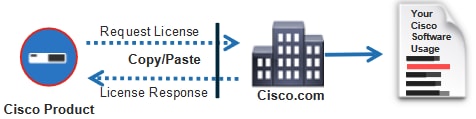
설정
1단계. WLC
1. 라이센싱 연결 모드를 Air Gap으로 설정하고 AirGap 기능을 Enabled로 설정합니다.
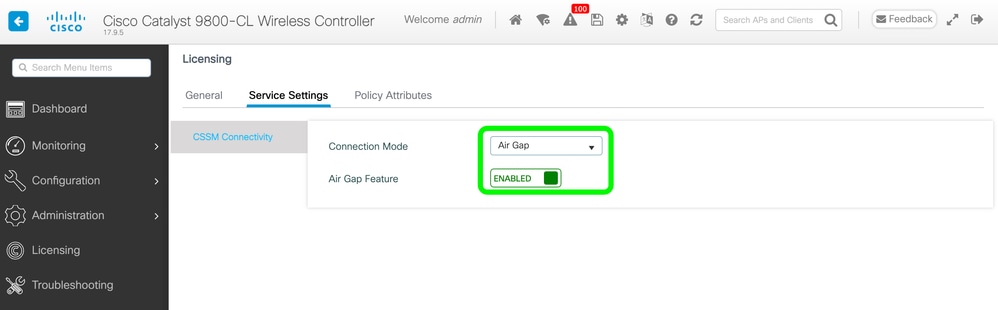
The CLI equivalent is:
9800-17-09-05(config)#license smart transport off
2. WLC에서 RUM 보고서를 내보냅니다. 이렇게 하면 현재 라이센스 사용량이 파일에 저장됩니다.
9800-17-09-05#license smart save usage all file bootflash:rum.txt2단계. Cisco License Central
1. Cisco License Central 계정에 로그인합니다.
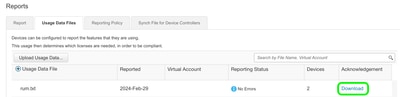
2. 보고서 탭, 사용 데이터 파일로 이동합니다. Usage Data Files를 클릭합니다.
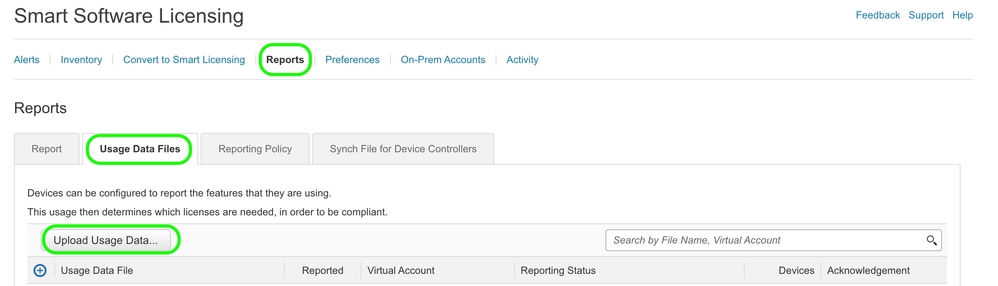
3. 찾아보기를 클릭한 다음 WLC에서 가져온 RUM 보고서를 선택합니다. 데이터 업로드를 클릭합니다.
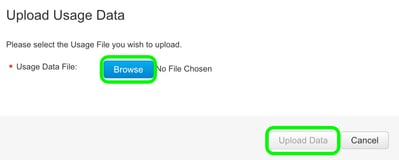
4. RUM 보고서가 Cisco License Central에 업로드되면 Acknowledgement(승인) 열 아래에 Download(다운로드) 버튼이 나타납니다. Download(다운로드)를 클릭합니다.
3단계. WLC
WLC에서 ACK를 가져옵니다.
9800-17-09-05#license smart import bootflash:ACK_rum.txt
Import Data Successful
참고: 라이선스 팩터리를 재설정한 후 RUM 보고서를 생성하려면 1시간 이상 기다려야 합니다.
다음을 확인합니다.
위의 컨피그레이션 단계를 적용한 후 WLC가 Cisco License Central의 Inventory(인벤토리) > Product Instances(제품 인스턴스) 아래에 나타납니다.
HA 쌍의 활성 WLC가 등록된 경우 Cisco License Central의 Product Instances(제품 인스턴스) 탭 아래에 활성 WLC와 대기 WLC가 모두 표시됩니다.
성공적으로 구성된 WLC의 출력 예:
------------------ show license status ------------------


Utility:
Status: DISABLED

Smart Licensing Using Policy:
Status: ENABLED

Account Information:
Smart Account:  As of Feb 29 15:24:40 2024 UTC
Virtual Account:

Data Privacy:
Sending Hostname: yes
Callhome hostname privacy: DISABLED
Smart Licensing hostname privacy: DISABLED
Version privacy: DISABLED

Transport:
Type: Transport Off

Policy:
Policy in use: Merged from multiple sources.
Reporting ACK required: yes (CISCO default)
Unenforced/Non-Export Perpetual Attributes:
First report requirement (days): 365 (CISCO default)
Reporting frequency (days): 0 (CISCO default)
Report on change (days): 90 (CISCO default)
Unenforced/Non-Export Subscription Attributes:
First report requirement (days): 90 (CISCO default)
Reporting frequency (days): 90 (CISCO default)
Report on change (days): 90 (CISCO default)
Enforced (Perpetual/Subscription) License Attributes:
First report requirement (days): 0 (CISCO default)
Reporting frequency (days): 0 (CISCO default)
Report on change (days): 0 (CISCO default)
Export (Perpetual/Subscription) License Attributes:
First report requirement (days): 0 (CISCO default)
Reporting frequency (days): 0 (CISCO default)
Report on change (days): 0 (CISCO default)

Miscellaneous:
Custom Id:

Usage Reporting:
Last ACK received: Feb 29 15:27:53 2024 UTC
Next ACK deadline: May 29 15:27:54 2024 UTC
Reporting push interval: 30 days
Next ACK push check:
Next report push: Mar 30 15:27:54 2024 UTC
Last report push: Feb 29 15:27:54 2024 UTC
Last report file write:

Trust Code Installed:
Active: PID:C9800-CL-K9,SN:
INSTALLED on Feb 29 15:27:53 2024 UTC
Standby: PID:C9800-CL-K9,SN:
INSTALLED on Feb 29 15:27:53 2024 UTC
문제 해결
Cisco License Central 포털에 대한 RUM 업로드가 실패한 경우, 포털에서 직접 연결을 통해 WLC가 이미 등록되어 있기 때문일 수 있습니다. Cisco License Central 인벤토리에서 디바이스를 삭제합니다. 그런 다음 RUM 보고서를 업로드할 수 있습니다.
참조
개정 이력
| 개정 | 게시 날짜 | 의견 |
|---|---|---|
4.0 |
27-May-2026
|
"Cisco SSM(Smart Software Manager)"에 대한 참조를 "Cisco License Central"로 바꿉니다. |
3.0 |
28-Jul-2025
|
메모를 추가했습니다. |
2.0 |
16-Apr-2025
|
서식, GUI 경로 스타일. |
1.0 |
01-Mar-2024
|
최초 릴리스 |
 피드백
피드백