AP 전력 프로파일 구성 및 문제 해결

소개
이 문서에서는 Cisco Catalyst 9800 WLC(Wireless LAN Controller)에서 AP 전력 프로파일을 구성하고 문제를 해결하는 방법에 대해 설명합니다.
사용되는 구성 요소
이 문서의 정보는 다음 소프트웨어 및 하드웨어 버전을 기반으로 합니다.
- Cisco Catalyst 9800 Series Wireless LAN Controller
- 소프트웨어 릴리스 17.15.4d 및 26.1.1
- C9130AXI-D
- CW9178I
- C9300-48UXM
이 문서의 정보는 특정 랩 환경의 디바이스를 토대로 작성되었습니다. 이 문서에 사용된 모든 디바이스는 초기화된(기본) 컨피그레이션으로 시작되었습니다. 현재 네트워크가 작동 중인 경우 모든 명령의 잠재적인 영향을 미리 숙지하시기 바랍니다.
개요
액세스 포인트 절전 기능은 다음과 같은 기능을 제공하는 전원 관리 기능입니다.
- 휴면 기간 동안의 에너지 소비 감소
- 유연한 스케줄링 및 정책 기반 저전력 운영 지원
- 성능 저하 없이 네트워크 효율성 최적화
전력 프로파일 유형
- 고정 전력 정책
고정 전력 정책은 AP에 대해 미리 정의된 작동 상태를 정의합니다. 각 AP 유형에 대해 인터페이스 상태(예: 무선 장치, USB, 이더넷 등)는 이러한 조건에서 미리 구성됩니다. AP는 일정 프로필에 정의된 컨피그레이션을 고려하기 전에 먼저 고정 전력 정책을 기반으로 인터페이스 상태를 적용합니다.
- AP 전력 프로파일
AP 전력 프로파일을 사용하면 활성 달력 기간 동안 전력 감소 및 동작을 제어하는 규칙의 우선 순위 목록을 정의할 수 있습니다.
- 규칙은 AP의 전원 요구 사항이 충족될 때까지 순차적으로 적용됩니다
- 컨피그레이션이 일반적이며 AP 프로파일 레벨에서 적용됩니다
- AP 프로파일이 사이트 태그와 연결됨
이 프로필은 스위치의 PoE(Power over Ethernet) 예산이 부족할 때 AP가 작동하는 방식을 결정합니다.
또한 녹색 AP 기능도 지원합니다. 즉, AP가 연결된 일정(예: 근무 시간 후)에 따라 저전력 모드로 전환됩니다.
- 일정 프로필
Calendar Profile(달력 프로파일)은 AP 인터페이스 활동을 시간 기반으로 제어할 수 있습니다.
- 어떤 인터페이스가 활성 또는 비활성 상태로 유지되는지 구성할 수 있습니다.
- 정의된 시간 일정에 따라 설정을 적용합니다.
따라서 수작업 없이 절전 작업을 자동화할 수 있습니다.

팁: AP 절전 기능을 지원하는 AP에 대한 자세한 내용은 https://www.cisco.com/c/en/us/td/docs/wireless/access_point/feature-matrix/ap-feature-matrix.html을 참조하십시오.
활용 사례
- 절전 모드 - 일반 전력 프로파일
Tri-radio 및 Quad-radio 액세스 포인트가 도입됨에 따라, 전체 기능에 필요한 전력은 802.3at에서 제공할 수 있는 전력을 초과하는 경우가 많습니다. 그러나 아직도 많은 구축에서 802.3bt 지원이 부족합니다.
현재 AP 동작(예: 송신 전력, 무선 체인, USB 포트, SFP 사용 등)은 낮은 전력 레벨(비 802.3bt)에서 작동할 때 정적으로 정의되며, 사용자는 이러한 매개변수를 제한적으로 제어할 수 있습니다.
Regular Power Profile(일반 전력 프로파일)은 가용 전력을 기준으로 전력 소비 제어를 허용함으로써 이를 해결합니다.

참고: 17.10 이상에서는 AP 절전 기능을 위한 일반 전력 프로파일이 지원됩니다.
- 녹색/에코 모드 AP - 절전 모드(달력 프로파일)
녹색 AP 기능은 연결된 클라이언트가 없을 때 AP가 자동으로 저전력 모드로 들어가는 에너지 절약 모드를 제공합니다.
- AP를 활성화하면 사용 빈도가 낮은 기간(예: 업무 시간 이후)에 절전 또는 저전력 상태로 전환할 수 있습니다
- 클라이언트가 (구성된 임계값을 기반으로) 연결을 시도할 경우, AP는 자동으로 절전 모드를 종료하고 적절한 고정 정책으로 전환합니다
- 모든 클라이언트의 연결이 끊어지면 AP는 절전 모드로 돌아갑니다
- 클라이언트 연결을 처리하는 AP만 저전력 모드를 종료합니다. 다른 AP는 영향을 받지 않음
전력 정책의 전체적인 목표는 사용자가 802.3af, 802.3at, 802.3bt(다중 레벨)와 같은 다양한 전원 간에 가용 전력 예산을 효율적으로 할당 및 관리할 수 있도록 하는 것입니다.
설정

주의: AP에 AP 전력 프로파일을 적용하려면 WLC와 AP 클럭이 동기화되어야 합니다.
활용 사례 1: 일반 전력 프로파일
- Regular Power Profile(일반 전력 프로파일)은 Calendar Profile(달력 프로파일)과 독립적으로 작동합니다
- 스위치 포트는 프로필이 AP에 적용될 수 있도록 감소된 전력을 제공해야 합니다
참고: 한 번에 하나의 일반 전력 프로파일만 적용할 수 있습니다.
아래 예에서 9130AXI 액세스 포인트는 24,000mW의 성능이 저하된 상태로 작동하고 있습니다. AP가 저하된 전원을 공급 받고 있으므로 달력 프로파일 없이 표준 전력 프로파일이 자동으로 적용됩니다.
AP에서
xo9130#show cdp inline_power

Power_Requested(mW) Power_Available(mW) Power_request-ID Power_management-ID

              30000               24000             7114                   5
정규 프로파일 매핑(CLI)
- 요구 사항에 따라 전력 프로파일을 구성하고 일반 프로파일로 적용합니다.
 (config)# wireless profile power simran-regular-profile-1

 (config-wireless-power-profile)# 10 ethernet GigabitEthernet0 speed 2500Mbps

 (config-wireless-power-profile)# 20 radio 24ghz state shutdown

 (config-wireless-power-profile)# 30 radio 5ghz spatial-stream 4

 (config-wireless-power-profile)# 40 radio 5ghz state shutdown

 (config-wireless-power-profile)# exit

 (config)# ap profile powermode

(config-ap-profile)# power-profile simran-regular-profile-1

 (config-ap-profile)# end
- 일반 프로필 표시
#show ap profile name powermode detailed | sec Power profile

           Power profile name            : simran-regular-profile-1
일반 프로파일 매핑(GUI)
- Configuration(컨피그레이션) > Tags & profiles(태그 및 프로필) > Power Profile(전력 프로필)
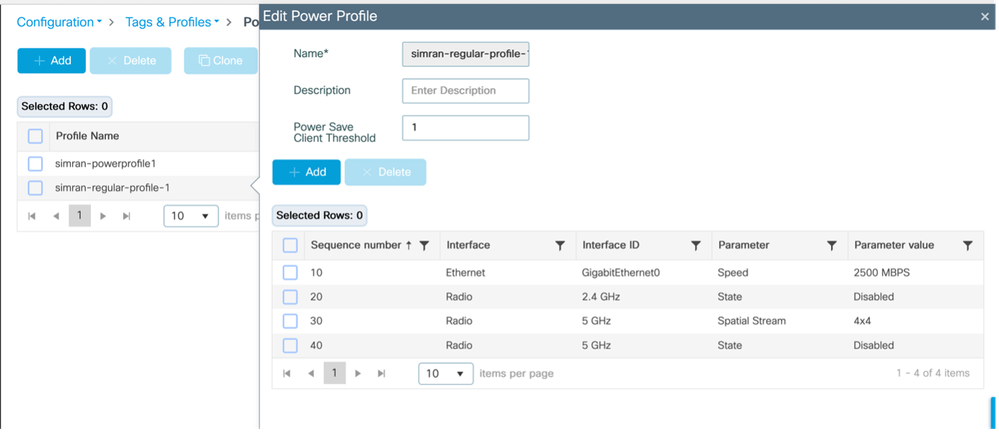
- 일반 프로필 적용 및 표시
Configuration(구성) > Tags & Profiles(태그 및 프로파일) > AP JOIN(AP 조인) > AP > Power Management(전력 관리)
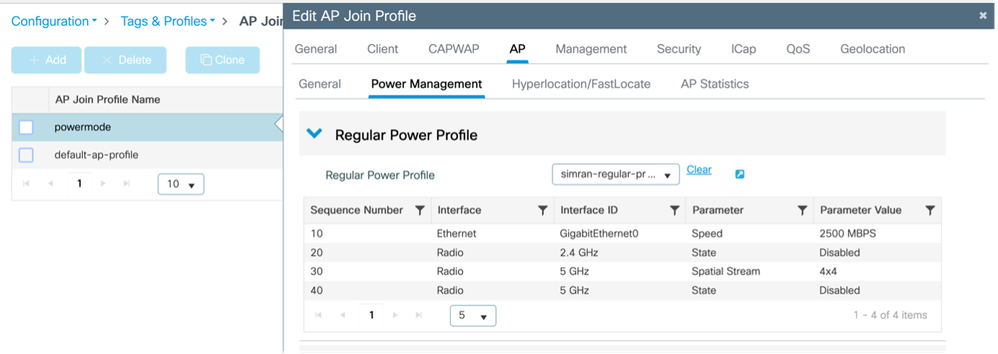
- AP에 적용되는 프로필 확인
Monitoring(모니터링) > Wireless > AP statistics(AP 통계)
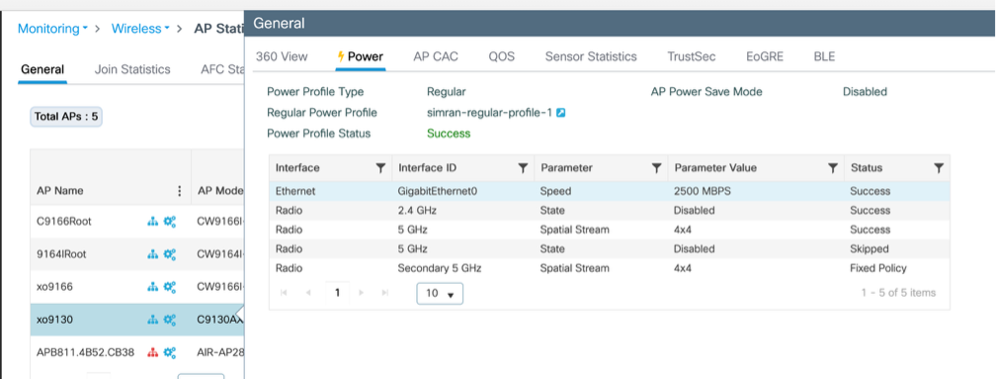
Configuration(구성) > Wireless(무선) > Access Points(액세스 포인트) > Select the AP(AP 선택) > Interfaces(인터페이스)
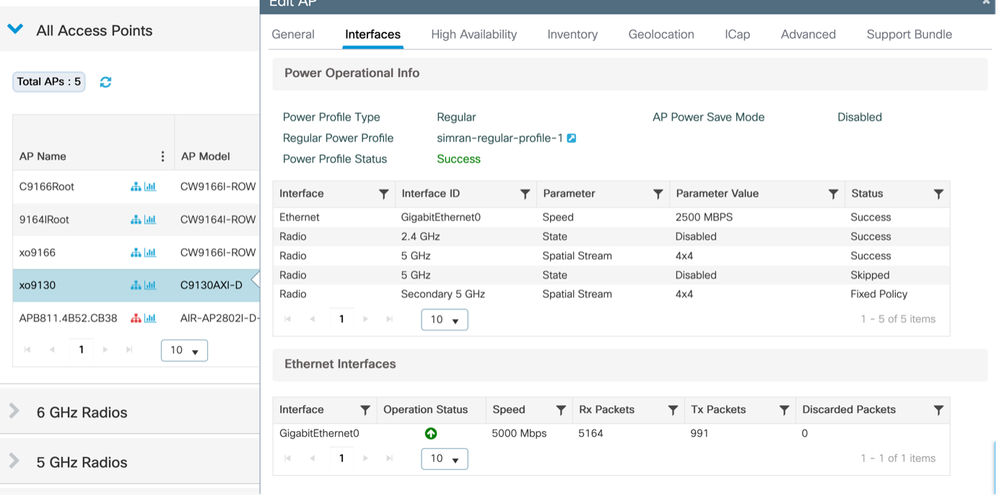
활용 사례 2: 녹색/에코 모드(달력 프로필)
- 여러/다른 반복 달력 전력 프로파일을 적용할 수 있습니다.
- 일정 일정이 활성 상태일 때 AP는 절전 모드로 전환됩니다. 클라이언트가 연결된 경우(구성된 임계값에 따라) AP는 절전 모드를 종료하고 고정 정책을 적용합니다. 클라이언트의 연결이 끊어지면 AP는 절전 모드로 돌아갑니다
- 클라이언트를 지원하는 AP만 절전 모드에서 벗어납니다.
예 1:
이 예에서는 보조 5GHz 무선 장치를 비활성화하고 기본 5GHz 무선 장치를 2x2 모드로 작동하는 전원 프로파일 컨피그레이션을 보여줍니다. 이 컨피그레이션은 21:32:00~22:00:00에 실행되는 일별 일정과 연결됩니다. 필요에 따라 다른 네트워크 시나리오를 수용하도록 유사한 프로파일을 조정할 수 있습니다.
일정 프로필 매핑(CLI)
전력 및 일정 프로필 구성 및 매핑
 (config)# wireless profile power simran-powerprofile1

 (config-wireless-power-profile)# 10 radio secondary-5ghz state shutdown

 (config-wireless-power-profile)# 30 radio 5ghz spatial-stream 2

 (config-wireless-power-profile)# exit

 (config)# wireless profile calender-profile name simran-calendar-daily1

 (config-calendar-profile)# recurrance daily

 (config-calendar-profile)# start 21:32:00 end 22:00:00

 (config-calendar-profile)# exit

 (config)# ap profile powermode

 (config-ap-profile)# calendar-profile simran-calendar-daily1

 (config-ap-profile-calendar)# action power-saving-mode po

 (config-ap-profile-calendar)# action power-saving-mode power-profile simran-powerprofile1

(config-ap-profile-calendar)# end
일정 프로필 매핑(GUI)
전력 프로파일 구성
Configuration(컨피그레이션) > Tags & profiles(태그 및 프로필) > Power Profile(전력 프로필)
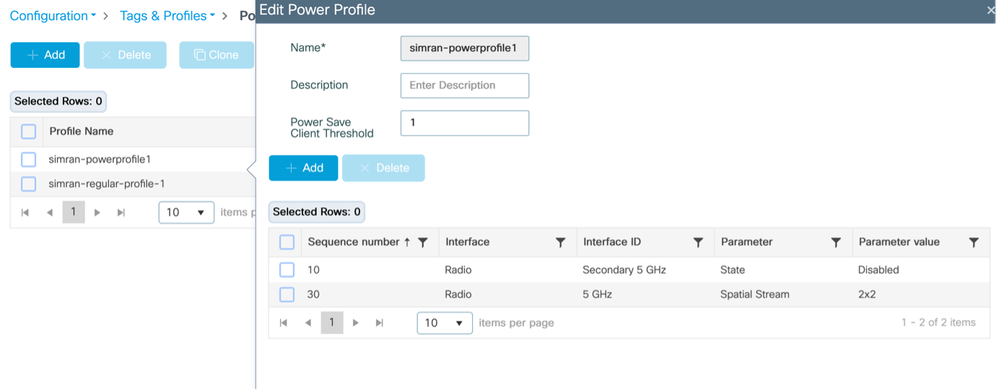
일정 프로필 구성
Configuration(컨피그레이션) > Tags & profiles(태그 및 프로필) > Calendar(달력)
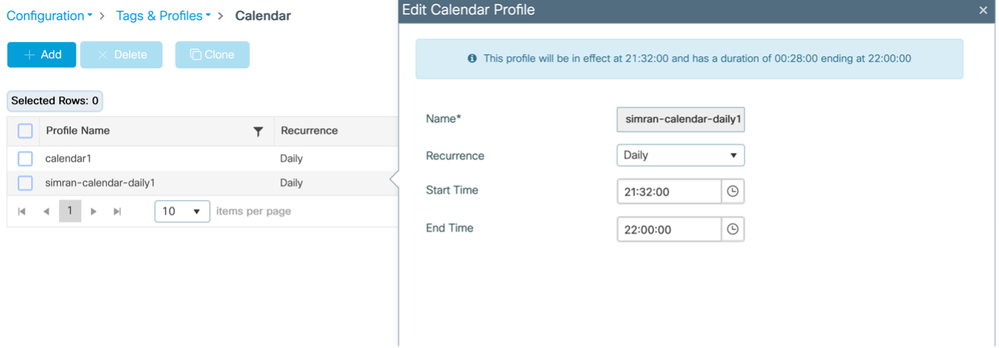
전력 프로파일 및 일정 프로파일을 AP 가입 프로파일에 매핑
Configuration(구성) > Tags & profiles(태그 및 프로필) > AP Join(AP 조인) > AP 조인 프로필을 선택합니다. > AP > Power Management(전력 관리)
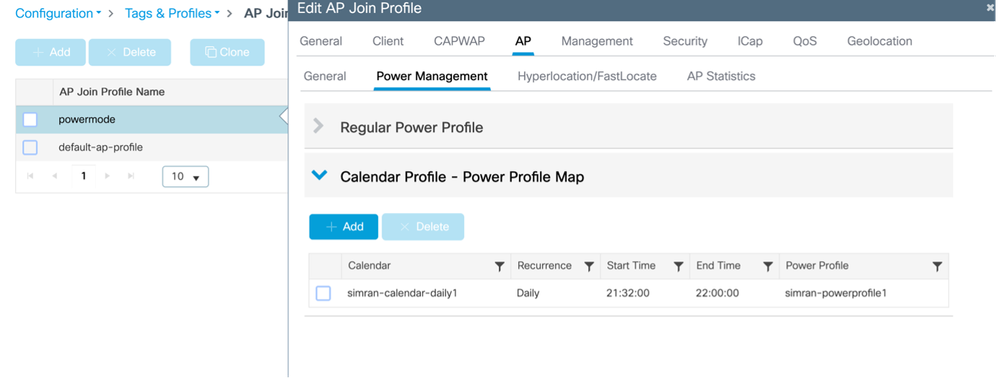
AP에 적용되는 프로필 확인
Monitoring(모니터링) > Wireless(무선) > AP Statistics(AP 통계) > AP > Power
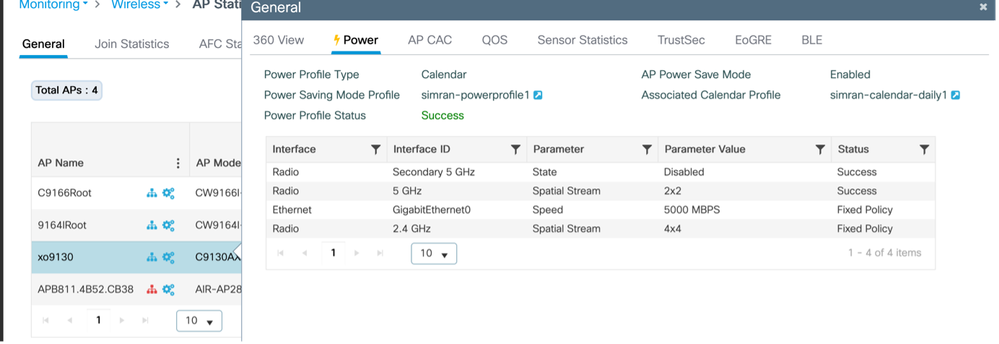
일정 시작 시 AP에서 콘솔 로그 기록
xo9130#[*04/13/2026 21:35:31.1536] DOT11_CFG[1]: poe_power_mode: low_pwr_mode=5, allowed_tx_ant=3, allowed_rx_ant=3

[*04/13/2026 21:35:31.1615] DOT11_DRV[1]: Stop Radio1 - Begin

[*04/13/2026 21:35:31.1634] wlan: [0:I:CMN_MLME] mlme_ext_vap_down: VAP (mon1) is down

[*04/13/2026 21:35:31.1647] DOT11_DRV[1]: Stop Radio1 - End

[*04/13/2026 21:35:31.1792] wlan: [0:I:CMN_MLME] mlme_ext_vap_down: VAP (apr1v0) is down

[*04/13/2026 21:35:31.1840] DOT11_DRV[1]: Start Radio1 - Begin

[*04/13/2026 21:35:31.1852] wlan: [7277:I:ANY] ol_ath_set_config_param: OL_ATH_PARAM_RTT_SKIP_VDEV_RESTART: value: 1

[*04/13/2026 21:35:31.1870] wlan: [0:I:ANY] ol_ath_pdev_is_multi_band_supported: 2 GHz modes: 0, 5GHz/6GHz modes: 391f9001

[*04/13/2026 21:35:31.1876] wlan: [7277:I:ANY] ieee80211_ucfg_setparam_util: rtt_enable = 0 already configured, skip configuration

[*04/13/2026 21:35:31.1880] wlan: [7277:I:ANY] ieee80211_ucfg_setparam_util: KERN_DEBUG

[*04/13/2026 21:35:31.1880]  setting the lci enble flag

[*04/13/2026 21:35:31.1896] DOT11_DRV[1]: Start Radio1 - End

[*04/13/2026 21:35:31.2121] DOT11_DRV[2]: Stop Radio2 - Begin

[*04/13/2026 21:35:31.2137] wlan: [0:I:CMN_MLME] mlme_ext_vap_down: VAP (mon2) is down

[*04/13/2026 21:35:31.2152] DOT11_DRV[2]: Stop Radio2 - End

[*04/13/2026 21:35:31.2167] wlan: [0:E:ANY] mlme_ext_vap_up: VAP (mon1) is up, vdev_id:33 pdev_id:0 psoc_id:0

[*04/13/2026 21:35:31.2200] wlan: [0:I:CMN_MLME] mlme_ext_vap_down: VAP (apr1v0) is down

[*04/13/2026 21:35:31.2202] wlan: [0:I:ANY] ol_ath_pdev_is_multi_band_supported: 2 GHz modes: 0, 5GHz/6GHz modes: 391f9001

[*04/13/2026 21:35:31.2290] wlan: [0:I:CMN_MLME] mlme_ext_vap_down: VAP (apr2v0) is down
온 스위치
#### 전력 프로파일 적용 전
Switch#show power inline tenGigabitEthernet 3/0/23 detail | i Meas

 Measured at the port: 11.8
#### 전력 프로파일 적용 후
Switch#show power inline tenGigabitEthernet 3/0/23 detail | in Meas

 Measured at the port: 10.8
# AP에 클라이언트를 연결했습니다. AP가 자동으로 고정 정책으로 다시 전환됨
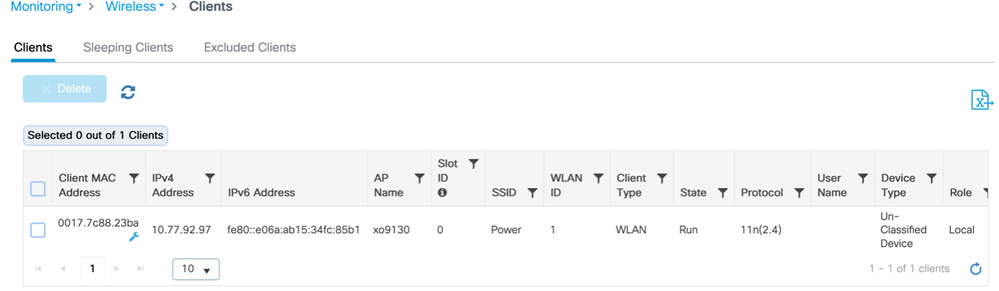
AP의 로그
[*04/13/2026 21:42:27.8792] DOT11_DRV[2]: Start Radio2 - Begin

[*04/13/2026 21:42:27.8802] wlan: [7277:I:ANY] ol_ath_set_config_param: OL_ATH_PARAM_RTT_SKIP_VDEV_RESTART: value: 1

[*04/13/2026 21:42:27.8820] wlan: [0:I:ANY] ol_ath_pdev_is_multi_band_supported: 2 GHz modes: 0, 5GHz/6GHz modes: 391f9001

[*04/13/2026 21:42:27.8827] wlan: [7277:I:ANY] ieee80211_ucfg_setparam_util: rtt_enable = 0 already configured, skip configuration

[*04/13/2026 21:42:27.8828] wlan: [7277:I:ANY] ieee80211_ucfg_setparam_util: KERN_DEBUG

[*04/13/2026 21:42:27.8828]  setting the lci enble flag

[*04/13/2026 21:42:27.8841] DOT11_DRV[2]: Start Radio2 - End

[*04/13/2026 21:42:27.8854] DOT11_CFG[2]: poe_power_mode: low_pwr_mode=5, allowed_tx_ant=15, allowed_rx_ant=15

[*04/13/2026 21:42:27.8974] wlan: [0:E:ANY] mlme_ext_vap_up: VAP (mon2) is up, vdev_id:50 pdev_id:2 psoc_id:0
켜기 스위치
클라이언트가 연결된 후 소비된 전력:
Switch#show power inline tenGigabitEthernet 3/0/23 detail | in Measu

 Measured at the port: 11.8
WLC에서
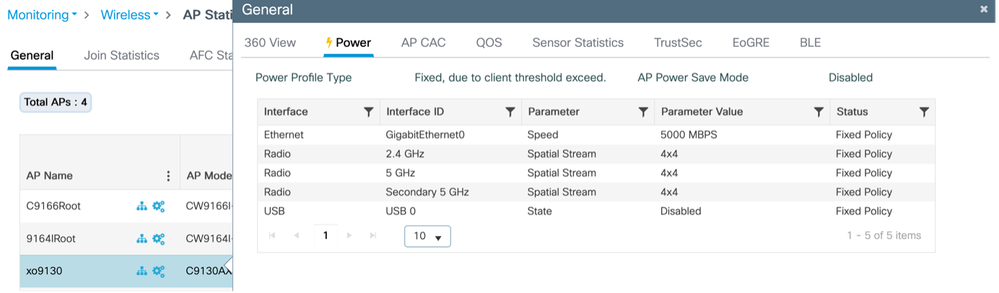
클라이언트를 분리하면 Ap가 자동으로 절전 모드로 전환됩니다.
AP에서
 xo9130#[*04/13/2026 21:46:47.2003] DOT11_CFG[1]: poe_power_mode: low_pwr_mode=5, allowed_tx_ant=3, allowed_rx_ant=3

[*04/13/2026 21:46:47.2088] DOT11_DRV[1]: Stop Radio1 - Begin

[*04/13/2026 21:46:47.2106] wlan: [0:I:CMN_MLME] mlme_ext_vap_down: VAP (mon1) is down

[*04/13/2026 21:46:47.2120] DOT11_DRV[1]: Stop Radio1 - End

[*04/13/2026 21:46:47.2264] wlan: [0:I:CMN_MLME] mlme_ext_vap_down: VAP (apr1v0) is down

[*04/13/2026 21:46:47.2452] DOT11_DRV[1]: Start Radio1 - Begin

[*04/13/2026 21:46:47.2464] wlan: [7277:I:ANY] ol_ath_set_config_param: OL_ATH_PARAM_RTT_SKIP_VDEV_RESTART: value: 1

[*04/13/2026 21:46:47.2494] wlan: [0:I:ANY] ol_ath_pdev_is_multi_band_supported: 2 GHz modes: 0, 5GHz/6GHz modes: 391f9001

[*04/13/2026 21:46:47.2504] wlan: [7277:I:ANY] ieee80211_ucfg_setparam_util: rtt_enable = 0 already configured, skip configuration

[*04/13/2026 21:46:47.2506] wlan: [7277:I:ANY] ieee80211_ucfg_setparam_util: KERN_DEBUG

[*04/13/2026 21:46:47.2506]  setting the lci enble flag

[*04/13/2026 21:46:47.2522] DOT11_DRV[1]: Start Radio1 - End

[*04/13/2026 21:46:47.2637] wlan: [0:E:ANY] mlme_ext_vap_up: VAP (mon1) is up, vdev_id:33 pdev_id:0 psoc_id:0

[*04/13/2026 21:46:47.2676] wlan: [0:I:CMN_MLME] mlme_ext_vap_down: VAP (apr1v0) is down

[*04/13/2026 21:46:47.2678] wlan: [0:I:ANY] ol_ath_pdev_is_multi_band_supported: 2 GHz modes: 0, 5GHz/6GHz modes: 391f9001

[*04/13/2026 21:46:47.2729] DOT11_DRV[2]: Stop Radio2 - Begin

[*04/13/2026 21:46:47.2744] wlan: [0:I:CMN_MLME] mlme_ext_vap_down: VAP (mon2) is down

[*04/13/2026 21:46:47.2760] DOT11_DRV[2]: Stop Radio2 - End

[*04/13/2026 21:46:47.2895] wlan: [0:I:CMN_MLME] mlme_ext_vap_down: VAP (apr2v0) is down
WLC에서
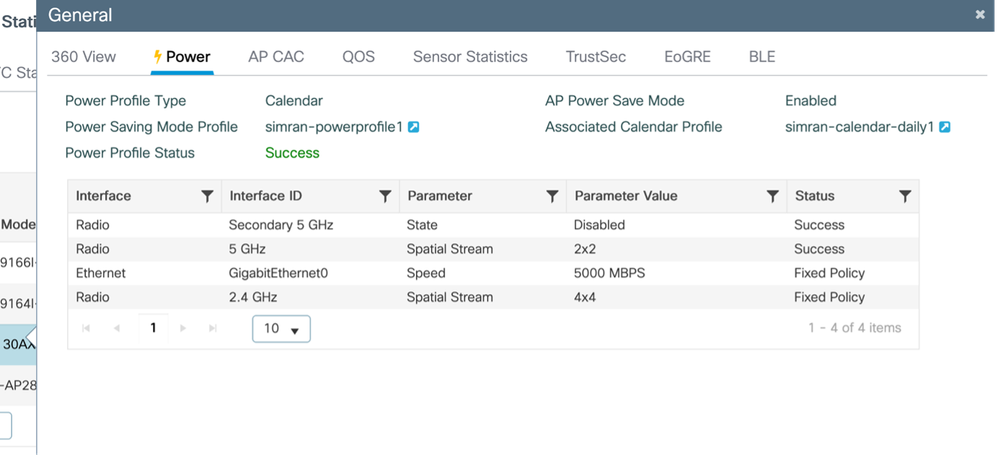
예 2:
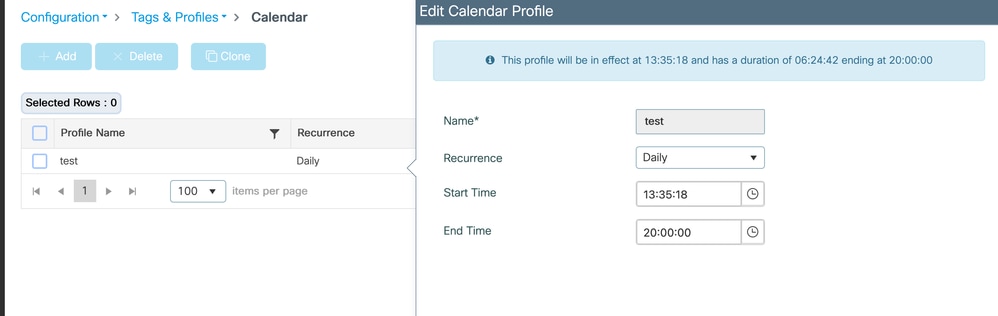
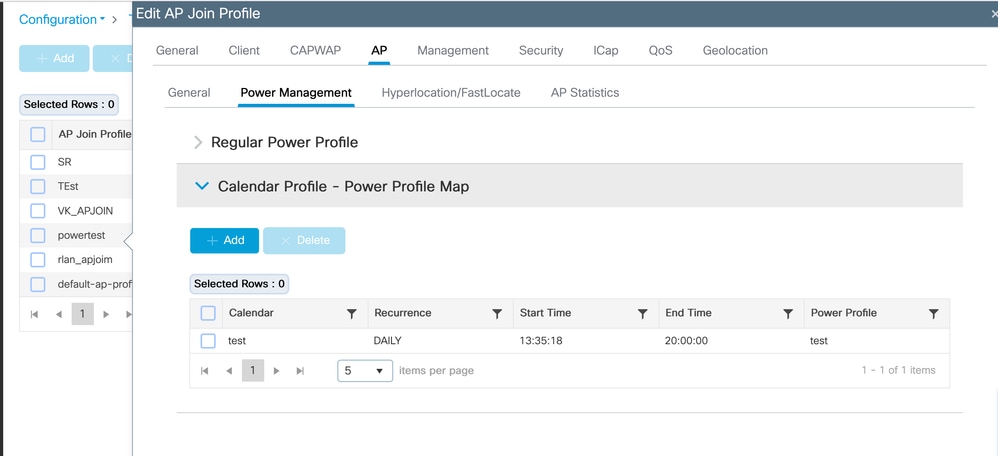
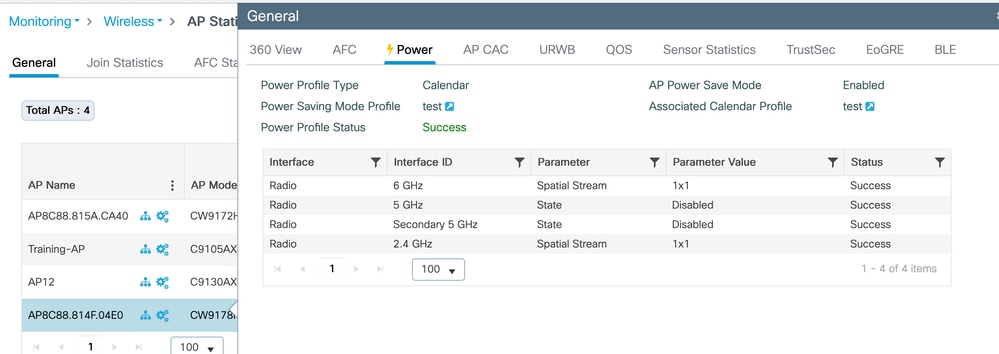
이 테스트에서는 CW9178I 액세스 포인트의 AP 전원 및 일정 프로필을 검증합니다. 전력 프로파일은 1x1 SS(Spatial Stream) 모드에서 2.4GHz 및 6GHz 무선을 활성화하면서 5GHz 무선을 모두 비활성화하도록 구성됩니다. 이 구성은 13:35:18부터 20:00:00까지 활성화된 일별 일정에 의해 관리됩니다. 이러한 프로파일은 필요에 따라 다양한 네트워크 요구 사항을 수용하도록 조정할 수 있습니다.
일정 프로필 매핑(CLI)
전력 및 일정 프로필 구성 및 매핑
(config)#wireless profile power test
(config-wireless-power-profile)#0 radio 6ghz spatial-stream 1
(config-wireless-power-profile)#10 radio 5ghz state shutdown
(config-wireless-power-profile)#20 radio secondary-5ghz state shutdown
(config-wireless-power-profile)#30 radio 24ghz spatial-stream 1
(config-wireless-power-profile)# exit
(config)# wireless profile calender-profile name test
(config-calendar-profile)# recurrance daily
(config-calendar-profile)# start 13:35:18 end 20:00:00
(config-calendar-profile)# exit
(config)# ap profile powertest
(config-ap-profile)# calendar-profile test
(config-ap-profile-calendar)# action power-saving-mode power-profile test
(config-ap-profile-calendar)# end
일정 프로필 매핑(GUI)
전력 프로파일 구성
Configuration(컨피그레이션) > Tags & profiles(태그 및 프로필) > Power Profile(전력 프로필)
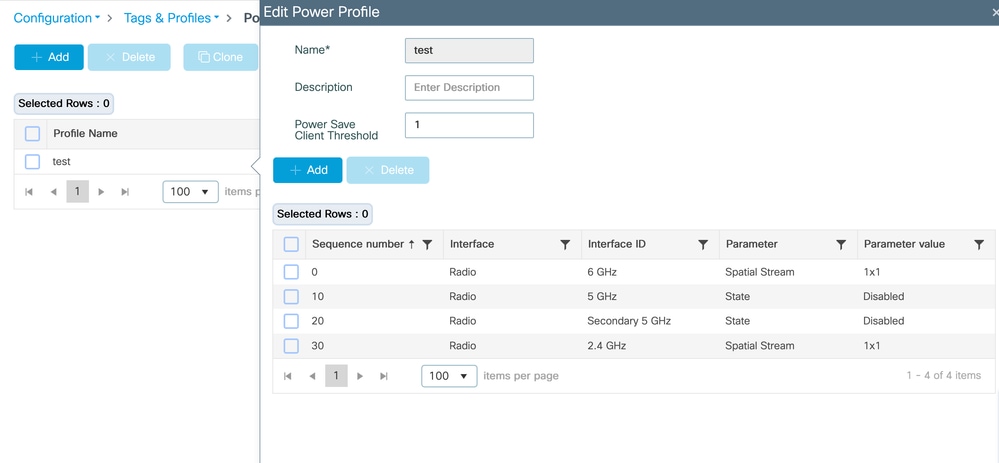
일정 프로필 구성
Configuration(컨피그레이션) > Tags & profiles(태그 및 프로필) > Calendar(달력)
전력 프로파일 및 일정 프로파일을 AP 가입 프로파일에 매핑
Configuration(구성) > Tags & profiles(태그 및 프로필) > AP Join(AP 조인) > AP 조인 프로필을 선택합니다. > AP > Power Management(전력 관리)
AP에 적용되는 프로필 확인
Monitoring(모니터링) > Wireless(무선) > AP Statistics(AP 통계) > AP > Power
온 스위치
#### 전력 프로파일 적용 전
Switch#show power inline twoGigabitEthernet 1/0/2 detail | i Mea
Measured at the port(watts) (Alt-A,B): 16.5
#### 전력 프로파일 적용 후
Switch#show power inline twoGigabitEthernet 1/0/2 detail | in Mea
Measured at the port(watts) (Alt-A,B): 14.8
PoE 할당 전력 대 실제 소비량
Catalyst 스위치에서 PoE 전력은 두 가지 방법으로 추적됩니다. 할당된 전력 및 실제 소비량.
할당 전력은 스위치가 IEEE 클래스 및 CDP/LLDP 전력 협상을 기반으로 장치에 대해 예약하는 전력량입니다. 이 값은 PoE 예산 계산에 사용되며 Used로 표시됩니다.
show power inline module.
예:
사용 가능한 모듈 남은 항목
1 525.0 315.9 209.1
여기서 315.9 W는 연결된 디바이스에 예약된 총 PoE 예산입니다.
예를 들어, 인터페이스 Tw1/0/2의 CW9178I AP에는 60W가 할당되어 있습니다.
할당된 전력
관리자 값: 60.0
할당된 전력: 60.0
그러나 AP에서 소비하는 실제 전력은 훨씬 낮을 수 있습니다.
실제 소비
포트에서 측정: 16.9W
전원이 켜진 후 최대: 18.6W
다음과 같이 실시간 소비에 대한 스위치 전체의 보기를 확인할 수 있습니다.
show power inline police
예:
합계: 103.8W
즉, 315.9W가 예약되어 있지만 디바이스는 현재 103.8W만 사용하고 있습니다.
이러한 동작은 PoE 스위치가 순간 소모가 아닌 최대 협상된 전력 요구 사항을 기반으로 전력을 예약하기 때문에 예상됩니다.
이렇게 하면 액세스 포인트와 같은 장치에서 전력 손실 없이 전력 사용량을 즉시 늘릴 수 있습니다(예: 무선 활동 스파이크 중).
AP 절전 프로파일을 적용하면, 일부 AP 구성 요소가 감소된 상태로 작동하기 때문에 실제 소비량만 감소합니다.
AP와 스위치 간의 협상된 최대 전력 포락선이 변경되지 않았으므로 할당된 전력은 변경되지 않습니다.
PoE 예산 계산에서는 실시간 사용량이 아닌 할당된(예약된) 전력을 사용합니다. 따라서 사용 전력과 측정된 전력 소모 사이에 큰 차이를 보이는 것은 정상이다.
검증
WLC(무선 LAN 컨트롤러)
- show ap profile name default-ap-profile detailed
- show ap name <ap-name> power-profile summary
- 무선 프로필 전력 요약 표시
- show wireless profile power detailed <power-profile-name>
- show wireless profile calendar-profile 요약
액세스 포인트
- show ap power policy config
- ap 전원 정책 상태 표시
- ap 전원 달력 구성 표시
온 스위치
실제 전력 소비량을 확인하려면
- show power inline gig <interface> 세부 정보 | 측정 항목 포함
문제 해결
AP에서
#Console 로그
#debug 클라이언트 페이로드 추가
#debug 로깅 레벨 추적
#debug 로깅 레벨 정보 추가
#debug 로깅 콘솔 활성화
#terminal 모니터
WLC에서
#RA 추적(AP 무선 MAC)
# 디버그 레벨의 WNCD 로그:
 #set platform software trace wncd <0/1/2/3> chassis active/Standby R0 ap-pwr-prof-main debug`
`#set platform software trace wncd <0/1/2/3> chassis active/Standby R0 ap-pwr-prof-db debug`
`#set platform software trace wncd <0/1/2/3> chassis active/Standby R0 ap-pwr-prof-wcnm debug`
`#set platform software trace wncd <0/1/2/3> chassis active/Standby R0 apcfg-profile-db debug`
`#set platform software trace wncd <0/1/2/3> chassis active/Standby R0 apmgr-db debug`
참고: 문제가 재현되면 소프트웨어 추적 수준을 '알림'으로 되돌립니다.
알려진 문제
- AP 전원 프로파일 상태에 대해 예기치 않은 "Insufficient De-rating(등급 제거 불충분)"이 표시되었습니다. Cisco 버그 ID CSCwf92519
- "Regular Power Profile(일반 전력 프로파일)" 기능은 아직 17.9를 지원하지 않지만 "Regular Power Profile(일반 전력 프로파일)"은 GUI:Cisco Bug ID에 나타납니다. CSCwi 51691

개정 이력
| 개정 | 게시 날짜 | 의견 |
|---|---|---|
2.0 |
09-Jun-2026
|
전력 예산 예약과 실제 소비된 전력에 대한 설명이 추가되었습니다. |
1.0 |
22-May-2026
|
최초 릴리스 |
 피드백
피드백