Catalyst 고정 구성 스위치의 비밀번호 복구

소개
이 문서에서는 레거시 Cisco Catalyst Layer 2 및 Layer 3 고정 구성 스위치의 비밀번호 복구 절차에 대해 설명합니다.
사전 요구 사항
요구 사항
이 문서에 대한 특정 요건이 없습니다.
사용되는 구성 요소
이 문서는 2900XL/3500XL, 2940, 2950/2955, 2960, 2970, 3550, 3560 및 3750 Series 스위치를 기반으로 합니다.

참고: 이 문서는 이전에 나열된 레거시 Cisco Catalyst 스위치 시리즈에서 비밀번호 복구를 위한 참조로 유지됩니다. 현재 Cisco Catalyst 플랫폼에 대해서는 다루지 않습니다.
이 문서의 정보는 특정 랩 환경의 디바이스를 토대로 작성되었습니다. 이 문서에 사용된 모든 디바이스는 초기화된(기본) 컨피그레이션으로 시작되었습니다. 현재 네트워크가 작동 중인 경우 모든 명령의 잠재적인 영향을 미리 숙지하시기 바랍니다.
표기 규칙
문서 규칙에 대한 자세한 내용은 Cisco 기술 팁 표기 규칙을 참조하십시오.
배경 정보
이 문서에서는 Cisco Catalyst Layer 2 고정 구성 스위치 2900XL/3500XL, 2940, 2950/2955, 2960, 2970 Series 및 Cisco Catalyst Layer 3 고정 구성 스위치 3550, 3560, 3750 Series의 비밀번호 복구 절차에 대해 설명합니다.
복구 절차
비밀번호를 복구하려면
1. 터미널 또는 터미널 에뮬레이션(예: Hyper Terminal)이 있는 PC를 스위치의 콘솔 포트에 연결합니다.
다음 터미널 설정을 사용합니다.
-
초당 비트(보드): 9600
-
데이터 비트: 8
-
패리티: 없음
-
정지 비트: 1
-
Flow Control: Xon/Xoff
1. 전원 케이블을 뽑습니다.
2. 스위치를 켜고 스위치로 연결합니다. 프롬프트로 이동합니다.
시리즈 스위치 2900XL, 3500XL, 2940, 2950, 2960, 2970, 3550, 3560 및 3750의 경우 다음 단계를 완료합니다.
3. 전원 케이블을 스위치에 다시 연결하는 동안 전면 패널의 왼쪽에 있는 모드 단추를 누릅니다.
| Catalyst Switch 시리즈 |
LED 동작 및 모드 버튼 릴리스 작업 |
|---|---|
| 2900XL, 3500XL, 3550 |
Port1X 위의 LED가 꺼지면 Mode(모드) 버튼을 놓습니다. |
| 2940, 2950 |
상태(STAT) LED가 꺼지면, 약 5초 후에 Mode(모드) 버튼을 놓습니다. Mode(모드) 버튼을 놓으면 SYST LED가 황색으로 깜박입니다. |
| 2960, 2970 |
SYST LED가 황색으로 깜박였다가 녹색으로 바뀌면 Mode(모드) 버튼을 놓습니다. Mode(모드) 버튼을 놓으면 SYST LED가 녹색으로 깜박입니다. |
| 3560, 3750 |
SYST LED가 녹색으로 바뀌면 약 15초 후에 Mode(모드) 버튼을 놓습니다. Mode(모드) 버튼을 놓으면 SYST LED가 녹색으로 깜박입니다. |
Catalyst 3524XL
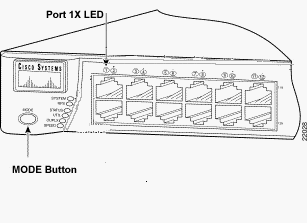 Catalyst 3524XL
Catalyst 2950-24
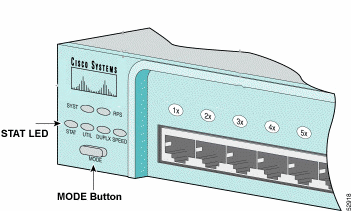 Catalyst 2950-24
2955 시리즈 스위치만 해당:
Catalyst 2955 Series 스위치는 비밀번호 복구를 위해 외부 모드 버튼을 사용하지 않습니다. 그 대신 스위치 부트 로더는 암호 복구를 위해 자동 부트 시퀀스를 중지하기 위해 브레이크 키 탐지를 사용합니다. 브레이크 시퀀스는 사용되는 터미널 애플리케이션 및 운영체제에 따라 결정됩니다. Windows 2000에서 실행되는 Hyperterm은 Ctrl + Break를 사용합니다. UNIX를 실행하는 워크스테이션에서 Ctrl-C가 브레이크 키입니다. 다음 예에서는 Hyperterm을 사용하여 스위치에 침입합니다. 모드로 들어갑니다.
C2955 Boot Loader (C2955-HBOOT-M) Version 12.1(0.0.514), CISCO DEVELOPMENT TEST
VERSION
Compiled Fri 13-Dec-02 17:38 by madison
WS-C2955T-12 starting...
Base ethernet MAC Address: 00:0b:be:b6:ee:00
Xmodem file system is available.
Initializing Flash...
flashfs[0]: 19 files, 2 directories
flashfs[0]: 0 orphaned files, 0 orphaned directories
flashfs[0]: Total bytes: 7741440
flashfs[0]: Bytes used: 4510720
flashfs[0]: Bytes available: 3230720
flashfs[0]: flashfs fsck took 7 seconds.
...done initializing flash.
Boot Sector Filesystem (bs:) installed, fsid: 3
Parameter Block Filesystem (pb:) installed, fsid: 4

*** The system will autoboot in 15 seconds ***
Send break character to prevent autobooting.


!--- Wait until you see this message before !--- you issue the break sequence.
!--- Ctrl+Break is entered using Hyperterm.


The system has been interrupted prior to initializing the flash file system to finish
loading the operating system software:

flash_init
load_helper
boot
switch:
4. flash_init 명령을 실행합니다.
switch: flash_init
Initializing Flash...
flashfs[0]: 143 files, 4 directories
flashfs[0]: 0 orphaned files, 0 orphaned directories
flashfs[0]: Total bytes: 3612672
flashfs[0]: Bytes used: 2729472
flashfs[0]: Bytes available: 883200
flashfs[0]: flashfs fsck took 86 seconds
....done Initializing Flash.
Boot Sector Filesystem (bs:) installed, fsid: 3
Parameter Block Filesystem (pb:) installed, fsid: 4
switch:

!--- This output is from a 2900XL switch. Output from
!--- other switches will vary slightly.
5. load_helper 명령을 실행합니다.
switch: load_helper
switch:
6. dir flash: 명령을 실행합니다.
스위치 파일 시스템이 다음과 같이 표시됩니다.
switch: dir flash:
Directory of flash:/
2    -rwx  1803357   <date>               c3500xl-c3h2s-mz.120-5.WC7.bin

!--- This is the current version of software.

4    -rwx  1131      <date>               config.text

!--- This is the configuration file.

5    -rwx  109       <date>               info
6    -rwx  389       <date>               env_vars
7    drwx  640       <date>               html
18   -rwx  109       <date>               info.ver
403968 bytes available (3208704 bytes used)
switch:

!--- This output is from a 3500XL switch. Output from
!--- other switches will vary slightly.
7. 구성 파일의 이름을 변경하려면 rename flash:config.text flash:config.old를 입력합니다.
switch: rename flash:config.text flash:config.old
switch:

!--- The config.text file contains the password
!--- definition.
8. boot 명령을 실행하여 시스템을 부팅합니다.
switch: boot
Loading "flash:c3500xl-c3h2s-mz.120-5.WC7.bin"...###############################
################################################################################
######################################################################
File "flash:c3500xl-c3h2s-mz.120-5.WC7.bin" uncompressed and installed, entry po
int: 0x3000
executing...

!--- Output suppressed.
!--- This output is from a 3500XL switch. Output from other switches
!--- will vary slightly.
9. 프롬프트에 "n"을 입력하여 초기 구성 대화상자를 중단합니다.
--- System Configuration Dialog ---
At any point you can enter a question mark '?' for help.
Use ctrl-c to abort configuration dialog at any prompt.
Default settings are in square brackets '[]'.
Continue with configuration dialog? [yes/no]: n

!--- Type "n" for no.

Press RETURN to get started.

!--- Press Return or Enter.

Switch>

!--- The Switch> prompt is displayed.
10. 스위치 프롬프트에 en을 입력하여 활성화 모드를 시작합니다.
Switch>en
Switch#
11. rename flash:config.old flash:config.text를 입력하여 구성 파일의 이름을 원래 이름으로 바꿉니다.
Switch#rename flash:config.old flash:config.text
Destination filename [config.text]

!--- Press Return or Enter.

Switch#
12. 컨피그레이션 파일을 메모리에 복사합니다.
Switch#copy flash:config.text system:running-config
Destination filename [running-config]?

!--- Press Return or Enter.

1131 bytes copied in 0.760 secs
Sw1#
이제 컨피그레이션 파일이 다시 로드됩니다.
13. 알지 못하는 현재 비밀번호를 덮어씁니다. 하나 이상의 대문자, 숫자, 특수 문자를 포함하는 강력한 비밀번호를 선택합니다.
Sw1#configure terminal !--- To overwrite existing secret password Sw1(config)#enable secret!--- To overwrite existing enable password Sw1(config)#enable password !--- To overwrite existing vty password Sw1(config)#line vty 0 15 Sw1(config-line)#password Sw1(config-line)#login !--- To overwrite existing console password Sw1(config-line)#line con 0 Sw1(config-line)#password
14. write memory 명령을 사용하여 실행 중인 컨피그레이션을 컨피그레이션 파일에 기록합니다.
Sw1#write memory
Building configuration...
[OK]
Sw1#
관련 정보
개정 이력
| 개정 | 게시 날짜 | 의견 |
|---|---|---|
2.0 |
08-Oct-2026
|
맞춤법, 문법, 삽입한 가로줄을 가독성을 위해 별도의 섹션으로 업데이트했습니다. 이것은 리커트입니다. |
1.0 |
04-May-2014
|
최초 릴리스 |
 피드백
피드백