이전에 구성된(레거시) Syslog 서버로 로그를 전송하는 방화벽 문제 해결

목차
문제
방화벽은 IP 주소 198.51.100.100에서 이전에 구성된(레거시) syslog 서버로 syslog 메시지를 전송합니다. 이 IP 주소는 방화벽 구성에 없습니다.
환경
영향을 받는 플랫폼은 특히 플랫폼 모드에서 ASA를 실행하는 Firepower 2100입니다.
해결
1단계. Syslog 메시지의 소스 IP 주소 찾기
레거시 syslog 서버에서 받은 메시지 분석을 기반으로 발신자 IP 주소는 Firepower 섀시의 관리 IP 주소입니다.
FXOS(Firepower eXtensible Operating System)에 구성된 IP 주소는 192.0.2.100입니다.
2026-04-27 15:22:49    User.Error    192.0.2.100    Apr 27 09:22:49 firepower FPRM: <<%FPRM-3-NTP_CONFIG_FAILED>> [F1329][major][ntp-config-failed][sys/svc-ext/datetime-svc] Ntp Configuration failed, please check the error message in Ntp host
2026-04-27 15:22:54   User.Error     192.0.2.100    Apr 27 09:22:54 firepower FPRM: <<%FPRM-3-NTP_CONFIG_FAILED>> [F1329][cleared][ntp-config-failed][sys/svc-ext/datetime-svc] Ntp Configuration failed, please check the error message in Ntp host
2단계. FXOS Syslog 구성 확인 및 확인
FXOS CLI(Command Line Interface) 컨피그레이션에 레거시 syslog 서버의 주소가 포함되어 있지 않습니다.
device # scope monitoring
device /monitoring # show configuration | i 198.51.100.100
device /monitoring # show configuration all | i 198.51.100.100
동시에 모니터링 범위의 show syslog 명령 출력에는 서버의 IP 주소가 표시됩니다.
device # scope monitoring
device /monitoring # show syslog

console
    state: Disabled
    level: Critical

platform
    state: Enabled
    level: Information
    Name     Hostname             State    Level         Facility
    -------- -------------------- -------- ------------- --------
    Server 1 198.51.100.10        Enabled  Warnings      Local7
    Server 2 198.51.100.100       Enabled  Warnings      Local7 <---- legacy server
    Server 3 none                 Disabled Critical      Local7

sources
    faults: Enabled
    audits: Enabled
    events: Disabled
Firepower Chassis Manager(FCM) User Interface(UI) > Platform Settings(플랫폼 설정) > Syslog는 syslog 서버 컨피그레이션을 나타내지 않습니다.
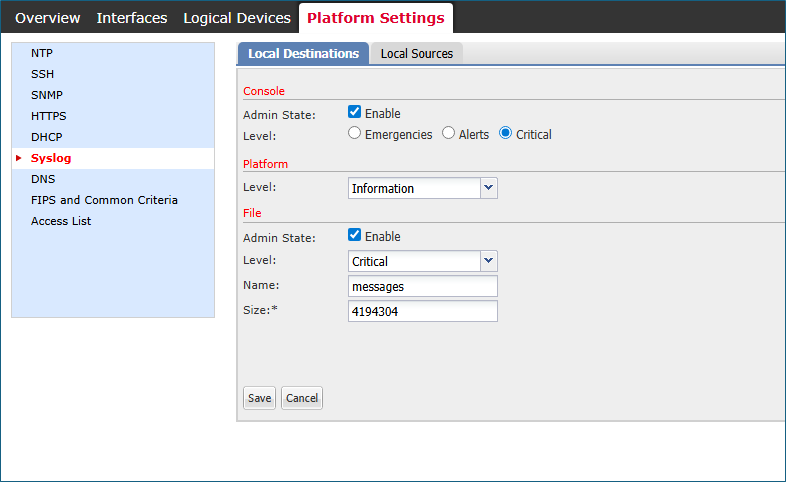 fcm_syslogs_configuration.png
3단계. Syslog 서버 수정 또는 삭제 시도
device# scope monitoring

device /monitoring # delete  <---
  snmp-trap  SNMP trap hostname or IP address
  snmp-user  SNMPv3 User

device /monitoring # set syslog  <---
  console   Console
  file      File
  platform  Platform

device /monitoring # set syslog platform <---
  level  Level
결론적으로 FXOS CLI와 FCM UI는 모두 198.51.100.100을 비롯한 어떤 syslog 서버도 생성, 수정 또는 삭제할 수 있는 방법을 제공하지 않습니다.
원인
세 가지 소프트웨어 결함을 고려합니다.
Cisco 버그 ID CSCvn19025
이 결함이 수정된 소프트웨어 버전은 CLI 또는 FCM UI에서 FXOS 원격 syslog 컨피그레이션을 허용하지 않습니다.
Cisco 버그 ID CSCvt85766
이 문제를 해결하면 FXOS show syslog 명령 출력에서 "remote destinations" 섹션이 제거됩니다.
수정 사항이 없는 버전:
device# scope monitoring
device /monitoring # show syslog

console
    state: Enabled
    level: Critical

platform
    state: Enabled
    level: Information

file
    state: Enabled
    level: Critical
    name:  messages
    size:  4194304

remote destinations <----------------
    Name     Hostname             State    Level         Facility
    -------- -------------------- -------- ------------- --------
    Server 1 192.0.2.1            Enabled  Information   Local7
    Server 2 192.0.2.2            Enabled  Information   Local7
    Server 3 none                 Disabled Critical      Local7

sources
    faults: Enabled
    audits: Enabled
    events: Disabled
수정 사항이 있는 버전에는 remote destinations 섹션이 없습니다.
device # scope monitoring
device /monitoring # show syslog

console
    state: Enabled
    level: Critical

platform
    state: Enabled
    level: Information
    Name     Hostname             State    Level         Facility
    -------- -------------------- -------- ------------- --------
    Server 1 192.0.2.1            Enabled  Information   Local7
    Server 2 192.0.2.2            Enabled  Information   Local7
    Server 3 none                 Disabled Critical      Local7

sources
    faults: Enabled
    audits: Enabled
    events: Disabled
remote destinations(원격 대상) 섹션이 없더라도 syslog 서버는 platform(플랫폼) 섹션에 표시됩니다.
Cisco 버그 ID CSCwu12470
Cisco 버그 ID CSCvn19025 수정으로 소프트웨어 버전을 업그레이드한 후 원격 syslog 서버의 관리(생성, 수정 또는 삭제)는 FXOS CLI 또는 FCM UI에서 허용되지 않습니다. 이 제한은 업그레이드 전에 구성된 서버에도 적용됩니다. 그럼에도 불구하고 소프트웨어 업그레이드 후 FXOS 소프트웨어는 show syslog 명령 출력의 platform 섹션에서 syslog 서버를 표시하고 syslog 메시지를 이러한 서버로 전송합니다. 사용자는 Cisco 버그 ID CSCwu12470에서 추적되는 기존 FXOS 원격 syslog 컨피그레이션을 관리할 수 없습니다.
관련 콘텐츠
Cisco 버그 ID CSCvn19025
Cisco 버그 ID CSCvt85766
Cisco 버그 ID CSCwu12470
개정 이력
| 개정 | 게시 날짜 | 의견 |
|---|---|---|
2.0 |
19-Aug-2026
|
재인증. |
1.0 |
29-Apr-2026
|
최초 릴리스 |
 피드백
피드백