IOS XE에서 Netflow 문제 해결

소개
이 문서에서는 Netflow on Technologies for Cisco IOS® XE의 문제를 해결하는 방법을 설명합니다.
사전 요구 사항
요구 사항
다음 주제에 대한 지식을 보유하고 있으면 유용합니다.
- Netflow
- Cisco IOS XE
이러한 항목에 대한 자세한 내용은 다음을 참조하십시오.
Flexible Netflow 개요
Flexible NetFlow 구성(Catalyst 9300 스위치)
Flexible NetFlow 구성(Catalyst 9400 스위치)
Flexible NetFlow 구성(Catalyst 9500 스위치)
Flexible NetFlow 구성(Catalyst 9600 스위치)
사용되는 구성 요소
이 문서의 정보는 Cisco IOS XE 소프트웨어를 기반으로 합니다.
이 문서의 정보는 특정 랩 환경의 디바이스를 토대로 작성되었습니다. 이 문서에 사용된 모든 디바이스는 초기화된(기본) 컨피그레이션으로 시작되었습니다. 현재 네트워크가 작동 중인 경우 모든 명령의 잠재적인 영향을 미리 숙지하시기 바랍니다.
Cisco 라우터의 NetFlow 문제 해결
네트워크 다이어그램
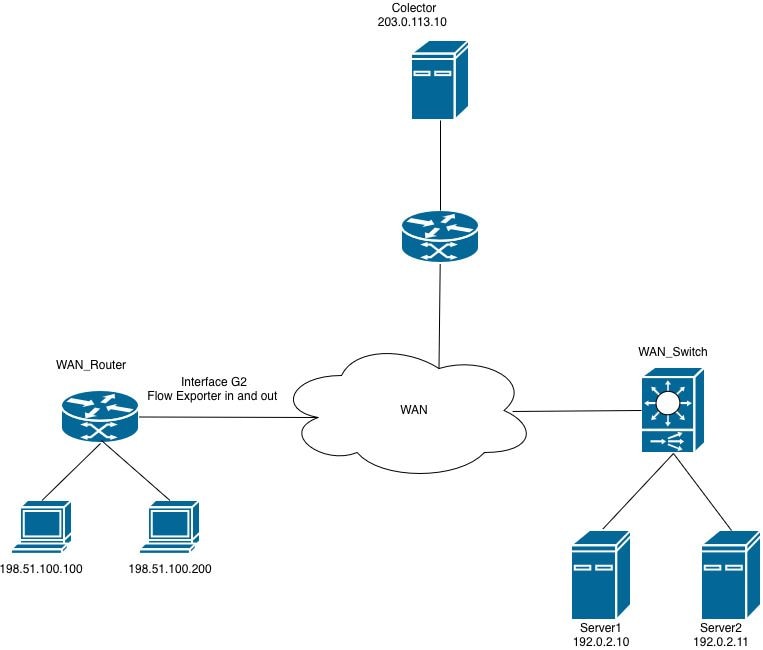 라우터의 Netflow
컬렉터가 라우터에서 CFLOWS(NetFlow Export Packets)를 수신하지 않습니다.
컬렉터가 인터페이스 GigabitEthernet2의 라우터에서 정보를 받지 못합니다.
1단계. 내보내기 컨피그레이션을 확인합니다.
- 컬렉터 IP 주소
- 소스 인터페이스
- UDP 포트
- 내보내기 프로토콜(NetFlow v9/IPFIX)
WAN_Router#show running-config | section flow exporter
flow exporter Netflow_Exporter
destination 203.0.113.10
source Loopback0
transport udp 9996
template data timeout 60
2단계. 인터페이스 상태를 확인합니다.
GigabitEthernet2가 작동하는지 확인합니다.
- 인터페이스가 가동/가동 중입니다.
- 올바른 IP 주소가 구성되었습니다.
- 과도한 오류 또는 삭제 없음
WAN_Router#show interface gigabitEthernet 2 | include up|error|drop
GigabitEthernet2 is up, line protocol is up
Full Duplex, 1000Mbps, link type is auto, media type is Virtual
output flow-control is unsupported, input flow-control is unsupported
Input queue: 0/375/0/0 (size/max/drops/flushes); Total output drops: 0
0 input errors, 0 CRC, 0 frame, 0 overrun, 0 ignored
0 output errors, 0 collisions, 0 interface resets
0 unknown protocol drops
3단계. 컬렉터에 연결할 수 있는지 확인합니다.
소스 인터페이스에서 연결 테스트:
WAN_Router#ping 203.0.113.10 source Loopback 0
Type escape sequence to abort.
Sending 5, 100-byte ICMP Echos to 203.0.113.10, timeout is 2 seconds:
Packet sent with a source address of 198.51.100.10
!!!!!
Success rate is 100 percent (5/5), round-trip min/avg/max = 1/2/5 ms
WAN_Router#

WAN_Router#traceroute 203.0.113.10 source Loopback 0 numeric
Type escape sequence to abort.
Tracing the route to 203.0.113.10
VRF info: (vrf in name/id, vrf out name/id)
1 X.X.X.X 2 msec 1 msec 1 msec
2 Y.Y.Y.Y 2 msec 2 msec 1 msec
3 Z.Z.Z.Z 2 msec * 2 msec
WAN_Router#
4단계. 내보내기 통계를 확인합니다.
라우터가 NetFlow 내보내기 패킷을 생성하여 구성된 컬렉터 주소로 전송하는지 확인합니다.
확인:
- 성공적으로 패킷을 보냈습니다.
- 템플릿을 보냈습니다.
- 전송 실패 없음
- 소켓 오류 없음
WAN_Router#show flow exporter statistics
Flow Exporter Netflow_Exporter:
Packet send statistics:
Successfully sent: 41 (3780 bytes)

Client send statistics:
Client: Flow Monitor MONITOR_INGRESS
Records added: 35
- sent: 35
Bytes added: 1750
- sent: 1750

Client: Flow Monitor MONITOR_EGRESS
Records added: 35
- sent: 35
Bytes added: 1750
- sent: 1750
5단계. 플로우 생성을 확인합니다.
플로우 항목이 플로우 모니터 캐시에서 채워지고 유지 관리되고 있는지 확인합니다.
확인:
- 활성 플로우는 플로우 모니터 캐시에 있습니다.
- 캐시 엔트리가 증가하고 있으며, 이는 트래픽이 기록되고 있음을 나타냅니다.
- 플로우 항목은 예상 시간 제한 간격 내에 만료(에이징 아웃)됩니다.

참고: 캐시에서 플로우가 관찰되지 않을 경우, 익스포트 기능과 관련이 없는 문제일 가능성이 있으므로 플로우 모니터를 조사하고 컨피그레이션을 기록합니다.
WAN_Router#show flow monitor MONITOR_EGRESS cache
Cache type: Normal (Platform cache)
Cache size: 200000
Current entries: 14
High Watermark: 27

Flows added: 3032
Flows aged: 3018
- Active timeout ( 60 secs) 200
- Inactive timeout ( 30 secs) 2818

IPV4 SOURCE ADDRESS: 198.51.100.200
IPV4 DESTINATION ADDRESS: 192.0.2.11
TRNS SOURCE PORT: 57188
TRNS DESTINATION PORT: 1967
INTERFACE OUTPUT: Gi2
IP TOS: 0x00
IP PROTOCOL: 17
counter bytes long: 80
counter packets long: 1
timestamp abs first: 22:09:34.067
timestamp abs last: 22:09:34.067
결과에 따라 다음을 확인할 수 있습니다.
- Flow Monitor MONITOR_EGRESS는 작동 중이며 캐시에 플로우 항목을 능동적으로 채웁니다.
- 캐시 상태가 확인됨 - 항목이 예상 속도로 추가 및 제거(시간 초과)되고 있습니다.
- 플로우의 상당 부분(3018년 중 2818년 경과)이 비활성 시간 제한으로 인해 만료됩니다. 이 비활성 시간 제한은 짧은 기간 또는 저빈도 트래픽에 대한 정상적인 동작입니다.
- 표시된 캐시 항목은 단일 패킷 UDP 흐름(프로토콜 17)을 나타냅니다. 소스 198.51.100.200, 포트 57188, 목적지 192.0.2.11, 포트 1967에서 인터페이스 GigabitEthernet2를 통해 나가는 것입니다.
6단계. 모니터 첨부 파일을 확인합니다.
흐름 모니터가 올바른 인터페이스에 적용되었는지 확인합니다.
WAN_Router#show running-config interface gigabitEthernet 2
Building configuration...

Current configuration : 217 bytes
!
interface GigabitEthernet2
ip flow monitor MONITOR_EGRESS output
ip address x.x.x.x 255.255.255.252
ip ospf network point-to-point
ip ospf 1 area 0
negotiation auto
end
7단계. ACL 또는 보안 정책을 확인합니다.
구성된 ACL 또는 보안 정책이 컬렉터로 향하는 NetFlow 내보내기 패킷을 필터링 또는 삭제하는 것이 아닌지 확인합니다.
WAN_Router#show running-config | include access-group
WAN_Router#
8단계. 라우터에서 트래픽을 캡처합니다.
- show ip route <collector_IP> 명령을 실행하여 컬렉터에 대한 라우팅 경로를 확인합니다. 라우터가 NetFlow 내보내기 트래픽을 전달하는 이그레스 인터페이스를 식별합니다.
- 소스 IP 주소가 구성된 NetFlow 내보내기 소스 인터페이스와 일치하고 목적지 IP 주소가 컬렉터와 일치하는 UDP 패킷을 허용하는 ACL을 생성합니다. 관련 트래픽을 필터링하려면 이 ACL을 패킷 캡처에 적용합니다.
WAN_Router#show running-config | sec flow exporter
flow exporter Netflow_Exporter
destination 203.0.113.10
source Loopback0
transport udp 9996
template data timeout 60
WAN_Router#show ip route 203.0.113.10
Routing entry for 203.0.113.10/32
Known via "ospf 1", distance 110, metric 22, type intra area
Last update from x.x.x.x on GigabitEthernet2, 02:12:27 ago
Routing Descriptor Blocks:
* x.x.x.x, from 203.0.113.10, 02:12:27 ago, via GigabitEthernet2
Route metric is 22, traffic share count is 1

WAN_Router#show running-config interface Loopback0
Building configuration...

Current configuration : 87 bytes
!
interface Loopback0
ip address 198.51.100.10 255.255.255.255
ip ospf 1 area 0
end

WAN_Router(config)#ip access-list extended netflow
WAN_Router(config-ext-nacl)#permit udp host 198.51.100.10 host 203.0.113.10
WAN_Router(config-ext-nacl)#end
!
WAN_Router#monitor capture netflow interface gigabitEthernet 2 out access-list netflow buffer size 10
WAN_Router#monitor capture netflow start
Started capture point : netflow

WAN_Router#show monitor capture netflow buffer brief
-------------------------------------------------------------------------------------
#    size     timestamp      source                destination     dscp   protocol
-------------------------------------------------------------------------------------
0    166      0.000000      198.51.100.10      -> 203.0.113.10      0 BE   UDP
1    166      0.055997      198.51.100.10      -> 203.0.113.10      0 BE   UDP
2    166      7.562019      198.51.100.10      -> 203.0.113.10      0 BE   UDP
3    166      7.617024      198.51.100.10      -> 203.0.113.10      0 BE   UDP
4    166      9.719009      198.51.100.10      -> 203.0.113.10      0 BE   UDP
5    166      9.776013      198.51.100.10      -> 203.0.113.10      0 BE   UDP
참고: 캡처된 데이터를 부트플래시에 .pcap 파일로 저장하거나 텍스트 파일의 16진수 덤프로 추출할 수 있습니다. 그런 다음 Wireshark와 같은 패킷 분석 툴로 가져와 자세히 검토할 수 있습니다.
소프트웨어의 임베디드 패킷 설정 및 캡처
WAN_Router#show monitor capture netflow buffer dump
0
0000: AABBCC00 18005254 00B62209 08004500 ......RT.."...E.
0010: 009863EA 0000FF11 F121C633 640ACB00 ..c......!.3d...
0020: 710AC027 270C0084 F2E70009 0002086E q..''..........n
0030: 9B7A6A2F 2ED40000 07CE0000 01000102 .zj/............
0040: 0068C000 020BC633 64C80011 07AFDCA1 .h.....3d.......
0050: 00000002 00000000 00000034 00000000 ...........4....
0060: 00000001 0000019E C84E6CDC 0000019E .........Nl.....
0070: C84E6CDC C000020B C63364C8 0011007B .Nl......3d....{
0080: DCA10000 00020000 00000000 002C0000 .............,..
0090: 00000000 00010000 019EC84E 6CF00000 ...........Nl...
00A0: 019EC84E 6CF0 ...Nl.
패킷 캡처 분석에 따라 NetFlow 내보내기 패킷(cfrows)이 라우터에서 구성된 컬렉터로 전송됩니다. 패킷 캡처 Netflow
내보내기 통계에 성공적인 전송이 표시되지만 컬렉터에서 패킷이 수신되지 않는 경우, NetFlow 내보내기 컨피그레이션 자체가 아니라 라우터와 컬렉터 간의 네트워크 경로에 문제가 있을 수 있습니다.
문제를 격리하려면 다음 확인을 수행합니다.
- 네트워크 경로 검증 - 경로를 따라 적용된 모든 ACL을 검토하여 구성된 NetFlow UDP 포트가 거부되거나 필터링되지 않았는지 확인합니다.
- 방화벽 정책 확인 - 내보내기와 컬렉터 간의 경로에 방화벽이 있는 경우 해당 보안 정책이 지정된 포트에서 NetFlow 내보내기 UDP 트래픽을 허용하는지 확인합니다.
- 컬렉터 애플리케이션 상태 확인 - 컬렉터 서비스 또는 프로세스가 실행 중이고 예상되는 UDP 포트에서 능동적으로 수신 대기하고 있는지 확인합니다.
NetFlow 내보내기가 VRF 인식 토폴로지에서 컬렉터에 플로우 데이터 전송 실패
컬렉터가 인터페이스 GigabitEthernet2에서 흐름 내보내기 데이터를 받지 않습니다. 컬렉터에 대한 연결이 확인되었지만 흐름 레코드가 성공적으로 전달되지 않습니다.
1단계. 트래픽이 학습되고 있는지 확인합니다.
모니터가 트래픽을 수신하고 흐름 엔트리를 생성하고 있는지 확인합니다.
WAN_Router#show flow monitor MONITOR_INGRESS cache
Cache type: Normal (Platform cache)
Cache size: 200000
Current entries: 7
High Watermark: 9

Flows added: 65
Flows aged: 58
- Active timeout ( 60 secs) 4
- Inactive timeout ( 30 secs) 54

IPV4 SOURCE ADDRESS: x.x.x.x
IPV4 DESTINATION ADDRESS: 224.0.0.5
TRNS SOURCE PORT: 0
TRNS DESTINATION PORT: 0
INTERFACE INPUT: Gi2
IP TOS: 0xC0
IP PROTOCOL: 89
counter bytes long: 100
counter packets long: 1
timestamp abs first: 01:54:53.144
timestamp abs last: 01:54:53.144
2단계. 내보내기 통계를 확인합니다.
내보내기 작업을 확인합니다.
WAN_Router#show flow exporter statistics
Flow Exporter Netflow_Exporter:
Packet send statistics :
Successfully sent: 0 (0 bytes)

Client send statistics:
Client: Flow Monitor MONITOR_INGRESS
Records added: 0
Bytes added: 0
이 출력은 flow monitor MONITOR_INGRESS가 흐름 데이터를 성공적으로 수집 및 캐시하고 있음을 나타냅니다. 그러나 플로우 내보내기 Netflow_Exporter가 어떤 레코드도 컬렉터에 전송하지 않습니다.
3단계. 라우팅 테이블에서 컬렉터 연결성을 확인합니다.
컬렉터 IP 주소에 대한 경로가 해당 라우팅 테이블에 있는지 확인합니다. 이는 네트워크 토폴로지에 따라 전역 라우팅 테이블 또는 VRF별 라우팅 테이블이 될 수 있습니다.
WAN_Router#show ip route 203.0.113.10
% Network not in table

WAN_Router#show ip cef 203.0.113.10
0.0.0.0/0
no route
WAN_Router#show ip vrf
Name           Default RD         Interfaces
A             <not set>           Lo0
                                  Gi1
                                  Gi2

WAN_Router#show ip route vrf A 203.0.113.10

Routing Table: A
Routing entry for 203.0.113.10/32
Known via "ospf 1", distance 110, metric 22, type intra area
Last update from x.x.x.x on GigabitEthernet2, 00:37:34 ago
Routing Descriptor Blocks:
* x.x.x.x, from 203.0.113.10, 00:37:34 ago, via GigabitEthernet2
Route metric is 22, traffic share count is 1

WAN_Router#ping vrf A 203.0.113.10 source loopback0
Type escape sequence to abort.
Sending 5, 100-byte ICMP Echos to 203.0.113.10, timeout is 2 seconds:
Packet sent with a source address of 198.51.100.10
!!!!!
Success rate is 100 percent (5/5), round-trip min/avg/max = 1/1/3 ms
WAN_Router
4단계. 플로우 내보내기 컨피그레이션을 확인합니다.
내보내기 컨피그레이션을 검토하여 적절한 VRF가 지정되었는지 확인하고, 내보내기가 VRF를 인식하는지 확인합니다.
WAN_Router#show running-config | sec flow exporter
flow exporter Netflow_Exporter
destination 203.0.113.10
source Loopback0
transport udp 9996
template data timeout 60
WAN_Router#
내보내기 실패의 근본 원인은 플로우 내보내기 컨피그레이션에 VRF 정의가 없기 때문입니다. VRF 인식 네트워크에서는 내보내기 패킷이 올바른 라우팅 테이블을 통해 컬렉터에 전달되도록 적절한 VRF로 흐름 내보내기를 명시적으로 구성해야 합니다.
수정된 구성과 수출자가 예상대로 작동하는지 확인하기 위한 검증 단계가 여기에 표시됩니다.
WAN_Router#show running-config | section flow exporter
flow exporter Netflow_Exporter
destination 203.0.113.10 vrf A
source Loopback0
transport udp 9996
template data timeout 60
5단계. 내보내기 패킷이 라우터를 이그레스(Egress)하고 있는지 확인합니다.
이그레스 인터페이스에서 패킷 캡처를 활성화하고 관련 show 명령을 사용하여 NetFlow 내보내기 패킷이 컬렉터로 전송되는지 확인합니다.
WAN_Router#show monitor capture netflow parameter
monitor capture netflow interface GigabitEthernet2 OUT
monitor capture netflow access-list netflow
monitor capture netflow buffer size 10
monitor capture netflow limit pps 1000
WAN_Router#show flow exporter statistics
Flow Exporter Netflow_Exporter:
Packet send statistics :
Successfully sent: 7 (576 bytes)

Client send statistics:
Client: Flow Monitor MONITOR_INGRESS
Records added: 9
- sent: 9
Bytes added: 450
- sent: 450

WAN_Router#show monitor capture netflow buffer brief
--------------------------------------------------------------------------------
#   size   timestamp      source               destination      dscp    protocol
--------------------------------------------------------------------------------
0    114    0.000000     198.51.100.10     -> 203.0.113.10         0 BE UDP
1    118    31.873947    198.51.100.10     -> 203.0.113.10         0 BE UDP
2    166    32.955004    198.51.100.10     -> 203.0.113.10         0 BE UDP
3    166    43.580963    198.51.100.10     -> 203.0.113.10         0 BE UDP
4    166    53.061993    198.51.100.10     -> 203.0.113.10         0 BE UDP
5    114    62.480978    198.51.100.10     -> 203.0.113.10         0 BE UDP
Cisco 스위치의 NetFlow 문제 해결
네트워크 다이어그램
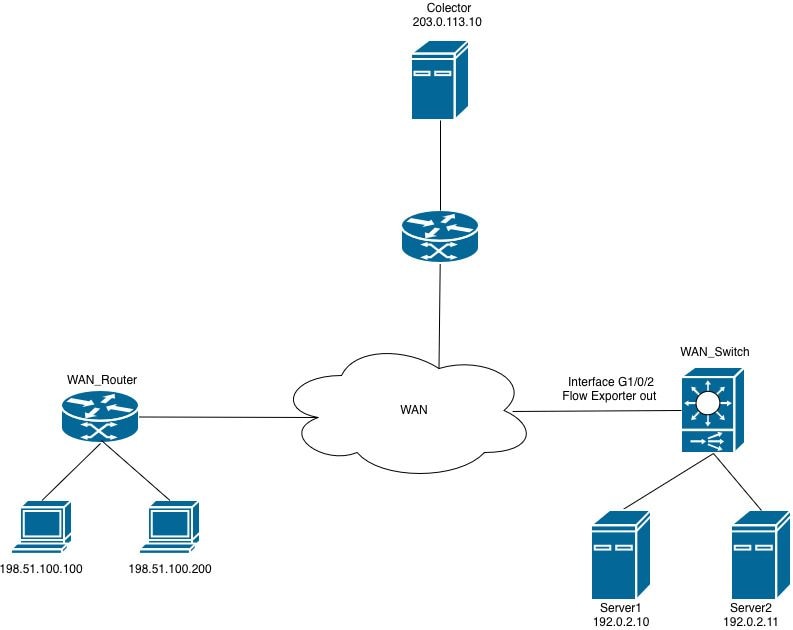 스위치의 Netflow
플로우 모니터를 인터페이스에 적용할 수 없습니다.
FNF(Flexible NetFlow) 흐름 모니터를 이그레스 방향으로 인터페이스에 연결하려고 하면 라우터가 컨피그레이션을 거부하고 오류 메시지를 생성합니다.
WAN_Switch(config-if)#interface TwentyFiveGigE1/0/1
WAN_Switch(config-if)#ip flow monitor MONITOR_INGRESS input
% Flow Monitor: Failed to add monitor to interface: Invalid set of fields in monitor record for wired interface
1단계. 모니터 구성을 확인합니다.
WAN_Switch#show running-config | section flow monitor
flow monitor MONITOR_INGRESS
exporter Netflow_Exporter
cache timeout inactive 30
cache timeout active 60
record INGRESS
2단계. 방향별 필드에 대한 플로우 레코드 구성을 검토합니다. 이 문제를 일으키는 가장 일반적인 필드는 다음과 같습니다. 애플리케이션 이름 일치
WAN_Switch#show running-config | section flow record
flow record INGRESS
match ipv4 version
match ipv4 protocol
match application name
match ipv4 destination address
match ipv4 source address
match transport destination-port
match transport source-port
match interface input
match flow direction
collect timestamp absolute first
collect timestamp absolute last
collect counter bytes long
collect counter packets long
FNF(Flexible NetFlow) 흐름 레코드의 match application name 필드는 AVC(Application Visibility and Control) 구축 내에서 흐름을 생성하는 애플리케이션을 기준으로 트래픽을 식별하고 분류하기 위해 사용됩니다.
이 필드는 NBAR(Network-Based Application Recognition) 엔진을 활용하여 DPI(Deep Packet Inspection)를 수행하고 각 플로우와 연결된 애플리케이션을 식별합니다. 이 필드는 포트 번호 또는 IP 주소에만 의존하지 않고 라우터가 애플리케이션 레이어(레이어 7)에서 트래픽을 분류할 수 있도록 합니다.
AVC 기능이 활성화되지 않은 채 FNF(Flexible NetFlow)만 사용하는 구축에서는 이 필드가 인터페이스 컨피그레이션과 호환되지 않으므로 플로우 모니터가 모니터링되는 인터페이스에 연결되지 않습니다.
참고: Catalyst 9500H 및 Catalyst 9600 플랫폼에서는 AVC 기능을 사용할 수 없습니다. AVC 기반 흐름 모니터링의 경우 Catalyst 9300 Series가 지원되는 플랫폼입니다.
3. 흐름 레코드 구성에서 지원되지 않는 필드를 제거한 다음 인터페이스에 흐름 모니터를 다시 적용합니다.
WAN_Switch(config)#interface twentyFiveGigE 1/0/1
WAN_Switch(config-if)#no ip flow monitor MONITOR_INGRESS in
WAN_Switch(config)#no flow monitor MONITOR_INGRESS
WAN_Switch(config)#flow record INGRESS
WAN_Switch(config-flow-record)#no match flow direction
<snip>
참고: 플로우 레코드를 수정한 후 플로우 모니터 컨피그레이션을 다시 적용하고 인터페이스에 플로우 모니터를 연결하여 컨피그레이션 변경을 완료합니다.
4단계. 컨피그레이션 변경이 적용된 후 흐름 모니터가 작동하는지 확인합니다.
WAN_Switch#show flow monitor MONITOR_INGRESS statistics
Cache type: Normal (Platform cache)
Cache size: 10000
Current entries: 1

Flows added: 1
Flows aged: 0

WAN_Switch#show flow monitor MONITOR_INGRESS cache
Cache type: Normal (Platform cache)
Cache size: 10000
Current entries: 1

Flows added: 1
Flows aged: 0

IPV4 SOURCE ADDRESS: x.x.x.x
IPV4 DESTINATION ADDRESS: y.y.y.y
TRNS SOURCE PORT: 0
TRNS DESTINATION PORT: 0
INTERFACE INPUT: Twe1/0/1
FLOW DIRECTION: Input
IP VERSION: 4
IP PROTOCOL: 89
counter bytes long: 708
counter packets long: 7
timestamp abs first: 20:38:23.408
timestamp abs last: 20:39:12.408
개정 이력
| 개정 | 게시 날짜 | 의견 |
|---|---|---|
1.0 |
18-Jun-2026
|
최초 릴리스 |
 피드백
피드백