ルータでのSSHの設定

内容
はじめに
このドキュメントでは、Ciscoルータでセキュアシェル(SSH)を設定およびデバッグする方法について説明します。
前提条件
要件
シスコのイメージまたはソフトウェアパッケージには、SSHの暗号化サポートが含まれている必要があります。要件は、プラットフォーム、ソフトウェアリリース、およびライセンスモデルによって異なります。
使用するコンポーネント
このドキュメントの情報は、Cisco IOSおよびCisco IOS XEソフトウェアに基づくものです。
このドキュメントの情報は、特定のラボ環境にあるデバイスに基づいて作成されたものです。このドキュメントで使用するすべてのデバイスは、クリアな(デフォルト)設定で作業を開始しています。本稼働中のネットワークでは、各コマンドによって起こる可能性がある影響を十分確認してください。
ネットワーク図
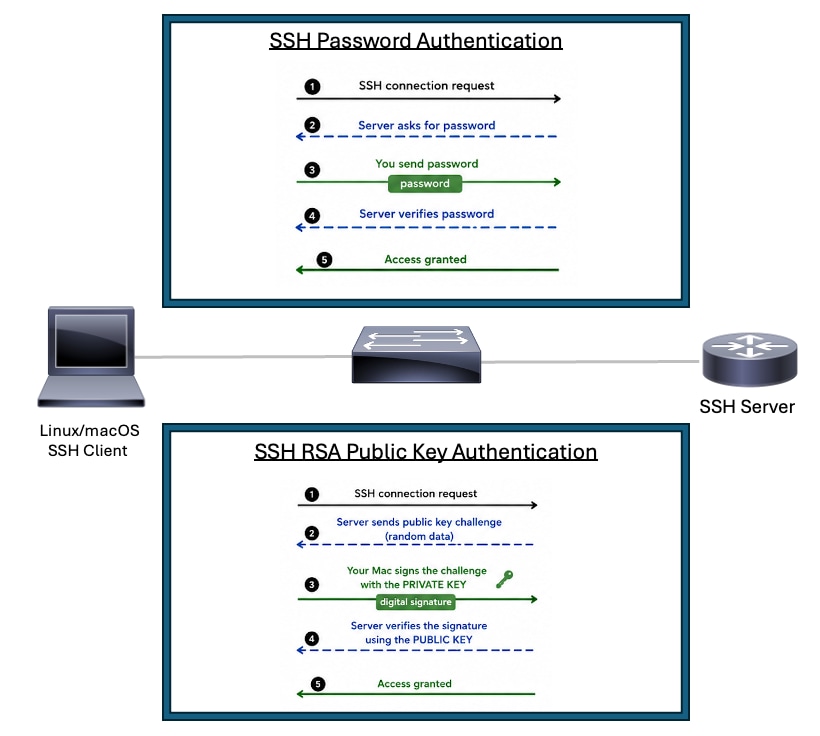 SSHトポロジ
パスワード認証を使用したCiscoルータでのSSHの設定
CiscoルータでSSHの基本サポートを有効にするには、いくつかの手順が必要です。
1. ルータのホスト名を設定します。
2. SSH認証用のローカルユーザアカウントを作成します。
3. DNSドメイン名を設定します。
4. プラットフォームでサポートされている最新のSSHバージョンを有効にします。サポートされている場合は、SSHバージョン2を使用します。
5. SSH用のRSAキーペアを生成します。プラットフォームでサポートされている最大のRSAモジュールを使用し、セキュリティポリシーに合わせます。
6. VTY回線設定モードに入ります。
7. 認証にローカルユーザデータベースまたはaaaを使用するようにVTY回線を設定します。
8. VTYアクセスをSSHトランスポートだけに制限します。
SSHサーバとして機能するシスコデバイスには、ホスト名、ドメイン名、RSAキー、認証、およびVTY設定が必要です。SSHセッションのみを開始するデバイスには、SSHクライアントのサポートとSSHサーバへの有効なルートが必要です。
Routert#configure terminal
Router(config)#hostname R2
R2(config)#username cisco privilege 15 secret C1sc0
R2(config)#ip domain name rtp.cisco.com
R2(config)#ip ssh version 2
R2(config)#crypto key generate rsa general-keys modulus 4096
R2(config)#line vty 0 4
R2(config-line)#login local
R2(config-line)#transport input ssh
R2(config-line)#end
注:login localを使用しない場合、aaa new-modelコマンドを使用すると、ルータのローカルユーザ名とシークレットが他のAAAステートメントのない状態で使用されます。
別のルータからテストする場合は、このコマンドをSSHクライアントコマンドの例として使用します。サポートされている暗号とhmacアルゴリズムは、ソフトウェアリリースとSSHポリシーによって異なります。
R3#ssh -v 2 -l cisco 10.20.20.20
Password:
R2>
RSA公開キー認証を使用したCiscoルータでのSSHの設定
RSA公開キー認証を使用すると、SSHクライアントは、パスワードを送信したりパスワードに依存したりすることなく、Ciscoルータまたはスイッチに対して認証を実行できます。SSHサーバは公開キーを保存します。SSHクライアントは、一致する秘密キーを保持します。ログイン時に、クライアントは認証データにデジタル署名することで、秘密キーを所有していることを証明します。サーバは、デバイスで設定されている公開キーを使用して署名を検証します。秘密キーはクライアント上に残り、ネットワーク経由では送信されません。
利点
- 設定されたユーザに対するパスワードベースのSSH認証を排除します。
- パスワードの推測や総当たり攻撃を受ける可能性を低減します。
- ネットワークデバイスやオートメーションシステムに再利用可能なパスワードを保存する代わりに、SSHクライアントに秘密キーを保持します。
- シスコデバイスへのセキュアなアクセスを必要とする自動化ツール、スクリプト、CI/CDシステムに適しています。
- 入力されたパスワードの代わりに信頼された公開キーをサーバーが検証するため、操作の一貫性が向上します。
- 管理者ワークステーション、ジャンプホスト、およびオートメーションサーバの強力な認証モデルをサポートします。
RSA公開キーベースの認証を実行するようにSSHサーバを設定するには、次の手順を実行します。
1. ルータのホスト名を設定します。
2. DNSドメイン名を設定します。
3. line vtyでAAAを有効にするか、login localを設定します。
4. SSHサーバが使用するRSAキーペアを生成します。
5. プラットフォームでサポートされている最新のSSHバージョンを使用します。サポートされている場合はSSHv2を使用します。
6. プラットフォームおよびセキュリティポリシーでサポートされている最も強力なRSAモジュールを使用します。4096ビットのモジュラス値は、サポートされている場合や、パフォーマンスへの影響を受け入れられる場合に推奨されます。
7. SSH公開キーチェーンコンフィギュレーションモードを開始します。
8. RSA公開キー認証による認証を許可するSSHユーザ名を設定します。
9. そのユーザ名のSSHクライアントからRSA公開キーを追加します。
注:SSH公開キーは、ssh-keygenコマンドを使用してLinux/macOSデバイスから生成できます。たとえば、ssh-keygen -m PEM -t rsa -b 1024 -f ~/.ssh/cisco1024というコマンドを使用すると、その後cat ~/.ssh/cisco1024.pub コマンドを使用してキーを読み取ることができます。
Router#configure terminal
Router(config)#hostname RSA-PublicKey
RSA-PublicKey(config)#ip domain name rtp.cisco.com
RSA-PublicKey(config)#aaa new-model
RSA-PublicKey(config)#crypto key generate rsa modulus 4096
The name for the keys will be: RSA-PublicKey.rtp.cisco.com

% The key modulus size is 4096 bits
% Generating 4096 bit RSA keys, keys will be non-exportable...
[OK] (elapsed time was 4 seconds)

RSA-PublicKey(config)#ip ssh version 2
RSA-PublicKey(config)#ip ssh pubkey-chain
RSA-PublicKey(conf-ssh-pubkey)#username ciscoadmin
RSA-PublicKey(conf-ssh-pubkey-user)#key-string
RSA-PublicKey(conf-ssh-pubkey-data)#$QaVSyuVNw== user@MacBook-Pro
RSA-PublicKey(conf-ssh-pubkey-data)#end
RSA-PublicKey#
追加の構成セット
SSHバージョン2の設定
SSHを設定するときは、SSHv2が有効になっていることを確認します。これは、SSHv1よりも強力な暗号化とセキュリティの大幅な向上を提供するためです。
Router(config)#ip ssh version 2非 SSH 接続の防止
非 SSH 接続を防止する場合は、行の下に transport input ssh コマンドを追加して、ルータを SSH 接続だけに制限します。通常の(非 SSH)Telnet は拒否されます。
Router(config)#line vty 0 15
Router(config-line)#transport input ssh
サブネットへの SSH アクセスを制限する
SSH 接続を特定のサブネットワークに制限し、サブネットワーク外 IP からのその他すべての SSH 接続試行がドロップされるようにする必要があります。
この設定は、次の手順を使用して実行できます。
- その特定のサブネットワークからのトラフィックを許可するアクセス リストを定義します。
- access-class を備える VTY ライン インターフェイスへのアクセスを制限します。
次に設定例を示します。この例では、10.10.10.0/24からのSSHアクセスだけが許可され、その他すべての送信元IPアドレスは、ACLの最後にある暗黙的なdenyによって拒否されます。
Router(config)#access-list 23 permit 10.10.10.0 0.0.0.255
Router(config)#line vty 0 15
Router(config-line)#transport input ssh
Router(config-line)#access-class 23 in
Router(config-line)#exitbanner コマンド出力のバリエーション
banner コマンドの出力は、Telnet と SSH 接続の異なるバージョンの間では異なります。この表では、さまざまな接続タイプで、さまざまな banner コマンド オプションが、どのように動作するのかを説明しています。
| バナーコマンドオプション |
Telnet |
SSH v2 |
| banner login |
デバイスにログインする前に表示されます。 |
デバイスにログインする前に表示されます。 |
| banner motd |
デバイスにログインする前に表示されます。 |
デバイスへのログイン後に表示されます。 |
| banner exec |
デバイスへのログイン後に表示されます。 |
デバイスへのログイン後に表示されます。 |
debug コマンドと show コマンド
ここで説明しているdebugコマンドを発行する前に、『debugコマンドの重要な情報について』を参照してください。
debug ip ssh:SSHのデバッグメッセージを有効にします。
show ssh:SSHサーバの接続状態を表示します。
RSA-PublicKey#show ssh
Connection Version Mode  Encryption  Hmac                          State                Username
0          2.0     IN   aes128-gcm@ohmac-sha2-256-etm@openssh.com Session started       ciscoadmin
0          2.0     OUT  aes128-gcm@ohmac-sha2-256-etm@openssh.com Session started       ciscoadmin
show ip ssh:SSHのバージョンと設定データを表示します。
RSA-PublicKey#show ip ssh
SSH Enabled - version 2.0
Authentication methods:publickey,keyboard-interactive,password
Authentication Publickey Algorithms:ssh-rsa,ecdsa-sha2-nistp256,ecdsa-sha2-nistp384,ecdsa-sha2-nistp521,ssh-ed25519,x509v3-ecdsa-sha2-nistp256,x509v3-ecdsa-sha2-nistp384,x509v3-ecdsa-sha2-nistp521,rsa-sha2-256,rsa-sha2-512,x509v3-rsa2048-sha256
Hostkey Algorithms:rsa-sha2-512,rsa-sha2-256,ssh-rsa
Encryption Algorithms:chacha20-poly1305@openssh.com,aes128-gcm@openssh.com,aes256-gcm@openssh.com,aes128-gcm,aes256-gcm,aes128-ctr,aes192-ctr,aes256-ctr
MAC Algorithms:hmac-sha2-256-etm@openssh.com,hmac-sha2-512-etm@openssh.com
KEX Algorithms:curve25519-sha256,curve25519-sha256@libssh.org,ecdh-sha2-nistp256,ecdh-sha2-nistp384,ecdh-sha2-nistp521,diffie-hellman-group14-sha256,diffie-hellman-group16-sha512
Authentication timeout: 120 secs; Authentication retries: 3
デバッグRSA公開認証の例
SSHクライアントデバッグ(Linux/macOS)
ciscouser@CISCOUSER-M-R Desktop % ssh -i ~/.ssh/cisco1024 -v ciscoadmin@10.82.139.71
debug1: OpenSSH_10.2p1, LibreSSL 3.3.6
debug1: Reading configuration data /etc/ssh/ssh_config
debug1: Reading configuration data /etc/ssh/ssh_config.d/100-macos.conf
debug1: /etc/ssh/ssh_config.d/100-macos.conf line 1: Applying options for *
debug1: Reading configuration data /etc/ssh/crypto.conf
debug1: Authenticator provider $SSH_SK_PROVIDER did not resolve; disabling
debug1: Connecting to 10.82.139.71 [10.82.139.71] port 22.
debug1: Connection established.
debug1: loaded pubkey from /Users/ciscouser/.ssh/cisco1024: RSA SHA256:w5wW3BqX15fO5Qm+BP75tJ1YzaXNsDNeHLLNZTW+Roo
debug1: identity file /Users/ciscouser/.ssh/cisco1024 type 0
debug1: no identity pubkey loaded from /Users/ciscouser/.ssh/cisco1024
debug1: Local version string SSH-2.0-OpenSSH_10.2
debug1: Remote protocol version 2.0, remote software version Cisco-1.25
debug1: compat_banner: match: Cisco-1.25 pat Cisco-1.* compat 0x60000000
debug1: Authenticating to 10.82.139.71:22 as 'ciscoadmin'
debug1: load_hostkeys: fopen /Users/ciscouser/.ssh/known_hosts2: No such file or directory
debug1: load_hostkeys: fopen /etc/ssh/ssh_known_hosts: No such file or directory
debug1: load_hostkeys: fopen /etc/ssh/ssh_known_hosts2: No such file or directory
debug1: SSH2_MSG_KEXINIT sent
debug1: SSH2_MSG_KEXINIT received
debug1: kex: algorithm: ecdh-sha2-nistp256
debug1: kex: host key algorithm: rsa-sha2-512
debug1: kex: server->client cipher: aes128-gcm@openssh.com MAC:  compression: none
debug1: kex: client->server cipher: aes128-gcm@openssh.com MAC:  compression: none
debug1: expecting SSH2_MSG_KEX_ECDH_REPLY
debug1: SSH2_MSG_KEX_ECDH_REPLY received
debug1: Server host key: ssh-rsa SHA256:5wvYU0FIJQmz+eHACVJMvoaX3WSgXkyem/3tOgyOYuQ
debug1: load_hostkeys: fopen /Users/ciscouser/.ssh/known_hosts2: No such file or directory
debug1: load_hostkeys: fopen /etc/ssh/ssh_known_hosts: No such file or directory
debug1: load_hostkeys: fopen /etc/ssh/ssh_known_hosts2: No such file or directory
debug1: Host '10.82.139.71' is known and matches the RSA host key.
debug1: Found key in /Users/ciscouser/.ssh/known_hosts:2
debug1: rekey out after 4294967296 blocks
debug1: SSH2_MSG_NEWKEYS sent
debug1: expecting SSH2_MSG_NEWKEYS
debug1: SSH2_MSG_NEWKEYS received
debug1: rekey in after 4294967296 blocks
debug1: SSH2_MSG_EXT_INFO received
debug1: kex_ext_info_client_parse: server-sig-algs=
debug1: SSH2_MSG_SERVICE_ACCEPT received debug1: Authentications that can continue: publickey,keyboard-interactive,password
debug1: Next authentication method: publickey
debug1: get_agent_identities: bound agent to hostkey
debug1: get_agent_identities: ssh_fetch_identitylist: agent contains no identities
debug1: Will attempt key: /Users/ciscouser/.ssh/cisco1024 RSA SHA256:w5wW3BqX15fO5Qm+BP75tJ1YzaXNsDNeHLLNZTW+Roo explicit debug1: Offering public key: /Users/ciscouser/.ssh/cisco1024 RSA SHA256:w5wW3BqX15fO5Qm+BP75tJ1YzaXNsDNeHLLNZTW+Roo explicit debug1: Server accepts key: /Users/ciscouser/.ssh/cisco1024 RSA SHA256:w5wW3BqX15fO5Qm+BP75tJ1YzaXNsDNeHLLNZTW+Roo explicit Enter passphrase for key '/Users/ciscouser/.ssh/cisco1024': Authenticated to 10.82.139.71 ([10.82.139.71]:22) using "publickey".
debug1: channel 0: new session [client-session] (inactive timeout: 0)
debug1: Entering interactive session.
debug1: pledge: filesystem
debug1: Sending environment.
debug1: channel 0: setting env LANG = "C.UTF-8"
debug1: channel 0: setting env LC_CTYPE = "UTF-8"
RSA-PublicKey>en Password:
RSA-PublicKey#show version
Cisco IOS XE Software, Version 17.12.04
Cisco IOS Software [Dublin], ASR1000 Software (X86_64_LINUX_IOSD-UNIVERSALK9-M), Version 17.12.4, RELEASE SOFTWARE (fc3)
Technical Support: http://www.cisco.com/techsupport
Copyright (c) 1986-2024 by Cisco Systems, Inc.
Compiled Tue 23-Jul-24 09:43 by mcpre


Cisco IOS-XE software, Copyright (c) 2005-2024 by cisco Systems, Inc.
All rights reserved.  Certain components of Cisco IOS-XE software are
licensed under the GNU General Public License ("GPL") Version 2.0.  The
software code licensed under GPL Version 2.0 is free software that comes
with ABSOLUTELY NO WARRANTY.  You can redistribute and/or modify such
GPL code under the terms of GPL Version 2.0.  For more details, see the
documentation or "License Notice" file accompanying the IOS-XE software,
or the applicable URL provided on the flyer accompanying the IOS-XE
software.


ROM: 17.3(1r)

RSA-PublicKey uptime is 2 weeks, 2 days, 10 hours, 28 minutes
Uptime for this control processor is 2 weeks, 2 days, 10 hours, 30 minutes
System returned to ROM by Reload Command
System image file is "bootflash:asr1000-universalk9.17.12.04.SPA.bin"
Last reload reason: Reload Command


This product contains cryptographic features and is subject to United
States and local country laws governing import, export, transfer and
use. Delivery of Cisco cryptographic products does not imply
third-party authority to import, export, distribute or use encryption.
Importers, exporters, distributors and users are responsible for
compliance with U.S. and local country laws. By using this product you
agree to comply with applicable laws and regulations. If you are unable
to comply with U.S. and local laws, return this product immediately.

A summary of U.S. laws governing Cisco cryptographic products may be found at:
http://www.cisco.com/wwl/export/crypto/tool/stqrg.html

If you require further assistance please contact us by sending email to
export@cisco.com.

License Type: Smart License is permanent
License Suite: AdvUCSuiteK9
Next reload License Suite: AdvUCSuiteK9

The current crypto throughput level is 20000000 kbps


Smart Licensing Status: Smart Licensing Using Policy

cisco ASR1001-HX (1SR) processor (revision 1SR) with 3684784K/6147K bytes of memory.
Processor board ID TKM20160032
Router operating mode: Autonomous
Crypto Hardware Module present
8 Gigabit Ethernet interfaces
8 Ten Gigabit Ethernet interfaces
32768K bytes of non-volatile configuration memory.
8388608K bytes of physical memory.
29401087K bytes of eUSB flash at bootflash:.

Configuration register is 0x2102

RSA-PublicKey#exit debug1: client_input_channel_req: channel 0 rtype exit-status reply 0 debug1: channel 0: free: client-session, nchannels 1 Connection to 10.82.139.71 closed by remote host. Connection to 10.82.139.71 closed.
Transferred: sent 3640, received 6336 bytes, in 114.1 seconds
Bytes per second: sent 31.9, received 55.5
debug1: Exit status 0
SSHサーバのデバッグ(Ciscoルータ)
RSA-PublicKey#show logging
Syslog logging: enabled (0 messages dropped, 3 messages rate-limited, 0 flushes, 0 overruns, xml disabled, filtering disabled)

No Active Message Discriminator.


No Inactive Message Discriminator.


    Console logging: disabled
    Monitor logging: level debugging, 0 messages logged, xml disabled,
                     filtering disabled
    Buffer logging:  level debugging, 617 messages logged, xml disabled,
                    filtering disabled
    Exception Logging: size (4096 bytes)
    Count and timestamp logging messages: disabled
    Persistent logging: disabled

No active filter modules.

    Trap logging: level informational, 161 message lines logged
        Logging Source-Interface:       VRF Name:
    TLS Profiles:

Log Buffer (102400 bytes):

*Aug 22 06:05:51.736: SSH2 0: ssh_receive: 36 bytes received
*Aug 22 06:05:58.163: SSH0: starting SSH control process
*Aug 22 06:05:58.163: SSH0: sent protocol version id SSH-2.0-Cisco-1.25
*Aug 22 06:05:58.165: SSH0: protocol version id is - SSH-2.0-OpenSSH_10.2
*Aug 22 06:05:58.165: SSH2 0:
ssh2_server_key_exchange: kexinit sent: kex algo = curve25519-sha256,curve25519-sha256@libssh.org,ecdh-sha2-nistp256,ecdh-sha2-nistp384,ecdh-sha2-nistp521,diffie-hellman-group14-sha256,diffie-hellman-group16-sha512
*Aug 22 06:05:58.165: SSH2 0: kexinit sent: hostkey algo = rsa-sha2-512,rsa-sha2-256,ssh-rsa
*Aug 22 06:05:58.165: SSH2 0: kexinit sent: encryption algo = chacha20-poly1305@openssh.com,aes128-gcm@openssh.com,aes256-gcm@openssh.com,aes128-gcm,aes256-gcm,aes128-ctr,aes192-ctr,aes256-ctr
*Aug 22 06:05:58.165: SSH2 0: kexinit sent: mac algo = hmac-sha2-256-etm@openssh.com,hmac-sha2-512-etm@openssh.com
*Aug 22 06:05:58.165: SSH2 0: send:packet of  length 656 (length also includes padlen of 7)
*Aug 22 06:05:58.165: SSH2 0: SSH2_MSG_KEXINIT sent
*Aug 22 06:05:58.239: SSH2 0: ssh_receive: 1300 bytes received
*Aug 22 06:05:58.239: SSH2 0: input: total packet length of 1568 bytes
*Aug 22 06:05:58.239: SSH2 0: partial packet length(block_size)8 bytes,
            needed 1560 bytes, maclen 0
*Aug 22 06:05:58.239: SSH2 0: input: padlength 4 bytes
*Aug 22 06:05:58.239: SSH2 0: SSH2_MSG_KEXINIT received
*Aug 22 06:05:58.239: SSH2 0: kex: client->server enc:aes128-gcm@openssh.com mac:hmac-sha2-256-etm@openssh.com
*Aug 22 06:05:58.239: SSH2 0: kex: server->client enc:aes128-gcm@openssh.com mac:hmac-sha2-256-etm@openssh.com
*Aug 22 06:05:58.239: SSH2 0: Using kex_algo = ecdh-sha2-nistp256
*Aug 22 06:05:58.242: SSH2 0: kexecdh_server: expecting SSH2_MSG_KEX_ECDH_INIT
*Aug 22 06:05:58.312: SSH2 0: ssh_receive: 80 bytes received
*Aug 22 06:05:58.312: SSH2 0: input: total packet length of 80 bytes
*Aug 22 06:05:58.312: SSH2 0: partial packet length(block_size)8 bytes,
            needed 72 bytes, maclen 0
*Aug 22 06:05:58.312: SSH2 0: input: padlength 5 bytes
*Aug 22 06:05:58.312: ssh2_calculate_modulus_length: modulus len 32
*Aug 22 06:05:58.312: SSH2 0: kexecdh_server: Calculated shared secret len 32
*Aug 22 06:05:58.333: SSH2 0: send:packet of  length 1160 (length also includes padlen of 10)
*Aug 22 06:05:58.333: SSH2: kex_derive_keys complete
*Aug 22 06:05:58.333: SSH2 0: send:packet of  length 16 (length also includes padlen of 10)
*Aug 22 06:05:58.333: SSH2 0: newkeys: mode 1
*Aug 22 06:05:58.333: SSH2: AES-GCM key initialized
*Aug 22 06:05:58.333: SSH2 0: SSH2_MSG_NEWKEYS sent
*Aug 22 06:05:58.333: SSH2 0: Preparing SSH2_MSG_EXT_INFO server-sig-algs
*Aug 22 06:05:58.333: SSH2 0: send:packet of  length 260 (length also includes padlen of 19)
*Aug 22 06:05:58.333: SSH2 0: SSH2_MSG_EXT_INFO sent
*Aug 22 06:05:58.333: SSH2 0: waiting for SSH2_MSG_NEWKEYS
*Aug 22 06:05:58.411: SSH2 0: ssh_receive: 16 bytes received
*Aug 22 06:05:58.411: SSH2 0: input: total packet length of 16 bytes
*Aug 22 06:05:58.411: SSH2 0: partial packet length(block_size)8 bytes,
            needed 8 bytes, maclen 0
*Aug 22 06:05:58.411: SSH2 0: input: padlength 10 bytes
*Aug 22 06:05:58.411: SSH2 0: newkeys: mode 0
*Aug 22 06:05:58.411: SSH2: AES-GCM key initialized
*Aug 22 06:05:58.411: SSH2 0: SSH2_MSG_NEWKEYS received
*Aug 22 06:05:58.411: %SSH-5-SSH2_SESSION: SSH2 Session request from 10.189.3.9 (tty = 0) using crypto cipher 'aes128-gcm@openssh.com', hmac 'hmac-sha2-256-etm@openssh.com' Succeeded
*Aug 22 06:05:58.604: SSH2 0: ssh_receive: 52 bytes received
*Aug 22 06:05:58.604: SSH2 0: input: total packet length of 36 bytes
*Aug 22 06:05:58.604: SSH2 0: partial packet length(block_size)16 bytes,
            needed 32 bytes, maclen 0
*Aug 22 06:05:58.604: SSH2 0: input: padlength 14 bytes
*Aug 22 06:05:58.604: SSH2 0: send:packet of  length 36 (length also includes padlen of 14)
*Aug 22 06:05:58.604: SSH2 0: Authentications that can continue = publickey,keyboard-interactive,password
*Aug 22 06:05:58.677: SSH2 0: ssh_receive: 68 bytes received
*Aug 22 06:05:58.677: SSH2 0: input: total packet length of 52 bytes
*Aug 22 06:05:58.677: SSH2 0: partial packet length(block_size)16 bytes,
            needed 48 bytes, maclen 0
*Aug 22 06:05:58.677: SSH2 0: input: padlength 6 bytes
*Aug 22 06:05:58.677: SSH2 0: Using method = none
*Aug 22 06:05:58.677: SSH2 0: Authentications that can continue = publickey,keyboard-interactive,password
*Aug 22 06:05:58.677: SSH2 0: send:packet of  length 68 (length also includes padlen of 18)
*Aug 22 06:05:58.755: SSH2 0: ssh_receive: 244 bytes received
*Aug 22 06:05:58.755: SSH2 0: input: total packet length of 228 bytes
*Aug 22 06:05:58.755: SSH2 0: partial packet length(block_size)16 bytes,
            needed 224 bytes, maclen 0
*Aug 22 06:05:58.755: SSH2 0: input: padlength 5 bytes
*Aug 22 06:05:58.755: SSH2 0: Using method = publickey *Aug 22 06:05:58.755: SSH2 0: Received publickey algo = rsa-sha2-512 *Aug 22 06:05:58.755: SSH2 0: Got Publickey algo = 9 *Aug 22 06:05:58.755: SSH2 0: ssh2_validate_pubkey: Verifying pubkey blob is acceptable for 'ciscoadmin' in SSH2_MSG_USERAUTH_REQUEST
*Aug 22 06:05:58.755: SSH2 0: send:packet of  length 196 (length also includes padlen of 19)
*Aug 22 06:05:58.755: SSH2 0: ssh2_validate_pubkey: Authenticating 'ciscoadmin' with method: publickey
*Aug 22 06:06:02.615: SSH2 0: ssh_receive: 404 bytes received
*Aug 22 06:06:02.615: SSH2 0: input: total packet length of 388 bytes
*Aug 22 06:06:02.615: SSH2 0: partial packet length(block_size)16 bytes,
            needed 384 bytes, maclen 0
*Aug 22 06:06:02.615: SSH2 0: input: padlength 13 bytes
*Aug 22 06:06:02.615: SSH2 0: ssh2_verify_pubkey_sign: Verifying signature for user 'ciscoadmin' in SSH2_MSG_USERAUTH_REQUEST *Aug 22 06:06:02.615: SSH2 0: ssh2_blob_to_key: Got blob_public key ssh-rsa, blob_key_type 1, publickey_algo_type 9 *Aug 22 06:06:02.616: SSH2 0: ssh2_verify_pubkey_sign: Client Signature Verification PASSED
*Aug 22 06:06:02.616: SSH2 0: passed: Pubkey Authentication ssh2_authenticate_pubkey for user 'ciscoadmin'
*Aug 22 06:06:02.616: SSH2 0: send:packet of  length 20 (length also includes padlen of 14)
*Aug 22 06:06:02.617: SSH2 0: authentication successful for ciscoadmin
*Aug 22 06:06:02.617: %SEC_LOGIN-5-LOGIN_SUCCESS: Login Success [user: ciscoadmin] [Source: 10.189.3.9] [localport: 22] at 06:06:02 UTC Fri Aug 22 2014 *Aug 22 06:06:02.617: %SSH-5-SSH2_USERAUTH: User 'ciscoadmin' authentication for SSH2 Session from 10.189.3.9 (tty = 0) using crypto cipher 'aes128-gcm@openssh.com', hmac 'hmac-sha2-256-etm@openssh.com' Succeeded
*Aug 22 06:06:02.617:  SSH: bulk-mode applying server configs
*Aug 22 06:06:02.617:  SSH: bulk_mode applied server configs
誤った設定
次のセクションでは、いくつかの誤った設定からのデバッグの出力例を示しています。
不適切なパスワード
ルータのデバッグ
*Jul 29 23:45:34.428: SSH2 0: input: padlength 9 bytes
*Jul 29 23:45:34.465: SSH0: password authentication failed for cisco
*Jul 29 23:45:36.465: SSH2 0: Authentications that can continue = publickey,keyboard-interactive,password
*Jul 29 23:45:36.465: SSH2 0: send:packet of  length 60 (length also includes padlen of 10)
*Jul 29 23:45:39.444: SSH2 0: ssh_receive: 64 bytes received
*Jul 29 23:45:39.444: SSH2 0: input: total packet length of 60 bytes
*Jul 29 23:45:39.444: SSH2 0: partial packet length(block_size)8 bytes,
            needed 56 bytes, maclen 0
*Jul 29 23:45:39.444: SSH2 0: input: padlength 5 bytes
*Jul 29 23:45:39.444: SSH2 0: Using method = password
*Jul 29 23:45:39.482: SSH0: password authentication failed for cisco *Jul 29 23:45:39.483: SSH0: AAA authentication fail reason: Password: *Jul 29 23:45:41.483: SSH2 0: authentication failed for userid (code=1) *Jul 29 23:45:41.484: %SSH-5-SSH2_USERAUTH: User '' authentication for SSH2 Session from 192.168.1.2 (tty = 0) using crypto cipher 'chacha20-poly1305@openssh.com', hmac 'hmac-sha2-512' Failed *Jul 29 23:45:41.484: %SSH-5-SSH2_CLOSE: SSH2 Session from 192.168.1.2 (tty = 0) for user '' using crypto cipher 'chacha20-poly1305@openssh.com', hmac 'hmac-sha2-512' closed *Jul 29 23:45:41.584: SSH0: Session disconnected - error 0x09
SSHクライアントがサポートされていない暗号を送信
ルータのデバッグ
R2#
*Jul 29 23:43:00.126: SSH0: starting SSH control process
*Jul 29 23:43:00.126: SSH0: sent protocol version id SSH-2.0-Cisco-1.25
*Jul 29 23:43:00.129: SSH0: protocol version id is - SSH-2.0-Cisco-1.25
*Jul 29 23:43:00.129: SSH2 0:
ssh2_server_key_exchange: kexinit sent: kex algo = curve25519-sha256,curve25519-sha256@libssh.org,ecdh-sha2-nistp256,ecdh-sha2-nistp384,ecdh-sha2-nistp521,diffie-hellman-group14-sha256,diffie-hellman-group16-sha512,kex-strict-s-v00@openssh.com
*Jul 29 23:43:00.129: SSH2 0: Host-Key not configured. Skipping algo = ecdsa-sha2-nistp256
*Jul 29 23:43:00.129: SSH2 0: Host-Key not configured. Skipping algo = ecdsa-sha2-nistp384
*Jul 29 23:43:00.129: SSH2 0: Host-Key not configured. Skipping algo = ecdsa-sha2-nistp521
*Jul 29 23:43:00.129: SSH2 0: kexinit sent: hostkey algo = rsa-sha2-512,rsa-sha2-256
*Jul 29 23:43:00.129: SSH2 0: kexinit sent: encryption algo = chacha20-poly1305@openssh.com,aes128-gcm@openssh.com,aes256-gcm@openssh.com,aes128-gcm,aes256-gcm,aes128-ctr,aes192-ctr,aes256-ctr
*Jul 29 23:43:00.130: SSH2 0: kexinit sent: mac algo = hmac-sha2-256-etm@openssh.com,hmac-sha2-512-etm@openssh.com,hmac-sha2-256,hmac-sha2-512
*Jul 29 23:43:00.130: SSH2 0: send:packet of  length 736 (length also includes padlen of 10)
*Jul 29 23:43:00.130: SSH2 0: SSH2_MSG_KEXINIT sent
*Jul 29 23:43:00.131: SSH2 0: ssh_receive: 64 bytes received
*Jul 29 23:43:00.131: SSH2 0: input: total packet length of 424 bytes
*Jul 29 23:43:00.131: SSH2 0: partial packet length(block_size)8 bytes,
            needed 416 bytes, maclen 0
*Jul 29 23:43:00.131: SSH2 0: input: padlength 10 bytes
*Jul 29 23:43:00.131: SSH2 0: SSH2_MSG_KEXINIT received
*Jul 29 23:43:00.131: SSH2 0: strict kex is enabled
*Jul 29 23:43:00.131: %SSH-3-NO_MATCH: No matching cipher found: client 3des-cbc server chacha20-poly1305@openssh.com,aes128-gcm@openssh.com,aes256-gcm@openssh.com,aes128-gcm,aes256-gcm,aes128-ctr,aes192-ctr,aes256-ctr *Jul 29 23:43:00.131: %SSH-5-SSH2_SESSION: SSH2 Session request from 192.168.1.2 (tty = 0) using crypto cipher '', hmac '' Failed *Jul 29 23:43:00.131: %SSH-5-SSH2_CLOSE: SSH2 Session from 192.168.1.2 (tty = 0) for user '' using crypto cipher '', hmac '' closed *Jul 29 23:43:00.232: SSH0: Session disconnected - error 0x07
SSHクライアントがサポートされていないHMACを送信する
ルータのデバッグ
R2#
*Jul 29 23:36:06.824: %SYS-4-LOG_CLEARED: Logging buffer was cleared by user Unknown
*Jul 29 23:36:11.418: SSH0: starting SSH control process
*Jul 29 23:36:11.418: SSH0: sent protocol version id SSH-2.0-Cisco-1.25
*Jul 29 23:36:11.421: SSH0: protocol version id is - SSH-2.0-Cisco-1.25
*Jul 29 23:36:11.421: SSH2 0:
ssh2_server_key_exchange: kexinit sent: kex algo = curve25519-sha256,curve25519-sha256@libssh.org,ecdh-sha2-nistp256,ecdh-sha2-nistp384,ecdh-sha2-nistp521,diffie-hellman-group14-sha256,diffie-hellman-group16-sha512,kex-strict-s-v00@openssh.com
*Jul 29 23:36:11.421: SSH2 0: Host-Key not configured. Skipping algo = ecdsa-sha2-nistp256
*Jul 29 23:36:11.421: SSH2 0: Host-Key not configured. Skipping algo = ecdsa-sha2-nistp384
*Jul 29 23:36:11.421: SSH2 0: Host-Key not configured. Skipping algo = ecdsa-sha2-nistp521
*Jul 29 23:36:11.421: SSH2 0: kexinit sent: hostkey algo = rsa-sha2-512,rsa-sha2-256
*Jul 29 23:36:11.421: SSH2 0: kexinit sent: encryption algo = chacha20-poly1305@openssh.com,aes128-gcm@openssh.com,aes256-gcm@openssh.com,aes128-gcm,aes256-gcm,aes128-ctr,aes192-ctr,aes256-ctr
*Jul 29 23:36:11.421: SSH2 0: kexinit sent: mac algo = hmac-sha2-256-etm@openssh.com,hmac-sha2-512-etm@openssh.com,hmac-sha2-256,hmac-sha2-512
*Jul 29 23:36:11.421: SSH2 0: send:packet of  length 736 (length also includes padlen of 10)
*Jul 29 23:36:11.421: SSH2 0: SSH2_MSG_KEXINIT sent
*Jul 29 23:36:11.421: SSH2 0: ssh_receive: 64 bytes received
*Jul 29 23:36:11.421: SSH2 0: input: total packet length of 416 bytes
*Jul 29 23:36:11.421: SSH2 0: partial packet length(block_size)8 bytes,
            needed 408 bytes, maclen 0
*Jul 29 23:36:11.422: SSH2 0: ssh_receive: 64 bytes received
*Jul 29 23:36:11.422: SSH2 0: partial packet length(block_size)8 bytes,
            needed 408 bytes, maclen 0
*Jul 29 23:36:11.422: SSH2 0: input: padlength 6 bytes
*Jul 29 23:36:11.422: SSH2 0: SSH2_MSG_KEXINIT received
*Jul 29 23:36:11.423: SSH2 0: strict kex is enabled
*Jul 29 23:36:11.423: %SSH-3-NO_MATCH: No matching mac found: client hmac-sha1 server hmac-sha2-256-etm@openssh.com,hmac-sha2-512-etm@openssh.com,hmac-sha2-256,hmac-sha2-512 *Jul 29 23:36:11.423: %SSH-5-SSH2_SESSION: SSH2 Session request from 192.168.1.2 (tty = 0) using crypto cipher '', hmac '' Failed *Jul 29 23:36:11.423: %SSH-5-SSH2_CLOSE: SSH2 Session from 192.168.1.2 (tty = 0) for user '' using crypto cipher '', hmac '' closed *Jul 29 23:36:11.523: SSH0: Session disconnected - error 0x07
エラー「%SSH-3-PRIVATEKEY: Unable to Retrieve RSA Private Key」
ドメイン名またはホスト名を変更すると、このエラーメッセージが表示されることがあります。次の回避策を試します。
-
RSA キーがゼロ化し、キーを再生成します。
crypto key zeroize rsa label crypto key generate rsa label modulus -
前の回避策が機能しなかった場合、次の手順を試してください。
- すべての RSA キーをゼロ化します。
- デバイスをリロードします。
- 新規にラベルが付けられた SSH キーを作成します。
推奨事項
- プラットフォームでサポートされている最新のSSHプロトコルバージョンを使用します。SSHv1よりもSSHv2が優先されます。
- プラットフォームでサポートされている最も強力なRSAモジュールを使用します。サポートされている場合は、2048ビットモジュラス以上を推奨します。
- プラットフォームでサポートされ、パフォーマンスへの影響が許容される場合は、4096ビットのモジュラスを使用します。
- SSHのみの設定を、デフォルト範囲だけでなく、使用可能なすべてのVTY回線に適用します。
- クリアテキストパスワードの代わりに、ローカルシークレットクレデンシャルまたはAAA認証を使用します。
-
SSH コンフィギュレーション コマンドが違法なコマンドとして拒否される場合、ルータで RSA キー ペアが正しく生成されていません。ホスト名とドメインが指定されていることを確認します。次に、crypto key generate rsa コマンドを使用して RSA キーペアを生成し、SSH サーバーを有効にします。
-
RSA キーペアを設定すると、次のエラーメッセージが表示されることがあります。
- “ホスト名が指定されていません" hostnameグローバルコンフィギュレーションコマンドを使用して、ルータのホスト名を設定します。
- 「ドメインが指定されていません」 ルータにホストドメインを設定するには、ip domain nameグローバルコンフィギュレーションコマンドを使用します。
-
使用できる SSH 接続数は、ルータに設定されている
VTYの最大数までに制限されます。各 SSH 接続は、vty リソースを使用します。 -
SSH では、ルータで AAA によって設定されるローカルセキュリティまたはセキュリティプロトコルが、ユーザー認証に使用されます。AAA を設定する場合は、コンソールが AAA で実行されないようにする必要があります。コンソールで AAA を無効にするには、グローバル コンフィギュレーション モードでキーワードを適用します。
-
コマンドshow sshは、アクティブなSSHセッションを表示します。メッセージ%No SSHv2 server connections runningは、現在アクティブなSSHv2セッションがないことを意味します。show ip sshを使用して、SSHサーバのステータスと設定を確認します。 SSH がすでに設定されている場合、デバイスの SSH サーバを再設定することを推奨します。デバイスで SSH サーバーを再設定するには、次の手順を実行します。
1. crypto key zeroize rsaコマンドを使用して、RSAキーペアを削除します。RSA キーペアを削除すると、SSH サーバーは自動的に無効になります。
2.hostname <name>コマンドとip domain name <domain>コマンドをそれぞれ使用して、デバイスのhostnameとdomain nameを再設定します。
3. crypto key generate rsaコマンドを使用して、ルータ用のRSAキーペアを生成します。生成すると、SSH が自動的に有効になります。
4. ip ssh version 2コマンドを使用して、SSHバージョン2を有効にします。他のSSHパラメータを指定しない場合は、デフォルト値が使用されます。
関連情報
更新履歴
| 改定 | 発行日 | コメント |
|---|---|---|
6.0 |
30-Jul-2026
|
再認定 |
4.0 |
06-Dec-2024
|
ブランディング要件とフォーマットを更新。 |
3.0 |
09-Aug-2023
|
免責事項、代替テキスト、フォーマットを更新。 |
1.0 |
10-Sep-2001
|
初版 |
 フィードバック