ASR 920でのマイクロバーストの処理、キュー制限によるバイトとパーセントの違い

ダウンロード オプション
偏向のない言語
この製品のドキュメントセットは、偏向のない言語を使用するように配慮されています。このドキュメントセットでの偏向のない言語とは、年齢、障害、性別、人種的アイデンティティ、民族的アイデンティティ、性的指向、社会経済的地位、およびインターセクショナリティに基づく差別を意味しない言語として定義されています。製品ソフトウェアのユーザインターフェイスにハードコードされている言語、RFP のドキュメントに基づいて使用されている言語、または参照されているサードパーティ製品で使用されている言語によりドキュメントに例外が存在する場合があります。シスコのインクルーシブ ランゲージの取り組みの詳細は、こちらをご覧ください。
翻訳について
シスコは世界中のユーザにそれぞれの言語でサポート コンテンツを提供するために、機械と人による翻訳を組み合わせて、本ドキュメントを翻訳しています。ただし、最高度の機械翻訳であっても、専門家による翻訳のような正確性は確保されません。シスコは、これら翻訳の正確性について法的責任を負いません。原典である英語版(リンクからアクセス可能)もあわせて参照することを推奨します。
内容
はじめに
このドキュメントでは、ASR 920ルータでのマイクロバーストの処理方法と、queue-limitコマンドを使用したバイト数とパーセント数の違いについて説明します。
前提条件
要件
次の項目に関する知識があることが推奨されます。
ASR 920 シリーズ ルータ
QoS ポリシー
使用するコンポーネント
このドキュメントの情報は、ソフトウェアバージョンCisco IOS-XE 16.9.6を実行するASR 920ルータに基づいています。
IXIAは、ラボテストのトラフィックジェネレータとして使用されます。
このドキュメントの情報は、特定のラボ環境にあるデバイスに基づいて作成されました。このドキュメントで使用するすべてのデバイスは、クリアな(デフォルト)設定で作業を開始しています。本稼働中のネットワークでは、各コマンドによって起こる可能性がある影響を十分確認してください。
背景説明
マイクロバーストは、ネットワークトラフィックの小さなスパイクと呼ばれ、多くの場合、インターフェイスの出力パケットのドロップの原因になります。たとえば、サービスプロバイダーアクセスネットワークでは、一般的に、トラフィックフローが10ギガビットイーサネット(GE)などの高速インターフェイスからルータに流入し、1 GEなどの低速インターフェイスから流出するような、速度のミスマッチが発生します。
マイクロバストがASR 920ルータで発生する最も一般的な問題は、出力方向のインターフェイスパケットのドロップです。これは、着信インターフェイスで、発信インターフェイスのレートよりも高いバーストが非常に短い時間(ミリ秒単位)にわたって発生した場合に発生します。 この間、パケットはバッファされる必要があります。
ASR 920/RSP2プラットフォームでは、各1 GEインターフェイスのキューに割り当てられるデフォルトバッファは48 KBですが、各10 GEインターフェイスのキューには120 KBです。
さらに、11.75 MBの共有バッファを使用できます。デフォルトのインターフェイスバッファがパケットのバーストに対応するのに十分でない場合は、共有バッファを使用できます。
インターフェイスで共有バッファの使用を有効にするには、そのインターフェイスでqueue-limitパラメータを定義するQoSポリシーを設定する必要があります。
キュー制限の設定
インターフェイスGE 0/0/1のキュー制限の設定例を次に示します。
class-map match-all DUMMY
 match qos-group 99  <--- it can be any unused group

policy-map QUEUE-LIMIT
 class DUMMY
 class class-default
  queue-limit percent 5

interface GigabitEthernet 0/0/1
 service-policy output QUEUE-LIMIT
このポリシーはどのトラフィックとも一致しないため、このポリシーも影響を受けません。このポリシーは、インターフェイスGE 0/0/1のキューバッファを増やすだけです。
非リーフクラスのキュー制限の設定はサポートされていないため、コマンドmatch qos-group 99が必要となります。このため、リーフクラスのデフォルトの下でqueue-limitコマンドを設定するには、架空のクラスマップを親クラスとして使用する必要があります。
ASR-920-1(config)#policy-map QUEUE-LIMIT
ASR-920-1(config-pmap)#class class-default
ASR-920-1(config-pmap-c)# queue-limit percent 5
QOS: queue-limit command not supported in non-leaf classes
queue-limit: platform params check fail
キュー制限はさまざまな方法で設定できます。
(config-pmap-c)#queue-limit ?
  <1-2097152> in bytes, <1-1677721> in us, <1-8192000> in packets by default
  percent % of threshol
パラメータと値は、ネットワーク要件に従って選択する必要があります。
これらのパラメータを理解し、値の変更がバッファ使用率に与える影響を理解するには、次のセクションで示すラボテストを参照してください。
注:ポートチャネルインターフェイスの下で、ポートチャネルの物理インターフェイス部分の下でのみQoSポリシーを設定することはサポートされていません
ASR-920-1(config)#interface port-channel 2
ASR-920-1(config-if)#service-policy output qos-tac
QoS: Configuration failed. Policy-map with Queueing actions not supported on EC main-interface/EFP
QoS: Configuration errors for policymap qos-tac
RSP3およびNCS 520との違い
- RSP3モジュールには、NPUごとに4 GBの外部パケットバッファがあります
- RSP3モジュールは48000キューをサポート
- デフォルトでは、RSP3モジュールはキューごとに最大1 MBのキュー制限をサポートします
- キュー制限のパーセンテージは、合計バッファの1 GBのうち考慮されます
RSP3スーパーバイザとNCS 520を搭載したルータでは、設定できるqos-groupの数は0 ~ 7に制限されています。
ASR-903-1(config)#class-map match-all qos-tac
ASR-903-1(config-cmap)#match qos-group ?
<0-7> Qos Group value
NCS 520では、デフォルトですべてのインターフェイス間で共有される2 MBのキューバッファがあり、queue-limitを使用したポリシーマップが設定されている場合は外部の2 GBバッファにアクセスできます。また、キュー制限のbytesパラメータとusパラメータにも違いがあります。
ASR-520-1(config-pmap-c)# queue-limit ?
<1-8192000> in bytes, <1-40000> in us, <1-8192000> in packets by default
percent % of threshold
キュー制限(QL)ラボテスト、バイトとパーセントの違い
テストの範囲とパラメータ
前述したように、キュー制限に設定可能な最大値はバイト数で2097152であり、これはASR 920プラットフォーム(11.75 MB ~ 45898 * 256バイト)の共有バッファの約18 %です。
ただし、queue-limitをパーセントで設定すると、最大で100 %まで増やすことができます。したがって、パーセントとバイトを同等の値と比較するために、テストでは117498 ~ 2097152バイトのバイト値と1 ~ 18%のキュー制限パーセント値を取得します。
queue-limit percent 1 <=> queue-limit 117498 bytes
queue-limit percent 2 <=> queue-limit 234996 bytes
queue-limit percent 3 <=> queue-limit 352494 bytes
queue-limit percent 4 <=> queue-limit 469992 bytes
queue-limit percent 5 <=> queue-limit 587490 bytes
queue-limit percent 6 <=> queue-limit 704988 bytes
queue-limit percent 7 <=> queue-limit 822486 bytes
queue-limit percent 8 <=> queue-limit 939984 bytes
queue-limit percent 9 <=> queue-limit 1057482 bytes
queue-limit percent 10 <=> queue-limit 1174980 bytes
queue-limit percent 11 <=> queue-limit 1292478 bytes
queue-limit percent 12 <=> queue-limit 1409976 bytes
queue-limit percent 13 <=> queue-limit 1527474 bytes
queue-limit percent 14 <=> queue-limit 1644972 bytes
queue-limit percent 15 <=> queue-limit 1762470 bytes
queue-limit percent 16 <=> queue-limit 1879968 bytes
queue-limit percent 17 <=> queue-limit 1997466 bytes
queue-limit percent 18 <=> queue-limit 2097152 bytes
36のポリシーマップが設定されており、18のqueue-limit値の範囲は1 ~ 18 %、他の18のqueue-limit値の範囲は117498 ~ 2097152バイトです。
policy-map QUEUE-LIMIT-PERCENT-X
class DUMMY
class class-default
  queue-limit percent X

policy-map QUEUE-LIMIT-BYTES-X
class DUMMY
class class-default
  queue-limit Y bytes

=> X values range from 1 to 18
=> Y values range from 117498 to 2097152
各ポリシーは、IXIAで生成された同じマイクロバーストトラフィックに対してテストされます。このトラフィックは、ASR 920の10 GEポートに到達し、同じルータの1 GEポートから送信されます。
バーストは、4Gbpsの20000個のパケットで構成され、5秒の間隔で発生します。特定のパケットサイズに対するバースト期間を次に示します。
1280000 bytes at 64 packet size, Burst duration: 0.00256 second
4000000 bytes at 200 packet size, Burst duration: 0.008 second
6000000 bytes at 300 packet size, Burst duration: 0.012 second
10360000 bytes at 518 packet size, Burst duration: 0.02072 second
16000000 bytes at 800 packet size, Burst duration: 0.032 second
20480000 bytes at 1024 packet size, Burst duration: 0.04096 second
28000000 bytes at 1400 packet size, Burst duration: 0.056 second
テスト手順
ステップ 1:発信インターフェイスの下で、ポリシーマップQUEUE-LIMIT-BYTES-X(X=1)をバイトY=117498で適用します。
ステップ 2:マイクロバーストトラフィックを1分間実行します。
ステップ 3:出力内のパケットの総数と、ドロップされたパケットの数を測定します。
ステップ 4:ドロップされたパケットと出力パケットの総数の比率を計算します。
ステップ 5:ステップ1から1回繰り返します。ここでは、policy-map QUEUE-LIMIT-PERCENT-Xとqueue-limit percent Xを使用します(X=1)。
手順 6:ポリシーマップ名とパーセント値Y=Y+117498バイトについて、ステップ1からX=X+1を繰り返します。X=18、Y=2097152まで繰り返します。
例
QUEUE-LIMIT-BYTES-1 policy-mapによる測定:
ASR-920-1#show int Gi0/0/1
GigabitEthernet0/0/1 is up, line protocol is up
  Hardware is 24xGE-4x10GE-FIXED-S, address is 70df.2f2f.ed01 (bia 70df.2f2f.ed01)
  Internet address is 10.12.10.47/31
  MTU 8900 bytes, BW 1000000 Kbit/sec, DLY 10 usec,
     reliability 255/255, txload 4/255, rxload 4/255
  Encapsulation ARPA, loopback not set
  Keepalive set (10 sec)
  Full Duplex, 1000Mbps, link type is auto, media type is T
  output flow-control is unsupported, input flow-control is on
  Carrier delay is 0 msec
  ARP type: ARPA, ARP Timeout 04:00:00
  Last input 00:00:01, output 00:00:02, output hang never
  Last clearing of "show interface" counters never
  Input queue: 0/375/0/0 (size/max/drops/flushes); Total output drops: 684263427
  Queueing strategy: Class-based queueing
  Output queue: 0/40 (size/max)
  30 second input rate 19475000 bits/sec, 19533 packets/sec
  30 second output rate 19157000 bits/sec, 13356 packets/sec
     5064106237 packets input, 4333296255278 bytes, 0 no buffer
     Received 29 broadcasts (0 IP multicasts)
     0 runts, 0 giants, 0 throttles
     0 input errors, 0 CRC, 0 frame, 0 overrun, 0 ignored
     0 watchdog, 726180 multicast, 0 pause input
     7829367523 packets output, 4217074973677 bytes, 0 underruns
     0 output errors, 0 collisions, 3 interface resets
     0 unknown protocol drops
     0 babbles, 0 late collision, 0 deferred
     0 lost carrier, 0 no carrier, 0 pause output
     0 output buffer failures, 0 output buffers swapped out

ASR-920-1#show policy-map int Gi0/0/1 output
GigabitEthernet0/0/1


  Service-policy output: QUEUE-LIMIT-BYTES-1


    Class-map: DUMMY (match-all)
      0 packets, 0 bytes
      30 second offered rate 0000 bps
      Match: qos-group 99


    Class-map: class-default (match-any)
      1044078 packets, 73085460 bytes
      30 second offered rate 9759000 bps, drop rate 0000 bps
      Match: any


      queue limit 117498 bytes
      (queue depth/total drops/no-buffer drops) 0/0/0
      (pkts output/bytes output) 0/0
マイクロバーストトラフィックの1分後の測定:
ASR-920-1#show int Gi0/0/1
GigabitEthernet0/0/1 is up, line protocol is up
  Hardware is 24xGE-4x10GE-FIXED-S, address is 70df.2f2f.ed01 (bia 70df.2f2f.ed01)
  Internet address is 10.12.10.47/31
  MTU 8900 bytes, BW 1000000 Kbit/sec, DLY 10 usec,
     reliability 255/255, txload 2/255, rxload 3/255
  Encapsulation ARPA, loopback not set
  Keepalive set (10 sec)
  Full Duplex, 1000Mbps, link type is auto, media type is T
  output flow-control is unsupported, input flow-control is on
  Carrier delay is 0 msec
  ARP type: ARPA, ARP Timeout 04:00:00
  Last input 00:00:01, output 00:00:01, output hang never
  Last clearing of "show interface" counters never
  Input queue: 0/375/0/0 (size/max/drops/flushes); Total output drops: 684561562
  Queueing strategy: Class-based queueing
  Output queue: 0/40 (size/max)
  30 second input rate 13981000 bits/sec, 19643 packets/sec
  30 second output rate 11256000 bits/sec, 12784 packets/sec
     5064715137 packets input, 4333338878716 bytes, 0 no buffer
     Received 29 broadcasts (0 IP multicasts)
     0 runts, 0 giants, 0 throttles
     0 input errors, 0 CRC, 0 frame, 0 overrun, 0 ignored
     0 watchdog, 726190 multicast, 0 pause input
     7829753878 packets output, 4217102018968 bytes, 0 underruns
     0 output errors, 0 collisions, 3 interface resets
     0 unknown protocol drops
     0 babbles, 0 late collision, 0 deferred
     0 lost carrier, 0 no carrier, 0 pause output
     0 output buffer failures, 0 output buffers swapped out

ASR-920-1#show policy-map int Gi0/0/1 output
GigabitEthernet0/0/1


  Service-policy output: QUEUE-LIMIT-BYTES-1


    Class-map: DUMMY (match-all)
      0 packets, 0 bytes
      30 second offered rate 0000 bps
      Match: qos-group 99


    Class-map: class-default (match-any)
      1847215 packets, 129305050 bytes
      30 second offered rate 10804000 bps, drop rate 0000 bps
      Match: any


      queue limit 117498 bytes
      (queue depth/total drops/no-buffer drops) 0/387570/0
      (pkts output/bytes output) 656508/45955560
パケットドロップデルタ:684561562 - 684263427 = 298135
出力パケットの合計デルタ:7829753878 ~ 7829367523 = 386355
パケットドロップと出力パケットの比率:298135 / 386355 = 77 %
ラボテストの結果
説明したとおり、36のポリシーマップがテストされます。1 ~ 18 %の範囲のキュー制限値で設定された18のポリシーは、117498 ~ 2097152バイトの範囲のキュー制限値で設定された18のポリシーと比較してテストされます。各ポリシーマップは、IXIAで生成された同じマイクロバーストトラフィックに対してテストされます。
このセクションでは、異なるパケットサイズの結果を確認するために、このテストの結果を7回繰り返し、64、200、300、518、800、1024、1400というバイト単位で示します。
読み取りを容易にするために、パケットサイズごとに結果がテーブルに表示され、グラフが作成されます。
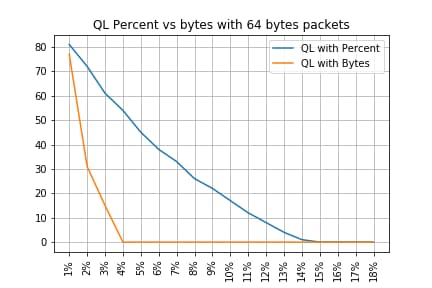
64バイトパケットのQLパーセント対バイト
-------------------------------------------------------------------
Policy-map          |      Drop rate with PC | Drop rate with Bytes
-------------------------------------------------------------------
QL Bytes/Percent  1 |                   81% |                   77%
QL Bytes/Percent  2 |                   72% |                   31%
QL Bytes/Percent  3 |                   61% |                   15%
QL Bytes/Percent  4 |                   54% |                    0%
QL Bytes/Percent  5 |                   45% |                    0%
QL Bytes/Percent  6 |                   38% |                    0%
QL Bytes/Percent  7 |                   33% |                    0%
QL Bytes/Percent  8 |                   26% |                    0%
QL Bytes/Percent  9 |                   22% |                    0%
QL Bytes/Percent 10 |                   17% |                    0%
QL Bytes/Percent 11 |                   12% |                    0%
QL Bytes/Percent 12 |                    8% |                    0%
QL Bytes/Percent 13 |                    4% |                    0%
QL Bytes/Percent 14 |                    1% |                    0%
QL Bytes/Percent 15 |                    0% |                    0%
QL Bytes/Percent 16 |                    0% |                    0%
QL Bytes/Percent 17 |                    0% |                    0%
QL Bytes/Percent 18 |                    0% |                    0%
-------------------------------------------------------------------
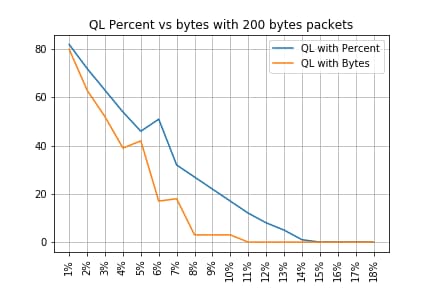
200バイトパケットのQLパーセントとバイト
-------------------------------------------------------------------
Policy-map          |      Drop rate with PC | Drop rate with Bytes
-------------------------------------------------------------------
QL Bytes/Percent  1 |                   82% |                   80%
QL Bytes/Percent  2 |                   72% |                   63%
QL Bytes/Percent  3 |                   63% |                   52%
QL Bytes/Percent  4 |                   54% |                   39%
QL Bytes/Percent  5 |                   46% |                   42%
QL Bytes/Percent  6 |                   51% |                   17%
QL Bytes/Percent  7 |                   32% |                   18%
QL Bytes/Percent  8 |                   27% |                    3%
QL Bytes/Percent  9 |                   22% |                    3%
QL Bytes/Percent 10 |                   17% |                    3%
QL Bytes/Percent 11 |                   12% |                    0%
QL Bytes/Percent 12 |                    8% |                    0%
QL Bytes/Percent 13 |                    5% |                    0%
QL Bytes/Percent 14 |                    1% |                    0%
QL Bytes/Percent 15 |                    0% |                    0%
QL Bytes/Percent 16 |                    0% |                    0%
QL Bytes/Percent 17 |                    0% |                    0%
QL Bytes/Percent 18 |                    0% |                    0%
-------------------------------------------------------------------
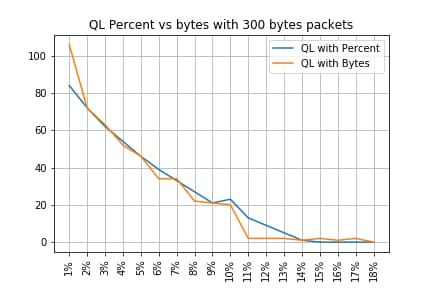
300バイトパケットのQLパーセントとバイト
-------------------------------------------------------------------
Policy-map          |      Drop rate with PC | Drop rate with Bytes
-------------------------------------------------------------------
QL Bytes/Percent  1 |                   84% |                  106%
QL Bytes/Percent  2 |                   72% |                   72%
QL Bytes/Percent  3 |                   62% |                   63%
QL Bytes/Percent  4 |                   54% |                   52%
QL Bytes/Percent  5 |                   46% |                   46%
QL Bytes/Percent  6 |                   39% |                   34%
QL Bytes/Percent  7 |                   33% |                   34%
QL Bytes/Percent  8 |                   27% |                   22%
QL Bytes/Percent  9 |                   21% |                   21%
QL Bytes/Percent 10 |                   23% |                   20%
QL Bytes/Percent 11 |                   13% |                    2%
QL Bytes/Percent 12 |                    9% |                    2%
QL Bytes/Percent 13 |                    5% |                    2%
QL Bytes/Percent 14 |                    1% |                    1%
QL Bytes/Percent 15 |                    0% |                    2%
QL Bytes/Percent 16 |                    0% |                    1%
QL Bytes/Percent 17 |                    0% |                    2%
QL Bytes/Percent 18 |                    0% |                    0%
-------------------------------------------------------------------
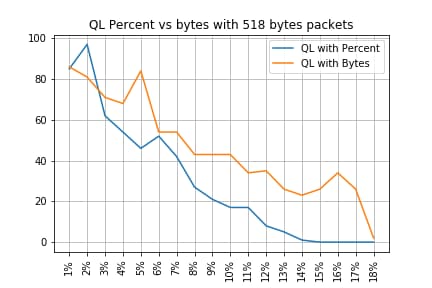
518バイトパケットのQLパーセントとバイト
-------------------------------------------------------------------
Policy-map          |      Drop rate with PC | Drop rate with Bytes
-------------------------------------------------------------------
QL Bytes/Percent  1 |                   85% |                   86%
QL Bytes/Percent  2 |                   97% |                   81%
QL Bytes/Percent  3 |                   62% |                   71%
QL Bytes/Percent  4 |                   54% |                   68%
QL Bytes/Percent  5 |                   46% |                   84%
QL Bytes/Percent  6 |                   52% |                   54%
QL Bytes/Percent  7 |                   42% |                   54%
QL Bytes/Percent  8 |                   27% |                   43%
QL Bytes/Percent  9 |                   21% |                   43%
QL Bytes/Percent 10 |                   17% |                   43%
QL Bytes/Percent 11 |                   17% |                   34%
QL Bytes/Percent 12 |                    8% |                   35%
QL Bytes/Percent 13 |                    5% |                   26%
QL Bytes/Percent 14 |                    1% |                   23%
QL Bytes/Percent 15 |                    0% |                   26%
QL Bytes/Percent 16 |                    0% |                   34%
QL Bytes/Percent 17 |                    0% |                   26%
QL Bytes/Percent 18 |                    0% |                    2%
-------------------------------------------------------------------
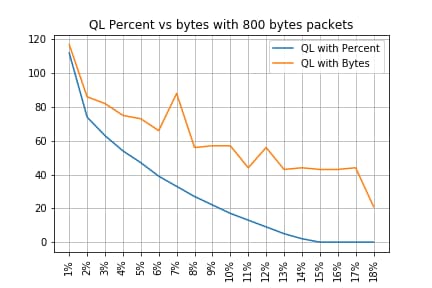
800バイトパケットのQLパーセントとバイト
-------------------------------------------------------------------
Policy-map          |      Drop rate with PC | Drop rate with Bytes
-------------------------------------------------------------------
QL Bytes/Percent  1 |                  112% |                  117%
QL Bytes/Percent  2 |                   74% |                   86%
QL Bytes/Percent  3 |                   63% |                   82%
QL Bytes/Percent  4 |                   54% |                   75%
QL Bytes/Percent  5 |                   47% |                   73%
QL Bytes/Percent  6 |                   39% |                   66%
QL Bytes/Percent  7 |                   33% |                   88%
QL Bytes/Percent  8 |                   27% |                   56%
QL Bytes/Percent  9 |                   22% |                   57%
QL Bytes/Percent 10 |                   17% |                   57%
QL Bytes/Percent 11 |                   13% |                   44%
QL Bytes/Percent 12 |                    9% |                   56%
QL Bytes/Percent 13 |                    5% |                   43%
QL Bytes/Percent 14 |                    2% |                   44%
QL Bytes/Percent 15 |                    0% |                   43%
QL Bytes/Percent 16 |                    0% |                   43%
QL Bytes/Percent 17 |                    0% |                   44%
QL Bytes/Percent 18 |                    0% |                   21%
-------------------------------------------------------------------
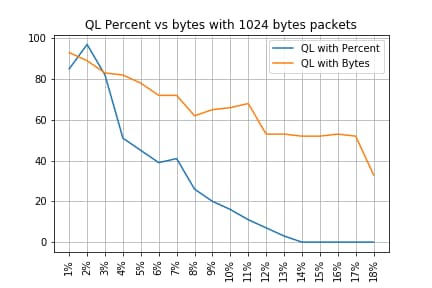
1024バイトパケットのQLパーセントとバイト
-------------------------------------------------------------------
Policy-map          |      Drop rate with PC | Drop rate with Bytes
-------------------------------------------------------------------
QL Bytes/Percent  1 |                   85% |                   93%
QL Bytes/Percent  2 |                   97% |                   89%
QL Bytes/Percent  3 |                   82% |                   83%
QL Bytes/Percent  4 |                   51% |                   82%
QL Bytes/Percent  5 |                   45% |                   78%
QL Bytes/Percent  6 |                   39% |                   72%
QL Bytes/Percent  7 |                   41% |                   72%
QL Bytes/Percent  8 |                   26% |                   62%
QL Bytes/Percent  9 |                   20% |                   65%
QL Bytes/Percent 10 |                   16% |                   66%
QL Bytes/Percent 11 |                   11% |                   68%
QL Bytes/Percent 12 |                    7% |                   53%
QL Bytes/Percent 13 |                    3% |                   53%
QL Bytes/Percent 14 |                    0% |                   52%
QL Bytes/Percent 15 |                    0% |                   52%
QL Bytes/Percent 16 |                    0% |                   53%
QL Bytes/Percent 17 |                    0% |                   52%
QL Bytes/Percent 18 |                    0% |                   33%
-------------------------------------------------------------------
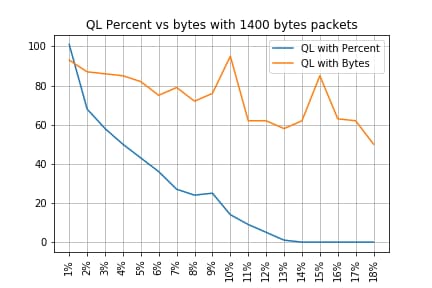
1400バイトパケットのQLパーセントとバイト
-------------------------------------------------------------------
Policy-map          |      Drop rate with PC | Drop rate with Bytes
-------------------------------------------------------------------
QL Bytes/Percent  1 |                  101% |                   93%
QL Bytes/Percent  2 |                   68% |                   87%
QL Bytes/Percent  3 |                   58% |                   86%
QL Bytes/Percent  4 |                   50% |                   85%
QL Bytes/Percent  5 |                   43% |                   82%
QL Bytes/Percent  6 |                   36% |                   75%
QL Bytes/Percent  7 |                   27% |                   79%
QL Bytes/Percent  8 |                   24% |                   72%
QL Bytes/Percent  9 |                   25% |                   76%
QL Bytes/Percent 10 |                   14% |                   95%
QL Bytes/Percent 11 |                    9% |                   62%
QL Bytes/Percent 12 |                    5% |                   62%
QL Bytes/Percent 13 |                    1% |                   58%
QL Bytes/Percent 14 |                    0% |                   62%
QL Bytes/Percent 15 |                    0% |                   85%
QL Bytes/Percent 16 |                    0% |                   63%
QL Bytes/Percent 17 |                    0% |                   62%
QL Bytes/Percent 18 |                    0% |                   50%
-------------------------------------------------------------------
ドロップとパケットサイズの関係
前述のとおり、ASR 920には11.75 MBの内部パケットバッファがあり、それぞれ256バイトの45898 Qnodeに分割されています。
- サイズが256バイト未満のパケットの場合は、正確に1 Qnodeが使用されます
- サイズが1024バイトのパケットの場合、4つのQnodeが使用されます
- サイズが257バイトのパケットの場合、2つのQnodeが使用され、未使用の255バイトは失われます
したがって、小さなパケットで格納できる量よりも小さな量の大きなパケットを格納できます。同等のキュー制限サイズでのドロップレートとパケットサイズの関係が予想されます。
等価バイト値とパーセント値の違い
説明したように、11.75 MBの共有バッファには45898個のQnodeがあり、計算しやすいように45900に丸められています。
queue-limit percentの計算では、11.75 MBのパーセンテージではなく、45900 Qnodeのパーセンテージが計算されます。したがって、queue-limit percent 10は、45900の10 %を意味し、4590個のQnodeが提供されます。
さらに、割り当てられたQnodeの割合は、そのサイズとは無関係に、キューに格納できるパケットの数と見なされます。前の例に戻ると、次のようになります。
queue-limit percent 10 = 4590 Qnode = 4590パケット。
この計算はパケットサイズとは無関係なので、256バイト以下のサイズのパケットに対しては、実際には1つのQnodeのみが使用され、Qnodeとパケットの間の等価性が維持されます。
queue-limit percent 10 = 4590 Qnodes = 256バイトの4590パケット= 4590*256バイト= 1.175 MB =バッファの10%
ただし、パケットが大きい場合は、バッファのより大きな部分が割り当てられます。たとえば、これは、各パケットが4つのQnodeを消費する1024バイトのパケットの計算です。
queue-limit percent 10 = 4590 Qnodes = 1024バイトの4590パケット= 4590*4*256バイト= 4.7 MB =バッファの40%
注意:queue-limit percentの値を高く設定することは推奨されません。
queue-limit percentの値を高く設定すると、単一のインターフェイスが一時的にすべての共有バッファ11.75 MBを占有する可能性があります。
まとめ
- 小さなパケットの場合、キュー制限バイトの効率が良いことは明らかです。キュー制限バイト<x>の方が、最大300バイトのキュー制限<x>よりも適切に機能します
- 300バイトのパケットでは、queue-limit bytesとqueue-limit percent efficiencyは同じです
- 300バイトを超えるパケットサイズでは、キュー制限の割合がより効率的です。インターネットトラフィックは平均で518バイトであるため、お客様から報告されたとおり、実際のシナリオではキュー制限の割合によるメリットが大きくなります
- キュー制限パーセントの効率は、パケットサイズに関連して直線的に向上します(パケットが大きくなるほど、キュー制限パーセントはキュー制限バイトよりも効率的になります)
- 256 MBサイズを超えるパケットに対してバッファ領域をより大きく割り当てるために、キュー制限の割合が実装されています
実際のトラフィックシナリオにおけるパーセント値の概算方法
サイズが256バイトでキュー制限が10 %のパケットがある場合は、次の等価性が有効であることはすでに判明しています。
minimum queue-limit = 4590 Qnodes = 4590*256 bytes = 1.175 MB = 10% of the buffer
512バイトのパケットでは使用量のみが2倍になり、1024バイトのパケットでは4倍になります。
つまり、実際のキュー制限はバッファの少なくとも10 %以上であり、MTUが1500バイトの最大を想定している場合は1つのパケットを格納するために6つのQnodeが必要になります。これにより、キュー制限は次のようになります。
maximum queue-limit = 4590*6 Qnodes = 4590*256*6 bytes = 7.05 MB = 60% of the buffer
このようにして、バッファ使用量の下限と上限をqueue-limit percent 10で定義できます。そのため、一般的に、最大バッファ使用量の平均値はほぼ次のようになります。
ceil(avg_pkt_size/256)*((qlimit_percent/45900)*100)
ラボ機器の例:
GigabitEthernet0/0/1 is up, line protocol is up
  Hardware is 24xGE-4x10GE-FIXED-S, address is 70df.2f2f.ed01 (bia 70df.2f2f.ed01)
  Internet address is 10.12.10.47/31
  MTU 8900 bytes, BW 1000000 Kbit/sec, DLY 10 usec,
     reliability 255/255, txload 25/255, rxload 30/255
  Encapsulation ARPA, loopback not set
  Keepalive set (10 sec)
  Full Duplex, 1000Mbps, link type is auto, media type is T
  output flow-control is unsupported, input flow-control is on
  Carrier delay is 0 msec
  ARP type: ARPA, ARP Timeout 04:00:00
  Last input 00:00:00, output 00:00:01, output hang never
  Last clearing of "show interface" counters 00:11:43
  Input queue: 0/375/0/0 (size/max/drops/flushes); Total output drops: 2036062
  Queueing strategy: Class-based queueing
  Output queue: 0/40 (size/max)
  30 second input rate 118520000 bits/sec, 18902 packets/sec
  30 second output rate 101646000 bits/sec, 16124 packets/sec
     13185272 packets input, 10328798549 bytes, 0 no buffer
     Received 0 broadcasts (0 IP multicasts)
     0 runts, 0 giants, 0 throttles
     0 input errors, 0 CRC, 0 frame, 0 overrun, 0 ignored
     0 watchdog, 235 multicast, 0 pause input
     11247114 packets output, 8870166880 bytes, 0 underruns  <<<  avg_pkt_size = 8870166880/11247114 = 788.66 bytes
     0 output errors, 0 collisions, 0 interface resets
     0 unknown protocol drops
     0 babbles, 0 late collision, 0 deferred
     0 lost carrier, 0 no carrier, 0 pause output
     0 output buffer failures, 0 output buffers swapped out
avg_pkt_sizeは、8870166880/11247114 ~ 788バイトで計算できます。
queue-limit percent 10では、最大バッファ平均使用率は次のようになります。
ceil(avg_pkt_size/256)*((45900/100)*qlimit_percent)

Calculation example with Python:
>>> import math
>>> math.ceil(788/256)*((45900/100)*10)
18360.0

=> 18360 Qnodes = 18360 * 256 bytes = 4.7 MB = 40% of the buffer
マイクロバーストバッファの使用状況の確認方法
16.9.3よりも前のCisco IOS XEリリースでは、インターフェイスの共有バッファはデータパケットと制御パケットの両方(BFD、ルーティングプロトコル、ARP、LDP、パントキープアライブなど)に使用されていました。 インスタントバッファの使用状況を確認するには、次のコマンドを使用できます。
ASR-920-1#request platform software sdcli "nile bm reg buffertablefreelistcount show 0 0 0"
16.9.3以降では、バッファ使用率を改善するためにいくつかの変更が導入され、2つに分割されました。1024個のエントリ(256 KB)が制御トラフィック用に予約され、残りはデータトラフィック用に予約されています。
この場合のバッファ使用量は、次のコマンドで監視できます。
ASR-920-1#request platform software sdcli "nile bm reg supervisorresourcereservedcounttableaccess sh 0 0 0"
reservedUsedCount = 48 (0x30)
reservedFreeCount = 976 (0x3d0)

ASR-920-1#request platform software sdcli "nile bm reg supervisorresourcereservedcounttableaccess sh 0 2 0"
reservedUsedCount = 8114 (0x1fb2)
reservedFreeCount = 37784 (0x9398)
バッファがマイクロバーストを処理するため、コマンドを何度も繰り返して、reservedUsedCountの値が0以外であることを確認する必要があることに注意してください。
バッファの使用量は、reservedUsedCount/reservedFreeCountを使用して簡単に計算できます。たとえば、8114/37784 = 21,5 %の使用率となります。バーストが終わると、バッファはすぐに0に戻るか、またはバッファの近くにフォールバックする必要があります。
Cisco IOS XEリリース17.6.1以降では、データトラフィックと制御トラフィックの両方にバッファ全体を使用するか(ネットワークの制御トラフィックのレートが高い場合に望ましい)、前述のように2に分割することができます。選択は、次の手順の設定に基づいて行われます(デフォルトでは無効)。
ACDC-920-1(config)#platform qos-buffer enhance enable
ACDC-920-1(config)#no platform qos-buffer enhance enable
Cisco IOS XEリリース17.7.1以降では、制御トラフィックに割り当てるサイズを選択することもできます。
ACDC-920-1(config)#platform qos-buffer enhance [1-4]
場所:
- 1は256 KBの制御バッファを示します。
- 2は500 KBを示す
- 3は756 KBを示す
- 4は1 MBを示します。
更新履歴
| 改定 | 発行日 | コメント |
|---|---|---|
1.0 |
10-Oct-2022
|
初版 |
 フィードバック