Cambia interfaccia dati di accesso di Gestione FTD
Introduzione
In questo documento viene descritto come modificare l'interfaccia dati di accesso del manager Secure Firewall Threat Defense (FTD).
Prerequisiti
Requisiti
- Conoscenze base dei prodotti.
- Familiarità con la gestione FTD e la gestione su interfacce dati.
Componenti usati
Le informazioni discusse in questo documento fanno riferimento a dispositivi usati in uno specifico ambiente di emulazione. Su tutti i dispositivi menzionati nel documento la configurazione è stata ripristinata ai valori predefiniti. Se la rete è operativa, valutare attentamente eventuali conseguenze derivanti dall'uso dei comandi.
Le informazioni fornite in questo documento si basano sulle seguenti versioni software e hardware:
- Secure Firewall 4200
- Secure Firewall Threat Defense (FTD) 10.0.x, 7.6.4
- Secure Firewall Management Center (FMC) 10.0.x
Configurazione iniziale
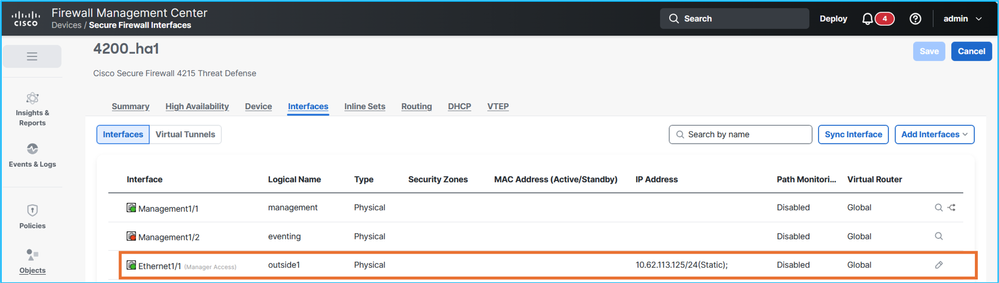
1. Il CCP gestisce FTD in alta disponibilità (HA) tramite interfaccia dati Ethernet1/1 con il nome se esterno1, utilizzando gli indirizzi IP attivi e in standby 10.62.113.125 e 10.62.113.126 rispettivamente:
Verifica su FTD CLISH:
> show network management-data-interface

Physical Interface               Name of the Interface
Ethernet1/1              outside1

> show network
===============[ System Information ]===============
Hostname                  : CSF4215-3
..
DNS from router           : enabled
Management port           : 8305
IPv4 Default route
  Gateway                 : data-interfaces
…
======[ System Information - Data Interfaces ]======
DNS Servers               : 192.0.2.100
Interfaces                : Ethernet1/1

==================[ Ethernet1/1 ]===================

State                     : Enabled
Link                      : Up
Name                      : outside1
MTU                       : 1500
MAC Address               : 40:F4:9F:3D:5A:0E
----------------------[ IPv4 ]----------------------
Configuration             : Manual
Address                   : 10.62.113.125
Netmask                   : 255.255.255.0
Gateway                   : 10.62.113.1
…
2. sono stabilite connessioni sftunnel tra l'unità HA FTD e il CCP:
> sftunnel-status-brief
PEER:fmc.example.org
        SFTunnel Status:-
                Channel A: Connected
                Channel B: Connected
        Peer channel Channel-A is valid  type (CONTROL), using 'tap_nlp', connected to '198.51.100.23' via '169.254.1.3'
        Peer channel Channel-B is valid  type (EVENT), using 'tap_nlp', connected to '198.51.100.23' via '169.254.1.3'
        Registration: Completed.
        IPv4 Connection to peer 'fmc.example.org' Start Time: Fri Jul 17 08:22:31 2026 UTC
        Heartbeat Send Time:     Fri Jul 17 08:52:42 2026 UTC
        Heartbeat Received Time: Fri Jul 17 08:53:03 2026 UTC
        Last disconnect time   : Fri Jul 17 08:22:16 2026 UTC
        Last disconnect reason : Process shutdown due to stop request from PM
3. FTD si basa sulla risoluzione DNS per connettersi a FMC. Il manager è la configurazione basata sul nome di dominio completo (FQDN):
> show managers
Type                      : Manager
Host                      : fmc.example.org
Display name              : fmc.example.org
Version                   : 10.0.1 (Build 1)
Identifier                : 6d86efc4-c095-11f0-9244-48f1a7894b18
Registration              : Completed
Management type           : Configuration and analytics

> show network
===============[ System Information ]===============
Hostname                  : KSEC-FPR-4215-3
Domains                   : example.org
DNS Servers               : 192.0.2.100
DNS from router           : enabled
Management port           : 8305
IPv4 Default route
  Gateway                 : data-interfaces
…
I server DNS sono raggiungibili tramite l'interfaccia esterna1.
4. Le connessioni sftunnel vengono stabilite tramite il motore Lina:
> show conn all port 8305
26 in use, 32 most used
Inspect Snort:
        preserve-connection: 0 enabled, 0 in effect, 0 most enabled, 0 most in effect

TCP nlp_int_tap  10.62.113.125(169.254.1.3):8305 outside1  198.51.100.23:45647, idle 0:00:03, bytes 2129062, flags UIO
TCP nlp_int_tap  10.62.113.125(169.254.1.3):37141 outside1  198.51.100.23:8305, idle 0:00:04, bytes 148581, flags UxIO
Procedura di configurazione
L'obiettivo è spostare l'accesso del manager dall'esterno1 corrente all'interfaccia esterna2 di destinazione. Gli indirizzi IP attivo e in standby esterno2 sono rispettivamente 10.62.114.51/24 e 10.62.114.52/24.
Si noti che FTD versione 7.7.0 o successive supportano interfacce di dati di accesso ridondanti per manager, che consentono la configurazione e l'installazione di più di 1 interfaccia di accesso per manager. Questa funzione non è supportata nelle versioni precedenti alla 7.7.0.
Per questo motivo, alcuni passaggi specifici vengono ignorati o contengono azioni diverse.
- Si consiglia di avere l'accesso da console agli FTD:
- Nel caso di Firepower 4100/9300, è possibile connettersi allo chassis utilizzando SSH e quindi alla console FTD nativa utilizzando il comando connect module x console, dove x è l'ID dello slot/modulo di sicurezza.
- Nel caso di Firepower 4100/9300 con FTD in modalità a più istanze (MI), è possibile collegarsi allo chassis utilizzando SSH e quindi alla console FTD nativa utilizzando il comando connect module x telnet, dove x è l'ID dello slot/modulo di sicurezza. Quindi collegatevi all'istanza FTD utilizzando il comando connect ftd <ftd_id>.
- Nel caso di Secure Firewall 3100/4200 in modalità MI, è possibile collegarsi allo chassis utilizzando SSH e quindi alla console FTD utilizzando il comando connect ftd<identifier>.
- Distribuire i criteri in sospeso.
- È consigliabile eseguire backup FTD e FMC. Nel caso di FTD HA, eseguire il backup di entrambe le unità.
- Configurare il nome dell'interfaccia di destinazione, se applicabile, l'indirizzo IP, l'area di protezione e altre impostazioni correlate all'interfaccia.
- Configurare l'indirizzo IP di standby dell'interfaccia di destinazione.
- Se la versione del software FTD è 7.7.0 o successiva, abilitare l'accesso del manager sull'interfaccia di destinazione e regolare le reti di accesso di gestione in base alle esigenze:
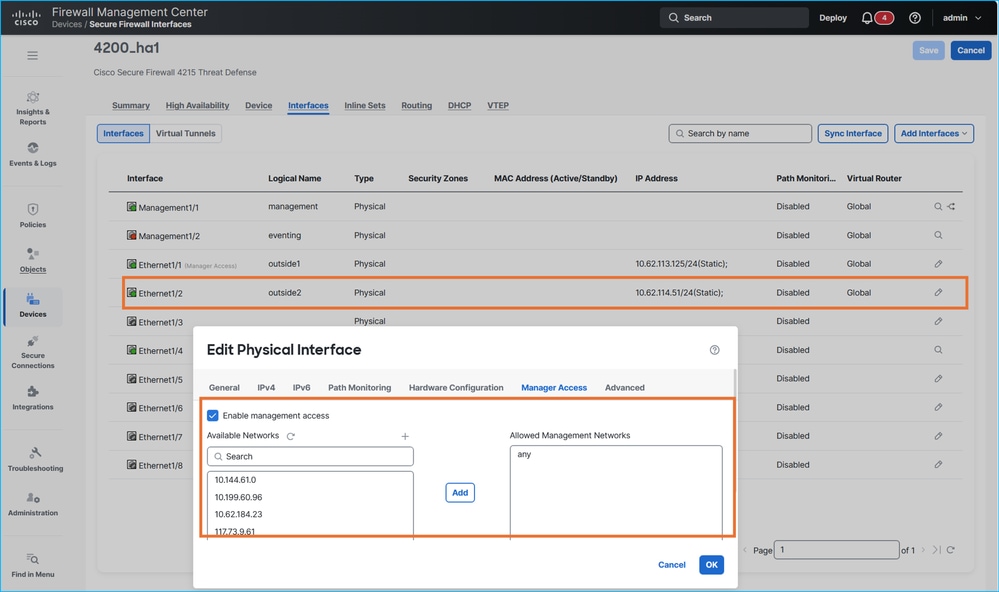
Si noti che le versioni FTD precedenti alla 7.7.0 non supportano le interfacce dati ridondanti per l'accesso al manager. Il tentativo di configurare l'interfaccia di accesso del secondo manager genera questo messaggio di errore:
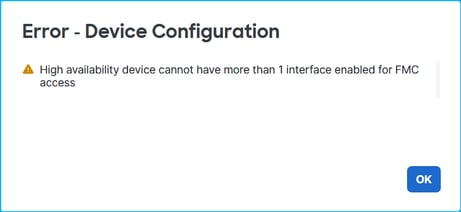
Accertarsi di ignorare i passaggi 7 e 8 per le versioni FTD precedenti alla 7.7.0.
7. Distribuire i criteri e verificare le impostazioni nel CLISH FTD. Nell'esempio, l'interfaccia Ethernet1/2 con nome outside2 ha gli indirizzi IP 10.62.114.51 e 10.62.114.52 rispettivamente:
> show ip
System IP Addresses:
Interface                Name                   IP address      Subnet mask     Method
Ethernet1/1              outside1               10.62.113.125   255.255.255.0   manual <- source interface
Ethernet1/2              outside2               10.62.114.51    255.255.255.0   manual <- target interface
Ethernet1/4              fover                  10.9.0.21       255.255.255.0   unset
L'interfaccia outside2 viene aggiunta alla configurazione del tunnel SFC:
> show running-config sftunnel
sftunnel interface outside2 <- target interface
sftunnel interface outside1 <- source interface
sftunnel port 8305
sftunnel route-map FMC_GEN_19283746_RBD_DUAL_WAN_RMAP_91827346
Sebbene nella tabella NAT (Network Address Translation) siano installate regole aggiuntive, le regole con l'interfaccia outside1 sono in uso:
> show nat detail
Manual NAT Policies Implicit (Section 0)
1 (nlp_int_tap) to (outside1) source static nlp_server__sftunnel_0.0.0.0_intf5 interface  destination static 0_0.0.0.0_5 0_0.0.0.0_5 service tcp 8305 8305
    translate_hits = 1448, untranslate_hits = 1448
    Source - Origin: 169.254.1.3/32, Translated: 10.62.113.125/24
    Destination - Origin: 0.0.0.0/0, Translated: 0.0.0.0/0
    Service - Protocol: tcp Real: 8305 Mapped: 8305
2 (nlp_int_tap) to (outside2) source static nlp_server__sftunnel_0.0.0.0_intf6 interface  destination static 0_0.0.0.0_9 0_0.0.0.0_9 service tcp 8305 8305
    translate_hits = 0, untranslate_hits = 0
    Source - Origin: 169.254.1.3/32, Translated: 10.62.114.51/24
    Destination - Origin: 0.0.0.0/0, Translated: 0.0.0.0/0
    Service - Protocol: tcp Real: 8305 Mapped: 8305
3 (nlp_int_tap) to (outside1) source static nlp_server__sftunnel_::_intf5 interface ipv6  destination static 0_::_6 0_::_6 service tcp 8305 8305
    translate_hits = 0, untranslate_hits = 0
    Source - Origin: fd00:0:0:1::3/128, Translated:
    Destination - Origin: ::/0, Translated: ::/0
    Service - Protocol: tcp Real: 8305 Mapped: 8305
4 (nlp_int_tap) to (outside2) source static nlp_server__sftunnel_::_intf6 interface ipv6  destination static 0_::_10 0_::_10 service tcp 8305 8305
    translate_hits = 0, untranslate_hits = 0
    Source - Origin: fd00:0:0:1::3/128, Translated:
    Destination - Origin: ::/0, Translated: ::/0
    Service - Protocol: tcp Real: 8305 Mapped: 8305
5 (nlp_int_tap) to (outside1) source dynamic nlp_client_0_intf5 interface
    translate_hits = 653, untranslate_hits = 0
    Source - Origin: 169.254.1.3/32, Translated: 10.62.113.125/24
6 (nlp_int_tap) to (outside2) source dynamic nlp_client_0_intf6 interface
    translate_hits = 0, untranslate_hits = 0
    Source - Origin: 169.254.1.3/32, Translated: 10.62.114.51/24
7 (nlp_int_tap) to (outside1) source dynamic nlp_client_0_ipv6_intf5 interface ipv6
    translate_hits = 0, untranslate_hits = 0
    Source - Origin: fd00:0:0:1::3/128, Translated:
8 (nlp_int_tap) to (outside2) source dynamic nlp_client_0_ipv6_intf6 interface ipv6
    translate_hits = 0, untranslate_hits = 0
    Source - Origin: fd00:0:0:1::3/128, Translated:
8. Verificare lo stato di elevata disponibilità e il monitoraggio dell'interfaccia:
> show monitor-interface
        This host: Primary - Active
                Interface management (203.0.113.130): Normal (Monitored)
                Interface outside1 (10.62.113.125): Normal (Monitored)
                Interface outside2 (10.62.114.51): Normal (Monitored)
        Other host: Secondary - Standby Ready
                Interface management (203.0.113.131): Normal (Monitored)
                Interface outside1 (10.62.113.126): Normal (Monitored)
                Interface outside2 (10.62.114.52): Normal (Monitored)
9. Se si intende gestire gli FTD sull'interfaccia esterna2, accertarsi che sia consentito l'accesso nella sezione Accesso SSH delle impostazioni della piattaforma.
10. Apportare le modifiche necessarie per consentire la connettività ai server dei nomi di dominio (DNS) e al CCP tramite l'interfaccia di destinazione:
- Se per la connettività tra FMC e FTD è richiesta la risoluzione dei nomi di dominio (DNS), verificare che gli FTD siano raggiungibili tramite l'interfaccia di destinazione fino all'hop successivo utilizzato per raggiungere i server DNS. La risoluzione DNS deve essere consentita anche nel percorso di transito.
- accertarsi che gli FTD siano raggiungibili sull'interfaccia di destinazione fino all'hop successivo da utilizzare per raggiungere il FMC.
- Verificare che sia consentita la connettività bidirezionale tra FMC e FTD sulla porta TCP 8305 nel percorso di transito sull'interfaccia di destinazione. La connessione deve essere consentita in entrambe le direzioni.
In questo caso, è necessario usare IP 10.62.114.1 come gateway predefinito sull'interfaccia di destinazione. L'indirizzo IP dell'hop successivo è raggiungibile tramite il protocollo ICMP (Internet Control Message Protocol):
> ping 10.62.114.1
Please use 'CTRL+C' to cancel/abort...
Sending 5, 100-byte ICMP Echos to 10.62.114.1, timeout is 2 seconds:
!!!!!
Success rate is 100 percent (5/5), round-trip min/avg/max = 1/2/10 ms
Se l'ICMP è bloccato a livello amministrativo nel percorso di transito o nell'hop successivo, verificare che l'indirizzo MAC (Media Access Control) dell'hop successivo sia visibile nell'output del comando show arp e che sia valido:
> show arp
        fover 10.9.0.22 4c01.f7e9.e111 13275
        outside1 10.62.113.1 c02c.1782.2cbf 1
        outside1 10.62.113.126 4c01.f7e9.e10e 5453
        outside2 10.62.114.1 c02c.1782.2cbf 0
        outside2 10.62.114.52 4c01.f7e9.e10f 5453
11. A seconda della versione FTD, effettuare le seguenti operazioni:
- Versione 7.7.0 o successiva: in FMC, disabilitare l'accesso del manager tramite l'interfaccia di origine (esterna1), regolare il routing, incluso il routing ai server DNS (se il DNS viene utilizzato per accedere a FMC) e a FMC tramite l'interfaccia di destinazione (esterna2). Ad esempio, configurare route statiche specifiche o configurare il gateway predefinito tramite l'interfaccia di destinazione.
- Versione precedente alla 7.7.0: in FMC, disabilitare l'accesso dei manager sull'interfaccia di origine (esterna a 1), abilitare l'accesso dei manager sull'interfaccia di destinazione (esterna a 2), regolare il routing, incluso il routing ai server DNS (se il DNS è utilizzato per accedere a FMC) e a FMC sull'interfaccia di destinazione (esterna a 2). Ad esempio, configurare route statiche specifiche o configurare il gateway predefinito sull'interfaccia di destinazione.
12. Distribuire i criteri.
13. Verificare su FTD CLISH:
> show route 0.0.0.0

Routing entry for 0.0.0.0 0.0.0.0, supernet
  Known via "static", distance 1, metric 0, candidate default path
  Routing Descriptor Blocks:
  * 10.62.114.1, via outside2 <- default route over outside2
      Route metric is 0, traffic share count is 1


> show running-config sftunnel
sftunnel interface outside2 <- sftunnel is enabled only over outside2
sftunnel port 8305


> show nat detail
Manual NAT Policies Implicit (Section 0)
1 (nlp_int_tap) to (outside2) source static nlp_server__sftunnel_0.0.0.0_intf6 interface  destination static 0_0.0.0.0_9 0_0.0.0.0_9 service tcp 8305 8305
    translate_hits = 3, untranslate_hits = 3
    Source - Origin: 169.254.1.3/32, Translated: 10.62.114.51/24
    Destination - Origin: 0.0.0.0/0, Translated: 0.0.0.0/0
    Service - Protocol: tcp Real: 8305 Mapped: 8305
2 (nlp_int_tap) to (outside2) source static nlp_server__sftunnel_::_intf6 interface ipv6  destination static 0_::_10 0_::_10 service tcp 8305 8305
    translate_hits = 0, untranslate_hits = 0
    Source - Origin: fd00:0:0:1::3/128, Translated:
    Destination - Origin: ::/0, Translated: ::/0
    Service - Protocol: tcp Real: 8305 Mapped: 8305
3 (nlp_int_tap) to (outside2) source dynamic nlp_client_0_intf6 interface
    translate_hits = 407, untranslate_hits = 0
    Source - Origin: 169.254.1.3/32, Translated: 10.62.114.51/24
4 (nlp_int_tap) to (outside2) source dynamic nlp_client_0_ipv6_intf6 interface ipv6
    translate_hits = 0, untranslate_hits = 0
    Source - Origin: fd00:0:0:1::3/128, Translated:


> show conn all port 8305
31 in use, 42 most used
Inspect Snort:
        preserve-connection: 0 enabled, 0 in effect, 0 most enabled, 0 most in effect

TCP nlp_int_tap  10.62.114.51(169.254.1.3):56853 outside2  198.51.100.23:8305, idle 0:00:06, bytes 33008, flags UxIO  <- connectivity over outside2
TCP nlp_int_tap  10.62.114.51(169.254.1.3):32905 outside2  198.51.100.23:8305, idle 0:00:00, bytes 1595942, flags UxIO <- connectivity over outside2
14. Se è necessario modificare i server DNS nell'output del comando 'show network' CLISH, configurare i nuovi server DNS:
> configure network dns servers 192.0.2.184
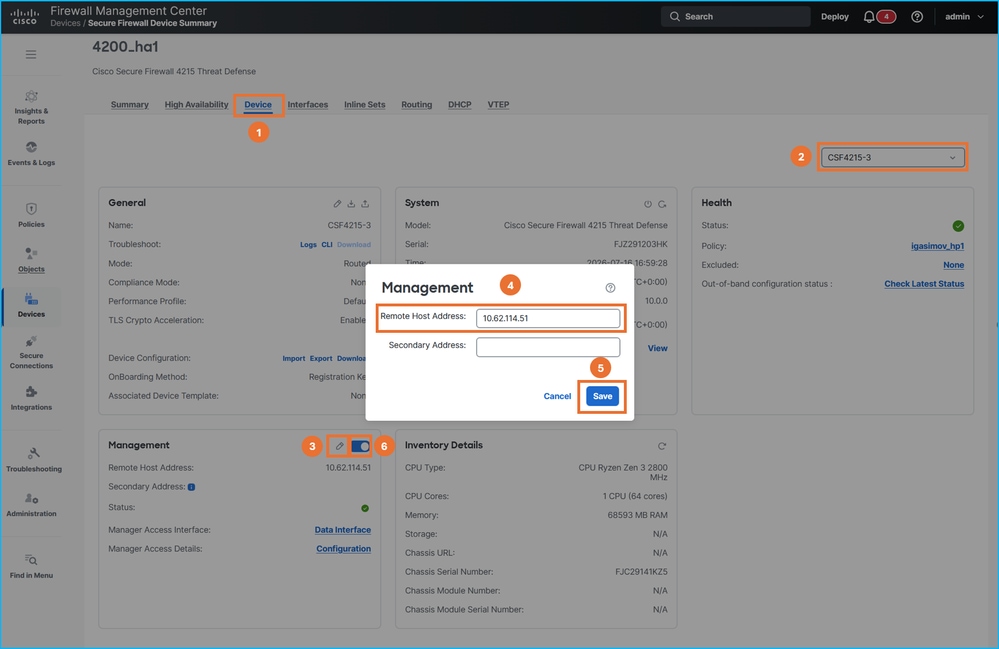
15. Su FMC modificare l'indirizzo IP di gestione FTD su indirizzo IP esterno2, quindi disabilitare e riabilitare la connettività utilizzando il dispositivo di scorrimento. Ripetere questo passaggio per entrambe le unità in HA:
16. Verificare la connettività del tunnel sicuro su tutti gli FTD:
> sftunnel-status-brief
PEER:198.51.100.23
        SFTunnel Status:-
                Channel A: Connected
                Channel B: Connected
        Peer channel Channel-A is valid  type (CONTROL), using 'tap_nlp', connected to '198.51.100.23' via '169.254.1.3'
        Peer channel Channel-B is valid  type (EVENT), using 'tap_nlp', connected to '198.51.100.23' via '169.254.1.3'
        Registration: Completed.
        IPv4 Connection to peer '198.51.100.23' Start Time: Thu Jul 16 16:37:14 2026 UTC
        Heartbeat Send Time:     Thu Jul 16 16:38:13 2026 UTC
        Heartbeat Received Time: Thu Jul 16 16:39:13 2026 UTC
        Last disconnect time   : Thu Jul 16 16:37:11 2026 UTC
        Last disconnect reason : Both control and event channel connections with peer went down

> show conn all port 8305
32 in use, 42 most used
Inspect Snort:
        preserve-connection: 0 enabled, 0 in effect, 0 most enabled, 0 most in effect

TCP nlp_int_tap  10.62.114.51(169.254.1.3):8305 outside2  198.51.100.23:36383, idle 0:00:00, bytes 235757, flags UIO  <- new connection over different source port
TCP nlp_int_tap  10.62.114.51(169.254.1.3):8305 outside2  198.51.100.23:50963, idle 0:00:01, bytes 12319, flags UIO <- new connection over different source port
17. Se è necessario modificare le impostazioni dei server DNS nelle piattaforme, apportare le modifiche di configurazione appropriate e distribuire i criteri.
Risoluzione dei problemi relativi a Connessione di gestione
Utilizzare i seguenti comandi per le verifiche:
- show network: visualizza la configurazione dell'interfaccia di gestione.
- sftunnel-status-brief: visualizza lo stato della connettività del tunnel sfc.
- show run sftunnel: visualizza la configurazione dello sftunnel nel motore del firewall (Lina).
- show conn all port 8305: visualizza le connessioni del tunnel sfc tramite il motore Lina.
Per risolvere i problemi relativi alle connessioni di gestione, consultare la sezione Risoluzione dei problemi relativi alle connessioni di gestione nella guida ufficiale.
Riferimenti
- Guida alla configurazione dei dispositivi di Cisco Secure Firewall Management Center, 10.x
- Modificare l'interfaccia di accesso di Manager
- Risoluzione dei problemi relativi alla connessione di gestione
Cronologia delle revisioni
| Revisione | Data di pubblicazione | Commenti |
|---|---|---|
1.0 |
07-Aug-2026
|
Versione iniziale |

 Feedback