Installation du correctif sur ISE
Table des matières
Introduction
Ce document décrit les méthodes d'installation des correctifs ISE et des FAQ pendant l'installation.
Conditions préalables
Exigences
Connaissances de base sur Identity Service Engine (ISE).
Composants utilisés
Les informations contenues dans ce document sont basées sur les versions de matériel et de logiciel suivantes :
- Cisco Identity Service Engine 3.X
The information in this document was created from the devices in a specific lab environment. All of the devices used in this document started with a cleared (default) configuration. Si votre réseau est en ligne, assurez-vous de bien comprendre l’incidence possible des commandes.
Informations générales
Cisco publie des correctifs ISE sur une base semi-régulière. Ces correctifs contiennent des correctifs de bogues et, si nécessaire, des correctifs de sécurité (par exemple, les vulnérabilités Heartbleed et Poodle découvertes avec SSL). Cela garantit que les correctifs de bogues sont appliqués, que les vulnérabilités de sécurité sont connectées et que la solution fonctionne de manière transparente.
Lorsque vous installez un correctif sur un noeud ISE, le noeud est redémarré. Redémarrez les services une fois l'installation terminée. Patientez quelques minutes avant de pouvoir vous reconnecter.
Vous pouvez planifier l’installation des correctifs pendant une période de maintenance pour éviter une panne temporaire.
Installez uniquement les correctifs applicables à la version Cisco déployée sur votre réseau. Cisco signale toute incompatibilité de version ainsi que toute erreur dans le fichier du correctif.
Vous ne pouvez pas installer un correctif d'une version inférieure à celle actuellement installée sur Cisco. De même, vous ne pouvez pas restaurer les modifications effectuées par un correctif de version antérieure si une version ultérieure est actuellement installée sur Cisco.
Lorsque vous installez un correctif à partir du noeud d'administration principal (PAN) qui fait partie d'un déploiement distribué, Cisco ISE installe le correctif sur le noeud principal, puis sur tous les noeuds secondaires du déploiement. Si l'installation du correctif réussit sur le PAN, Cisco ISE poursuit l'installation du correctif sur les noeuds secondaires. En cas d'échec sur le PAN, l'installation ne se poursuit pas sur les noeuds secondaires. Toutefois, si l'installation échoue sur l'un des noeuds secondaires pour une raison quelconque, elle continue avec le noeud secondaire suivant dans votre déploiement.
Lorsque vous installez un correctif à partir du PAN qui fait partie d'un déploiement à deux noeuds, Cisco installe le correctif sur le noeud principal, puis sur le noeud secondaire.
Si l'installation du correctif réussit sur le PAN, Cisco poursuit l'installation du correctif sur le noeud secondaire. Si le PAN échoue, l'installation ne se poursuit pas jusqu'au noeud secondaire.
Installation des correctifs avec interface graphique utilisateur
Pour télécharger les correctifs ISE à partir de Cisco.com, accédez à Téléchargements > Produits > Sécurité > Contrôle et stratégie d'accès > Identity Services Engine > Logiciel Identity Services Engine(ici).
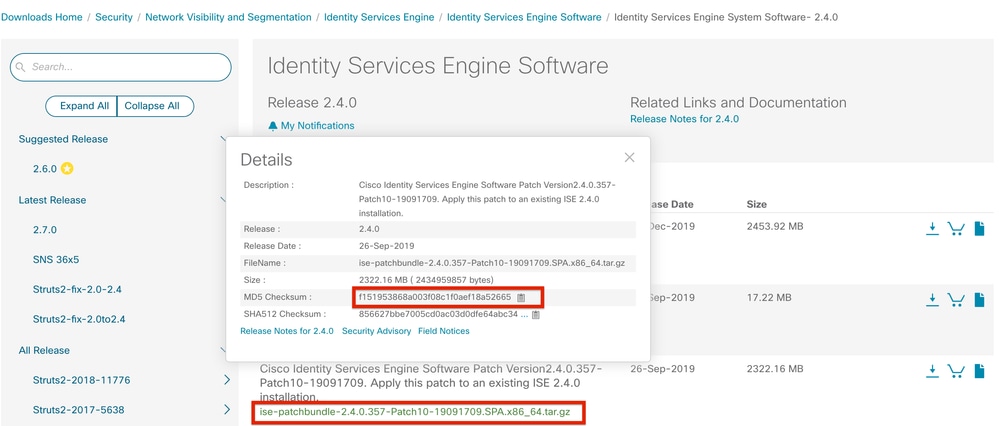
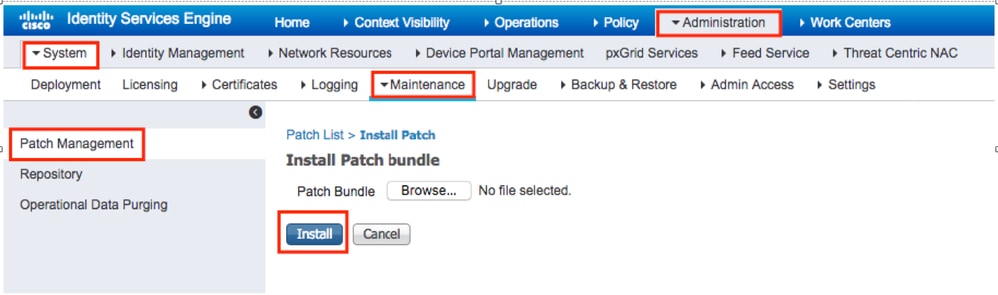
Afin d'appliquer le correctif sur ISE, connectez-vous à l'interface utilisateur graphique du noeud d'administration principal ISE (PAN) et exécutez ces instructions :
Étape 1. Accédez à Administration > System > Maintenance > Patch Management > Install.
Étape 2. Cliquez sur Browse et choisissez le fichier de correctif téléchargé à partir de Cisco.com.
Étape 3. Cliquez sur Install pour installer le patch.
Installation des correctifs avec CLI
Étape 1 : configuration d’un référentiel ISE et installation du correctif ISE requis dans le référentiel Pour configurer le référentiel ISE, consultez la procédure de configuration du référentiel sur ISE
Étape 2 : connexion à l'interface de ligne de commande ISE avec SSH
Étape 3. Assurez-vous que l'interface de ligne de commande ISE peut répertorier le contenu du référentiel.
ise1/admin# show repository FTP_repository

ise-patchbundle-3.3.0.430-Patch2-24041511.SPA.x86_64.tar.gz
ise-patchbundle-3.3.0.430-Patch3-24070910.SPA.x86_64.tar.gz
ise-patchbundle-3.3.0.430-Patch4-24102504.SPA.x86_64.tar.gz
Étape 4. Pour installer le correctif sur un noeud ISE spécifique à partir de l’interface de ligne de commande, exécutez patch install la commande en mode EXEC.
patch install
Connectez-vous au CLI du nœud ISE avec SSH et exécutez ces commandes :
ise1/admin# patch install ise-patchbundle-3.3.0.430-Patch4-24102504.SPA.x86_64.tar.gz FTP_repository
% Warning: Patch will be installed only on this node. Install using Primary Administration node GUI to install on all nodes in deployment. Continue? (yes/no) [yes] ? yes
Initiating Application Patch installation...

Getting bundle to local machine...
Unbundling Application Package...
Verifying Application Signature...
Patch successfully installed

Broadcast message from root@ISE (pts/3) (Tue Dec 17 09:36:52 2024):

Trying to stop processes gracefully. Reload might take approximately 3 mins


% This application Install or Upgrade requires reboot, rebooting now...

Broadcast message from root@ISE (pts/3) (Tue Dec 17 09:37:21 2024):

The system is going down for reboot NOW
Installer le correctif sur tous les noeuds ISE du déploiement
Lorsque vous installez un correctif à partir du PAN faisant partie d'un déploiement distribué, Cisco ISE installe le correctif sur le noeud principal, puis sur tous les noeuds secondaires du déploiement. Si l'installation du correctif réussit sur le PAN principal, Cisco ISE poursuit l'installation du correctif sur les noeuds secondaires. Si le PAN échoue, l'installation ne se poursuit pas jusqu'aux noeuds secondaires.
Toutefois, si l’installation échoue sur l’un des nœuds secondaires pour une raison quelconque, elle se poursuit avec le nœud secondaire suivant dans votre déploiement.
Restauration du correctif sur tous les noeuds ISE du déploiement
Pour restaurer un correctif à partir de nœuds Cisco ISE dans un déploiement, vous devez d’abord restaurer la modification à partir du PAN. Si cela réussit, le correctif est ensuite restauré à partir des nœuds secondaires. Si le processus de restauration échoue sur le PAN, les patches ne sont pas restaurés à partir des noeuds secondaires. Toutefois, si la restauration des patches échoue sur un noeud secondaire, elle continue à restaurer le patch à partir du noeud secondaire suivant dans votre déploiement.
Pendant que Cisco ISE restaure le patch à partir des noeuds secondaires, vous pouvez continuer à effectuer d'autres tâches à partir de l'interface graphique PAN. Les noeuds secondaires redémarrent après la restauration.
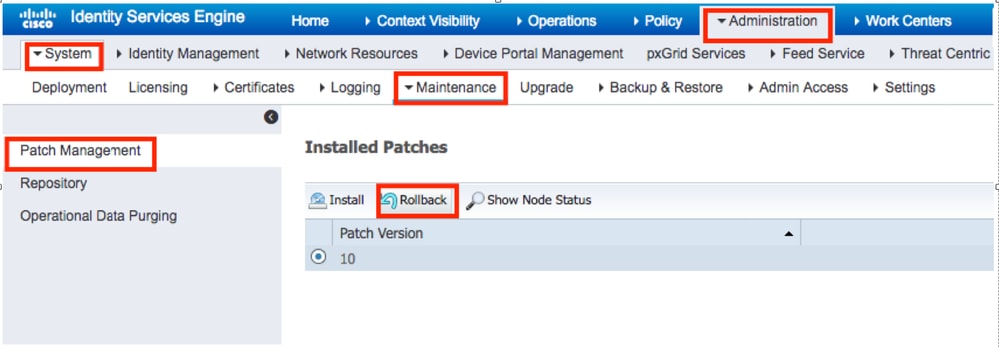
Pour restaurer les correctifs ISE, connectez-vous à l'interface utilisateur graphique ISE et accédez à Administration > System > Maintenance > Patch Management, sélectionnez le correctif requis et cliquez sur Rollback, comme indiqué :
Restauration du correctif à partir de l'ILC ISE
Étape 1. Établissez une connexion SSH avec le noeud ISE dans lequel vous souhaitez supprimer le correctif.
Étape 2 : vérification des correctifs installés sur le noeud ISE à l’aide de la commande show version
ise1/admin# show version

Cisco Application Deployment Engine OS Release: 3.3
ADE-OS Build Version: 3.3.P.097
ADE-OS System Architecture: x86_64

Copyright (c) 2005-2023 by Cisco Systems, Inc.
All rights reserved.
Hostname: ise-aaa-dnac1


Version information of installed applications
---------------------------------------------

Cisco Identity Services Engine
---------------------------------------------
Version : 3.3.0.430
Build Date : Tue Jul 4 00:31:18 2023
Install Date : Sat Nov 9 22:42:47 2024

Cisco Identity Services Engine Patch
---------------------------------------------
Version : 1
Install Date : Tue Dec 17 09:57:23 2024

Cisco Identity Services Engine Patch
---------------------------------------------
Version : 4
Install Date : Tue Dec 17 11:49:53 2024
Étape 3. Exécutez la commande patch remove <nom de l’application> <numéro du fichier de patch à supprimer>.
Par exemple, patch remove ise 4 :
ise1/admin# patch remove ise 4
Continue with application patch uninstall? [y/n] y
% Warning: Patch is removed only from this node. Remove patch with Primary Administration node GUI to remove from all nodes in deployment.

Patch successfully uninstalled

% This application Install or Upgrade requires reboot, rebooting now...
Broadcast message from root@ISE (pts/1) (Sun Mar 8 03:16:29 2020):
Trying to stop processes gracefully. Reload takes approximately 3 mins
Broadcast message from root@ISE (pts/1) (Sun Mar 8  03:16:29 2020):
Trying to stop processes gracefully. Reload takes approximately 3 mins
Broadcast message from root@ISE (pts/1) (Sun Mar 8 03:17:41 2020):
The system is going down for reboot NOW
Broadcast message from root@ISE (pts/1) (Sun Mar 8 03:17:41 2020):
The system is going down for reboot NOW
Pour désinstaller le correctif précédent, désinstallez d'abord le dernier correctif, puis la version précédente.
ise1/admin#patch remove ise 1
Continue with application patch uninstall? [y/n] y
% Warning: Patch is removed only from this node. Remove patch with Primary Administration node GUI to remove from all nodes in deployment.
Continue? (yes/no) [yes] ? yes
% Patch cannot be rolled back while a newer version exists, which needs to rolled back first.
Vérifier
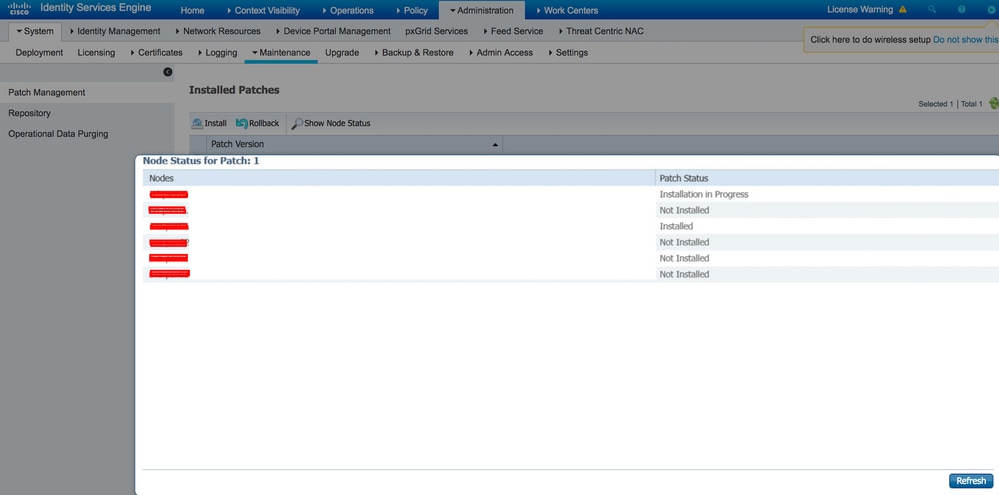
Afin de visualiser la progression de l'installation du correctif ISE, accédez à Administration > System > Maintenance > Patch Management > Show Node Status comme indiqué dans l'image :
Vérifiez l'état d'installation des correctifs depuis le noeud ISE. Connectez-vous au même serveur ISE et exécutez la commande show version :
ise1/admin# show version

Cisco Application Deployment Engine OS Release: 3.3
ADE-OS Build Version: 3.3.P.097
ADE-OS System Architecture: x86_64

Copyright (c) 2005-2023 by Cisco Systems, Inc.
All rights reserved.
Hostname: ise-aaa-dnac1


Version information of installed applications
---------------------------------------------

Cisco Identity Services Engine
---------------------------------------------
Version : 3.3.0.430
Build Date : Tue Jul 4 00:31:18 2023
Install Date : Sat Nov 9 22:42:47 2024

Cisco Identity Services Engine Patch
---------------------------------------------
Version : 4
Install Date : Tue Dec 17 11:49:53 2024
Vérifiez les messages de correctif réussis et échoués dans les alarmes ISE :
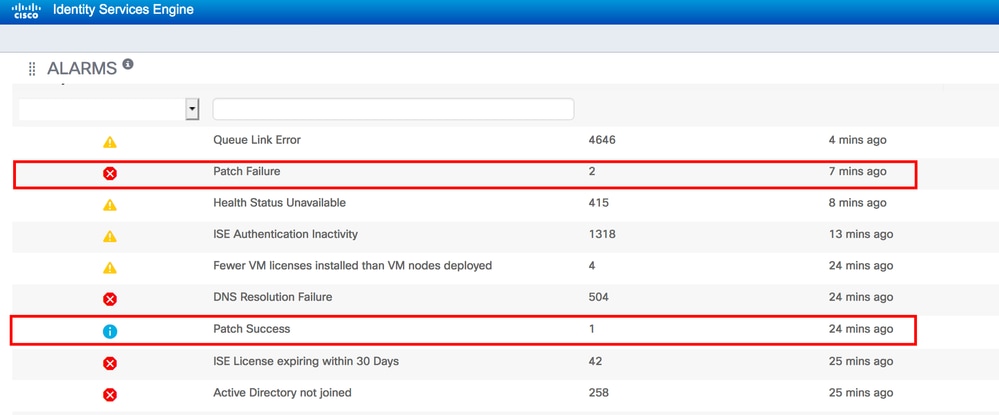
Référence du journal d’installation réussie des correctifs
ise1/admin# sh logging system ade/ADE.log tail
2024-12-17T09:28:29.162564+00:00 ise1 CARSSetup[2783958]: ADEAUDIT 2030, type=PATCH INSTALL, name=PATCH INSTALL STARTED, username=system, cause=Application patch install has been inititated, adminipaddress=127.0.0.1, interface=CLI, detail=Patch Install initiated with bundle - ise-patchbundle-3.3.0.430-Patch4-24102504.SPA.x86_64.tar.gz, repo - SFTP-REPO
2024-12-17T09:28:29.104724+00:00 ise1 ADE-SERVICE[1379]: [2783958]:[info] user: cars_install.c[5641] [system]: Illegal characters or double dots not found in name ise-patchbundle-3.3.0.430-Patch4-24102504.SPA.x86_64.tar.gz
2024-12-17T09:28:29.105444+00:00 ise1 ADE-SERVICE[1379]: [2783958]:[info] user: cars_install.c[5641] [system]: Illegal characters or double dots not found in name SFTP-REPO
2024-12-17T09:28:29.162700+00:00 ise1 ADE-SERVICE[1379]: [2783958]:[info] application:install cars_install.c[2568] [system]: Install initiated with bundle - ise-patchbundle-3.3.0.430-Patch4-24102504.SPA.x86_64.tar.gz, repo - SFTP-REPO
2024-12-17T09:28:29.171681+00:00 ise1 ADE-SERVICE[1379]: [2783958]:[info] application:install cars_install.c[2734] [system]: Stage area - /storeddata/Installing/.1734427709
2024-12-17T09:28:29.193007+00:00 ise1 ADE-SERVICE[1379]: [2783958]:[info] application:install cars_install.c[2737] [system]: Getting bundle to local machine
2024-12-17T09:28:29.193704+00:00 ise1 ADE-SERVICE[1379]: [2783958]:[info] transfer: cars_xfer.c[159] [system]: sftp copy in of ise-patchbundle-3.3.0.430-Patch4-24102504.SPA.x86_64.tar.gz requested
2024-12-17T09:28:29.194062+00:00 ise1 ADE-SERVICE[1379]: [2783958]:[info] transfer: cars_xfer_util.c[2643] [system]: Server validation successful x.x.x.x
2024-12-17T09:28:29.194784+00:00 ise1 ADE-SERVICE[1379]: [2783958]:[info] transfer: sftp_handler.c[689] [system]: DEBUG: local user: admin UID: 0 sftp_run_parent FD: 9 remote host: x.x.x.x remote user: admin command: get /ise-patchbundle-3.3.0.430-Patch4-24102504.SPA.x86_64.tar.gz /storeddata/Installing/.1734427709/ise-patchbundle-3.3.0.430-Patch4-24102504.SPA.x86_64.tar.gz
2024-12-17T09:29:24.127455+00:00 ise1 ADE-SERVICE[1379]: [2783958]:[info] transfer: cars_xfer_util.c[2666] [system]: Properties file /tmp/.cars_repodownload.props does not exist
2024-12-17T09:29:24.127573+00:00 ise1 ADE-SERVICE[1379]: [2783958]:[info] application:install cars_install.c[2794] [system]: Got bundle at - /storeddata/Installing/.1734427709/ise-patchbundle-3.3.0.430-Patch4-24102504.SPA.x86_64.tar.gz
2024-12-17T09:29:24.156171+00:00 ise1 ADE-SERVICE[1379]: [2783958]:[info] application:install cars_install.c[2867] [system]: Unbundling package ise-patchbundle-3.3.0.430-Patch4-24102504.SPA.x86_64.tar.gz
2024-12-17T09:29:41.327286+00:00 ise1 ADE-SERVICE[1379]: [2783958]:[info] application:install cars_install.c[2969] [system]: Verifying signature for package ise-patchbundle-3.3.0.430-Patch4-24102504.SPA.x86_64.tar.gz
2024-12-17T09:29:51.072928+00:00 ise1 ADE-SERVICE[1379]: [2783958]:[info] application:install cars_install.c[2993] [system]: Signed bundle /storeddata/Installing/.1734427709/ise-patchbundle-3.3.0.430-Patch4-24102504.SPA.x86_64.tar.gz confirmed with release key
2024-12-17T09:30:09.180007+00:00 ise1 ADE-SERVICE[1379]: [2783958]:[info] application:install cars_install.c[3172] [system]: Unbundling done. Verifying input parameters...
2024-12-17T09:30:09.180604+00:00 ise1 ADE-SERVICE[1379]: [2783958]:[info] application:install cars_install.c[3214] [system]: Manifest file is at - /storeddata/Installing/.1734427709/manifest.xml
2024-12-17T09:30:09.180652+00:00 ise1 ADE-SERVICE[1379]: [2783958]:[info] application:install cars_install.c[3283] [system]: Manifest file appname - ise
2024-12-17T09:30:09.180953+00:00 ise1 ADE-SERVICE[1379]: [2783958]:[info] application:install cars_install.c[3388] [system]: Patch bundle contains patch(4) for app version(3.3.0.430)
2024-12-17T09:30:09.183179+00:00 ise1 ADE-SERVICE[1379]: [2783958]:[info] application:install ci_util.c[322] [system]: Comparing installed app version:(3.3.0.430) and version of app the patch is meant for:(3.3.0.430)
2024-12-17T09:30:09.183259+00:00 ise1 ADE-SERVICE[1379]: [2783958]:[info] application:install cars_install.c[3443] [system]: Manifest file pkgtype - CARS
2024-12-17T09:30:09.183288+00:00 ise1 ADE-SERVICE[1379]: [2783958]:[info] application:install cars_install.c[4152] [system]: Verifying zip...
2024-12-17T09:30:32.843082+00:00 ise1 root: info:[patchinstall.sh] Current Disable_RSA_PSS=0
2024-12-17T09:30:32.847037+00:00 ise1 root: info:[patchinstall.sh] STARTING PATCH INSTALL SCRIPT. PATCHDIR: /storeddata/Installing/.1734427709 INSTALLDIRS:
2024-12-17T09:30:32.850535+00:00 ise1 root: info:[patchinstall.sh] NEW PATCH VER: 4 PRIOR PATCH VER: 0
2024-12-17T09:30:32.708937+00:00 ise1 ADE-SERVICE[1379]: [2783958]:[info] application:install cars_install.c[4241] [system]: Executing patch install script patchinstall.sh from patch.zip
2024-12-17T09:30:35.742426+00:00 ise1 root: info:[application:operation:cpmcontrol.sh] In Stop Monit
2024-12-17T09:30:35.755071+00:00 ise1 root: Monit daemon with pid [21765] killed
2024-12-17T09:30:36.816209+00:00 ise1 root: info:[application:operation:cpmcontrol.sh] Done Stop Monit
2024-12-17T09:30:37.125419+00:00 ise1 ADEOSShell[2791127]: ADEAUDIT 2062, type=USER, name=M&T Log Processor, username=system, cause=M&T Log Processor Stopped, adminipaddress=127.0.0.1, interface=CLI, detail=Stopping M&T Log Processor
2024-12-17T09:30:45.772624+00:00 ise1 root: info:[application:operation:adprobe.sh] adprobe:Stopping wmi probe...
2024-12-17T09:30:45.799438+00:00 ise1 root: info:[application:operation:adprobe.sh] adprobe:wmi probe is disabled
2024-12-17T09:30:45.871771+00:00 ise1 root: info:[application:operation:syslogprobe.sh] syslogprobe:Stopping syslog probe...
2024-12-17T09:30:45.898168+00:00 ise1 root: info:[application:operation:syslogprobe.sh] syslogprobe:syslog probe is disabled
2024-12-17T09:30:45.967252+00:00 ise1 root: info:[application:operation:restprobe.sh] restprobe:Stopping rest probe...
2024-12-17T09:30:45.994671+00:00 ise1 root: info:[application:operation:restprobe.sh] restprobe:rest probe is disabled
2024-12-17T09:30:46.074828+00:00 ise1 root: info:[application:operation:agentprobe.sh] agentprobe:Stopping agent probe...
2024-12-17T09:30:46.103781+00:00 ise1 root: info:[application:operation:agentprobe.sh] agentprobe:agent probe is disabled
2024-12-17T09:30:46.619128+00:00 ise1 root: info:[application:operation:appservercontrol.sh] Stopping ISE Application Server...
2024-12-17T09:30:46.621415+00:00 ise1 ADEOSShell[2791750]: ADEAUDIT 2062, type=USER, name=Application server status, username=system, cause=Application server stopped, adminipaddress=127.0.0.1, interface=CLI, detail=Application server stopped
2024-12-17T09:33:00.041627+00:00 ise1 root: info:[patchinstall.sh] ISE 3.3.0.430 patch 4 installFileSystem() INVOKED
2024-12-17T09:33:00.074901+00:00 ise1 root: info:[patchinstall.sh] Updating patched file: /storeddata/Installing/.1734427709/filesystem/opt/sp-hub/libs/cxf-core-3.5.7.jar
2024-12-17T09:33:00.085182+00:00 ise1 root: info:[patchinstall.sh] Updating patched file: /storeddata/Installing/.1734427709/filesystem/opt/sp-hub/libs/cxf-rt-ws-policy-3.5.7.jar
2024-12-17T09:33:00.094910+00:00 ise1 root: info:[patchinstall.sh] Updating patched file: /storeddata/Installing/.1734427709/filesystem/opt/sp-hub/libs/cxf-rt-bindings-soap-3.5.7.jar
2024-12-17T09:33:00.107845+00:00 ise1 root: info:[patchinstall.sh] Updating patched file: /storeddata/Installing/.1734427709/filesystem/opt/sp-hub/libs/prrt-interface-3.3.0.904.6-x86_64.jar
2024-12-17T09:33:00.117375+00:00 ise1 root: info:[patchinstall.sh] Updating patched file: /storeddata/Installing/.1734427709/filesystem/opt/sp-hub/libs/cxf-rt-transports-http-3.5.7.jar
Broadcast message from root@ise1 (pts/3) (Tue Dec 17 09:36:52 2024):

Trying to stop processes gracefully. Reload takes approximately 3 mins

Broadcast message from root@ise1 (pts/3) (Tue Dec 17 09:37:21 2024):

The system is going down for reboot NOW

Session terminated, killing shell... ...killed.
Historique de révision
| Révision | Date de publication | Commentaires |
|---|---|---|
4.0 |
30-Sep-2024
|
Texte et mise en forme de remplacement mis à jour. |
3.0 |
08-Nov-2023
|
Recertification |
2.0 |
09-Sep-2022
|
Révisé pour masquer les noms de fichiers, les commandes, les actions utilisateur et la navigation dans le répertoire à partir de la traduction automatique. Grammaire, ponctuation, structure, format. |
1.0 |
20-Apr-2020
|
Première publication |

 Commentaires
Contacter Cisco
- Ouvrir un dossier d’assistance

- (Un contrat de service de Cisco est requis)