Installation et mise à niveau de Cisco IoT Field Network Director avec PostgreSQL

Options de téléchargement
-
ePub (719.6 KB)
Consulter à l’aide de différentes applications sur iPhone, iPad, Android ou Windows Phone -
Mobi (Kindle) (401.3 KB)
Consulter sur un appareil Kindle ou à l’aide d’une application Kindle sur plusieurs appareils
Langage exempt de préjugés
Dans le cadre de la documentation associée à ce produit, nous nous efforçons d’utiliser un langage exempt de préjugés. Dans cet ensemble de documents, le langage exempt de discrimination renvoie à une langue qui exclut la discrimination en fonction de l’âge, des handicaps, du genre, de l’appartenance raciale de l’identité ethnique, de l’orientation sexuelle, de la situation socio-économique et de l’intersectionnalité. Des exceptions peuvent s’appliquer dans les documents si le langage est codé en dur dans les interfaces utilisateurs du produit logiciel, si le langage utilisé est basé sur la documentation RFP ou si le langage utilisé provient d’un produit tiers référencé. Découvrez comment Cisco utilise le langage inclusif.
À propos de cette traduction
Cisco a traduit ce document en traduction automatisée vérifiée par une personne dans le cadre d’un service mondial permettant à nos utilisateurs d’obtenir le contenu d’assistance dans leur propre langue. Il convient cependant de noter que même la meilleure traduction automatisée ne sera pas aussi précise que celle fournie par un traducteur professionnel.
Table des matières
Introduction
Ce document décrit comment installer le logiciel Cisco IoT FND PostgreSQL OVA et mettre à niveau FND version 5.0.0 vers les versions ultérieures sur VMware ESXi.
Conditions préalables
VMware ESXi 7.x ou version ultérieure
Cisco IoT Field Network Director (FND) PostgreSQL Open Virtual Appliance (OVA) version 5.0.0 ou ultérieure
Exigences VM :
Mémoire : 24 Go
Processeurs virtuels : 4
Disque : 450 Go minimum
Composants utilisés
The information in this document was created from the devices in a specific lab environment. All of the devices used in this document started with a cleared (default) configuration. Si votre réseau est en ligne, assurez-vous de bien comprendre l’incidence possible des commandes.
Déploiement de Cisco IoT FND PostgreSQL OVA
Voici les instructions à suivre pour installer Cisco IoT FND version 5.x.x ou ultérieure avec un logiciel Open Virtual Appliance (OVA) exécutant VMware ESXi versions 7.x ou 8.0.
Étape 1 : Téléchargez l'OVA à partir de Cisco Software Downloads
Téléchargez le fichier OVA depuis la page du logiciel cisco - Cliquez ici
Étape 2: Connectez-vous au client VMware vSphere pour déployer OVA sur un serveur ESXi.
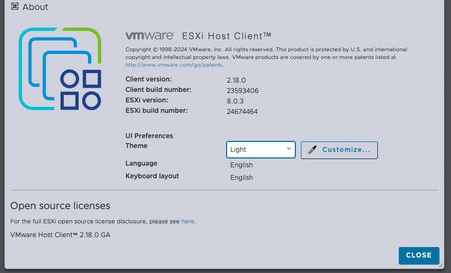
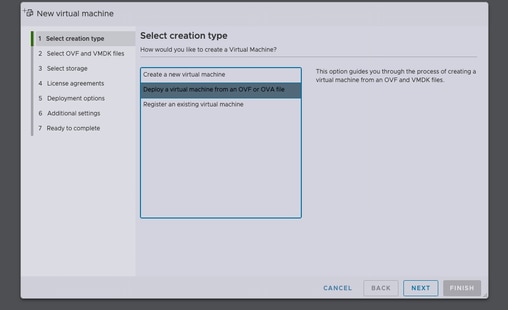
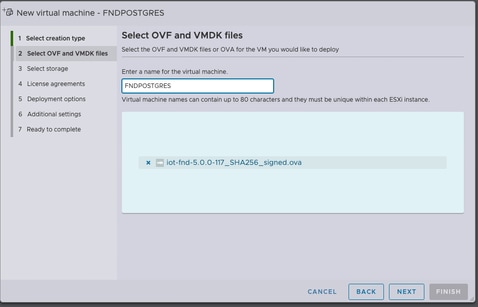
Après avoir sélectionné le magasin de données, sélectionnez le type de provisionnement et activez l'option Mise sous tension automatique. Cela garantit la mise sous tension de la machine virtuelle une fois le processus de déploiement terminé. Cliquez sur Suivant.
Remarques
Provisionnement épais
-
Réserve l'espace disque à l'avant.
-
Requiert 600 Go d'espace disque disponible sur le serveur ESXi pour Cisco IoT FND OVA.
Provisionnement léger
-
L'espace disque augmente à la demande.
-
L'utilisation initiale du disque est d'environ 50 Go, augmentant en fonction de l'échelle de déploiement.
Vérifiez les sélections avant de cliquer sur Terminer.
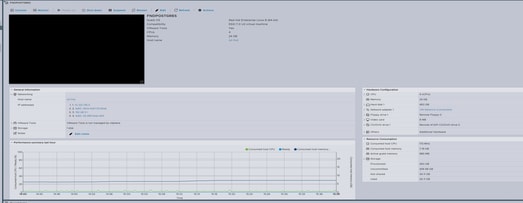
Étape 3: Connexion avec les informations d'identification
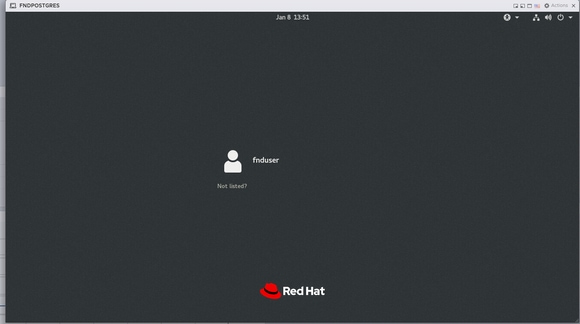
Une fois le déploiement OVA terminé et l'écran de démarrage de Linux affiché, utilisez les informations d'identification par défaut suivantes :
Accès SSH
-
username (nom d’utilisateur) :
consommateur de carburant -
Mot de passe :
C ! sco123
Accès GUI
-
username (nom d’utilisateur) :
racine -
Mot de passe :
racine123
Étape 4: Configuration du réseau
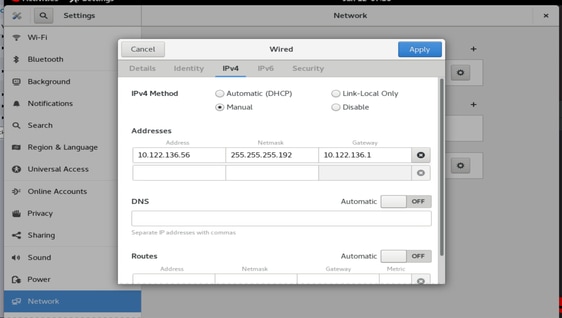
Effectuez les étapes de configuration du réseau :
-
Attribuez une adresse IP statique ou assurez-vous qu'un serveur DHCP est disponible pour attribuer une adresse IP.
-
Configurer un serveur DNS valide et accessible sur la machine virtuelle hôte.
-
Redémarrez les services réseau une fois la configuration IP terminée.
Mise à niveau de Cisco IoT FND de la version 5.0 à la version 5.1
Étape 1: Télécharger le package de mise à niveau
Téléchargez le package de mise à niveau depuis la page de téléchargement de logiciels Cisco - Cliquez ici
Nom du fichier : CISCO-IOTFND-VPI-K9-UPGRADE-SCRIPTS-5.1.0-155.zip
Étape 2 : vérification avant la mise à niveau
Avant de procéder à la mise à niveau, vérifiez l'état de fonctionnement des services Cisco IoT FND.
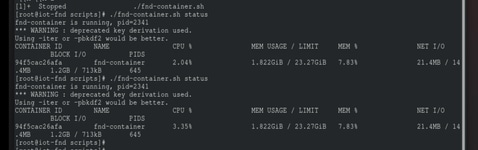
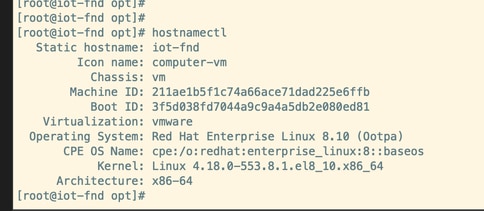
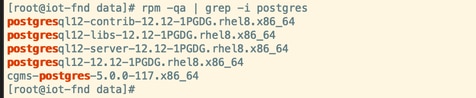
Étape 3: Copiez le RPM de mise à niveau dans le répertoire /opt.

Étape 4: Exécuter la commande Upgrade
Exemple :
rpm -Uvh upgrade-ova—<version>-<numéro de build>.rpm
[root@iot-fnd opt]# rpm -Uvh upgrade-ova-5.1.0-155.rpm

warning: upgrade-ova-5.1.0-155.rpm: Header V4 RSA/SHA256 Signature, key ID a5a10227: NOKEY

Verifying...                          ################################# [100%]

Preparing...                          ################################# [100%]

Updating / installing...

   1:upgrade-ova-5.1.0-155            ################################# [100%]

Deleting /var/lib/docker/volumes/fogd_data/_data/dist/appmgr/extensions/fnd/dependencies...

Deletion complete.


Started installer in background. Please check ~/rpm.log in few minutes for details.

[root@iot-fnd opt]#

Mon Jan 12 13:38:02 EST 2026 Background installer started

Mon Jan 12 13:38:02 EST 2026 Please wait until the 'RPM installation completed' message is logged


Mon Jan 12 13:38:02 EST 2026 Upgrading cgms-postgres-5.1.0-155.x86_64.rpm

Verifying...                          ########################################

Preparing...                          ########################################

Updating / installing...

cgms-postgres-5.1.0-155               ########################################

Cleaning up / removing...

cgms-postgres-5.0.0-117               ########################################


Mon Jan 12 13:38:22 EST 2026 Upgrading cgms-influx-5.1.0-155.x86_64.rpm

Verifying...                          ########################################

Preparing...                          ########################################

Updating / installing...

cgms-influx-5.1.0-155                 ########################################

Cleaning up / removing...

cgms-influx-5.0.0-117                 ########################################


Mon Jan 12 13:38:28 EST 2026 monit-5.33.0-1.el7 already installed on non-RHEL 9 system

Mon Jan 12 13:38:36 EST 2026 Stopping PostgreSQL services

Mon Jan 12 13:39:37 EST 2026 Upgrading Postgresql 16.7

Mon Jan 12 13:39:38 EST 2026 Using RHEL 8.x Installing PostgreSQL 16.7 libraries

warning: postgresql16-libs-16.7-1PGDG.rhel8.x86_64.rpm: Header V4 RSA/SHA256 Signature, key ID 08b40d20: NOKEY

Verifying...                          ########################################

Preparing...                          ########################################

Updating / installing...

postgresql16-libs-16.7-1PGDG.rhel8    ########################################

postgresql16-16.7-1PGDG.rhel8         ########################################

postgresql16-server-16.7-1PGDG.rhel8  ########################################

postgresql16-contrib-16.7-1PGDG.rhel8 ########################################


Mon Jan 12 13:39:42 EST 2026 Migrating DB data to Postgresql 16.7

Initializing database ... OK


Created symlink /etc/systemd/system/multi-user.target.wants/postgresql-16.service → /usr/lib/systemd/system/postgresql-16.service.

Performing Consistency Checks

-----------------------------

Checking cluster versions                                     ok

Checking database user is the install user                    ok

Checking database connection settings                         ok

Checking for prepared transactions                            ok

Checking for system-defined composite types in user tables    ok

Checking for reg* data types in user tables                   ok

Checking for contrib/isn with bigint-passing mismatch         ok

Checking for incompatible "aclitem" data type in user tables  ok

Checking for user-defined encoding conversions                ok

Checking for user-defined postfix operators                   ok

Checking for incompatible polymorphic functions               ok

Creating dump of global objects                               ok

Creating dump of database schemas                             ok

Checking for presence of required libraries                   ok

Checking database user is the install user                    ok

Checking for prepared transactions                            ok

Checking for new cluster tablespace directories               ok


If pg_upgrade fails after this point, you must re-initdb the

new cluster before continuing.


Performing Upgrade

------------------

Setting locale and encoding for new cluster                   ok

Analyzing all rows in the new cluster                         ok

Freezing all rows in the new cluster                          ok

Deleting files from new pg_xact                               ok

Copying old pg_xact to new server                             ok

Setting oldest XID for new cluster                            ok

Setting next transaction ID and epoch for new cluster         ok

Deleting files from new pg_multixact/offsets                  ok

Copying old pg_multixact/offsets to new server                ok

Deleting files from new pg_multixact/members                  ok

Copying old pg_multixact/members to new server                ok

Setting next multixact ID and offset for new cluster          ok

Resetting WAL archives                                        ok

Setting frozenxid and minmxid counters in new cluster         ok

Restoring global objects in the new cluster                   ok

Restoring database schemas in the new cluster                 ok

Copying user relation files                                   ok

Setting next OID for new cluster                              ok

Sync data directory to disk                                   ok

Creating script to delete old cluster                         ok

Checking for extension updates                                ok


Upgrade Complete

----------------

Optimizer statistics are not transferred by pg_upgrade.

Once you start the new server, consider running:

    /usr/pgsql-16/bin/vacuumdb --all --analyze-in-stages

Running this script will delete the old cluster's data files:

    ./delete_old_cluster.sh

Starting new PostgreSQL server...

waiting for server to start.... done

server started

Setting password encryption method to 'scram-sha-256'...

ALTER ROLE

ALTER ROLE

Stopping new PostgreSQL server...

waiting for server to shut down.... done

server stopped

Upgrade and password config completed.

Mon Jan 12 13:40:05 EST 2026 Data migration completed

Removed /etc/systemd/system/multi-user.target.wants/postgresql-12.service.

Reinitializing monit daemon

Mon Jan 12 13:40:53 EST 2026 Deleting postgres 12

Updating Subscription Management repositories.

Unable to read consumer identity


This system is not registered with an entitlement server. You can use subscription-manager to register.


Dependencies resolved.

================================================================================

 Package                 Arch      Version               Repository        Size

================================================================================

Removing:

 postgresql12            x86_64    12.12-1PGDG.rhel8     @@commandline    8.6 M

 postgresql12-contrib    x86_64    12.12-1PGDG.rhel8     @@commandline    2.3 M

 postgresql12-libs       x86_64    12.12-1PGDG.rhel8     @@commandline    1.5 M

 postgresql12-server     x86_64    12.12-1PGDG.rhel8     @@commandline     21 M


Transaction Summary

================================================================================

Remove  4 Packages


Freed space: 33 M

Running transaction check

Transaction check succeeded.

Running transaction test

Transaction test succeeded.

Running transaction

  Preparing        :                                                        1/1

  Running scriptlet: postgresql12-contrib-12.12-1PGDG.rhel8.x86_64          1/1

  Erasing          : postgresql12-contrib-12.12-1PGDG.rhel8.x86_64          1/4

  Running scriptlet: postgresql12-server-12.12-1PGDG.rhel8.x86_64           2/4

  Erasing          : postgresql12-server-12.12-1PGDG.rhel8.x86_64           2/4

  Running scriptlet: postgresql12-server-12.12-1PGDG.rhel8.x86_64           2/4

  Erasing          : postgresql12-12.12-1PGDG.rhel8.x86_64                  3/4

  Running scriptlet: postgresql12-12.12-1PGDG.rhel8.x86_64                  3/4

  Erasing          : postgresql12-libs-12.12-1PGDG.rhel8.x86_64             4/4

  Running scriptlet: postgresql12-libs-12.12-1PGDG.rhel8.x86_64             4/4

  Verifying        : postgresql12-12.12-1PGDG.rhel8.x86_64                  1/4

  Verifying        : postgresql12-contrib-12.12-1PGDG.rhel8.x86_64          2/4

  Verifying        : postgresql12-libs-12.12-1PGDG.rhel8.x86_64             3/4

  Verifying        : postgresql12-server-12.12-1PGDG.rhel8.x86_64           4/4

Installed products updated.

Removed:

  postgresql12-12.12-1PGDG.rhel8.x86_64

  postgresql12-contrib-12.12-1PGDG.rhel8.x86_64

  postgresql12-libs-12.12-1PGDG.rhel8.x86_64

  postgresql12-server-12.12-1PGDG.rhel8.x86_64

Complete!

Mon Jan 12 13:41:00 EST 2026 Using PostgreSQL version 16 for configuration path.
setting idle_in_transaction_session_timeout to 3h
set idle_in_transaction_session_timeout to 3h
Mon Jan 12 13:41:01 EST 2026 Already running influxdb 1.8.3
Mon Jan 12 13:41:04 EST 2026 Already running docker-ce 19.03.15
Mon Jan 12 13:41:04 EST 2026 Restarting services
Mon Jan 12 13:41:34 EST 2026 RPM installation completed

Cisco IoT FND on OVA upgrade is complete.
Historique de révision
| Révision | Date de publication | Commentaires |
|---|---|---|
1.0 |
04-Mar-2026
|
Première publication |
Contribution d’experts de Cisco
- Kiran Jabbala VenkatesuluIngénieur-conseil technique
 Commentaires
Contacter Cisco
- Ouvrir un dossier d’assistance

- (Un contrat de service de Cisco est requis)