Configuración de la extensión TLOC de capa 3
Contenido
Introducción
Este documento describe cómo configurar la capa 3 de extensión TLOC (L3) en una red de área extensa definida por software (SD-WAN).
Prerequisites
Requirements
Cisco recomienda que tenga conocimiento sobre estos temas:
- Plantillas
- TLOC-Extension
- Protocolos de ruteo
- Descripción general de SD-WAN
Componentes Utilizados
La información que contiene este documento se basa en las siguientes versiones de software y hardware.
- vBond versión 20.7.2
- vSmart versión 20.7.2
- vManage versión 20.7.2
- Cisco vManage versión 20.7.x o posterior
- Routers de servicios integrados (ISR)4451/K9 versión 17.7.2
La información que contiene este documento se creó a partir de los dispositivos en un ambiente de laboratorio específico. Todos los dispositivos que se utilizan en este documento se pusieron en funcionamiento con una configuración verificada (predeterminada). Si tiene una red en vivo, asegúrese de entender el posible impacto de cualquier comando.
Antecedentes
La extensión TLOC permite a un router de extremo de la WAN:
- Comunicarse a través del transporte WAN (conectado al router periférico WAN adyacente) a través de una interfaz de extensión TLOC.
- Amplíe el TLOC para tener redundancia en el lado del transporte.
Hay dos formas de configurar la extensión TLOC:
Vía L2
- Conecte otro router SD-WAN en el mismo sitio físico.
Vía L3
- Requiere un router con capacidades L3 que se utilizan para configurar cualquier protocolo de ruteo.
- Se conecta entre dispositivos SD-WAN y dispositivos no SD-WAN.
- Debe ser a través del túnel GRE para extender el TLOC.
Configurar
Diagrama de la red
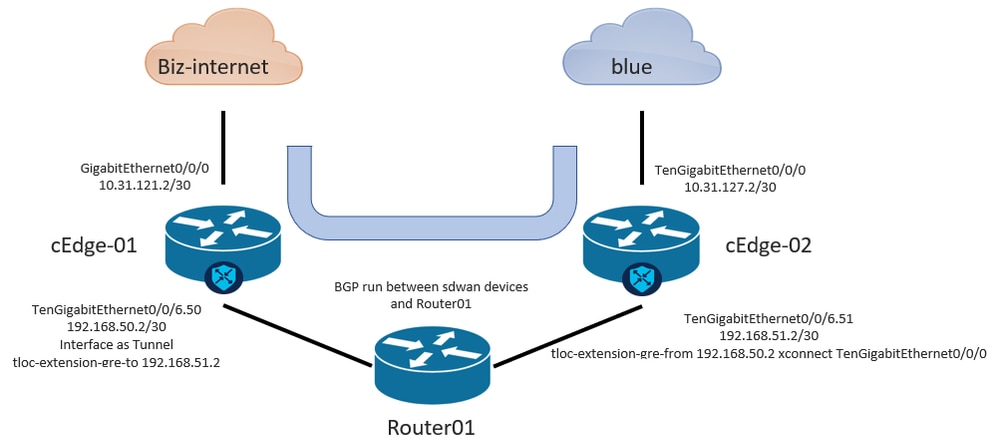
Configuración de la extensión L3 de TLOC desde la GUI de vManage

Nota: Debe configurar un protocolo de routing para comunicarse entre dispositivos SD-WAN con un dispositivo que no sea SW-WAN. En este ejemplo, se configura BGP.
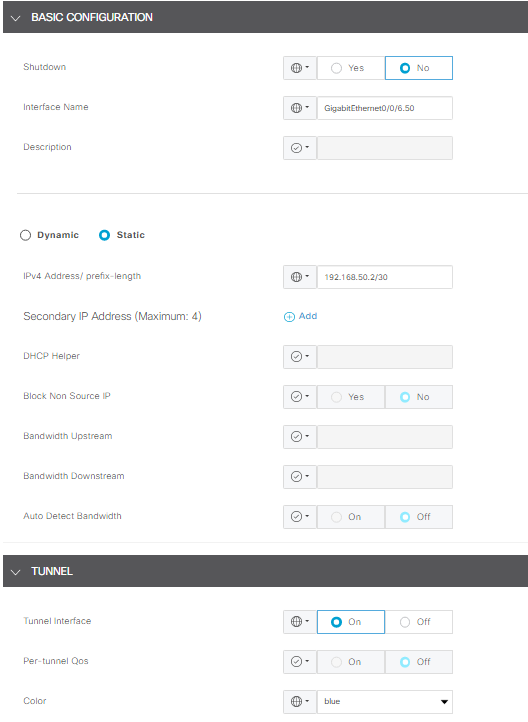
Paso 1. Configuración en cEdge-01
- Configure la interfaz para la conexión TLOC-L3 y asígnela a la interfaz de túnel.
- En vManage GUI, vaya a Configuration > Templates > Feature Template > Select Device > VPN Interface Ethernet.
- Configure la configuración básica de la interfaz, asigne una dirección IP; en este ejemplo, interface GigabitEthernet0/0/6.50.
- Navegue hasta la sección Túnel y enciéndala. Utilice el mismo color que el otro dispositivo SD-WAN utilizado como color local, en este ejemplo, azul.
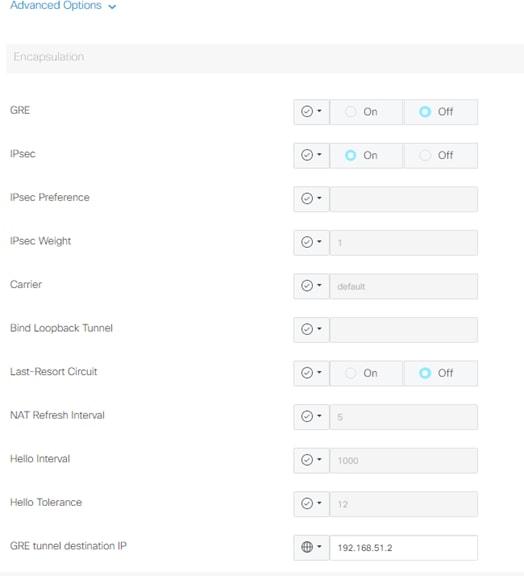
2. Active la sentencia de extensión TLOC desde el dispositivo que recibe la TLOC.
- Vaya a Tunnel > Advance Option > GRE Tunnel destination IP.
Nota: La dirección IP debe ser la dirección de interfaz asignada al otro dispositivo SD-WAN utilizado para la conexión L3. Un ejemplo es la dirección IP en cEdge-02 de la interfaz TengigabitEthernet0/0/6.51.
3. Habilite la declaración de extensión TLOC desde donde el dispositivo obtiene el TLOC.
- Vaya a Tunnel > Advance Option > GRE Tunnel destination IP.
4. La dirección IP debe ser la interfaz asignada al otro dispositivo SD-WAN, que se utiliza para la conexión L3. En este caso, la dirección IP en cEdge-02 de la interfaz TenGigabitEthernet0/0/6.51.
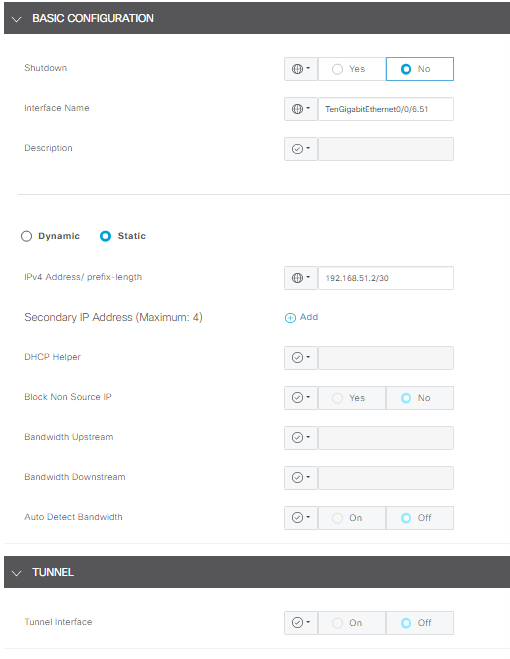
Paso 2. Configuración en cEdge-02
1. En la GUI de vManage, navegue hasta Configuration > Templates > Feature Template > Select Device > VPN Interface Ethernet.
Nota: En esta interfaz, el túnel debe estar apagado.
- Configure la configuración básica de la interfaz.
- Asigne una dirección IP (TenGigabitEthernet0/0/6.51 en este caso).
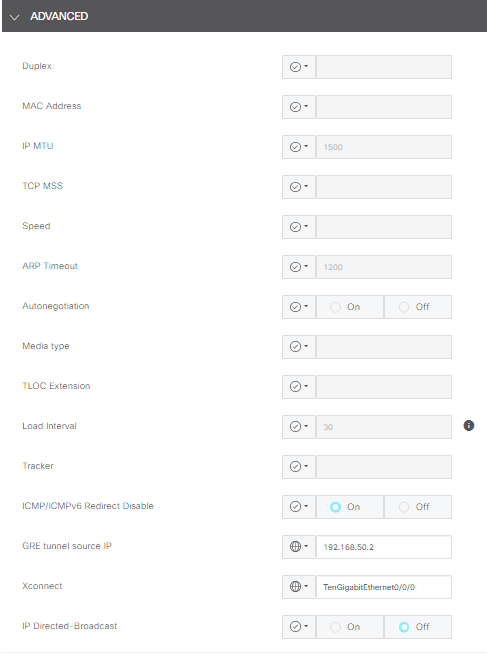
2. Navegue hasta la sección Avance y complete la información para IP de origen del túnel GRE.
Nota:
- La dirección IP debe ser la dirección de interfaz asignada al otro dispositivo SD-WAN utilizado para la conexión L3.
- xconnect debe ser la interfaz WAN utilizada para enviar tráfico a través del TLOC extendido.
Un ejemplo es la dirección IP en cEdge-02 de la interfaz TengigabitEthernet0/0/6.51.
Configuración de la extensión L3 de TlOC desde CLI
En esta sección, puede comprobar el aspecto de la configuración en CLI después de insertar la plantilla.
Configuración en cEdge-01:
cEdge-01#show sdwan running-config
system
 system-ip             <system_ip>
 site-id               <site_id>
 organization-name     <organization_name>
 vbond <vbond>
!
hostname cEdge-01
!
ip route 0.0.0.0 0.0.0.0 10.31.121.1
interface GigabitEthernet0/0/0
 no shutdown
 ip address 10.31.121.2 255.255.255.252
exit
interface GigabitEthernet0/0/6
 no shutdown
 ip mtu 1504
 mtu 1504
 negotiation auto
exit
interface GigabitEthernet0/0/6.50
 no shutdown
 encapsulation dot1Q 50
 ip address 192.168.50.2 255.255.255.252
exit
interface Loopback100
 no shutdown
 ip address 10.10.10.10 255.255.255.255
exit
interface Tunnel0
 no shutdown
 ip unnumbered GigabitEthernet0/0/0
 tunnel source GigabitEthernet0/0/0
 tunnel mode sdwan
exit
interface Tunnel10101012
 no shutdown
 ip unnumbered GigabitEthernet0/0/6.50
 no ip redirects
 ipv6 unnumbered GigabitEthernet0/0/6.50
 no ipv6 redirects
 tunnel source GigabitEthernet0/0/6.50
 tunnel mode sdwan
exit
router bgp 65001
 bgp log-neighbor-changes
 bgp router-id 10.10.10.10
 neighbor 192.168.50.1 remote-as 65003
 address-family ipv4 unicast
  neighbor 192.168.50.1 activate
  network 192.168.50.0 mask 255.255.255.252
  exit-address-family
 !
sdwan
 interface GigabitEthernet0/0/0
  tunnel-interface
   encapsulation ipsec
   color biz-internet
   allow-service all
  exit
 exit
 interface GigabitEthernet0/0/6.50
  tunnel-interface
   encapsulation ipsec
   color blue
   tloc-extension-gre-to 192.168.51.2
  exit
exit
cEdge-01#
Configuración en cEdge-02:
cEdge-02#show sdwan running-config
system
 system-ip             <system_ip>
 site-id               <site_id>
 organization-name     <organization_name>
 vbond <vbond>
!
hostname cEdge-02
!
ip route 0.0.0.0 0.0.0.0 10.31.127.1
ip nat inside source list nat-dia-vpn-hop-access-list interface TenGigabitEthernet0/0/0 overload
interface TenGigabitEthernet0/0/0
 no shutdown
 ip address 10.31.127.2 255.255.255.252
 ip nat outside
exit
interface TenGigabitEthernet0/0/6
 no shutdown
 mtu 1504
exit
interface TenGigabitEthernet0/0/6.51
 no shutdown
 encapsulation dot1Q 51
 ip address 192.168.51.2 255.255.255.252
exit
interface Loopback200
 no shutdown
 ip address 10.200.200.200 255.255.255.255
exit
interface Tunnel0
 no shutdown
 ip unnumbered TenGigabitEthernet0/0/0
 ipv6 unnumbered TenGigabitEthernet0/0/0
 tunnel source TenGigabitEthernet0/0/0
 tunnel mode sdwan
exit
router bgp 65002
 bgp log-neighbor-changes
 bgp router-id 10.200.200.200
 neighbor 192.168.51.1 remote-as 65003
 address-family ipv4 unicast
  neighbor 192.168.51.1 activate
  network 192.168.51.0 mask 255.255.255.252
  exit-address-family
 !
sdwan
 interface TenGigabitEthernet0/0/0
  tunnel-interface
   encapsulation ipsec
   color blue
   allow-service all
   allow-service bgp
   allow-service dhcp
   allow-service dns
   allow-service icmp
   no allow-service sshd
   no allow-service netconf
   no allow-service ntp
   no allow-service ospf
   no allow-service stun
   allow-service https
   no allow-service snmp
   no allow-service bfd
  exit
 exit
 interface TenGigabitEthernet0/0/6.51
  tloc-extension-gre-from 192.168.50.2 xconnect TenGigabitEthernet0/0/0
 exit
cEdge-02#
Verificación
Validación en cEdge-01:
cEdge-01 debe crear conexiones de control con TLOC local (biz-internet) y TLOC Extension (blue).
cEdge-01L#show sdwan control connections
                                                                                       PEER                                          PEER                                          CONTROLLER
PEER    PEER PEER            SITE       DOMAIN PEER                                    PRIV  PEER                                    PUB                                           GROUP
TYPE    PROT SYSTEM IP       ID         ID     PRIVATE IP                              PORT  PUBLIC IP                               PORT  ORGANIZATION            LOCAL COLOR     PROXY STATE UPTIME      ID
----------------------------------------------------------------------------------------------------------------------------------------------------------------------------------------
vsmart  dtls                 10         1      192.168.21.34                           32953 172.18.121.106                          32953 CISCORTPLAB             biz-internet    No    up     3:00:16:15 0
vsmart  dtls                 10         1      192.168.21.34                           32953 172.18.121.106                          32953 CISCORTPLAB             blue            No    up     3:00:16:20 0
vbond   dtls                 0          0      172.18.121.105                          32853 172.18.121.105                          32853 CISCORTPLAB             biz-internet    -     up     3:00:16:22 0
vbond   dtls                 0          0      172.18.121.105                          32853 172.18.121.105                          32853 CISCORTPLAB             blue            -     up     3:00:16:24 0
vmanage dtls                 10         0      192.168.28.25                           32953 172.18.121.106                          44803 CISCORTPLAB             blue            No    up     3:00:16:18 0

cEdge-01#show sdwan control local-properties

                         PUBLIC          PUBLIC PRIVATE         PRIVATE                                 PRIVATE                              MAX   RESTRICT/           LAST         SPI TIME    NAT  VM
INTERFACE                IPv4            PORT   IPv4            IPv6                                    PORT    VS/VM COLOR            STATE CNTRL CONTROL/     LR/LB  CONNECTION   REMAINING   TYPE CON REG
                                                                                                                                                   STUN                                              PRF IDs
-------------------------------------------------------------------------------------------------------------------------------------------------------------------------------------------------------------
GigabitEthernet0/0/0          10.31.121.87    32853  10.31.121.87    ::                                      32853    1/0  biz-internet     up     2      no/yes/no   No/No  0:00:00:15   0:11:42:53  N    5  Default
GigabitEthernet0/0/6.50       10.31.127.62    5063   192.168.50.2    ::                                      32853    1/1  blue             up     2      no/yes/no   No/No  0:00:00:11   0:11:42:53  N    5  Default
Troubleshoot
Si tiene problemas, consulte: Troubleshooting de Conexiones de Control SD-WAN
Historial de revisiones
| Revisión | Fecha de publicación | Comentarios |
|---|---|---|
4.0 |
13-Aug-2026
|
Ortografía, gramática, líneas horizontales insertadas para separar secciones para facilitar su lectura, texto alternativo fijo. |
3.0 |
21-Jul-2025
|
Recertificación |
2.0 |
13-Jun-2024
|
Texto alternativo y formato actualizados. |
1.0 |
03-Apr-2023
|
Versión inicial |

 Comentarios
Contacte a Cisco
- Abrir un caso de soporte

- (Requiere un Cisco Service Contract)